FluxGrowth is reader-supported. Some links in our guides are affiliate links — if you buy through one we may earn a commission, at no extra cost to you. It never changes which tools we recommend. How we test tools.
Most marketers are using AI wrong. Not because they picked bad tools but because they’re using AI to do more of the same thing, faster, instead of building smarter systems. Pumping out 10 blog posts a week with ChatGPT isn’t a strategy. It’s just a louder noise machine.
This guide is part of our AI Marketing hub – everything we have published on AI marketing tools and content workflows, in one place.
Are marketers actually winning right now? They’ve stopped treating AI as a content printer and started treating it as an infrastructure layer. AI handles the research, the first drafts, the data crunching, and the scheduling. Humans handle the strategy, the voice, and the final call. That’s the difference between AI generated marketing and AI powered marketing.
In this guide, I’ll walk you through exactly how to use artificial intelligence in marketing across content creation, social media, customer research, SEO, and automation. I’ll share what I’ve seen work in my testing at FluxGrowth, what the data actually says, and where AI will hurt you if you’re not careful.
Quick Summary
- AI works best as a workflow layer, not a replacement for strategy or human editing
- The biggest mistake is publishing raw AI output without a human review step
- Top use cases: content creation, social media repurposing, audience research, SEO, and email automation
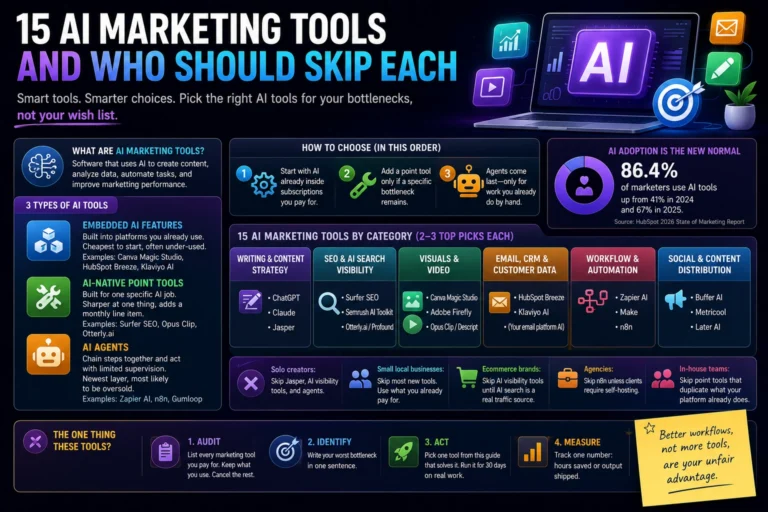
- Best tools for most creators and small businesses: ChatGPT, Claude, Perplexity, Canva AI, and Opus Clip
- AI adoption in marketing is near universal but using it strategically is still the exception
What Is Artificial Intelligence in Marketing?
AI in marketing means using machine learning, natural language processing, and generative models to automate, improve, or accelerate marketing tasks. That covers everything from writing email subject lines to predicting which leads are most likely to convert.
The term gets thrown around so loosely it’s almost meaningless. So skip the technical definition. What actually matters: can this tool do something in 30 seconds that used to take you 30 minutes? If yes, that’s AI working for your marketing.
A chatbot answering customer questions? AI. A tool that generates five Instagram captions from a product description? AI. Predictive analytics telling you the best time to post? Also AI. The category is wide. What matters is how you connect these tools into a workflow.
Why Businesses Are Using AI in Marketing
The numbers are stark. According to Salesforce’s State of Marketing 2026 report, 87% of marketers are now using generative AI in at least one recurring workflow, up from 51% just two years ago. The global AI marketing market reached $47 billion in 2025 and is projected to exceed $107 billion by 2028, according to Statista.
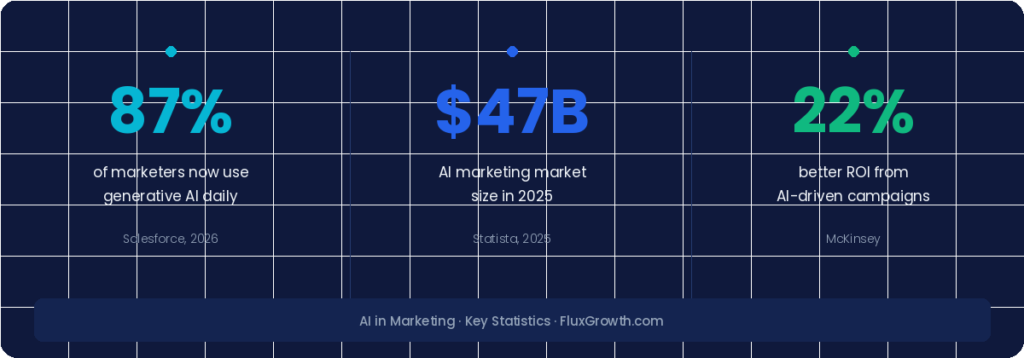
That kind of adoption doesn’t happen because something is trendy. It happens because it works. McKinsey research shows AI driven campaigns deliver 22% better ROI and 32% more conversions compared to traditional methods.
But here’s the number I find more interesting: according to data compiled by Digital Applied, 34% of enterprise marketing teams now run at least one autonomous AI agent in production, a system that takes multi-step actions without a human approving each one. That’s more than double the 14% reported just one quarter earlier.
We’re not in the “should we try AI?” phase anymore. The question is how fast and how deep you go.
For small businesses, creators, and solopreneurs, the opportunity is even bigger. AI levels the playing field. A one person brand can produce content at the volume and consistency of a team of five if the workflow is set up right.
How to Use AI for Content Creation
This is where most people start, and where most people make their first mistake. They open ChatGPT, type “write me a blog post about [topic],” copy-paste the result, and hit publish. The output is technically correct. It’s also forgettable.
The better approach: use AI to build the skeleton, then you put the meat on the bones. Your stories, your takes, your specific examples that’s what nobody else can generate. Here’s how that plays out across the main content types.
Blog Content
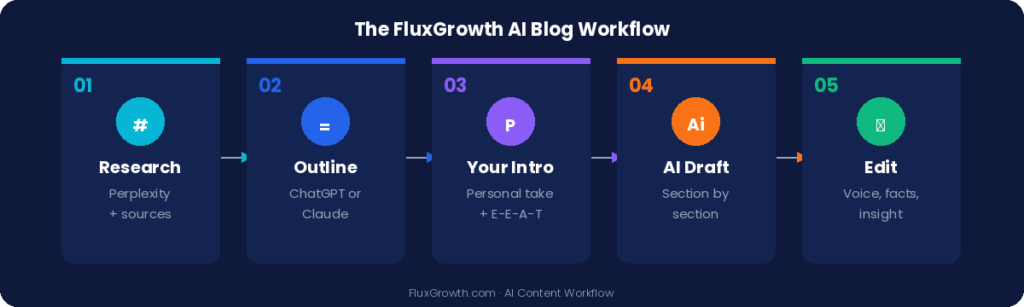
The most effective AI blog workflow I’ve tested at FluxGrowth looks like this:
- Use Perplexity to research the topic and gather current data with sources
- Use ChatGPT or Claude to generate a detailed outline based on your angle
- Write your intro and any personal anecdotes yourself these are what make the post rankable under Google’s E E A T guidelines
- Use AI to draft each section from your outline
- Edit every section for voice, accuracy, and insight this usually takes 30–45 minutes for a 2,000 word post
The goal is never to publish a first draft. The goal is to never start from a blank page. According to the Co Schedule State of AI in Marketing Report 2025, 55% of marketers say AI’s biggest value is scaling content creation but only when paired with a human editing layer.
Social Media Posts
Social media is where AI content creation gets genuinely fast. You can take one long form piece and extract 15–20 social posts in about 20 minutes.
The prompt structure that works best: feed the AI your full article or transcript, specify the platform (LinkedIn, X, Instagram), your audience, and your tone, then ask for 10 variations across different angles contrarian take, data driven, story based, question based. Pick the two or three that actually sound like you, edit lightly, and schedule.
One thing I always rewrite: the opening line. AI almost always writes openers that are too soft or too generic. The first line on any social platform determines whether someone keeps scrolling. That part’s yours.
Email Marketing
AI is excellent at email subject lines and body copy but it needs your strategy first. Before you prompt anything, lock in: what action do you want the reader to take, what’s the one thing they need to believe to take that action, and what’s your tone?
With that context in your prompt, ChatGPT or Claude can write a solid 200 word email in under a minute. According to HubSpot’s AI Trends for Marketers 2025 report, email marketing is the most common AI content use case. 51% of marketers are already doing this. That means your competition is too. Your edge is using AI for the drafting while keeping your judgment on the strategy.
Video Scripts
This is one of the most underused AI applications I’ve come across. Give an AI your video idea, target audience, and rough length, and you get a full script hook, body, CTA — in under two minutes.
I’ve done this repeatedly for YouTube. The structure is usually solid. Talking points land, the flow makes sense. What always needs work: the specific examples and the personal transitions between sections. Add those yourself, and the script sounds like you made it from scratch. Because strategically, you did.
How to Use AI for Social Media Marketing
Social media is where AI delivers some of its most visible time savings for small teams. The biggest wins come from planning, repurposing, and research,not just caption writing.
Content Planning
Give Claude or ChatGPT your niche, your main content pillars, your platform, and how often you want to post, then ask for a month of content ideas with suggested formats Reel, carousel, thread, talking head video, and so on. You’ll get a full 30 day calendar in 60 seconds that would have taken you an hour to map out manually.
Refine it by cutting anything that doesn’t fit your current goals or feels off brand. This is one of the lowest risk uses of AI in your marketing stack.
Content Repurposing
This is the highest leverage move in this entire guide. Full stop.
You create one long form asset: a 30 minute podcast, a YouTube video, a detailed blog post and AI helps you pull 10–15 pieces of short form content from it. One recording session becomes a week of content across every platform.
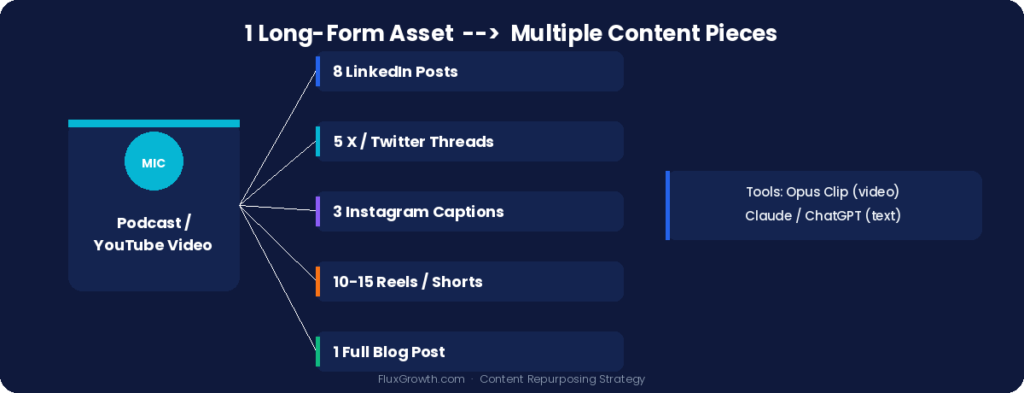
Opus Clip is the tool I’ve seen do this best for video. It analyzes your full video, scores clips by predicted virality, adds captions, and reformats for vertical viewing automatically. The platform has over 10 million users who’ve collectively generated more than 172 million clips, and it raised $50 million including a 2025 SoftBank Vision Fund 2 investment. That kind of adoption means it’s solving a real problem, not just a niche one. A 45 minute podcast becomes 10–15 Reels or Shorts in minutes.
Related: how to use artificial intelligence, step by step
For written content, use Claude or ChatGPT with a simple prompt: “Here’s my full blog post. Extract 8 LinkedIn posts, 5 X/Twitter threads, and 3 Instagram captions. Keep my voice and tone.”
Audience Research
This is the most underrated AI application in social media marketing. Instead of guessing what your audience cares about, use AI to synthesize real signals.
Feed ChatGPT or Claude the top comments from your last 20 posts, a competitor’s comment section, or reviews of products in your niche. Ask it to identify the recurring frustrations, the most common questions, and any language patterns your audience uses. That language, the exact phrases real people use to describe their problems, is what your content should be built around.
Caption Generation
Here’s something most creators get backwards: they use AI to write captions but spend no time using it to figure out what the caption should actually say. Flip the order. Research first, write last. Once you know the specific angle or insight, generating a caption takes 30 seconds.
How to Use AI for Customer Research
Knowing your customer is the foundation of every marketing decision. AI doesn’t replace that research, it speeds it up dramatically.
Finding Customer Pain Points
Use Perplexity to search for real customer discussions. Try queries like: “What do [your target customer] complain about most when it comes to [your category]?” Perplexity pulls live results from Reddit, Quora, forums, and review sites and synthesizes them into readable summaries — with sources attached.
In my work at FluxGrowth testing content workflows, this research step alone has made the difference between articles that rank and articles that don’t. When you’re writing to real, specific frustrations instead of assumed ones, the content connects differently.
Analyzing Reviews
Paste 20–50 competitor or product reviews into Claude and ask it to sort them: what do customers love, what do they hate, what do they keep asking for that doesn’t exist yet. The output is a customer sentiment map that would take a human analyst hours to build from scratch.
Works on Amazon reviews, Google reviews, App Store reviews, any text based feedback. The thing you’re mining for: the exact phrasing customers use to describe their pain. That’s your copywriting, handed to you for free.
Identifying Content Opportunities
After you’ve got your audience’s real pain points, feed them back into an AI with this prompt: “Based on these frustrations, what blog topics, YouTube video ideas, and social media hooks would resonate most for someone in [your niche]?”
You’ll get a content plan aligned to actual demand. Not what sounds clever in a brainstorm — what people are already searching for and talking about.
How to Use AI for SEO
Let’s be clear about something: AI won’t rank your content. Good content that satisfies search intent ranks your content. But AI can dramatically speed up getting you there.
Keyword Research
Use Perplexity or ChatGPT to find keyword clusters around a seed topic. Ask: “What are the most common questions people search for related to [your topic]? Include long tail and question based variations.” Then validate those in a real SEO tool Ahrefs or Semrush before committing. AI surfaces ideas fast. It can’t tell you search volume or keyword difficulty. That still needs a dedicated tool.
Content Outlines
This is where AI saves the most time in SEO work. Feed it your target keyword, your intended audience, and 3–4 competitor URLs you want to outrank, and ask for a comprehensive outline that covers what the competition missed.
The instruction “what did they miss” is doing a lot of work in that prompt. AI scans the pattern of what’s already ranking and helps you find the gap, the angle, the sub topic, the question nobody’s answered well. That’s where you write.
Content Optimization
After you draft, run your article through Surfer SEO or Clearscope to check topical coverage. Then use AI to close the gaps — add a missing section, deepen a thin explanation, sharpen a weak paragraph. This is faster than starting over and keeps your final output sharper than whatever’s already on page one.
How to Use AI for Marketing Automation
This is the area most small businesses and solopreneurs haven’t fully explored yet. It’s also where the compounding time savings live because you set it up once and it keeps working.
Lead Generation
AI powered chatbots can qualify leads 24/7 without a sales rep involved. Tools like Intercom and Drift use AI to ask qualification questions, route leads to the right resource, and capture contact info automatically. For a one person operation, that’s a part time sales assistant who never clocks out.
Email Sequences
Map out your email sequence logic manually first the triggers, what each email needs to accomplish, the timing. Then use AI to write each individual email. The combination of human built strategy and AI executed copy is faster than writing from scratch, and the sequence logic tends to be tighter because you thought it through before touching a prompt.
Tools like Active Campaign and Klaviyo now have built in AI that can suggest sequence structure, predict optimal send times, and test subject line variations automatically.
Customer Support
AI support tools are best for handling the 20% of questions that account for 80% of your support volume — FAQs, shipping status, refund policies, basic instructions. Fast to automate, low risk when done right.
Here’s where it will hurt you: any conversation where the customer is already annoyed. Frustrated people can tell when they’re talking to a script. Route those to a human, fast. Automating the answer is fine. Automating empathy isn’t.
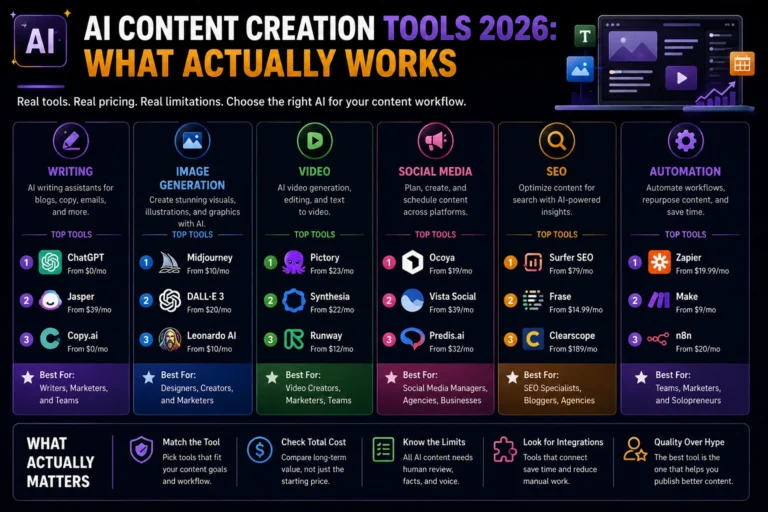
Best AI Marketing Tools
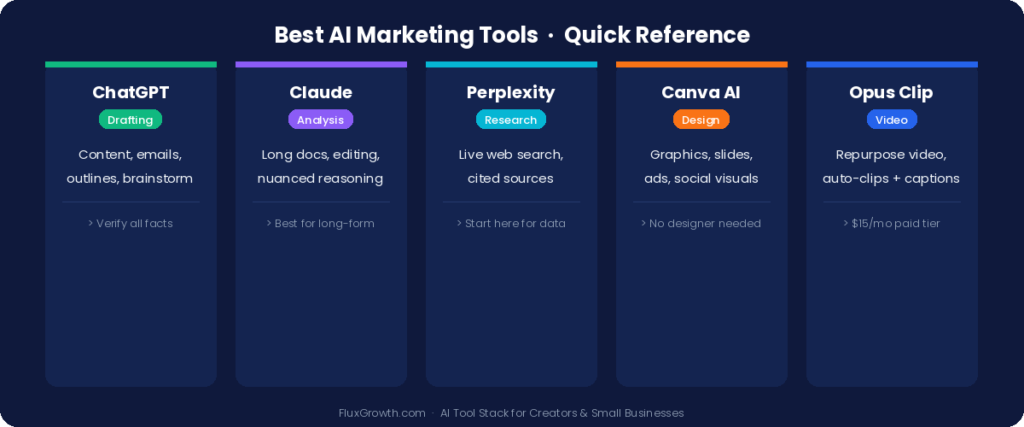
This is a quick reference not a comprehensive review, just enough to know what to reach for and when.
ChatGPT
The most versatile tool in the stack. Use it for content drafting, brainstorming, email writing, outline creation, and research synthesis. GPT 4o handles long documents well and understands nuanced prompts. The biggest limitation: it can confidently produce outdated or inaccurate information. Always verify facts with a source before publishing, especially stats, dates, and platform specifics.
Claude
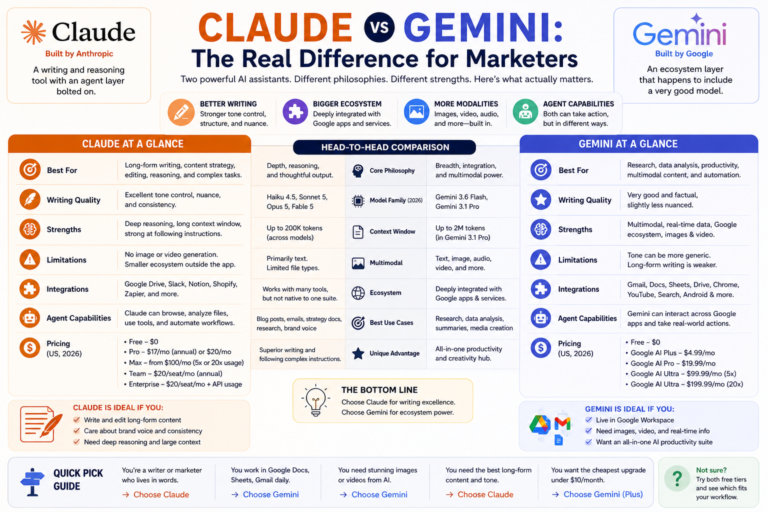
Claude handles very long documents and complex instructions better than most models. It’s the tool I reach for when I need to analyze a large block of text, a competitor’s full website, a long transcript, a 50 page PDF or when a task requires careful reasoning rather than speed. For long form writing that needs to sound clean and considered, Claude’s output tends to need less cleanup than GPT 4o.
Perplexity
Perplexity is the research tool in this stack. It searches the web in real time and cites its sources, which makes it far more reliable for current data, recent platform changes, and verified statistics. For any marketing research that needs to be accurate, start here not with ChatGPT.
Canva AI
For small businesses and solo creators, Canva’s AI features Magic Write, text to image, background removal, and auto resize collapse a full graphic design workflow into a few clicks. It won’t replace a designer for high stakes brand work. For social graphics, presentation slides, and quick ads? More than enough, and faster than any alternative at this price point.
Opus Clip
Opus Clip takes a long video, finds the best moments, adds captions, reformats for vertical, and scores each clip by predicted virality automatically. The free plan adds a watermark; paid starts at $15/month for 150 minutes of processing. (That’s enough to repurpose 2–3 long videos per week.) If video is part of your content plan at all, this one’s hard to skip.
Artificial Intelligence Marketing Examples
Small Business Example
A local personal trainer with no marketing team used ChatGPT to build a 30 day Instagram content calendar in one afternoon. She fed it her three content pillars: training tips, client results, and the mindset of her target audience (women 30–50 trying to build consistency), and her posting goal of 5x/week. The AI produced a full calendar with captions and hashtag groups. She edited the captions for her voice, added her own photos, and scheduled everything through Buffer.
Total time: 4 hours. She went from posting twice a week inconsistently to five times a week for an entire month without burning out.
Creator Example
A podcaster with a 45 minute weekly show used Opus Clip to generate short form clips from each episode and Perplexity to research episode topics. The workflow: record Monday, upload to Opus Clip Tuesday, review and pick the 5 best clips Wednesday, schedule them across LinkedIn, Instagram, and TikTok for the rest of the week.
One piece of content became six social posts. About 90 minutes of additional effort per week. That’s the repurposing multiplier in practice.
Agency Example
A two person content agency serving 8 clients used Claude to run customer research at scale. At the start of each engagement, they pasted 50+ competitor reviews, 30+ client testimonials, and onboarding notes into Claude and asked it to produce a “Voice of Customer” document the exact language real customers use to describe their problems and what success looks like for them.
That document became the brief for every piece of content, every email, every ad. The process took 45 minutes. Previously it took 4–6 hours. Clients noticed the difference immediately because the copy sounded like their customers, not like a marketing team guessing at them.
Common AI Marketing Mistakes
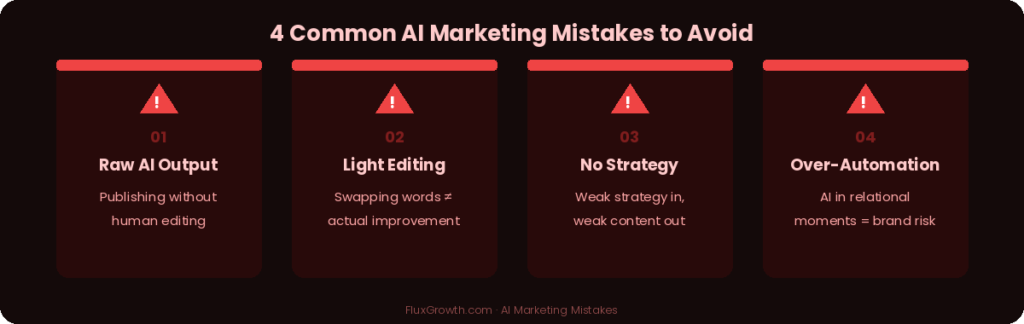
Publishing Raw AI Output
This is the most common mistake and the one that does the most damage over time. AI output is generic by design, its pattern matching to what’s already been written. Your audience can feel when content has no perspective, no specific insight, no real voice behind it.
Publish raw AI output and you’re not just failing your audience. You’re training them to scroll past you.
Ignoring Human Editing
Related but distinct. Some marketers do edit their AI output but lightly, and without really improving it. Swapping a few words out isn’t editing. Real editing means asking: does this paragraph have an actual insight or is it just sentences? Would my reader learn something useful, or is this filler that sounds plausible? That review step isn’t optional.
Using AI Without Strategy
AI amplifies whatever direction you give it. Weak strategy in, weak content out just faster. Before you prompt anything, nail down: who you’re talking to, what specific problem you’re solving for them, and what action you want them to take. Strategy first. AI second. Every time.
Over Automation
The point where AI starts costing you more than it saves is when it removes human judgment from decisions that need it. Automating your email welcome sequence? Smart. Automating replies to a frustrated customer on social media? That’s a brand risk. The rule is simple: automate the repeatable, keep humans in the loop for anything relational.
The Future of AI Marketing
The most important 2026 shift isn’t a new tool, it’s a new mode of working. The move from AI tools to AI agents. Right now, 34% of enterprise marketing teams have at least one autonomous agent running in production, according to DigitalApplied. A system that doesn’t just draft content but monitors your analytics, identifies what’s working, builds variations, and schedules them. Without waiting for you to ask.
For small businesses and creators, we’re not fully there yet. But we’re close enough that it’s worth building your workflows with that future in mind: modular, documented, easy to hand off to a system that runs itself.
What won’t change: your audience’s desire for content that actually gets them. AI can produce volume. It can’t produce trust. The marketers who win over the next three years won’t be the ones with the best prompts, they’ll be the ones with a clear point of view that AI helps them express faster.
What I’d Do If I Were Starting Today
Start with Perplexity for all research. Stop Googling and start using a tool that shows you its sources. Your content will be more accurate and harder to copy immediately.
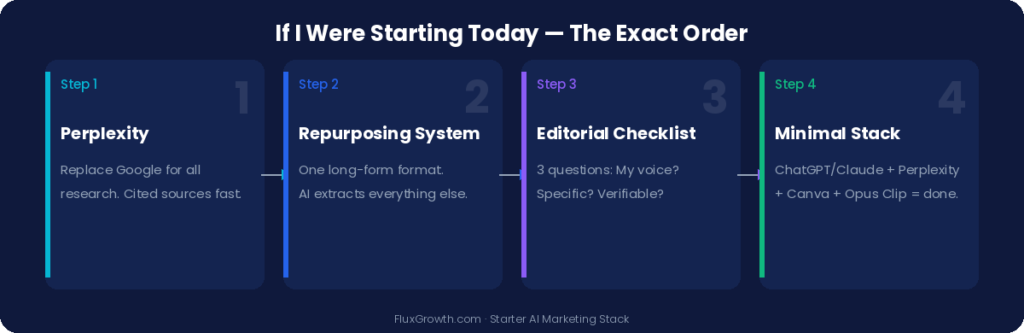
Next, set up a content repurposing workflow before you create anything new. Pick one long form format: a weekly YouTube video, a podcast episode, a 1,500 word post and commit to it. Use AI to pull everything else out of that anchor content. One asset, many outputs.
Third, build a simple editorial checklist for everything AI produces before it goes live. Three questions: Does this sound like me? Does it contain a specific insight my audience can use today? Is every claim I’m making verifiable? All three yes publish. One no edit until it is.
Don’t buy more tools than you need. ChatGPT or Claude, Perplexity, Canva, and Opus Clip cover 90% of what a solo creator or small business actually needs. Add something new only when you’ve hit a specific, named bottle neck.
Frequently Asked Questions
Is AI content bad for SEO? Google’s position since 2023 is that AI generated content is acceptable if it’s genuinely helpful, accurate, and written for humans. The problem isn’t the AI it’s when the output is thin, generic, or factually shaky. Well edited AI assisted content, with real expertise behind it, performs fine in search.
What’s the best AI tool for small business marketing? For most small businesses starting out, ChatGPT is the right first tool, versatile, widely supported, and with the largest ecosystem of tutorials and use cases around it. Once you have a content workflow running, add Canva AI for visuals and Perplexity for research.
How much time does AI actually save in marketing? It depends entirely on whether you’ve built an actual workflow or you’re just using tools ad hoc. In my experience working with content systems at FluxGrowth, teams with a structured AI workflow cut production time by 50–60%. Teams that just “use AI sometimes” see marginal gains. The workflow is the work.
Should I tell my audience I use AI? You don’t have to disclose AI assisted drafting any more than you’d disclose using Grammarly or a ghostwriter. What matters is whether the content is accurate, valuable, and genuinely reflects your perspective. If it does, it’s yours. If it doesn’t, fix it before it goes out.
Can AI replace a marketing team? For high volume, repeatable production tasks drafting, scheduling, basic research AI can meaningfully reduce headcount needs. But strategy, creative direction, community management, and brand judgment still require humans. A solo operator using AI can produce at the output level of a small team. That’s not the same as replacing anyone, it’s just not needing to hire them yet.
Closing Thought
Here’s the thing about using AI in marketing that most guides skip: the tech isn’t your bottleneck. Your strategy is.
AI gives you speed. It gives you volume. It cannot give you a clear audience, a compelling offer, or a perspective worth following. The marketers who’ll look back on 2026 as a turning point are the ones who used AI to clear the production backlog so they had actual time to think about what to say, who they’re saying it to, and why anyone should care.
Start with one workflow. Build it well. Then build the next one.
Explore more AI marketing and social media growth tutorials on FluxGrowth.