FluxGrowth is reader-supported. Some links in our guides are affiliate links — if you buy through one we may earn a commission, at no extra cost to you. It never changes which tools we recommend. How we test tools.
You can ship a clean marketing site this weekend on five different platforms. The hard part isn’t building it. It’s picking the one you won’t resent in eighteen months when traffic climbs, the CMS fills up, or a client asks for the source code.
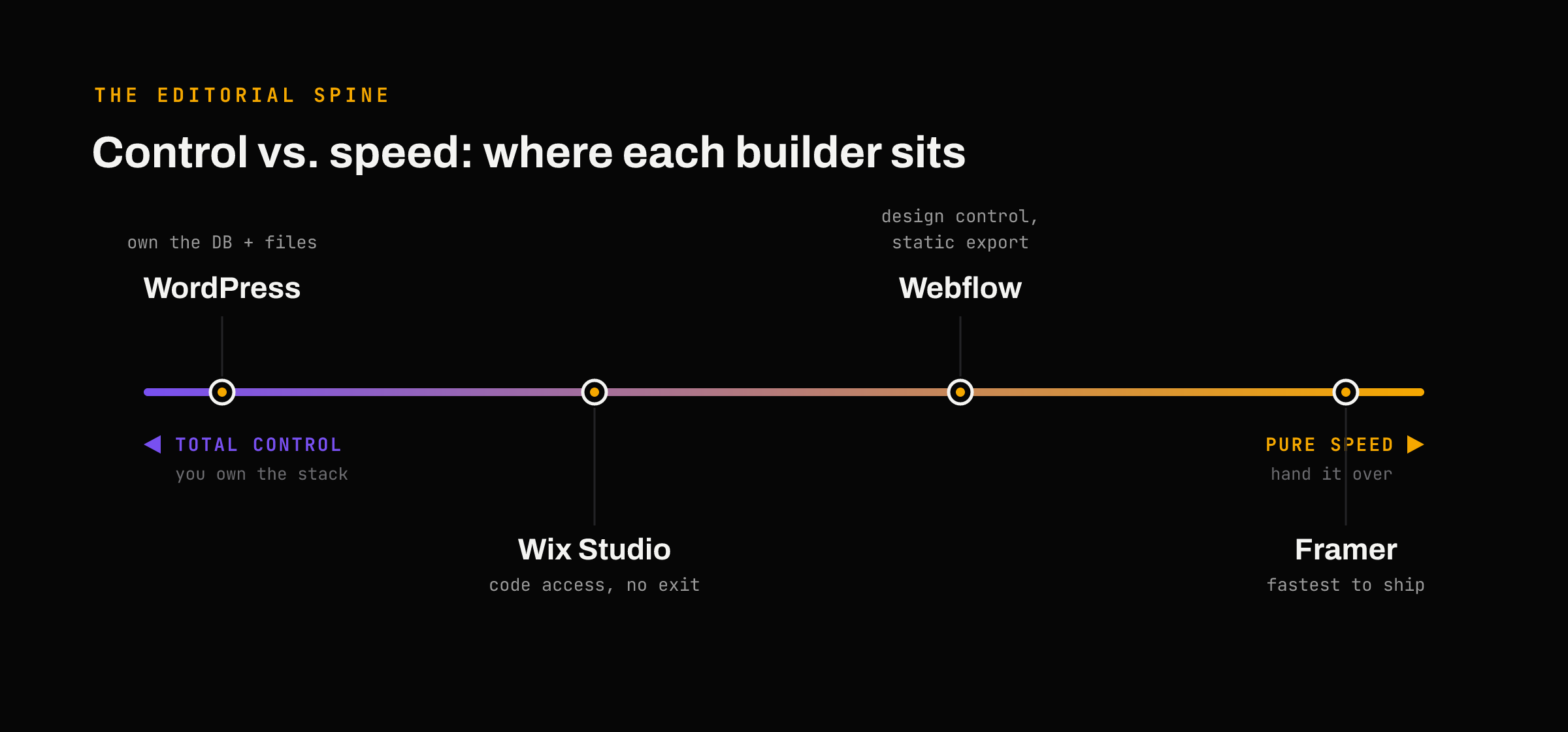
So what website builder is best in 2026? If you can write code, the honest answer comes down to a single trade-off: how much control you’re willing to hand over for speed. A drag-and-drop tool that ships a landing page in an afternoon is also the tool that locks your content behind a proprietary export. A platform you fully own is also the one you have to patch at 2 a.m.
This isn’t a roundup of pretty templates. It’s a breakdown of where each major builder actually sits on that control-versus-speed line, what it really costs over a few years, and when you should skip the builder entirely and just ship a framework. I’ve learned about current pricing and platform data from the last few weeks, because half the “best builder” articles ranking today quote tiers that changed in May.
How to Judge a Website Builder If You Can Actually Code

Most comparison posts grade builders on the wrong things template count, “is it easy,” whether the homepage looks nice. None of that matters much when you’re technical. These five do.
Can you get your code and content out?
Lock-in is the line that splits this whole category. Webflow lets you export static HTML, CSS, and JS on paid plans, though the CMS-driven parts don’t come with it. WordPress is the opposite: you own the database and the files outright. Wix Studio gives you almost nothing portable. Before you build, ask what leaving looks like not because you plan to leave, but because the answer tells you who has the leverage.
Does it expose a real CMS API?
A visual builder is only useful to a developer if its content layer is queryable. Webflow, Framer, and Wix Studio all ship a CMS with an API. WordPress goes further with a full REST API, which is why so many teams run it headless behind a Next.js or Astro front end. If you want your content in one place and your rendering somewhere else, that API is the feature that makes it possible.
How far can you drop into actual code?
There’s a real gap here. Wix Studio ships the Wix IDE a VS Code–based browser environment with hot reload plus Velo for full-stack logic and a CLI for local development. Framer lets you write React code components. Webflow added code components too, but you’re still mostly working inside its Designer. The deeper you expect to go, the more this matters.
What does it cost once the limits hit?
The sticker price is almost never the price. Builders meter bandwidth, CMS items, editor seats, and AI usage, and the overages are where budgets quietly break. A $25 plan with a $299 add-on and three $39 seats isn’t a $25 plan. We’ll do that math in a minute.
How fast is it without you fighting it?
Core Web Vitals are a ranking input, and a slow build costs you traffic before anyone reads a word. Framer and Webflow serve from a global CDN and tend to score well out of the box. Self-hosted WordPress can be faster than all of them or much slower depending entirely on your hosting, caching, and plugin discipline. The platform sets your ceiling; you set your floor.
The Best Website Builders in 2026, Ranked for Technical Users
I’m ranking these for developers and technical founders, not for someone building their first blog. Different audience, different order.
1. Webflow — the most design control without writing markup
Webflow gives you near-pixel control over a real, semantic DOM, plus a CMS, hosting, and SEO tooling in one place. For a marketing site where design quality is the whole point, nothing else in the no-code category comes this close.
The catch is the pricing model, which Webflow overhauled on May 13, 2026 its biggest change since the 2024 seat restructure. The old CMS and Business plans merged into a single Premium tier, and that tier now bundles 20,000 CMS items and 40 Collections by default.
Pricing (2026): Basic $15/mo and Premium $25/mo (billed annually), with Enterprise custom. Workspace seats run $0 to $39 each, and add-ons like Optimize start at $299/mo. AI credits landed across all Workspaces on May 13, with limits enforced starting June 29, 2026.
Best for: Design-led marketing sites and agencies that bill for craft.
2. Framer — the fastest path from idea to live
Framer is the quickest way I know to get a polished, animated site onto a real domain. The free tier hands you the full editor and AI tools, so you can design the entire thing before paying a cent then upgrade only to publish on your own domain.
The trap is the CMS. Framer counts CMS items per locale, so a 2,000-item catalog in English and Spanish burns 4,000 against your cap. There’s no à-la-carte CMS upgrade either. Hit the ceiling and your only move is the next tier up.
Pricing (2026): Free, Basic $10/mo, Pro $30/mo, and Scale $100/mo (billed annually). The May 2026 update dropped editor seats to $20/mo and added a $10 Content Editor seat for marketing teams.
Best for: Fast launches, portfolios, and animation-heavy marketing pages. Less ideal for content-heavy or multilingual sites, because of that per-locale math.
3. Wix Studio — the dev story nobody mentions
Here’s the thing: most “best builders” list file Wix under “for beginners” and move on. They’re describing the wrong product. Wix Studio is a separate platform aimed squarely at agencies and developers, and it’s genuinely underrated for technical work.
It ships the Wix IDE, a VS Code–based browser environment with hot reload and an AI code assistant. You get Velo for full-stack logic, a built-in CMS, and a Wix CLI that connects to GitHub so you can develop locally and push. That’s a real workflow, not a toy.
The cost is portability. There’s no meaningful way to export and self-host a Wix Studio site, so you’re committing to the platform. Build here and you build here for good.
Pricing (2026): Free to build; publishing needs a paid plan, with the entry tier around $17/mo Best for: Agencies and freelancers managing multiple client sites who want code access without leaving a visual canvas.
4. WordPress (self-hosted) — the default that still wins on reach
WordPress still runs the web. W3Techs puts it at roughly 42–43% of all websites in 2026 and around 59–62% of every site using a known CMS — and about 58% of CMS usage even among the top 10,000 sites by traffic. Version 7.0, “Armstrong,” shipped May 20, 2026. This isn’t a legacy tool limping along; it’s the platform most of the internet is still choosing.
For a developer, the pull is total ownership: your database, your files, a full REST API, and the option to run it headless behind Next.js or Astro. You’re not renting your stack.
The honest trade-off is security and upkeep. WordPress sites field roughly 90,000 attacks per minute, and about 97% of vulnerabilities come from plugins and themes rather than core. That’s a maintenance line item, not a footnote budget for hardening, updates, and a real backup strategy.
Pricing (2026): The software is free; you pay for hosting (roughly $5–$15/mo to start) plus any premium plugins.
Best for: Content-heavy sites, anything where ownership and flexibility matter more than a turnkey editor.
The quick calls: Shopify, Squarespace, Hostinger
If you’re selling physical products, Shopify is still the answer it handles payments, inventory, and checkout in ways a general builder can’t fake .Squarespace remains the clean pick for a non-technical founder who wants a sharp site with zero fuss, but it gives you little room to drop into code. Hostinger’s AI builder is the budget play for a simple business site shipped fast; it’s not built for the kind of control this audience usually wants. None of the three is wrong; they’re just answers to a different question than the one you’re asking.
The Pricing Traps That Never Make the Comparison Table

Comparison tables list the headline tier and stop. The money leaks below that line.
Webflow stacks four layers. You pay for a Site plan, then a Workspace plan, then per-seat fees, then usage add-ons. Most teams owe at least two of those at once, which is why the published $25 rarely matches the invoice. Run the full stack before you commit.
Framer counts CMS per locale. Go multilingual and your item count multiplies by the number of languages. For a translated store or docs site, that quietly pushes you up a full tier.
Wix Studio bills you for staying. The trap isn’t a fee, it’s the exit. With no real export path, the switching cost is rebuilding from scratch somewhere else. Factor that in on day one, not year three.
WordPress hides the cost in your time. The platform is free; the patching, the plugin audits, the security hardening are not. That’s salaried hours, and on a self-hosted site they’re non-negotiable.
Here’s how the core four line up on the things developers actually weigh:
Builder | Entry price (2026) | Get your code out? | CMS API | Best for |
| Webflow | $15/mo Basic · $25 Premium | Static HTML/CSS/JS export (no CMS) | Yes | Design-led marketing sites |
| Framer | $10/mo Basic | CMS content export only | Yes | Fast, animation-heavy launches |
| Wix Studio | ~$17/mo [VERIFY] | No real export | Velo + APIs | Agency / client builds |
| WordPress (self-hosted) | Hosting ~$5–15/mo | Full — you own it | REST API / headless | Content + ownership |
Prices reflect each platform’s 2026 tiers and shifts often confirm on the source before you publish or subscribe.

When You Shouldn’t Use a Website Builder at All
This is the part the consumer roundups can’t tell you, because their readers can’t act on it. You can.
If your site is mostly static, a marketing page, docs, a portfolio, a launch site you may be better off skipping the builder and shipping Astro or Next.js to Vercel or Netlify. You get version control, real components, a Git workflow your team already knows, and hosting that’s free or close to it at modest traffic. No per-seat fees. No CMS item caps. No export anxiety, because the code is just yours.
The cost is that you own everything, including the parts a builder would’ve handled forms, redirects, a content editor your non-technical teammates can actually use. Astro plus a headless CMS like Sanity or a headless WordPress backend solves the editor problem, but now you’re maintaining two systems instead of zero.
So when is the framework the wrong call? When a non-developer needs to edit the site weekly, when you need it live tomorrow, or when “I’ll just maintain it myself” is a promise you’ve broken before. A builder you’ll actually keep updated beats an elegant Astro repo that goes stale in a month. Be honest about which person you are.
What I’d Choose If I Were Starting Today?

No single winner, the right pick, changes with the job. Here’s how I’d map it.
A SaaS marketing site where design is the pitch:
Webflow. The control is worth the pricing-stack headache, and the CMS handles a blog and changelog without a second tool.
Clients and agencies work across many sites:
Wix Studio or Framer. Wix Studio if your clients need ongoing editing and you want code access in one canvas; Framer if speed of delivery is the whole value.
A content-heavy site you intend to own for years:
Self-hosted WordPress, ideally headless if you’ve got the team for it. Nothing else matches the API, the plugin depth, or the exit options.
An actual store: Shopify. Don’t bend a general builder into ecommerce it wasn’t built for.
A throwaway landing page for a launch or campaign:
Framer’s free tier, or a single Astro page on Vercel. Spend zero, ship today, delete it next month without a second thought.
Frequently Asked Questions
What website builder is best for SEO?
Self-hosted WordPress gives you the deepest control of clean URLs, schema, and tuning down to the template — which is why it dominates content-heavy search. Webflow is the strongest no-code option, with solid technical SEO baked in. Both can rank; WordPress just hands you more levers.
What’s the best website builder for ecommerce?
Shopify, for anything beyond a handful of products. It owns checkout, payments, and inventory in ways general builders only approximate. Webflow and Wix Studio can sell, but they’re better for content-first sites with a small shop attached.
Is WordPress still worth it in 2026?
Yes, if you’ll maintain it. It still powers around 42% of the web and gives you ownership nothing else matches. But it’s only as secure as your patching habit with most vulnerabilities arriving through plugins, a neglected install is a liability, not an asset.
Webflow vs Framer: which should I pick?
Framer if you want a beautiful site live fast and your content needs are simple. Webflow if you need granular design control, a heavier CMS, or static code export. Watch Framer’s per-locale CMS counting if you’re going multilingual, and watch Webflow’s four-layer pricing if you’re adding seats and add-ons.
Can I export my site if I leave?
It depends, and it’s worth knowing before you build. WordPress is fully yours. Webflow exports static code but not the CMS. Framer exports CMS content but not a portable site. Wix Studio gives you no real export path so treat it as a long-term commitment.
Explore our latest articles on fluxgrowth.io