FluxGrowth is reader-supported. Some links in our guides are affiliate links — if you buy through one we may earn a commission, at no extra cost to you. It never changes which tools we recommend. How we test tools.
Landing page builder pricing looks simple until you actually try to compare two tools side by side. Unbounce says $99 a month. So does Instapage. But one caps you at 20,000 visitors and the other caps you at 15,000, and neither number shows up until you’re three clicks into their pricing page.
Here’s what actually drives the price of a landing page builder: how many visitors you’re allowed, how many pages you can publish, whether A/B testing is included or locked behind a higher-priced plan, AI features, custom domains, team collaboration, integrations, and what happens when you exceed your monthly traffic allowance. Looking only at the advertised monthly price rarely tells the whole story.
If you’re still deciding whether you need a dedicated landing page builder or a complete website platform, read our What Website Builder Is Best? guide first. If you’re building a complete AI-powered marketing stack, you’ll also find our guides on Best AI Tools for Business in 2026 and Best AI SEO Tools in 2026 useful for choosing the right tools alongside your landing page builder.
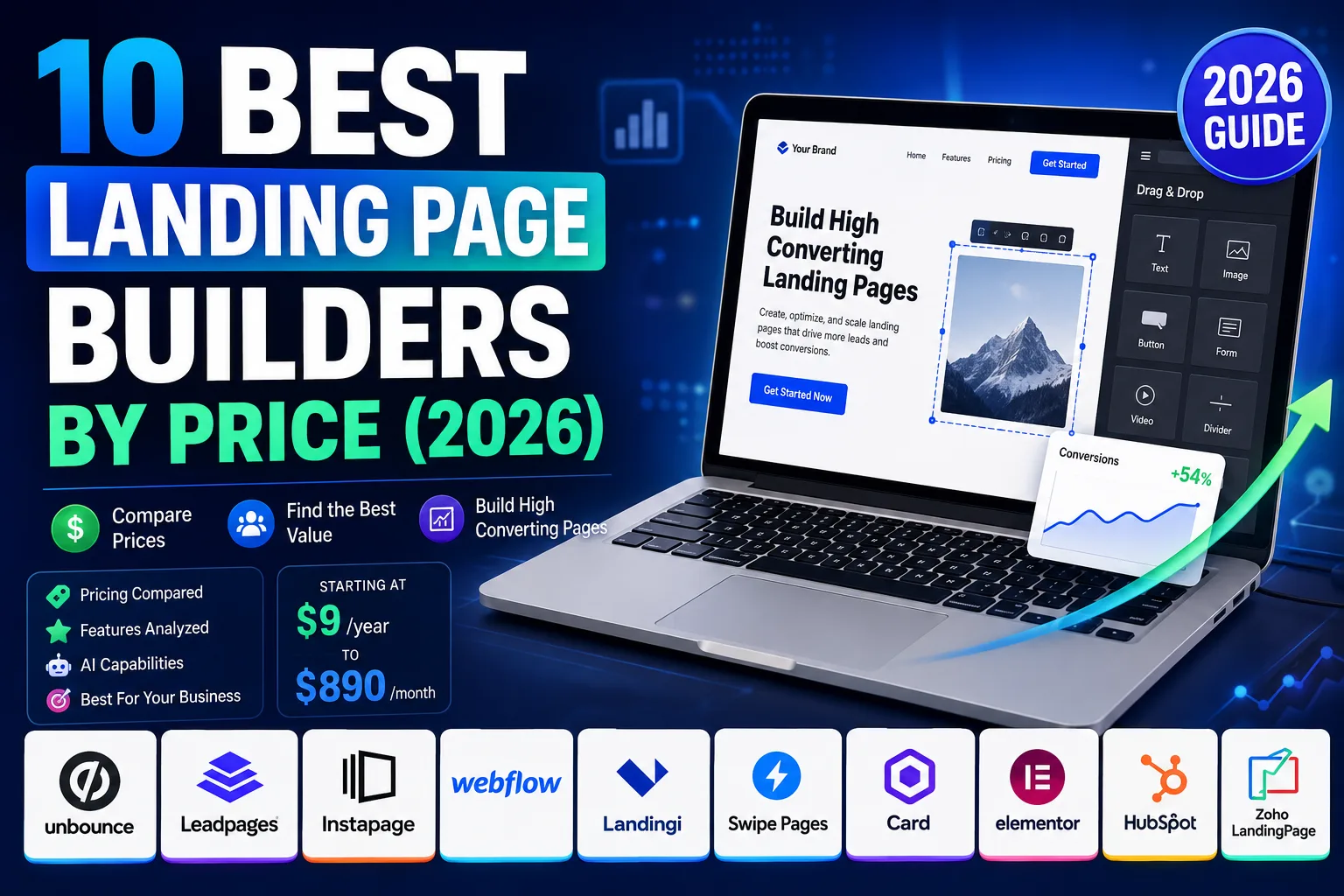
By the end of this guide, you’ll know exactly which platform fits your budget, which plans hide the most extra costs, and which landing page builder offers the best overall value in 2026..
- Why Landing Page Builder Pricing Varies So Much
- How We Compared Landing Page Builders
- Pricing Comparison Table (2026)
- Landing Page Builder Pricing Comparison (2026)
- Cheapest Landing Page Builders
- Best Landing Page Builders by Budget
- AI Landing Page Builders vs. Traditional Builders
- Hidden Costs You Should Know
- Which Landing Page Builder Is Best For…
- Free vs. Paid Landing Page Builders
- What I'd Choose Depending on My Budget
- Frequently Asked Questions
- Conclusion
Why Landing Page Builder Pricing Varies So Much
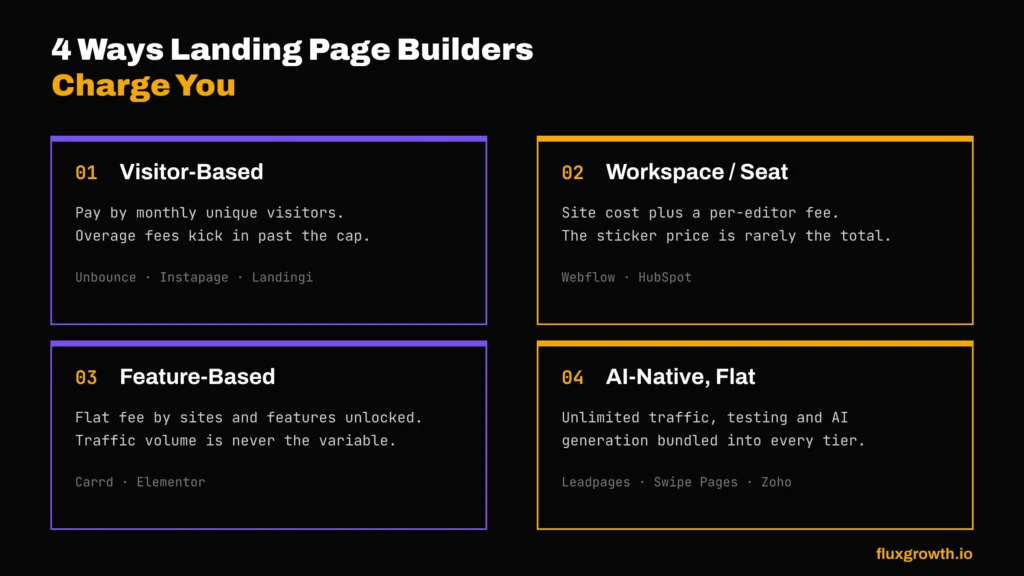
Every landing page builder charges for something different. Once you know which lever a tool pulls, its pricing stops being confusing.
Visitor-Based Pricing
Unbounce, Instapage, and Landingi all meter your monthly visitors. Unbounce’s Build plan: 20,000 visitors for $74/month, then $80 for every 10,000 more. Instapage’s Create plan is closer to 15,000 visitors for $79/month.
Here’s the annoying part: this pricing model punishes success. The exact traffic spike that tells you your ad is working is the same spike that triggers an overage bill.
Workspace/User-Based Pricing
Webflow splits its bill into two pieces: a Site plan (what visitors see) and a Workspace plan (who can edit it). The Site plan alone looks cheap at $25/month for Premium. Add a couple of Full Seats at $39/month each, though, and you’re suddenly at $100+.
HubSpot plays the same game at enterprise scale: Marketing Hub Professional’s $890/month sticker price includes 3 seats, and every person past that adds roughly $45/month.
Feature-Based Plans
Card and Elementor don’t touch visitor counts or traffic at all. Card charges $9 to $49 per year based on how many sites and features you need forms, custom domains, embeds. Elementor Pro charges $59 to $399 per year based on how many WordPress sites you’re licensing it for. Neither cares how much traffic hits your page.
AI-Powered Builders vs. Traditional Builders
Leadpages rebuilt its product from scratch in 2026 and now bundles AI page generation, A/B testing, and Smart Traffic-style optimization into every tier starting at $49/month, with zero traffic caps. That’s a genuinely different pricing philosophy than Unbounce’s “pay more as your AI features get better” ladder. We’ll get into the AI-vs-traditional trade-off in more detail later in this guide.
How We Compared Landing Page Builders
We pulled every number straight from the tool’s own pricing page, not aggregator sites, which we found running 3-6 months stale on more than one of these. Then we scored each tool on:
- Pricing — entry cost, mid-tier cost, and what triggers an upgrade
- Templates — quantity and quality of starting points
- A/B testing — included, gated, or absent
- AI features — page generation, copy, layout, optimization
- Integrations — native connections vs. Zapier-only
- Ease of use — drag-and-drop vs. code-adjacent
- Performance — page load speed claims and architecture
- Value for money — features relative to price, not price alone
Pricing Comparison Table (2026)
| Tool | Free Plan | Entry Price (annual) | Mid-Tier Price (annual) | AI Features | A/B Testing | Best For |
| Unbounce | No (14-day trial) | $74/mo (Build) | $187/mo (Optimize) | Smart Traffic ($249+/mo) | Gated at $149+/mo | High-volume paid teams |
| Leadpages | No (7-day trial) | $49/mo (Grow) | $199/mo (Optimize) | Included on every tier | Included on every tier | Solopreneurs, small teams |
| Instapage | No (14-day trial) | $79/mo (Create) | $159/mo (Optimize) | Content generation | Gated at $159+/mo | Enterprise CRO teams |
| Webflow | Yes (Starter site) | $15/mo (Basic site) | $25/mo (Premium site) | AI credits, all Workspace tiers | Add-on ($299+/mo) | Designers, content-rich sites |
| Landingi | No (14-day trial) | $24/mo (Build) | $119/mo (Optimize) | Lunar AI generator, all tiers | Gated at $119+/mo | Freelancers, agencies |
| Swipe Pages | No (14-day trial) | $29/mo (Startup) | $69/mo (Marketer) | Swipe Genie, all tiers | Gated at $69+/mo | Mobile/AMP-first campaigns |
| Card | Yes (3 sites) | $9/yr (Pro Lite) | $19/yr (Pro Standard) | None | None | Simple one-pagers, link-in-bio |
| Elementor | Yes (limited) | $59/yr (Essential) | $99/yr (Advanced) | Angie AI (Elementor One) | Third-party plugin | WordPress users |
| HubSpot | Yes (2 users) | $15/mo/seat (Starter) | $890/mo (Professional) | Content assistant, Pro+ | Gated at Professional | All-in-one marketing teams |
| Zoho LandingPage | Yes (5,000 visitors) | $18/mo (Professional) | $39/mo (Enterprise) | AI content suggestions | Verify before publishing | Existing Zoho users |
Landing Page Builder Pricing Comparison (2026)
1.Unbounce
Overview: Unbounce is the tool most performance marketers think of first when someone says “landing page builder.” It’s been around since 2009, and its Smart Traffic feature, an AI that routes each visitor to the page variant most likely to convert them, is the most mature version of that idea on this list.
Starting price: $74/month (Build plan, billed annually; $99/month billed monthly), capped at 20,000 monthly visitors.
Free plan: No permanent free plan. 14-day free trial.
Best for: Agencies and in-house teams running high-volume paid traffic who want a proven AI optimization layer and don’t mind paying a premium for it.
Pros:
- Smart Traffic is a real, differentiated feature not a marketing label slapped on basic A/B testing
- 1,000+ native integrations on the Build tier and above
- Unlimited landing pages on every paid plan
Cons:
- A/B testing doesn’t unlock until the Experiment tier ($112/month annual)
- Visitor caps mean a good campaign can trigger a surprise overage bill
- No native AI landing page generation from a prompt (a growing table-stakes feature elsewhere on this list)
Hidden costs: If you exceed your monthly traffic allowance, Unbounce charges a one-time overage fee of $80 USD for every additional 10,000 visitors (rounded up). For businesses with consistently growing campaigns, upgrading to a higher plan is often more cost-effective than paying repeated overage fees.
2.Leadpages
Overview: Here’s the thing about Leadpages in 2026 it isn’t the same product it was in 2024. The company rebuilt it from scratch, splitting into two products: HTML Pub (a lightweight publishing layer starting at $10/month) and Leadpages itself, which now bundles A/B testing, Smart Traffic-style routing, dynamic text replacement, and AI page generation into every single tier, with no traffic caps anywhere.
Starting price: $49/month (Grow plan, billed annually; $99/month billed monthly).
Free plan: No permanent free plan. 7-day free trial.
Best for: Solopreneurs and small marketing teams who want CRO tools (A/B testing, personalization) without paying Unbounce or Instapage prices to unlock them.
Pros:
- Unlimited traffic on every tier the single biggest differentiator on this list
- A/B testing and AI page creation included starting at the entry tier, not gated behind an upgrade
- 40,000 AI credits per month even on the base plan
Cons:
- The 2026 rebuild means older reviews and comparisons (including some competitor “vs” pages) describe a product that no longer exists
- AI credits are metered heavy users of AI page generation can burn through the monthly allotment
- Full auto-optimization (continuous testing without manual intervention) requires the $399/month Scale tier
Hidden costs: AI credit top-up packs start at $2.50 if you exceed your monthly allotment (40K on Grow, 80K on Optimize, 160K on Scale).
3.Instapage
Overview: Instapage plays the enterprise card server-side A/B testing, AdMap page-to-ad visualization, Fortune 1000 logos on the homepage. Prices actually dropped after airSlate’s 2023 acquisition, which is unusual for this space. The builder itself, though? Hasn’t moved much in two years.
Starting price: $79/month (Create plan, billed annually; $99/month billed monthly), capped at 15,000 monthly visitors.
Free plan: No permanent free plan. 14-day free trial.
Best for: Enterprise teams with an established ad budget where server-side testing and personalization justify the premium.
Pros:
- Server-side A/B testing with no flicker or page-load delay
- AdMap visualizes which ad maps to which landing page genuinely useful at scale
- Unlimited published pages on every tier
Cons:
- A/B testing is completely absent from the entry Create tier you’re paying $79-99/month for a page builder with no testing
- 15,000-visitor cap on Create is the tightest entry-tier limit of any tool on this list
- G2 reviewers cite two-system login requirements and analytics accuracy questions that make justifying the premium price harder
Hidden costs: Global blocks, heatmaps, and ad-to-page personalization require the custom-priced Convert tier.
4.Webflow
Overview: Worth saying upfront: Webflow isn’t really a landing page tool. It’s a full website builder that marketers borrow for landing pages because the design freedom beats anything template-based. And it just went through its biggest pricing shake-up in years May 13, 2026, the old CMS and Business plans got merged into one “Premium” tier, and every Workspace now ships with AI credits baked in.
Starting price: $15/month (Basic site plan, billed annually) for the site itself; a separate Workspace plan (Core at $19/month annual) is needed to actually build and manage it.
Free plan: Yes a free Starter site plan exists, published to a webflow.io subdomain.
Best for: Designers and content-heavy marketing teams who want landing pages that live inside a broader website, not a standalone tool.
Pros:
- Genuinely best-in-class visual design control among anything on this list
- The new Premium Site plan includes 20,000 CMS items the old add-on structure is gone
- AI credits are now bundled into every Workspace tier, not sold separately
Cons:
- The Site-plan-plus-Workspace-plan-plus-seats structure means the number on the pricing page is rarely what you actually pay
- Optimize, Webflow’s A/B testing add-on, starts at $299/month steep for a single landing page use case
- Not built as a dedicated landing page tool, so campaign-specific features (visitor caps by campaign, dynamic text replacement) don’t exist the way they do on Unbounce or Leadpages
Hidden costs: Bandwidth overages, per-seat Workspace costs ($39/month for a Full Seat), and the Optimize add-on if you want A/B testing.
5.Landingi
Overview: Landingi picks its fight directly with Unbounce and Instapage on price, and mostly wins it. The tier that matters Optimize, $119/month annual bundles A/B testing, Smart Sections, and an AI insights tool called Solis. That’s a real feature set for less than what Unbounce charges for testing alone.
Starting price: $24/month (Build plan, billed annually; $29/month billed monthly), capped at 2,000 monthly visits.
Free plan: No permanent free plan (recently discontinued). 14-day free trial.
Best for: Freelancers and professional marketers running multiple campaigns who want A/B testing without Unbounce or Instapage pricing.
Pros:
- Lunar, Landingi’s AI page generator, is included on every tier not gated to a premium plan
- Optimize tier at $119/month undercuts Unbounce’s comparable Experiment tier ($112-149/month) while adding Smart Sections
- 170+ native integrations
Cons:
- The entry Build tier’s 2,000-visit cap is tight most real campaigns outgrow it within weeks
- The jump from Build ($24/month) to Optimize ($119/month) is steep, and Optimize is really the tier you need for the tools that make Landingi worth choosing
- Recently pulled its free plan, raising the effective entry cost
Hidden costs: Additional custom domains cost $5/month each beyond your plan’s included allotment.
6.Swipe Pages
Overview: Swipe Pages is built around one specific technical advantage: native AMP (Accelerated Mobile Pages) support, which Google’s own case studies tie to significantly faster mobile load times. It’s the only builder on this list built mobile-first from the ground up.
Starting price: $29/month (Startup plan, billed annually; $39/month billed monthly).
Free plan: No permanent free plan. 14-day free trial.
Best for: Marketers running paid mobile traffic where load speed is the single biggest lever on conversion rate.
Pros:
- Native AMP support without the manual coding complexity AMP normally requires
- Swipe Genie AI assistant included on every tier
- Built-in CDN across 36 global servers, included at every price point
Cons:
- Template library is genuinely small around 40 templates, the thinnest selection on this list
- No page import/export functionality, so migrating an existing page in is manual work
- Multiple reviewers flag slow customer support response times
Hidden costs: None disclosed beyond the standard tier upgrade path Swipe Pages doesn’t meter visitors the way Unbounce or Instapage do.
7.Card
Overview: Card is the outlier on this entire list. It’s a single-page site builder, not a marketing-focused landing page platform, no A/B testing, no visitor analytics, no AI. What it has instead is the lowest price of anything here by a wide margin, billed annually with no monthly option at any tier.
Starting price: $9/year (Pro Lite) for branding removal and premium templates; $19/year (Pro Standard) is the tier most people actually want, since it’s the first to unlock custom domains and forms.
Free plan: Yes 3 sites, Carrd branding, .carrd.co subdomain.
Best for: Solo creators, freelancers, and anyone needing a fast, cheap link-in-bio page, pre-launch page, or simple one-pager who doesn’t need conversion optimization tools.
Pros:
- Genuinely the cheapest paid option on this list $19/year is less than two months of any other tool’s entry tier
- Zero transaction fees on Stripe or PayPal integrations
- No confusing visitor-based pricing or overage charges of any kind
Cons:
- No A/B testing, no analytics beyond basic integrations, no AI page generation
- Annual-only billing there’s no way to pay monthly even to test it
- Team collaboration requires a full second seat at full price; there’s no discounted add-on-user pricing
Hidden costs: Custom domain registration ($10–15/year through a separate registrar), since Card doesn’t sell domains directly.
8.Elementor
Overview: Elementor isn’t a standalone landing page tool it’s a WordPress page builder plugin, and landing pages are one thing it does among many. Its new “Elementor One” bundle (launched late 2025) folds AI credits, image optimization, accessibility tooling, and email deliverability into a single subscription on top of the existing Pro tiers.
Starting price: $59/year (Essential, 1 site) for Elementor Pro; Elementor One starts higher and bundles the AI/accessibility layer.
Free plan: Yes a genuinely usable free plugin, though the Theme Builder, Popup Builder, and Pro widgets are all Pro-only.
Best for: Anyone already building on WordPress who wants landing pages inside their existing site rather than a separate tool.
Pros:
- Cheapest per-site cost of any full-featured builder on this list at higher tiers ($99/year for 3 sites)
- Massive template and widget ecosystem, refined over a decade
- Elementor One’s bundled AI (Angie) genuinely consolidates what used to require 3-4 separate plugins
Cons:
- Requires WordPress and, in practice, a decent hosting setup not a standalone hosted solution like the others on this list
- A/B testing isn’t native; it requires a third-party plugin
- Pricing has gotten more layered with Elementor One added on top of legacy Pro tiers, making it harder to compare at a glance
Hidden costs: WordPress hosting itself (not included), plus any third-party plugins for A/B testing or advanced form handling.
9.HubSpot
Overview: HubSpot doesn’t sell a landing page builder. It sells Marketing Hub, and landing pages are one small piece bolted onto a much bigger platform. Which is exactly why it’s on this list as a warning, mostly. Nothing else here makes you jump from free to $890/month just to unlock A/B testing.
Starting price: Free tier includes up to 30 landing pages with HubSpot branding. The first real paid tier, Marketing Hub Starter, runs about $15-20/month per seat. But A/B testing and workflow automation for landing pages don’t unlock until Marketing Hub Professional, which starts at $890/month (annual) and includes a $3,000 one-time onboarding fee.
Free plan: Yes up to 30 landing pages and 30 website pages, both branded.
Best for: Teams that already need (or plan to need) a full marketing automation platform CRM, email, workflows, reporting and want landing pages bundled into that, not teams that just need to build a landing page.
Pros:
- The free tier is genuinely usable for basic lead capture, not just a crippled trial
- Landing pages connect natively to the same CRM data as email and sales tools — no Zapier needed
- A/B testing on Professional includes AI/ML-based adaptive testing, not just simple split tests
Cons:
- $890/month plus a $3,000 onboarding fee is an order of magnitude more expensive than any dedicated landing page tool on this list
- Landing pages carry HubSpot branding all the way up through the Starter tier
- Buying HubSpot “for landing pages” alone is close to the worst value on this entire list you’re paying for CRM, email, and automation infrastructure you may not need
Hidden costs: The $3,000 (Professional) or $6,000+ (Enterprise) one-time onboarding fee, plus per-seat costs beyond the included core seats (~$45/month per additional seat on Professional).
10.Zoho LandingPage
Overview: Zoho LandingPage is the budget-conscious, Zoho-ecosystem play. A recent pricing update made its Essentials tier fully free (up from a paid $9/month plan), and the paid tiers above it are still meaningfully cheaper than anything else on this list with comparable features.
Starting price: Free tier now includes 5,000 monthly visitors. Professional starts at $18/month (billed annually), with 5,000 visitors and A/B testing tools.
Free plan: Yes genuinely free, not just a trial, with 5,000 monthly visitors included.
Best for: Teams already using Zoho CRM, Campaigns, or SalesIQ who want landing pages that plug directly into that ecosystem without adding a new vendor.
Pros:
- Free tier with 5,000 visitors is more generous than most “free trial” competitors on this list
- Native Zoho CRM integration means leads flow directly into your pipeline with zero setup
- Professional tier at $18/month is the cheapest paid, full-featured option on this list outside of Card
Cons:
- The template library is smaller than competitors like Unbounce or Landingi.
- Some user reviews mention occasional usability issues with advanced optimization features.
- Delivers the most value if you’re already invested in the Zoho ecosystem.
Hidden costs: None significant beyond standard tier upgrades; Zoho’s pricing is comparatively transparent.
Cheapest Landing Page Builders
If price is your biggest concern, four platforms stand out but the cheapest option isn’t always the best value. A low monthly fee means little if you’re forced to upgrade after your first successful campaign or if essential features are locked behind higher-priced plans.
Card ($9–19/year) is the cheapest option overall, but it’s better described as a lightweight website builder than a true conversion-focused landing page platform. There’s no built-in A/B testing, advanced analytics, or AI optimization. If you simply need a professional one-page website, portfolio, or link-in-bio page, it’s hard to beat for the price.
Elementor ($59–99/year) delivers exceptional value for WordPress users. You get a powerful visual builder for less than the cost of a single month on premium landing page platforms. The catch is that you’ll also need WordPress hosting and be responsible for maintaining your own website.
Zoho LandingPage (Free–$18/month) offers one of the strongest free plans in this comparison, including 5,000 monthly visitors at no cost. Even its Professional plan remains one of the most affordable full-featured landing page builders, especially for businesses already using Zoho CRM or other Zoho applications.
Landingi ($24–119/month) isn’t the cheapest entry-level option, but it offers excellent value as your campaigns grow. Its higher-tier plans include A/B testing, AI-powered content generation, heatmaps, and optimization tools at a significantly lower price than many enterprise-focused competitors.
Example structure: “If a client came to me with a limited budget, I’d recommend Zoho LandingPage if they wanted the best balance of price and marketing features, or Card if they only needed a clean one-page website with no advanced optimization. The decision ultimately depends on whether the goal is collecting leads, running paid ads, or simply creating an online presence.”
Best Landing Page Builders by Budget
Under $20/month
Card ($1.58/month equivalent on Pro Standard) and Zoho LandingPage’s free tier are your only real options here. Neither includes serious A/B testing.
$20-50/month
Landingi’s Build tier ($24/month), Leadpages’ Grow tier ($49/month), and Swipe Pages’ Startup tier ($29/month) all land here and Leadpages is the standout, since it includes A/B testing and AI page generation that the others gate behind higher tiers.
$50-100/month
Unbounce Build ($74/month), Instapage Create ($79/month), and Landingi Optimize’s lower range live here. This is where visitor caps start mattering more than feature lists check your expected traffic before choosing.
Enterprise
HubSpot Marketing Hub Professional ($890/month+) and Instapage Convert (custom pricing) target teams that need landing pages integrated into a much larger marketing or CRM system, not standalone campaign pages.
AI Landing Page Builders vs. Traditional Builders
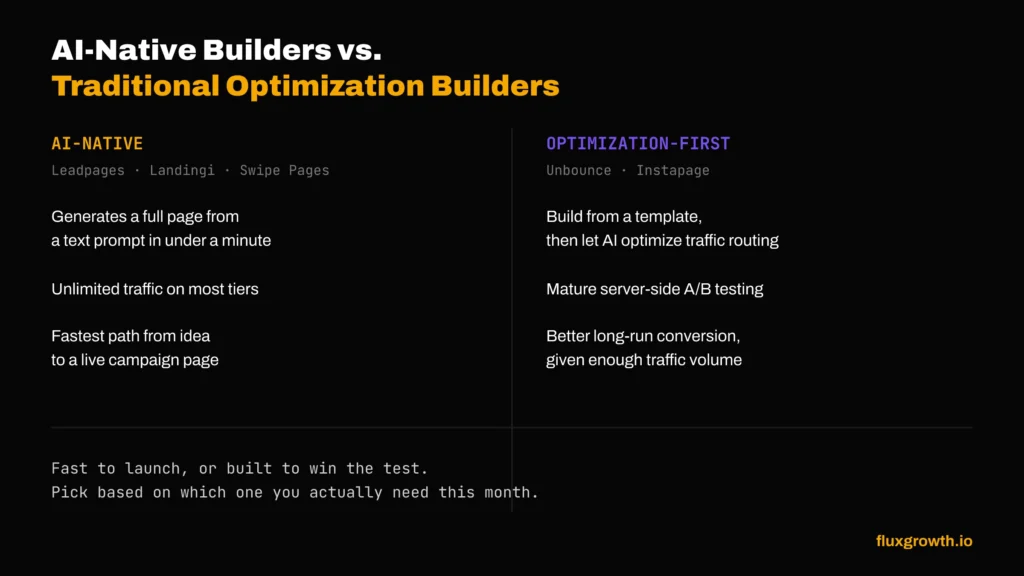
Every tool on this list now claims some AI feature, but they’re not equivalent.
AI-generated copy and layout is genuinely native to Leadpages (AI page creation across every tier), Landingi (Lunar), and Swipe Pages (Swipe Genie) describe your campaign, get a starting page in under a minute. Unbounce and Instapage still require you to build from a template first; their AI lives in optimization (Smart Traffic), not generation.
Speed to first draft favors the AI-native tools by a wide margin; this is the single biggest practical difference for someone building their fifth campaign page this month versus their first.
Want pixel-level control? Webflow and Elementor still win there. Their design systems reward the kind of fussing-over-4px-margins work that AI-first builders simply don’t support yet.
Conversion optimization is where Unbounce and Instapage’s more mature AI (Smart Traffic, server-side testing) actually outperforms the newer AI-native builders generating a page fast doesn’t mean optimizing it well.
The honest trade-off: AI-native builders get you to a live page faster. AI-optimization builders get you a better-converting page over time, assuming you have the traffic volume to make testing statistically meaningful.
Hidden Costs You Should Know
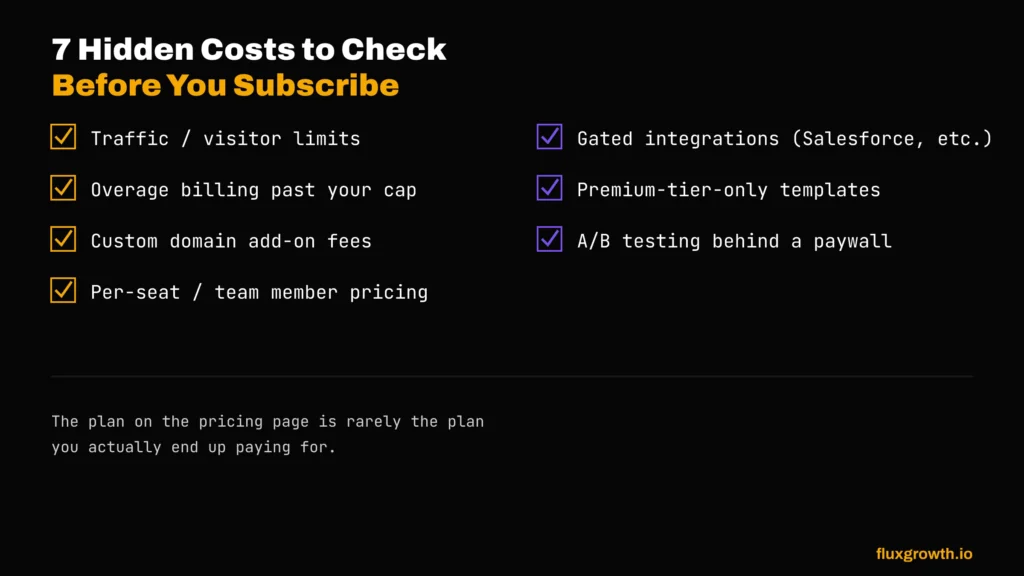
- Traffic limits. Unbounce, Instapage, and Landingi all cap monthly visitors on lower tiers and charge overages or force upgrades past the limit.
- Visitor overages. nbounce charges $80 for each additional block of 10,000 monthly visitors beyond your plan’s allowance. Instapage doesn’t offer metered overage billing instead, businesses typically need to upgrade to a higher plan as traffic increases.
- Custom domains. Carrd, Landingi, and Elementor all charge separately for domain registration or additional domains beyond your plan’s included count.
- Team members. Leadpages, HubSpot, and Webflow all charge per additional seat once you exceed your plan’s included user count.
- Integrations. Deeper integrations (Salesforce, custom webhooks) are frequently locked to top-tier or custom-priced plans across Unbounce, Instapage, and HubSpot.
- Premium templates. Rare among this list, but some tools reserve their best-designed templates for higher tiers.
- A/B testing restrictions. The single most common upsell triggers on this list Unbounce, Instapage, Landingi, and HubSpot all gate A/B testing behind a mid-tier or higher plan.
Which Landing Page Builder Is Best For…
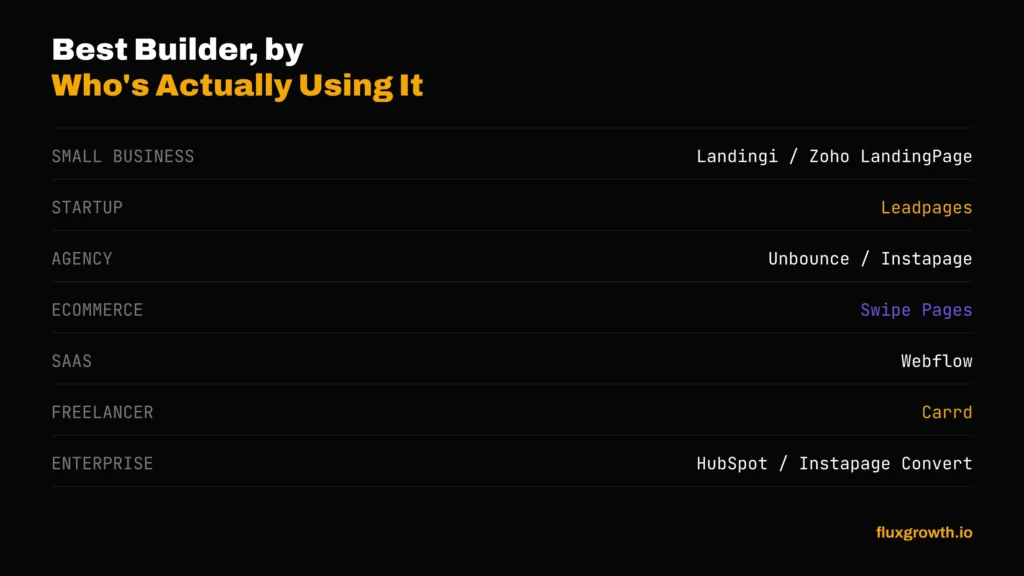
- Small businesses: Landingi or Zoho LandingPage enough features without enterprise pricing
- Startups: Leadpages unlimited traffic and included A/B testing matter most when you don’t yet know which campaign will spike
- Agencies: Unbounce or Instapage sub-account support and client management features are built for this
- Ecommerce: Swipe Pages built-in Stripe/PayPal checkout and mobile-first AMP pages suit product launch pages
- SaaS: Webflow design control and CMS depth suit content-heavy product marketing sites
- Freelancers: Card cheapest way to spin up a client’s simple landing page fast
- Enterprise: HubSpot or Instapage Convert when landing pages need to live inside a broader CRM/marketing system
Free vs. Paid Landing Page Builders
Free tiers vary enormously in what they actually let you do. Zoho LandingPage’s free tier (5,000 visitors) and HubSpot’s free tier (30 pages) are the most generous in raw allowance. Card’s free tier (3 sites) is generous for simple pages but blocks custom domains and forms entirely. Unbounce, Instapage, Leadpages, Swipe Pages, and Landingi offer no permanent free tier at all, just time-limited trials.
The pattern: free tiers work fine for testing a tool’s editor and templates. They fall short the moment you need a custom domain, real analytics, or A/B testing features that push you into a paid plan on every tool in this list except Zoho.
What I’d Choose Depending on My Budget
Choosing a landing page builder isn’t about buying the most expensive platform, it’s about paying for the features you’ll actually use. Here’s how I’d approach it based on budget.
Under $50/month
I’d choose Landingi. At this price point, it offers the strongest balance of AI-powered features, templates, integrations, and room to grow without immediately forcing you onto an expensive plan. If I only needed a simple one-page website instead of a conversion-focused landing page, Card would be my pick because it’s incredibly affordable and easy to launch.
$50–100/month
I’d choose Leadpages. It strikes one of the best balances between ease of use, built-in A/B testing, AI-assisted content, solid templates, and pricing. It’s powerful enough for freelancers, small businesses, and growing marketing teams without feeling overly complex.
$100+/month
I’d choose Unbounce. Once you’re investing heavily in paid advertising, conversion optimization matters more than subscription cost. Features like Smart Traffic, advanced optimization tools, and its mature ecosystem make it one of the strongest choices for businesses running large-scale marketing campaigns.
If I Were Starting Completely From Scratch Today
If I were launching a new business today, I’d start with Landingi. It gives me modern landing page features, AI assistance, A/B testing on higher plans, and enough flexibility to grow without the premium price tag of enterprise platforms. As traffic increased and paid advertising became a major acquisition channel, I’d consider upgrading to Unbounce for its advanced optimization capabilities. I wouldn’t pay enterprise prices on day one because, for most new businesses, improving the offer and driving traffic will have a bigger impact than buying the most expensive landing page builder.
The biggest lesson from comparing all these platforms is simple: don’t buy the builder with the longest feature list, buy the one that solves your current problem. The right platform should pay for itself through higher conversions, not become another subscription you’re trying to justify every month.
Frequently Asked Questions
What is the cheapest landing page builder?
Card, at $9/year for Pro Lite or $19/year for Pro Standard (the tier most people actually need, since it includes custom domains and forms). It’s not a conversion-optimization tool, though no A/B testing or analytics.
Is Unbounce worth the price?
For high-volume paid teams that want Smart Traffic’s AI-based traffic routing, yes it’s the most mature version of that feature on this list. For anyone running under 20,000 monthly visitors without a dedicated CRO strategy, cheaper tools like Leadpages or Landingi deliver comparable core functionality.
Is Leadpages cheaper than Instapage?
Yes, meaningfully. Leadpages starts at $49/month with no traffic caps and A/B testing included. Instapage starts at $79/month, caps at 15,000 visitors, and doesn’t include A/B testing until the $159/month Optimize tier.
Which landing page builder has the best free plan?
Zoho LandingPage, which now offers 5,000 monthly visitors on a genuinely free (not trial) tier more generous than any other tool on this list.
Which builder is best for small businesses?
Landing or Zoho LandingPage. Both balance real conversion features (A/B testing, integrations) against small-business-friendly pricing, without the enterprise complexity of HubSpot or Instapage.
Which landing page builder includes AI?
All ten now claim some AI feature, but Leadpages, Landingi, and Swipe Pages bake AI page generation into every tier. Unbounce and Instapage focus their AI on traffic optimization rather than page creation.
Which platform has the best value in 2026?
If I had to pick one platform, I’d choose Landingi. It offers the best balance of price, AI features, templates, integrations, and scalability for most businesses. Unless you’re running large enterprise campaigns that justify Unbounce’s premium pricing, Landingi gives you the best overall value for your money in 2026.
Conclusion
The sticker price on a landing page builder tells you almost nothing. What matters is whether you’ll hit a visitor cap mid-campaign, whether A/B testing is included or hidden behind a higher-priced plan, and whether the platform fits how you actually market your business.
If I had to recommend just one builder for most businesses in 2026, it would be Landingi. It offers the best balance of price, AI features, conversion tools, and scalability without the premium cost of enterprise platforms. Choose the builder that fits your current needs, upgrade only when your business outgrows it, and let your ROI not marketing hype decide when it’s time to spend more.