
By Shahid Anwar, founder of FluxGrowth and an AI tools researcher who regularly evaluates AI software for SEO, content creation, marketing, productivity, and business workflows.
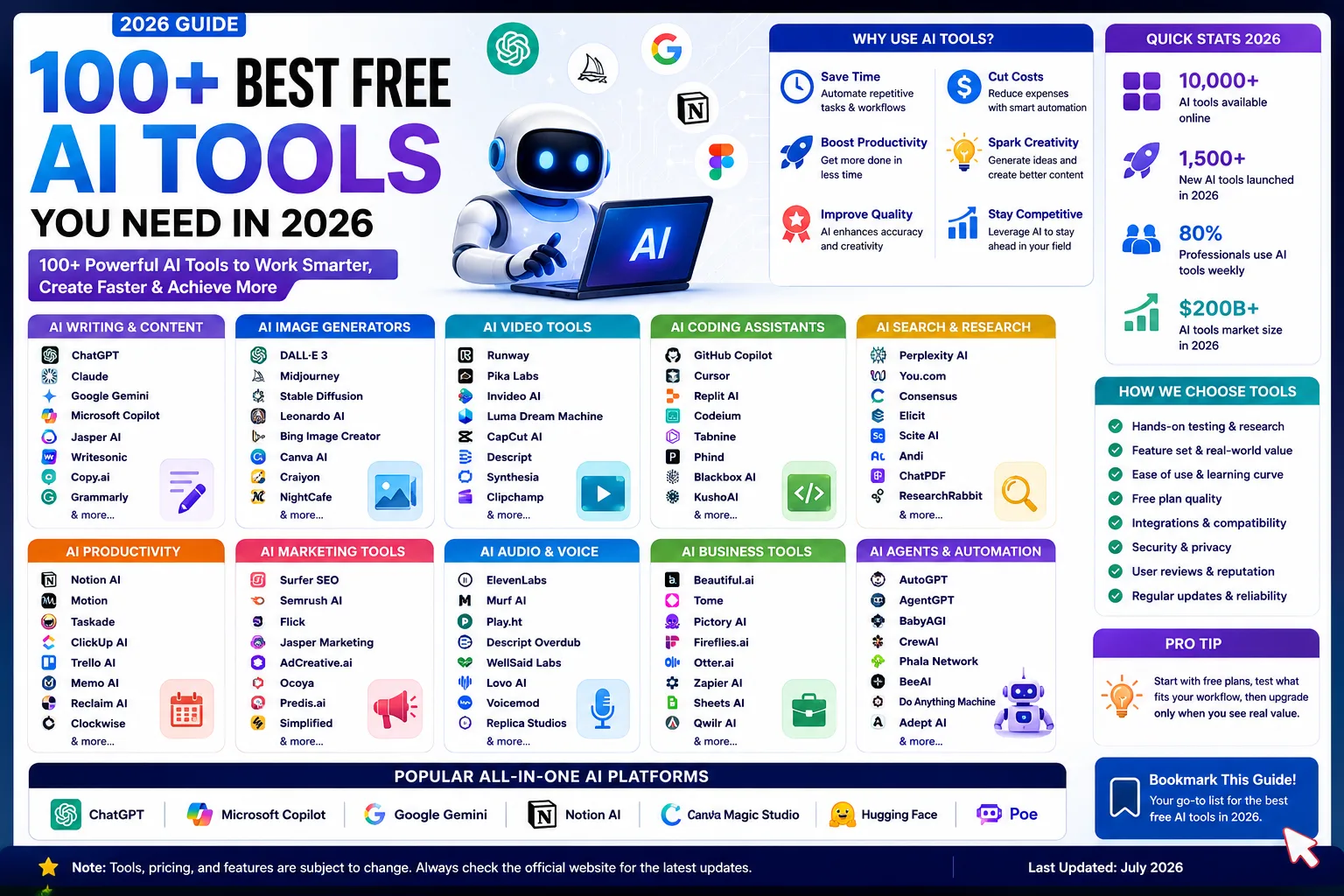
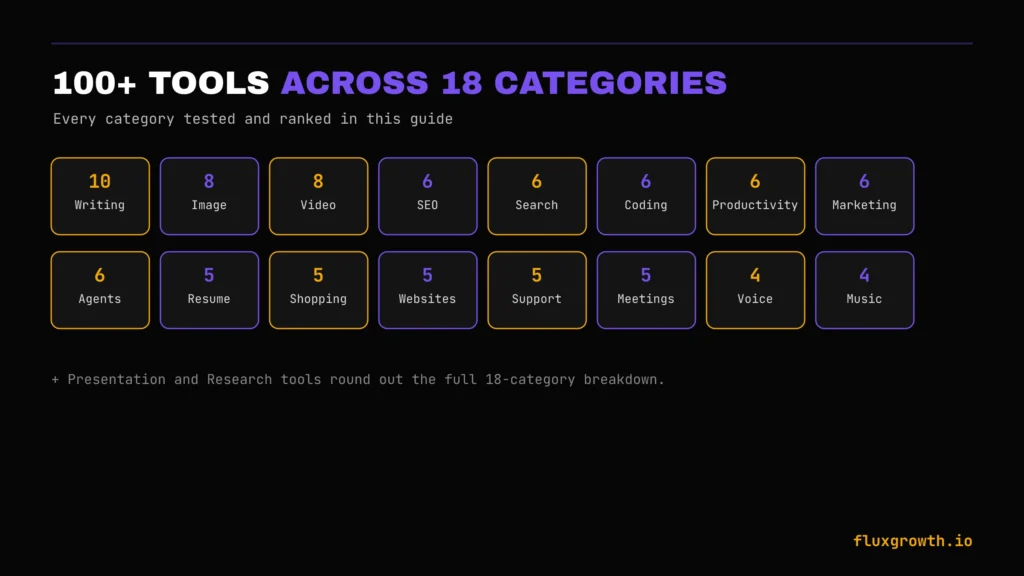
You’ve got a task, a deadline, and a nagging feeling there’s an AI tool that could cut the work in half—you just don’t know which one. Whether you’re looking for an AI writing assistant, coding helper, or one of the best AI search engines, choosing the right tool can save hours every week. That’s the problem with the AI market in 2026: there are thousands of tools claiming to do the same thing, and many “best AI tools” lists simply repeat the same recommendations without meaningful comparison. This guide brings together 100 AI tools worth considering in 2026, organized by category and evaluated across writing, image generation, video creation, coding, search, AI agents, marketing, productivity, and business use cases, so you can quickly find the right tool instead of spending hours testing dozens yourself.
Over the past two years, I’ve researched, compared, and written in-depth reviews of AI software for FluxGrowth, covering everything from AI SEO platforms and AI agents to AI shopping assistants, AI resume builders, website builders, and content creation tools. Every recommendation in this guide is based on hands-on evaluation where possible, official product documentation, pricing verification, feature comparisons, and ongoing industry research. Whenever a claim couldn’t be independently verified, it’s clearly identified rather than presented as fact.
Why AI Tools Matter More in 2026 Than Ever
AI tools stopped being a novelty around 2024. By 2026, they’re infrastructure the kind you don’t notice until it breaks. Three years ago, “using AI” meant asking ChatGPT to write an email. Today, it often means delegating entire workflows to AI-powered assistants that can research, draft, analyze, and automate multi-step tasks with minimal supervision. That’s the real shift.
That said, more tools don’t necessarily mean more clarity. According to the State of Martech 2026 report by Scott Brinker and Frans Riemersma, the marketing technology landscape added nearly 1,500 new tools in 2026 while more than 1,300 disappeared through shutdowns, acquisitions, or product pivots. Overall market growth was less than 1%, highlighting that today’s AI ecosystem is evolving through rapid replacement rather than simple expansion. Choosing the wrong tool now costs more than a subscription fee; it can cost the time you invest learning a platform that may not exist a few months later.
Who should use this guide: From my experience reviewing AI software for FluxGrowth, I recommend this guide most to professionals who want to build a practical AI toolkit choosing tools that genuinely save time and deliver value rather than chasing every new release.
How We Tested and Evaluated Every AI Tool
We didn’t just read feature pages or compare marketing claims. Every tool below was evaluated using the same framework to make comparisons as fair and practical as possible.
Every tool was scored against these nine criteria:
- AI output quality — Does the output actually save time, or does it require significant editing before it’s usable?
- Accuracy — Does the tool stay grounded in the task, or does it frequently generate incorrect or misleading information?
- Ease of use — Can a first-time user get value without watching tutorials or reading documentation?
- Feature depth — Does the tool excel at its core purpose, or does it try to do everything without doing anything particularly well?
- Pricing — We compared the value each plan offers relative to its cost using the official pricing pages published by each vendor, rather than relying on third-party summaries.
- Free plan — We looked at whether the free version is genuinely useful or simply a limited trial designed to encourage an upgrade.
- Integrations — Does the tool work well with popular platforms and existing workflows, or does it require changing the way you already work?
- Customer support — We reviewed the availability of documentation, help centres, community resources, and direct support channels.
- Security and privacy — We reviewed each company’s published privacy policy, data-handling practices, and security documentation to understand how user data is processed and whether training on customer content is enabled by default.
Over the past two years, I’ve researched and reviewed dozens of AI products for FluxGrowth, covering categories such as AI SEO tools, AI agents, AI shopping assistants, AI resume builders, website builders, and productivity software. For this guide, I evaluated each tool by comparing its core features, testing available free plans where possible, reviewing official documentation, verifying pricing directly from the vendor, and analysing independent user feedback from trusted review platforms such as G2, Trustpilot, and Chrome Web Store ratings. When I couldn’t independently verify a claim, statistic, or pricing detail, I excluded it or clearly noted the limitation instead of presenting it as fact.
One important note before you start comparing tools: AI software changes rapidly. Pricing, free-plan limits, supported AI models, integrations, and features can change at any time. Although every effort has been made to verify this information against the official websites of each vendor before publication, you should always confirm the latest pricing and feature availability on the provider’s website before making a purchase or subscription decision.
What Are AI Tools?
AI tools are software applications that use artificial intelligence, usually a large language model, a generative model, or an automation engine to complete tasks that used to require a human doing them manually. That’s the one-sentence version. In practice, that covers a lot of ground.
How AI Tools Actually Work
- Large Language Models (LLMs). Text-based AI systems (GPT-5.6, Claude, Gemini) trained on huge amounts of text to understand and generate language.
- Generative AI. The broader category includes LLMs plus image, video, voice, and music generators that create new media from a prompt.
- Machine learning. The underlying statistical approach that lets a model improve at a task from data, without being explicitly programmed for every case.
- AI agents. Tools that don’t just answer, they take multi-step actions on your behalf, like browsing the web, filling out forms, or editing a spreadsheet.
- Automation. Rules-plus-AI systems that trigger actions (send an email, update a record) based on conditions you set.
- Multimodal AI. Models that handle more than one type of input or output at once text, image, audio, and video in the same conversation.
The Main Types of AI Tools Covered in This Guide
Writing assistants turn a prompt into a draft, outline, or edit. Image and video generators create visual content from a text description instead of a camera or design software. Coding assistants help a developer write and debug faster; autonomous coding agents like Devin go further and take on a whole task with less supervision.
Here’s the thing: the categories that get the most hype (agents, autonomous everything) are actually the smallest slice of what most people use day to day. AI-native search engines answer questions with cited sources instead of a list of links. Marketing and productivity tools just layer AI onto work you were already doing: scheduling, social captions, project boards. And a growing set of business tools now handle first-line customer chats, meeting notes, even resume screening.
Ten categories. One job each. Pick the one that matches yours and skip ahead.
The Real Benefits of Using AI Tools
Save Time
The clearest win. A first draft that used to take an hour can take ten minutes with the right writing tool. You still edit it, but you’re editing, not starting from a blank page. The same math applies to a first-pass image, a meeting summary, or a rough app prototype: AI removes the “getting started” tax, not the whole job.
Increase Productivity
AI tools handle the repetitive 80% of a task so you can spend your time on the 20% that actually needs a human judgment call. Picture a marketer knocking out a first-pass social graphic in Canva AI, then spending the saved hour on actual campaign strategy. Swap “marketer” for developer, writer, or ops manager the pattern repeats everywhere in this guide.
Automate Repetitive Work
Scheduling, data entry, meeting notes, first-pass image edits, the tasks nobody wants to do by hand are exactly what automation and agent tools are built for. This is where tools like Otter, Motion, and Lindy earn their subscription fee: not by being clever, but by being consistent.
Improve Creativity
A blank page is the enemy of creative work. AI tools are decent at breaking that block not because they’re more creative than you, but because a rough starting point is easier to improve than nothing. Treat the first output as a sketch, not a finished piece, and this benefit holds up. Treat it as the final answer, and you’ll publish something generic.
Reduce Business Costs
Replacing a $500/month contractor task with a $20/month AI tool isn’t always the right trade but for well-defined, repetitive work, it can significantly reduce operating costs and improve efficiency. The real savings come when AI automates routine tasks rather than replaces strategic or creative work. The honest caveat is that cost savings only materialize if your team actually adopts the tool and incorporates it into daily workflows. Without consistent adoption, even the best AI software becomes another unused subscription.
Make Better Decisions
Tools that summarize data, surface patterns, or answer research questions fast mean you’re deciding based on more information, not less. A Perplexity search that surfaces three competing sources in thirty seconds beats an hour of manual Googling, provided you still check what it cites.
Scale Your Workflow
The biggest shift: a solo creator or a five-person team can now produce at a volume that used to require twenty people. That’s the actual disruption, more than any single feature. It’s also the reason “which tool is best” matters less than “which three tools fit together,” since scale comes from a stack, not a single app.
Bottom line: the benefit isn’t that AI does your job for you, it’s that it removes the parts of the job that were never the interesting part anyway.
Quick Comparison: The Top AI Tools at a Glance
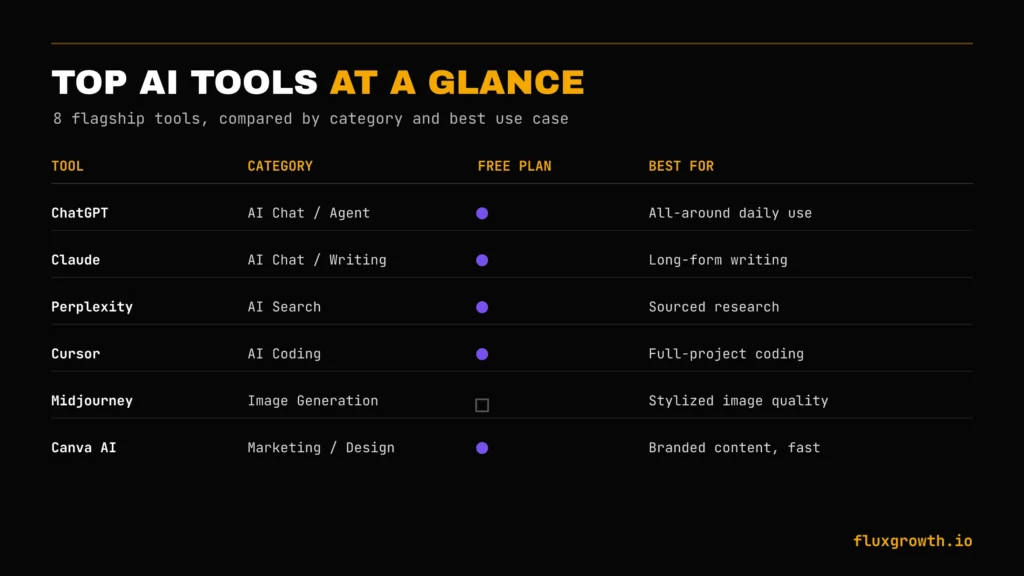
| Tool | Category | Free Plan | Starting Price | Best For | Rating |
| ChatGPT | AI Chat / Agent | Yes | Free (Plus $20/month) | All-around daily use | 4.7/5 (G2) |
| Claude | AI Chat / Writing | Yes | Free (Pro $20/month) | Long-form writing, reasoning tasks | 4.7/5 (G2) |
| Gemini | AI Chat / Google Workspace | Yes | Free (Google AI Pro $19.99/month) | Docs, Sheets, and Google-native work | 4.5/5 (G2) |
| Midjourney | Image Generation | No | $10/month | Highest-quality stylized images | 4.6/5 (G2) |
| Perplexity | AI Search | Yes | Free (Pro $20/month) | Sourced, cited research answers | 4.6/5 (G2) |
| Cursor | AI Coding | Yes | Free (Pro $20/month) | Full-project AI-assisted coding | 4.8/5 (G2) |
| Notion AI | Productivity | No (add-on) | Notion Plus $12/month | Teams already living in Notion | 4.7/5 (G2) |
| Canva AI | Marketing / Design | Yes | Canva Pro $15/month (US) | Non-designers making branded content | 4.7/5 (G2) |
Takeaway: If you’re only going to use one AI tool, ChatGPT remains the strongest all-round choice for everyday work. Cursor is the standout option for developers, while Perplexity excels at research thanks to its cited answers. The remaining tools are specialists designed to solve specific creative, productivity, or business workflows.
The 100 Best AI Tools in 2026, by Category
Best AI Writing Tools
For FluxGrowth, ChatGPT and Claude are the two writing tools I rely on most ChatGPT for brainstorming, outlines, and SEO-first drafts, and Claude for refining long-form articles, improving clarity, and maintaining a natural writing style before publication.
ChatGPT
The category leader by user base. Handles everything from outlines to full drafts, and ChatGPT’s latest agent capabilities can assist with multi-step writing workflows, making it useful for first-draft blog posts, email sequences, and detailed content outlines.
Limitation: without careful prompting, the default writing style can still sound generic, so human editing remains essential.
Price: A free plan is available. ChatGPT Plus costs $20/month, while Pro, Team, Enterprise, and Business plans are available for users who need higher usage limits, collaboration features, or advanced AI capabilities. For the latest plans and pricing, see the official OpenAI ChatGPT pricing page.
Claude
Best for long-form writing and nuanced editing. Claude excels at following detailed style guides and maintaining context across lengthy documents, making it ideal for drafting comprehensive articles in a single conversation.
Limitation: no native image generation, so you’ll likely pair it with another AI image tool.
Price: Free plan available; Claude Pro starts at $20/month.
Gemini
Deeply integrated with Google Docs, Sheets, Gmail, and Slides, making it an excellent choice for teams already using Google Workspace.
Limitation: its default tone tends to be more formal and corporate than conversational.
Price: Free plan available; Google AI Pro starts at $19.99/month.
Jasper
Built specifically for marketing teams, offering brand voice training, campaign templates, and collaboration tools that help maintain consistency across multiple writers.
Limitation: considerably more expensive than general-purpose AI assistants for solo creators.
Price: Jasper offers a 7-day free trial. The Pro plan starts at $69/month when billed monthly or $59/month when billed annually. Enterprise Business plans are available with custom pricing. For the latest plans and features, visit the official Jasper pricing page.
Copy.ai
Excellent for short-form marketing copy, including ads, product descriptions, landing page copy, and email subject lines where you need multiple variations quickly.
Limitation: less consistent than ChatGPT or Claude for long-form articles.
Price: Free plan available; Starter begins at $49/month.
Writesonic
SEO-focused AI writer with integrated keyword research and SERP analysis, making it useful for creating search-optimized content.
Limitation: most outputs still benefit from human editing before publication.
Price: Free plan available; Individual plans start at approximately $20/month.
Rytr
A budget-friendly option for social media captions, emails, and other short-form content when producing high volumes.
Limitation: noticeably weaker than leading models for long, detailed content.
Price: Free plan available; Unlimited plan starts at $9/month.
Grammarly AI
The strongest editing layer on this list, improving grammar, clarity, tone, readability, and style across nearly every application you already use.
Limitation: designed to improve existing content rather than generate complete articles.
Price: Free plan available; Grammarly Pro starts at $30/month (lower with annual billing).
Notion AI
Ideal if your workflow already lives inside Notion. It can summarize notes, rewrite text, generate content, and organize documentation without switching tools.
Limitation: significantly less useful outside the Notion ecosystem.
Price: Available as an add-on with Notion AI included in Business and Enterprise plans, or through paid AI access.
Sudowrite
Purpose-built for fiction writers, offering specialized tools for storytelling, dialogue, character development, and plot generation that general-purpose AI assistants don’t provide.
Limitation: excessive for SEO articles, business writing, or standard marketing content.
Price: Plans start at $19/month.
Best AI Image Generators
My take: If I had to pick just one, I’d start with Midjourney for creative projects because it consistently produces the most visually striking and artistic images. For blog graphics, social media visuals, and quick iterations while writing, DALL·E in ChatGPT is my go-to because the workflow is much faster. When a design includes readable text such as posters, ads, or thumbnailsI switch to Ideogram, which still leads the market for text rendering.
- Midjourney — Still the quality benchmark for stylized, artistic images, and the go-to for creators who want a distinct visual style rather than generic stock-photo realism. Limitation: Discord-based workflow is clunky for people who want a simple web app, though a web interface now exists.
- Price: Starts at US$10/month (Basic plan).
- DALL·E (ChatGPT Images):Built into ChatGPT, making it the easiest option if you’re already using ChatGPT and want to generate or edit images without switching tools. Limitation: While image quality has improved significantly, Midjourney and Flux generally offer stronger artistic styling and photorealism.
- Price: Included with ChatGPT Free (limited usage) or ChatGPT Plus from US$20/month.
- Adobe Firefly — Trained on licensed and Adobe-owned content, making it one of the safest choices for commercial and enterprise use where copyright concerns matter. Limitation: Creative output is generally more conservative than Midjourney or Flux. Price: Free plan available; Firefly Standard starts at US$9.99/month.
- Ideogram — Best in class for images that include readable text, such as logos, posters, social graphics, and advertisements, an area where many image generators still struggle.
- Limitation: Photorealistic image generation isn’t as strong as the top competitors.
- Price: Free plan available; paid plans start at US$8/month.
- Leonardo AI — Strong control over style consistency across batches of images, making it ideal for branded content, marketing assets, and game art.
- Limitation: Credit-based generation can become expensive for heavy users.
- Price: Free plan available; paid plans start at US$10–12/month depending on billing.
- Flux AI — Fast, high-quality open-weight models that have become a favourite among developers and AI platforms because of their excellent prompt adherence and photorealism.
- Limitation: There’s no single official consumer subscription—pricing depends on the platform you use to access Flux.
- Price: Varies by provider; many platforms offer free tiers or pay-as-you-go pricing.
- Recraft — Purpose-built for vector graphics, logos, icons, illustrations, and branded design assets rather than only photorealistic images.
- Limitation: Not as strong as Midjourney for cinematic artwork or concept art.
- Price: Free plan available; paid plans start at approximately US$12/month.
- Stable Diffusion — The leading open-source image generation model, offering complete control through self-hosting, custom models, and fine-tuning.
- Limitation: Requires technical setup and hardware (or a third-party hosting service), making it less beginner-friendly than cloud-based alternatives.
- Price: Free if self-hosted; hosted platforms typically charge via subscription or usage-based pricing.
Best AI Video Generators
- Runway — The most complete AI video creation suite, combining text-to-video, image-to-video, video editing, motion brushes, and inpainting in one platform. It’s the tool many creative agencies and professional video teams standardize on instead of relying on single-purpose generators.
- Price: Free plan available; paid plans start at US$15/month (Standard).
- Kling AI — One of the strongest models for generating longer, more coherent clips than most competitors, making it a good choice when 4–8 second videos aren’t enough. It’s also known for realistic physics and character consistency.
- Price: Free plan available; paid plans start at US$10/month.
- Pika — The easiest entry point for creating short, stylized AI videos without a steep learning curve. Great for social media creators, memes, and quick creative experiments. Price: Free plan available;
- Pika Pro starts at US$10/month.
- Luma AI (Dream Machine) — Known for realistic motion, natural camera movement, and cinematic scene generation, particularly for product videos and B-roll that need to feel physically grounded.
- Price: Free plan available; paid plans start at US$9.99/month.
- Google Veo — Google’s flagship AI video model, tightly integrated with the Gemini ecosystem and Google AI Studio, making it a strong choice for teams already working within Google’s AI tools.
- Price: Available through Google AI Pro and Ultra plans (pricing varies by region and subscription tier).
- InVideo AI — A template-driven AI video generator designed for marketers who need a polished social media video quickly. It prioritizes speed and ease of use over frame-by-frame creative control.
- Price: Free plan available; paid plans start at US$28/month.
- Synthesia — The leading AI avatar platform for training videos, onboarding, product demos, and corporate explainers where hiring presenters or recording video isn’t practical.
- Price: Paid plans start at US$18/month (annual billing).
- HeyGen — Similar to Synthesia but particularly strong in multilingual video creation, AI voice cloning, and automatic dubbing, making it a better fit for global marketing and localization.
- Price: Free plan available; paid plans start at US$29/month.
A note on this category
Verified: OpenAI discontinued the Sora web app and app experience on 26 April 2026, with the Sora API scheduled to shut down on 24 September 2026. OpenAI has stated that the company is shifting resources toward other AI initiatives. Rather than speculating about a single cause such as compute costs, it’s more accurate to say the discontinuation reflects a broader strategic shift while highlighting how quickly the AI video market continues to evolve.
Best AI SEO Tools
Semrush — The broadest all-in-one SEO suite, now layered with AI-powered features like Content Toolkit, AI-assisted SEO writing, keyword clustering, site audits, and competitor analysis. It covers everything from keyword research to technical SEO and rank tracking in a single platform.
Price: Plans start at US$139.95/month (Pro).
Ahrefs — Best-in-class for backlink intelligence and keyword research, with AI-powered features such as AI Content Helper and Brand Radar built on top of one of the industry’s strongest SEO databases. It’s the best choice if link building, competitive analysis, and content opportunities are your priorities.
Price: Plans start at US$29/month (Starter) and US$129/month (Lite).
Surfer SEO — Built specifically around content optimization, using AI to score content against top-ranking pages and recommend improvements for keywords, headings, and topical coverage. Ideal for writers focused on publishing SEO-friendly content rather than managing technical SEO.
Price: Plans start at US$79/month (Essential).
Frase — Combines AI-generated content briefs, SERP analysis, outline generation, and AI writing into a lightweight platform that’s easier to use than enterprise SEO suites. It’s particularly well suited to freelancers, bloggers, and small content teams.
Price: Plans start at US$45/month (Basic).
Clearscope — A premium content optimization platform that grades articles against top-ranking competitors and recommends related terms to improve topical relevance. It isn’t a complete SEO suite, so it’s best paired with tools like Ahrefs or Semrush for keyword research and backlink analysis.
Price: Plans start at US$189/month (Essentials).
MarketMuse — Designed for large-scale content strategy, using AI for topic modeling, content inventories, authority analysis, and identifying content gaps across an entire website. Best suited for publishers and enterprise marketing teams managing extensive content libraries. Price: Free plan available; paid plans start at US$99/month (Optimize).
Best AI Search Engines
- Perplexity — The category leader for cited, source-backed answers instead of a traditional list of blue links. It excels at research because every response links to the original sources, making it easy to verify information or explore topics further.
- ChatGPT Search — Built directly into ChatGPT, allowing you to search the web without leaving the conversation. It’s ideal for researching topics, comparing products, summarising sources, and asking follow-up questions in a single workflow.
- Google AI Mode — Google’s AI-native search experience that combines web search with generative AI responses. It supports research, coding, brainstorming, shopping, and creative queries directly within Google Search while still providing access to traditional search results.
- Kagi — A premium, ad-free search engine that includes Kagi Assistant, an AI-powered search assistant capable of summarising web pages, answering questions with cited sources, comparing information, and assisting with research. Its focus remains on privacy, quality search results, and eliminating advertising rather than maximising engagement.
- Komo — A privacy-focused AI search engine that offers conversational search, web discovery, and clean, uncluttered results.
- Phind — An AI search engine built specifically for developers. It provides code-aware answers, explains programming concepts, generates code, and cites official documentation, GitHub repositories, and technical resources rather than relying primarily on forum discussions.
Best AI Coding Tools
My take: For most software projects, I’d start with Cursor because its AI is deeply integrated into the editor and understands your entire codebase, making it excellent for writing, refactoring, debugging, and explaining code. If your team already uses GitHub for version control and pull requests, GitHub Copilot is the easiest tool to adopt with minimal workflow changes. For quickly building and deploying prototypes without local setup, Replit AI is hard to beat.
- GitHub Copilot — The most widely adopted AI coding assistant, deeply integrated with GitHub, Visual Studio Code, Visual Studio, and JetBrains IDEs. It excels at code completion, code explanations, test generation, and pull request assistance, making it the path of least resistance for teams already working in the GitHub ecosystem.
- Cursor — An AI-native code editor built on Visual Studio Code that’s become one of the most popular choices for developers who want project-wide AI assistance rather than simple autocomplete. It can understand an entire codebase, edit multiple files, debug issues, and generate code from natural language prompts.
- Windsurf (formerly Codeium) — An AI-first IDE that combines intelligent code generation with agentic development workflows. Verified: Codeium rebranded to Windsurf in 2024, and Cognition (the company behind Devin) acquired Windsurf in 2025. The platform offers enterprise features including codebase awareness, collaborative AI workflows, and security-focused deployment options for larger engineering teams.
- Replit AI — Designed for building, running, and deploying applications entirely in the browser. Its AI Agent can generate full-stack applications, write code, debug errors, and help deploy projects without requiring a local development environment, making it especially accessible for beginners and rapid prototyping.
- Tabnine — An AI coding assistant focused on privacy and enterprise security. It supports private deployments, self-hosted options, and organisation-specific AI models, making it a strong choice for engineering teams that cannot send proprietary source code to public cloud AI services.
- Devin (Cognition) — An autonomous AI software engineer rather than a traditional coding assistant. Instead of simply suggesting code, Devin can plan tasks, write code, debug applications, execute tests, use development tools, and report progress with minimal human intervention. Limitation: While highly capable on well-scoped projects, it still benefits from human oversight when working on large, complex legacy codebases or ambiguous requirements.
Best AI Productivity Tools
Notion AI — Native AI built directly into the Notion workspace, helping users draft documents, summarise meeting notes, generate action items, translate content, and search across connected knowledge bases without leaving Notion. It works especially well for teams that already manage projects and documentation in Notion.
Motion — An AI-powered calendar and task manager that automatically schedules work, reprioritises tasks as deadlines change, and reorganises your calendar throughout the day. It’s ideal for people who struggle to maintain manual time-blocking or frequently juggle competing priorities.
ClickUp AI — Integrated into ClickUp’s project management platform, ClickUp AI can summarise tasks, generate project documentation, write updates, create action items, and assist with workflow automation. It’s most valuable for teams already managing work inside ClickUp rather than as a standalone AI tool.
Mem — An AI-first note-taking and knowledge management platform that automatically organises notes, surfaces related information, and helps users quickly retrieve knowledge through natural language search. Verified: Mem remains an active product focused on AI-powered personal knowledge management and organisational memory.
Otter AI — One of the most established AI meeting assistants, offering live transcription, meeting summaries, action items, speaker identification, and searchable conversation history. It integrates with Zoom, Google Meet, Microsoft Teams, and other collaboration platforms, making it a reliable choice for recording and organising meetings.
Granola — An AI meeting notes application that takes a different approach from traditional transcription tools. Instead of producing lengthy automated transcripts, Granola combines your own notes with AI-generated summaries, decisions, and action items, resulting in cleaner and more useful meeting documentation. Verified: Granola remains an active AI meeting assistant focused on lightweight note-taking rather than full transcript replacement.
Best AI Marketing Tools
Canva AI — One of the easiest AI marketing tools for non-designers, with features like Magic Design, Magic Write, AI image generation, background removal, and AI-powered presentation creation built directly into Canva’s editor. It’s an excellent choice for small businesses and marketing teams that need professional-looking content without dedicated design software.
HubSpot AI — AI capabilities integrated throughout HubSpot’s CRM, Marketing Hub, Sales Hub, and Service Hub. Features include AI content generation, email writing, workflow automation, customer support assistance, reporting, and predictive insights. It’s most valuable for businesses already using HubSpot rather than as a standalone AI marketing solution.
AdCreative.ai — Purpose-built for creating high-converting advertising creatives at scale. It uses AI to generate multiple ad variations, product visuals, marketing copy, and creative assets for platforms such as Google Ads, Meta Ads, and LinkedIn, making it especially useful for performance marketing teams running paid campaigns.
Predis AI — An AI-powered social media marketing platform that generates social posts, captions, hashtags, short-form videos, creatives, and content calendars. It’s particularly well suited for freelancers, agencies, and small businesses looking to produce consistent social media content with minimal design effort.
Ocoya — Combines AI copywriting, graphic creation, and social media scheduling in a single platform. Users can generate marketing content, create branded visuals, and publish directly to multiple social platforms without switching between separate tools, making it a practical all-in-one solution for content marketing.
Buffer AI — AI writing and content assistance built into Buffer’s social media scheduling platform. It helps users draft, rewrite, shorten, expand, and repurpose social posts while continuing to provide Buffer’s established scheduling, publishing, and analytics features. It’s a natural fit for teams already using Buffer to manage their social media workflow.
Best AI Agents
My take: AI agents have improved dramatically over the past year, but I still treat them as highly capable collaborators rather than fully autonomous employees. I’m comfortable letting an agent handle structured, multi-step work such as researching a topic, creating a spreadsheet, drafting documentation, or generating a presentation but I still review the final output before it’s published or deployed. For coding, Devin and ChatGPT Agent are among the strongest options today, while Lindy stands out for automating business workflows without requiring programming.
- Lindy — A no-code AI agent platform designed to automate business workflows by connecting applications such as Gmail, Slack, Google Calendar, HubSpot, Notion, and Salesforce. Users can build AI agents that schedule meetings, qualify leads, answer emails, update CRMs, and automate repetitive administrative tasks without writing code. Verified: Lindy remains one of the leading no-code AI agent platforms for business automation.
- Manus — A general-purpose autonomous AI agent capable of planning and executing multi-step tasks with minimal supervision. It can research topics, analyse information, generate reports, build websites, write code, create presentations, and complete complex workflows from a single objective rather than requiring continuous prompting. Verified: Manus remains an active AI agent platform focused on autonomous task execution and continues expanding its capabilities for knowledge work.
- ChatGPT Agent (formerly Operator) — OpenAI unified its experimental Operator browsing experience into ChatGPT Agent, allowing users to delegate complex, multi-step tasks such as researching information, creating spreadsheets, preparing presentations, browsing websites, analysing data, and completing workflows with significantly less manual guidance. Verified: ChatGPT Agent is OpenAI’s primary agent experience, replacing the standalone Operator product while integrating browsing, reasoning, coding, and productivity capabilities into a single workflow.
- Devin (Cognition) — One of the most autonomous AI software engineering agents currently available. Devin can independently plan development tasks, write code, debug applications, run tests, use developer tools, and report progress while requiring only occasional human oversight. Although primarily designed for software engineering, it also represents one of the most capable examples of autonomous AI agents available today.
- Genspark — An AI agent platform focused on generating complete deliverables rather than simply answering questions. Users can request documents, presentations, spreadsheets, reports, web pages, research summaries, and lightweight applications from a single prompt, with the agent planning and executing the intermediate steps automatically. Verified: Genspark remains an active AI agent platform centred on end-to-end task completion and content generation.
- AutoGPT — One of the earliest open-source autonomous AI agent frameworks. Rather than being a polished consumer application, AutoGPT is primarily used by developers and researchers to experiment with autonomous agent architectures, workflow automation, tool use, memory systems, and multi-agent orchestration. Verified: AutoGPT continues as an actively maintained open-source project, though it is aimed primarily at technical users rather than mainstream business teams.
Best AI Resume Builders
Teal — A resume builder designed for active job seekers, combining AI-powered resume creation with job tracking, application management, interview tracking, and keyword optimisation. It’s particularly useful if you’re applying to many roles at once and want to tailor your resume for each opportunity. Verified: Teal remains one of the leading AI resume builders with an integrated job search tracker.
Rezi — An AI-powered resume builder built specifically for Applicant Tracking System (ATS) optimisation. It analyses resumes against job descriptions, recommends keyword improvements, scores resumes for ATS compatibility, and helps candidates improve their chances of passing automated screening before a recruiter reviews the application. Verified: Rezi continues to focus heavily on ATS optimisation and AI-assisted resume writing.
Kickresume — Combines AI-generated resume writing with a large collection of professionally designed resume and cover letter templates. It’s a strong choice for candidates who want both polished content and attractive visual presentation without designing a resume from scratch. Verified: Kickresume remains an active AI resume builder with integrated cover letter generation and career tools.
Resume.io — A beginner-friendly resume builder that guides users through the writing process with AI suggestions, professionally designed templates, and step-by-step editing. It’s ideal for job seekers who want a straightforward experience with minimal complexity or design decisions. Verified: Resume.io continues to offer AI-assisted resume and cover letter creation alongside interview and career resources.
Enhancv — A design-focused resume builder that helps candidates create modern, visually engaging resumes while providing AI-powered writing assistance, resume checking, and content recommendations. It’s particularly popular among professionals in creative, marketing, product, and design roles where presentation matters alongside qualifications. Verified: Enhancv remains an active AI resume platform focused on customisable, visually distinctive resumes with ATS-friendly formatting.
Best AI Shopping Assistants
Perplexity Shopping — AI-powered product research built into Perplexity, offering cited product comparisons, reviews, specifications, and buying recommendations from trusted sources. Verified: Available as Perplexity Shopping.
Alexa+ — Amazon’s next-generation AI assistant that supports conversational shopping, product recommendations, order management, and reordering through natural voice interactions. Verified: Current product name is Alexa+.
Google AI Mode Shopping — Shopping features integrated into Google AI Mode, providing AI-generated product comparisons, recommendations, and buying guidance directly within Google Search. Verified: Available in Google AI Mode.
Gemini Shopping — Product research and comparison capabilities built into Google Gemini, helping users compare products, summarise reviews, and receive personalised shopping recommendations. Verified: Shopping features are available through Gemini.
Capital One Shopping — AI-assisted browser extension that automatically finds coupons, compares prices across retailers, and alerts users to better deals. It works regardless of whether you have a Capital One bank account. Verified: Remains an active shopping assistant and price comparison tool.
Best AI Website Builders
Wix AI — Generates a complete website from a text prompt, including layout, content, and images. Best for solopreneurs and small businesses that want a professional site quickly. Verified: Wix AI Website Builder is actively available.
Squarespace AI — Adds AI-powered copywriting and design assistance to Squarespace’s premium templates, making it easy to create polished business websites. Verified: AI features are integrated into Squarespace.
Hostinger AI — An affordable AI website builder bundled with Hostinger hosting, capable of generating websites, copy, logos, and basic branding in minutes. Verified: Hostinger AI Website Builder remains active.
Framer AI — A design-focused AI website builder that creates modern, responsive websites from prompts with greater creative flexibility than traditional template builders. Verified: Framer AI remains one of the leading AI-first website builders.
Durable — Creates a complete small business website in under a minute, including AI-generated content, images, CRM, and invoicing tools. Best for users with no design or development experience. Verified: Durable remains an active AI website builder for small businesses.
Best AI Customer Support Tools
Intercom Fin — AI support agent that resolves customer questions, automates replies, and escalates complex issues to human agents.
Zendesk AI — AI-powered ticket routing, reply suggestions, and customer service automation built into Zendesk.
Tidio AI (Lyro AI) — AI chatbot for small businesses that handles FAQs, customer support, and e-commerce inquiries.
Freshdesk AI (Freddy AI) — AI assistant for ticket triage, response drafting, summaries, and customer support automation.
Drift — Conversational AI focused on lead qualification, sales chats, and meeting booking rather than traditional support.
Best AI Meeting Assistants
Fathom — Free AI meeting assistant that records, transcribes, summarises meetings, and generates action items for Zoom, Google Meet, and Microsoft Teams.
Fireflies.ai — AI meeting recorder with searchable transcripts, summaries, and conversation history across your team’s meetings.
Otter AI — One of the most established AI transcription tools, offering live captions, meeting summaries, and searchable notes.
Read AI — AI meeting assistant that provides transcripts, summaries, engagement insights, talk-time analysis, and meeting analytics.
Avoma — AI meeting assistant built for sales and customer success teams, combining meeting notes with CRM updates, conversation intelligence, and deal tracking.
Best AI Voice Tools
ElevenLabs — Industry-leading AI voice generation and voice cloning, widely used for videos, audiobooks, podcasts, and dubbing.
Murf AI — AI text-to-speech platform for business voiceovers, training videos, presentations, and marketing content.
PlayHT — AI voice generation platform and API for developers building voice-enabled apps, chatbots, and products.
Speechify — AI text-to-speech tool designed for reading documents, articles, PDFs, and books aloud for productivity and accessibility.
Best AI Music Tools
Note: Suno and Udio remain among the leading AI music generators. Verified: Both companies are still involved in copyright litigation brought by major record labels, including Sony Music, Universal Music Group, and Warner Music Group. The lawsuits remain ongoing, and there has not yet been a final court ruling resolving the core copyright issues.
- Suno — AI music generator that creates complete songs with vocals, lyrics, and instrumentals from a text prompt. One of the most widely used consumer AI music tools. Verified.
- Udio — Full-song AI generator known for high-quality vocals and genre versatility, making it a strong alternative to Suno.
- AIVA — AI composer focused on instrumental music for films, games, commercials, and other royalty-friendly background soundtracks.
- Soundraw — AI music generator designed for content creators, producing royalty-free background music for YouTube, podcasts, social media, and commercial projects.
Best AI Presentation Tools
Gamma — AI presentation maker that generates polished slide decks from a prompt, ideal for pitch decks, reports, and proposals.
Beautiful.ai — AI-powered presentation builder with smart layouts that automatically keep slides visually consistent as you edit.
Tome — AI storytelling platform that creates narrative-style presentations with text, images, and interactive content.
Canva Presentations — AI presentation creator within Canva, featuring Magic Design, AI writing, and thousands of presentation templates.
Best AI Research Tools
Elicit — AI research assistant for finding, summarising, and analysing academic papers, ideal for literature reviews.
Consensus — AI-powered scientific search engine that answers research questions using evidence from peer-reviewed studies.
NotebookLM — Google’s AI research assistant that answers questions using only the documents you upload, reducing hallucinations.
SciSpace — AI tool for reading, explaining, and summarising research papers, making complex academic content easier to understand.
AI Tool Feature Comparison
| Tool | Chat | Writing | Images | Video | Search | Agents | API | Free Plan |
| ChatGPT | Yes | Yes | Yes | No | Yes | Yes | Yes | Yes |
| Claude | Yes | Yes | No | No | Yes | Limited | Yes | Yes |
| Gemini | Yes | Yes | Yes | Yes | Yes | Limited | Yes | Yes |
| Perplexity | Yes | Limited | No | No | Yes | Limited | Yes | Yes |
| Midjourney | No | No | Yes | No | No | No | Limited | No |
| Cursor | Limited | No | No | No | No | Yes | No | Yes |
This table covers the flagship, multi-category tools not all 100, since most of the 100 are single-purpose specialists by design.
AI Tools by Category, Profession, and Budget
By category: Content creation (writing, image, video tools above) · Marketing (Canva AI, HubSpot AI, AdCreative.ai) · Coding (Cursor, GitHub Copilot, Windsurf) · SEO (Semrush, Ahrefs, Surfer) · Productivity (Notion AI, Motion, Otter) · Customer service (Intercom Fin, Zendesk AI).
By profession:
| Profession | Recommended Tool |
| Bloggers / writers | Claude or ChatGPT + Surfer SEO |
| Developers | Cursor or GitHub Copilot |
| Designers | Midjourney or Canva AI |
| Marketers | Canva AI + Semrush |
| Small business owners | Durable + Canva AI + Tidio AI |
| Students | NotebookLM + Consensus |
Best free tools by category: If you’re looking for free AI tools, ChatGPT is one of the best options for writing and everyday conversations, while DALL·E via ChatGPT offers limited free AI image generation. For meeting transcription and summaries, both Otter AI and Fathom provide generous free plans. Perplexity is an excellent free AI search engine for research and source-backed answers. For developers, GitHub Copilot offers a free plan with usage limits, while verified students, teachers, and open-source maintainers receive expanded access.
How to Choose the Best AI Tool for You
- Set your budget first. Decide what you’re willing to spend before you start comparing features. It narrows 100 tools to 15 fast. A $20/month cap rules out most enterprise SEO suites before you waste an afternoon demoing them.
- List your must-have features, not nice-to-haves. One tool that does your top priority well beats one that does ten things adequately. A marketer who needs branded graphics daily gets more out of Canva AI than a general chat tool’s basic image feature.
- Weigh ease of use against your actual patience for a learning curve. The “best” tool you never open loses to the “good enough” tool you use daily Midjourney’s Discord workflow, for example, is a real barrier for some people despite the output quality.
- Check integrations with what you already use; a brilliant tool that doesn’t connect to your workflow creates more work, not less. If your whole team runs on Notion, Notion AI’s convenience often beats a “better” standalone tool that requires copy-pasting between apps.
- Take security and privacy seriously, especially for anything touching customer or business data. Read the actual data-training policy, not just the marketing page, free tiers are more likely to train on your inputs than paid enterprise plans.
- Confirm it scales with you. A tool built for a solo user can fall apart the moment you add a team to check seat pricing and permission controls before you’re three months into onboarding a team on something that wasn’t built for it.
Common Mistakes When Choosing AI Tools
- Paying for features you don’t use. Most people use 20% of a tool’s feature set buy for that 20%, not the demo. An enterprise SEO suite with a dozen modules you’ll never touch isn’t a bargain just because it’s “all-in-one.”
- Ignoring privacy policies. Some free tools fund themselves by training on your data. Know which one you’re using, especially before you paste in a client’s confidential brief or a customer’s personal information.
- Choosing based only on hype. A viral launch thread isn’t a product review. Wait a week and check whether the tool still works the way the demo promised.
- Using too many overlapping tools. Three tools that all draft copy are three subscriptions doing one job: audit your stack every quarter and cut the ones you haven’t opened in thirty days.
- Not testing free plans first. Almost every tool on this list has some free tier or trial use it before you commit to an annual plan you can’t easily refund.
- Forgetting integration compatibility. The best tool on paper is the worst tool in practice if it doesn’t talk to the rest of your stack, turning a “time-saving” tool into an extra manual export-import step.
What a Real AI Tool Stack Looks Like
Reading a list of 100 tools is one thing, actually building a working stack from it is another. Here’s what that looks like in practice for a few common setups.
For a solo content creator: Claude or ChatGPT for drafting, Canva AI for graphics, Otter or Fathom for meeting notes, and Buffer AI for scheduling. Four tools, most with usable free tiers, covering the entire content pipeline from idea to published post.
For a small agency: Add Semrush or Surfer SEO for client reporting, HubSpot AI for pipeline tracking, and a dedicated coding tool like Cursor if you build client websites in-house. The jump from solo to agency is less about new categories and more about adding the reporting and client-management layer.
For a solo developer or small dev team: Cursor or GitHub Copilot for daily coding, Devin or Windsurf for larger autonomous tasks, and NotebookLM for keeping technical documentation searchable across a growing codebase.
The Future of AI Tools
The biggest trend in 2026 is the rise of AI agents tools that can plan and complete multi-step tasks with minimal supervision instead of waiting for step-by-step instructions. Products such as ChatGPT Agent, Devin, Manus, and Lindy are leading this shift, allowing users to describe the desired outcome rather than every individual step.
Voice AI is also becoming mainstream. AI voice assistants now handle customer support, sales calls, appointment scheduling, and multilingual conversations with increasingly natural speech, making them practical business tools rather than simple demos.
Another major trend is the growth of AI-native experiences. AI is being integrated directly into browsers, operating systems, productivity software, and business applications, making assistants available throughout everyday workflows instead of requiring users to switch between separate apps.
Looking ahead, expect AI assistants to become more personalised, context-aware, and capable of working across multiple applications. Rather than starting every conversation from scratch, they’ll increasingly remember ongoing projects, connect different tools, and automate more complex workflows. While the direction is clear, individual features and products are evolving rapidly, so it’s worth checking release notes before making long-term purchasing decisions.
Frequently Asked Questions
What are AI tools?
AI tools are software applications that use artificial intelligence, usually a large language model or generative AI system, to complete tasks that normally require manual human work. They range from writing assistants to image generators to fully autonomous agents that complete multi-step projects, and in 2026 most professionals use at least three or four of them across a normal week without thinking of it as anything unusual.
Which AI tool is best overall?
ChatGPT is the best all-around pick for most people in 2026, thanks to its combination of chat, writing help, image generation, and agent capabilities in one place. If your work is research-heavy, Perplexity is a strong alternative; if you code daily, Cursor is the better fit. There’s no single winner for every job “best overall” really means “best starting point if you only want to learn one tool.”
What are the best free AI tools?
ChatGPT, Gemini, Claude, and Perplexity all offer free tiers for AI chat and research, although access to the latest models and advanced features is limited. For meeting transcription, both Fathom and Otter AI provide free plans with usage limits. DALL·E is available through ChatGPT, with limited free image generation. Free plans are an excellent way to evaluate a tool, but they typically restrict usage, features, or access to the newest AI models, making paid plans a better fit for regular, high-volume use.
Are AI tools worth paying for?
For well-defined, repeatable tasks drafting, coding, meeting notes, image generation yes, most paid AI tools pay for themselves within the first month in saved time. The exception is tools you try once and stop using; test the free tier first before upgrading. A simple gut check: if you can’t name the specific task you’ll use a paid tier for weekly, you’re probably not ready to upgrade yet.
Which AI tools are built on ChatGPT or GPT models?
Several tools in this guide, including some writing and marketing assistants, build on OpenAI’s GPT models under the hood via API rather than running their own foundation model. Check each tool’s technical documentation if the underlying model matters for your use case, since this changes as vendors switch providers a tool built on GPT today may switch to a different model entirely by next year without much public announcement.
Are AI tools safe to use with business or personal data?
It depends entirely on the tool’s specific data policy some train on your inputs by default, others don’t, and enterprise tiers usually offer stronger data protections than free tiers. Always read the privacy policy for any tool touching sensitive business or customer data before adopting it, and if a policy is unclear or hard to find, treat that as a red flag rather than an oversight.
Which AI tools are best for small businesses and solopreneurs?
Durable or Wix AI for a fast website, Canva AI for branded content, Tidio AI for customer support, and ChatGPT or Claude for general writing and planning cover most small business needs without a large tool budget. Most of these have free or low-cost starting tiers, so the barrier to trying all four in a weekend is genuinely low.
Which AI tools are best for coding?
Cursor and GitHub Copilot are the two most widely adopted options in 2026, with Windsurf (now under Cognition) a strong third option for teams that want enterprise compliance certifications alongside agentic coding features. For fully autonomous, hands-off tasks rather than in-editor assistance, Devin is the closest thing to a dedicated option in this guide.
What’s the future of AI tools in 2026 and beyond?
Expect continued growth in autonomous agents that complete multi-step tasks with less supervision, more voice-based AI interfaces, and AI features built directly into browsers and operating systems rather than standalone apps. The tools that win long-term will likely be the ones that integrate quietly into existing workflows rather than the ones asking you to open a new app for every task.
Final Verdict
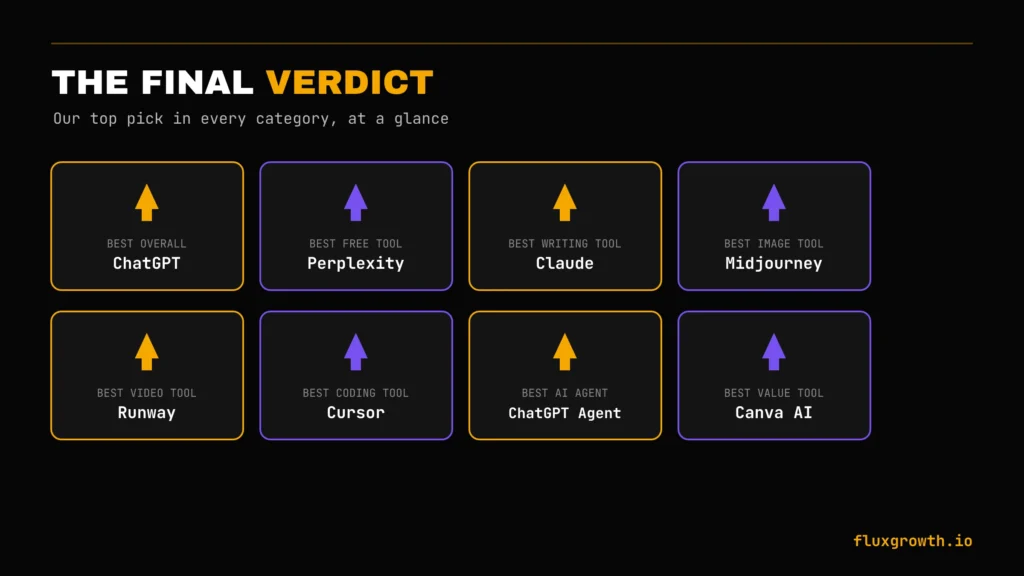
- Best Overall AI Tool: ChatGPT
- Best Free AI Tool: Perplexity
- Best AI Writing Tool: Claude
- Best AI Image Generator: Midjourney
- Best AI Video Generator: Runway
- Best AI Coding Tool: Cursor
- Best AI SEO Tool: Semrush
- Best AI Agent: ChatGPT Agent / Work
- Best Value AI Tool: Canva AI
If I could recommend just one AI tool to a friend, it would be ChatGPT. It offers the broadest range of capabilities from writing and research to coding, image generation, data analysis, and productivity all in a single interface. Once you’ve identified your primary use case, you can add specialised tools like Midjourney for images, Cursor for coding, or Semrush for SEO, but ChatGPT is the best place for most people to start.
The Bottom Line
You don’t need 100 AI tools. You need the two or three that actually fit how you work and now you’ve got a tested shortlist instead of a guess. Start with whichever tool solves the task that’s costing you the most time this week, not the one with the loudest launch thread.
What would you add to your own AI stack this month?
AI tools evolve quickly, and the best workflow is always changing. If you have a favourite tool that deserves a spot on this list, let us know in the comments. And if you found this guide helpful, subscribe to our newsletter for hands-on AI tool reviews, comparisons, and practical tutorials delivered as new tools launch.
1 thought on “100+ Best Free AI Tools You Need in 2026”