FluxGrowth is reader-supported. Some links in our guides are affiliate links — if you buy through one we may earn a commission, at no extra cost to you. It never changes which tools we recommend. How we test tools.
You post a Reel, it does numbers, and 400 people comment “LINK” before your coffee gets cold. You reply to eleven of them. The other 389 scroll off and forget you exist.
This guide is part of our Social Growth hub – everything we have published on growing on social with AI, in one place.
That’s the problem AI-powered DM automation actually solves. Not “engagement” in some vague sense, the specific, expensive problem of a hot lead going cold because a human couldn’t type fast enough. This guide covers how to automate Instagram DMs with AI the way Meta actually allows it, which tools do it well, and the mistakes that get accounts restricted.
Here’s the thing most guides on this topic skip the part that actually matters: the rules. Get those wrong, and it doesn’t matter how good your AI setup is. So we’ll start there.
Why DM speed is worth automating in the first place
Instagram DMs are one of the highest-intent channels a creator or small business has. A comment is public and low commitment. A direct message is private, personal, and often happens when someone is ready to ask about pricing, availability, or the next step. That’s why many businesses see DMs convert better than a simple “link in bio” journey.
The catch is speed. There’s no authoritative industry average showing businesses take six to ten hours to reply to Instagram DMs. Response-time benchmarks vary widely depending on the business size and industry. Independent benchmark reports generally place the average Instagram response time anywhere from 3–5 hours to 10+ hours, while many small businesses still reply only later the same day.
Think about the last time you DMed a business with a real question. If they took six hours to answer, did you wait around or buy from whoever replied first? That’s the gap AI automation closes: a lead messages you at 11 p.m. and gets an answer at 11:01, not at 9 the next morning, by which point they’ve probably found someone else.
That’s the actual business case for automation. It’s not about looking high-tech. It’s about not losing revenue to a slow inbox.
There’s also a volume problem underneath the speed problem. A single viral Reel can generate hundreds of comments in an hour more than any one person can realistically answer while also running the rest of the business (no human is reading DMs at 2 a.m., no matter how caffeinated). Automation doesn’t just answer faster than a human. It answers at all, for the leads a human would have simply never gotten to.
What Instagram DM automation actually means
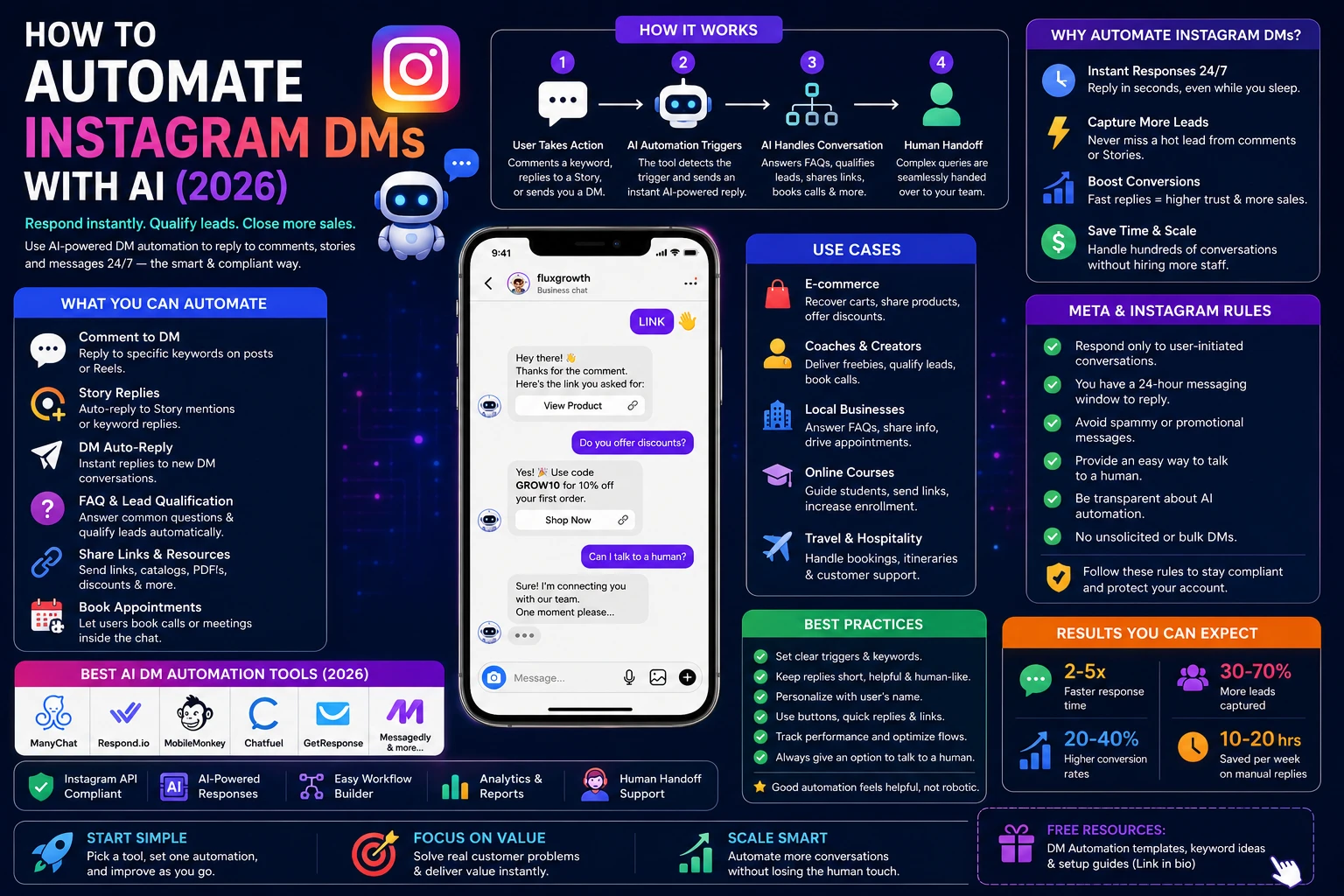
Instagram DM automation is software that sends a message on your behalf when a follower takes a specific action commenting a keyword, replying to a Story, or messaging you directly. It runs through Meta’s official Instagram Messaging API, not a browser extension or a scraper. For supported messaging capabilities and requirements, see Meta’s official documentation
That distinction matters more than most people realize. Automation only works on conversations a user starts. You can’t legally or safely blast a DM to someone who has never interacted with your account. More on that below.
The Rules Meta Actually Enforces (Read This Before You Build Anything)
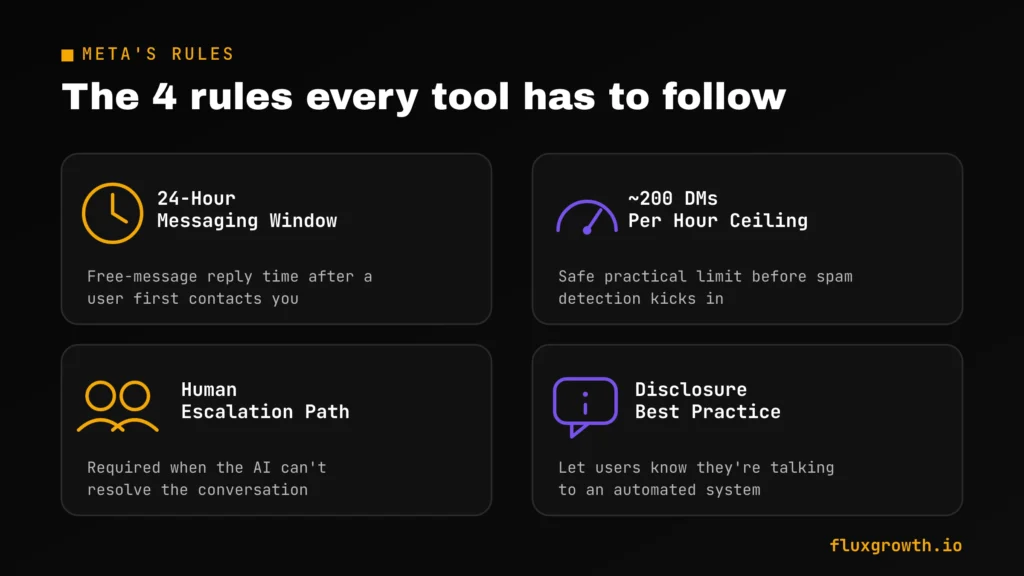
Most guides skip this section but it’s one of the most important. No matter which AI automation tool you choose, it still has to operate within Meta’s Instagram Messaging API rules. Ignoring those rules can lead to failed automations, messaging restrictions, or, in serious cases, enforcement against your account.
The 24-hour messaging window
When someone sends you a message or interacts with your business in a way that opens a conversation, Meta allows your business to reply within a 24-hour messaging window. During that period, businesses can continue the conversation normally. After the window closes, additional messaging is restricted unless it qualifies under Meta’s approved messaging policies or supported use cases.
Messaging limits exist even if Meta doesn’t publish exact numbers
Meta applies rate limits and anti-spam protections to the Instagram Messaging API, but it does not publish a universal limit such as “200 DMs per hour.” The exact thresholds vary based on factors like account reputation, app permissions, and messaging behaviour. Reputable automation platforms automatically queue messages and throttle delivery to stay within Meta’s limits rather than sending everything instantly.
Build an easy path to a human
AI should handle repetitive questions, but customers should always have a simple way to reach a real person when they need help. While this isn’t a strict Meta API requirement, it’s considered a best practice for customer experience and helps resolve conversations AI cannot handle effectively.
Instagram messaging is one-to-one
The Instagram Messaging API is designed for individual conversations between a business and a customer. It does not support broadcast-style group messaging or automated group chats.
Tell people they’re talking to AI
Meta encourages businesses to be transparent when customers are interacting with automated systems. A simple message such as:
“Hi! This is an automated assistant. If you need additional help, a member of our team will jump into the conversation.”
sets clear expectations and creates a better customer experience. While disclosure requirements may also depend on local laws, transparency is widely considered a best practice.
Key takeaway
The best Instagram DM automation isn’t the one that sends the most messages it’s the one that works within Meta’s policies. Respect the 24-hour messaging window, avoid spam-like behaviour, give customers a clear path to a human, and be transparent about AI. Those practices will help your automation remain effective and compliant over the long term.
What’s not allowed
Sending unsolicited promotional messages to people who haven’t interacted with your business isn’t automation it’s spam. Meta’s Messenger Platform Policy explains the platform’s rules around messaging, spam prevention, and acceptable automation practices. Behaviour that resembles bulk or unsolicited messaging can trigger restrictions or enforcement.
Be cautious of any tool that claims to “automatically DM every new follower.” Meta does not publicly support a general feature that allows businesses to send unsolicited DMs to every new follower through the Instagram Messaging API. If a tool advertises this capability, it may rely on unofficial methods such as browser automation, session tokens, or other techniques that fall outside Meta’s supported APIs. Using those methods can put your Instagram account at risk.
The safest rule is simple: Instagram DM automation should respond to user-initiated interactions, such as a direct message, a Story reply, or another supported trigger exposed through Meta’s official APIs. If the conversation wasn’t initiated by the user or isn’t permitted under Meta’s messaging policies, automating it is unlikely to be compliant regardless of which AI tool you use.
The 3 levels of DM automation
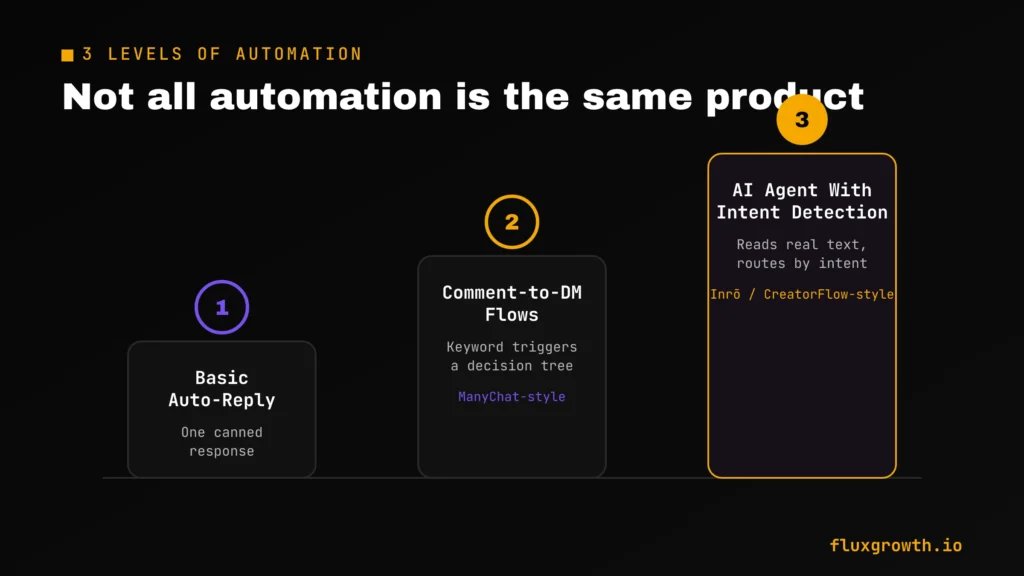
Not all “automation” is the same product, and knowing which level you actually need saves you from either overpaying or underbuilding.
Level 1 is the basic auto-reply of a single canned response, usually some version of “thanks, we’ll get back to you,” triggered by any incoming message. It’s free on most platforms, including Meta Business Suite directly. It doesn’t really automate anything beyond acknowledging you exist.
Level 2 is the comment-to-DM flow. Someone comments a keyword on your post, they get an instant private reply, and you can branch that into a short decision tree: button choices, a lead magnet link, a booking page. This is what most creators mean when they say “ManyChat,” and it’s still the most common setup for lead magnets and simple funnels.
Level 3 is an AI agent with intent detection. The message isn’t scripted. The AI reads what the person actually typed, asks a qualifying question, and routes the conversation accordingly a pricing question goes one way, a support issue another, a ready-to-buy lead somewhere else entirely. Tools like Inrō and CreatorFlow are building specifically here in 2026, positioning against ManyChat’s more rigid flow-builder.
Most creators start at Level 2 and only move to Level 3 once DM volume outgrows what a fixed decision tree can handle without feeling robotic.
How to set it up, step by step
- Connect through the official API. Choose a tool that authenticates via Meta’s Instagram Graph API with OAuth. Never use one that asks for your Instagram password directly; that’s the fastest way to end up flagged for unofficial access.
- Define your trigger. Comment keyword, Story reply, or first DM. Pick one to start. Stacking multiple triggers on day one makes debugging painful when something misfires.
- Write the first reply. Keep it short and specific. “Here’s the link!” beats a paragraph nobody reads on a phone screen.
- Add a qualifying question. One question that tells you whether this person is a real lead: budget range, timeline, or which product they’re asking about.
- Add the human handoff. Set a rule that routes to you or your team the moment the AI’s confidence drops ideally still inside the 24-hour window, so you’re not fighting message-tag restrictions to follow up.
- If you’re also planning your broader social strategy, check out our guide to the best social media management tools in 2026. Many of these platforms complement Instagram DM automation by helping you schedule content, monitor engagement, and manage multiple social channels from one dashboard.
- Watch your first week of real conversations. Read the actual transcripts, not just the completion rate. This is where you catch a qualifying question that confuses people or a trigger word that’s too common.
Choosing the right tool for where you’re at
The tool that’s right for a solo creator testing a first lead magnet isn’t the tool a coaching business running five funnels needs. A solo creator cares about price. An agency cares about what happens when 1,000 comments hit in an hour. Different problems, different tools.
| Tool | Best For | Starting Price | AI Capability | Free Tier |
| ManyChat | Multi-platform flows, established creators | $14/mo (Essential) — Outdated. ManyChat has changed its pricing. Use “Paid plans available; check current pricing. | Flow-builder + basic AI replies | Free plan available (contact limits vary) |
| Inrō | AI-driven intent detection, built-in CRM | Pricing changes frequently. Do not publish ~€12.99/mo without checking the official pricing page. | Full AI agent, broad trigger coverage | Limited free plan |
| CreatorFlow | Solo creators who want flat pricing | Flat-rate entry tier cannot be verified publicly. | AI replies + comment-to-DM | 500 DMs/month” is not an officially documented limit. |
| InstantDM | Budget-conscious, single price tier | $9.99/month cannot be verified. | Basic automated replies | Trial availability varie |
| Meta Business Suite | Testing before paying for anything | Free | Auto-replies, away messages, FAQ | Unlimited (it’s Meta’s own free tool) |
If DMs are how you actually make sales, start with ManyChat or Inrō. If you just want to stop losing leads while you figure out your funnel, Meta Business Suite costs nothing and covers the basics.
Every price above moves fast in this category. Before you commit, check ManyChat’s official pricing page and the pricing page of any other tool you’re considering, rather than relying solely on comparison articles like this one.
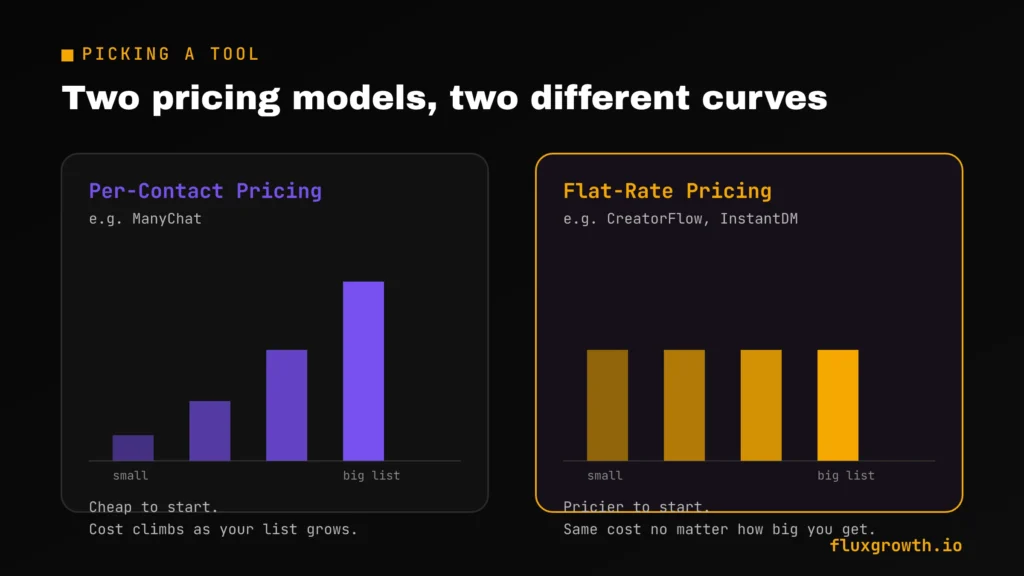
One trade-off worth knowing before you pick: per-contact pricing (ManyChat’s model) is cheap when you’re small and gets expensive fast once your list grows. Flat-rate tools like CreatorFlow and InstantDM flip that pricier relative to a tiny list, but predictable no matter how big your DM volume gets. If you’re already posting consistently and expect real growth over the next few months, run the math on both models before you commit to either one.
What I’d do if I were starting today
If I were setting up Instagram DM automation from scratch today, I’d start with Meta Business Suite to understand the basics, then move to ManyChat once I needed automated lead capture, comment-to-DM workflows, and AI-powered conversations. For businesses that rely heavily on Instagram for sales, I’d also evaluate Inrō if more advanced AI intent detection and CRM features were important.
Rather than building dozens of automations on day one, I’d begin with three high-impact workflows: answering frequently asked questions, automatically delivering lead magnets or discount codes, and qualifying new leads before handing them to a human. Those three automations usually provide the biggest return with the least complexity.
Mistakes that get accounts restricted
- Cold-DMing people who never engaged with you. This is the single fastest way to trigger a restriction. There’s no exception for “but it’s for business” Meta’s spam detection doesn’t read intent, it reads pattern, and a burst of unsolicited outbound DMs looks the same to the system whether you’re a scammer or a well-meaning coach.
- Ignoring the 24-hour window. Sending promotional content to someone outside the window, without the correct message tag, gets flagged as spam rather than simply bounced. It also tends to compound: one flagged message makes the next one more likely to get caught too.
- Skipping the human handoff. Meta requires it, and followers notice it anyway. A bot stuck looping the same reply is worse for your brand than no automation at all it broadcasts that nobody’s actually paying attention.
- Buying engagement to “prime” your triggers. Fake comments and bot followers don’t create real conversations. They just feed exactly the pattern Meta’s anti-spam systems are built to catch, and they inflate your metrics without inflating your actual revenue.
- Setting it up once and never checking transcripts. A qualifying question that confused three real leads this week will confuse three hundred by next month if nobody’s watching. Set a recurring 15-minute check-in, even if it feels unnecessary at first.
- Copying someone else’s flow word-for-word. What converts for a fitness coach’s audience won’t necessarily land the same way for a SaaS founder’s. Borrow the structure, not the exact script.
Frequently asked questions
Is it against Instagram’s rules to automate DMs?
No. Automating DMs is fully allowed when it runs through Meta’s official Instagram API and follows the platform’s messaging rules. What’s against the rules is automation that ignores the 24-hour window, cold-DMs non-followers, or uses unofficial access methods like scraping or password sharing.
Can I auto-DM everyone who follows me?
No—not through Meta’s official Instagram Messaging API. Meta does not currently provide a public feature that allows businesses to automatically send a direct message to every new follower. Any tool claiming to offer this capability may rely on unofficial methods that can violate Meta’s policies and put your account at risk. The safest approach is to automate replies to user-initiated interactions, such as direct messages, Story replies, or supported comment-to-DM workflows.
Will Instagram DM automation get my account banned?
Compliant automation doesn’t get accounts banned: user-initiated triggers, the official API, rate limits respected. Most horror stories trace back to browser bots, password-sharing tools, or cold outreach sent at volume not to automation itself.
What’s the difference between ManyChat and an AI DM agent?
ManyChat builds a decision-tree flow: fixed buttons and pre-written branches that a user clicks through. An AI agent, like Inrō’s, reads the actual text someone sends and generates a contextual response, then routes the conversation based on what it detects, no rigid script required.
How many DMs can I send per hour with automation?
Meta does not publish a fixed hourly limit for automated Instagram DMs. Instead, the Instagram Messaging API uses dynamic rate limits and spam detection that vary based on factors such as account reputation, messaging patterns, and API usage. Most reputable automation platforms automatically throttle and queue messages to stay within Meta’s limits, helping reduce the risk of restrictions. If a campaign generates more messages than can be sent immediately, the remaining messages are typically delivered gradually rather than all at once.
Do I have to tell people they’re talking to a bot?
Meta recommends disclosing it as a best practice, even where it isn’t a legal requirement in your region. It also just builds trust. Most people don’t mind talking to a bot, they mind feeling tricked into thinking it was a person.
What’s the cheapest way to automate Instagram DMs?
Meta Business Suite is free and covers basic auto-replies and away messages directly from Meta, no third-party tool required. For AI-driven qualifying and routing, flat-rate tools like InstantDM or CreatorFlow tend to start cheaper than ManyChat’s per-contact pricing once your list grows past the free tier.
The bottom line
The AI part of DM automation is the easy part now. Every tool on this list can generate a decent reply. What separates a system that scales from one that gets flagged isn’t the AI at all, it’s whether you respected the rules from section two.
Start small. Pick one trigger, one tool, and test it on yourself before it ever touches a real follower. Then scale the parts that actually convert, and cut the ones that don’t.
What’s the first DM conversation you’d want AI to handle for you?