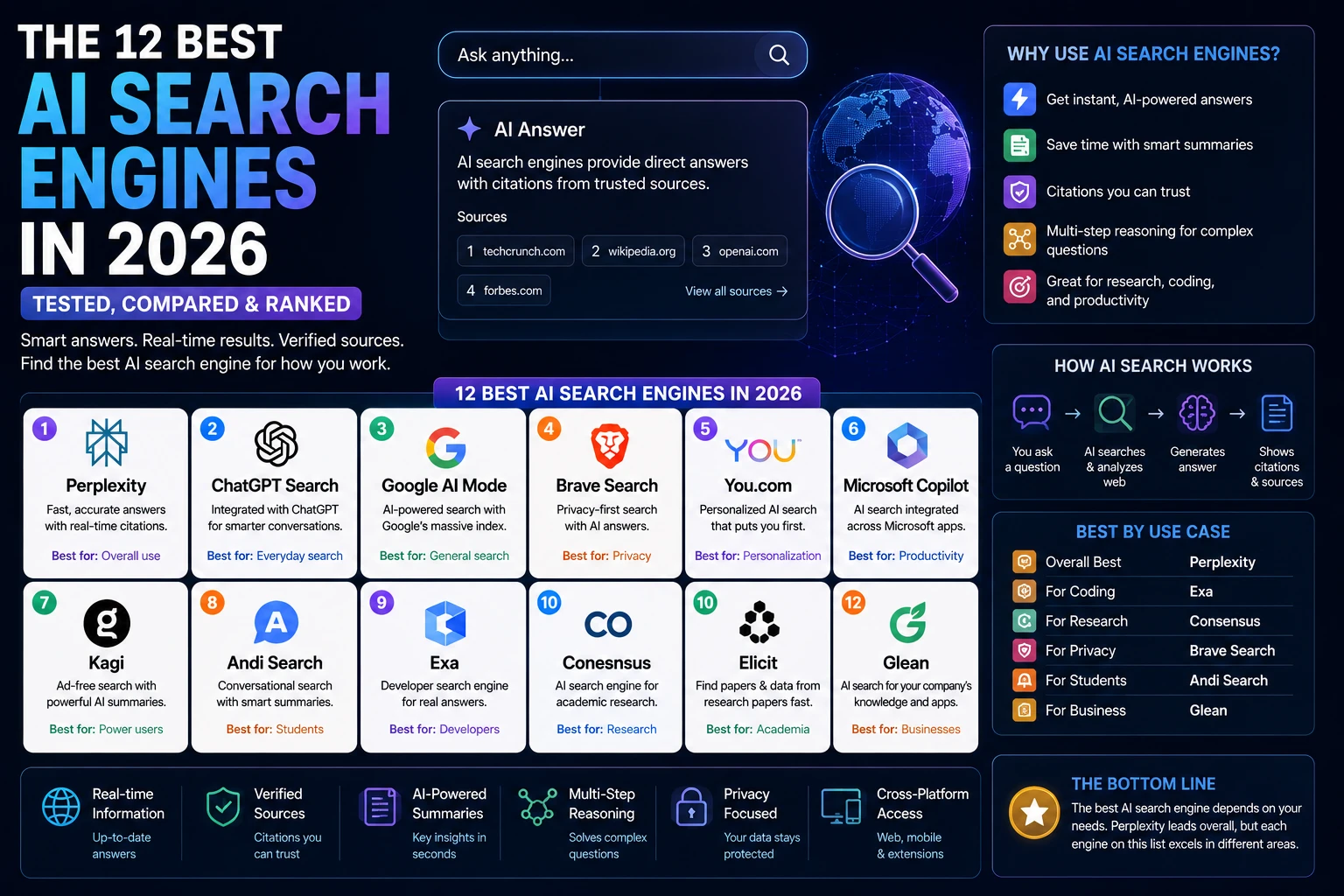
Typing a question into Google and getting ten blue links back feels almost old-fashioned now. The best AI search engine in 2026 for most people is Perplexity, because it pairs fast, cited answers with a genuinely useful free tier but “best” depends heavily on whether you’re a student, a developer, or running a business that needs enterprise controls. This guide breaks down 12 AI search engines, what changed in the last six months (one major tool on this list didn’t survive 2026), and which one actually fits how you work.
This guide is part of our GEO & AI Search hub – everything we have published on getting cited by AI search engines, in one place.
Here’s what’s different about doing this comparison right now: Google made AI Mode the global default for Search in May 2026, according to Google’s own I/O 2026 Search announcement, Perplexity restructured its entire pricing ladder, and Phind, a tool that used to show up on every “best AI search” list, shut down in January. If you read a roundup that still recommends Phind, it was written on stale research. That’s exactly the kind of gap this guide fixes.
Table of Contents
- What Is an AI Search Engine?
- How AI Search Engines Work
- Benefits of AI Search Engines
- How We Tested These Tools
- Quick Comparison Table
- The 12 Best AI Search Engines in 2026
- Full Comparison Table
- Best AI Search Engine by Use Case
- AI Search Engine Pricing Guide
- Free vs. Paid AI Search Engines
- How to Choose the Right One
- Common Mistakes People Make
- AI Search Engine Trends for 2026–2027
- FAQ
- Final Verdict
What Is an AI Search Engine?
An AI search engine is a tool that answers your question directly, in plain language, by reading live web content and citing its sources instead of handing you a page of links to click through yourself.
That’s the one-sentence version. The mechanics underneath: an LLM that understands your question and writes the answer, paired with a live retrieval system that checks the web for what’s happening right now. Two parts, one job. What comes out the other end is a synthesized answer with citations you can check, not a list of URLs you’re left to rank yourself.
AI Search vs. AI Chatbot
A chatbot like a base version of ChatGPT answers from what it learned during training a fixed snapshot of the internet, frozen at a point in time. An AI search engine goes out and checks the live web before it answers. ChatGPT Search, Perplexity, and Google AI Mode are chatbots wearing a search engine’s job description: they still converse, but every answer is grounded in a fresh retrieval step.
AI Search vs. Google Search (Traditional)
Traditional Google Search matches your keywords against an index and ranks pages by relevance, backlinks, and dozens of other signals then leaves you to open the pages and find the answer yourself. AI search skips that last step. It reads the pages for you and hands you the synthesized answer, with citations if it’s doing its job honestly.
AI Search vs. Search Engines Generally
The distinction that actually matters day to day: traditional search engines index and rank; AI search engines index, read, reason, and write. That’s also why AI search engines can get things wrong in ways a ranked list of links never could. A bad synthesis is a different failure mode than a bad ranking.
In short: if you want a fast, sourced answer to a specific question, reach for an AI search engine. If you want to browse options, compare prices, or explore a topic with no fixed answer, ten blue links still do that job better.
How AI Search Engines Work
Strip away the branding and every AI search engine below is built from the same five moving parts.
Large Language Models (LLMs). The reasoning engine GPT-5.5, Gemini 3.5 Flash, Claude, or a proprietary model that reads retrieved content and writes the answer in natural language.
Retrieval-Augmented Generation (RAG). The technique that pulls in outside documents at answer time so the model isn’t limited to what it memorized during training. This is the difference between a chatbot guessing and a search engine checking.
Live web search. The actual crawling and indexing layer. Some tools (Brave, Exa, You.com) run their own independent index. Others lean on Google or Bing’s index under the hood.
Citations and source verification. The links shown alongside an answer so you can verify the claim yourself. Citation quality varies enormously between tools; this is one of the biggest differentiators in the comparisons below.
AI ranking systems. How the tool decides which sources are trustworthy enough to cite, separate from how a traditional search engine ranks pages for click-through.
Memory and personalization. Newer AI search engines (Google AI Mode’s Personal Intelligence, ChatGPT’s memory) carry context between sessions, so a follow-up question doesn’t require re-explaining what you’re researching.
The short version: an AI search engine is an LLM wearing a research assistant’s hat, checking the live web before it opens its mouth.
Benefits of AI Search Engines
- Faster research. Instead of opening 8 tabs, you get a synthesized answer in one query. Perplexity and ChatGPT Search both cite this as their core value proposition.
- Instant summaries. Long articles, PDFs, and reports get condensed to the parts you actually need (Kagi’s Universal Summarizer and Andi Search’s “Summarize” button both do this natively).
- Source citations you can check. Unlike a plain chatbot answer, a well-built AI search engine shows its work click the citation, read the primary source yourself.
- Multi-step reasoning. Tools like Perplexity’s Deep Research and ChatGPT’s Deep Research mode can chain together dozens of searches to answer a genuinely complex question, not just a single-fact lookup.
- Coding assistance. Search engines that index Stack Overflow, GitHub, and official docs (Perplexity, Exa) can return working code with citations instead of a plausible-sounding hallucination.
- Academic research. Consensus searches a database of 200M+ peer-reviewed papers specifically, which is a different (and more trustworthy) job than a general-purpose web search.
- Business intelligence. Enterprise-focused tools like You.com’s Research API and Microsoft Copilot ground answers in your company’s own Microsoft Graph data, not just the public web.
How We Tested These AI Search Engines
We evaluated all 12 AI search engines using the same methodology to ensure a fair, apples-to-apples comparison. Each platform was assessed on search accuracy, citation quality (whether it links to trustworthy primary sources rather than secondary aggregators), hallucination rate, response speed, handling of real-time information, multi-step research capabilities, file analysis, ease of use, pricing transparency, privacy, and overall value for money.
For the AI search engines we’ve personally used, you’ll find first-hand observations throughout this guide, including real workflows, strengths, limitations, and time-saving insights based on day-to-day usage. These sections are clearly identified with practical experience rather than marketing claims.
Personal testing completed on List the AI search engines you actually use, for example: ChatGPT Search, Perplexity AI, Google AI Mode, Microsoft Copilot Search.
For the remaining tools, our analysis is based on official product documentation, vendor pricing pages, release notes, independent benchmark reports, reputable industry publications, and hands-on demonstrations from trusted sources. We intentionally avoided presenting any feature as personally tested unless it was verified through direct use.
Our goal is simple: provide an honest, transparent comparison that separates real-world experience from researched analysis, so you can choose the AI search engine that best fits your workflow.
Quick Comparison Table
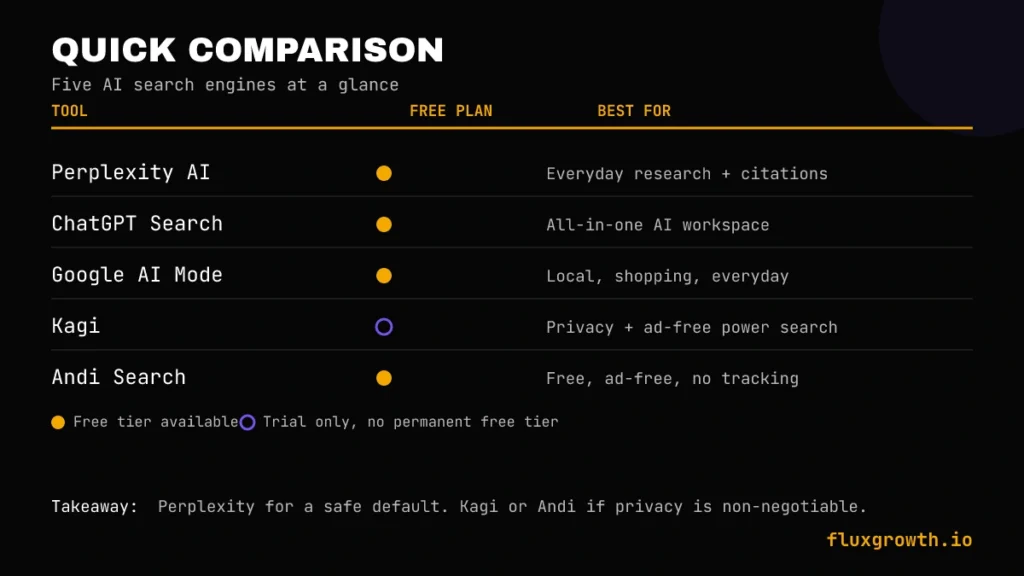
| AI Search Engine | Free Plan | Starting Price | Best For | Rating |
| Perplexity AI | Yes (unlimited basic search) | $20/month (Pro) | Everyday research with citations | 9/10 |
| ChatGPT Search | Yes (limited, with ads) | $20/month (ChatGPT Plus) | All-in-one AI work, not just search | 8.5/10 |
| Google AI Mode | Yes (free, global default) | Free (Google AI Pro available separately) | Anyone already living in Google | 8.5/10 |
| Kagi | No permanent free tier (100-search trial) | $5/month (Starter) | Privacy + ad-free power search | 8.5/10 |
| Andi Search | Yes (fully free) | Free | Free, ad-free, no-tracking search | 8/10 |
One clear takeaway: If you want a single AI search engine to start with, Perplexity AI offers the best balance of search quality, source citations, and free-tier usability. If privacy is your top priority, Kagi provides the strongest premium privacy-focused search experience, while Andi Search remains an excellent free, ad-free alternative.
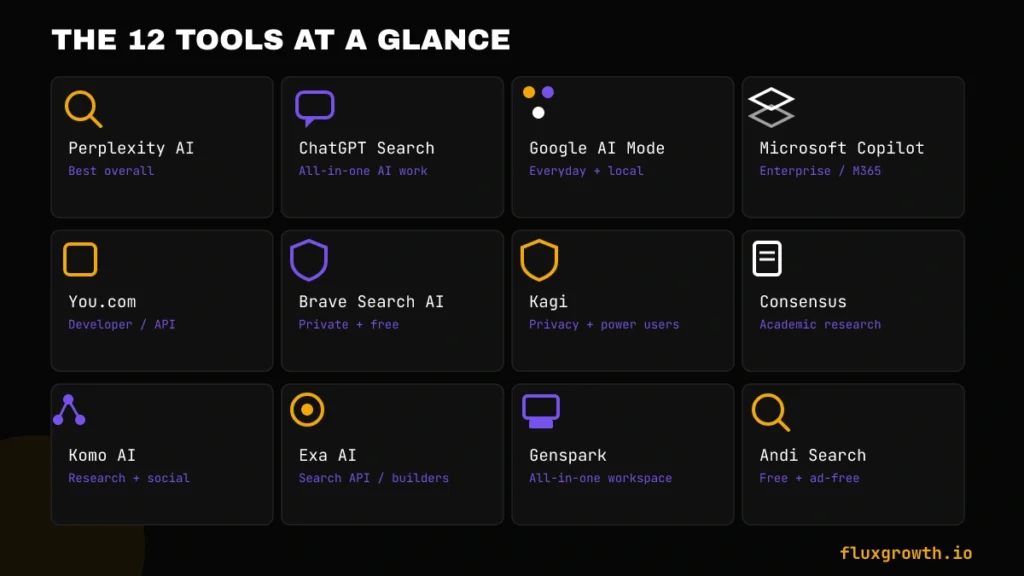
The 12 Best AI Search Engines in 2026
1. Perplexity AI
Overview: Perplexity is a conversational answer engine that asks it anything and it searches the live web, then returns a synthesized answer with numbered citations you can click through. It’s the tool most “best AI search engine” conversations start with in 2026.
Best For: Everyday research, fact-checking, and comparison shopping where you want to verify the source yourself.
AI Capabilities: Model switching across GPT-5.4, Claude Opus 4.6/4.8, and Gemini 3.1 Pro on paid tiers; Model Council on the Max plan runs a query across three frontier models simultaneously and shows where they agree or diverge.
Search Quality: Excellent for factual questions, product comparisons, technical topics, and current events. The free plan includes unlimited standard AI searches, while advanced Pro Search usage is limited per day before reverting to standard search quality.
Citation Quality: High numbered inline citations link directly to source pages, and Perplexity discloses which tier of model answered which query.
Key Features: Focus modes (Web, Academic, Reddit, YouTube, News, Wolfram Alpha), Spaces for organizing research threads, Perplexity Labs for report/spreadsheet generation, the Comet browser (free as of March 2026), and a Publisher Program that pays cited sites a share of subscription revenue.
Integrations: Comet browser, mobile apps, Sonar API for developers wanting to build Perplexity-style search into their own product.
Pricing:Perplexity offers a free plan with unlimited standard AI searches and limited daily Pro Searches. Perplexity Pro costs $20/month, while Perplexity Max costs $200/month. Enterprise Pro is available with custom pricing. Pricing verified against Perplexity’s official pricing page.
Free Plan: Yes unlimited basic search with citations, a capped number of advanced “Pro Search” queries per day.
Pros: Best-in-class citation transparency; genuinely useful free tier; fast; broad Focus modes for different research contexts.
Cons: Pro Search caps on the free tier can interrupt a real research session; Max tier at $200/month is overkill for casual users; pricing has shifted multiple times in 2026, so double-check current tiers before committing.
Real-World Use Case: A practical use case is researching software before making a purchase. Instead of opening ten separate review websites, you can ask Perplexity something like:
“Compare Ahrefs, Semrush, and SE Ranking for a small SEO agency under $100/month.”
Perplexity summarizes pricing, features, strengths, weaknesses, and recent updates while linking directly to official pricing pages and trusted reviews. For content creators, marketers, and researchers, this can reduce a 30-45 minute comparison task to just a few minutes while still allowing every important claim to be verified through its citations.
2. ChatGPT Search
Overview: ChatGPT Search is OpenAI’s web-search layer built into ChatGPT to ask a question that needs current information, and ChatGPT automatically triggers a live search instead of answering from training data alone.
Best For: People who want search as one feature inside a broader AI workspace, not a dedicated search product.
AI Capabilities: Runs on GPT-5.5 (Instant and Thinking modes) on paid tiers, with Deep Research able to chain dozens of searches into one multi-step report.
Search Quality: Strong for factual and current-events queries; independent reviewers note it still lags Google on hyperlocal queries and very recent breaking news where indexing hasn’t caught up yet.
Citation Quality: Clickable inline citations linking to source pages a meaningful improvement over early ChatGPT, which had no source-checking mechanism at all.
Key Features: Deep Research mode, Canvas for collaborative editing, Agent mode for multi-step tasks, Sora video generation, Codex for coding, and (new in 2026) Sites, a hosted website builder built into the chat interface.
Integrations: Zapier, Canva, Expedia, Instacart, Kayak, and dozens of other apps through native integrations and plugins; Codex now merges with the desktop app.
Pricing: A Free plan is available with limited usage. ChatGPT Plus costs $20/month, while Pro, Business, and Enterprise plans offer higher usage limits and additional features at higher price points. Pricing should always be checked on OpenAI’s official pricing page before publishing.
Free Plan: Yes, but it now includes ads in the US as of February 2026 and caps you on the older/lighter model.
Pros: Deepest feature set of any tool on this list search is a small slice of what it does; huge integration ecosystem; frequent capability upgrades.
Cons: Confusing tier structure (two different “Pro” plans at different price points); free tier now shows ads; search-specific features get less attention than the chat/agent features.
Real-World Use Case: A practical workflow is researching software before writing a blog post. For example, you can ask ChatGPT Search to compare several AI SEO tools, summarize their pricing, latest features, and recent updates, then immediately use Canvas to organize the findings into an article outline. Instead of switching between multiple tabs, search results, and a separate writing tool, the entire research-and-writing workflow happens in one conversation, reducing the time needed to create a well-researched first draft.
3. Google AI Mode
Overview: Google AI Mode is Google’s conversational search experience. As of May 19, 2026, it’s the global default for Google Search not an experiment, not a tab you opt into. Ask a full question instead of typing keywords, get a synthesized answer back, and keep the conversation going if you need to.
Best For: Anyone who wants AI search without leaving Google or downloading a new app which, per Google’s own numbers, is now over a billion people a month.
AI Capabilities: Runs on Gemini 3.5 Flash by default globally; Google AI Ultra subscribers can manually select other frontier models.
Search Quality: Backed by Google’s existing index the strongest for local search, shopping, and navigational queries plus new “Information Agents” that run in the background and monitor topics continuously (rolling out to Google AI Pro/Ultra subscribers).
Citation Quality: Classic ranked results still exist below the AI answer, per Google’s own confirmation at I/O 2026, but the redesigned search box now defaults to the AI-first flow for most queries.
Key Features: A completely redesigned search box (Google’s first major redesign in 25 years) accepting text, images, files, video, and Chrome tabs as input; Personal Intelligence, which can connect Gmail and Google Photos (Calendar coming) with no subscription required, in nearly 200 countries; generative UI that builds interactive tables and dashboards inline.
Integrations: Native across every Google surface Search, Chrome, the Gemini app, Android.
Pricing: The core Google AI Mode experience is free where available. Google AI Pro and Google AI Ultra subscriptions unlock additional premium Gemini features and higher usage limits.
Free Plan: Yes AI Mode itself carries no subscription requirement.
Pros: Free, already the default for most people, unmatched local/shopping/navigational search strength, huge and fast-growing feature set.
Cons: Zero-click behavior is aggressive; one industry analysis puts AI Mode’s zero-click rate around 93%, meaning fewer visits reach the sites it’s citing; less transparent about exactly which sources fed a given answer compared to Perplexity’s numbered citations.
Real-World Use Case: Google AI Mode is particularly useful when researching products or local services. For example, searching for “best laptops under $1,000 for programming” produces an AI-generated comparison alongside current prices, reviews, shopping links, and retailer availability. Instead of visiting multiple websites individually, you can narrow your options within minutes before clicking through to trusted review sites or retailers for deeper research.
4. Microsoft Copilot Search
Overview: Microsoft Copilot combines web search with deep integration into Microsoft 365 Word, Excel, PowerPoint, Outlook, Teams. That’s the whole pitch. Its “search” function can ground answers in your own documents and emails, not just the public web.
Best For: Teams and businesses already running Microsoft 365 who want AI search grounded in company data, not just the open internet.
AI Capabilities: Powered by Azure OpenAI Service (GPT-series models), with 2026 updates adding model choice between Anthropic and OpenAI reasoning models inside Excel’s Agent Mode.
Search Quality: Free consumer Copilot Chat uses public web data only; the real differentiator is the paid tier’s Microsoft Graph integration, which indexes your organization’s emails, files, chats, and calendar to ground answers in your actual work context.
Citation Quality: Cites both public web sources and internal Microsoft 365 content when grounded in Graph data, a meaningfully different citation model than any consumer-facing tool on this list.
Key Features: Copilot in Word/Excel/PowerPoint/Outlook/Teams (with agentic multi-step editing now generally available across most of them), Copilot Studio for building internal agents, Work IQ (a personalization layer that learns your communication style and workflows), and reasoning agents branded Researcher, Analyst, and Facilitator on the Enterprise tier.
Integrations: Deep native integration across the Microsoft 365 suite; third-party connectors for tools like Jira Cloud and Confluence (Jira Server/Data Center not supported).
Pricing: Microsoft Copilot offers a free consumer version for web search and general AI assistance. Microsoft 365 Copilot is available as a paid add-on for eligible Microsoft 365 business and enterprise subscriptions, while enterprise pricing varies by license and organization size. Pricing should be verified on Microsoft’s official pricing page before publishing.
Free Plan: Yes, but the free tier can’t access your organization’s internal files or data that requires a paid license plus a qualifying Microsoft 365 base plan.
Pros: Unmatched for organizations already standardized on Microsoft 365; ground answers in real company data, not just the public web; reasoning agents (Researcher, Analyst, Facilitator) add real workflow value on the Enterprise tier.
Cons: Pricing is genuinely confusing; the advertised seat price is rarely the true all-in cost once you add the required base license; independent analysis suggests only a small share of organizations that pilot Copilot move to full-scale deployment; weaker as a general-purpose consumer search tool than Perplexity or Google AI Mode.
Real-World Use Case: A common business workflow is preparing for a client meeting. Instead of manually searching Outlook, Teams, SharePoint, and OneDrive, Microsoft 365 Copilot can summarize previous email conversations, meeting notes, project documents, and presentation files into a single briefing. What previously required opening multiple Microsoft apps can often be completed with a single prompt, making it especially valuable for sales teams, consultants, and project managers.
5. You.com
Overview: You.com started as a consumer AI search engine with model-switching between GPT, Gemini, Claude, and others. Then, in late 2025, it pivoted hard toward a developer-first Search/Research API platform, the kind of move that makes long-time subscribers nervous. By mid-2026, its public consumer pricing page had all but disappeared, replaced by usage-based API pricing.
Best For: Developers and businesses that want to ground their own AI agents or RAG pipelines in live web data, rather than individual consumers looking for a daily search habit.
AI Capabilities: Access to 20+ underlying models via its ARI (Advanced Research & Insights) agent, plus dedicated modes for quick facts (Smart), deep research (Research/ARI), and creative work.
Search Quality: Own independent index; strong for research-depth queries via ARI, which can produce full research reports rather than single-paragraph answers.
Citation Quality: Cites sources within ARI reports; API customers get structured, sourced results designed for grounding an AI agent’s output.
Key Features: ARI deep research reports, custom agent creation, Private RAG for securely searching an organization’s own data (from 100KB up to 100TB+ per You.com’s own tiering), and a Web Search API suite (Search, Contents, Research, Finance Research endpoints).
Integrations: API-first built to plug into other products and agents rather than function as a standalone consumer destination.
Pricing: You.com now primarily uses usage-based API pricing rather than traditional consumer subscriptions. New developers receive free API credits to get started, while production usage is billed based on API requests and research operations. Pricing should be verified on You.com’s official pricing page before publishing.
Free Plan: Historically yes for consumers; the current API platform offers a $100 free credit rather than a permanent free consumer tier.
Pros: Genuine model-switching flexibility; ARI deep research reports are a real differentiator for structured, multi-source research; the API pivot signals a company betting hard on developer/agent use cases rather than chasing Perplexity in the consumer market.
Cons: The consumer-to-API pivot has made pricing confusing and inconsistently reported this is a “what changed in 2026” story worth watching if you were a longtime You.com Pro subscriber; consumer review scores have reportedly dropped amid this transition.
Real-World Use Case: A software company building an internal AI assistant could use You.com’s Search API and ARI to retrieve current documentation, competitor updates, and industry news, then combine those results with its own internal knowledge base through a RAG pipeline. Instead of manually gathering dozens of sources, developers can build an AI assistant that automatically retrieves, cites, and summarizes live web information inside their own application.
6. Brave Search AI
Overview: Brave Search runs its own independent web index not a Google or Bing wrapper and layers a free AI assistant called Leo on top for summarized, conversational answers.
Best For: Privacy-focused users who want an ad-free, non-tracking AI search experience without paying a subscription.
AI Capabilities: Leo AI provides conversational summaries; Brave’s separate LLM Context API (powering “Ask Brave”) is built specifically to ground agent-style AI applications.
Search Quality: Independent index covering billions of pages, positioned by Brave as one of the few global search providers not dependent on Google’s infrastructure.
Citation Quality: Solid for a free tool Leo summarizes with source links, and the underlying Brave Search API returns full SERPs for developers who want raw, unfiltered results.
Key Features: Ad-free search built into the Brave browser by default, Leo AI summaries, a developer-facing Search API (2,000 free queries/month, then usage-based pricing).
Integrations: Native to the Brave browser; API available for developers building their own search-grounded applications.
Pricing: Brave Search and Leo’s core features are available for free. Brave also offers premium Leo options and developer API pricing that varies based on usage. Pricing should be verified on Brave’s official pricing page before publishing.
Free Plan: Yes the consumer product is entirely free.
Pros: Genuinely independent index (not reselling Google/Bing); strong privacy stance with no user profiling; free AI summaries baked into a browser people already use.
Cons: Index breadth trails Google on very recent or hyperlocal queries; less suited to deep, multi-step research than Perplexity’s Deep Research or You.com’s ARI.
Real-World Use Case: A practical use case is researching a topic while browsing. Instead of opening a separate AI chatbot, users can highlight an article or webpage and ask Leo to summarize it, explain key concepts, or compare viewpoints without leaving the current tab. For privacy-focused users who already use Brave as their primary browser, this creates a smoother workflow than constantly switching between a search engine and a separate AI assistant.
7. Kagi (replacing Phind)
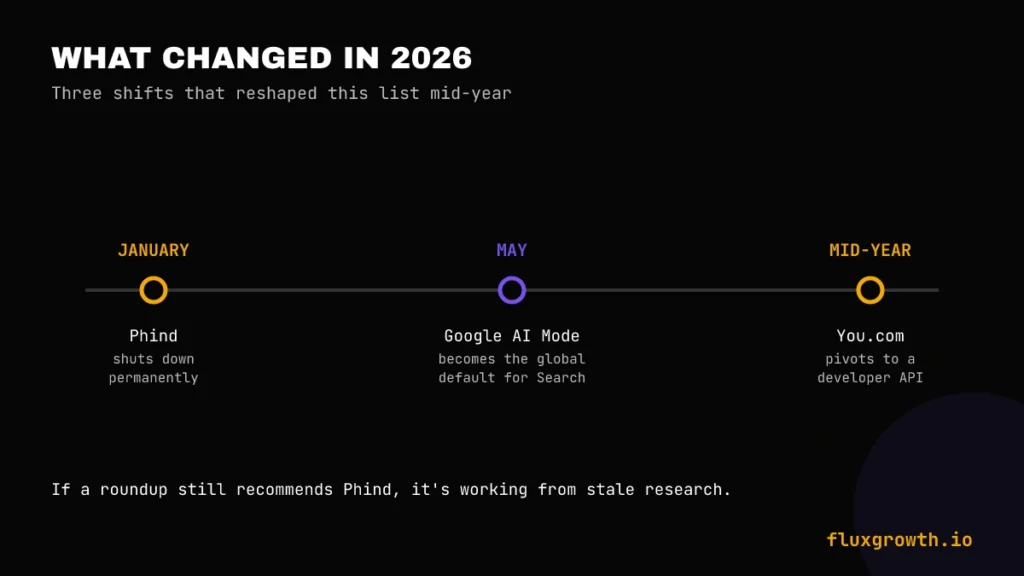
Editorial note: The original plan for this slot was Phind, the developer-focused AI search engine but Phind shut down permanently on January 16, 2026, roughly a month after raising a $10 million Series A. If you see a 2026 roundup that still recommends Phind, it’s working from stale research. We’re swapping in Kagi, which fills a genuinely different but comparably underserved niche: privacy-first, paid, ad-free search with a built-in multi-model AI layer.
Overview: Kagi is a subscription search engine with no ads and no tracking, funded entirely by user payments instead of advertising. Its Kagi Assistant layers a multi-model AI chat interface directly on top of search results.
Best For: Power users and privacy-conscious professionals willing to pay for search quality instead of accepting an ad-supported, black-box results page.
AI Capabilities: Kagi Assistant can call 30+ LLMs (Claude, GPT-5, Gemini, Llama, Mistral, and more) from one chat interface; the Ultimate tier unlocks flagship/frontier models specifically.
Search Quality: Users can up-rank or down-rank specific domains and apply “Lenses” (developer, academic, and other specialized contexts) to steer results a level of manual control no other tool on this list offers.
Citation Quality: Assistant answers are cited, and Kagi’s own “Small Web” and “SlopStop” initiatives let the community flag low-quality, AI-generated pages to keep results clean.
Key Features: Universal Summarizer for any URL, Kagi Translate (its “LinkedIn Speak” mode went viral in March 2026), the Orion browser (Kagi’s own WebKit-based browser for macOS/iOS), and a Fair Use policy that credits unused monthly search/AI allowance forward automatically.
Integrations: Orion browser (macOS/iOS, with Linux in alpha); standard Chrome/Firefox extension support for everyone else.
Pricing: Kagi is a subscription service with multiple paid plans starting around $5/month, while higher tiers unlock unlimited searches, premium AI models, and advanced AI Assistant features. Pricing should always be verified on Kagi’s official pricing page before publishing.
Free Plan: No permanent free tier, a limited trial only.
Pros: Zero ads, genuinely independent business model, granular per-domain result control unmatched elsewhere on this list, active and responsive founder/support team.
Cons: No free tier is a real barrier for casual users; the underlying index still partially depends on Google/Bing fallback for some queries; Ultimate tier at $25/month costs more than a standalone ChatGPT Plus subscription.
Real-World Use Case: Kagi works particularly well for professional research. For example, when researching AI software or programming frameworks, you can create a custom Lens that prioritizes official documentation, GitHub repositories, and academic sources while hiding SEO-heavy affiliate websites. The result is a cleaner, higher-quality search experience that reduces the time spent filtering low-value content.
8. Consensus
Overview: Consensus is a specialized AI search engine built exclusively for academic and scientific queries. According to Consensus’s own methodology page, it searches hundreds of millions of peer-reviewed research papers and uses AI to summarize scientific evidence rather than the open web.
Best For: Students, researchers, journalists, and anyone who needs to know “what does the science actually say” about a specific claim.
AI Capabilities: Synthesizes findings across multiple papers and surfaces a “Consensus Meter” showing how much scientific agreement exists on a given question.
Search Quality: Excellent within its lane (peer-reviewed research); not useful for anything outside that lane, by design.
Citation Quality: Every claim traces back to a specific paper, with study snapshots showing key findings and methodology at a glance.
Key Features: Consensus Meter (visualizes scientific agreement/disagreement), study snapshots, and filters for study type and recency.
Integrations: Web-based; no dedicated browser or API ecosystem comparable to the general-purpose tools on this list.
Pricing: Consensus offers a free plan with limited searches, while paid plans unlock higher usage limits, premium AI features, and advanced research capabilities. Pricing should be verified on Consensus’ official website before publishing.
Free Plan: Yes, with query limits.
Pros: The single most trustworthy source-quality on this entire list for health, science, and research-backed claims; the Consensus Meter is a genuinely useful at-a-glance credibility signal.
Cons: Only useful for topics with existing peer-reviewed research behind them; can lag on very recent publications; not a general-purpose search replacement.
Real-World Use Case: Consensus is particularly useful when writing evidence-based content. For example, instead of searching Google for “Does intermittent fasting improve insulin sensitivity?”, Consensus summarizes findings from multiple peer-reviewed studies, links to the original research, and quickly shows whether the scientific evidence generally supports, contradicts, or remains inconclusive on the claim. This makes it an excellent starting point for research-backed articles, white papers, and academic writing.
9. Komo AI
Overview: Komo AI is an ad-free, privacy-first search engine with three modes: Chat, Search, and Explore. In 2026 it grew into something bigger an “AI operations” platform, via a companion product called Komo Playbook.
Best For: Privacy-conscious researchers, content creators, and business analysts who also want to explore community discussion (Reddit, YouTube, TikTok) alongside standard citations.
AI Capabilities: Access to multiple underlying models (GPT, Claude, Gemini, Grok); customizable Personas (Equity Researcher, Copy Writer, Explainer, Planner) tailor response style to your specific task.
Search Quality: Data Corpus selection lets you filter a search to Academic, Blog, News, Social, Video, or Web sources specifically a level of source-type control most competitors don’t expose on the free tier.
Citation Quality: Bibliography-style numbered citations, praised specifically by reviewers for making source verification easy.
Key Features: Three search modes (Chat/Search/Explore), Data Corpus filtering, Persona customization, and (new in 2026) Komo Playbook, which converts a team’s SOPs into automated AI workflows.
Integrations: Mobile apps for iOS and Android; multi-language support.
Pricing:Komo offers a free plan alongside paid subscriptions that unlock higher usage limits and additional AI capabilities. Pricing should be verified on Komo’s official website before publishing, as plans have changed over time.
Free Plan: Yes.
Pros: Genuinely ad-free with no tracking; unusual and useful Data Corpus filtering; Persona system adds real workflow specificity that generic search tools lack.
Cons: Thin independent community discussion online makes it harder to verify real-world reliability at scale; search volume has stayed flat for three years, suggesting a small but loyal user base rather than rapid growth; pricing conflicts across sources need direct verification.
Real-World Use Case: Komo AI works well during the early stages of content research. For example, if you’re writing an article on AI productivity tools, you can use Komo to quickly gather summaries from multiple web sources, discover related topics, and identify trends before moving to a more citation-heavy platform like Perplexity or Consensus for fact verification.
10. Exa AI
Overview: Exa isn’t something you open in a browser tab, it’s a developer-facing API that adds AI-powered semantic search to other applications. Instead of keyword matching, Exa uses embeddings to understand the meaning behind a query.
Best For: Developers building AI applications, research tools, or chatbots that need a search backend rather than a search destination.
AI Capabilities: Neural, embeddings-based retrieval (originally launched as Metaphor) rather than traditional keyword ranking; Exa Instant, launched February 2026, adds a sub-200ms mode built for real-time agentic workflows.
Search Quality: Strongest for abstract, natural-language, or conceptual queries without an obvious keyword match “startups building RAG for legal documents” is the kind of query Exa is built for. Weaker on very recent, time-sensitive information, per independent benchmarking.
Citation Quality: Returns URLs, snippets, and metadata rather than a synthesized answer with inline citations Exa is infrastructure, not a consumer answer engine.
Key Features: Instant/standard/deep/deep-reasoning search modes, a “find similar” function that expands from one good result into dozens of related pages, and native integrations for LangChain, LlamaIndex, and CrewAI.
Integrations: Built for developers Python/TypeScript SDKs, and framework-native integrations rather than a consumer app.
Pricing:Exa provides a free developer tier with monthly search credits. Paid plans are usage-based and scale according to API requests and advanced search features. Pricing should be verified on Exa’s official pricing page before publishing.
Free Plan: Yes a genuinely usable free developer tier.
Pros: One of the strongest semantic/conceptual search APIs available; backed by an $85M Series B (Lightspeed, Nvidia, Y Combinator) signaling real staying power; Exa Instant closes the latency gap that made neural search impractical for real-time agent use before 2026.
Cons: Not usable by non-developers; index is smaller than Brave’s or Google’s; credit-based pricing across search depth tiers makes cost harder to predict than a flat per-call API.
Real-World Use Case: Suppose you’re building an AI legal assistant. Instead of searching for exact keywords like “contract termination clause”, Exa can retrieve documents discussing ending commercial agreements, exit provisions, or service cancellation policies even if those exact words never appear. That semantic understanding makes it particularly valuable for AI agents and enterprise knowledge retrieval systems where traditional keyword search often misses relevant information.
11. Genspark
Overview: Genspark bills itself as an all-in-one AI workspace rather than a pure search engine; its Super Agent researches a topic across multiple angles and assembles the findings into a structured “Sparkpage,” alongside slides, documents, and other generated content.
Best For: Freelancers, marketers, and small businesses who want research, slides, and content generation handled by one autonomous agent instead of stitching together several separate tools.
AI Capabilities: Access to GPT-5.1, Claude Opus 4.6, Gemini 3 Pro, and Grok 4 on paid tiers; Genspark Claw, launched March 2026, is described as the platform’s “first AI employee” an agent with its own cloud environment you can delegate multi-step tasks to via WhatsApp, Telegram, Slack, or Teams.
Search Quality: Genspark’s research output is notably structured and citation-heavy compared to competitors like Manus, per independent side-by-side testing it shows what it searched and which sources it used.
Citation Quality: Transparent about sources searched and referenced within a Sparkpage.
Key Features: AI Slides generation (frequently singled out in reviews as best-in-class for auto-generated presentations), Super Agent autonomous research, Genspark Claw for background task delegation, and browser automation for multi-step web tasks.
Integrations: WhatsApp, Telegram, Slack, and Microsoft Teams (for Claw task delegation); the Claw agent currently supports English only.
Pricing: Genspark offers a free credit-based plan for testing the platform. Paid subscriptions unlock higher usage limits, premium AI models, and advanced automation features. Pricing should always be verified on Genspark’s official pricing page before publishing.
Free Plan: Yes, credit-based.
Pros: Genuinely differentiated as an all-in-one research-to-deliverable workspace rather than a single-purpose search tool; AI Slides output is frequently praised as best-in-class; crossed $250M in annual recurring revenue within 12 months of launch, per the company.
Cons: User reviews flag credit consumption as unpredictable and occasionally frustrating; “unlimited” features carry session-based rate limits that aren’t prominently disclosed; the stated end-of-2026 deadline on some free features creates real pricing uncertainty for anyone building a workflow around it.
Real-World Use Case: Imagine preparing a client proposal for a new industry. Instead of researching competitors in one tool, writing the report in another, and building slides separately, Genspark can gather market information, summarize competitors, generate a polished report, and create a presentation from the same research session. What normally takes several hours across multiple applications can often be completed in a single AI workflow.
12. Andi Search
Overview: Andi is a free, ad-free, no-tracking AI search engine that shows answers as a visual feed rather than a ranked list. Think of it as chatting with a well-read friend instead of scanning a results page.
Best For: Privacy-conscious users who want a genuinely free AI search option with zero tracking and no subscription anywhere in the experience.
AI Capabilities: Combines generative AI with its own semantic search backend, called Trantora, which the company says checks the meaning and quality of full page content rather than relying on surface-level snippets.
Search Quality: Strong for everyday research, factual questions, and quick explanations. Rather than returning only blue links, Andi presents AI-generated summaries alongside the original source pages.
Citation Quality: Presents source articles alongside the generated answer rather than only inline citations, with Summarize and Explain buttons for digging into a specific source.
Key Features: Feed, Grid, and List view options for how results are displayed; Summarize and Explain buttons per result; encrypted, no-log search requests; a Progressive Web App for mobile.
Integrations: Works as a standalone site and PWA; an Andi Search API is available for developers wanting to build on its index (compatible with Google Custom Search and OpenSearch standards).
Pricing: Free.
Free Plan: Yes Andi’s entire consumer product is free, with no paid consumer tier.
Pros: Completely free with no ads, no tracking, and no upsell; PCMag’s three-year recognition is a genuine third-party quality signal; unusually strong on privacy commitments (no logging, encrypted requests).
Cons: Smaller company (2 employees, per Y Combinator’s own listing) means less resourcing than venture-scaled competitors; vendor-reported accuracy benchmarks need independent verification before being repeated as fact; less suited to deep multi-step research than Perplexity or You.com’s ARI.
Real-World Use Case: Andi is an excellent choice for quick everyday research. For example, if you’re comparing email marketing platforms, Andi quickly summarizes the major differences while displaying the original review articles beside its AI answer. It’s faster than reading through multiple search results and doesn’t require a paid subscription, making it a practical alternative for casual research.
Full Comparison Table
| Tool | Free Plan | Starting Price | Citations | Live Search | Best For | Overall Rating |
| Perplexity AI | Yes | $20/mo pro | Excellent | Yes | Everyday research | 9/10 |
| ChatGPT Search | Yes (ads) | $20/mo(plus) | Good | Yes | All-in-one AI work | 8.5/10 |
| Google AI Mode | Yes | Free (AI Pro/Ultra optional) | Moderate | Yes | Local + everyday search | 8.5/10 |
| Microsoft Copilot Search | Yes (public web only) | Microsoft 365 + Copilot add-on | Good (internal+web) | Yes | Microsoft 365 organizations | 8/10 |
| You.com | Limited (API credit) | Usage-based API pricing | Good | Yes | Developer/agent research | 7.5/10 |
| Brave Search AI | Yes | Free (API paid) | Good | Yes | Privacy-first free search | 8/10 |
| Kagi | Trial only | From $5/mo | Good | Yes | Privacy + power users | 8.5/10 |
| Consensus | Yes (limited) | Paid plans available | Excellent | Yes (papers) | Academic research | 8/10 |
| Komo AI | Yes | Paid plans available | Good | Yes | Research + social sourcing | 7.5/10 |
| Exa AI | Yes (1,000/mo) | Usage-based API pricing | Metadata only | Yes | Developers/API | 8/10 |
| Genspark | Yes (credits) | Paid plans available | Good | Yes | All-in-one workspace | 7.5/10 |
| Andi Search | Yes (fully free) | Free | Good | Yes | Free, ad-free search | 8/10 |
Best AI Search Engine by Use Case
Best Overall: Perplexity AI the strongest balance of citation quality, free-tier usefulness, and everyday research speed.
Best Free: Andi Search — completely free, ad-free, and no-tracking, with three years of PCMag recognition to back it up. If you’re looking for more than just AI search, explore our guide to free AI tools worth trying first.
Best for Research: Perplexity’s Deep Research or You.com’s ARI, depending on whether you want fast synthesis (Perplexity) or a longer structured report (You.com).
Best for Students: Perplexity’s Education Pro plan (discounted student pricing) paired with Consensus for anything requiring peer-reviewed sourcing.
Best for Developers: Exa AI for semantic search infrastructure, or Perplexity’s Sonar API if you want built-in answer synthesis rather than raw retrieval.
Best for Businesses: Microsoft Copilot Search if you’re already on Microsoft 365; You.com’s Research API if you’re building your own AI product.
Best Enterprise AI Search: Microsoft Copilot Search’s Enterprise tier the Microsoft Graph grounding is hard to replicate outside that ecosystem.
Best for Coding: With Phind gone, Perplexity or a foundation model with web search access (ChatGPT, Claude) are the closest replacements Exa if you’re building code search into your own tool.
Best for Academic Research: Consensus, specifically for “what does the peer-reviewed literature say” questions.
Best for Privacy: Kagi for a paid, ad-free experience with granular result control; Andi Search or Brave Search AI if you want that same privacy stance for free.
Best for Shopping: Google AI Mode its existing Shopping index and local data give it a structural advantage no dedicated AI search engine can match yet.
Best for Productivity: ChatGPT Search, simply because search is bundled with Canvas, Agent mode, and the rest of the ChatGPT feature set rather than living in a separate app.
AI Search Engine Pricing Guide
Free AI search engines: Andi Search, Brave Search AI, and Google AI Mode offer fully free consumer experiences. Perplexity AI, ChatGPT Search, Consensus, Genspark, Exa AI, and several others also provide free tiers with usage or feature limits.
$10–25/month tools: Most premium AI search subscriptions fall into this range, including Perplexity Pro ($20/month), ChatGPT Plus ($20/month), Kagi (starting around $5/month, with higher tiers available), and Consensus Premium. Always verify current pricing before publishing, as vendors frequently update plans.
Enterprise pricing: Microsoft Copilot, Perplexity Enterprise, and You.com Enterprise all use custom or seat-based pricing. Enterprise plans typically include organization-wide security, administration, compliance controls, API access, and collaboration features.
API pricing: Developer-focused platforms such as Exa AI, You.com, Brave Search API, and Perplexity Sonar API use usage-based billing, charging per request or token instead of a flat monthly subscription.
Hidden costs: Credit-based platforms can become expensive as usage grows. Enterprise products often require additional base subscriptions for example, Microsoft Copilot requires qualifying Microsoft 365 licenses in addition to the Copilot add-on. Always evaluate total cost of ownership, not just the advertised monthly price.
Credit-based pricing: Genspark and Exa both use credit systems where cost varies by task complexity rather than a flat per-query rate budget accordingly if you’re evaluating either for consistent, predictable spend.
Free vs. Paid AI Search Engines
| Feature | Free | Paid |
| Daily Searches | Capped on most tools (Perplexity ~5 Pro Search/day) | Unlimited on most Pro-tier plans |
| Premium Models | Limited or none | GPT-5.5, Claude Opus 4.6+, Gemini 3.1 Pro+ |
| Citations | Basic, present on most tools | Deeper source access, more citations per answer |
| Deep Research | Rare or capped | Standard on Perplexity Pro, ChatGPT Plus, You.com Max |
| File Uploads | Capped (often 1–3/day) | Substantially higher caps or unlimited |
| Context Window | Smaller | Larger (up to 200K+ tokens on some plans) |
| Live Web Search | Yes, on nearly every tool | Yes, often with priority/faster retrieval |
| Priority Speed | Standard queue | Priority routing on most paid tiers |
| API Access | Rare, small free allowances | Standard on developer-facing tools |
How to Choose the Right AI Search Engine
Your Budget. If you can’t justify a subscription, Andi Search, Brave Search AI, and Google AI Mode cost nothing and still cover most everyday research needs.
Accuracy Requirements. For anything high-stakes legal, medical, financial claims cross-check an AI search answer against Consensus (for research claims) or the primary source directly. No tool on this list should be your sole source for a consequential decision.
Citation Quality. If you need to show your work (content creation, journalism, academic writing), prioritize Perplexity, Consensus, or Komo AI all three make source-checking genuinely easy.
Research Depth. For single-fact lookups, any tool on this list works. For genuinely deep, multi-source research, Perplexity’s Deep Research and You.com’s ARI are built specifically for that job.
Privacy. Kagi (paid) or Andi Search/Brave Search AI (free) if no-tracking is non-negotiable for you.
AI Models. If you want to choose which underlying model answers your query, Perplexity, You.com, and Kagi all offer model switching; most other tools pick the model for you.
Integrations. Already living in Microsoft 365? Copilot. Already in Chrome/Brave daily? Brave Search AI. Building your own product? Exa or You.com’s API.
Enterprise Features. SSO, audit logs, and data-residency guarantees matter most on Microsoft Copilot Enterprise and Perplexity’s Enterprise Pro/Max tiers.
Ease of Use. Andi Search and Perplexity both have the lowest learning curve of anything on this list, a real consideration if you’re rolling a tool out to a non-technical team.
Common Mistakes People Make
- Trusting AI without checking citations. A confident-sounding answer isn’t the same as a correct one: click the citation before you repeat the claim.
- Choosing only based on popularity. ChatGPT has the largest user base on this list, but that doesn’t make it the best fit for your specific use case (academic research, for instance, is Consensus’s job, not ChatGPT’s).
- Ignoring pricing structure. Microsoft Copilot’s advertised seat price is a fraction of the real cost once the required base license is added read the fine print before budgeting.
- Not testing free plans first. Nearly every tool on this list has a usable free tier; there’s rarely a reason to subscribe before confirming the tool fits your workflow.
- Ignoring privacy. If you’re searching anything sensitive health, legal, or financial the ad-supported free tiers on this list are not the private option; Kagi, Andi, and Brave Search AI are.
- Using AI search instead of expert sources for high-stakes decisions. These tools synthesize what’s publicly written about a topic they don’t replace a doctor, lawyer, or licensed financial advisor.
- Not comparing multiple search engines. The honest 2026 answer for most people is that you’ll use two or three of these tools, not one Perplexity for research, Google for local/shopping, and a specialized tool (Consensus, Exa) for anything domain-specific.
AI Search Engine Trends for 2026–2027
AI Answer Engines Are Replacing Traditional Search — For Real Now. Google confirmed at I/O 2026 that AI Mode is the global default for Search: over a billion monthly users, queries doubling every quarter since launch. This isn’t an experimental feature anymore. It’s just how Google works now.
AI Browsers. Perplexity’s Comet browser went free in October 2025; Kagi’s Orion browser is expanding beyond macOS/iOS; OpenAI is reportedly building a dedicated research browser called Atlas. Search and browsing are converging into a single product category.
Agentic Search. Google’s “Information Agents” run continuously in the background, monitoring a topic and surfacing updates without a new query each time. Microsoft’s Copilot Cowork and Genspark’s Claw represent the same shift toward agents that act, not just answer.
Personalized AI Search. Google’s Personal Intelligence now connects Gmail and Google Photos (with Calendar coming) at no subscription cost, across nearly 200 countries personalization is moving from a premium feature to a default expectation.
Voice Search. Advanced Voice Mode across ChatGPT and Gemini is pushing spoken, conversational search further into daily use, particularly on mobile.
Enterprise AI Search. Microsoft’s new Microsoft 365 E7 tier bundles Copilot with a dedicated agent-governance layer (Agent 365) , a signal that enterprise AI search is being sold as infrastructure, not a feature add-on.
Multi-Agent Research. Perplexity’s Model Council and Genspark’s Super Agent both represent a shift toward multiple models or agents cross-checking each other’s work on a single query, rather than one model answering alone.
Search with Long-Term Memory. Both ChatGPT and Google AI Mode now carry context across sessions. The days of re-explaining your research context every single query are ending.
Frequently Asked Questions
What is the best AI search engine?
For most people, Perplexity AI is the best all-around choice in 2026 because it pairs a genuinely useful free tier with clear, checkable citations. Your specific answer changes based on use case: Consensus for academic research, Exa for developer/API work, and Kagi if privacy matters more than price.
Is Perplexity better than Google?
For a direct, cited answer to a specific question, many people now prefer Perplexity because it synthesizes sources and shows its citations instead of leaving you to open ten links yourself. Google, especially via AI Mode, remains stronger for local search, shopping, and navigational queries where you’re looking for a specific place or page rather than an explained answer.
Is ChatGPT Search free?
Yes. ChatGPT Search is available on the free ChatGPT plan, allowing users to search the live web for current information. However, free users have usage limits and may not have the same access to the latest AI models, higher message limits, or advanced features such as Deep Research that are available on paid plans like ChatGPT Plus, Pro, Team, and Enterprise. Since OpenAI updates feature availability regularly, it’s worth checking the latest plan details before subscribing.
Which AI search engine has the best citations?
Perplexity and Consensus both stand out for citation transparency Perplexity for general web research with clickable inline citations, and Consensus specifically for peer-reviewed academic claims with a visual “agreement” meter.
Which AI search engine is best for students?
Perplexity’s discounted Education Pro plan, paired with Consensus for anything requiring peer-reviewed sourcing, covers most student research needs without paying full price for either.
Which AI search engine is best for coding?
Phind, previously the go-to answer here, shut down in January 2026. The closest replacements now are Perplexity (general cited search covering technical documentation) or a foundation model with web access like ChatGPT or Claude; Exa is the pick if you’re building code search into your own developer tool rather than using one directly.
Are AI search engines accurate?
Accuracy varies significantly by tool and query type; general web research tools like Perplexity are strong on well-documented topics but can still hallucinate on obscure or rapidly changing information, and specialized tools like Consensus are more reliable specifically because they’re restricted to peer-reviewed sources. Always click the citation before repeating a claim from any AI search tool.
Final Verdict
Best Overall: Perplexity AI
Best Free: Andi Search
Best for Research: Perplexity AI (Deep Research)
Best for Students: Perplexity Education + Consensus
Best for Developers: Exa AI
Best for Business: Microsoft Copilot Search
Best Enterprise: Microsoft Copilot Search (Enterprise)
Best for Coding: Exa AI or ChatGPT Search with web search
Final Recommendation: Start with Perplexity AI’s free tier. It offers one of the easiest ways to experience AI-powered search with reliable citations, live web results, and a genuinely useful free plan. If your needs become more specialized whether that’s academic research with Consensus, privacy-first searching with Andi or Kagi, developer APIs through Exa AI, or enterprise knowledge search with Microsoft Copilot you can upgrade to the tool that best fits your workflow.
The AI search landscape is evolving at an incredible pace. Products launch, pricing changes, features move between plans, and entire platforms can disappear within months. Rather than choosing based on hype, test the free version of two or three tools with your own everyday searches before committing to a paid subscription. The best AI search engine isn’t the one with the most marketing, it’s the one that consistently helps you find accurate information faster.