FluxGrowth is reader-supported. Some links in our guides are affiliate links — if you buy through one we may earn a commission, at no extra cost to you. It never changes which tools we recommend. How we test tools.
Last updated: July 2026
This guide is part of our AI Automation hub – everything we have published on automating a small business with AI, in one place.
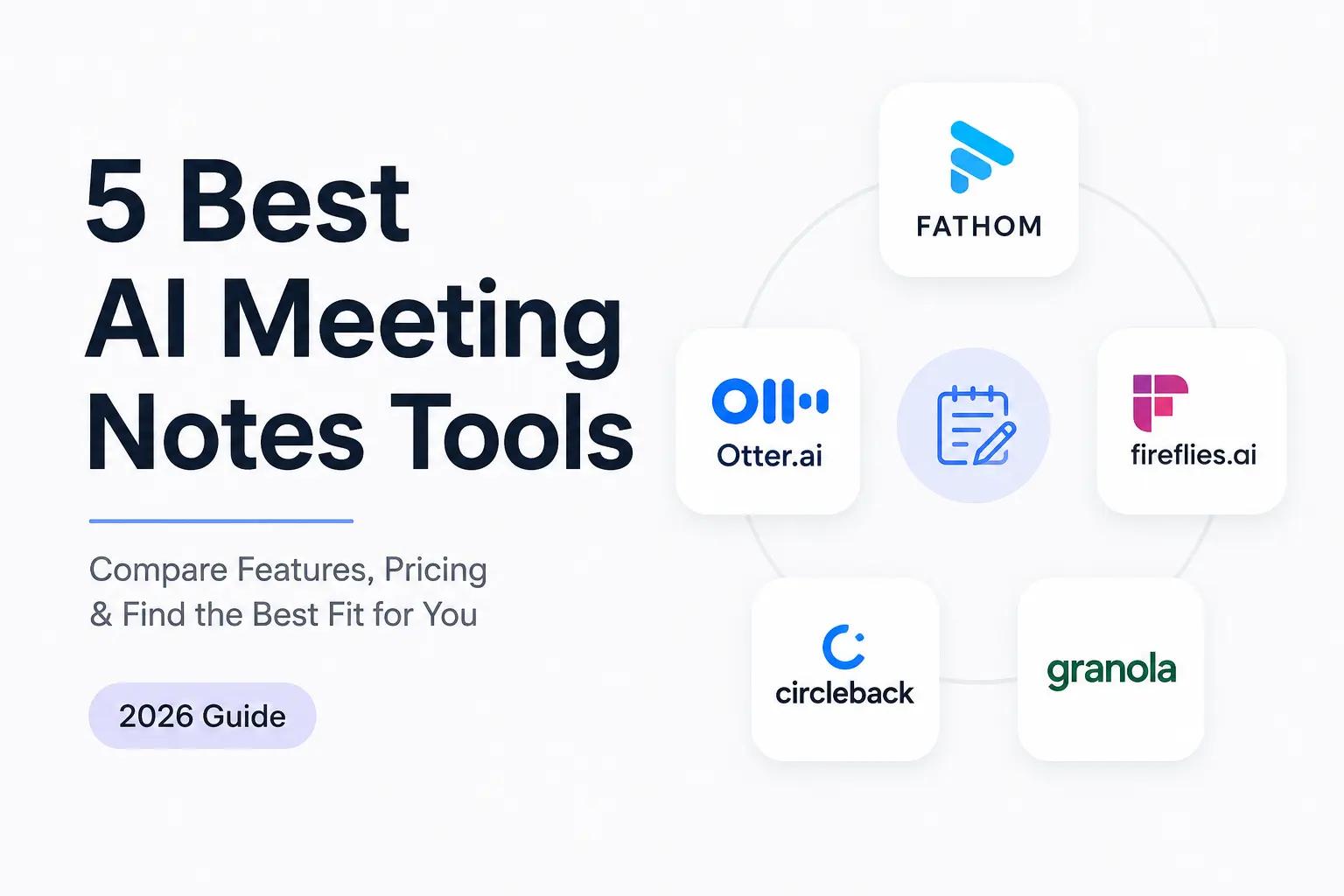
For most freelancers and small teams, the best AI meeting notes tool is Fathom — its free plan records and transcribes unlimited calls, and paid runs cheaper than Otter. Granola wins if your client calls are sensitive, because no bot ever joins. Fireflies wins if the notes need to reach a CRM.
That’s the short version. The longer version matters because what separates these tools in 2026 isn’t accuracy — it’s what the free plan actually gives you, and whether a recording bot is legal on a call with someone in California.
You’ve had this happen. Client call ends, you promised something specific about scope, and four calls later you’re staring at a blank Notion page trying to reconstruct it. Here’s what to buy, what to skip, and the legal detail most roundups leave out.
What is an AI meeting notes tool?
An AI meeting notes tool records your call, transcribes it, and turns the transcript into a structured summary with action items — so you’re not typing while someone’s talking.
Every tool in this category splits into two designs, and the split matters more than any feature list.
Bot-based tools send a visible participant into your Zoom, Meet, or Teams call. Fathom, Fireflies, Otter, and Circleback all work this way. Fathom’s bot appears in the participant list under a name like “Fathom Notetaker,” so everyone can see it. MeetJamie
Bot-free tools capture your computer’s system audio locally instead. Granola is the main one — it captures desktop system audio, so nobody in the meeting sees a recording bot. Convo
Bot-based tools are easier to share across a team. Bot-free tools change the conversation less. Pick based on who’s on your calls, not on which one has more integrations.
What should a freelancer actually look for?
Skip the feature grid. Five things decide whether you’re still using the tool in three months:
- What the free plan really includes. The cap is almost never on recordings — it’s on AI summaries, storage, or history.
- The per-meeting length cap. A 30-minute ceiling turns a one-hour discovery call into half a transcript.
- Action-item quality over transcript quality. One 2026 hands-on test across 50+ meetings found all eight leading tools hit 90–95%+ accuracy in English. What varies is whether you get “Shahid sends the revised scope by Thursday” or a wall of text. Product Hunt
- Bot or no bot. A trust decision, not a spec.
- Where the notes go. A summary you have to copy-paste into Notion is one you’ll stop reading.
Short version: judge these tools on free-tier caps and action items. On accuracy, the top options are close enough that it rarely decides the purchase.
The 5 best AI meeting notes tools for freelancers and small teams
Fathom — best free AI meeting notes tool for most freelancers
Fathom has the most usable free plan in the category. Free includes unlimited recordings and transcription with unlimited storage and no time limit, but advanced AI summaries are capped at 5 calls per month — after that you get a basic chronological template.
That cap is new, and older reviews still describe the free tier as fully unlimited.
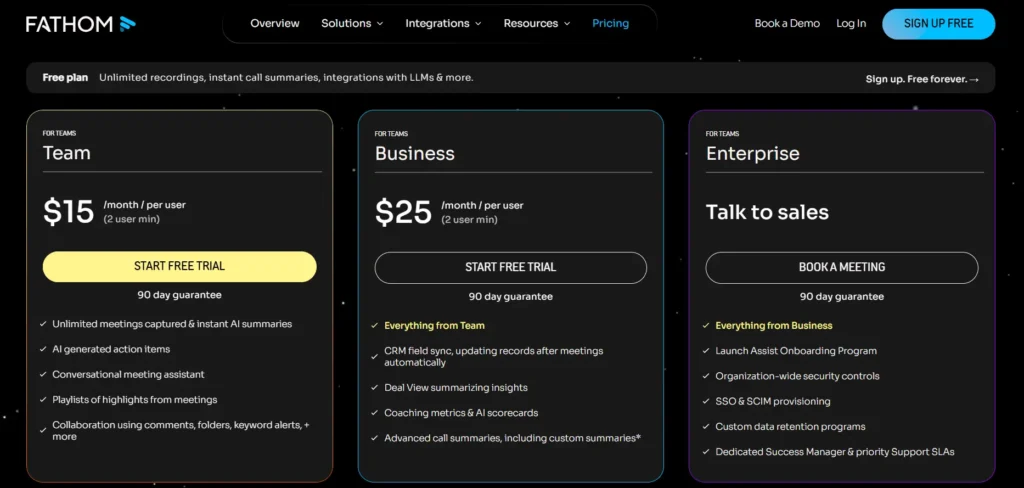
Paid runs $20/month, or $16/month billed annually. Fathom also offers a 90-day money-back guarantee, which no other major notetaker in this category matches. prospeoprospeo
The catch: the bot is visible, and Teams support is the weakest of its three platforms.
Granola — best for sensitive or high-trust client calls
Granola doesn’t join your meeting. It listens to your computer’s audio and enhances the notes you typed yourself. Which is also its biggest limitation: if you don’t type during calls, it does very little for you. Fireflies.ai
Pricing restructured this year. Granola dropped its old Pro and Individual plans in 2026 and now runs three tiers: free Basic, Business at $14 per user/month, and Enterprise at $35 per user/month. The free limit is on history — Basic caps meeting history at 25 notes total. Some reviews report a 14-day window instead. Convo
The catch: Mac, Windows, and iOS only, with no Android app announced, and meeting data trains Granola’s models by default, with organisation-wide opt-out gated to the $35 Enterprise plan. Fireflies.
Fireflies.ai — best if your notes need to reach a CRM
Fireflies scales from solo to team without switching tools. Every tier includes unlimited transcription and unlimited AI summaries in 100+ languages — what you pay for is storage, integrations, admin controls, and AI credits. Recording Law
Pro is $10 per user/month annually or $18 monthly; Business is $19 annually, $29 monthly, and adds CRM sync, video recording, and conversation intelligence.
The catch: the credits. AI features like AskFred and Smart Highlights consume credits even on paid plans — Pro gets 20 a month, Business gets 30. Free storage is reported as both 400 and 800 minutes across sources.
Otter.ai — best for live transcription and shared editing
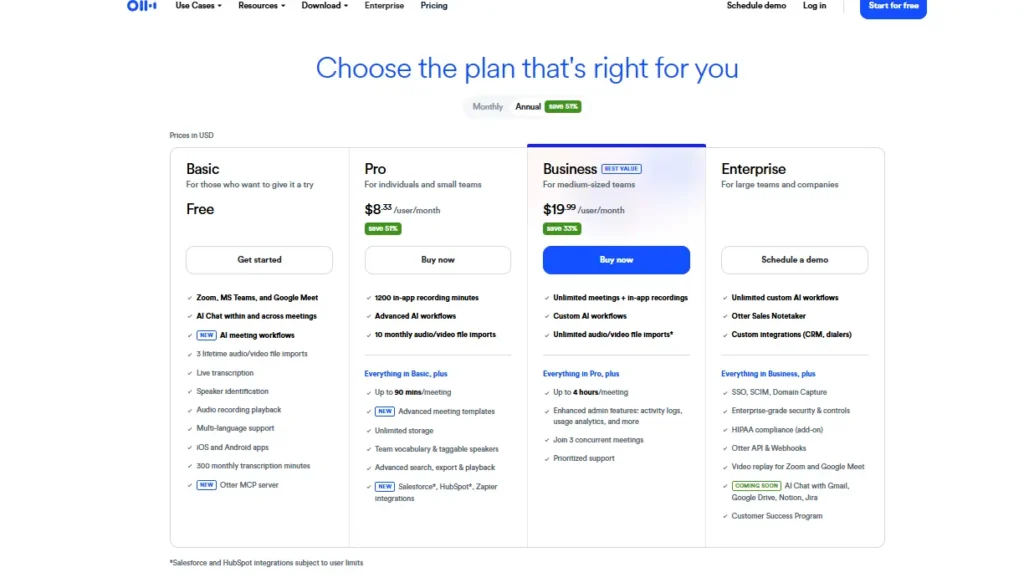
Otter still has the best live experience. The free plan is tighter than most roundups admit: 300 transcription minutes per month, a 30-minute cap on any single conversation, and 3 lifetime file imports — not 3 per month. ScreenApp
Pro is $16.99 per user/month or $8.33 annually, with 1,200 minutes and 10 file imports monthly. Business is $30, or $19.99 annually. Unused minutes don’t roll over. Spokenly
The catch: Otter is currently the defendant in a federal privacy class action. More below — it doesn’t make the tool unusable, but know before you put it on client calls.
Circleback — best when follow-through matters more than price
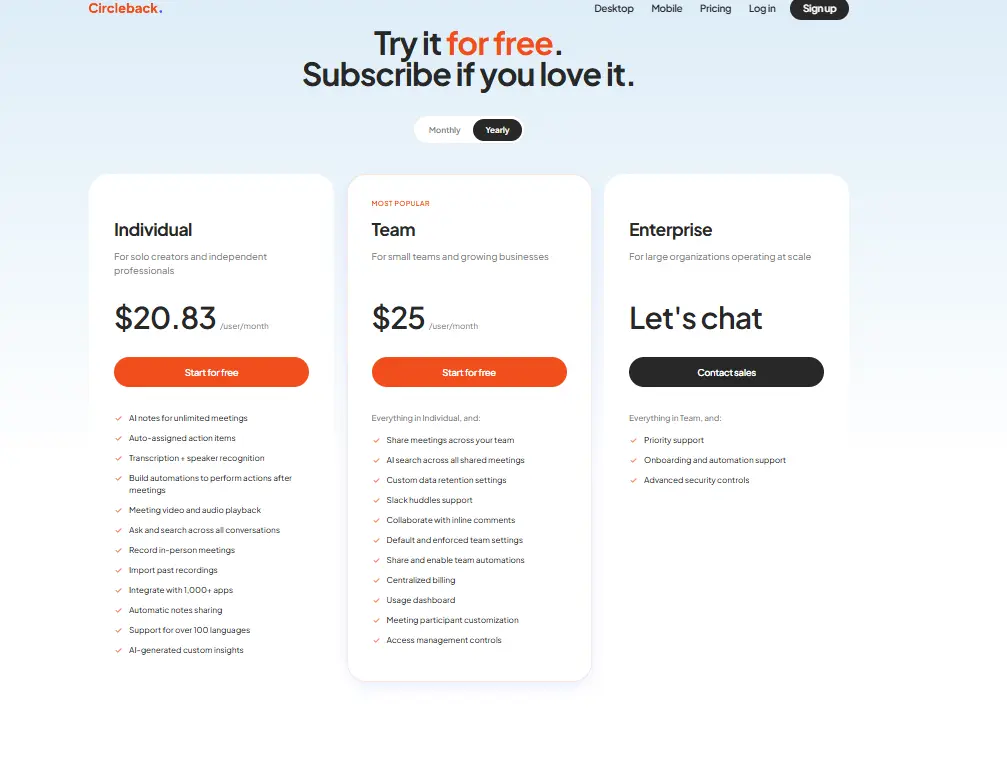
Circleback is the priciest here and the only one without a real free tier. Paid plans start at $25/month with a 7-day free trial. Annual individual pricing lands near $20.83/month, with Team at $25 per user/month. Circleback
You’re paying for note quality and the automation layer that pushes action items into your other tools. It’s SOC 2 Type II and HIPAA compliant with EU-U.S. DPF certification — which matters for healthcare or finance clients. Softwares
The catch: no free plan, so you can’t test it against a month of real calls first.
Comparison table
| Tool | Best for | Free plan, honestly | Paid starts at | The catch |
|---|---|---|---|---|
| Fathom | Solo freelancers | Unlimited recording; ~5 AI summaries/mo | ~$16/mo annual | Visible bot; summary cap is new |
| Granola | Client-facing consultants | ~25 notes of history | $14/user/mo | Desktop-first, no Android |
| Fireflies | CRM-driven small teams | Unlimited transcription, capped storage | $10/user/mo annual | AI credits run dry |
| Otter | Live captions, shared notes | 300 min/mo, 30-min per call | $8.33/user/mo annual | Pending privacy litigation |
| Circleback | Automated follow-through | 7-day trial only | ~$20.83/user/mo | Highest entry price |
Winner by use case: solo freelancer on a budget, Fathom. Consultant whose calls hinge on candor, Granola. Small team pushing notes into HubSpot or Salesforce, Fireflies.
Do you need consent to use an AI notetaker on client calls?
Sometimes yes — and it depends on where the other person is sitting, not where you are.
Federal law (ECPA, 18 U.S.C. § 2511) sets a one-party consent floor, and 38 states plus DC follow it. Twelve states require all-party consent: California, Connecticut, Delaware, Florida, Illinois, Maryland, Massachusetts, Montana, New Hampshire, Oregon, Pennsylvania, and Washington. UMEVO
Here’s the part that catches freelancers. On interstate calls, the strictest law that touches the call applies — a position supported by Kearney v. Salomon Smith Barney. Those 12 states hold roughly 35% of the US population, so selling nationally means hitting an all-party requirement on essentially any workday. Recording Law
There’s also live litigation. In re Otter.AI Privacy Litigation (No. 5:25-cv-06911, N.D. Cal.) alleges OtterPilot recorded meetings without all-party consent; the motion to dismiss was argued May 20, 2026, with a ruling pending as of mid-June 2026. No court has found Otter’s practices lawful or unlawful LegalClarity Open Class Actions
The practical fix takes eight seconds. Say this at the top of every call:
“Quick heads up — I use an AI notetaker so I can stay present instead of typing. It records and summarizes. Totally fine to say no.”
.If you use AI to record or summarize client meetings, always tell the client first and ask for permission. It helps you comply with different recording laws and builds trust with your clients
General information, not legal advice. Check your state and your client’s.
What I’d do if I were starting today
I’d stop shopping and run one week of real calls through Fathom’s free plan. Not a demo. Actual client calls with actual stakes.
Then judge it on one question: did the action items match what I’d have written myself?
I currently use Fireflies.ai for client meetings. It does an excellent job of summarizing long discussions and highlighting action items. That said, it sometimes misses acronyms or product names, so I always double-check the final notes.
If the answer’s yes, stay free until the 5-summary cap starts hurting, then pay the $16. If your calls are sensitive — investor conversations, HR, anything where a visible bot changes what people say — go straight to Granola and accept you’ll be typing during calls. Already living in HubSpot? Skip both and start with Fireflies Pro.
One thing I’d skip: paying for two tools “to compare.” You’ll use neither properly.
Frequently asked questions
What is the best AI meeting notes tool?
Fathom is the best AI meeting notes tool for most freelancers and small teams, because its free plan includes unlimited recording and transcription. Granola is better for sensitive client calls since no bot joins. Fireflies is stronger for teams needing notes pushed into a CRM.
Is there a truly free AI meeting notes tool?
Yes, but every free plan caps something. Fathom’s free plan offers unlimited recordings with AI summaries limited to 5 calls per month. Otter’s free tier allows 300 minutes monthly with a 30-minute limit per conversation. Fireflies includes unlimited transcription on every tier but caps storage and AI credits.
Do AI notetakers work with Zoom, Google Meet, and Microsoft Teams?
Most do. Fathom supports Zoom, Google Meet, and Microsoft Teams, but not Webex or other niche platforms. Fireflies, Otter, and Circleback cover the same three. Granola works differently — it captures your computer’s audio, so the platform doesn’t matter.
Is it legal to use an AI notetaker without telling everyone on the call?
It depends where participants are located. Thirty-eight states plus DC allow one-party consent, meaning you can record a call you’re part of, while 12 states require consent from everyone. On multi-state calls, apply the strictest applicable rule and disclose at the start. Announcing it takes seconds and removes the risk.
Which AI notetaker doesn’t join the meeting as a bot?
Granola. It captures audio directly from your computer’s system output, so no bot joins and other participants aren’t notified. Every other tool here — Fathom, Fireflies, Otter, Circleback — sends a visible participant into the call.
Can AI meeting notes tools record in-person meetings?
Some can. Granola added an iOS app in 2026 for mobile and phone-call recording. Circleback records in-person sessions as well as virtual ones. Tools relying on a meeting bot generally can’t, since there’s no video call to join.
The one thing to take away
The best AI meeting notes tool is the one whose free plan survives contact with your actual calendar — not the one with the longest feature list.
So do this today: install Fathom, let it run on every call this week, and at the end read only the action items. Ignore the transcripts entirely. If those action items match what you’d have written yourself, you’re done shopping. If they don’t, you learned it in five days instead of five months.
Explore Our More Articles on Fluxgrowth