FluxGrowth is reader-supported. Some links in our guides are affiliate links — if you buy through one we may earn a commission, at no extra cost to you. It never changes which tools we recommend. How we test tools.
Picture a store owner answering the same “where’s my order?” for the fortieth time before lunch while shipped orders pile up and a low-stock alert sits unread in another tab. That’s the problem worth solving. Not “the future of retail.” Just the repetitive work that eats a team’s day.
This guide is part of our AI Automation hub – everything we have published on automating a small business with AI, in one place.
AI automation for e-commerce means using AI to handle steps a person would otherwise do by hand: reading a customer message, classifying it, drafting a reply. Here’s the part most guides skip you don’t need to automate everything. The real wins come from a handful of repetitive, measurable, low-risk workflows.
This guide covers seven worth building, how to pick your first, and where a human still has to stay in the loop. A couple of them should never run unsupervised, and I’ll flag exactly which.
What Is AI Automation for E-commerce?
AI automation for e-commerce is any workflow where an AI model reads, classifies, or generates something in the middle of an otherwise automated process. The AI does the judgment step, while the automation platform handles the wiring around it.
Three terms get mixed up constantly, so let’s separate them.
Traditional (rule-based) automation follows fixed instructions. For example, if an order is placed, send a confirmation email. There’s no interpretation — same input, same output, every time.
AI-assisted automation adds a thinking step. So if a customer sends a product question, the workflow reads it, pulls the relevant details, drafts an answer, then sends it or routes it for approval. That way, the AI handles the messy, unstructured part a rule can’t.
AI agents go further. An agent monitors, decides which action to take, remembers context across steps, and can call several tools on its own. That’s a different animal from a workflow with one AI step bolted in. And for most stores, the simpler workflow is the safer place to start.
Here’s the trade-off. AI adds flexibility, because it handles language and ambiguity. But it also adds risk, because it can be confidently wrong. A rule that misfires is predictable. But an AI step that misreads a refund request is not. That’s why review checkpoints matter more here than in classic automation.
How to Choose the Right E-commerce Workflow to Automate
The best first workflow is repetitive, measurable, and low-risk if it breaks. So start where a mistake costs you a minor annoyance — not a charge-back or a lost customer.
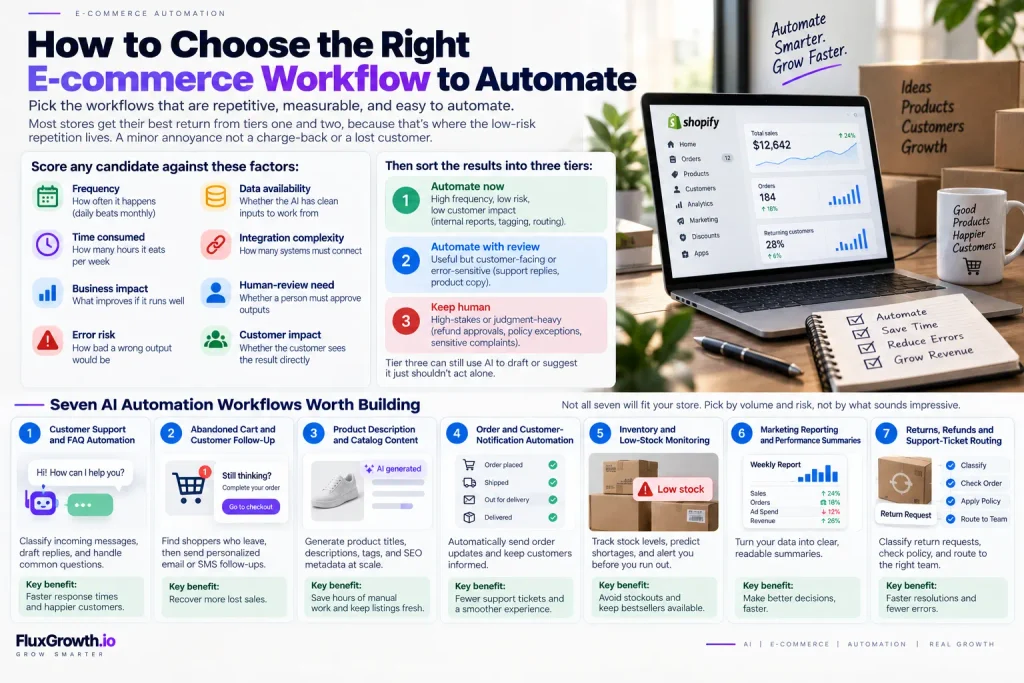
Score any candidate against these factors:
- Frequency — how often it happens (daily beats monthly)
- Time consumed — how many hours it eats per week
- Business impact — what improves if it runs well
- Error risk — how bad a wrong output would be
- Data availability — whether the AI has clean inputs to work from
- Integration complexity — how many systems must connect
- Human-review need — whether a person must approve outputs
- Customer impact — whether the customer sees the result directly
Then sort the results into three tiers:
- Automate now — high frequency, low risk, low customer impact (internal reports, tagging, routing).
- Automate with review — useful but customer-facing or error-sensitive (support replies, product copy).
- Keep human — high-stakes or judgment-heavy (refund approvals, policy exceptions, sensitive complaints).
Most stores get their best return from tiers one and two, because that’s where the low-risk repetition lives. Tier three can still use AI to draft or suggest — it just shouldn’t act alone.
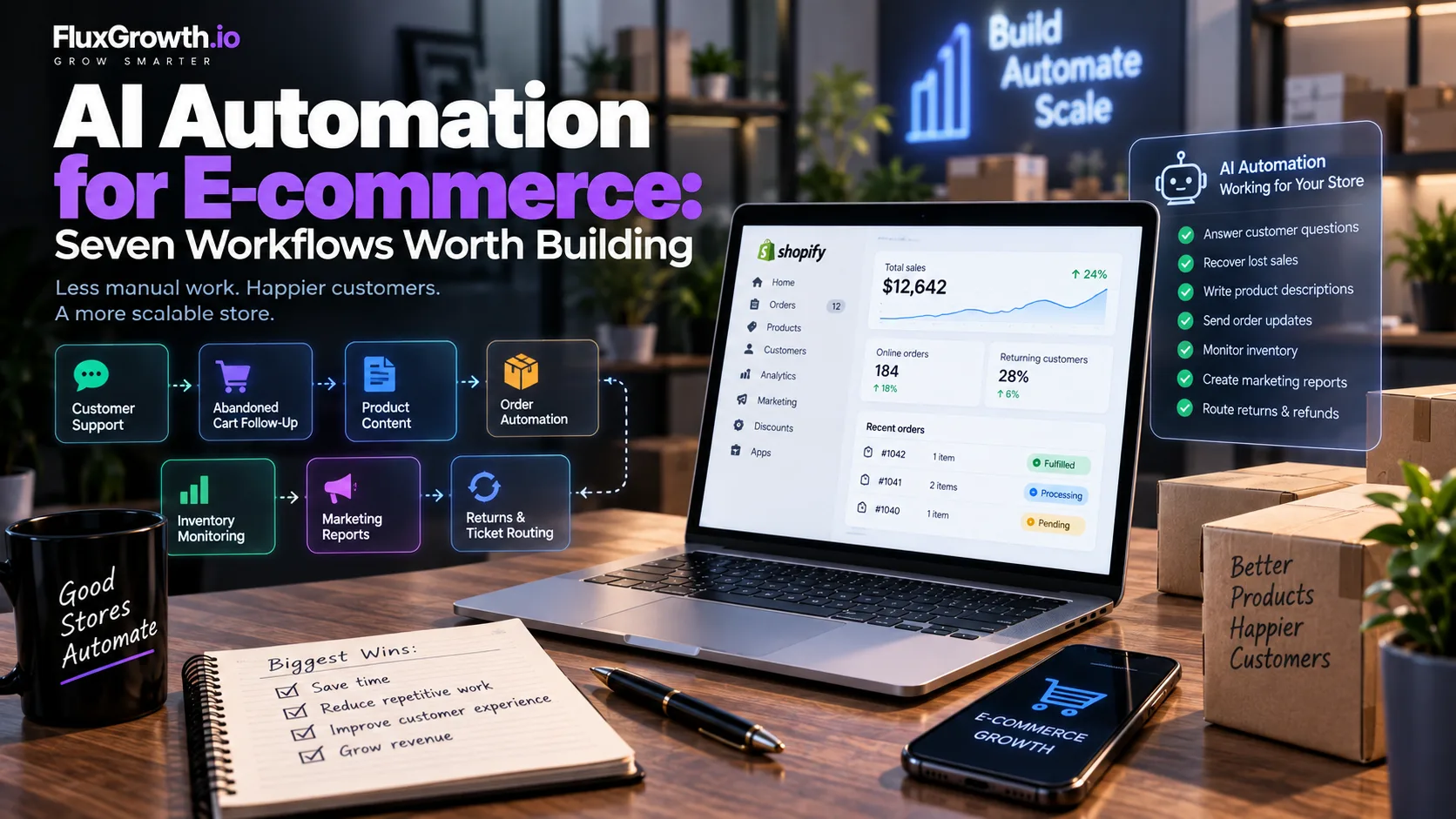
Seven AI Automation Workflows Worth Building
Each one below follows the same shape: what it does, why it helps, the trigger, the AI step, the actions, where a human belongs, common tools, and the main limitation. But not all seven will fit your store. So pick by volume and risk, not by what sounds impressive.
1. Customer Support and FAQ Automation
Support automation reads an incoming message, works out what the customer actually wants, and drafts a reply. It’s most useful for stores with high message volume and a lot of repeat questions, such as shipping status, returns policy, and sizing.
- Trigger: a new message arrives in your help desk, chat, or inbox.
- AI step: classify the intent, then pull the matching answer from your knowledge base or product data.
- Actions: draft a reply, tag the ticket, and either send automatically or queue it for approval.
Still, keep a human on refunds, disputes, angry complaints, and anything unusual, because those need judgment and often a policy call.
Shopify’s own tools point at this pattern. Shopify Inbox can suggest replies, and its Sidekick assistant (the purple-glasses icon in your admin) can read store data and take actions with your approval, while respecting staff permissions — so people only touch data they’re authorized to see. Plenty of help desks offer similar AI drafting. But there’s a catch: AI answers confidently even from stale or missing data. So your knowledge base has to be right before you turn drafting on.
2. Abandoned Cart and Customer Follow-Up
Someone adds a $60 candle to their cart, reaches checkout, sees the shipping cost, and vanishes. Cart follow-up is the workflow that chases them back. And it matters, because leaving is the norm. In fact, Baymard Institute’s aggregate of 50 studies puts the average documented cart abandonment rate at 70.22% (updated September 2025) — so roughly seven in ten carts don’t convert.
- Trigger: a cart sits idle past a set time, or a checkout starts but doesn’t finish.
- AI step: segment the shopper and personalize the message — tone, product mentions, timing.
- Actions: send an email or SMS sequence, and adjust based on whether they open or click.
Here’s the honest part. Rule-based follow-up already works, and it’s cheaper to run, because a fixed three-email sequence needs no AI at all. But AI earns its keep when you want the copy or product picks tailored per shopper across a big, varied catalog. So review is optional — mostly a brand-voice check on the templates. One caution, though: don’t promise yourself a recovery rate. It depends on your product, price, and audience, and most of the “AI recovers X%” numbers floating around don’t trace to a real source.
3. Product Description and Catalog Content Automation
Got 2,000 SKUs and nobody to write them? Then this is the workflow for you. It drafts and structures catalog content at scale, such as descriptions, titles, bullets, meta descriptions, image alt text, and category tags.
- Trigger: a new product is added, or a batch of listings needs updating.
- AI step: generate copy from product attributes, and suggest tags, attributes, and SEO metadata.
- Actions: fill the fields, or stage them for a quick human pass.
For example, Shopify Magic does exactly this inside the admin — descriptions, image edits, and tag or SEO suggestions, free on paid plans. The copy is a usable first draft, but it typically needs editing for brand voice, technical accuracy, and SEO targeting.
Still, human review isn’t optional for anything factual: specs, measurements, ingredients, compatibility, and especially legal or health claims. Because AI will cheerfully invent a dimension or a benefit that doesn’t exist — and in the U.S., that’s a liability, not a typo.
4. Order and Customer-Notification Automation
This one’s mostly plumbing. It connects your store, order system, and messaging so status updates fire on their own. And plumbing is exactly where automation earns its money, because the steps are predictable.
- Trigger: an order is placed, paid, shipped, or delayed.
- AI step: light and optional — say, turning a cryptic carrier status into a plain-English delay message.
- Actions: verify status, update the CRM, send the notification, kick off fulfillment.
The flow: order placed → verify status → update CRM → send notification → trigger fulfillment. Most of that is rule-based, so it needs no AI. But where AI helps is the exceptions — for example, a messy shipping status that needs translating, or an order that doesn’t fit the normal path. So keep a human on those: address problems, payment holds, anything that breaks the standard flow.
5. Inventory and Low-Stock Monitoring
Low-stock monitoring watches your inventory and pokes you before a bestseller hits zero. Its job is visibility, not decisions — and that line matters a lot.
- Trigger: stock for a SKU crosses a threshold you set.
- AI step: read sales velocity and flag what’s about to sell out, or summarize inventory into a report.
- Actions: send a low-stock alert, notify a supplier, or draft a reorder recommendation.
So draw a hard line between monitoring and recommending and automatically placing purchase orders. Alerts and suggestions are safe to automate. But committing money to a supplier isn’t, because one bad forecast or data glitch, and you’ve ordered thousands of units you don’t need. So purchase decisions go to a person. Common pieces include your platform’s inventory data, a spreadsheet or Airtable as the record, and an automation tool to run the checks. Still, the limitation is data quality — because if your stock counts are wrong, every alert built on them is wrong too.
6. Marketing Reporting and Performance Summaries
Every Monday, someone opens Shopify, GA4, and Meta Ads Manager in three tabs and squints. So this workflow turns that raw data into one readable summary instead. It’s a strong first automation, because it’s internal, low-risk, and genuinely time-saving.
- Trigger: a schedule (daily or weekly), or a data threshold.
- AI step: summarize the numbers in plain language and flag anomalies worth a look.
- Actions: post a daily or weekly report to Slack or email, or a product- and segment-level breakdown.
Inputs can include Shopify, Google Analytics 4 (GA4), Google Ads, Meta Ads, your email platform, and CRM data. As a result, the output is a summary instead of ten open dashboards. Still, review it before acting on anything, because AI can misread a spike or miss the context behind it. And don’t let it invent benchmarks — instead, it should describe your numbers, not compare them to figures it made up. After all, a summary is only as good as the data underneath it, and AI can smooth a data error into a confident, wrong sentence.
7. Returns, Refunds, and Support-Ticket Routing
Returns-and-routing sorts each incoming request and sends it down the right path — by your rules, not the AI’s whims. It’s useful for support teams handling a steady mix of returns and ticket types.
- Trigger: a return or refund request, or any new support ticket.
- AI step: classify the reason, check the order, and match it against your policy.
- Actions: route to the right queue, draft a response, and flag anything outside policy.
The flow: return request → classify reason → check order → apply policy → route → human review where required. But the rule that matters most: AI shouldn’t override refund policy or make sensitive calls on its own. Instead, it prepares and routes, while a person approves the money and the exceptions. So keep review on any refund above a threshold, any dispute, and any request that doesn’t cleanly match a rule. The risk, again, is classifications. For example, a “damaged item” request wrongly tagged and skipped past review can cost you a customer, or a refund you never owed.
The E-commerce AI Automation Stack
An automation stack is just the set of parts that carry a workflow from trigger to logged result. You don’t need every part for every workflow, and no single tool is mandatory.
The usual components:
- Store platform — Shopify, WooCommerce
- Trigger — an event (order placed, message received) or a schedule
- Automation platform — Zapier, Make, or n8n
- AI model — an LLM via API (an OpenAI model, say)
- Database — Airtable or Google Sheets as a lightweight record
- CRM — HubSpot or similar
- Communication — email, SMS, Slack, or a messaging API
- Analytics — where results get measured
- Human approval — a review step for anything customer-facing or risky
- Logging — a record of every action taken
Two example stacks pick the shape, not the exact tools. A no-code support setup: Shopify fires the trigger, Zapier or Make runs the flow, an OpenAI model classifies and drafts, your help desk sends, and a Slack message waits for your yes. A developer setup for higher volume: WooCommerce or Shopify → self-hosted n8n → an LLM with custom logic → a database → a log of every action. Same idea, more control. For more AI automation software options, see Best AI Automation Software Tools for 2026.
One note on picking a platform. All three added real AI in the last year Zapier shipped Agents across 8,000+ apps, Make added an assistant called Maia, and n8n 2.0 brought native LangChain and 70+ AI nodes with human-in-the-loop steps. Pricing differs in a way that bites at scale: n8n bills per workflow execution, Zapier per task, so a multi-step flow run thousands of times can cost noticeably more on Zapier. Check current plans before you commit. They change often.
AI Automation vs. Traditional E-commerce Automation
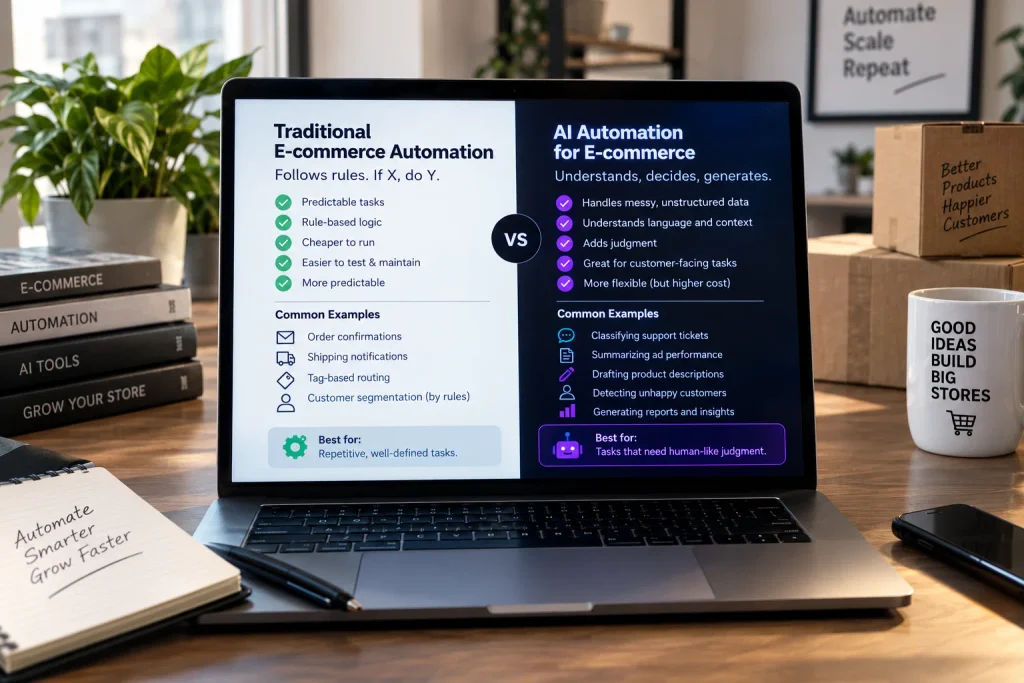
These aren’t rivals, they do different jobs. Traditional automation follows rules you write in advance: if X, do Y. AI automation reads the messy stuff a rule can’t parse, then decides or generates before the workflow continues.
Use plain rules when the task is predictable. Order confirmations, shipping triggers, tag-based routing cheaper, easier to test, easier to maintain, more predictable as simple rules. Bolting AI onto those just adds cost and a new way to fail.
Reach for AI when there’s language involved classifying a ticket, summarizing a week of ad data, drafting product copy, or reading a message and deciding it needs a person. A rule can’t tell that a one-line email is quietly furious. An AI step can flag it and hand it off. Most stores end up running both: plain rules for the predictable work, AI for the few steps that genuinely need judgment.
How to Build Your First AI E-commerce Workflow
Start with one workflow, not your whole operation. Automating everything at once is the fastest way to ship something brittle that nobody trusts.
A practical sequence:
- Choose one repetitive process.
- Define the outcome you want.
- Map the current workflow, step by step.
- Identify the trigger.
- Identify the data the AI needs.
- Add the AI step.
- Define the deterministic rules around it.
- Add human-review checkpoints.
- Add error handling for when a step fails.
- Log every important action.
- Test with real edge cases, not just the happy path.
- Monitor results before expanding.
One workflow is easier to build, test, and fix than ten. Once it runs reliably for a few weeks and you trust its output, use what you learned to build the next.
Privacy, Security, and Human Review
E-commerce automation handles sensitive business and customer data, which raises the stakes on how you build it. A workflow can touch names, email addresses, phone numbers, order history, shipping addresses, payment-related details, support conversations, and internal business data.
Basic safeguards worth putting in place:
- Data minimization — send the AI only what the task needs
- Access controls — limit who and what can trigger actions
- Secure API credentials — never expose keys in shared files
- Vendor review — check how any AI provider handles your data
- Logging — keep an audit trail
- Human approval — for sensitive or customer-facing steps
- Retention policies — don’t store data longer than needed
- Permission management — review access regularly
This isn’t legal advice. Review the privacy laws, platform policies, vendor contracts, and security requirements that apply to your business. Two U.S. references worth a read: the FTC’s guidance that AI tools have to work as advertised and you shouldn’t over-promise what yours can do, and its reminder that using a model-as-a-service provider for a support chatbot doesn’t hand off your own privacy and confidentiality obligations.
Common AI Automation Mistakes E-commerce Businesses Make
The most common mistake is automating too much, too early. Here are the ones that sink projects each with a fix.
- Automating too much too early → start with one workflow, prove it, then expand.
- Using AI where simple rules are better → default to rules; add AI only for judgment steps.
- No human fallback → build an escalation path for anything the AI can’t handle.
- No error handling → decide what happens when a step fails, before it fails.
- No audit trail → log every action so you can trace problems.
- Poor data quality → clean the inputs first; AI amplifies bad data.
- Sending wrong product info → keep human review on specs and claims.
- Unguarded access to sensitive actions → gate refunds, purchases, and data behind approval.
- Skipping edge cases → test the weird inputs, not just the clean ones.
- Measuring activity, not outcomes → track resolved tickets and recovered revenue, not messages sent.
- Workflows nobody owns → assign a person to maintain each one.
Which Workflow Fits Which Store
Here’s how the main workflows stack up on fit, AI role, complexity, and review.
| Workflow | Best For | AI Role | Automation Complexity | Human Review |
| Customer Support | High message volume | Classify, retrieve, draft | Medium | Recommended |
| Abandoned Cart | Customer follow-up | Personalization | Low–Medium | Optional |
| Product Content | Large catalogs | Generate/classify | Low–Medium | Recommended |
| Inventory Monitoring | Stock visibility | Analyze and alert | Medium | Recommended |
| Reporting | Marketing teams | Summarize/analyze | Medium | Recommended |
There’s no universal winner. The right first workflow depends on your order volume, how much a mistake would hurt, what integration’s you already run, and whether you’ve got clean data to feed it. A high-ticket store buried in support should start with support drafting. A big catalog with a small team should start with product content or reporting.
Frequently Asked Questions
What is AI automation in e-commerce?
AI automation in e-commerce is a workflow where an AI model reads, classifies, or generates content in the middle of an otherwise automated process. Unlike rule-based automation, which follows fixed instructions, AI handles unstructured inputs like customer messages. It’s used for support, content, routing, and reporting tasks.
What e-commerce tasks can AI automate?
AI can help automate customer support drafting, abandoned-cart follow-up, product descriptions and tags, order notifications, inventory alerts, marketing reports, and returns routing. Tasks involving language, classification, or summation fit best. High-stakes decisions like refund approvals should keep a human in control.
How can AI automate a Shopify store?
Shopify offers native AI through Shopify Magic and the Sidekick assistant, included on paid plans, covering product descriptions, image edits, tag and SEO suggestions, and suggested replies in Shopify Inbox. For workflows across other apps, store owners connect Shopify to an automation platform like Zapier, Make, or n8n with an AI step. Feature availability varies by plan.
What is the best AI automation for e-commerce?
There’s no single best one; it depends on your volume and risk. Stores with heavy support benefit most from support and ticket automation; large catalogs benefit from product-content automation; small teams often start with reporting. Pick the workflow that’s repetitive, measurable, and low-risk to fail.
Can AI automate customer service for an online store?
Yes, partially. AI can classify questions, retrieve answers, and draft replies, and it can send routine responses automatically once you trust the setup. Refunds, disputes, and sensitive complaints should route to a human. AI works best as a drafting and triage layer, not a full replacement.
How much does e-commerce AI automation cost?
Cost depends on the software, API usage, automation platform, workflow complexity, and your business volume. There’s no fixed price. Some AI features (like Shopify’s native tools) are included on existing plans, while automation platforms and LLM APIs bill by task, execution, or usage. Start small to keep costs predictable while you test.
Is AI automation safe for e-commerce businesses?
It can be, with the right controls. Use data minimization, access controls, secure credentials, logging, human approval for sensitive actions, and clear retention policies. Because these workflows touch customer and payment-related data, review the privacy laws, platform policies, and vendor contracts that apply to your business.
Start With One Workflow
Successful e-commerce AI automation starts with one focused workflow not a plan to automate the whole store at once. Pick something repetitive, measurable, and low-risk if it breaks: support drafting, product content, or a weekly report are all good first candidates. Build it, test it against real edge cases, and keep a human on anything customer-facing or sensitive. Mind your data quality, add error handling, lock down your credentials, and watch the results before you scale.
The stores getting real value here aren’t automating the most; they’re picky about what they automate. So pick the one task that’s eating your week (the same shipping question forty times over, or that Monday report you rebuild by hand), map it on paper, and decide whether a plain