FluxGrowth is reader-supported. Some links in our guides are affiliate links — if you buy through one we may earn a commission, at no extra cost to you. It never changes which tools we recommend. How we test tools.
Most three-person businesses ask the wrong question first. They ask, “Which AI tool should we buy?” The more useful question is: What will AI automation actually cost a three-person business once the workflow is running?
This guide is part of our AI Automation hub – everything we have published on automating a small business with AI, in one place.
The answer is usually more complicated than the price of an AI subscription. A small business may also need an automation platform, API usage, integration’s, implementation, maintenance, monitoring, and human review.
For example, a workflow might start with a $20-per-month software subscription but require additional automation services or development work as it becomes more complex. Zapier’s current pricing illustrates how platform costs can vary by usage and plan.
The goal of this guide is to break those costs down so a three-person business can build a realistic automation budget instead of looking at the AI subscription alone.
How Much Does AI Automation Cost for a Three-Person Business?
There’s no single price. A lean setup automating one or two simple tasks can run under $50 a month. A more advanced setup with custom development and AI agents can cost thousands to build and hundreds a month to run. Most three-person businesses land somewhere in between.
The cost depends on four things, and the tool you pick is only one of them:
- Workflow complexity — a one-step “new lead emails me” automation costs almost nothing; a multi-step flow that reads, classifies, drafts, and files costs more to build and run.
- AI usage volume — how many times per month the AI actually runs, and which model you use.
- Number of integration’s — every extra app you connect adds setup time and often a paid tier.
- Build vs. buy — no-code tools you set up yourself are cheap to start; custom development means paying a developer.
So when someone quotes you a flat “AI automation costs $X,” be skeptical. The only number that matters is the one you build from your own workflows.
What Actually Makes Up the Cost of AI Automation?
AI automation cost is made up of seven components. Some are recurring, some are one-time, and most businesses only budget for the first one.
AI software subscriptions
This is the AI assistant your team logs into ChatGPT, Claude, or Gemini. ChatGPT Business (renamed from ChatGPT Team) costs $20 per seat per month billed annually, or $25 billed monthly, with a two-seat minimum, per OpenAI’s pricing page. It’s a real cost, but it’s the smallest line in most automation budgets. Recurring.
Automation platforms
This is the tool that connects your apps and runs the workflow — Zapier, Make, or n8n. It’s the engine. If you want to compare the main options before choosing one, see our guide to AI automation software. You pay for it monthly based on how much it runs, which sounds obvious until the bill scales faster than your business does. Recurring, and we’ll come back to that scaling problem.
API and usage costs
When your automation calls an AI model directly (rather than through a chat window), you pay per token, a token being roughly three-quarters of a word. OpenAI bills the API by tokens, not by requests or minutes. For a small team’s volume, this is usually cents to a few dollars per workflow, but it’s variable and it’s easy to lose track of. Recurring and unpredictable.
Implementation
The time and money to actually build the thing. If you set up a simple Zap yourself, this is an afternoon. If you hire someone to design a multi-step flow, it’s a one-time project fee. Mostly one-time.
Maintenance
Automation break. An app changes its login, a workflow starts failing silently, a format shifts. Somebody has to notice and fix it. This is the cost nobody puts in the spreadsheet. Recurring, even if it’s just your own time.
Human review
For anything customer-facing or high-stakes, a person still checks the output before it goes out. That’s not a failure of the automation, it’s the correct design. But it’s staff time, so it’s a cost. Recurring.
Security and compliance
If your automation touches customer data, you own how it’s stored and who can see it. Picture a Zap that dumps every new lead name, email, phone into a Google Sheet the whole team can open, including the contractor who left last month and still has access. That’s a cost you pay in risk, not dollars. Sometimes it’s a real dollar too: ChatGPT’s Business plan contractually commits that OpenAI won’t train on your data, while the individual Plus plan only gives you an opt-out toggle. Recurring.
Three AI Automation Budget Scenarios
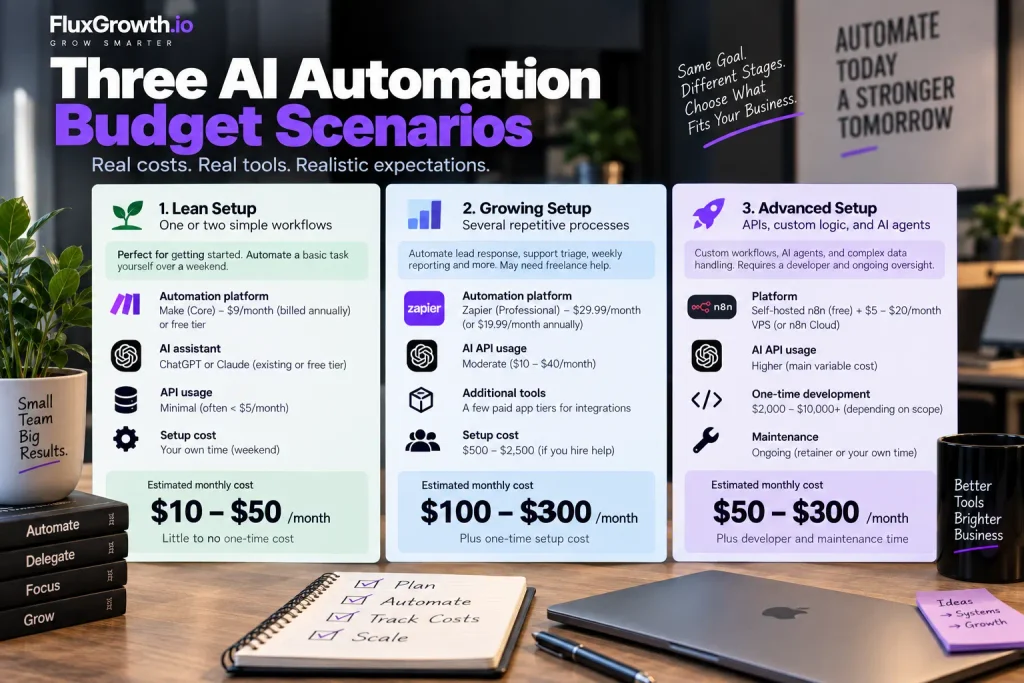
The numbers below are illustrative estimates. The subscription and platform prices are verified against official pages and cited; the usage and setup figures are examples built on stated assumptions, not market quotes. Your real numbers will differ.
Lean setup — one or two simple workflows
You’re automating something basic: new form submissions get logged to a sheet and you get a Slack ping, or new leads get an instant reply. You build it yourself over a weekend.
- Automation platform: Make on the Core plan. Make’s Core plan runs about $9 a month billed annually (roughly $10.59 monthly) and includes 10,000 operations. Or start on Make’s or Zapier’s free tier and pay nothing.
- AI assistant: your existing ChatGPT or Claude subscription, or the free tier.
- API usage: minimal, often under a few dollars a month at this volume.
- Setup: your own time, call it a weekend.
Illustrative recurring total: roughly $10–50/month, with little to no one-time cost. This is where every business should start.
Growing setup — several repetitive processes
Now you’re automating lead response, support triage, and weekly reporting. A few of these are multi-step. You might pay a freelancer to build the trickier ones.
- Automation platform: Zapier’s Professional plan starts around $29.99/month monthly (about $19.99/month billed annually) for 750 tasks, and its Team plan is higher — or Make’s Pro tier at a lower per-unit cost.
- AI API usage: moderate an illustrative $10–40/month depending on volume and model.
- A couple of paid app tiers to unlock the integration’s you need.
- One-time setup: an illustrative $500–2,500 if you hire help for the complex flows.
Illustrative recurring total: roughly $100–300/month, plus one-time setup. The platform bill is the part that creeps here more on that below.
Advanced setup — APIs, custom logic, and AI agents
You’re running custom workflows: an AI agent that reads incoming email, pulls from a database, drafts a response, and routes it. This needs a developer and ongoing oversight.
- Platform: self-hosted n8n. n8n’s Community Edition is free to self-host, and n8n bills by workflow execution one run of an entire workflow, regardless of how many steps it has. You pay for the server instead, often a $5–20/month VPS.
- AI API usage: higher this is your main variable cost, and model choice drives it hard.
- One-time development: an illustrative $2,000–10,000+ depending on scope.
- Maintenance: budget for it, whether that’s a retainer or your own hours.
Illustrative recurring total: roughly $50–300/month in cash, but with real developer and maintenance time behind it. Cheaper in dollars, more expensive in expertise.
The jump from one tier to the next isn’t about ambition. It’s about whether your process genuinely needs multi-step logic and custom data handling, or whether a simple no-code flow would do the same job for a tenth of the cost.
What Can a Three-Person Business Actually Automate?

Plenty but “automate” rarely means “hands off.” For most of these, the AI does the repetitive 80% and a person still checks the 20% that carries risk. Here’s a practical map.
| Workflow | What gets automated | Likely tools | Where a human still reviews | Complexity |
| Lead response | Instant reply, logging, routing | Zapier/Make + CRM | Anything that quotes a price | Low |
| Support triage | Sorting and tagging incoming tickets | Make + help desk + AI model | The actual reply to the customer | Medium |
| Appointment scheduling | Booking, reminders, follow-ups | Calendar tool + Zapier | Reschedule edge cases | Low |
| Email classification | Sorting inbox by type/priority | AI model + email API | Anything flagged sensitive | Low–Medium |
| CRM updates | Logging activity, updating fields | Zapier/Make + CRM | Data-quality spot checks | Low |
| Invoice/document processing | Extracting data from PDFs | AI model + storage | Numbers before they’re paid | Medium |
| Weekly reporting | Pulling metrics into a summary | Make/n8n + AI model | The narrative and takeaways | Medium |
| Social media workflows | Drafting, scheduling, repurposing | AI model + scheduler | Brand voice and facts | Low–Medium |
| E-commerce order notifications | Alerts on new/failed orders | Store platform + Zapier | Exceptions and refunds | Low |
| Internal knowledge search | “Ask our docs” for the team | AI model + vector store | Answers on critical topics | Medium–High |
| Meeting summaries | Transcribing and summarizing calls | AI transcription tool | Action items and commitments | Low |
| Data entry | Moving data between systems | Zapier/Make/n8n | Mismatches and errors | Low–Medium |
| Customer follow-ups | Sequenced reminders and check-ins | CRM + automation platform | Tone on anything delicate | Low |
Start at the top of that list. Low-complexity, low-risk workflows are where a three-person team gets a real return without much to go wrong.
No-Code vs. Custom AI Automation
The four approaches trade cash for control, and control for maintenance. Pick based on complexity and who’s going to own the thing.
No-code hosted (Zapier and Make)
You build in a visual editor, no code. Fastest to set up, easiest to hand to a non-technical teammate. The catch is the billing model. Zapier charges per task every action step consumes a task, so a five-step workflow burns five tasks each run. Make charges per operation (now called credits), also per module run. Great for simple to medium workflows. Gets expensive as volume climbs.
Self-hosted (n8n)
n8n bills by execution one full workflow run counts as one execution no matter how many steps it contains, which makes a ten-step workflow far cheaper to run than on a per-step tool. The Community Edition is free to self-host. The trade is maintenance: you’re the sysadmin now. When it breaks at 2 a.m., that’s yours. Best if you (or someone on your team) are comfortable running a server.
API-based custom automation
You or a developer write code that calls AI models and your apps directly. Total control, no platform ceiling, but you need real development skill and you’re maintaining code. Best for processes that no-code tools can’t handle cleanly.
AI agents
The most capable option is an AI that decides its own steps toward a goal rather than following a fixed path. Also the most demanding to set up and the most in need of oversight, especially early. Best for genuinely complex processes, and worth approaching carefully.
There’s no overall winner here. A solo founder who hates servers should stay on Make. A technical team automating high-volume work will save real money on n8n. The right answer is the one that matches your skills and your workflow, not the one with the best marketing.
How to Calculate Whether AI Automation Is Worth It
Use one simple ratio:
Monthly automation cost ÷ estimated monthly value created.
If a workflow costs you $60 a month all-in and saves your team eight hours a month, value those eight hours at whatever your time is honestly worth and compare. Under 1, it’s paying for itself. Well over 1, it isn’t yet.
“Value” is broader than dollars saved. Say a lead that used to sit in your inbox for four hours now gets a reply in two minutes that speed can be the difference between booking the job and losing it to whoever answered first. Here’s the catch, though: be brutally honest with the inputs. The most common mistake is counting time “saved” that just leaks into other busywork. If those eight freed-up hours don’t go toward something that actually grows the business, the savings only exist on the spreadsheet.
Run the ratio per workflow, not for “AI automation” as a whole. One workflow can be wildly worth it while another quietly loses money.
Hidden Costs Most Small Businesses Miss
The sticker price is the part you see coming. These are the parts you don’t.
- The per-unit billing trap. This is the big one. Usage-based pricing scales with your success, not your value. The same workflow costs more simply because it runs more often. On Zapier, going past your task limit bills extra tasks at 1.25x your plan’s rate, and a business capturing 30 leads a day through a four-step flow can burn 3,600 tasks a month, far past the entry tiers. Model your real volume before you commit to a plan.
- API overages. Variable AI usage can spike without warning. Set spending limits and alerts on day one. OpenAI’s API pricing explains how input and output token usage affects API costs.
- Human review. Ongoing staff time to check output. Real, recurring, rarely budgeted.
- Maintenance. Things break when apps change. Someone fixes them.
- Vendor price increases. Tools raise prices and change billing models. Make switched its billing unit from “operations” to “credits” in August 2025, which changed what a plan actually buys. Your bill can move without you doing anything.
- Data cleanup, integration changes, staff training, and monitoring. Each small on its own. Together they add up to more than the subscription.
How to Start AI Automation Without Overspending
Start small, prove it works, then expand. Here’s the process I’d follow.
- Pick one repetitive workflow. The most annoying, most frequent, lowest-risk task you do. One.
- Measure what it costs now. How many hours a week, at what hourly value. Write the number down; it’s your baseline.
- Estimate the automation cost. Platform tier, expected AI usage, any setup help. All-in monthly.
- Build the smallest version that works. Free or cheap tier, minimum steps. Don’t gold-plate a prototype.
- Keep human approval where risk is high. Anything touching money, contracts, or customers gets a person in the loop.
- Track results for a few weeks. Did it actually save the time you predicted? Did it break?
- Expand only after the first one runs reliably. One solid, boring automation beats five half-working ones.
That sequence keeps your spend tied to proof. You’re not budgeting for “AI automation.” You’re budgeting for one workflow that either earns its keep or gets cut.
AI Automation Approaches at a Glance
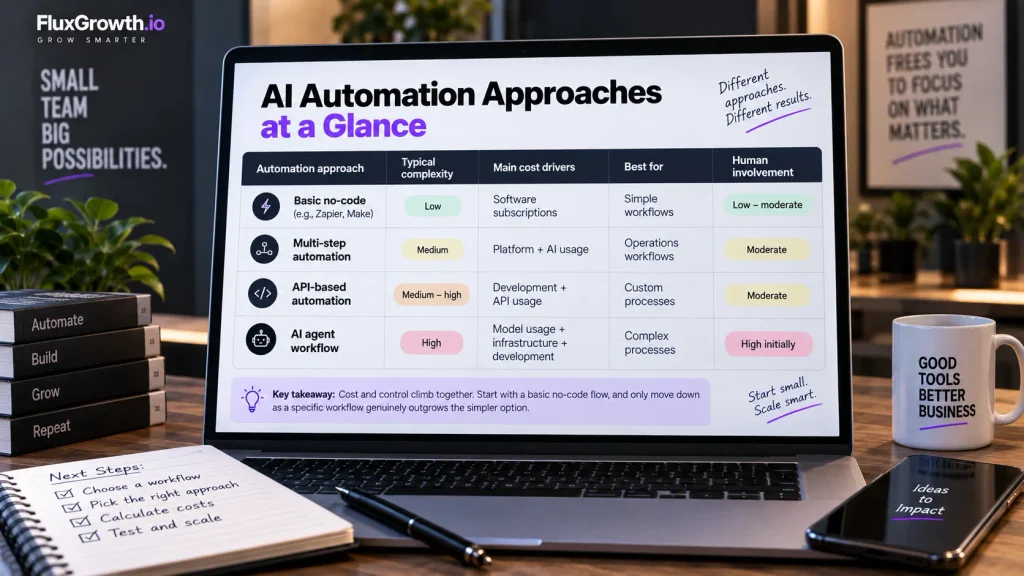
| Automation approach | Typical complexity | Main cost drivers | Best for | Human involvement |
| Basic no-code | Low | Software subscriptions | Simple workflows | Low–moderate |
| Multi-step automation | Medium | Platform + AI usage | Operations workflows | Moderate |
| API-based automation | Medium–high | Development + API usage | Custom processes | Moderate |
| AI agent workflow | High | Model usage + infrastructure + development | Complex processes | High initially |
The practical takeaway: cost and control climb together as you move down the table. There’s no single best row; a basic no-code flow is the right call for most first automation, and you only move down as a specific workflow genuinely outgrows the simpler option. Match the approach to the job in front of you. Most first automation never need to leave the top row.
Frequently Asked Questions
How much does AI automation cost for a small business?
It ranges from under $50 a month for a simple no-code setup to thousands in one-time development plus a few hundred a month for custom AI agents. Most small businesses start at the low end and grow their spend as workflows prove out. The subscription is usually the smallest piece platform usage, AI API costs, and maintenance make up the rest.
Is AI automation expensive for a small business?
It doesn’t have to be. You can automate a genuinely useful workflow for the price of a single software subscription, sometimes free on a starter tier. It gets expensive when workflow volume climbs on per-task pricing, or when you commission custom development. The cost tracks complexity, so simple automation stays cheap.
How much should a three-person business budget for AI automation?
A reasonable starting budget is $50–150 a month for the tools plus a few hours of setup time, then scale from there based on results. That covers an automation platform, light AI usage, and one or two workflows. Add a one-time setup budget only if you’re hiring help for something complex. Treat the first month as an experiment, not a commitment.
What are the hidden costs of AI automation?
The most-missed costs are usage-based billing that scales with volume, AI API overages, ongoing maintenance when automation break, and human review time. Vendor price increases and billing-model changes also move your bill without warning. Budget for the running costs, not just the setup.
Is AI automation cheaper than hiring an employee?
Not exactly they do different things. Automation handles specific repetitive tasks well; an employee handles judgment, relationships, and everything unpredictable. AI automation can reduce the manual, repetitive work that eats a small team’s time, which delays or shrinks a hire, but it rarely replaces a full role. Compare the automation cost to the specific hours it frees up, not to a whole salary.
What should a small business automate first?
Start with the most repetitive, frequent, low-risk task you do — lead logging, appointment reminders, or sorting incoming email are common first picks. These deliver a clear return without much that can go wrong. Prove one workflow works reliably before adding a second.
Do I need a developer to automate my business with AI?
Usually not, to start. No-code tools like Zapier and Make let a non-technical owner build real workflows in a visual editor. You only need a developer when you move into API-based custom automation, self-hosted setups, or AI agents to the point where cost and capability both climb.
The One Thing to Do This Week
What AI automation actually costs a three-person business comes down to complexity and implementation, not the subscription you’re staring at. The $20 plan is the sticker. The build, the usage, the upkeep, and the human checking the output are the real price.
So do this today: pick your single most repetitive task, figure out what it costs you right now in time and money, and put that number next to the cost of automating it. If automating it is clearly cheaper, build the smallest version this week. If it’s close, wait. That one comparison will teach you more than any pricing guide including this one.