FluxGrowth is reader-supported. Some links in our guides are affiliate links — if you buy through one we may earn a commission, at no extra cost to you. It never changes which tools we recommend. How we test tools.
Elementor used to be the default answer to “which WordPress page builder should I use?” Not anymore. Its share of builder usage dropped to 43% in mid-2026 down from 56% just two years ago while WordPress’s own native block editor climbed to 18% and keeps climbing (per WPZOOM’s usage tracking).
People are quietly walking away from heavy, plugin-dependent builders toward lighter, faster ones.
I’ve used Elementor extensively, tested Gutenberg and GenerateBlocks on real projects, and poked around Spectra enough to know where it fits. If you’re still deciding which website builder is right for your project, read our What Website Builder Is Best in 2026? guide. This guide walks through the best WordPress page builder options in 2026, what each one actually does well, what it costs today, and which one fits your specific situation. Whether you’re building your first blog or managing a 40-site agency portfolio, you’ll find an option that fits your needs.
What Is a WordPress Page Builder?
A WordPress page builder is a plugin (or, in some cases, a full theme) that replaces WordPress’s default editing experience with a drag-and-drop visual interface. Instead of writing HTML or fighting with the block editor’s limitations, you place elements text, images, buttons, forms directly where you want them and see the result in real time.
How Page Builders Work
Most page builders hook into WordPress’s post editor and swap in their own front-end or back-end interface. You build a layout visually, the plugin generates the underlying code, and WordPress renders the page like any other.
Visual Editing vs. Block Editing
There’s a real distinction worth understanding before you pick one. Visual builders like Elementor, Divi, and Bricks give you free-form control over spacing, layout, and design closer to designing in Figma. Block-based tools like Gutenberg, GenerateBlocks, and Spectra work within WordPress’s native block system, which tends to produce lighter, cleaner code but asks more of you when you want a complex, custom layout.
Neither’s objectively better. Depends whether you want design flexibility or lean performance more.
Why Use a WordPress Page Builder?
Faster Development, No Coding Required
The core pitch hasn’t changed: you can build a professional page in hours instead of days, without touching PHP or CSS. That’s still true in 2026, though the gap has narrowed as WordPress’s native tools have improved.
Mobile Responsive Design and Landing Pages
Every builder on this list handles responsive breakpoints out of the box, and most include dedicated landing page templates useful if you’re running paid traffic or building out a funnel.
WooCommerce and Marketing Integrations
If you’re selling anything, builder choice matters more than people admit. Elementor, Bricks, Divi, and Beaver Builder all ship visual WooCommerce editors for product pages, carts, and checkout.
Not every builder treats WooCommerce as a first-class citizen, though. SeedProd, for instance, locks WooCommerce blocks behind its highest tier easy to miss until you’re already invested.
Types of WordPress Page Builders
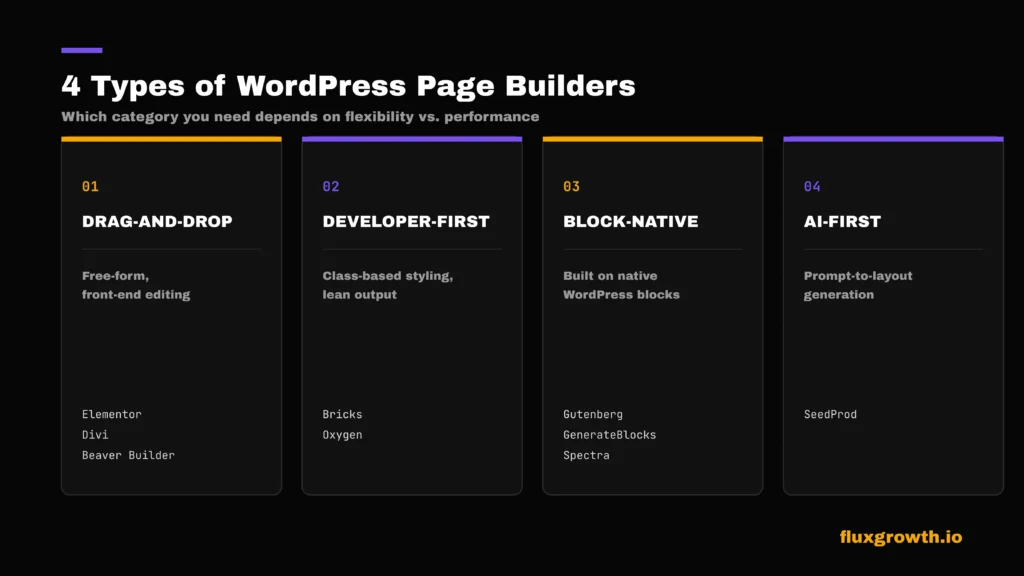
Four rough categories exist in 2026:
- Drag-and-drop visual builders (Elementor, Divi, Beaver Builder) front-end editing, large template libraries, beginner-friendly
- Developer-first builders (Bricks, Oxygen) class-based styling, cleaner output, steeper learning curve
- Block-native tools (Gutenberg, GenerateBlocks, Spectra) built on WordPress’s block system, lightweight, faster by default
- AI-first / landing page builders (SeedProd) narrower focus, heavier reliance on templates and AI generation
Best WordPress Page Builders in 2026
1.Elementor
Elementor is still the builder most people think of first, and there’s a reason for that. I’ve used it extensively across client and personal projects, and the interface genuinely is the easiest of anything I’ve tried drag, drop, done.
Features: Theme Builder for headers/footers/archives, Popup Builder, Form Builder, WooCommerce Builder, and a widget library that’s grown into hundreds of options through the plugin ecosystem.
AI tools: Elementor’s new Elementor One bundle centers on “Angie,” an agentic AI assistant that can generate layouts, run accessibility scans, and handle image optimization from a shared credit pool.
Pricing: Essential plan starts at $59/year for one site; Agency runs $399/year for up to 1,000 sites. Elementor One launched at $168/year (first year), renewing at $228/year, and bundles the AI tools plus hosting-adjacent extras. A free version exists but is missing the Theme Builder, Popup Builder, and most Pro widgets.
Pros: Genuinely intuitive for beginners, the largest template and plugin ecosystem of any builder here, frequent updates.
Cons: Here’s the honest part: Elementor gets heavy fast if you’re not careful with add-ons. I’ve watched sites slow down noticeably once someone stacks three or four third-party widget packs on top of the core plugin. In my experience, simplifying the plugin stack and relying on Elementor’s built-in widgets whenever possible has consistently made sites easier to maintain and noticeably more responsive.
Best for: Beginners, freelancers building client sites fast, and small businesses that want a huge template library without hiring a designer.
2.Gutenberg (WordPress Block Editor)
Gutenberg is WordPress’s native editor, and it’s the one I reach for most often now. It’s not flashy, but it’s fast, and it’s free forever because it ships with WordPress itself.
Features: Full Site Editing (headers, footers, templates), a growing pattern library, native block-based layout tools, and starting with WordPress 7.0’s release in April 2026 a built-in AI infrastructure layer called the WP AI Client, baked directly into WordPress core rather than bolted on as a plugin.
Pricing: Free. No premium tier exists because it’s core WordPress software.
Pros: Lightest code output of any option on this list, zero licensing cost, and it’s not going anywhere since it’s maintained by WordPress itself.
Cons: Complex, highly custom layouts take noticeably longer to build than in a visual builder. You’re also more reliant on block plugins (like GenerateBlocks or Spectra) to fill functionality gaps.
Best for: Bloggers, developers who want clean output, and anyone who’d rather not pay a recurring license fee.
3.GenerateBlocks
Five blocks. That’s basically the whole pitch. Container, Grid, Headline, Button, Query Loop no bloat, no 300-template library to scroll through, just a handful of deeply customizable primitives built on top of native Gutenberg.
Features: Container, Grid, Headline, Button, and Query Loop blocks, each customizable for spacing, color, and typography.
Pricing: GenerateBlocks offers a free version that includes its core blocks. GenerateBlocks Pro is available as an individual annual subscription, or as part of the GeneratePress One bundle. At the time of writing, GeneratePress One costs $149/year, while GenerateBlocks Pro can also be purchased separately from the official website. Both subscriptions include one year of updates and support and renew annually unless canceled.
Pros: Minimal bloat, clean HTML output, works natively inside the block editor rather than replacing it.
Cons: Fewer pre-built patterns than Spectra or a full visual builder you’re assembling layouts from primitives, which takes longer for complex pages. In my own testing, this trade-off shows up immediately: faster to load, slower to build with.
Best for: Developers and performance-focused freelancers building on top of Gutenberg who don’t need a large template library.
4.Spectra
Brainstorm Force built Spectra (formerly Ultimate Addons for Gutenberg) to solve the same problem GenerateBlocks solves extending the block editor without replacing it but it leans harder into pre-made patterns than GenerateBlocks does.
Features: A large library of pre-designed block patterns, WooCommerce-specific blocks, form blocks, and a full site-building layer on top of native Gutenberg.
Pricing: Free core plugin. Pro starts around $59–61/year for a single site, scaling up for multi-site and lifetime options.
Pros: More ready-made patterns than GenerateBlocks, strong WooCommerce block support, integrates cleanly with the Astra theme ecosystem.
Cons: Heavier than GenerateBlocks if you enable a lot of pattern libraries worth trimming down to just the blocks you actually use.
Best for: WooCommerce sites and freelancers who want more design flexibility than raw GenerateBlocks without jumping to a full visual builder.
5.Bricks Builder
Bricks has built its reputation on speed and clean code, and it’s become the go-to recommendation for developers migrating off Elementor for performance reasons (assuming they’re willing to learn a bit of CSS thinking along the way).
Features: Query Loop Builder, full visual WooCommerce Builder, Popup Builder, Conditions and Interactions all included at every tier, with no feature-gating.
Pricing: No free version. Starter is $79/year (1 site), Business $149/year (3 sites), Agency $249/year (unlimited sites), or a one-time Ultimate Lifetime license at $599 covering unlimited sites forever.
Pros: Clean, class-based HTML output that tends to score well on Core Web Vitals; the lifetime option genuinely pays for itself for agencies running multiple sites.
Cons: No free version to test-drive first (you can try it on Bricks’ online playground instead). The learning curve is steeper than Elementor’s, too. Bricks expects you to understand CSS concepts even if you’re not writing code directly.
Best for: Developers and agencies prioritizing performance who don’t mind a shorter ramp-up period.
6.Divi Builder
Divi’s been around long enough that most WordPress people already have an opinion on it. Fair or not, 2026 changed the conversation Elegant Themes rebuilt it from the ground up as Divi 5.
Features: 2,000+ pre-made layouts, a built-in split-testing tool, WooCommerce template support, and new for Divi 5 a chat-based AI assistant for guided site building.
Pricing: $89/year or $249 as a one-time lifetime purchase, both covering unlimited websites. That’s a licensing model no other builder here matches at this price.
Pros: Largest ready-made layout library of any builder, unlimited sites even on the cheaper plan, unique split-testing built directly into the editor.
Cons: Historically heavier front-end output than Bricks or GenerateBlocks. Divi 5’s rewrite claims meaningful performance gains, but that’s worth testing on your own hosting before you commit, not just taking on faith.
Best for: Agencies managing many client sites who want the largest possible template selection without per-site fees.
7.Beaver Builder
Beaver Builder has quietly stayed one of the most stable, drama-free options in this space for over a decade.
Features: Beaver Themer for headers/footers/archives, Loop Builder for dynamic content, deep WooCommerce integration, and multisite support on higher tiers.
Pricing: Starter $89/year (1 site) up to Unlimited $546/year (unlimited sites, white labeling, cloud asset storage). No free full version, only a limited Lite plugin and no lifetime license option.
Pros: Reliable, clean code, genuinely good customer support, and white-labeling on the top tier for agencies that don’t want their name attached to the tool.
Cons: Most expensive single-site option on this list at $89/year, with fewer included features than Elementor’s equivalent tier. No lifetime plan means the cost never stops.
Best for: Agencies that specifically want white-labeling and are managing enough sites to justify the higher tiers.
8.SeedProd
Coming-soon pages were the whole product once. Not anymore SeedProd’s grown into a full landing-page and light website builder, and AI generation is now the thing that sets it apart from the rest of this list.
Features: AI website generator (describe your site, get a working layout), AI copywriting and image generation built into the drag-and-drop editor, theme builder on Pro tiers and above.
Pricing: Free Lite version. Basic $39.50/year (1 site) up to Elite $239.60/year (100 sites) WooCommerce blocks are locked behind the Elite tier specifically.
Pros: Cheapest entry point on this list, fastest page-load times for simple landing pages, AI generation is more integrated than most competitors’ bolt-on versions.
Cons: Not built for full, complex websites. It hits a ceiling fast if you’re trying to run a large content site rather than landing pages and funnels.
Best for: Marketers who mainly need sales pages, opt-ins, and funnels rather than a full site build.
Also Worth Knowing: Thrive Architect and Oxygen Builder
Thrive Architect is no longer sold as a standalone plugin; it’s bundled into Thrive Suite at $299/year (introductory pricing, renewing at $599/year), alongside seven other Thrive marketing tools. If you specifically want a conversion-focused builder with built-in A/B testing (Thrive Optimize) and quiz/lead-gen tools, the bundle is worth a look. If you only want a page builder, the price-per-feature doesn’t compete with the other options here.
Oxygen Builder rebuilt itself as Oxygen 6, which now shares roughly 80% of its core engine with sibling product Breakdance; the two are converging into one underlying codebase. A lifetime license runs $199.50 with a 60-day money-back guarantee. It remains a solid, developer-oriented choice, but the recent architecture overhaul means less mature documentation and fewer third-party add-ons than Bricks currently has.
Comparison Table
| Builder | Best For | Free Version | Starting Price | Ease of Use | Performance | AI Features |
| Elementor | Beginners, freelancers | Yes | $59/yr | Very easy | Good with optimization | Angie (Elementor One) |
| Gutenberg | Bloggers, developers | Yes (free forever) | $0 | Moderate | Excellent | Native AI (WP 7.0+) |
| GenerateBlocks | Developers | Yes | $99/year (Pro) | Moderate | Excellent | None built-in |
| Spectra | WooCommerce sites | Yes | ~$59/yr | Easy | Good | None built-in |
| Bricks Builder | Developers, agencies | No | $79/yr | Moderate-Hard | Excellent | None built-in |
| Divi Builder | Agencies | No | $89/yr | Easy | Good (Divi 5 improved) | Divi AI Agents |
| Beaver Builder | Agencies (white-label) | Lite only | $89/yr | Easy | Good | None built-in |
| SeedProd | Marketers, landing pages | Yes | $39.50/yr | Very easy | Excellent (landing pages) | AI site/copy/image gen |
WordPress Page Builder vs. Gutenberg
This is the comparison most people actually need to make in 2026, and it’s the one your typical roundup skips.
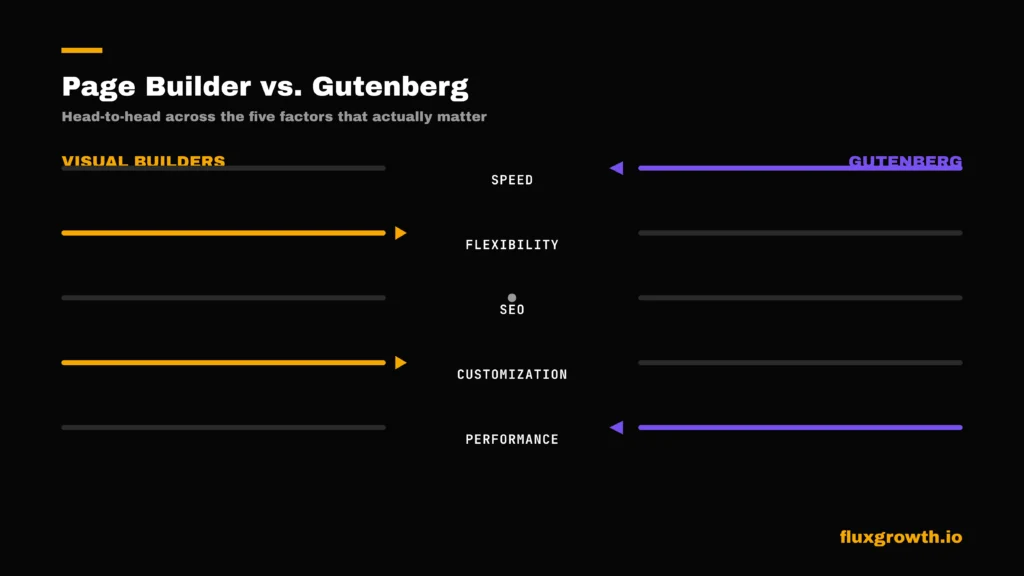
Speed: Gutenberg wins by default no builder overhead means less code shipped to the browser. GenerateBlocks and Spectra come close since they build on top of Gutenberg rather than replacing it.
Flexibility: Visual builders like Elementor and Divi still win here. Free-form positioning and pixel-level control are harder to replicate in a block-based system, even with Full Site Editing.
SEO: Both approaches can rank well. Cleaner code gives Gutenberg a slight technical edge on Core Web Vitals, but content quality and structure matter far more than which builder generated the markup.
Customization: Visual builders again, especially for non-standard layouts. Gutenberg’s Full Site Editing has closed some of the gap since its introduction, but it’s still not a one-to-one replacement for a dedicated builder.
Performance: Gutenberg, consistently assuming you’re not stacking a dozen block plugins on top of it.
My honest take, based on switching between these tools regularly: if you’re building a simple content site or blog, Gutenberg plus GenerateBlocks is hard to beat on speed. If you’re building something visually complex an agency portfolio, a service business site with custom sections Elementor still saves real time.
Elementor vs. Bricks Builder
The comparison developers ask about most.
Speed: Bricks wins out of the box. Its class-based approach avoids the wrapper-div bloat that Elementor’s section-and-column system can produce, though Elementor’s newer flexbox containers have narrowed that gap somewhat.
Design: Elementor is more visual and beginner-friendly dragging a loop into three columns, for example, takes seconds. Bricks gives you more querying power under the hood but expects more CSS familiarity to use it well.
Pricing: Bricks’ lifetime option ($599, unlimited sites) beats Elementor’s Agency tier ($399/year, 1,000 sites) for any agency running the license for more than roughly a year and a half. The math favors Bricks the longer you keep it.
Developers: Bricks, generally. Custom PHP support in the Query Loop Builder and a class-first styling system give developers more direct control.
Agencies: Depends on your team. Agencies with non-technical staff building pages lean Elementor for the visual-first workflow. Agencies with in-house developers increasingly lean Bricks for performance and the lifetime cost model.
Which WordPress Builder Is Fastest?
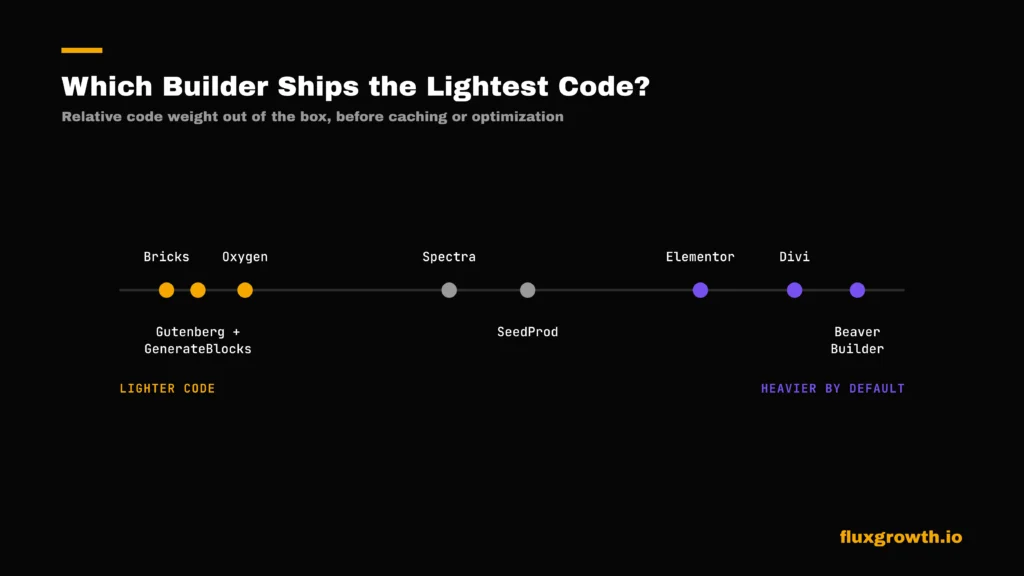
Want the short answer? GenerateBlocks + Gutenberg, Bricks Builder, and Oxygen Builder are generally considered the fastest WordPress builders in 2026 thanks to their lightweight code output. Elementor, Divi, and Beaver Builder can also achieve excellent performance, but they typically require more optimization, such as caching, image compression, and limiting third-party add-ons.
What’s not in dispute: Core Web Vitals remain a Google ranking factor, and every builder here can hit strong PageSpeed scores with proper caching, a CDN, and image optimization.
The real difference between builders shows up before optimization how much unnecessary code ships by default. Class-based, block-native tools ship less of it.
Best WordPress Builder by Use Case
- Beginners: Elementor free version and enormous template library flatten the learning curve
- Bloggers: Gutenberg free, fast, and you likely don’t need a heavy visual builder for a content-first site
- Agencies: Divi (largest template library, unlimited sites) or Bricks (performance-first, lifetime pricing)
- Freelancers: Elementor for client speed, Bricks if performance is your selling point
- Small business: Elementor or Divi both offer enough templates to get a professional site live fast
- WooCommerce: Bricks or Elementor, both with full visual store editors; Spectra if you’re staying block-native
- Landing pages: SeedProd purpose-built for exactly this
- Developers: Bricks or Gutenberg with GenerateBlocks cleanest code, most direct control
AI Features in Modern WordPress Builders
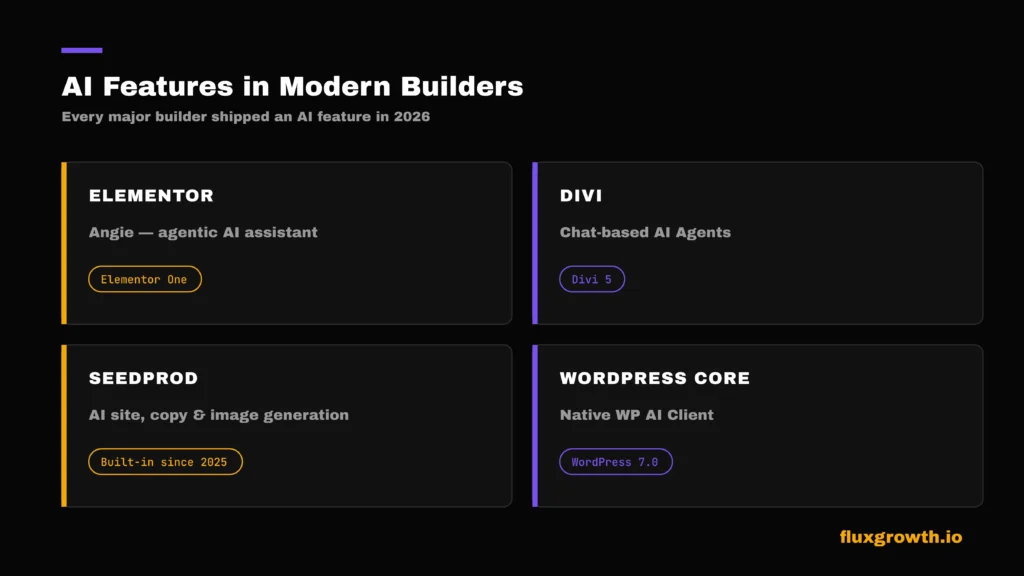
Every builder here shipped an AI feature this year. Elementor got Angie. Divi got chat-based Agents. SeedProd’s AI generation has been built since 2025. The novelty wore off fast.
Elementor AI (Angie): Part of the Elementor One bundle, Angie handles layout generation, accessibility fixes, and image work from a shared credit system rather than a flat unlimited-use model.
Divi AI: Divi 5 introduced chat-based AI Agents that guide site building conversationally, alongside longer-standing text and image generation tools.
SeedProd AI: Generates full page layouts and copy from a text prompt, plus standalone AI image generation inside the drag-and-drop editor.
AI website generation: Beyond individual builder features, WordPress 7.0 (releasing April 2026) bakes a native AI infrastructure layer the WP AI Client directly into WordPress core. AI capabilities won’t require a separate plugin going forward the way they have until now.
AI content creation: Every major builder now offers some flavor of AI copywriting, though quality and integration depth vary significantly. None of them replace an editor who knows your brand voice. They’re a starting point, not a finished draft.
How Much Does a WordPress Page Builder Cost?
| Builder | Annual Price | Lifetime Option | Free Version |
| Elementor | $59–$399/yr | No (Elementor One is subscription-only) | Yes |
| Gutenberg | $0 | N/A free forever | Yes |
| GenerateBlocks | Included in GeneratePress One ($149/year) or separate Pro plan | No | Yes |
| Spectra | ~$59/yr+ | Available on higher tiers | Yes |
| Bricks Builder | $79–$249/yr | Yes $599 | No |
| Divi Builder | $89/yr | Yes $249 | No |
| Beaver Builder | $89–$546/yr | No | Lite only |
| SeedProd | $39.50–$239.60/yr | No | Yes |
| Thrive Architect | $299/yr (Thrive Suite) | No | No |
| Oxygen Builder | N/A (lifetime only) | Yes $199.50 | No |
Hidden Costs to Watch For
Sticker price rarely tells the whole story. Factor in:
- Hosting: Heavier builders (Divi, older Elementor setups) may push you toward better hosting to keep load times reasonable
- Templates: Some “free” builders gate their best templates behind a Pro tier
- Add-ons: Elementor’s ecosystem in particular tempts you toward third-party widget packs each one adds weight and its own renewal cost
How to Choose the Best WordPress Page Builder
- Budget: Lifetime licenses (Bricks, Divi, Oxygen) win long-term for agencies; annual plans make more sense for a single site you might abandon
- Performance: If Core Web Vitals matter to your SEO strategy, lean toward Bricks, Gutenberg, or GenerateBlocks
- SEO: All the major builders here are SEO-capable; the differentiator is code weight, not built-in SEO tools
- Templates: Elementor and Divi have the deepest libraries if you want to start from something rather than a blank canvas
- AI tools: Elementor One, Divi AI, and SeedProd currently lead; expect this list to shift fast as WordPress 7.0’s native AI layer matures
- Support: Beaver Builder and Elementor both have strong reputations here; Bricks’ support is smaller but responsive
- Updates: Check release cadence before committing Oxygen’s recent architecture shift is a good example of how much a builder can change under you
Common Mistakes When Choosing a Builder
- Choosing only on price — the cheapest option often costs more in add-ons and workarounds later
- Ignoring performance — a beautiful site that loads slowly loses both rankings and visitors
- Installing too many plugins — every add-on you stack on top of a builder is another thing that can break on update
- Vendor lock-in — switching builders later usually means rebuilding pages from scratch, not a clean export
- Poor support — check response times and community size before you’re stuck mid-project with no help
Future of WordPress Page Builders
AI is the clearest trend shaping 2026. WordPress 7.0’s native AI infrastructure means every builder, not just the ones with dedicated AI teams, will likely gain baked-in AI capabilities without needing a separate integration.
Full Site Editing continues narrowing the gap between Gutenberg and dedicated visual builders, which is part of why native block editor usage climbed to 18% while Elementor’s share slid. Headless WordPress and no-code development remain more of a developer-focused trend than something most FluxGrowth readers need to think about today, but it’s worth watching if you’re building for scale.
What I’d Do If I Were Choosing a WordPress Page Builder Today
If I were building a brand-new site today, I wouldn’t automatically install the most popular builder. I’d define my goals first.
Maximum flexibility and a huge template library? Elementor it’s still where I’ve had the smoothest experience, add-on bloat aside. Speed and clean code over convenience? I’d seriously look at Bricks Builder, or lean into Gutenberg with GenerateBlocks, which is closer to my actual workflow these days.
Here’s the thing I’d avoid switching builders every year. Migrating pages between builders is rarely clean; you’re often rebuilding from scratch, not exporting and importing. Starting with the right builder for your actual needs saves time, money, and a lot of frustrated redesigns later.
From my own experience, I’ve found it’s much easier to spend a little extra time choosing the right builder at the beginning than to redesign an entire website later because the original choice no longer fits the project’s needs. That upfront decision can save hours of rebuilding pages, fixing layouts, and rechecking SEO after a migration.
Frequently Asked Questions
What is the best WordPress page builder?
There isn’t a single best option Elementor fits most beginners and freelancers, Bricks fits developers who prioritize speed, and Gutenberg fits anyone who wants a free, lightweight starting point.
Is Elementor still the best?
It’s still the most widely used and beginner-friendly, but its share of the market has dropped as lighter alternatives gain traction. “Best” now depends more on your specific priorities than it used to.
Which WordPress builder is fastest?
Bricks, Gutenberg, and GenerateBlocks consistently ship lighter code than visual builders like Elementor or Divi, though proper caching and hosting matter just as much as the builder itself.
Which page builder is best for SEO?
All the major builders here can support strong SEO outcomes. Code weight affects Core Web Vitals slightly, but content quality and site structure matter far more than which builder you choose.
Are free WordPress page builders good?
Yes, for straightforward sites. Gutenberg, GenerateBlocks, and Spectra’s free tiers cover most content-site needs without a recurring cost.
What’s better: Gutenberg or Elementor?
Gutenberg wins on speed and cost. Elementor wins on design flexibility and ease of use for complex layouts. Neither is universally better to match it to what you’re building.
Which builder is best for WooCommerce?
Bricks and Elementor both offer full visual WooCommerce editors. Spectra is a solid block-native alternative if you want to stay lightweight.
Which page builder do agencies use?
Divi and Elementor remain popular for their template libraries and unlimited-site pricing options; Bricks is gaining ground among performance-focused agencies.
Can AI build a WordPress website?
Partially. Tools like SeedProd’s AI generator and Elementor’s Angie can produce a working starting layout from a prompt, but they still need human editing for brand voice, real content, and polish.
Should beginners use a page builder?
Generally yes Elementor or SeedProd both flatten the learning curve significantly compared to hand-coding or wrestling with the native editor alone.