If you’re doing academic or scientific research in 2026, you don’t need one AI tool. You need four: one for finding papers, one for mapping how they cite each other, one for pulling evidence out of the PDF, and one for tightening your own draft. Below is the actual stack, tool by tool, with current pricing, honest limitations, and a workflow you can copy today.
This guide covers academic and scientific research only literature reviews, citation mapping, evidence extraction, and writing support for papers, theses, and dissertations. If you’re researching markets, competitors, or consumer trends, that’s a different toolkit (Crayon, Brandwatch, Exploding Topics, SurveyMonkey), and it deserves its own guide rather than getting crammed in here.
Fifty-four percent of teens now say they use a chat bot for schoolwork, according to Pew Research Center’s February 2026 survey. That habit doesn’t stop at graduation. It just gets more specialized because the day you’re writing a thesis chapter, “ask ChatGPT and hope for the best” stops working. You need tools that show their work.
How We Evaluated These Tools
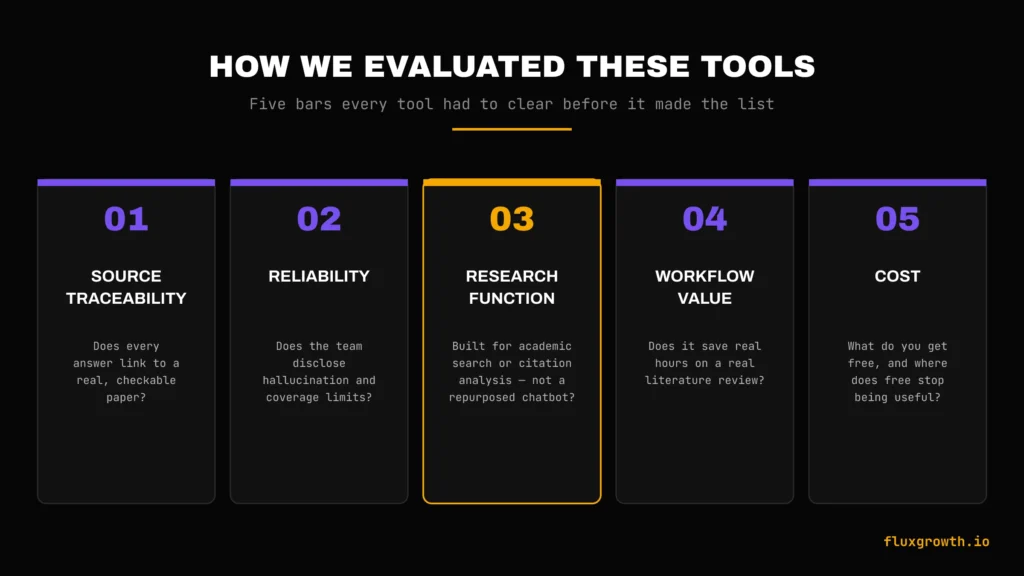
I didn’t include a tool here because it has a slick landing page. Every tool on this list had to clear five bars first:
- Source traceability. Does every answer link back to a real, check able paper or does it just assert things?
- Reliability. How often does the tool’s own team disclose limitations, hallucination risk, or coverage gaps? Tools that hide this lose points.
- Research function. Is the tool built for academic search, citation analysis, or paper synthesis not a repurposed general chat bot?
- Workflow value. Does it save real hours on a real literature review, or is it a novelty?
- Cost. What do you actually get for free, and where does the free tier genuinely stop being useful?
If a tool failed source traceability, it didn’t make the cut. Period. A tool that can’t show you where a claim came from doesn’t belong anywhere near academic work.
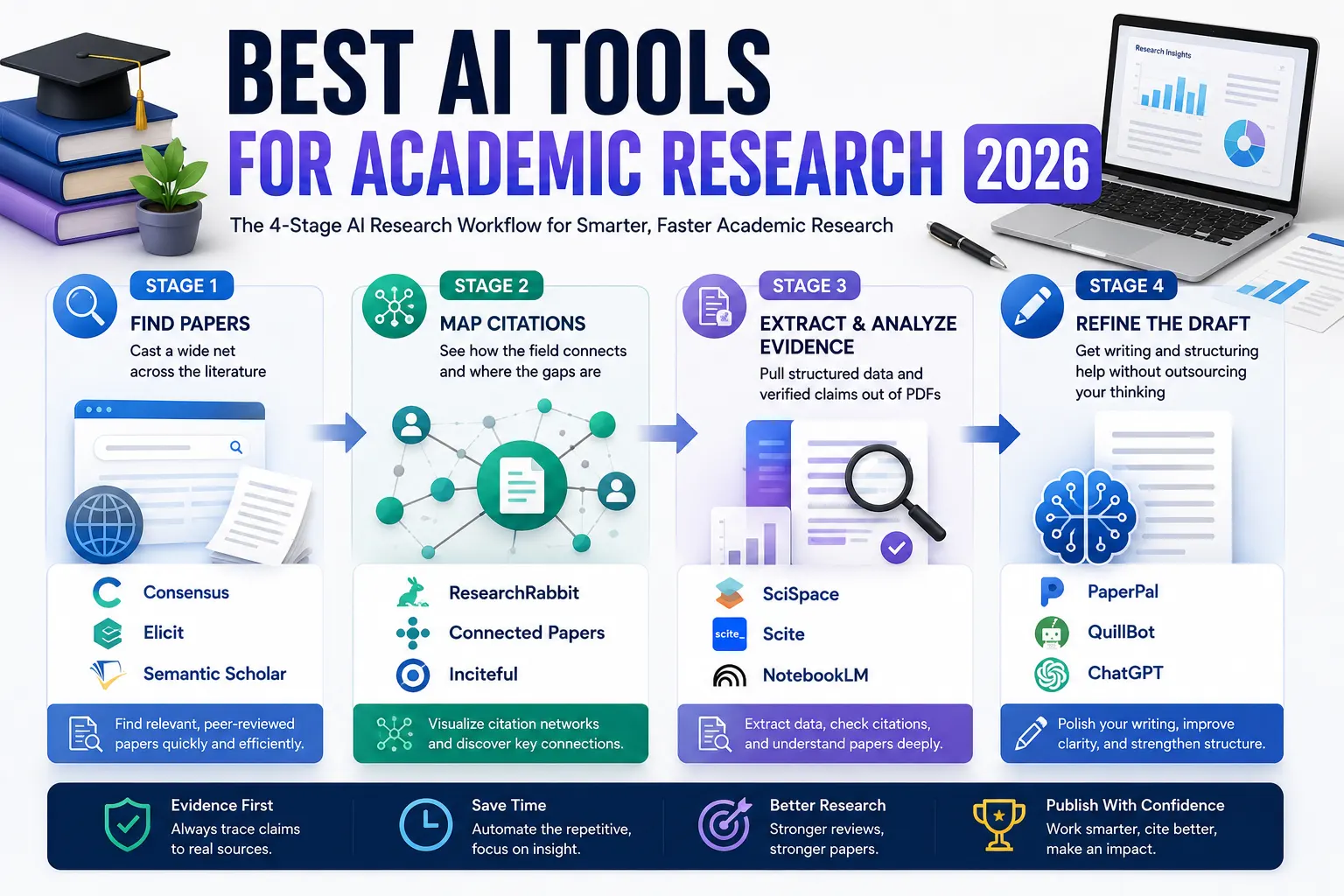
The 4-Stage AI Research Workflow
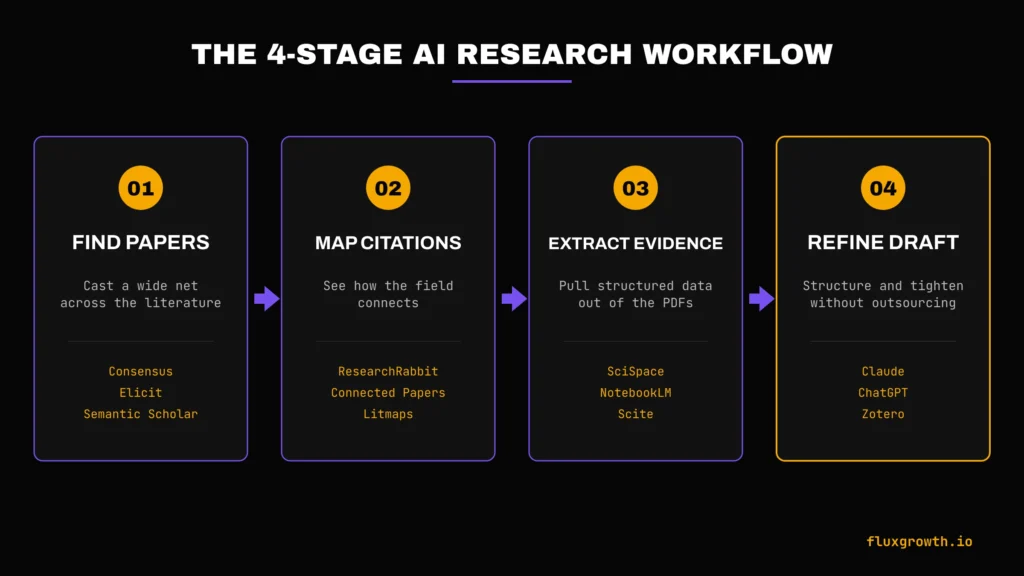
Instead of sorting these tools into vague buckets like “search tools” and “writing tools,” group them by what you’re actually doing at each stage of a research project:
- Find Papers — cast a wide net across the literature
- Map Citations — see how the field connects and where the gaps are
- Extract & Analyze Evidence — pull structured data and verified claims out of PDF
- Refine the Draft — get writing and structuring help without outsourcing your thinking
Here’s what belongs at each stage.
Stage 1: Find Papers
1.Consensus
Consensus searches over 200 million peer-reviewed papers and spits out a “Consensus Meter” , a quick visual read on whether the literature agrees, disagrees, or is split down the middle. Type a yes/no research question (does intermittent fasting improve cardiovascular health, that kind of thing) and it pulls the relevant studies instead of making you dig for them one by one.
Free plan: Unlimited quick paper search, 15 Pro messages per month, 3 Deep Review reports per month, 10 Study Snapshots per month (Consensus Help Center, verified April 30, 2026).
Paid plans: Pro runs $15/month, or $10/month billed annually ($120/year), and adds 15 Deep Reviews per month. The Deep plan runs $65/month, or $45/month billed annually ($540/year), with 200 Deep Reviews per month. Team and Enterprise pricing is custom.
Strength: The Consensus Meter makes it fast to see scientific agreement at a glance, and every synthesis links back to source papers.
Limitation: It’s limited to published, peer-reviewed literature, no reprints outside what’s indexed, and it won’t touch your uploaded PDF the way SciSpace or NotebookLM will.
2.Elicit
Elicit is built for structured, prisms-style literature reviews. It searches over 138 million papers, and its systematic review workflow can screen thousands of papers against your inclusion criteria. That’s the part of a review that normally eats a week of your life gone.
Free plan (Basic): Unlimited search across 138M+ papers, unlimited summaries, unlimited chat with full-text papers, source citations on every answer, Zotero import (Elicit, official pricing page, verified 2026). Research Agent and Report generation are capped on the free tier.
Paid plans: Plus starts around $7/user/month billed annually. Pro runs $29/month billed annually (or $49/month billed monthly) and adds the dedicated Systematic Review workflow that can screen up to 5,000 papers, plus 20 extraction columns at a time. Scale runs $49/month billed annually (or $169/month monthly) for team collaboration. Enterprise is custom-priced.
Strength: Nothing else on this list handles PRISMA-compliant screening and structured data extraction this well.
Limitation: Elicit can’t export a formal, reproducible Boolean search string which matters if a journal requires you to document your exact search methodology (Fastio, 2026).
3.Semantic Scholar
Semantic Scholar is the free academic search engine most of these other tools are quietly built on top of. Connected Papers, for instance, runs on its citation graph you’re using Semantic Scholar’s data whether you realize it or not. It indexes roughly 200 million papers across every discipline and includes AI-generated summaries.
Pricing: Completely free, no paid tier. The API requires no key for up to 100 requests per 5 minutes; a free API key raises that limit (Semantic Scholar, official FAQ; University of Calgary Library, 2026).
Strength: Broadest free coverage on this list, and it’s the backbone data source for several paid tools licenses.
Limitation: It’s a discovery and metadata tool, not an analysis tool; it won’t synthesize findings or evaluate whether a claim is well-supported the way Consensus or Scite do.
Stage 2: Map Citations
1.ResearchRabbit
Start with one paper and ResearchRabbit builds a visual map of related work, citing authors, and emerging subtopics the closest thing to seeing a research field from above instead of reading it one paper at a time.
Free plan: Free forever, with unlimited search, unlimited collections, collaboration, and up to 50 seed articles per search (ResearchRabbit, official pricing page and Free Tier guide, 2026).
Paid plan: RR+ costs $10/month in the US, UK, and Canada, with parity pricing for over 100 other countries.
Strength: The free tier is genuinely complete; most researchers may never need to upgrade.
Limitation: No full-text search inside papers, and it’s a discovery tool, not a summarizer you still have to read what it finds.
2.Connected Papers
Connected Papers builds a single visual graph from one seed paper, showing prior work and derivative work as a network you can click through.
Free plan: 5 graphs per month, with full feature access on every graph you build (Connected Papers, official product announcement; verified across multiple 2026 sources).
Paid plans: Connected Papers offers Academic and Business plans, both of which unlock unlimited graphs and all premium features. The official pricing page no longer displays public monthly or annual prices; users must begin the sign up process or request a quote for institutional plans
Strength: The clearest visual for understanding how a field’s papers relate to each other at a glance.
Limitation: The 5-graph free cap is tight if you’re mapping several subtopics in the same week, and it doesn’t summarize paper content only relationships.
3.Litmaps
Litmaps does a similar job to Connected Papers but adds ongoing monitoring; it can alert you when new papers matching your map get published, which matters for a multi-month thesis or dissertation.
Free plan: Includes 2 Litmaps, up to 100 articles per lit map, Basic Search (up to 20 inputs), and a monthly literature summary.
Paid plan: Litmaps Pro starts at $10/month (annual billing) or $120/year (two months free). Pricing is adjusted through country-based parity pricing, so the exact amount may vary depending on your location. Users affiliated with a university or educational institution automatically qualify for an Educational License, which provides 75% off the standard commercial price.
Strength: The automatic new-paper alerts are the standout feature — nothing else on this list monitors a topic for you over time.
Limitation: The free tier’s low map cap pushes serious users toward Pro faster than Connected Papers does.
Stage 3: Extract & Analyze Evidence
1.SciSpace
SciSpace lets you upload a PDF and chat with it directly, ask it to explain a confusing methods section, define jargon inline, or pull specific figures. It also has a literature review mode and AI writing assistance layered on top.
Pricing: SciSpace offers a free plan with usage limits, while paid plans (Premium, Advanced, and Max) provide higher monthly AI credits, increased concurrent research tasks, access to more advanced AI models, and significantly higher limits for features such as literature reviews and AI-powered research workflows. Chat with PDF remains available on the free plan, but paid subscriptions are designed for heavier research workloads and higher usage limits. Refer to the official pricing page for the latest plan details and feature limits.
Strength: Best-in-class for making a dense, jargon-heavy paper actually readable in real time.
Limitation: Like most PDF-chat tools, it can misread figures or tables it can’t parse cleanly. Always check the source page yourself for anything you plan to cite.
2.NotebookLM
Google’s NotebookLM turns your uploaded sources PDF, Google Docs, web pages into a notebook you can chat with, quiz yourself against, or turn into an audio overview. Here’s the thing that makes it different from a regular chat bot: every answer traces back to the exact source and passage it came from. That doesn’t make it hallucination-proof. But it makes hallucinations a lot easier to catch, because you can click through and check the passage yourself.
Free plan: 100 notebooks, 50 sources per notebook, 50 chat queries per day, audio and video overviews included. Each individual source can be up to 500,000 words or 200MB (NotebookLM, verified June 2026 following Google’s May 2026 restructure into Google AI subscription tiers).
Paid plans: Plus comes bundled with Google AI Plus at $7.99/month (200 notebooks, 100 sources/notebook). Pro comes with Google AI Pro at $19.99/month (500 notebooks, 300 sources/notebook, 20 Deep Research reports/day). Ultra starts at $99.99/month via Google AI Ultra (up to 600 sources/notebook).
Strength: Source-grounded answers mean it’s far less likely to invent a claim that isn’t in your uploaded material a real advantage over general chat bots.
Limitation: No offline mode, and everything processes on Google’s servers, so it’s not the right tool for confidential or unpublished data.
3.Scite
Scite isn’t really about finding papers. It’s about grading them. Its “Smart Citations” classify every citation as supporting, contrasting, or simply mentioning the claim it’s citing so you can see, at a glance, whether a finding has held up or gotten quietly demolished since publication.
Free plan: Limited number of Smart Citation lookups per month (exact cap not publicly disclosed).
Paid plan: Individual (Personal) plans start at $20/month on monthly billing or $12/month when billed annually ($144/year). Team, Organization, and Developer/API plans are available with custom pricing.
Strength: Nothing else on this list tells you whether later research actually supports or contradicts the paper you’re about to cite.
Limitation: It’s a citation-evaluation tool, not a discovery engine, pair it with Consensus or Semantic Scholar rather than using it as your only search tool.
4.Perplexity
Perplexity isn’t academic-only, but its citation-first design and Deep Research mode make it useful for fast, sourced background reading before you go deep on a topic and treat it as a starting point, not a primary source finder.
Free plan: Unlimited basic search, roughly 5 Pro Searches per day, and a small daily Deep Research allowance.
Paid plans: Pro is $20/month or $200/year, and includes unlimited Pro Search plus a daily Deep Research allotment and access to multiple frontier AI models. Education Pro is $10/month for verified students.
Strength: Fast, cited answers for background context and cross-checking claims across the open web, not just academic databases.
Limitation: It searches the general web alongside academic sources, so results mix scholarly and non-scholarly material you have to filter that yourself, and independent 2026 testing has flagged real citation-accuracy error rates worth knowing about before you trust it blind (TechJack Solutions, 2026).
Stage 4: Refine the Draft
1.Claude and ChatGPT
Once you’ve found the papers, mapped the field, and extracted the evidence, general-purpose AI assistants like Claude and ChatGPT are genuinely useful for structuring an argument, tightening prose, or pressure-testing your outline as long as you’re feeding them your own verified research, not asking them to generate citations from memory.
Strength: Long context windows (particularly Claude) mean you can paste in an entire literature review draft plus your extracted evidence and get structural feedback in one pass.
Limitation: Neither tool should be your source of facts or citations for a paper. Treat them purely as editors and thinking partners, never as research databases.
Comparison Table 1: Finding & Mapping Tools
| Tool | Best For | Database/Scope | Main Strength | Main Limitation | Free Plan? | Pricing |
| Consensus | Yes/no evidence questions | 200M+ peer-reviewed papers | Consensus Meter shows scientific agreement at a glance | Peer-reviewed literature only, no PDF uploads | Yes | Free / $10–$15/mo Pro / $45–$65/mo Deep |
| Elicit | Systematic reviews | 138M+ papers | PRISMA-style screening at scale | No exportable Boolean search string | Yes | Free / ~$7/mo Plus / $29–$49/mo Pro |
| Semantic Scholar | Broad free search | ~200M papers, all disciplines | Free API, powers other tools | Discovery only, no synthesis | Yes | Free (no paid tier) |
| ResearchRabbit | Visual paper discovery | 280M+ articles via citation graph | Free tier is fully featured | No full-text search inside papers | Yes | Free / $10/mo RR+ |
| Connected Papers | Single-paper citation graphs | Built on Semantic Scholar data | Clear visual field overview | 5 graphs/month free cap | Yes | Academic & Business plans available (official pricing not publicly listed) |
| Litmaps | Ongoing topic monitoring | Citation-graph based | New-paper alerts over time | Free plan limited to 5 graphs/month | Yes | Free plan limited to 2 Litmaps (100 papers each) |
Comparison Table 2: Evidence & Drafting Tools
| Tool | Best For | Database/Scope | Main Strength | Main Limitation | Free Plan? | Pricing |
| SciSpace | Chatting with dense PDFs | User-uploaded papers + search | Explains jargon inline | Can misread complex figures/tables | Yes | Free / Premium starts at $12/month (annual) or $20/month (monthly) |
| NotebookLM | Source-grounded study notes | Your uploaded sources only | Answers trace to exact source passage | No offline mode; data on Google servers | Yes | Free / $7.99–$19.99+/mo |
| Scite | Verifying if evidence holds up | 1.6B+ citation statements | Classifies citations as supporting/contrasting | Not a discovery engine on its own | Yes (limited) | Free trial / Personal $20/mo or $12/mo annually; Team & Enterprise custom pricing |
| Perplexity | Fast cited background reading | Open web + academic sources | Deep Research mode, multi-model access | Mixes scholarly and non-scholarly sources | Yes | Free / $20/mo Pro |
| Claude / ChatGPT | Structuring and editing drafts | General-purpose LLM | Long-context structural feedback | Not a citation or fact source | Yes (limited) | Free / ~$20/mo Pro tiers |
Sample AI Research Workflow
Here’s how these tools chain together on an actual literature review, start to finish:
- Find papers with Consensus. Start with your core research question phrased as a yes/no claim. Use the Consensus Meter to see where the field stands before you read a single full paper.
- Expand with Semantic Scholar or Elicit. Broaden your search past what Consensus surfaced, especially for adjacent subtopics your first question didn’t cover.
- Map the field with ResearchRabbit. Drop your 5–10 strongest seed papers in and let it surface citation clusters, key authors, and papers you missed.
- Build a focused graph in Connected Papers for your single most important seed paper, to see its prior work and derivative work at a glance.
- Read the dense ones in SciSpace or NotebookLM. Upload your shortlisted PDF and use chat to pull out methods, sample sizes, and key findings without re-reading every page.
- Verify contested claims in Scite. Before you cite anything controversial or older than a few years, check whether later research has supported or challenged it.
- Organize everything in Zotero. Export your citations and keep your reference list clean and exportable from day one not scrambled together the night before your deadline.
- Draft and structure with Claude or ChatGPT. Feed it your own extracted evidence and ask for structural feedback, never ask it to supply the citations itself.
No tool in this chain thinks for you. Each one just removes a bottleneck search volume, citation mapping, PDF fatigue so you spend your time evaluating evidence instead of hunting for it.
Using AI for Research Ethically
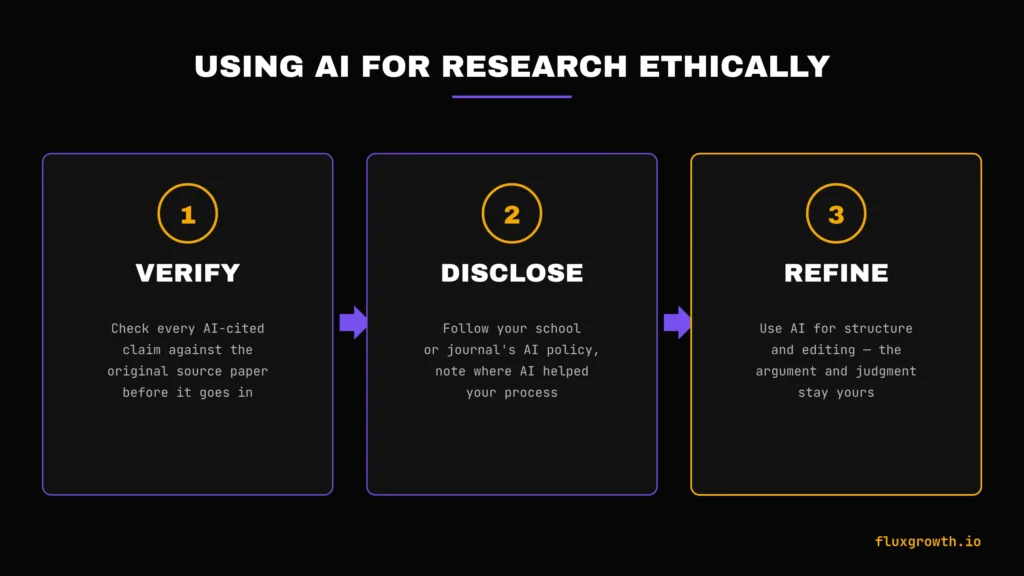
Verify. Every AI-generated summary, citation, or claim needs to be checked against the original source before it goes in your paper. AI research tools reduce hallucination risk compared to general chat bots because they cite sources but “reduced” isn’t “zero.” Open the paper. Confirm the claim is actually in there.
Disclose. If your institution or journal has an AI use policy, follow it, and note where AI tools assisted your search or synthesis process. This isn’t optional, it’s part of doing transparent, reproducible research.
Refine, don’t replace. AI tools are strongest at the mechanical parts of research: search, extraction, formatting, first-draft structure. The parts that make a piece of research yours the argument, the interpretation, the judgment about what matters are still your job. A search engine, however well-cited, cannot tell you which finding actually answers your question.
Common Mistakes When Using AI for Research
- Trusting AI without verification. Every synthesized claim needs a source check, no exceptions.
- Citing the AI tool instead of the original source. Your citation should point to the paper, not to Consensus or Elicit’s summary of it.
- Relying on one tool for the whole workflow. No single tool covers search, mapping, extraction, and writing well; that’s the entire reason for the 4-stage approach above.
- Hallucinated references. This risk drops with citation-grounded tools like Elicit, Consensus, and NotebookLM, but it never hits zero. Check every reference before it goes in your bibliography.
Frequently Asked Questions
What is the best AI tool for academic research?
There isn’t one best tool, it depends on the stage. Consensus and Elicit are strongest for finding evidence-backed answers, ResearchRabbit and Connected Papers are strongest for mapping a field, and NotebookLM or SciSpace are strongest for reading dense PDF.
Are AI research tools free?
Most have a free tier. Semantic Scholar and ResearchRabbit are free with no meaningful paywall for core features. Consensus, Elicit, NotebookLM, Connected Papers, Litmaps, and Scite all cap free usage and charge for higher volume.
Which AI tool is best for literature reviews?
Elicit, for structured, prisms-style systematic reviews. Consensus for faster, less formal evidence synthesis.
Can ChatGPT be used for academic research?
For structuring arguments and editing prose, yes. For finding or citing sources, no it isn’t grounded in a verified academic database and can fabricate citations.
Which AI tool helps with citations?
Scite for evaluating whether a citation still holds up. Zotero (with AI plugins) for managing and formatting your reference list.
What AI tool reads research papers?
SciSpace and NotebookLM both let you upload PDF and chat with them directly.
Is it ethical to use AI for research?
Yes, when it’s used to accelerate search, mapping, and extraction and when every AI-assisted claim is independently verified before publication.
What I’d Do If I Were Starting Academic Research Today
In my own research workflow, this process has saved me a significant amount of time compared to relying on a single AI tool. Instead of manually searching through dozens of papers or asking a chat bot to summarize everything, I first identify the most relevant studies with Consensus or Semantic Scholar, expand the literature using ResearchRabbit, and then use NotebookLM or SciSpace to understand complex papers more efficiently.
By the time I start writing, I’ve already verified the key evidence with Scite and organized every reference in Zotero, which makes the final drafting process much faster and reduces the risk of citing weak or outdated research. If you’re also looking for AI tools that can help with content creation, SEO, and research workflows beyond academia, check out our guide to the Best AI SEO Tools in 2026 (Free & Paid)
This workflow helps me spend less time searching for information and more time analyzing, writing, and producing research that’s both accurate and well-supported by credible sources.