FluxGrowth is reader-supported. Some links in our guides are affiliate links — if you buy through one we may earn a commission, at no extra cost to you. It never changes which tools we recommend. How we test tools.
Last updated: August 2026
This guide is part of our AI Automation hub – everything we have published on automating a small business with AI, in one place.
You don’t have a shortage of AI tools. You have too many of them, and no clear way to tell which ones actually save you time versus which ones just add another tab and another login. This guide breaks down the best AI productivity tools 2026 has to offer, organized by what they actually do, not by hype. Match a tool to your workflow, your team size, and your budget in the next ten minutes.
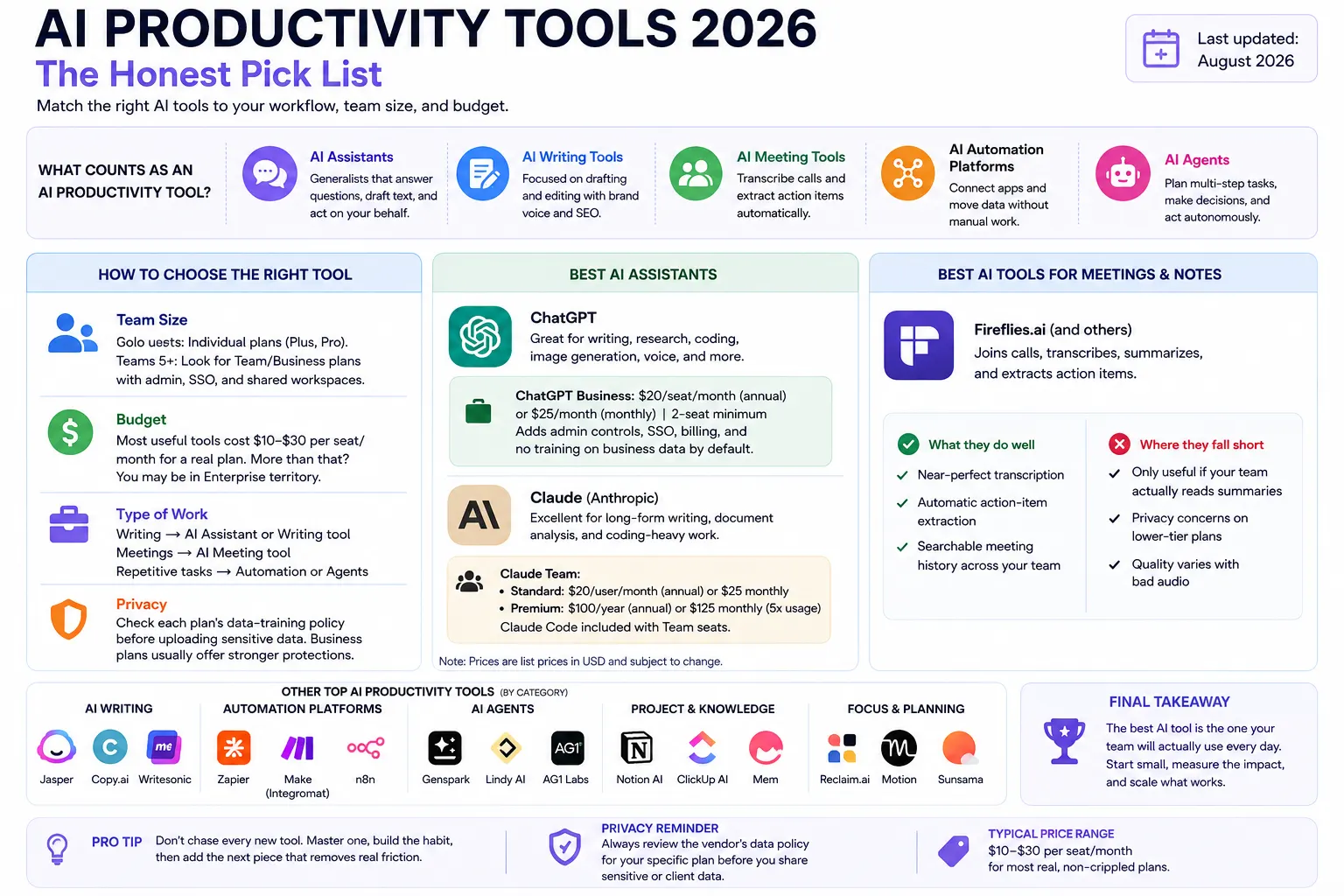
What Counts as an “AI Productivity Tool” in 2026?
The category got messy fast. Here’s the rundown, in plain English.
AI assistants are the generalists — ChatGPT, Claude, and Gemini. They answer questions, draft text, write code, research topics, and increasingly act on your behalf right inside the chat window. For a deeper look at developer-focused assistants, see our guide to the best AI coding assistants in 2026
AI writing tools narrow the focus to drafting and editing, usually with brand-voice or SEO features layered on top of a general model.
AI meeting tools join your calls, transcribe them, and pull out action items automatically no more typing notes one-handed while you talk.
AI automation platforms connect your apps and move data between them without you touching anything. Think: when X happens, do Y.
AI agents take automation a step further. They can plan a multi-step task, make real decisions along the way, and only check in with you when they’re stuck or done.
Most people don’t need one of each. They need one or two tools that actually fit how they already work.
How to Choose an AI Productivity Tool for Your Workflow
Before you pick a tool, answer four questions honestly.
Team size. A solo freelancer and a 12-person agency have almost nothing in common here. Solo users should default to individual plans (Plus, Pro) and skip anything billed per seat with a minimum headcount. Teams of 5+ should look at Team or Business tiers specifically that’s where admin controls, SSO, and shared workspace live.
Budget. Most useful tools now cluster in the $10–30 per seat per month range for a real, non-crippled plan. Quoted more than that for a basic seat? You’ve wandered into Enterprise territory you don’t need yet.
Type of work. Writing-heavy work wants an AI assistant or a writing-specific tool. Meeting-heavy work wants a dedicated meeting recorder. Repetitive, multi-app tasks want automation. Don’t buy a Swiss Army knife when you need a screwdriver.
Privacy. If you’re handling client data, contracts, or anything covered by an NDA, check the specific plan’s data-training policy before uploading it. Business and commercial plans generally provide stronger default data protections than consumer plans, but the exact terms vary by vendor. For example, OpenAI says ChatGPT Business data is not used to train models by default, while personal ChatGPT Free, Plus, and Pro workspace have training enabled by default with an opt-out control
Best AI Assistants for General Productivity
If you only adopt one tool this year, it’s a general AI assistant. Everything else on this list is more specialized.
ChatGPT remains the default pick for most people, thanks to its broad mix of writing, research, coding, image generation, and voice features.
ChatGPT Business costs $20 per seat per month annually or $25 monthly, with a two-seat minimum. It adds admin controls, SAML SSO, centralized billing, and no training on business data by default. Personal Plus uses a different data policy, with an opt-out available for model training.
Where it falls short: the different plans and usage limits can get confusing, especially for teams with heavier workloads. Enterprise pricing isn’t publicly listed, so larger organizations need to contact OpenAI sales.
Claude, from Anthropic, is a strong choice for long-form writing, document analysis, and coding-heavy work. In my own testing, for example, “I run the same 3,000-word client brief through both and Claude needed fewer editing rounds.
Here’s the useful part for teams: Claude Team has Standard and Premium seats, so a small agency can mix and match based on workload. Standard seats cost $20 per user/month when billed annually or $25 monthly, while Premium seats cost $100 annually or $125 monthly. Premium seats provide significantly higher usage than Standard seats.
Claude Code is included with every Team seat, while Premium seats give heavier users more capacity. Teams can also enable usage credits so members can continue using Claude, Claude Code, and Cowork after reaching their included limits.
Conflict-of-interest note: FluxGrowth uses Claude for parts of its own content workflow. Pricing and plan details above are based on Anthropic’s current documentation the recommendation should be based on your workflow rather than that relationship.
Best AI Tools for Meetings and Notes
If your calendar is full of client calls, standups, or sales demos, a dedicated meeting tool pays for itself fast. Tools like Fireflies.ai join the call, transcribe it, and turn the transcript into action items and a short summary you can forward instead of you typing notes one-handed while you talk.
What they do well: near-perfect transcription, automatic action-item extraction, searchable meeting history across your whole team.
Where they fall short: they’re only as useful as your habit of actually opening the summary afterward. (Most teams never look at week-old meeting notes, AI or not.) Someone still has to decide who owns each follow-up. The tool won’t do that part for you.
Best AI Tools for Scheduling and Time Management
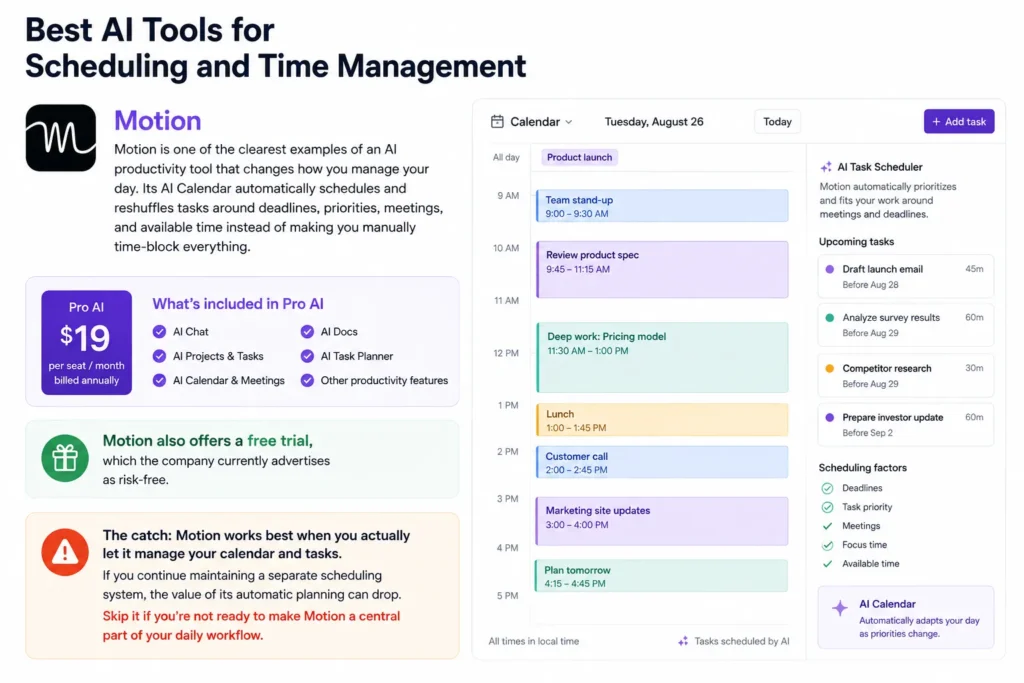
Motion is one of the clearest examples of an AI productivity tool that changes how you manage your day. Its AI Calendar automatically schedules and reshuffles tasks around deadlines, priorities, meetings, and available time instead of making you manually time-block everything.
Pro AI costs $19 per seat/month when billed annually and includes AI Chat, AI Projects & Tasks, AI Calendar & Meetings, AI Docs, AI Task Planner, and other productivity features. Motion also offers a free trial, which the company currently advertises as risk-free.
The catch: Motion works best when you actually let it manage your calendar and tasks. If you continue maintaining a separate scheduling system, the value of its automatic planning can drop. Skip it if you’re not ready to make Motion a central part of your daily workflow.
Best AI Workspace and Writing Tools
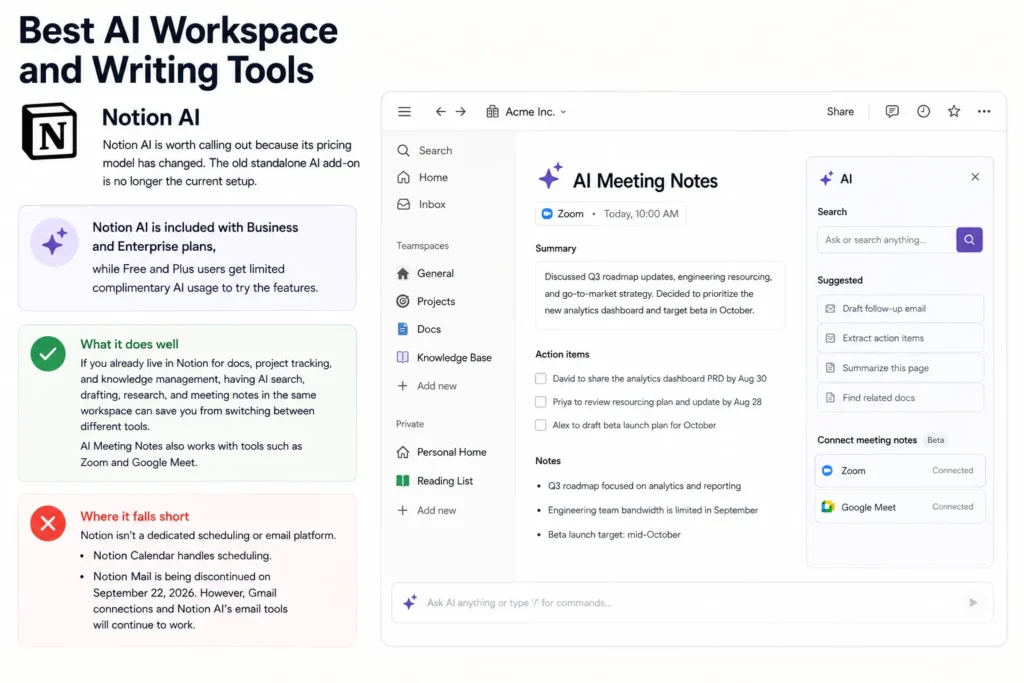
Notion AI is worth calling out because its pricing model has changed. The old standalone AI add-on is no longer the current setup. Notion AI is included with Business and Enterprise plans, while Free and Plus users get limited complimentary AI usage to try the features.
What it does well: if you already live in Notion for docs, project tracking, and knowledge management, having AI search, drafting, research, and meeting notes in the same workspace can save you from switching between different tools. AI Meeting Notes also works with tools such as Zoom and Google Meet.
Where it falls short: Notion isn’t a dedicated scheduling or email platform. Notion Calendar handles scheduling, while Notion Mail is being discontinued on September 22, 2026. However, Gmail connections and Notion AI’s email tools will continue to work.
Best AI Automation Platforms
Zapier is the connective tissue that makes the rest of your stack talk to each other when a form gets submitted, it can add the lead to your CRM, notify your team in Slack, and kick off a welcome sequence, all without you touching anything. Its AI layer now includes a Copilot feature for building these automations conversationally instead of clicking through a builder manually.
Automation tools like this are the least glamorous item on this list. Often the highest-leverage one, too. The honest limitation: setup takes real time upfront, and a broken automation fails silently unless you build in alerts so budget an hour to actually test each workflow before trusting it.
Comparison: AI Productivity Tools 2026 at a Glance
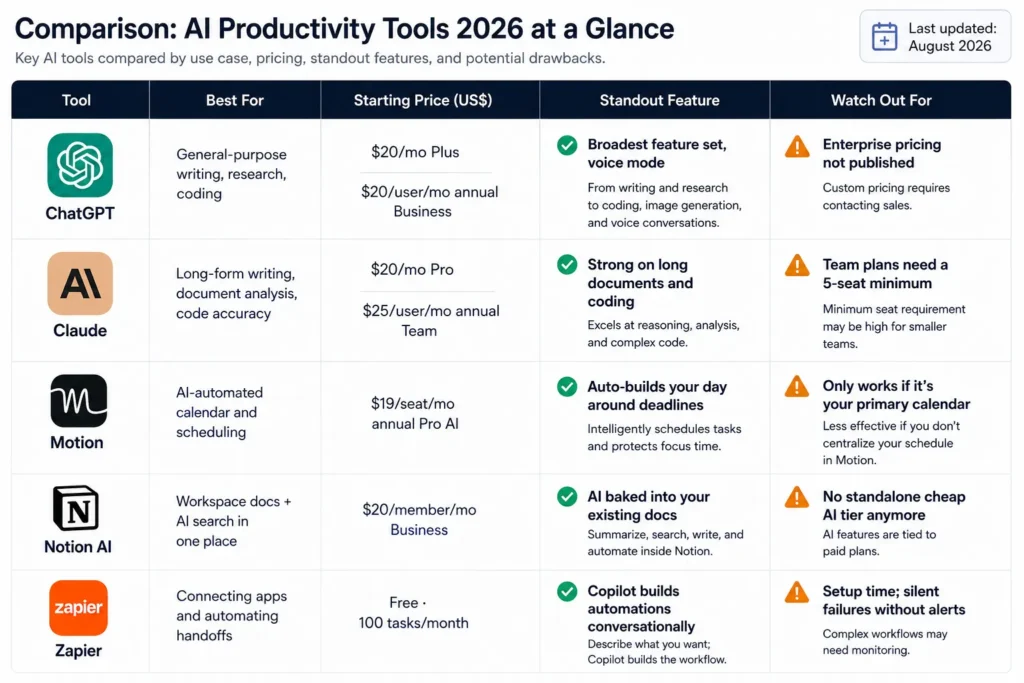
| Tool | Best For | Starting Price (US$) | Standout Feature | Watch Out For |
| ChatGPT | General-purpose writing, research, coding | $20/mo Plus · $20/user/mo annual Business | Broadest feature set, voice mode | Enterprise pricing not published |
| Claude | Long-form writing, document analysis, code accuracy | $20/mo Pro · $25/user/mo annual Team | Strong on long documents and coding | Team plans need a 5-seat minimum |
| Motion | AI-automated calendar and scheduling | $19/seat/mo annual Pro AI | Auto-builds your day around deadlines | Only works if it’s your primary calendar |
| Notion AI | Workspace docs + AI search in one place | $20/member/mo Business | AI baked into your existing docs | No standalone cheap AI tier anymore |
| Zapier | Connecting apps and automating handoffs | Free · 100 tasks/month | Copilot builds automations conversationally | Setup time; silent failures without alerts |
What I’d Do If I Were Starting Today
If I were building a productivity stack for FluxGrowth today, I’d start with ChatGPT as the main AI assistant for research, content planning, writing, and everyday marketing tasks. I’d add Notion AI for organizing content, documents, and internal knowledge, and use Zapier only for repetitive tasks that are worth automating. I wouldn’t subscribe to every AI tool at once because most productivity gains come from improving a few repeatable workflows, not from having the biggest tool stack.
From my experience, the biggest time savings come when an AI tool becomes part of the workflow rather than something you occasionally open for help e.g., “Using AI for content research and first drafts saves me around X hours per week.” I’d test one tool for two weeks, measure the time it actually saves, and only then add another specialist tool. That approach keeps the stack simpler, cheaper, and easier to manage while giving you real evidence about what is worth paying for.
FAQ
What is the best free AI productivity tool?
ChatGPT’s Free tier and Claude’s Free tier both offer real daily use without a credit card, though both cap usage and route you to a lighter model during peak times. For most casual use, either is enough to test whether an AI assistant fits your workflow before paying.
Is ChatGPT or Claude better for productivity?
Neither wins outright ChatGPT has the broader feature set and voice mode, while Claude tends to perform better on long documents and coding accuracy. The better question is which one fits your specific task; testing both on your actual work for a week is more useful than any general ranking.
How much do AI productivity tools cost?
Most individual plans run $20 per month, and most team plans run $20–30 per seat per month for a real, full-featured tier. Enterprise pricing for any of these tools is typically custom-quoted and not published, so budget for a sales conversation if you’re scaling past a small team.
Are AI productivity tools safe for business data?
It depends on the specific tool and plan. Business plans often provide stronger data protections than personal plans, but policies vary. Always check training, retention, and data-access policies before uploading client or confidential information.
Can AI tools replace a project manager?
No AI tools can track tasks, summarize meetings, and draft updates, but someone still has to make the calls on priority, tradeoffs, and who owns what. Treat these tools as support for a PM’s judgment, not a replacement for it.
What AI tool should a solopreneur start with?
A general AI assistant, full stop. It’s the one tool that touches writing, research, and planning all at once, and it’s cheap enough to test for a month before committing to anything more specialized.
The Bottom Line
The right AI productivity tool for 2026 isn’t the one with the longest feature list, it’s the one that fits the workflow you already have and pays for itself within the first month. Start with one general AI assistant, use it daily for two weeks, and only add a specialist tool once you can name the exact bottleneck it’s solving. Which one are you testing first?