FluxGrowth is reader-supported. Some links in our guides are affiliate links — if you buy through one we may earn a commission, at no extra cost to you. It never changes which tools we recommend. How we test tools.
Last updated: August 2026
You’ve got a budget for one AI coding tool, maybe two. The marketing pages for Claude Code and GitHub Copilot promise the same thing: faster shipping, fewer bugs, less boilerplate. They’re not the same tool, though. Claude Code runs as a terminal-based coding agent. GitHub Copilot lives inside your editor and your GitHub workflow. This guide walks through pricing, real coding workflows, agentic features, and data controls for both so you can pick based on how your team actually works, not a feature checklist.
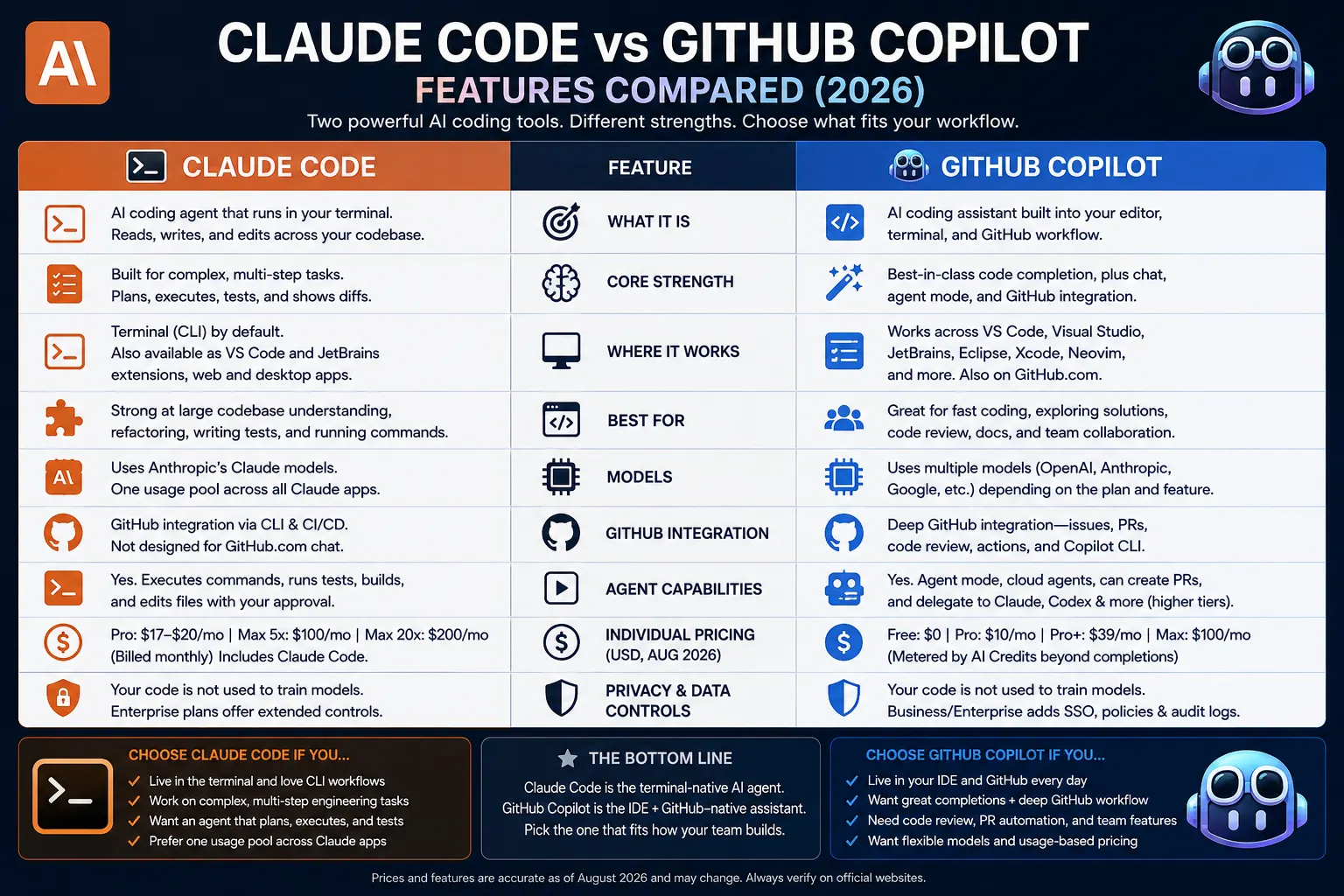
Claude Code vs. GitHub Copilot at a Glance
Claude Code runs from your terminal (or a VS Code/JetBrains extension). You hand it a task, it reads and writes across your project, and you review the diff. GitHub Copilot lives where you already do inline in your editor, in chat, in GitHub.com itself.
Price-wise: Claude Code runs $17–$200/month for individuals. Copilot’s cheaper at the door free to $100/month with team seats running $19–$39.
A note on this comparison: Claude Code is built by Anthropic, the company behind Claude, the same model this article’s author uses daily. We’ve tried to keep this comparison factual and use-case driven rather than promotional, and we’ve flagged anywhere a claim comes from a source other than the vendors’ own documentation.
What Is Claude Code?
Claude Code is a terminal-based AI coding agent that reads your codebase, writes and edits files, runs builds and tests, and executes multi-step tasks with minimal hand-holding. It’s not primarily an autocomplete tool. It’s closer to handing a task to a junior developer and reviewing their diff.
The core experience is the CLI. You type claude in your terminal, describe a task in plain language (“refactor the auth module to use JWT, then update the tests”), and it works through it, showing you diffs to approve along the way. Claude is also part of the broader AI tools landscape covered in our Best AI Tools in 2026 roundup.
Anthropic also ships an official VS Code extension and a JetBrains plugin on top of the same CLI engine, plus a web app and desktop app. All of these interfaces share one underlying agent and one usage pool tied to your Claude account.
Claude Code integrates with GitHub through the CLI and CI/CD pipelines, not through a native GitHub.com chat interface the way Copilot does. It’s built to be driven from your terminal or editor, not the GitHub web UI.
In short: if your workflow already lives in the terminal running tests, driving Git, scripting deploys Claude Code slots into that motion instead of asking you to leave it.
What Is GitHub Copilot?
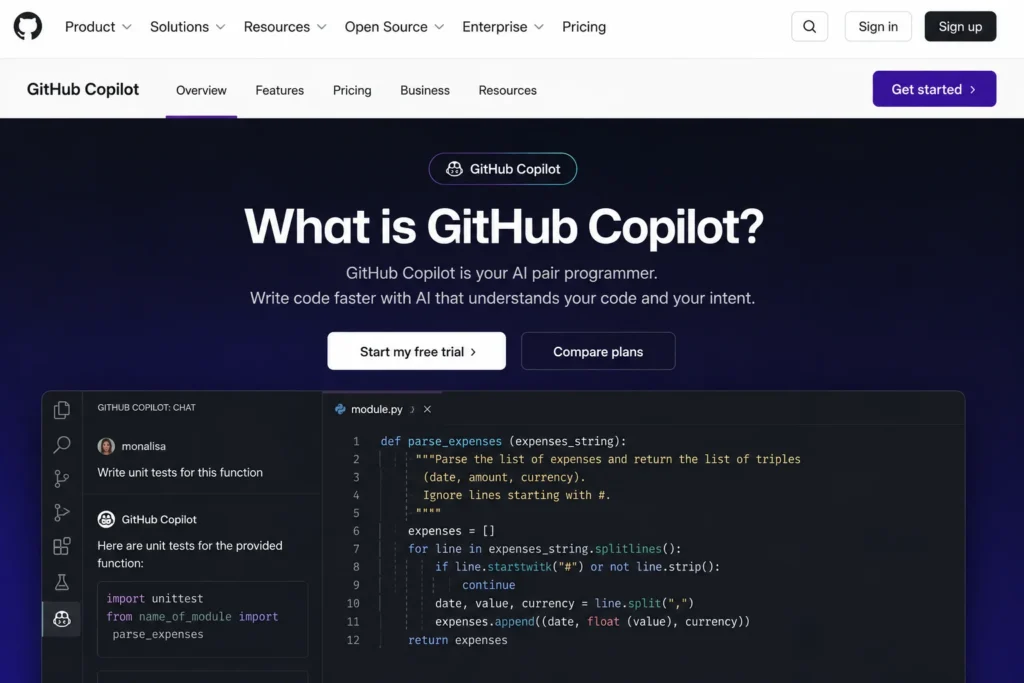
GitHub Copilot is an AI coding assistant built into your editor, terminal, and GitHub workflow. It provides code completion, chat, agent mode, code review, and cloud-agent capabilities, with different features depending on your plan and development environment.
Copilot works across VS Code, Visual Studio, JetBrains IDEs, Eclipse, Xcode, and Neovim, although specific features vary by editor. It also works directly with GitHub, which makes it particularly useful for developers whose workflow already revolves around repositories, issues, and pull requests.
The biggest pricing change is GitHub’s move to GitHub AI Credits for metered Copilot features. 1 AI Credit equals $0.01, and usage depends on the model and number of tokens consumed. Chat, agent mode, Copilot CLI, code review, and other AI features can consume credits, while code completions and next-edit suggestions remain unlimited on paid individual plans.
For individual users, GitHub currently lists Copilot Pro at $10/month, Pro+ at $39/month, and Max at $100/month. Max is designed for sustained, high-volume agent workflows and includes a larger AI Credit allowance.
Copilot’s agent capabilities have also expanded beyond simple autocomplete. Paid plans can use cloud agents, code review, agent mode, and in higher tiers delegate work to third-party coding agents such as Claude and Codex. Copilot can also create pull requests from assigned work, making it more than an autocomplete tool.
In short: GitHub Copilot is the stronger fit when your development workflow already lives in GitHub and your IDE. Its biggest advantage over Claude Code is not necessarily the underlying model; it’s the integration between coding, repositories, pull requests, code review, and agent workflows
Pricing Compared (U.S. Dollars, August 2026)
Pricing for both tools has changed significantly in 2026, particularly with GitHub Copilot moving to usage-based AI Credits and Claude adding usage-based credits on paid plans. The prices below are an August 2026 snapshot, so confirm the official pricing pages before budgeting or publishing.
Individual plans
Claude Code isn’t sold on its own. It’s bundled into a Claude subscription, and your coding usage draws from the same pool as your regular Claude chat usage.
- Claude Pro: $17/month billed annually ($200 upfront) or $20/month billed monthly. Includes Claude Code, Claude Cowork, and access to Claude’s standard models.
- Claude Max 5x: $100/month roughly 5x the per-session usage of Pro.
- Claude Max 20x: $200/month roughly 20x Pro’s usage, aimed at all-day, heavy Claude Code sessions.
GitHub Copilot’s individual tiers run from free to $100/month, with AI Credits metering everything beyond code completions.
- Copilot Free: $0/month includes up to 2,000 code completions per month, plus limited chat and agent usage. Copilot Free also includes a monthly allowance of GitHub AI Credits, with access to models through automatic model selection.
- Copilot Pro: $10/month unlimited completions plus a monthly AI Credits allowance for chat and premium models.
- Copilot Pro+: $39/month a larger credit allowance and broader premium-model access.
- Copilot Max: $100/month built for sustained, agent-driven workflows, with $100/month in AI Credits.
Team and Enterprise plans
- Claude Team Standard: $20/seat/month billed annually ($25/month billed monthly), 2–150 seats.
- Claude Team Premium: $100/seat/month billed annually ($125/month billed monthly) roughly 5x Standard usage.
- Claude Enterprise: $20/seat/month plus usage billed at API rates, annual billing only, adds SSO, SCIM, audit logs, and custom data retention on top of Team.
- Copilot Business: $19/user/month, includes a pooled AI Credits allowance, organizational policy controls, and IP indemnity.
- Copilot Enterprise: $39/user/month, available only with GitHub Enterprise Cloud. It adds deeper GitHub.com integration, organization codebase indexing, enterprise controls, and 3,900 AI Credits per user per month. The $39 price covers Copilot Enterprise, not the separate GitHub Enterprise Cloud license.
How usage-based billing actually works
Here’s the thing: neither of these is really a flat subscription. Claude Code and your regular Claude chat pull from the same usage pool, on a rolling five-hour window with weekly caps stacked on top. Run a marathon refactor session and you’ve just eaten into the capacity you’d use for chat later that day.
Copilot works differently. Code completions never touch your AI Credits at all; only chat, agent runs, and premium-model calls draw them down. If you’re mostly leaning on inline suggestions, you might not hit your allowance for months.
One pricing detail worth flagging with an expiration date: GitHub’s own documentation lists Claude Sonnet 5 inside Copilot at promotional pricing $2 per million input tokens, $10 per million output tokens through August 31, 2026, after which standard rates apply.
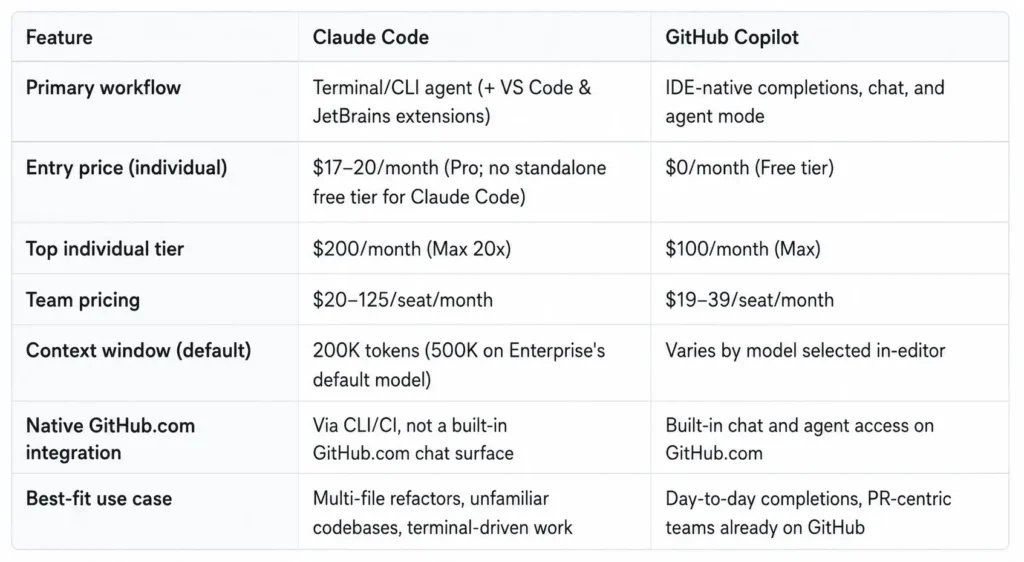
Comparison Table
| Claude Code | GitHub Copilot | |
| Primary workflow | Terminal/CLI agent (+ VS Code & JetBrains extensions) | IDE-native completions, chat, and agent mode |
| Entry price (individual) | $17–20/month (Pro; no standalone free tier for Claude Code) | $0/month (Free tier) |
| Top individual tier | $200/month (Max 20x) | $100/month (Max) |
| Team pricing | $20–125/seat/month | $19–39/seat/month |
| Context window (default) | 200K tokens (500K on Enterprise’s default model) | Varies by model selected in-editor |
| Native GitHub.com integration | Via CLI/CI, not a built-in GitHub.com chat surface | Built-in chat and agent access on GitHub.com |
| Best-fit use case | Multi-file refactors, unfamiliar codebases, terminal-driven work | Day-to-day completions, PR-centric teams already on GitHub |
Takeaway: teams that live in pull requests and GitHub Actions get more out-of-the-box value from Copilot. Developers doing large-scale, multi-step changes tend to lean on Claude Code’s agent loop.
Coding Workflows: Where Each Tool Actually Wins
Large refactors, migrations, and unfamiliar codebases
Claude Code’s terminal-agent model is built for tasks that span many files and steps: a framework migration, a dependency upgrade across a monorepo, or getting oriented in a codebase you didn’t write. You describe the end state. It works through the files in sequence instead of making you open and edit each one yourself.
In-editor completions and day-to-day coding
For the bread-and-butter of typing code inline suggestions as you write, a quick chat question without leaving your cursor Copilot’s IDE-native design is the more frictionless experience. Its completions are free and unlimited on every paid plan, so routine, boilerplate-heavy work has no metering to think about at all.
Debugging and code review
Both tools can explain errors and suggest fixes, but they get there differently. Copilot’s code review feature runs inside GitHub’s PR interface, so comments and suggested changes live where your team already collaborates.
Claude Code’s edge is that it can run your test suite itself. Ask it to “fix the failing tests” and it actually executes them; it’s not just reading the error text you paste in and guessing.
Repository and PR-level work
This is where GitHub’s home-field advantage shows up clearest. Copilot Chat on GitHub.com, PR summaries, Actions integration all native to the platform Copilot was built for. Claude Code can drive Git and open PRs from the terminal or through CI (it just doesn’t have a dedicated GitHub.com chat surface the way Copilot does).
Summary: neither tool replaces the other’s strength. Copilot wins on in-context, in-editor speed. Claude Code wins on autonomous, multi-step execution.
Agentic Coding: Terminal Agent vs. Cloud Agent Mode
Claude Code was built to work this way from day one. You hand it a task say, “migrate this Express app to Fastify” and it plans the file edits, runs the commands, runs the tests, and hands you diffs to review. Not keystrokes. Diffs.
If you’d rather not live in the terminal, the VS Code and JetBrains extensions put the same agent in a panel next to your code.
GitHub Copilot’s Agent mode and its Max tier bring a comparable autonomous workflow: the agent works through multi-file changes and opens pull requests with less direct supervision than standard chat-assisted completions. It’s a newer addition to Copilot’s lineup than Claude Code’s terminal-first design and it’s priced as the top individual tier ($100/month), not bundled into the entry-level plans.
In practice: if agentic, multi-step execution is your primary reason for buying an AI coding tool, that’s Claude Code’s native mode of operation. If you want agentic capability as an occasional upgrade on top of an otherwise IDE-centric habit, Copilot Agent mode or Max lets you dial it up without switching tools.
Privacy, Data Controls, and Enterprise Requirements
Both vendors publish opt-out-by-default training policies on paid plans. The specifics of what’s included differ by tier, though, and this is where you actually need to read the fine print.
Claude’s paid plans (Pro, Max, Team, Enterprise) opt-out on model training by default, per Anthropic’s pricing page. Enterprise adds SSO, SCIM, audit logs, a compliance API, custom data retention controls, network-level access control, IP allowlisting, and a HIPAA-ready offering.
GitHub Copilot Business: This is the first Copilot tier that provides organization-level controls such as content exclusion, centralized policy management, and business/enterprise data protections. GitHub states its agreements with Business and Enterprise customers prohibit Copilot data from training. Additionally, individual Free, Pro, and Pro+ users have different data controls and can opt out.
For regulated industries or teams handling sensitive code: don’t take either vendor’s marketing copy at face value. Pull the current Data Processing Agreement or trust documentation for the specific tier you’re evaluating before signing anything.
Which Tool Should You Choose?
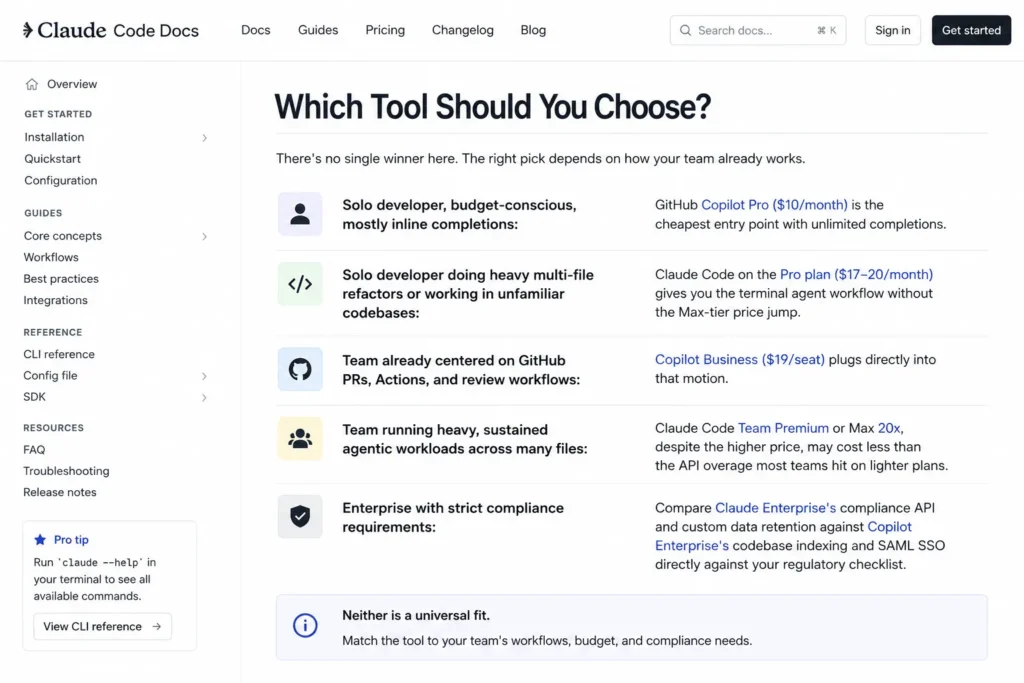
There’s no single winner here. The right pick depends on how your team already works.
- Solo developer, budget-conscious, mostly inline completions: GitHub Copilot Pro ($10/month) is the cheapest entry point with unlimited completions.
- Solo developer doing heavy multi-file refactors or working in unfamiliar codebases: Claude Code on the Pro plan ($17–20/month) gives you the terminal agent workflow without the Max-tier price jump.
- Team already centered on GitHub PRs, Actions, and review workflows: Copilot Business ($19/seat) plugs directly into that motion.
- Teams bear heavy, ongoing agentic workloads across many files. Even with higher prices, Claude Code Team Premium or Max 20x may be cheaper than API overage on lighter plans. Most teams hit API overage on lighter plans, making the comparison relevant.
- Enterprises with strict compliance needs should compare Claude Enterprise’s compliance API. They should contrast custom data retention with Copilot Enterprise’s codebase indexing. Include SAML SSO in the evaluation against your regulatory checklist. Neither is a universal fit.
Many teams end up running both Copilot for daily in-editor completions, Claude Code for the occasional large refactor where an autonomous agent saves real hours.
FAQ
Is Claude Code cheaper than GitHub Copilot?
It depends on your usage pattern. GitHub Copilot has a genuine free tier and a $10/month Pro plan, both cheaper than Claude Code’s $17–20/month entry point. But Claude Code’s usage is bundled with your full Claude subscription, so if you’d pay for Claude chat access anyway, the coding tool comes at no extra cost.
Can I use Claude Code inside VS Code?
Yes. Anthropic ships an official VS Code extension that wraps the same CLI engine, adding inline diff viewing, file navigation, and a graphical chat panel. A JetBrains plugin covering IntelliJ IDEA, PyCharm, WebStorm, PhpStorm, GoLand, and Android Studio is also available.
Does GitHub Copilot work with Claude models?
Yes. GitHub’s own documentation lists Claude Sonnet 5 as an available model inside Copilot, at promotional per-token pricing through August 31, 2026. Model availability varies by Copilot plan, so confirm access on your specific tier.
What’s the difference between Copilot Agent mode and Claude Code?
Copilot Agent mode is an autonomous feature layered on top of an otherwise IDE-native tool, most fully available on the Copilot Max tier. Claude Code is built as an agent from the ground up, operating primarily from the terminal with IDE extensions as an optional layer on top.
Which tool is better for large codebases?
Claude Code’s terminal-agent model and multi-step execution are built for working across many files at once, which tends to suit large-scale refactors and migrations. Copilot’s strength is faster in-editor completions rather than autonomous, codebase-wide changes though its Agent mode narrows that gap for teams that prefer to stay in Copilot.
Do Claude Code and GitHub Copilot train on my code?
Both vendors publish opt-out-by-default training policies on paid tiers. GitHub Copilot Business adds a contractual guarantee that your code isn’t used for training. Verify the exact terms for whichever specific plan you’re on data-handling terms differ between individual and organizational tiers on both platforms.
Can I use both Claude Code and GitHub Copilot together?
Yes, and many developers do. There’s no technical conflict running both tools in the same editor or project. The tradeoff is cost: two subscriptions instead of one.
Bottom Line
Copilot wins the sprint. Claude Code wins the marathon. Figure out which one you’re running more often, start there, and add the other tool the day a task actually calls for it (most teams end up doing exactly that). Both vendors sell entry tiers cheap enough to test against your own codebase this week so test before you commit a whole team to either one.