FluxGrowth is reader-supported. Some links in our guides are affiliate links — if you buy through one we may earn a commission, at no extra cost to you. It never changes which tools we recommend. How we test tools.
Last updated: August 2026
You’ve got a dozen tabs open. Cursor, Claude Code, GitHub Copilot, Windsurf, Cline every AI coding tool out there claims it’ll finally make you 10x faster. None of them tell you which one actually fits how you work.
Here’s the thing they’re not even competing in the same category. An IDE assistant, a terminal agent, and an autonomous coding tool solve three different problems. Pick the wrong one and you’re not slower by a few minutes. You’re three weeks into learning Cursor’s keybindings when what you actually needed was a terminal agent that could tear through your Django refactor overnight.
This guide breaks down what each type actually does, where each tool wins and where it falls short, and how to pick based on your language, project size, team, and budget not whichever one has the loudest launch thread this month.
What “AI Coding Tool” Actually Means in 2026
The terms get thrown around interchangeably, but they’re not the same thing. Getting this straight first makes every comparison below make sense.
An AI coding assistant suggests code as you type autocomplete on steroids. You stay in control of every keystroke; it just speeds up the typing.
An AI coding agent takes a task (“fix this bug,” “add this feature”) and works through it semi-independently: reading files, writing code, running tests, and reporting back. You review the result instead of watching every line.
agent coding is what happens when AI stops finishing your sentence and starts writing the paragraph, planning the steps, making the edit, running the check, and telling you what changed. That’s the whole shift in one sentence.
IDE-based vs. terminal-based vs. autonomous
- IDE-based tools (Cursor, Windsurf, GitHub Copilot) live inside your editor. You see suggestions inline, chat in a side panel, and everything happens where you already work.
- Terminal-based agents (Claude Code, Aider) run from your command line. You describe the task in plain English; the agent reads your rep, makes changes across multiple files, and you review the diff.
- Autonomous development tools go beyond code suggestions by handling multi-step tasks with limited supervision. They are becoming more capable and widely used, but adoption is still uneven, so most teams should treat them as an emerging option rather than an automatic default
The short version: want suggestions while you type? You want an IDE assistant. Want to hand off a task and review the result? You want an agent. Most experienced developers in 2026 end up using both, for different jobs.
How to Choose — the Real Decision Factors
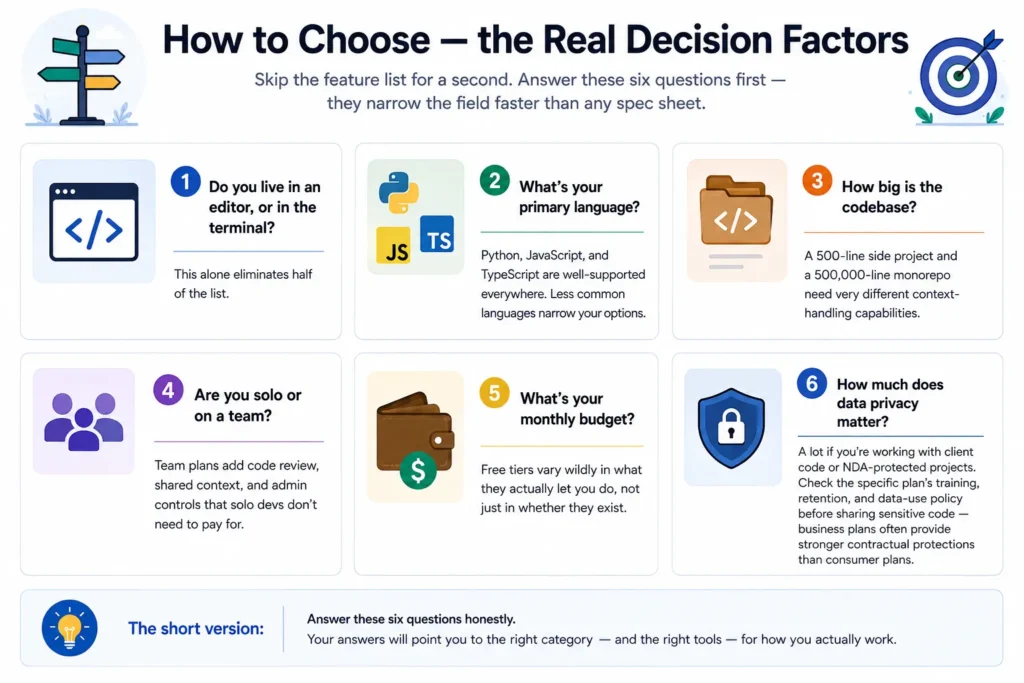
Skip the feature-list comparison for a second. Answer these six questions first they narrow the field faster than any spec sheet:
- Do you live in an editor, or in the terminal? This alone eliminates half the list.
- What’s your primary language? Python, JavaScript, and TypeScript are well-supported everywhere. Less common languages narrow your options.
- How big is the codebase? A 500-line side project and a 500,000-line Moreno need very different context-handling capabilities.
- Are you solo or on a team? Team plans add code review, shared context, and admin controls that solo debs don’t need to pay for.
- What’s your monthly budget? Free tiers vary wildly in what they actually let you do, not just in whether they exist.
- How much does data privacy matter? A lot if you’re working with client code or Ida-protected projects. Check the specific plan’s training, retention, and data-use policy before sharing sensitive code business plans often provide stronger contractual protections than consumer plans.
The AI-Native idea: Cursor and Windsurf
These tools rebuilt the editor around AI instead of bolting AI onto an existing one.
Cursor is a VS Code-based AI editor, so developers can bring much of their familiar VS Code workflow into an AI-first environment. It combines inline completions, agent editing, and codebase-aware chat, while also supporting VS Code extensions.
Where it falls short: Cursor’s agent features can consume usage quickly, so teams should monitor their plan and usage. Current U.S. individual pricing starts at $20/month for Pro, while higher tiers provide larger usage allowances.
Windsurf is an AI-native coding IDE built around agent-assisted development, with its Cascade agent helping developers work across code and files without constantly switching tools. It is available on Mac, Windows, and Linux, and Windsurf also offers AI assistance through supported IDE plugins.
Best for: developers who want an AI-first editor with agent coding built into their daily development workflow. Windsurf introduced usage-based self-serve plans in 2026, so developers should check current pricing and usage allowances before choosing a plan
The Terminal-First Agents: Claude Code, Aider, and Codex
These don’t live in your editor at all. You run them from the command line and describe what you need in plain English.
Claude Code can work through multi-step development tasks, including planning changes, editing code, debugging, and working across a repository. It is designed for agent coding workflows and is available through Claude Code’s clip and other supported interfaces.
Where it stands out: Claude Code is particularly useful when you want an AI agent to handle several related coding tasks rather than only provide autocomplete. Avoid quoting the 80.8% SWE-bench figure unless you can cite a specific current benchmark result.
Aider is the open-source option in this category free to use, with your own API key covering usage costs. Solid pick if you want terminal-agent behavior without a subscription. You’re just managing your own model costs directly instead.
Codex, OpenAI’s coding agent, can inspect repositories, edit multiple files, run commands and tests, and work through defined development tasks from the terminal. It also offers IDE and cloud interfaces, so developers can review changes and move work between environments.
Where it falls short: Codex is designed for agent workflows rather than constant line-by-line autocomplete, so developers who prefer watching every edit happen inside an IDE may prefer an editor-native tool.
Best for: developers who want to delegate defined tasks such as refactoring a module or fixing failing tests and then review the resulting changes
Quick summary: IDE tools show you the work happening. Terminal agents do the work and show you what changed. Neither is objectively better; they fit different working styles.
The Embedded Copilots: GitHub Copilot, tab nine, Cline, Continue.dev, dodo
This is the lowest-friction category. Install an extension in the editor you already use, and it starts suggesting code immediately. No new tool to learn.
GitHub Copilot remains a strong choice for developers who want AI coding assistance directly inside their IDE and GitHub workflow. Copilot Free includes up to 2,000 code completions and 50 chat requests per month, while Copilot Pro costs $10/month and includes unlimited IDE completions plus a monthly AI-credit allowance.
Copilot now goes beyond autocomplete with chat, agent features, Copilot clip, and GitHub-integrated workflows. Because GitHub has moved to an AI-credit/usage-based model for several features, the old “autocomplete first, agent second” description is too simplistic for 2026
Best for: developers who want AI assistance tightly integrated with their IDE, GitHub repositories, pull requests, and everyday coding workflow.
tab nine leans hardest into the privacy of anyone in this group. It offers four deployment tiers: SaaS, vac, on-premises, and fully air-gaped with SOC 2 Type II, ISO 27001, and GDP compliance, and it doesn’t train on your code. For defense, healthcare, or finance teams that have already vetoed Copilot and Cursor over where the code goes, tab nine is usually the one that clears security review.
Cline and Continue.dev are open-source, editor-embedded options that give you more control over which model powers the assistant, useful if you want to swap models without switching tools.
dodo focuses specifically on code review and testing rather than general-purpose completion. Worth a look if review quality is your actual bottleneck, not writing speed.
Best for: developers who want the least disruption to their current setup, or beginners who don’t want to learn a new tool alongside a new skill.
Free vs. Paid Plans — What You Actually Get
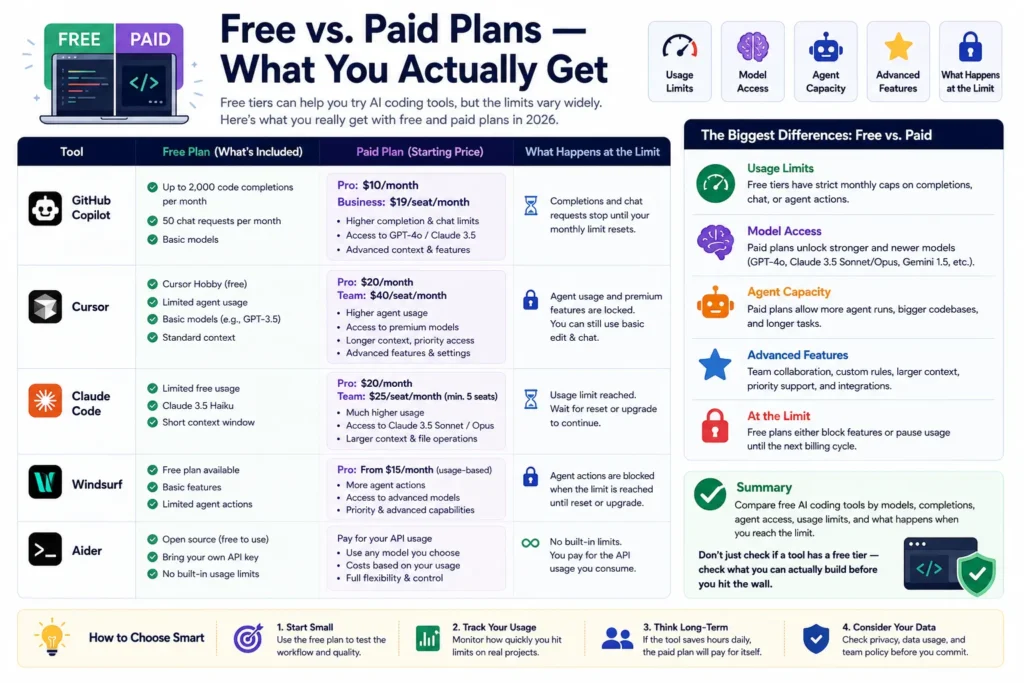
Free AI coding tools can be useful for small projects, but their limits vary. GitHub Copilot Free includes up to 2,000 code completions and 50 chat requests per month, while Cursor Hobby offers limited Agent usage without a paid subscription.
The biggest differences between free and paid plans are usage limits, model access, agent capacity, and advanced features. Don’t compare plans simply by whether they have a free tier, check what you can actually build before hitting the limit.
Summary: Compare free AI coding tools by models, completions, agent access, usage limits, and what happens when you reach the limit.
Privacy, Data Security, and Code Training Policies
Privacy matters when your repository contains client code, proprietary IP, or Ida-protected information. Policies vary by product and plan: OpenAI says business products such as ChatGPT Business and its API do not use business inputs and outputs for training by default, Anthropic says the same for its commercial products, and GitHub provides additional data protections for Copilot Business and Enterprise customers.
For highly sensitive environments, locally deployed models can keep inference inside your infrastructure, but you still need to review the model’s license, deployment setup, security controls, and generated-code licensing risks. Qwen2.5-Coder uses Apache 2.0 for its released models, while StarCoder2 uses BigCode OpenRAIL-M and DeepSeek-Coder-V2 has its own Model License, so don’t treat all “open” coding models as legally interchangeable.
If privacy is a hard requirement: check the vendor’s terms of service directly, not a summary article including this one. Data-training defaults change, and the only source that matters is the current policy page.
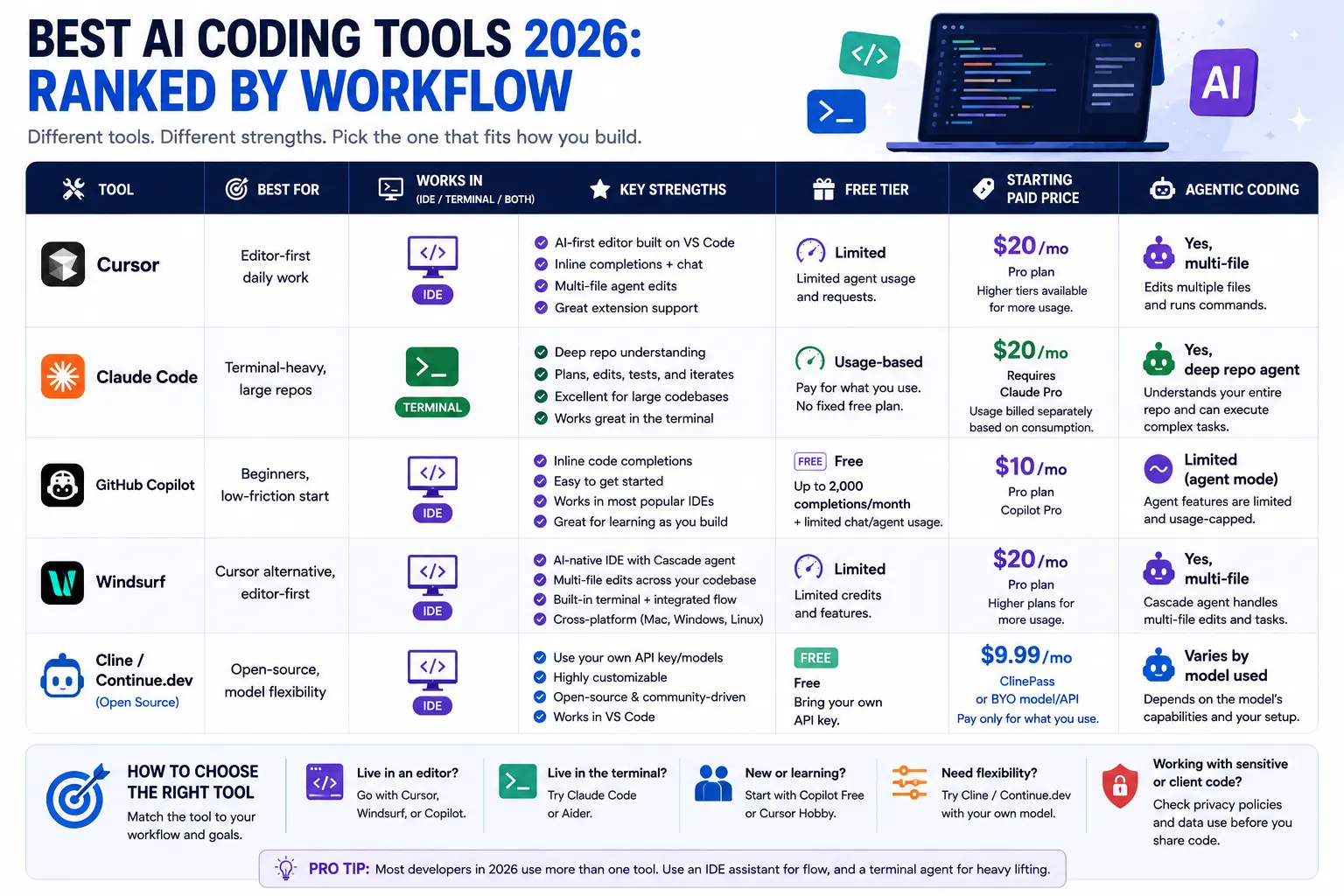
Comparison Table
| Tool | Best For | IDE / Terminal / Both | Free Tier | Starting Paid Price | Agentic Coding |
| Cursor | Editor-first daily work | IDE | Limited | $20/mo | Yes, multi-file |
| Claude Code | Terminal-heavy, large repos | Terminal | Usage-based | $20/mo Claude Pro | Yes, deep repo agent |
| GitHub Copilot | Beginners, low-friction start | IDE | Free — up to 2,000 completions/month + limited chat/agent usage | $10/mo | Limited (agent mode) |
| Windsurf | Cursor alternative, editor-first | IDE | Limited | $20/mo Pro | Yes, multi-file |
| Cline / Continue.dev | Open-source, model flexibility | IDE | Free (bring your own API key) | $9.99/mo ClinePass or BYO model/API | Varies by model used |
One-line takeaway: GitHub Copilot Pro is the lowest-priced mainstream paid option at $10/month, while Cursor, Claude Code, and Windsurf start at $20/month; Cline and Continue can cost less upfront but may require separate model or API spending.
What I’d Recommend If You’re Starting Today
Solo beginner: Start with GitHub Copilot. Low cost, minimal setup it teaches you what AI-assisted coding actually feels like before you invest time in a bigger tool switch.
Experienced solo developer: Try Cursor for daily editing and Claude Code for anything that touches multiple files or needs a real refactor. This two-tool combination shows up repeatedly in 2026 developer surveys as the practical default, and the tools don’t conflict.
Small team: Standardize on one IDE assistant across the team first. Consistency in review and on boarding matters more than chasing the single “best” tool. Add a terminal agent for your senior debs handling the gnarlier rep work.
Large codebase or enterprise: Prioritize context handling, repository understanding, privacy controls, and integration depth over raw completion speed. For large projects, an AI coding tool that can understand relationships between files and make consistent multi-file changes can reduce correction work. Before choosing a tool, test it on a representative section of your own codebase rather than relying only on benchmark scores or marketing claims.
Frequently Asked Questions
What’s the difference between an AI coding assistant and an AI coding agent?
An AI coding assistant suggests code as you type, and you approve each suggestion. An AI coding agent takes a described task, works through it across multiple files or steps, and reports back a completed change for you to review.
Is GitHub Copilot or Cursor better for beginners?
GitHub Copilot is generally the easier starting point and cheaper, and it lives inside editors you likely already use. Cursor has a steeper feel at first, since it’s a full editor switch even though it’s built on VS Code.
What is agent coding?
agent coding refers to AI that plans and executes multi-step development tasks reading code, writing changes, running tests rather than only completing the next line as you type. It’s the shift from autocomplete to task delegation.
Are AI coding tools safe to use with private or proprietary code?
Depends on the tool and plan. Most tools use submitted code to improve their models by default unless you opt out, so check each vendor’s current privacy policy directly before using any tool with proprietary or client code. [VERIFY]
Can AI coding tools work with large, existing codebases?
Yes. Modern AI coding tools can work with large repositories, but their effectiveness depends on context handling, repository indexing, model capability, and agent design. Claude Code supports models with a 1 million-token context window, which is useful for long coding sessions and large codebases.
Do I need both an IDE assistant and a terminal-based agent?
Not necessarily, but many experienced developers in 2026 use one of each an IDE tool for daily editing, a terminal agent for deeper, multi-file work since the two don’t conflict and cover different parts of the workflow.
What’s the cheapest way to start using AI coding tools?
GitHub Copilot Free is the simplest no-cost way to test AI-assisted coding, with 2,000 code completions per month and no credit card required. For more flexibility, open-source tools such as Aider and Continue are free to install, but you’ll generally pay separately for the AI model/API you connect to them.
The Bottom Line
Forget the benchmark scores for a second. The right AI coding tool is the one that matches where you already work editor, terminal, or some mix of both. Everything else is noise.
Next step: pick your top two candidates from the table above based on your budget and IDE preference, and test both on a real task from your own codebase this week. That’s the only benchmark that actually matters for your work.