
Last updated: August 2026
Conflict-of-interest note: This article compares Codex CLI against Claude Code, a product built on Claude, the AI model that wrote this article. Pricing and feature claims about Claude Code are sourced from Anthropic own documentation and flagged the same way as every other vendor’s claims below.
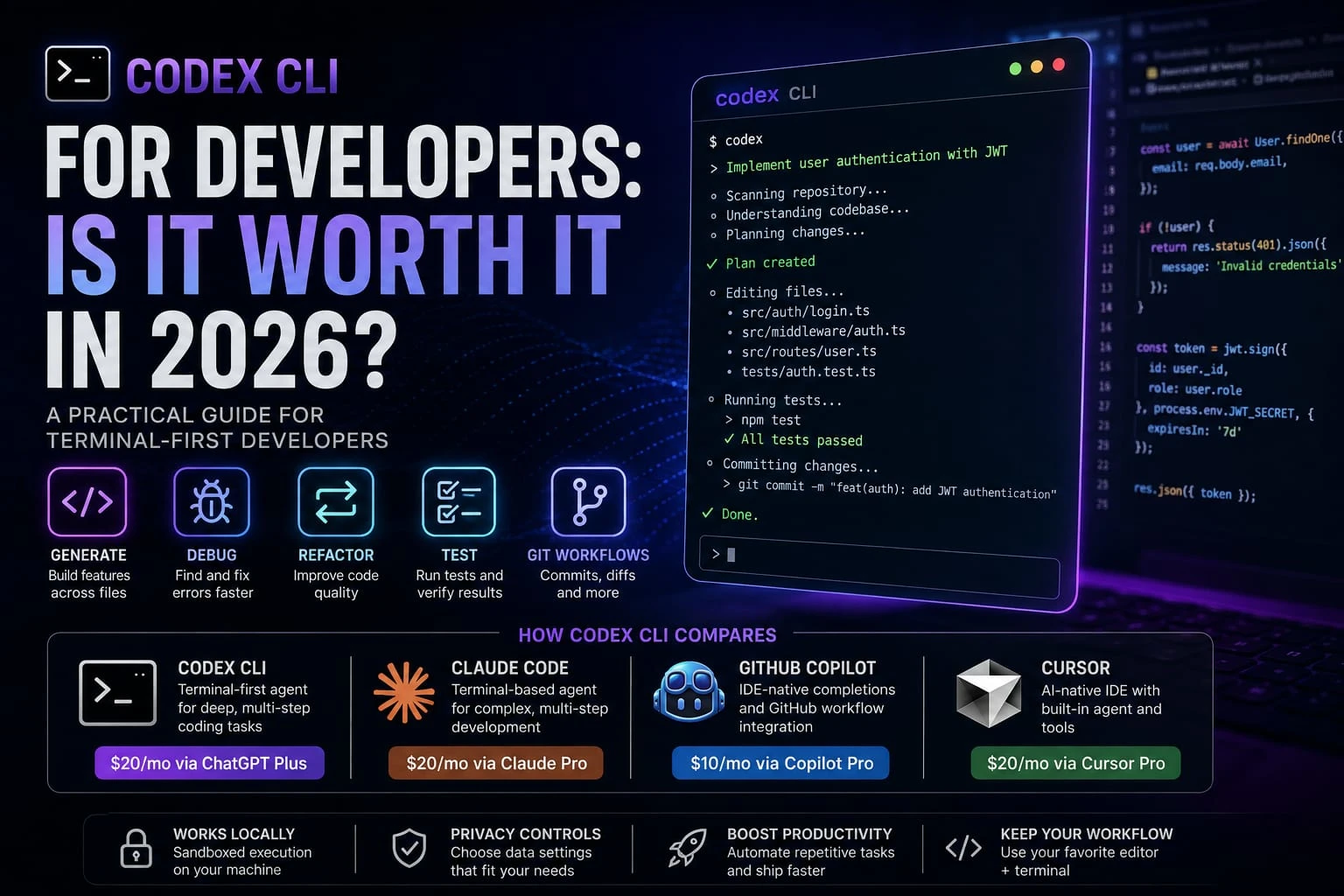
Is Codex CLI actually useful for everyday development, or is it just another AI coding tool riding the agent hype cycle? Short answer: depends on whether you live in a terminal. Codex CLI for developers means OpenAI’s local, terminal-first coding agent. It reads your repo, proposes multi-file changes, runs commands all inside a sandbox on your machine, not a browser tab.
Here’s the thing this version of Codex isn’t the same tool people wrote off in 2023. It picked up sub agents, MCP support, and a faster backing model through 2026. This guide covers what it does, what it costs, how safe it is for client code, and where it wins or loses against Claude Code, GitHub Copilot, and Cursor.
What Is Codex CLI for Developers?
Codex CLI is OpenAI’s command-line coding agent. You install it, point it at a repository, and it reads the code, plans a set of changes, and executes them editing files and running shell commands with your permission level set in advance.
That’s different from a coding assistant, which mostly auto completes or answers questions one prompt at a time. AI coding agent: an AI system that can plan and execute multiple coding tasks instead of only generating code from individual prompts. Codex CLI fits that definition. It doesn’t just suggest a line, it can open a file, edit it, run your test suite, read the failure, and try again.
It’s also not in the same category as an AI-powered IDE like Cursor. Cursor is a full editor with AI woven into every pane. Codex CLI has no editor at all. It lives in your terminal full stop. You either work from there directly or bolt on a separate IDE extension.
That’s the whole pitch, really: keep whatever editor you already use, and skip learning a new one.
Who it’s built for: developers who are already comfortable in the terminal, work across large or unfamiliar repositories, and want an agent that can chain together multiple steps: generate, test, fix, repeat without babysitting every prompt.
Section takeaway: Codex CLI is OpenAI’s terminal-native coding agent, built for developers who want repository-aware automation without leaving the command line.
How Codex CLI Works
Working With an Existing Repository
Point Codex CLI at a project directory and it reads the file structure and relevant code before proposing changes; it’s not working blind on a single open file the way a basic auto complete tool does.
Generating and Editing Code
Ask it to build a feature in plain language, and it drafts the change across whatever files the task touches, not just the one you happen to have open.
Debugging and Fixing Errors
Feed it an error message or a failing behavior, and it can trace the cause through the co debase and propose a fix then apply it, if your permission level allows.
Running Tests and Reviewing Results
Codex CLI can run your test suite, read the output, and iterate on a fix if something breaks. This loop edit, test, read, retry is the core of what makes it an “agent” rather than a one-shot generator.
Git and GitHub Workflows
It can stage changes, write commit messages, and work with your existing Git history as part of a task, which matters if you want a clean diff to review rather than one giant nonrenewable commit.
Section takeaway: The workflow is a loop, not a single request-response Codex CLI reads, edits, runs, and re-checks its own work inside your existing repo and Git setup.
Codex CLI Features for Developers
Code generation. Multi-file feature builds from a natural-language prompt, scoped to the parts of the repo the task actually touches.
Debugging. Trace errors back through related files rather than only looking at the one you’re staring at.
Refactoring. Handling renames, restructuring, and cross-file consistency changes the tedious stuff that’s easy to get wrong by hand.
Testing. Runs your existing test suite and can write new tests for the code it generates.
Repository understanding. Reads project structure and conventions before proposing changes, instead of guessing from a single file.
agent coding and automation. Chains multiple steps plan, edit, test, fix without a fresh prompt at every stage. OpenAI has also rolled out sub agents, which let Codex delegate specific sub-tasks to focused agents and bring the results back into your main session.
IDE and workflow integration. Codex CLI is terminal-native, but Codex also integrates with supported development environments, allowing developers to use Codex alongside their existing workflow. Check OpenAI’s current Codex documentation for the latest supported IDE integration.
Section takeaway: The core feature set covers the full loop generate, debug, refactor, test with automation layered on top through sub agents and optional IDE integration.
Codex CLI for Different Types of Developers
fronted Developers
For React and TypeScript projects, Codex CLI can help refactor components, update props across files, and write tests.
Example: Ask Codex CLI to rename a React prop across the project, update TypeScript types, fix affected components, and run tests.
back-end Developers
Python, Java, and PHP developers can point it at API endpoints, server-side logic, or a flaky test suite and let it trace an error across the service layer instead of one file at a time.
Full-Stack Developers
This is where the repository-aware angle matters most. A change that touches both a fronted component and its back-end endpoint is exactly the kind of cross-file task Codex CLI is built to handle in one pass, rather than two separate manual edits.
DevOps Engineers
Codex CLI can help with shell scripting, configuration file edits, and automating repetitive command-line tasks. It’s not a specialized DevOps platform, though it treats it as a general coding agent that happens to be comfortable in a terminal, not a replacement for dedicated infrastructure tooling.
Freelancers and Startup Teams
Say you’re scaffolding the same auth flow for the third client this quarter. That’s exactly the kind of repetitive setup Codex CLI is good at automating.
One catch, though if you’re under an NDA or touching code you don’t own, don’t skip the privacy section below. Which access method you use actually changes what OpenAI does with that code.
Section takeaway: The value scales with how much of your work spans multiple files and repositories solo single-file edits benefit less than cross-cutting changes.
Codex CLI Pricing for Developers
Codex CLI isn’t sold as a separate subscription. Your cost depends on how you access Codex and which ChatGPT or Codex plan you use. OpenAI currently includes Codex with eligible ChatGPT plans, while usage limits and credit-based pricing vary by plan.
According to OpenAI’s current documentation:
- Plus ($20/month): Codex access included, with usage limits tied to the plan.
- Pro ($100/month or $200/month): Higher Codex usage than Plus, with the $100 tier offering 5× Plus usage and the $200 tier offering 20× Plus usage. See OpenAI’s Codex rate card
- Business ($20/user/month annually or $25/user/month monthly): Includes Codex with standard ChatGPT Business seats. Existing eligible workspace can also have usage-based Codex seats, but new Codex-only seats are no longer available to new Business workspace since June 24, 2026.
- Enterprise: Custom pricing with organization-level usage and spending controls. See OpenAI Business & Enterprise pricing
What actually affects Codex usage is the model, input and output tokens, task complexity, and how much work the agent performs. A larger coding task can consume substantially more usage than a short request, so your actual consumption will vary by workflow.
One thing worth knowing before you budget around a specific number: OpenAI’s pricing has moved more than once in 2026, and third-party guides frequently disagree on the exact current figures. Check developers.openai.com/codex and the ChatGPT pricing page directly before you commit a team budget to a specific tier.
Section takeaway: Codex CLI rides on your ChatGPT plan rather than billing separately Plus at $20/month is the entry point, and heavier repo work is what pushes you toward the higher tiers.
Is Codex CLI Safe for Proprietary Code?
This depends heavily on how you access Codex CLI and which data controls apply. OpenAI’s current documentation distinguishes between personal ChatGPT plans and business/API usage.
ChatGPT-plan access (Plus, Pro): OpenAI says Codex content may be used to improve its models by default, but personal users can turn off training through ChatGPT’s Data Controls. Codex also has separate controls for training on full environments.
API-key access: OpenAI says API inputs and outputs are not used to train models by default. Organizations can separately opt in to data sharing through their API data controls.
Business and Enterprise plans: OpenAI says Business, Enterprise, and Edu data is not used to train models by default, and qualifying organizations can use additional data-retention controls.
Practical takeaway for freelancers and teams: If you’re working under an NDA or handling proprietary client code, don’t assume every Codex access method has identical protections. Check your authentication method, plan, training settings, and retention controls before using Codex with confidential code.
Codex CLI vs. Other AI Coding Tools
Codex CLI vs. Claude Code
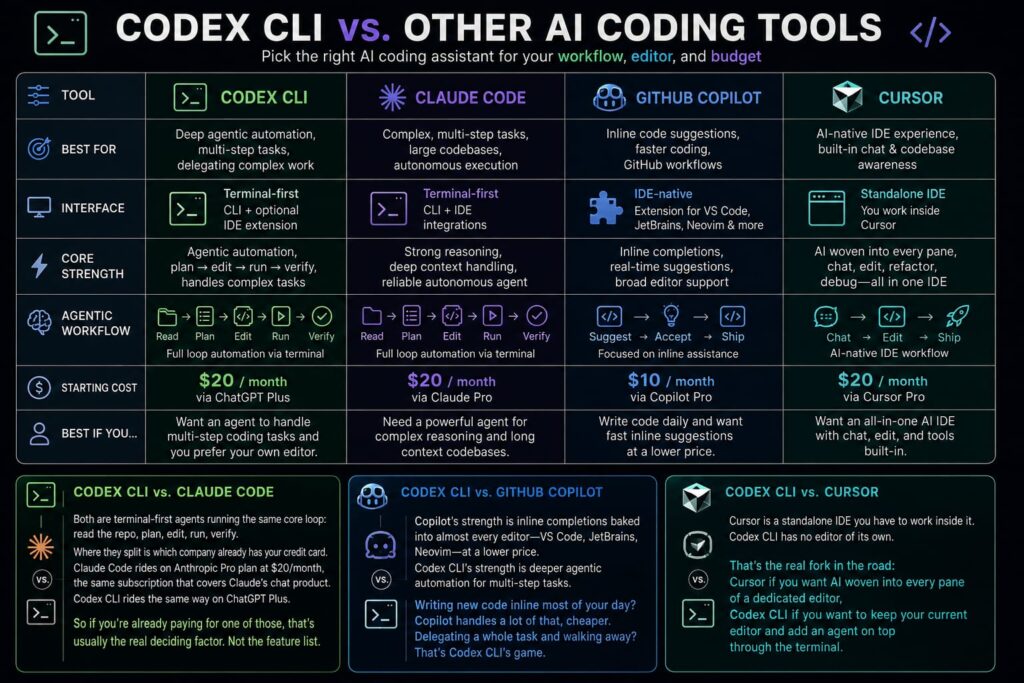
Both are terminal-first agents running the same core loop: read the repo, plan, edit, run, verify. Where they split is which company already has your credit card.
Claude Code rides on Anthropic Pro plan at $20/month, the same subscription that covers Claude’s chat product. Codex CLI rides the same way on ChatGPT Plus. So if you’re already paying for one of those, that’s usually the real deciding factor. Not the feature list.
Codex CLI vs. GitHub Copilot
Copilot’s strength is inline completions baked into almost every editor VS Code, JetBrains, Neovim at a lower price. Codex CLI’s strength is deeper agent automation for multi-step tasks.
Writing new code inline most of your day? Copilot handles a lot of that, cheaper. Delegating a whole task and walking away? That’s Codex CLI’s game.
Codex CLI vs. Cursor
Cursor is a standalone IDE you have to work inside it. Codex CLI has no editor of its own. That’s the real fork in the road: Cursor if you want AI woven into every pane of a dedicated editor, Codex CLI if you want to keep your current editor and add an agent on top through the terminal.
Comparison Table
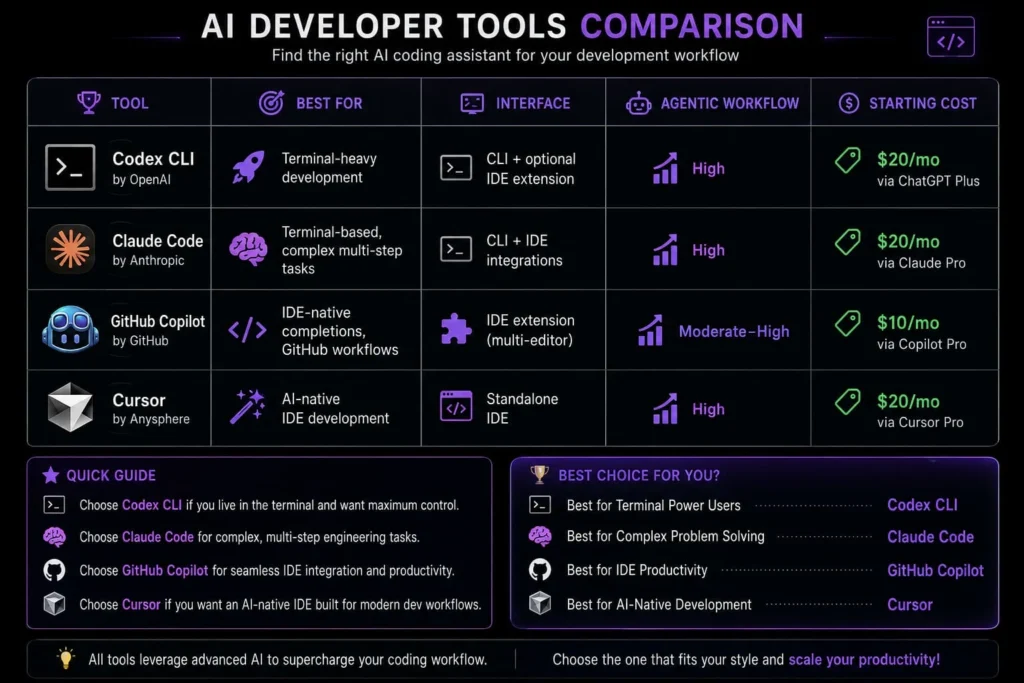
| Tool | Best For | Interface | Agentic Workflow | Starting Cost |
| Codex CLI | Terminal-heavy development | CLI + optional IDE extension | High | $20/mo via ChatGPT Plus |
| Claude Code | Terminal-based, complex multi-step tasks | CLI + IDE integrations | High | $20/mo via Claude Pro |
| GitHub Copilot | IDE-native completions, GitHub workflows | IDE extension (multi-editor) | Moderate–High | $10/mo via Copilot Pro |
| Cursor | AI-native IDE development | Standalone IDE | High | $20/mo via Cursor Pro |
Winner by use case (editorial recommendation, not a benchmark result):
- Terminal-first workflow: Codex CLI
- Terminal-centered alternative: Claude Code
- GitHub/IDE workflow: GitHub Copilot
- AI-native IDE: Cursor
These are editorial calls based on how each tool is designed to be used, not head-to-head benchmark scores treat them as a starting point for your own trial, not a verdict.
Who Should Use Codex CLI?
- Developers who prefer working in the terminal over a dedicated AI IDE
- Anyone working across larger or less-familiar repositories who wants an agent that reads context first
- Developers who want agent, multi-step automation rather than one-prompt-at-a-time suggestions
- Teams automating repetitive coding tasks scaffolding, refactors, test-writing
- Developers already on a ChatGPT Plus or higher plan who want to try Codex without a separate subscription
Who Should Skip Codex CLI?
- Developers who strongly prefer a visual, all-in-one AI IDE Cursor fits that better
- Beginners who benefit from heavy visual guidance rather than a command-line interface
- Teams whose data-handling requirements don’t match their intended access path resolve that before adopting, not after
- Anyone whose workflow is mostly single-file, low-complexity edits, where a lighter tool like Copilot’s inline completions may be enough
Frequently Asked Questions
What is Codex CLI?
Codex CLI is OpenAI’s terminal-based coding agent that reads your co debase, proposes and applies multi-file changes, and runs commands inside a local sandbox. It’s built for developers who want an AI agent working from the command line rather than inside a dedicated app or IDE.
Is Codex CLI free?
Yes. Codex CLI is available on the ChatGPT Free plan, with usage limits that vary by plan. Paid plans such as Go, Plus, Pro, Business, and Enterprise provide higher usage options, and eligible users can purchase additional credits when available
How much does Codex CLI cost per month?
Access starts at $20/month through ChatGPT Plus, which is OpenAI’s confirmed official price for that plan. Higher usage ceilings are available on Pro and Business tiers, but confirm exact current pricing at OpenAI’s official pricing page before budgeting, since third-party sources disagree on the specifics.
Is Codex CLI better than Claude Code?
Neither tool has a clear universal advantage; it comes down to which model ecosystem you prefer and whether you’re already paying for ChatGPT or Claude. Both are terminal-first agents with a similar core workflow: read, plan, edit, test.
Does Codex CLI support languages beyond JavaScript and Python?
Yes. Codex CLI can work with projects written in many programming languages, including Java, PHP, TypeScript, and others. OpenAI does not publish an official fixed list of supported languages, so avoid claiming that every language has the same level of support.
Is my code safe with Codex CLI?
It depends on your access method. API-key access follows OpenAI’s no-training data policy for API inputs, while consumer ChatGPT-plan access follows different terms to check which path you’re using before working with proprietary or client code.
Is Codex CLI worth it for developers?
If you already work primarily in a terminal and want an agent that understands your whole repository rather than one file at a time, it’s a reasonable pick, especially if you’re already paying for ChatGPT Plus. If you’d rather have AI built into a full IDE, Cursor or Copilot may fit better.
The Bottom Line
Codex CLI is a legitimate terminal-first agent, not a re brand of the old Codex tooling nobody used. It reads your repo, chains multi-step edits, runs your tests, hands the work back.
Worth trying if you’re terminal-first and already on a ChatGPT plan. Want AI baked into a dedicated editor instead? Look at Cursor. Just want cheap inline completions? Copilot’s lower tier covers most of that.
One last thing: confirm current pricing and data terms straight from the vendor before you commit a team budget. This space moves fast enough that guides like this one (yes, including this one) go stale in months, not years.