
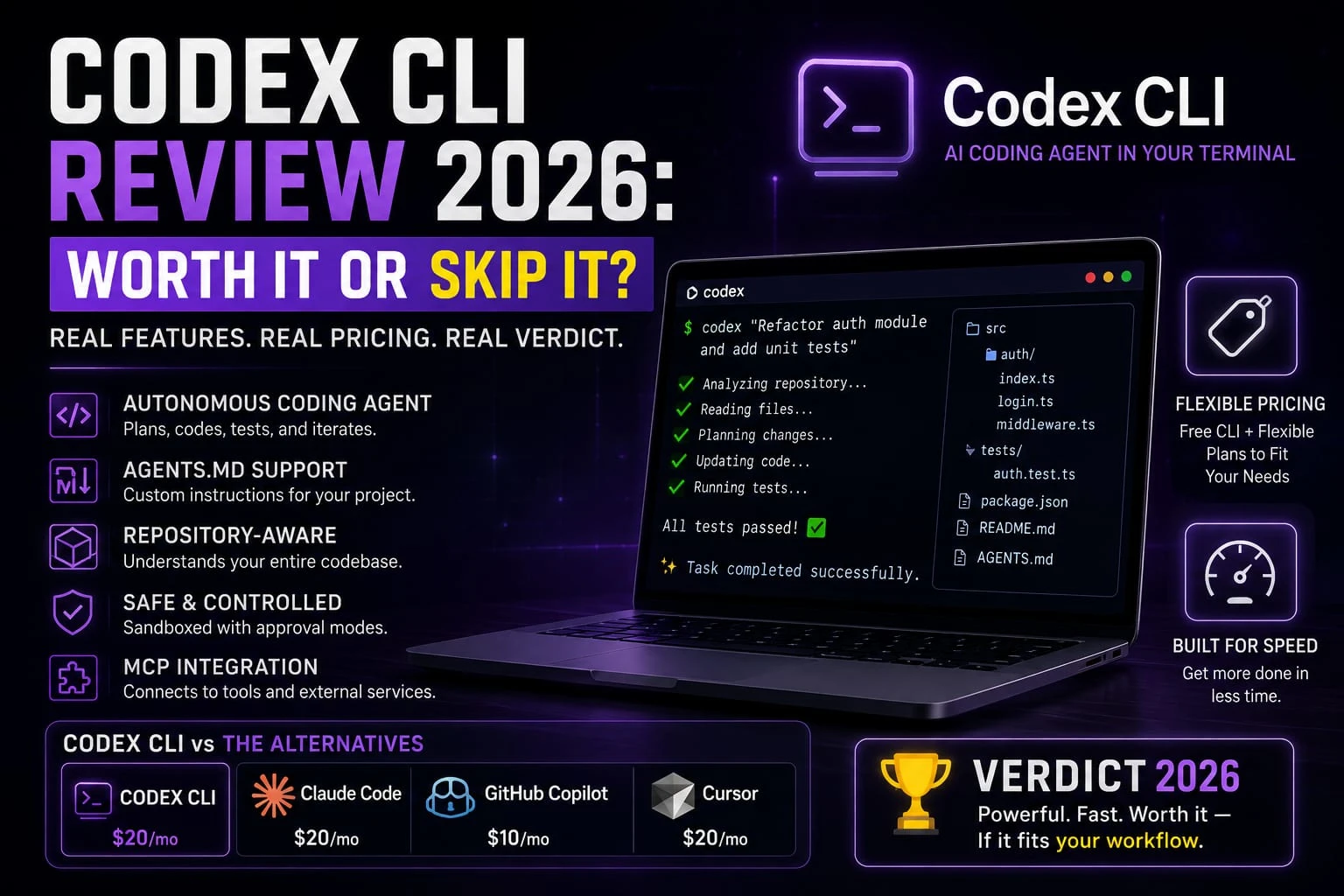
Last updated: August 2026
You’ve probably seen “Codex,” “Claude Code,” and “AI coding agent” tossed around in the same breath, like they’re all interchangeable. They’re not. And if you’re trying to figure out whether Codex CLI actually fits how you build software, not how some influence builds software, the terminology gets in the way before you even reach the pricing page.
This guide breaks down what Codex CLI actually is, what it costs, and whether it fits how you build. No affiliate links, no vendor talking points. Just the trade offs the kind you’d get from a colleague who already read the docs so you don’t have to.
AI Coding Assistant, Agent, or IDE? The Terms Everyone Mixes Up
Before comparing anything, it helps to know what you’re actually comparing. People throw these terms around loosely, and that’s exactly what makes a first-time buyer’s decision harder than it needs to be.
An AI coding assistant suggests code as you type. Think auto complete with context GitHub Copilot in its original form. You stay in the driver’s seat; it fills in lines and functions.
An AI coding agent works differently. It doesn’t just suggest it plans a task, executes it across multiple steps, runs commands, checks its own work, and iterates until the task’s done or it hits a wall. Codex CLI and Claude Code are both agents in this sense.
An AI-powered IDE builds agent capability directly into a code editor. Cursor and Windsurf are the well-known examples. You get agent behavior, but it lives inside a visual editor instead of a terminal window.
A terminal-based coding agent which is what Codex CLI is runs entirely in your shell. No graphical interface. You type a goal, it works, you watch the output scroll by.
Repository-aware means the tool can read and reason about your whole code base, not just the file you have open, so it can trace how a change in one file ripples into another.
Assistants suggest. Agents act. And the interface (terminal, IDE, or chat) is a separate question entirely from how autonomous the tool is.
What Is OpenAI Codex CLI, Exactly?
OpenAI Codex CLI is an open-source, terminal-native coding agent. You install it, point it at a project directory, and give it a goal in plain English “refactor this API route to use async/await,” say, or “add unit tests for the auth module.” It reads the relevant files, makes a plan, edits code, runs your test suite, and reports back.
Worth clearing up a naming collision here. “Codex” isn’t the 2021 OpenAI code-completion API that shut down that was a different product entirely. The Codex CLI that matters in 2026 launched in April 2025 as a fresh, Rust-based open-source tool, unrelated to the earlier API.
OpenAI also ships Codex under the same name across three other surfaces. There’s a cloud-based agent inside ChatGPT that runs tasks asynchronously in an isolated sandbox. A desktop app for coordinating multiple agents at once. And IDE extensions for VS Code and JetBrains. This guide focuses specifically on the CLI, the one you run from a terminal window, not the browser tab.
How Codex CLI Actually Works: Repository Understanding, AGENTS.md, and Automation
Codex CLI reads your project’s structure automatically: package manager, lock file, test runner without needing a configure file to get started. The CLI just auto-detects those on launch.
For project-specific instructions, it uses a file called AGENTS.md at your repo root: a plain-markdown file where you describe coding conventions, build commands, and things the agent should never touch. This isn’t unique to Codex, by the way AGENTS.md has become something close to an open standard, with Cursor, Aider, and other agent tools reading the same file format.
Safety is handled through sand boxing and approval modes. Codex runs with OS-level sand boxing, and you choose how much autonomy to grant it from “ask before every change” up to “run without stopping to check in.” Tighter setting, safer for production code. Looser setting, faster for routine, low-stakes work.
Codex also supports MCP (Model Context Protocol), a standard that lets it connect to external tools a database, a project-tracking app, a documentation source without custom integration work on your end.
OpenAI Codex CLI Pricing in 2026 (U.S. Dollars)
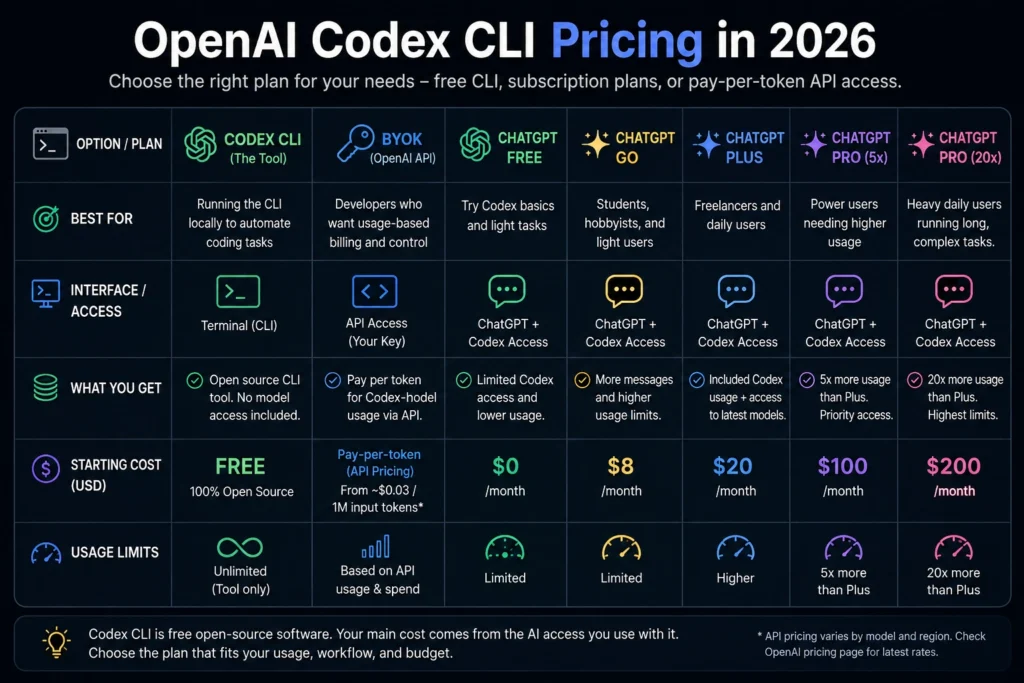
The Codex CLI itself is free, it’s open source, and you can download it at no cost. What you pay for is the model access behind it, through one of two paths:
- Your own OpenAI API key (BYOK), billed per token used
- A ChatGPT subscription, which bundles a quota of Codex usage into your existing plan
As of August 2026, OpenAI’s subscription lineup includes a Free tier, a Go tier, Plus, and two Pro tiers (a 5x-usage option and a 20x-usage option), plus Business and Enterprise plans. Codex access is limited on Free and Go, included on Plus, and expanded further on Pro.
Current ChatGPT pricing: Go is about $8/month, Plus is $20/month, and Pro has $100/month and $200/month tiers. Codex is included with eligible plans, while actual Codex usage depends on token consumption and the current credit system.
Here’s a rough way to think about which path fits your budget:
- Student or hobbyist testing the waters: the free CLI plus a low-cost plan is enough to learn how agent coding works before committing money.
- Freelancer or solo developer working daily: a mid-tier ChatGPT subscription that bundles Codex usage is usually simpler to budget than pay-per-token API billing, since your cost is fixed instead of variable.
- Heavy daily user running long, multi-step tasks: BYOK with the API can get expensive fast if you’re not watching token usage. A bundled Pro-tier subscription tends to be the more predictable option once you’re using Codex several hours a day.
Whichever path you pick, check the live pricing page before you commit subscription tiers and included usage have shifted multiple times through 2026 as OpenAI has responded to competition from Anthropic Claude Code.
Codex CLI for Core Dev Tasks: Code Generation, Debugging, Refactoring, and Testing
Code generation
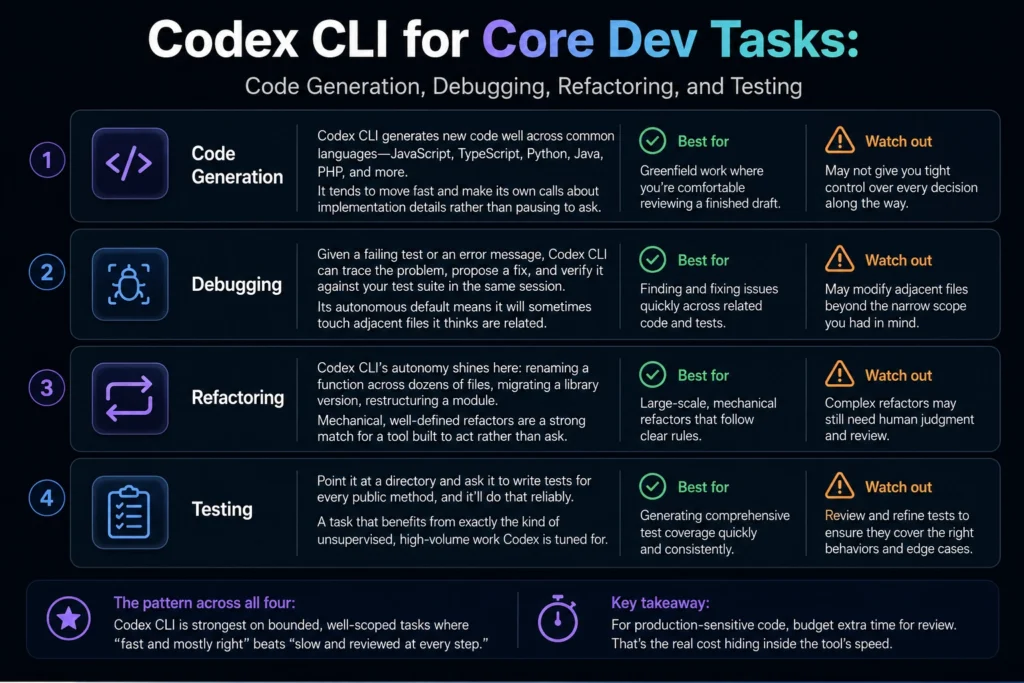
Codex CLI generates new code well across common languages JavaScript, TypeScript, Python, Java, PHP, and more. It tends to move fast and make its own calls about implementation details rather than pausing to ask. That’s a feature for greenfield work where you’re comfortable reviewing a finished draft, and a liability if you wanted tighter control over every decision along the way.
Debugging
Given a failing test or an error message, Codex CLI can trace the problem, propose a fix, and verify it against your test suite in the same session. Its autonomous default means it will sometimes touch adjacent files it thinks are related worth watching if you want a narrowly scoped fix.
Refactoring
This is where Codex CLI’s autonomy tends to shine: renaming a function across dozens of files, migrating a library version, restructuring a module. Mechanical, well-defined refactors are a strong match for a tool that’s built to act rather than ask.
Testing
Point it at a directory and ask it to write tests for every public method, and it’ll do that reliably, a task that benefits from exactly the kind of unsupervised, high-volume work Codex is tuned for.
The pattern across all four: Codex CLI is strongest on bounded, well-scoped tasks where “fast and mostly right” beats “slow and reviewed at every step.” For production-sensitive code, budget extra time for review. That’s the real cost hiding inside the tool’s speed.
GitHub Integration and Working With a Real Repository
Codex CLI works directly against your local git repo. It stages changes and, depending on your approval mode, can open a pull request once the task’s done.
Here’s the thing because it’s terminal-based, it doesn’t care whether you’re on your laptop or SSH’d into a headless server at 2am fixing a production issue. Try that with an IDE-based tool and you’re stuck. That’s a real edge for anyone doing DevOps work or managing remote boxes.
For teams, this means Codex can slot into existing CI/CD pipelines and PR-review workflows without much extra tooling. The agent produces a diff like any other contributor would. Your existing review process still applies.
Privacy and Data Security: What Happens to Your Code
Privacy matters if you’re a freelancer working under a client NDA or a startup protecting proprietary source code. Codex data handling depends on your access method, plan, and data-control settings.
If you’re using ChatGPT Plus or Pro, OpenAI says conversations and Codex content may be used to improve its models unless you turn off training in ChatGPT’s Data Controls. Codex also has separate controls for training on full environments.
If you’re using the OpenAI API, ChatGPT Business, or ChatGPT Enterprise, OpenAI says inputs and outputs are not used to train models by default. API organizations can explicitly opt in to data sharing, and eligible organizations can configure additional retention controls, including Zero Data Retention for supported API use cases.
Don’t assume every Codex access method has the same privacy terms. If you’re handling confidential client code, check the specific terms and data controls for your ChatGPT plan, Codex configuration, or API organization before sending proprietary code to the service.
Sources: OpenAI — How your data is used to improve model performance · OpenAI — Using Codex with your ChatGPT plan · OpenAI — Business data privacy and security
Codex CLI vs. the Alternatives
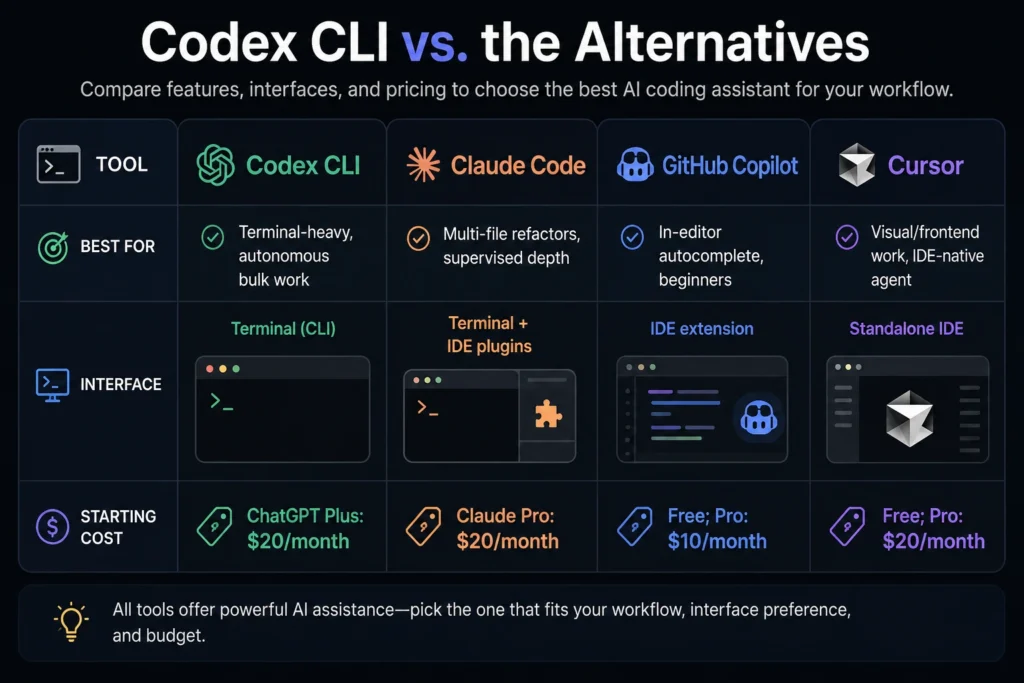
| Tool | Best for | Interface | Starting cost |
| Codex CLI | Terminal-heavy, autonomous bulk work | Terminal (CLI) | ChatGPT Plus: $20/month |
| Claude Code | Multi-file refactors, supervised depth | Terminal + IDE plugins | Claude Pro: $20/month |
| GitHub Copilot | In-editor autocomplete, beginners | IDE extension | Free; Pro: $10/month |
| Cursor | Visual/frontend work, IDE-native agent | Standalone IDE | Free; Pro: $20/month |
The takeaway per use case: if you live in a terminal and want maximum autonomy on bulk, well-defined work, Codex CLI fits. If you want a tighter, more supervised loop on complex multi-file changes, Claude Code is the closer match. Several independent comparisons through 2026 describe Codex as faster and cheaper per task, with Claude Code producing more consistently clean output on the harder problems. And if you’ve never left an IDE especially for fronted work, where you want to see the UI change Cursor or GitHub Copilot will feel far more natural than switching to a terminal-only tool.
None of these fully replaces the others. Plenty of developers run two side by side in 2026 Claude Code open in one terminal tab for the gnarly refactor, Codex CLI in another for the thirty-file rename nobody wants to do by hand.
Who Should Actually Use Codex CLI? A Workflow-Based Decision Framework
Rather than a generic “yes or no,” here’s how the fit changes based on your actual situation:
By coding workflow. If you’re comfortable living in a terminal and delegating well-scoped tasks, Codex CLI matches your habits. If you prefer visual feedback while code changes especially for UI work you’ll fight the tool more than it helps you.
By programming language. Codex CLI works across mainstream languages, including JavaScript, TypeScript, Python, Java, and PHP. It’s not language-limited the way some specialized tools are.
By project size. Small-to-mid-sized projects and well-organized larger code bases both work fine. Extremely large, tangled legacy code bases the ten-year-old monolith nobody fully understands anymore benefit more from a tool with a longer context window and more conservative editing behavior.
By experience level. Intermediate and senior developers get the most value here, because reviewing Codex’s autonomous decisions means knowing what “correct” looks like in the first place. If you’re a coding student or beginner, Codex CLI can still teach you a lot. Just treat every change it makes as something to read and understand, not something to accept blindly. Starting with an in-editor assistant like Copilot where you see suggestions inline before accepting them is a gentler on-ramp before you hand off to a fully autonomous terminal agent.
By terminal usage and IDE preference. If you’ve never used a command line comfortably, there’s a real learning curve before Codex CLI feels natural. If your whole workflow lives in VS Code or a similar editor, weigh whether an IDE-native agent gets you most of the benefit with less friction.
By monthly budget. Match your usage pattern to a plan tier rather than defaulting to the most expensive option see the pricing breakdown above.
By individual vs. team use. Solo developers get straightforward value from Codex’s speed on bulk tasks. Teams get additional benefit from its GitHub-native PR workflow and the way it integrates into existing CI pipelines without much extra setup.
Honest Limitations
No tool is a universal fix. A few limitations are worth knowing before you sink an afternoon into setup.
Codex CLI doesn’t like to stop and ask. It’ll install a package, touch a file you never mentioned, and make an architectural call on its own to get the task across the finish line. Most of the time that’s fine. When it’s not, you’re untangling a diff that’s way bigger than the task called for. Treat anything it ships as a first draft not something you merge on faith.
It’s also OpenAI-only. You can’t swap in a different model provider through Codex CLI the way some IDE tools let you. Found that a different model handles a specific kind of task better? Too bad you’re switching tools entirely, not just switching models within the same one.
And it’s terminal-only. No visual interface. That’s a real drawback for fronted work, where you actually want to watch the UI update as the agent edits components instead you’re flipping between terminal and browser, piecing it together.
What I’d Recommend If You’re Starting Today
New to coding, or still a student? Start with an in-editor assistant to build intuition for what “good” AI-generated code looks like before handing off full autonomy to a terminal agent.
Freelancing or building solo? Install the free CLI, pair it with whichever subscription tier matches your daily hours, and use it first on the tasks it’s built for — bulk refactors, test back fills, mechanical migrations — before trusting it with anything client-facing and unrelieved.
Running a small team? Pilot it on one repository’s routine maintenance work first — dependency bumps, lint fixes, the backlog nobody wants to own. See how the diffs look before it goes anywhere near customer-facing code.
FAQ
Is Codex CLI free?
The CLI itself is free and open source. What costs money is the model access behind it either your own OpenAI API key billed per token, or a ChatGPT subscription that includes a Codex usage quota.
Is Codex CLI better than Claude Code?
Neither wins outright. Codex CLI tends to be faster and more token-efficient on bulk, well-scoped work; Claude Code tends to produce more consistently polished results on complex, multi-file changes. Many professional developers use both, choosing based on the task.
Do I need to know how to code using Codex CLI?
You’ll get far more value if you do. Codex CLI acts autonomously, which means you need to be able to read and evaluate the changes it makes. It’s not designed as a no-code tool for non-programmers.
Does Codex CLI work with GitHub?
Yes. It operates on your local git repository and, depending on setup and approval mode, can prepare or open pull requests, fitting into an existing GitHub-based workflow.
Is my code safe with Codex CLI?
Codex CLI can be used with proprietary code, but the data-handling terms depend on how you access it. For personal ChatGPT Plus or Pro accounts, Codex content may be used to improve OpenAI’s models unless you turn off training in your data controls.
Can beginners use Codex CLI?
Yes, but with caution. It’s a strong learning tool if you review every change it proposes, but its autonomous style can move faster than a beginner can evaluate pairing it with a more supervised, in-editor tool first is a reasonable on-ramp.
How much does Codex CLI cost per month?
Codex CLI has no separate subscription fee. It is included with eligible ChatGPT plans, with Plus at $20/month and Pro at $100 or $200/month. Usage depends on the model and task, and additional credits may be available after reaching included limits.
The Bottom Line
Codex CLI is free, open-source, and fast at the things it’s good at. Right pick if you live in a shell, want speed on bulk mechanical work, and you’re willing to review what it hands you. Wrong pick if you need to see your UI update in real time, want to swap between AI models mid-task, or you’re not yet confident telling good code from bad on your own.
Try it on one low-stakes repository this week. A side project, a test back fill, a routine refactor — something with no blast radius. Then decide whether it earns a permanent spot in your toolkit.