Last updated: August 2026
You’ve got six browser tabs open right now: a regex tester, a meta tag extractor, a robots.txt checker, a CSV-to-JSON converter, a plagiarism detector, and a keyword density tool. None of them talk to each other. ToolSuite Pro tries to fix that by putting SEO and developer utilities in one browser-based hub.
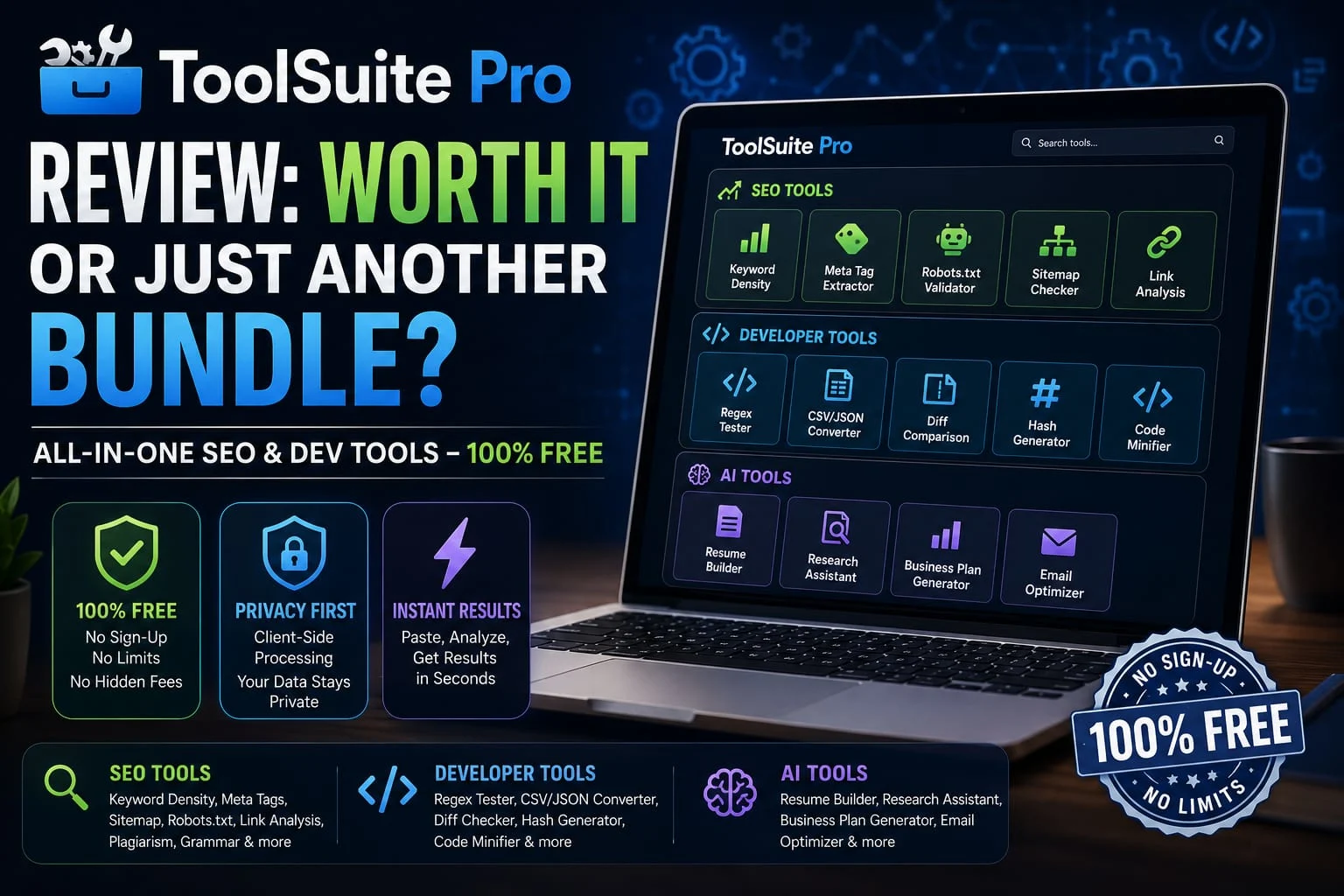
ToolSuite Pro offers a collection of SEO and developer tools, including keyword density analysis, meta tag extraction, link analysis, sitemap checking, robots.txt validation, plagiarism detection, grammar checking, regex testing, CSV/JSON conversion, diff comparison, hash generation, and code magnification.
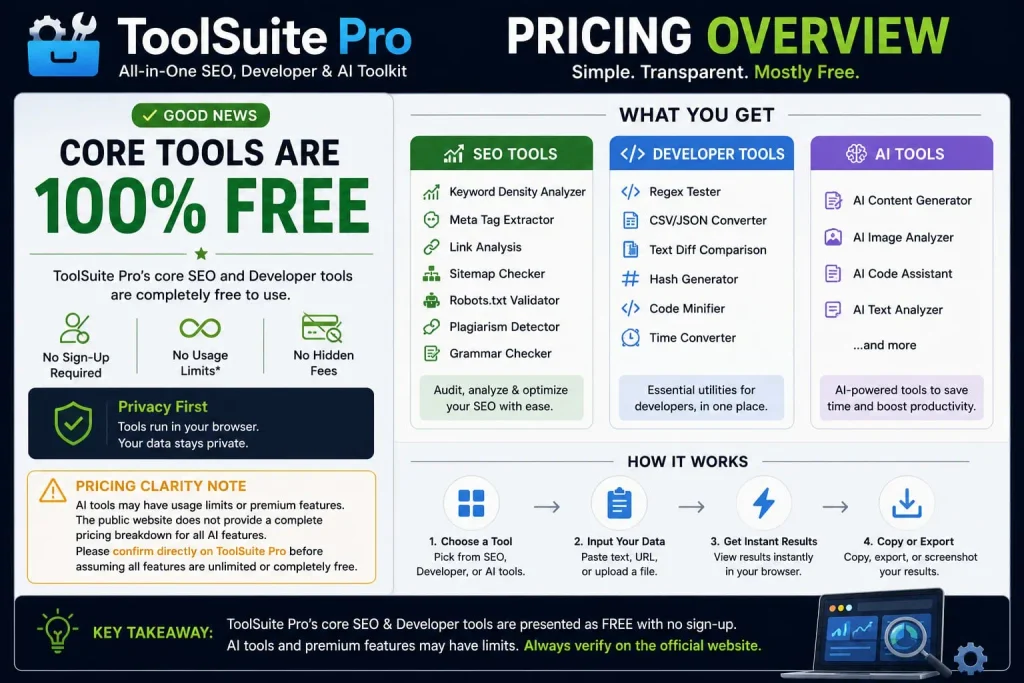
According to ToolSuite Pro’s official FAQ, all of its tools are 100% free, with no registration or sign-up, no usage limits, no hidden fees, and no premium tiers.
This ToolSuite Pro review breaks down what’s actually in the suite, how it compares with the single-purpose tools you may already use, and where it falls short. No affiliate angle here, just what’s confirmed on the product’s own pages and what you should know before building a workflow around it.
What Is ToolSuite Pro?
ToolSuite Pro is a web-based collection of SEO and developer utilities, built around two main categories: SEO tools and developer tools, with a separate AI tools section layered on top. Everything runs in your browser. There’s no account creation required to use the core tools, based on the product’s public-facing pages.
The two core tool categories
The SEO side covers things like a keyword density analyzer, a meta tag extractor, a robots.txt validator, and a sitemap checker, the kind of checks you’d normally run through five separate Chrome extensions. The developer side covers a regex tester, a CSV/JSON converter, a text diff tool, a hash generator, and a code magnifier. Neither side requires you to leave the browser tab.
The privacy-first, browser-based model
Here’s the part worth paying attention to: ToolSuite Pro markets itself as processing everything client-side, meaning your data supposedly never touches their servers. That’s a real differentiation if you’re pasting client SEO data or proprietary code into a free web tool most competitors process server-side. I haven’t independently verified this claim through a network trace or security audit, so treat it as vendor-stated until you (or a security-minded teammate) confirm it yourself.
ToolSuite Pro Features
The feature set splits cleanly into three buckets. None of these are groundbreaking on their own; you can find a regex tester or a meta tag extractor anywhere. What’s different is having them under one roof.
SEO tools
- Keyword density analyzer
- Meta tag extractor
- Link analysis
- Sitemap checker
- Robots.txt validator
- Plagiarism detector
- Grammar checker
These are audit-and-check tools, not tracking tools. Don’t expect rank history or back link databases, that’s a different category of software entirely, and ToolSuite Pro doesn’t claim to compete there.
Developer tools
- Regex tester
- CSV/JSON converter
- Text diff comparison
- Hash generator
- Code magnifier
- Time converter
This is the toolkit you’d bookmark for one-off tasks: cleaning up a data export, debugging a regex pattern at 11 p.m., diffing two versions of a config file. It’s not an IDE replacement, and it’s not trying to be.
AI tools
ToolSuite Pro also runs a separate AI tools page with a resume builder (ATS scoring and keyword matching), a research assistant (auto-stigmatization and citation generation), a business plan generator, and an email campaign optimizer. These feel like a different product wearing the same skin worth knowing about, but I’d evaluate them separately from the core SEO/dev suite rather than assuming the same quality bar carries over.
A claim worth flagging directly: ToolSuite Pro’s own site states it’s “trusted by 120,000+ professionals.” I could not find independent, third-party confirmation of that number anywhere, no press coverage, no case studies, no review-site aggregation. Treat it as the vendor’s own marketing copy, not a verified stat. Same goes for the “5k+ successful plans” figure on the business plan tool and the “47% open rate improvement” claim on the email optimizer both are vendor-stated, outsourced, and should be verified before you repeat them anywhere.
How Does ToolSuite Pro Work?
There’s no dashboard to learn and no on boarding flow. The workflow is closer to a utility website than a SaaS product:
- Pick the tool you need from the SEO, developer, or AI section
- Paste in your text, URL, or file
- Get an instant result in the browser
- Copy, export, or screenshot the output
- Close the tab nothing saves unless you save it yourself
That last point cuts both ways. No login means nothing to lose if the site goes down, but it also means no history, no saved projects, and no way to pick up where you left off across sessions.
ToolSuite Pro for Developers
If you’re doing front-end or backend work, the realistic use case here is fast, disposable utility tasks not your daily driver. Testing a regex pattern before you commit it. Converting a messy CSV export into JSON for a quick script. magnifying a snippet before pasting it somewhere size-constrained. Diffing two config files without opening a full diff tool.
What’s missing matters just as much as what’s included: no IDE plugin, no CLI, no API access that I could find, and no CI/CD integration. If you need any of that, ToolSuite Pro isn’t the right layer of your stack. It’s a browser tab, not infrastructure. If you’re looking for more specialized AI tools for specific workflows, our guide to the 12 best AI resume builders tested in 2026 is a useful place to start.
ToolSuite Pro for SEO and Marketing
For SEO professionals and content marketers, the suite covers the “quick check” layer of the job: is this meta description too long, does this page’s keyword density look reasonable, is the sitemap actually valid, does robots.txt block something it shouldn’t. Those are real, recurring tasks that usually mean bouncing between three or four separate free tools.
What it doesn’t do: rank tracking, back link index data, competitor gap analysis, or historical trend data. If your workflow depends on watching keyword positions move over weeks or building a back link profile, you’ll still need a dedicated platform like Ahrefs or Semrush alongside ToolSuite Pro, not instead of it.
ToolSuite Pro Pricing
Is ToolSuite Pro Worth It?
If the pricing holds up as genuinely free, this is an easy yes for the specific job it does: consolidating a handful of single-purpose free tools into one place. You’re not locked in, there’s nothing to cancel, and the downside of trying it is a few minutes of your time.
Where it gets less clear-cut: if you’re already happy with your current scattered toolset, switching costs you nothing to try but also saves you less than it sounds like on paper. And because several of the vendor’s own trust signals (the user count, the AI tool stats) are unverified, I’d treat this as a solid utility tool rather than a platform you build a business process around.
ToolSuite Pro Pros and Cons
Pros
- No cost found anywhere in the current product materials
- No signup required to use the core tools
- Broad tool range across SEO, developer, and AI categories in one place
- Browser-based, privacy-first processing model (vendor-stated, not independently audited)
- AI tools bundled in at no extra charge based on available evidence
Cons
- Key trust signals (user count, AI tool performance stats) are unverified vendor claims
- No API, CLI, or IDE integration for developers
- No rank tracking or back link data for SEO use cases audit tools only, not a full platform
- No saved history or account system, so nothing persists between sessions
- Full pricing page couldn’t be independently loaded during this review needs a live confirmation
Who Should Use ToolSuite Pro?
- Freelance developers who want a quick regex or hash tool without installing another app
- Solo SEOs and content creators who currently juggle several free single-purpose SEO checkers
- Startup founders and small-business owners doing their own basic SEO audits without budget for Ahrefs or Semrush
- Students and beginners learning SEO or dev fundamentals who want low-stakes tools to experiment with
Who Should Skip ToolSuite Pro?
- Agencies or teams that need collaboration, saved history, or multi-user accounts
- Anyone whose workflow depends on rank tracking, back link databases, or historical SEO trend data
- Developers who need API access or CI/CD-integrated tooling rather than a browser utility
- Teams with strict vendor-verification requirements, since several of ToolSuite Pro’s own claims aren’t independently confirmed yet
ToolSuite Pro Alternatives
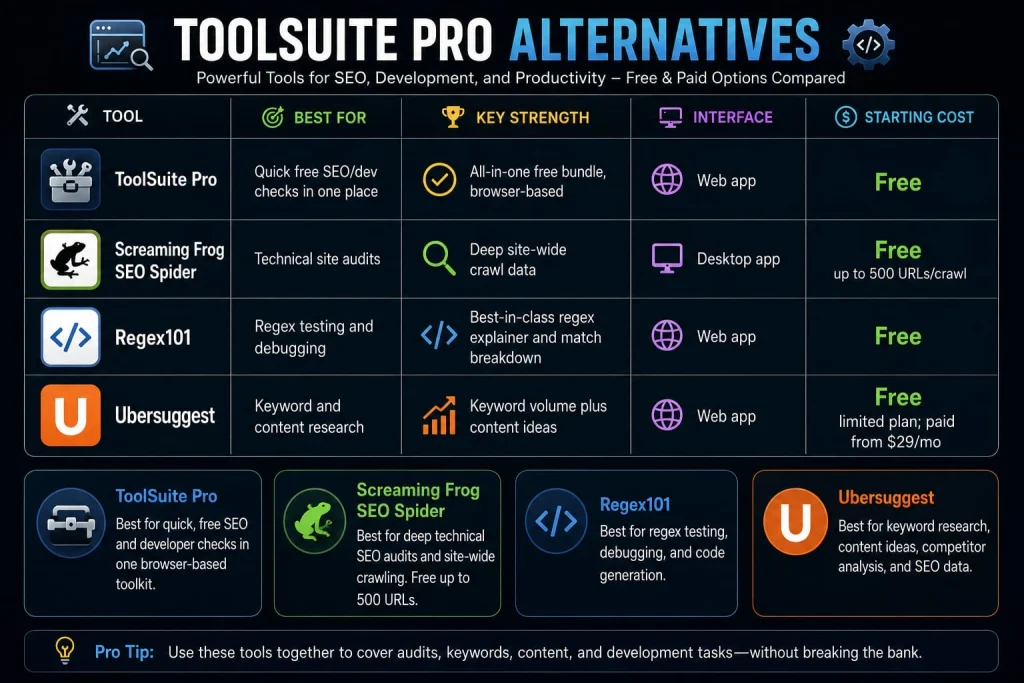
| Tool | Best For | Key Strength | Interface | Starting Cost |
| ToolSuite Pro | Quick free SEO/dev checks in one place | All-in-one free bundle, browser-based | Web app | Free |
| Screaming Frog SEO Spider | Technical site audits | Deep site-wide crawl data | Desktop app | Free up to 500 URLs/crawl |
| Regex101 | Regex testing and debugging | Best-in-class regex explainer and match breakdown | Web app | Free |
| Ubersuggest | Keyword and content research | Keyword volume plus content ideas | Web app | Free limited plan; paid from $29/mo |
- ToolSuite Pro: Best for quick, free SEO and developer checks in one browser-based toolkit.
- Screaming Frog: Best for deep technical SEO audits and site-wide crawling. Free up to 500 URLs.
- Regex101: Best for regex testing, debugging, and code generation.
- Ubersuggest: Best for keyword research, content ideas, competitor analysis, and SEO data.
Bottom line: ToolSuite Pro wins for quick utility checks; Screaming Frog for technical SEO; Regex101 for regex; and Ubersuggest for keyword research.
FAQ
What is ToolSuite Pro?
ToolSuite Pro is a browser-based collection of free SEO and developer tools, including a keyword density analyzer, meta tag extractor, regex tester, and CSV/JSON converter. It also includes a separate section of AI-powered tools like a resume builder and business plan generator.
Is ToolSuite Pro free?
Yes. ToolSuite Pro currently presents its core SEO and developer tools as free to use, and its public website does not display a conventional paid plan for the core tool suite.
However, I would avoid claiming that every feature is unlimited and that no paid tier exists anywhere on the platform. The site mentions subscriptions for early access to roadmap releases and bonus automation scripts, so the safest wording is that the core tools are presented as free, while some additional roadmap or subscriber benefits may be separate.
How much does ToolSuite Pro cost?
All available evidence points to $0, with no login required to use the core SEO and developer tools. No pricing page listing paid plans was found during this review.
What can ToolSuite Pro be used for?
It covers everyday SEO audit tasks (meta tags, keyword density, sitemap and robots.txt checks) and developer utility tasks (regex testing, JSON/CSV conversion, hashing, code minifying), plus a separate set of AI tools for resumes, research, and business planning.
Is ToolSuite Pro worth it?
For consolidating several free single-purpose tools into one place, yes the switching cost is close to zero if it’s genuinely free. It’s not a replacement for full SEO platforms like Ahrefs or Semrush, which offer rank tracking and back link data that ToolSuite Pro doesn’t provide.
Is ToolSuite Pro good for developers?
It’s useful for quick, disposable tasks like regex testing, hashing, and format conversion, but it has no API, CLI, or IDE integration, so it won’t fit into an automated dev workflow; it’s a utility tab, not infrastructure.
What are the best ToolSuite Pro alternatives?
Screaming Frog for deep technical SEO crawls, Regex101 for dedicated regex debugging, and Ubersuggest for keyword and content research are the closest comparable tools, though each specializes rather than bundling everything the way ToolSuite Pro does.
Conclusion
ToolSuite Pro’s real value is simple: if you’re tired of bouncing between five free single-purpose tools, it puts most of them in one browser tab at no apparent cost. Freelancers, solo SEOs, and students doing quick checks will likely get the most out of it. Teams needing collaboration, rank tracking, or API access should stick with dedicated platforms instead. Before you build it into your workflow, open toolsuitepro.com yourself and confirm the pricing and privacy claims directly this review flags exactly which ones still need that check. Try one tool on a real task today and see if it earns a permanent bookmark.