FluxGrowth is reader-supported. Some links in our guides are affiliate links — if you buy through one we may earn a commission, at no extra cost to you. It never changes which tools we recommend. How we test tools.
Last updated: August 2026
This guide is part of our Social Growth hub – everything we have published on growing on social with AI, in one place.
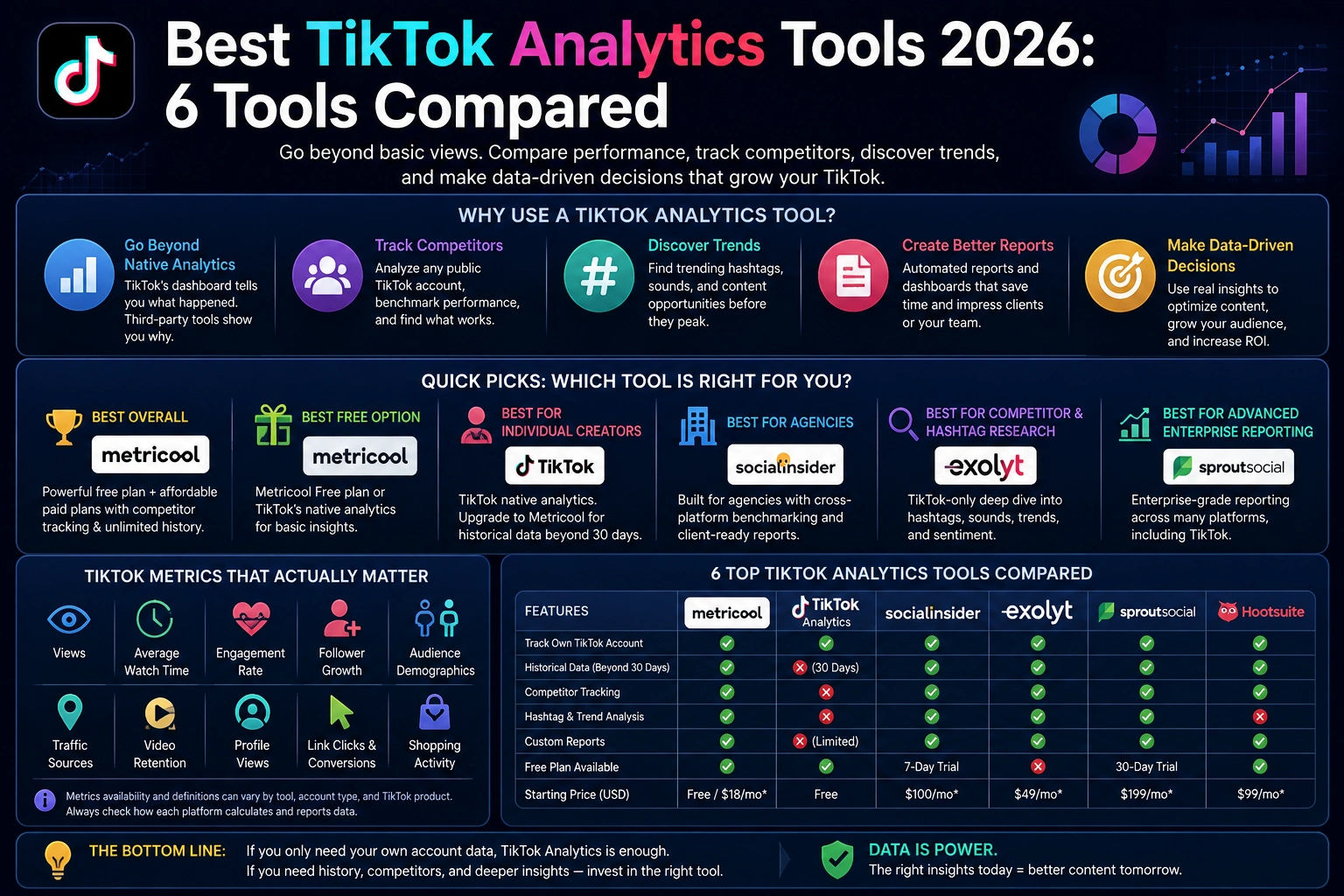
If you’ve ever stared at your TikTok dashboard wondering why a video with fewer views outperformed your “big” one, you already know the problem: TikTok’s built-in analytics tell you what happened, not why. They don’t show you what competitors are posting, which hashtags are actually driving reach this week, or how your account stacks up against anyone else’s. That gap is exactly what third-party TikTok analytics tools exist to close.
Here’s what this guide covers: what native analytics gives you for free, when a paid tool earns its $25 or $200 a month, and which one fits your setup: solo creator, five-person team, or agency juggling a dozen client accounts. You can also explore our guide to 15 essential AI marketing tools and who should skip them for broader marketing-tool recommendations.
Start With a Direct Answer
There’s no universal winner here. Budget, how many accounts you’re tracking, and whether you need competitor data those three things decide it, not some ranked list. Here’s the short version anyway:
- Best overall for most users: Metricool a genuinely useful free tier plus affordable paid plans that add competitor tracking, unlimited history, and cross-platform reporting.
- Best free option: Metricool Free plan, or TikTok’s own native analytics if you only need your own account’s numbers.
- Best for individual creators: TikTok’s native analytics dashboard, upgraded to Metricool if you want historical data beyond 30 days.
- Best for agencies: Socialinsider, built specifically for cross-platform competitive benchmarking and client reporting.
- Best for competitor and hashtag research: Exolyt, which is TikTok-only but goes deeper on hashtag, sound, and sentiment data than any general-purpose tool.
- Best for advanced enterprise reporting: Sprout Social, if TikTok analytics is one piece of a much bigger multi-platform reporting need.
What TikTok Analytics Tools Actually Are
A TikTok analytics tool tracks how your videos and accounts perform: views, engagement, who’s actually watching. Third-party tools add one more layer to how you stack up against everyone else.
TikTok’s own analytics measure your account and nothing else — your views, your followers, your top content. Full stop. Third-party tools become useful the moment you need to see accounts you don’t control — a competitor, an industry benchmark, a set of influencers. you’re vetting for a campaign (data TikTok’s native dashboard was never built to show you).
The TikTok Metrics That Actually Matter
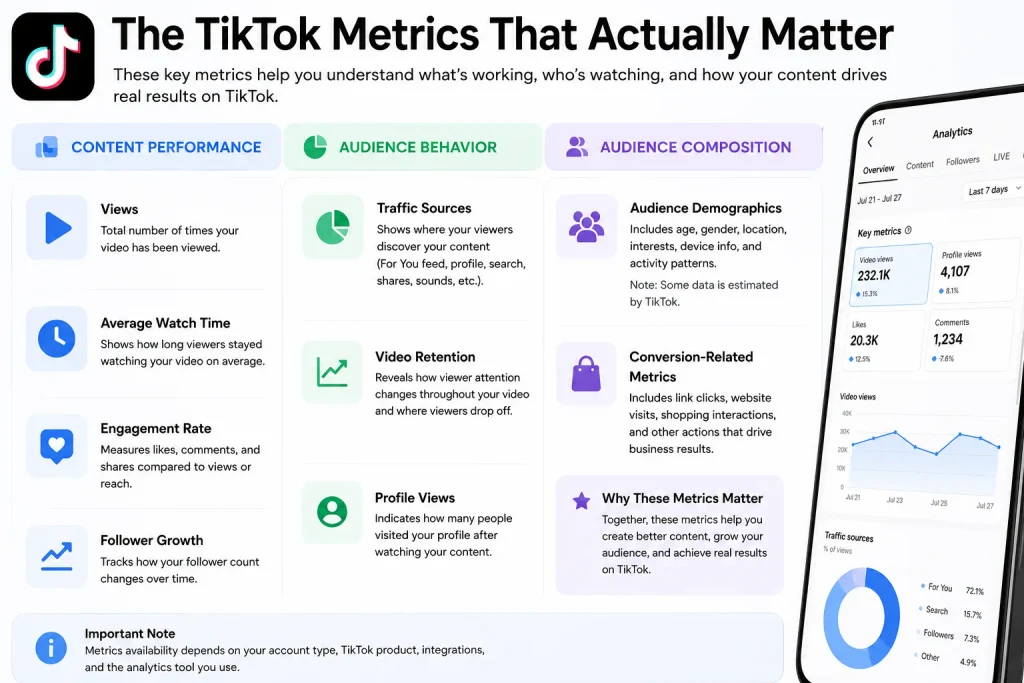
Not every TikTok analytics tool tracks every metric, and the data available can vary by account type, product, and how TikTok makes data available to the platform. The most useful metrics generally fall into three groups: content performance, audience behavior, and audience composition.
- Views. Counts how many times a video has been viewed. TikTok’s developer documentation lists this as
view_count, a video-level metric. - Average watch time. Shows how long viewers actually stuck around. Definitions vary between TikTok’s own analytics and third-party platforms, so check how each tool calculates it before comparing numbers.
- Engagement rate. Compares interactions likes, comments, shares against a measure like views or reach. Formulas differ by platform, so verify the calculation before comparing rates across tools.
- Follower growth. Follower growth shows how an account’s follower count changes over time. It can help identify whether successful videos are also contributing to longer-term audience growth.
- Audience demographics. TikTok provides audience insights that can include demographics, location, interests, device information, and activity. TikTok says some audience information is estimated, so these figures should be treated as directional rather than guaranteed.
- Traffic sources. Traffic-source data can help explain where viewers discover content, but the exact sources and reporting available depend on the TikTok product or analytics platform being used.
- Video retention. Retention data shows how viewer attention changes during a video and can help identify where viewers stop watching. Because retention reporting is not universally available through every TikTok analytics product or third-party API, verify its availability before selecting a tool specifically for this purpose.
- Profile views. Profile views can help connect video discovery with interest in the broader TikTok account, when the metric is available in the relevant analytics product.
- Conversion-related metrics. Link clicks, website activity, shopping interactions, and other conversion metrics can be useful for businesses, but availability depends on the account, TikTok product, integration, and analytics platform.
TikTok’s developer documentation also shows that available video-level data can include likes, comments, shares, views, favorites, hashtags, video duration, and other fields. However, API availability should not be confused with the full set of metrics visible inside every TikTok analytics or advertising product.
In short: views tell you how many video views you generated, while watch time and retention help show whether viewers stayed engaged. Audience data helps you understand who you’re reaching. Track all three categories instead of judging performance from views alone.
The Best TikTok Analytics Tools, Reviewed
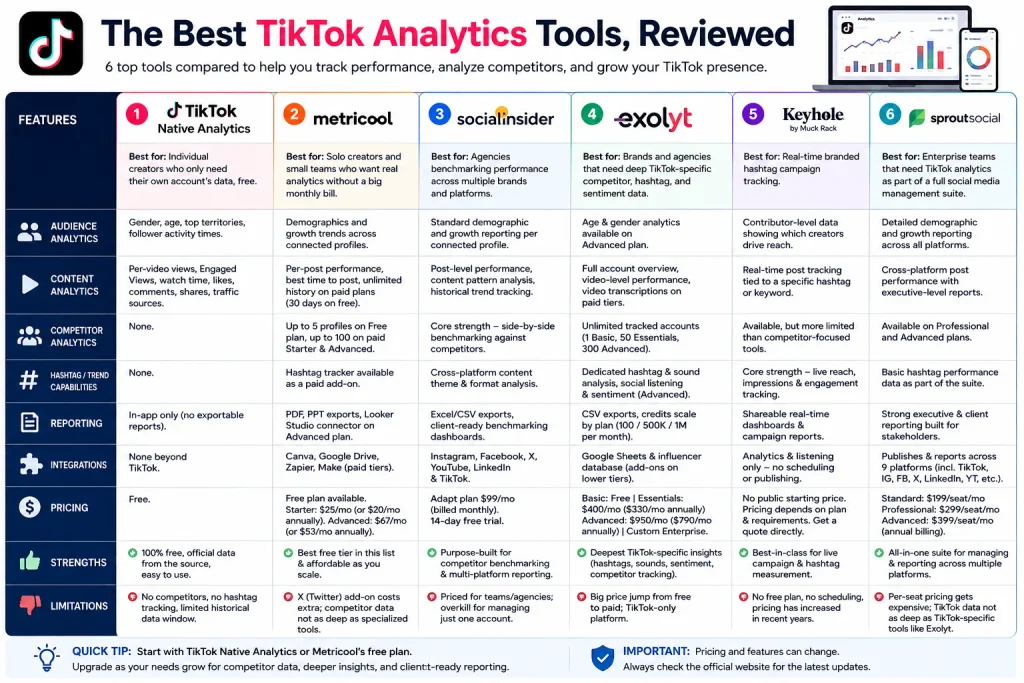
1.TikTok Native Analytics
Best for: Individual creators who only need their own account’s data, free.
TikTok’s built-in analytics dashboard comes free with any Creator or Business account. Switch account types in Settings and Privacy → Account, then find analytics under Creator Tools → Analytics on mobile, or at business.tiktok.com on desktop.
- Audience analytics: Gender split, age brackets, top territories, follower activity times.
- Content analytics: Per-video views, Engaged Views, average watch time, likes, comments, shares, and traffic source breakdown.
- Competitor analytics: None. This is the core limitation that pushes people toward third-party tools.
- Reporting: In-app only no exportable client-ready reports.
- integration: None beyond TikTok itself.
- Pricing: Free.
- Strengths: Zero cost, official data straight from the source, no setup beyond switching account types.
- Limitations: No competitor benchmarking, no hashtag tracking, and a rolling data window rather than permanent historical storage TikTok doesn’t guarantee unlimited look back on your own numbers.
2.Metricool
Best for: Solo creators and small teams who want real analytics without a big monthly bill.
Metricool is a social media scheduling and analytics platform that supports TikTok alongside nine other networks, including Instagram, YouTube, and Facebook.
- Audience analytics: Demographics and growth trends across connected profiles.
- Content analytics: Per-post performance, best-time-to-post recommendations, and (on paid plans) unlimited analytics history instead of the free plan’s 30-day window.
- Competitor analytics: Up to 5 competitor profiles on the Free plan, up to 100 on paid Starter and Advanced plans.
- Hashtag/trend capabilities: A dedicated hashtag tracker is available as a paid add-on.
- Reporting: PDF and PPT exports, plus a Looker Studio connector on the Advanced plan for custom dashboards.
- integration: Canva, Google Drive, Zapier, and Make on paid tiers.
- Pricing: Free plan available (1 brand, 20 scheduled posts per month, 5 competitor profiles, 30 days of analytics history). Starter starts at $25/month billed monthly or $20/month billed annually for up to 5 brands. Advanced starts at $67/month billed monthly or $53/month billed annually for up to 15 brands.
- Strengths: The most usable free tier of any tool in this list, and paid plans stay affordable even as you scale.
- Limitations: X/Twitter requires a separate paid add-on, and deep competitor benchmarking is stronger in tools built specifically for that purpose, like Socialinsider.
3.Socialinsider
Best for: Agencies benchmarking performance across multiple brands and platforms.
Socialinsider is built around competitive analysis comparing your TikTok performance directly against named competitors, not just tracking your own account.
- Audience analytics: Standard demographic and growth reporting per connected profile.
- Content analytics: Post-level performance data, content pattern analysis, and historical trend tracking.
- Competitor analytics: This is the tool’s core strength: add competitor profiles and get side-by-side benchmarking without manual spreadsheet work.
- Hashtag/trend capabilities: Cross-platform content theme and format analysis rather than dedicated hashtag tracking.
- Reporting: Excel and CSV exports, client-ready benchmarking dashboards.
- integration: Supports Instagram, Facebook, X, YouTube, and LinkedIn alongside TikTok, useful for agencies reporting across a client’s full platform mix.
- Pricing: Socialinsider’s current 2026 materials show the Adapt plan at $99/month when billed monthly, with higher-tier plans available for teams needing additional capabilities. The platform also advertises a 14-day free trial. Pricing and included limits can change, so verify the official pricing page before publishing.
- Strengths: Purpose-built for competitor benchmarking, which is the single hardest thing to do manually.
- Limitations: Priced for teams and agencies rather than solo creators; the entry tier is overkill if you only manage one account.
4.Exolyt
Best for: Brands and agencies that need deep TikTok-specific competitor, hashtag, and sentiment data.
Exolyt is TikTok-only, and that focus shows in how much further it goes on hashtag, sound, and social listening data than general-purpose tools.
- Audience analytics: Age and gender analytics available on the Advanced plan.
- Content analytics: Full account overview, video-level performance, and (on paid tiers) video transcriptions.
- Competitor analytics: Unlimited tracked accounts scale by plan 1 on Basic, 50 on Essentials, 300 on Advanced.
- Hashtag/trend capabilities: Dedicated hashtag and sound analysis, plus social listening projects (0 on Basic, 3 on Essentials, 15 on Advanced) and sentiment analysis on the Advanced tier.
- Reporting: CSV exports, with credit allowances that scale sharply by plan (100 per month on Basic, 500K on Essentials, 1M on Advanced).
- integration: Google Sheets and an influencer database, available as paid add-ons on lower tiers.
- Pricing: Basic is free (1 tracked account, 1 hashtag, 1 influencer campaign, 7 days of chart history). Essentials is $400/month, or $330/month billed annually. Advanced is $950/month, or $790/month billed annually. Custom enterprise pricing is available on request.
- Strengths: The most TikTok-specific depth on this list is hashtag, sound, and sentiment data that general social media tools don’t attempt to match.
- Limitations: The jump from the free Basic plan to Essentials is steep. $400/month is a big leap for anyone testing the waters and Exolyt covers TikTok only, so you’ll need a separate tool for any other platform.
5.Keyhole
Best for: Real-time branded hashtag campaign tracking.
Keyhole (acquired by Muck Rack in 2024) specializes in tracking hashtags and campaigns as they unfold, rather than reviewing performance after the fact.
- Audience analytics: Contributor-level data showing which creators are driving a campaign’s reach.
- Content analytics: Real-time post tracking tied to a specific hashtag or keyword.
- Competitor analytics: Available, though more limited than tools like Socialinsider that are purpose-built for it.
- Hashtag/trend capabilities: This is Keyhole’s core strength — live reach, impressions, and engagement tracking as a branded hashtag spreads.
- Reporting: Shareable real-time dashboards and campaign reports.
- integration: No scheduling or publishing — Keyhole is analytics and listening only.
- Pricing: Pricing: Keyhole does not currently publish a fixed starting price publicly. Pricing depends on the plan and requirements, so verify the current quote directly with Keyhole before publishing.
- Strengths: Best-in-class for live campaign and hashtag measurement.
- Limitations: No free plan, no scheduling, and pricing has reportedly climbed in recent years to confirm current rates directly before budgeting.
6.Sprout Social
Best for: Enterprise teams that need TikTok analytics as one part of a full social media management suite.
Sprout Social bundles TikTok analytics into a much larger platform that also handles scheduling, social listening, and inbox/CRM-style engagement management.
- Audience analytics: Detailed demographic and growth reporting across all connected platforms.
- Content analytics: Cross-platform post performance with executive-level reporting templates.
- Competitor analytics: Available on Professional and Advanced tiers.
- Hashtag/trend capabilities: Basic hashtag performance data as part of the broader analytics suite, not a dedicated hashtag tool.
- Reporting: Strong executive and client reporting, built for teams presenting results to stakeholders.
- integration: Publishes and reports across nine platforms, including TikTok, Instagram, Facebook, X, LinkedIn, YouTube, Pinterest, Threads, and Bluesky.
- Pricing: Standard costs $199/seat/month, Professional $299/seat/month, and Advanced $399/seat/month when billed annually. Enterprise pricing is custom.
- Strengths: If your team already manages five platforms in Sprout, adding TikTok is a natural extension rather than a new tool to learn.
- Limitations: Per-seat pricing gets expensive fast for larger teams; a 5-person team on Standard runs almost $1,000/month before add-ons and TikTok analytics here isn’t as deep as what a TikTok-specific tool like Exolyt provides.
Native TikTok Analytics vs. Third-Party Tools
Here’s the honest breakdown of when native analytics is enough, and when it isn’t.
| Factor | Native TikTok Analytics | Third-Party Tools |
| Cost | Free | Free to $950+/month depending on tool and scale |
| Data depth | Your own account only | Your account plus competitors, hashtags, industry trends |
| Historical reporting | Limited rolling window | 30 days to unlimited, depending on plan |
| Competitor tracking | Not available | Core feature in most third-party tools |
| Cross-platform reporting | TikTok only | Most tools cover 5–10+ platforms in one dashboard |
| Team collaboration | Not built for teams | Role management and shared dashboards on paid tiers |
| Client reporting | Not available | Branded, exportable reports on most paid plans |
| Automation | None | Scheduled reports, alerts, and (on some tools) API access |
| Data exports | Not available | CSV, PDF, PPT, or Looker Studio depending on tool |
Bottom line: solo creator tracking your own growth? Native analytics covers it. Need to compare yourself to a competitor, report to a client, or keep data past a 30-day window? That’s when a third-party tool earns its price tag.
How to Choose a TikTok Analytics Tool
- Identify your account type. Individual creator, business account, or agency managing multiple clients this alone narrows the field significantly.
- Decide which metrics matter most. Growth-focused creators care about retention and watch time; brands often care more about conversion and traffic source.
- Determine whether competitor data is required. If yes, prioritize tools like Socialinsider or Exolyt over general schedulers with light analytics.
- Check historical-data availability. A 30-day window is fine for quick checks, but useless for tracking growth trends over a quarter.
- Compare pricing against your actual usage. Per-brand pricing (Metricool) behaves very differently from per-seat pricing (Sprout Social) as your team grows.
- Check integration. If you already report through Looker Studio or need Zapier automation, confirm the tool supports it before committing.
- Review privacy and data-access requirements. Understand what account permissions a tool needs before connecting it.
- Test the platform before committing. Nearly every tool on this list offers a free plan or free trial use it before signing an annual contract.
TikTok Analytics for Different Users
- Individual creators: Start with native analytics. Add Metricool free plan once you want historical data beyond 30 days.
- Influencers: Metricool or Exolyt’s free Basic tier, depending on whether brand partners are asking for competitor or hashtag data.
- Small businesses: Metricool Starter covers most needs competitor tracking, cross-platform reporting, and exportable reports at an affordable per-brand rate.
- Marketing teams: Socialinsider or Sprout Social Standard, depending on whether TikTok is the primary focus or one platform among several.
- Agencies: Socialinsider’s Agency plan or Sprout Social Professional, both built for multi-client reporting and team access.
- E-commerce brands: Metricool or Sprout Social, especially if you’re already running TikTok Ads and want organic and paid data in one dashboard.
- SaaS companies: Sprout Social or Socialinsider, depending on whether TikTok is a core to growth strategy or a secondary channel.
- Enterprise organizations: Sprout Social Advanced or Exolyt Advanced, depending on whether the priority is broad multi-platform reporting or TikTok-specific depth.
What to Look for in a TikTok Analytics Tool
- Accuracy. Third-party tools pull from TikTok’s API, so numbers can differ slightly from native analytics that’s expected, not a red flag.
- Data freshness. Some tools update once a day, others multiple times daily check this if you’re tracking a live campaign.
- Historical data. Confirm the actual retention window on your plan, not just the marketing copy.
- Reporting. Look for exportable, brandable reports if you’re presenting to clients or leadership.
- Ease of use. A tool with more features than you’ll use is often worse than a simpler one you’ll actually open every week.
- Competitor tracking. Confirm the tracker limit on your plan; some tools cap this lower than expected.
- Audience insights. Depth varies widely; some tools only show basics like gender and age.
- Export options. CSV is standard; PDF, PPT, and Looker Studio connectors are pricier-tier features.
- API access. Only relevant if you’re building custom dashboards or integrating with other systems.
- integration. Check for the specific tools you already use Canva, Zapier, Google Sheets, Looker Studio.
- Team permissions. Matters more for agencies than solo creators.
- Security and privacy. Understand what TikTok account access a tool requests before connecting it.
- Pricing transparency. Tools that don’t publish pricing (requiring a sales call) tend to cost more than published tiers suggest.
Practically speaking: match the tool’s depth to your actual reporting needs. Paying for enterprise-level competitor tracking when you manage one account is as much a mistake as trying to run agency reporting off a free plan.
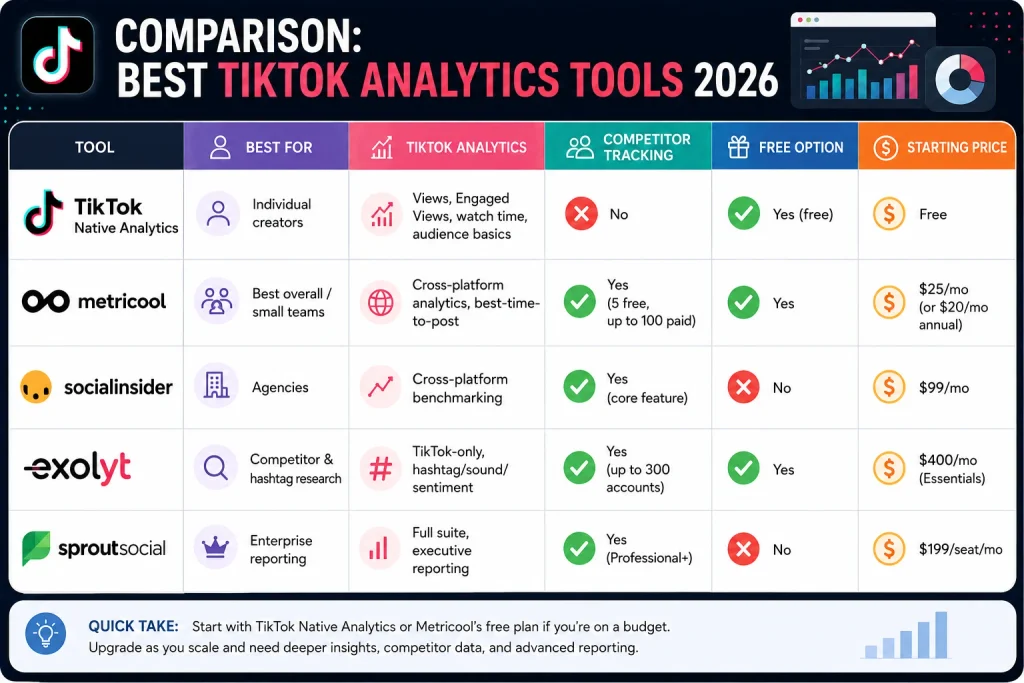
Comparison: Best TikTok Analytics Tools 2026
| Tool | Best For | TikTok Analytics | Competitor Tracking | Free Option | Starting Price |
| TikTok Native Analytics | Individual creators | Views, Engaged Views, watch time, audience basics | No | Yes (free) | Free |
| Metricool | Best overall / small teams | Cross-platform analytics, best-time-to-post | Yes (5 free, up to 100 paid) | Yes | $25/mo (or $20/mo annual) |
| Socialinsider | Agencies | Cross-platform benchmarking | Yes (core feature) | No | $99/mo |
| Exolyt | Competitor & hashtag research | TikTok-only, hashtag/sound/sentiment | Yes (up to 300 accounts) | Yes | $400/mo (Essentials) |
| Sprout Social | Enterprise reporting | Full suite, executive reporting | Yes (Professional+) | No | $199/seat/mo |
Winner per use case: Metricool for best overall value and best free option. Native analytics for individual creators who only need their own numbers. Socialinsider for agency-level competitor benchmarking. Exolyt for the deepest TikTok-specific hashtag and sentiment research. Sprout Social for enterprise teams already managing multiple platforms.
Frequently Asked Questions
What is the best TikTok analytics tool in 2026?
There’s no single universal winner Metricool offers the strongest overall balance of free and paid features for most creators and small businesses, while agencies needing deep competitor benchmarking are usually better served by Socialinsider or Exolyt.
Is TikTok Analytics free?
Yes. TikTok’s native analytics dashboard is free on any Creator or Business account and includes views, engagement, and basic audience data for your own account.
What is the best free TikTok analytics tool?
Metricool Free plan is the strongest free third-party option, offering 30 days of analytics history and tracking for 5 competitor profiles alongside native TikTok analytics.
Can TikTok analytics tools track competitors?
Yes, most third-party tools support competitor tracking, though the number of profiles you can track and the depth of comparison data varies significantly by plan and provider.
What metrics should I track on TikTok?
Track Engaged Views and average watch time to judge content quality, follower growth to measure account health, and audience demographics to confirm you’re reaching the right people.
Are third-party TikTok analytics tools accurate?
Third-party tools pull data through TikTok’s API, so minor differences from native analytics numbers are normal and expected rather than a sign of inaccuracy.
Can I use TikTok analytics tools for multiple accounts?
Yes, most third-party tools support multiple accounts, though pricing and account limits vary — Metricool prices by “brand,” while Sprout Social prices per user seat.
The Bottom Line
Here’s the thing: the right tool comes down to one question: are you tracking your own growth, or sizing up everyone else’s? If it’s just your own numbers, TikTok’s free native dashboard (especially post-2026, with Engaged Views front and center) probably covers it. If you need competitor data, start with Metricool it’s the most practical entry point for creators and small teams. Socialinsider, Exolyt, and Sprout Social sit at the top end for agencies and enterprise reporting. Not everyone needs to start there.
Test whichever tool’s free plan or trial matches your use case above. You’ll know within a week whether it earns a place in your workflow.