FluxGrowth is reader-supported. Some links in our guides are affiliate links — if you buy through one we may earn a commission, at no extra cost to you. It never changes which tools we recommend. How we test tools.
Most Facebook Ads campaigns that lose money don’t lose it in the ad. They lose it before launch: the wrong objective, a landing page nobody tested on a phone, or a Pixel that never records a single purchase.
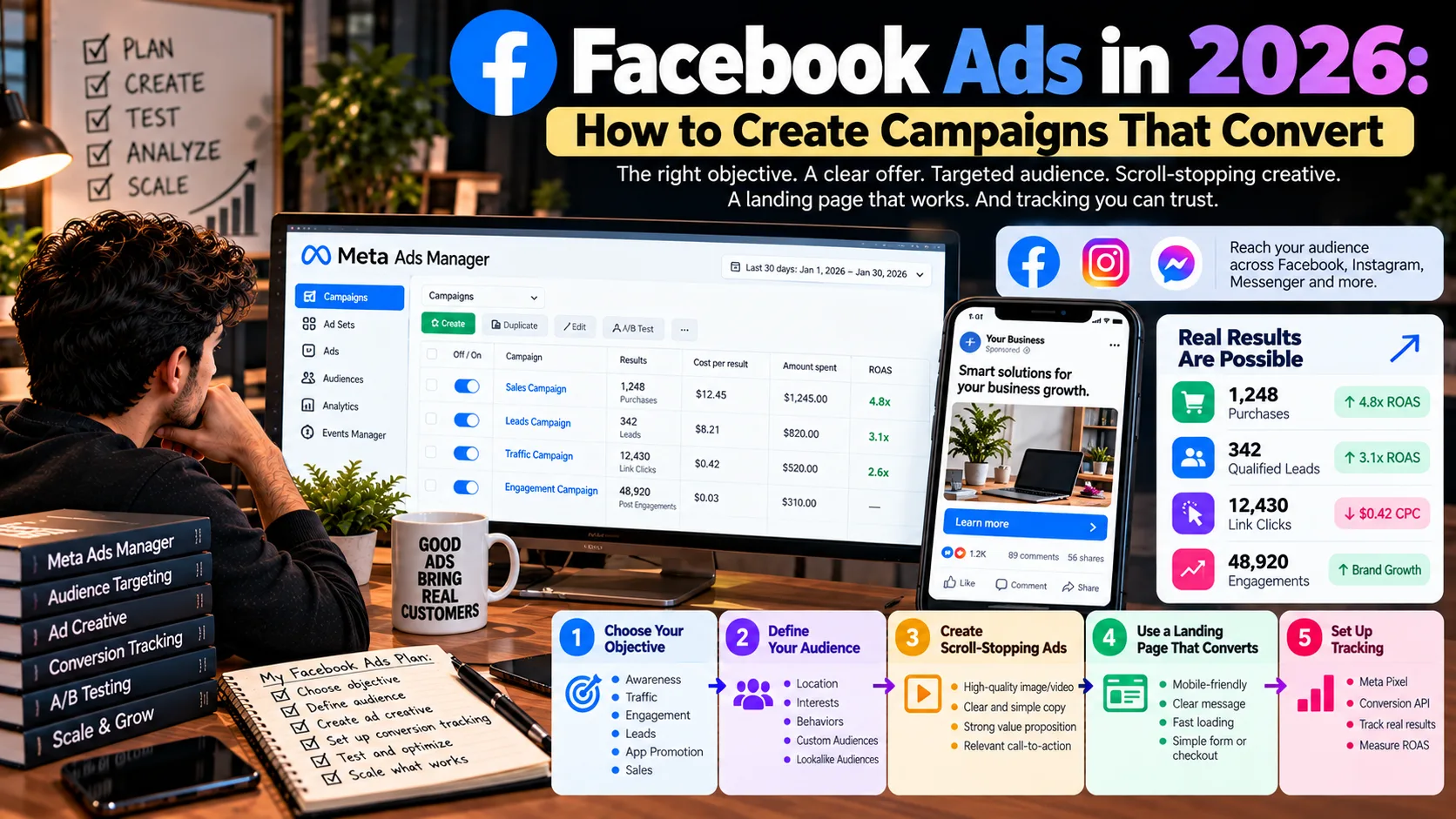
Facebook Ads convert in 2026 when six things line up: the campaign objective, the offer, the audience inputs, the creative, the landing page, and tracking you can trust. Meta’s automation now handles much of the targeting work. Your job has shifted toward feeding it clean signals and checking its math against your own sales records.
This guide walks through each of those pieces for U.S. businesses, from your first campaign in Meta Ads Manager to reading ROAS without fooling yourself. No result is guaranteed. A clear process just makes it much harder to waste the budget.
What are Facebook Ads and how do they work in 2026?
Facebook Ads are paid advertisements created through Meta Ads Manager. Depending on your campaign settings, ads can appear on Facebook, Instagram, Messenger, and Meta Audience Network. Meta uses an ad auction to decide which ads to show, considering factors such as bids, estimated results, and ad quality.
Advantage placements automatically distributes ads across eligible placements. Where available, manual placements let you choose Facebook-only placements.
Ads Manager vs. the Boost button
Boosting promotes a post that already exists on your Page, with a short list of settings. Ads Manager gives you every objective, conversion tracking, audience controls, and testing. Boost is fine for a quick reach or engagement push on a post that’s already doing well. It’s the wrong tool when the goal is sales or booked calls you need to track.
Campaign, ad set, ad
Every Facebook ad campaign has three layers:
- Campaign: the objective, plus the budget if you use a campaign-level budget.
- Ad set: the audience inputs, placements, schedule, optimization event, and budget if you set it here.
- Ad: the image or video, the copy, the destination URL, and the call-to-action button.
Which settings show up depends on the objective you pick first. So the objective comes before everything else.
Which Facebook Ads Campaign Objective Should You Choose?
Choose your campaign objective based on the business result you want. Meta Ads Manager offers six objectives: Awareness, Traffic, Engagement, Leads, App Promotion, and Sales. Each helps Meta optimize ad delivery for a different goal. See Meta’s official guide to ad objectives.
For example, Traffic campaigns prioritize visits, while Sales campaigns optimize for purchases or other conversion events. If your goal is sales, use appropriate conversion tracking to help measure results.
| Campaign objective | Best suited for | Key metrics |
| Awareness | Brand recognition and reach | Reach, frequency |
| Traffic | Website visits and content | Landing-page views, CPC |
| Engagement | Messages, video views, interactions | Cost per result |
| Leads | Service inquiries and sign-ups | Cost per qualified lead |
| App Promotion | App installs and activity | Cost per install, in-app events |
| Sales | Purchases and conversions | CPA, conversion rate, ROAS |
Important: Campaign editing options and Advantage features can vary by setup. Check the options available in Ads Manager before launching.
How much will Facebook Ads cost in 2026?
Facebook Ads have no fixed price. Costs depend on competition, audience, campaign objective, ad creative, and season. Meta uses an ad auction to determine delivery costs.
There is no single minimum budget for every campaign. Requirements vary by factors such as bid strategy, optimization, currency, and schedule. Check Meta’s minimum-budget guidance and the budget recommendations shown in Ads Manager before launching.
What the 2026 benchmarks show
The most current independent data comes from WordStream’s 2026 Facebook Ads Benchmarks, published September 2026 from roughly 1,800 U.S. campaigns. Traffic campaigns posted a median click-through rate of 1.93% and a median cost per click of $0.60, down from $0.70 the year before. Lead campaigns came in at a median cost per lead of $27.39.
Treat those as context, not targets. They’re medians across industries, and your account can land far above or below them.
Two budget mechanics that surprise beginners
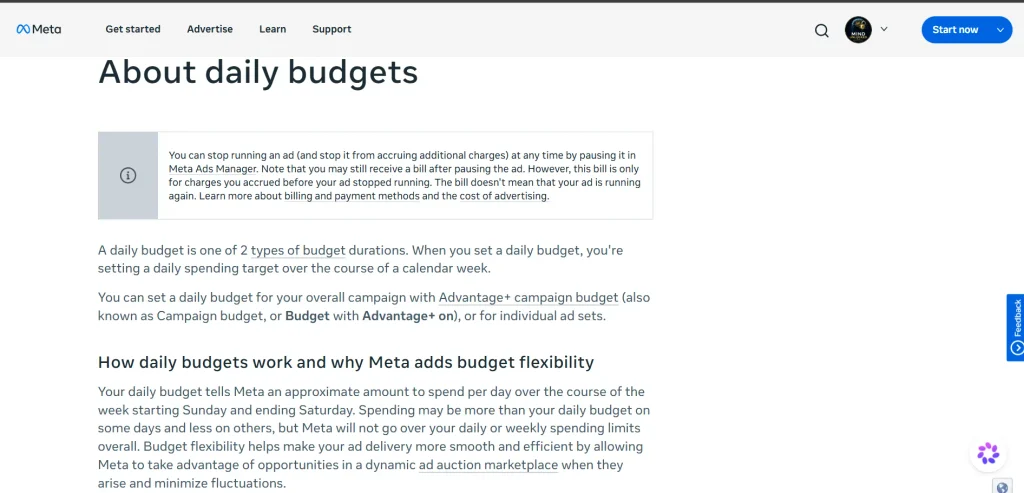
1. Daily budgets can fluctuate. A daily budget is an average, not a strict daily cap. Meta may spend up to 75% more on some days, while keeping weekly spending within seven times your daily budget under its stated limits. Check Meta’s daily budget guidance for the rules applicable to your account.
2. The learning phase takes time. After an ad set is created or significantly edited, Meta’s delivery system learns how to optimize performance. Delivery typically stabilizes after around 50 optimization events within seven days. Results may fluctuate during this phase, so avoid unnecessary significant edits. See Meta’s learning-phase guidance.
A hypothetical starting budget
That 50-event number gives you honest math. Daily budget per ad set ≈ (target cost per result × 50) ÷ 7.
Hypothetical example: a cleaning company in Austin expects about $40 per quote request. That’s $40 × 50 ÷ 7 ≈ $286 a day for one ad set to exit learning quickly. Most small businesses won’t spend that, and that’s fine. It just means you’ll either accept a slower, “Learning Limited” ad set, or optimize for a more frequent event (like landing-page views or a lead-form open) while you build volume.
The math won’t tell you what you’ll pay. It tells you whether your budget can realistically teach the system anything.
How do you set up a Facebook Ads campaign step by step?
You set up a Facebook Ads campaign in Meta Ads Manager in eleven steps, and the first two happen before you open it. Menu labels shift often, so treat the names below as a map, not a script.
- Define one measurable goal. “20 quote requests at under $50 each this month” beats “get more customers.”
- Prepare the offer and landing page. Load the page on your own phone first. If the headline and button aren’t visible without scrolling, fix that before spending a dollar.
- Open Meta Ads Manager and click Create. You’ll need a Facebook Page and a payment method on the ad account.
- Select the objective that matches step 1.
- Configure the campaign: name it clearly (for example, “Leads – Quote Form – Austin – Oct”), declare a Special Ad Category if one applies, and choose campaign or ad set budgeting.
- Set the audience and placements: location, minimum age, language, any exclusions, then Advantage or manual placements.
- Set the budget and schedule using the learning-phase math from the cost section.
- Build the ad: creative, primary text, headline, call-to-action button, destination.
- Verify the URL and tracking: confirm the Pixel or dataset is selected, add UTM parameters, and click through the preview yourself.
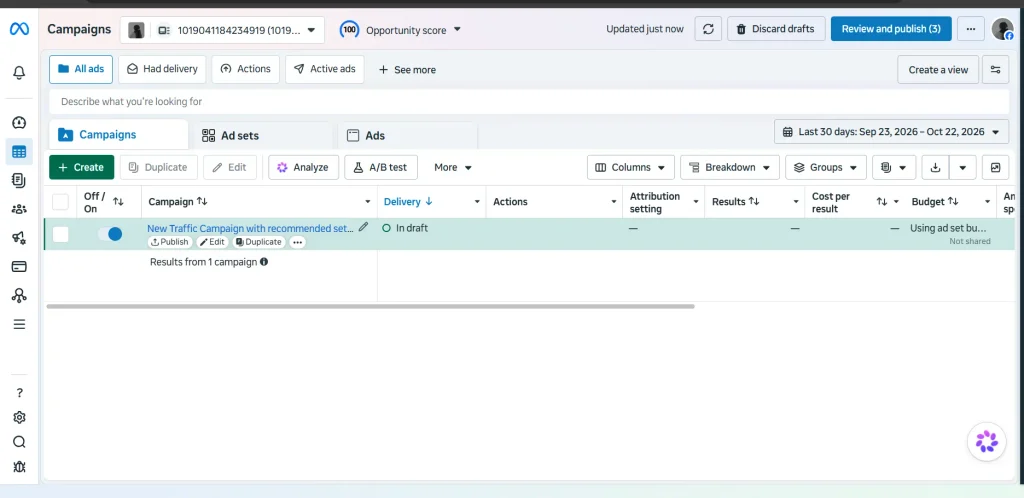
Step 9 is where most first campaigns quietly break. A missing purchase event won’t throw an error. It’ll just leave Meta optimizing blind.
How do you target the right audience on Facebook in 2026?
Facebook Ads targeting in 2026 is less about picking interests and more about setting firm limits, then letting your creative and conversion data do the finding. Advantage audience is on by default for new campaigns, and it changes what your inputs mean.
Controls vs. suggestions
With Advantage audience, Meta distinguishes between audience controls and audience suggestions. Controls generally include location, minimum age, language, and excluded custom audiences. Suggestions can include age ranges, gender, included custom audiences, lookalike audiences, and detailed targeting. Meta may expand beyond suggestions to find better results.
For example, if your plumbing business serves customers within a 25-mile radius of Columbus, set your location carefully and ensure the option to reach people beyond your selected locations is disabled. Check the controls available in your Ads Manager account before publishing.
For more ways to improve your Facebook marketing workflow, explore our guide to the 7 Best AI Tools for Facebook Marketing in 2026, covering tools for ad creative, campaign optimization, content scheduling, and Messenger automation.
What happened to detailed targeting
Detailed targeting still exists, but Meta has consolidated many interest options and removed detailed-targeting exclusions. As of January 15, 2026, ad sets using certain retired interests could stop delivering unless those interests were replaced or removed. Check your Ads Manager notifications for affected ad sets.
Broad targeting isn’t automatically best for every business. Test broad audiences against relevant audience suggestions when your budget allows. Avoid stacking too many narrow interests without evidence that they improve results.
Sources: Meta Business Help Center · Jon Loomer Digital: Detailed Targeting Changes
Custom audiences, lookalikes, and re-targeting
Custom audiences built from your own data are now your most reliable lever:
- Website visitors captured by the Pixel, for re-targeting people who viewed a product or started checkout
- Customer lists uploaded to Ads Manager, used to exclude current buyers from acquisition campaigns
- Lookalikes seeded from your best customers, used as a suggestion to point Meta in a direction
Customer lists, consent, and privacy
Only upload customer contact data to Meta when you have the necessary rights, permissions, and lawful basis to use it for advertising. Explain relevant data-sharing practices in your privacy policy and honor applicable opt-outs.
Meta hashes customer-list data before matching it to Meta accounts, but hashing does not remove your legal responsibilities. You must still comply with Meta’s Customer List Custom Audiences Terms and applicable privacy laws, including relevant U.S. state privacy laws.
How do you create Facebook Ads that convert?
Facebook Ads that convert make one specific promise to one specific person, back it with proof, and send them to a page that keeps the same promise. With interest targeting weaker, your creative now does much of the targeting: the hook decides who stops scrolling.
The six-part structure
A working ad usually hits these beats, in roughly this order:
- A hook in the first line or first second of video
- The customer’s problem, in their words
- What your product or service changes
- Evidence: a real review, a number you can prove, a before-and-after
- A call to action that matches the objective (“Get a quote,” not “Learn more,” on a Leads campaign)
- A landing page whose headline repeats the ad’s promise
Hypothetical example for that Austin cleaning company: “Moving out Friday? We’ll handle the deposit-back clean so you don’t have to. Flat-rate quotes in 2 minutes.” The landing page headline should say the same thing, not “Welcome to Sparkle Cleaning.”
Picking a format
Video suits explaining or demonstrating. A single image suits one clear offer. Carousels suit several products or a step-by-step story. Instant forms (on a Leads campaign) cut friction, but they also make it easy to submit a form without real intent, so score those leads before celebrating the volume.
Using AI without getting burned
AI tools can help you brainstorm hook variations, test copy angles, and create rough storyboards. Meta’s Advantage creative features can also adjust ad images, videos, and text. Some enhancements may be enabled by default, so review each ad’s settings and previews before publishing. See Meta Business Help Center.
A human should verify every factual claim, price, offer, and testimonial. The FTC prohibits fake or misleading reviews and testimonials, including AI-generated testimonials that falsely portray nonexistent people or experiences. However, AI-generated faces and avatars are not automatically prohibited. Read the FTC’s official guidance.
How do you track Facebook Ads performance after Meta’s 2026 attribution changes?
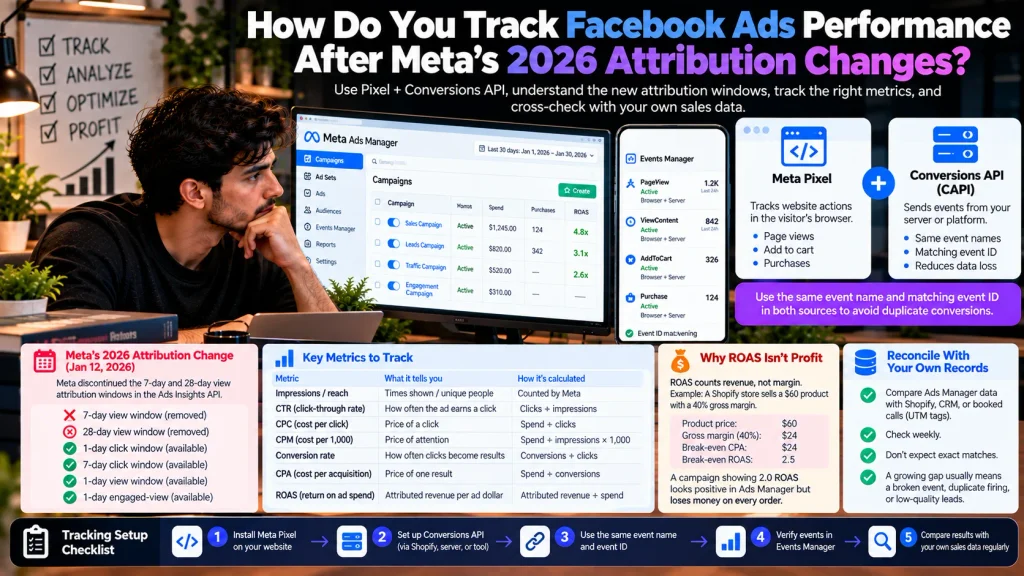
Track Facebook Ads with both the Meta Pixel and the Conversions API, then check Ads Manager’s numbers against your own sales records. That second step matters more in 2026, because Meta changed how much credit it can give your ads.
Pixel + Conversions API
The Meta Pixel tracks website actions through a visitor’s browser, while the Conversions API (CAPI) sends events from your server or platform. Using both can help Meta receive events missed by browser-based tracking.
To avoid counting the same conversion twice, ensure both sources send the same event name and matching event ID. See Meta’s official duplication documentation.
Shopify and other platforms offer integration’s that simplify setup, but verify event delivery and duplication in Meta Events Manager.
The attribution change most guides skip
On January 12, 2026, Meta discontinued the 7-day and 28-day view attribution windows in its Ads Insights API. The 1-day and 7-day click windows and 1-day view window remained available, along with 1-day engaged-view reporting.
In practical terms, reporting dashboards that relied on the retired view windows may show fewer attributed conversions. However, a drop in reported ROAS is not necessarily caused by this change. Check your attribution settings and reporting source, and compare Meta Ads results with your actual sales data before concluding that campaign performance declined.
The metrics, in one place
| Metric | What it tells you | How it’s calculated |
| Impressions / reach | Times shown / unique people shown | Counted by Meta |
| CTR (click-through rate) | How often the ad earns a click | Clicks ÷ impressions |
| CPC (cost per click) | Price of a click | Spend ÷ clicks |
| CPM (cost per 1,000 impressions) | Price of attention | Spend ÷ impressions × 1,000 |
| Conversion rate | How often clicks become results | Conversions ÷ clicks |
| CPA (cost per acquisition) | Price of one result | Spend ÷ conversions |
| ROAS (return on ad spend) | Attributed revenue per ad dollar | Attributed revenue ÷ spend |
Why ROAS isn’t profit
ROAS counts revenue, not margin. Hypothetical: a Shopify store sells a $60 product with a 40% gross margin, so each order earns $24 before ad costs. Break-even CPA is $24. Break-even ROAS is 1 ÷ 0.40 = 2.5.
That means a campaign showing a 2.0 ROAS looks positive in Ads Manager and loses money on every order. Work out your break-even numbers before you launch, not after.
Reconcile with your own records
Once a week, compare Ads Manager’s purchases or leads with Shopify orders, CRM records, or booked calls tagged with UTM parameters. They won’t match exactly, and that’s normal. A gap that keeps growing usually means a broken event, duplicate firing, or a lead form attracting junk.
How do you optimize and scale Facebook Ads without wasting budget?
Optimize Facebook Ads by changing one meaningful thing at a time, and only after the data can actually support a decision. Most wasted spend comes from editing too often, not from editing too little.
Test concepts, not tweaks
A new button color rarely teaches you anything. A different angle does: price-led vs. speed-led vs. trust-led, or a founder-to-camera video vs. a product demo. Run two or three distinct concepts, then swap your offer or landing page once you know which message lands.
Respect the learning phase
Significant edits to targeting, creative, or the optimization event can send an ad set back into the learning phase. Large budget changes may also trigger a reset. During learning, performance is less stable and cost per result may be higher.
There is no universal waiting period for every campaign. Give your ads enough time and data to evaluate performance, and judge results by cost per qualified lead or sale—not by yesterday’s numbers alone.
Official reference: Meta Business Help Center — Significant Edits and the Learning Phase.
Scale when results repeat
Scale a campaign after it’s hit your target CPA across several consecutive weeks, not after one good weekend. Raise budgets gradually, and expect cost per result to rise as Meta reaches past your most responsive buyers. Check profit at each step, because platform ROAS can hold steady while real margin shrinks.
Seven common mistakes
- Running Traffic when you want sales
- Sending paid clicks to a homepage instead of an offer page
- Never testing the landing page on mobile
- Launching without confirming that the purchase or lead event fires
- Editing daily, then blaming “the algorithm”
- Making claims you can’t prove, which also risks ad rejection
- Reporting clicks and CTR to the business owner instead of leads and revenue
What policies and laws apply to Facebook Ads in the U.S.?
Every Facebook ad has to pass Meta’s Advertising Standards and follow U.S. advertising law. Meta’s rules decide whether the ad runs; the law decides whether you’re liable for what it says. This section is a practical overview, not legal advice.
Meta’s own rules
- Advertising Standards: Meta prohibits misleading claims, discriminatory advertising, and ads that assert or imply sensitive personal attributes. For example, avoid wording such as “Struggling with your debt?” that implies knowledge of someone’s financial situation. Review Meta’s Advertising Standards.
- Special Ad Categories: Ads involving housing, employment, credit, and social issues, elections, or politics may require special declarations and authorization, depending on the category and region. These ads can face additional targeting restrictions. Check Meta’s Special Ad Category guidance.
- Data Source Restrictions: Meta may restrict data sharing and conversion-event tracking for certain websites and apps, including some health and financial services businesses. These restrictions can affect purchase-event optimization and reporting. If your Sales campaign cannot optimize for purchases, check your data source’s assigned category and restrictions in Meta Events Manager.
Federal and state law
The FTC’s Consumer Reviews and Testimonials Rule, effective October 21, 2024, prohibits certain fake reviews, deceptive testimonials, and undisclosed insider reviews. The FTC’s Endorsement Guides require clear disclosure of material connections, such as payments or free products.
State privacy laws, including California’s CCPA, may give consumers rights over personal data used for advertising. If you use Meta Pixel or upload customer lists, review your privacy policy and applicable consent and opt-out requirements. Ensure income and health claims are truthful and supported by evidence.
What would a practical 30-day Facebook Ads plan look like?
The first 30 days of Facebook Ads should end with clean data and clear lessons, not necessarily a profit. If you were starting today, this is the order I’d follow:
- Week 1, set the foundation: write down one goal, your break-even CPA, the audience limits that truly apply (location, age), and the offer. Build or fix the landing page. Install the Pixel and Conversions API, then test one real purchase or lead to confirm the event fires.
- Week 2, launch small and simple: one campaign, one or two ad sets, two or three distinct creative concepts. Use a budget you can lose entirely without regret, sized with the learning-phase math.
- Week 3, review without panicking: check delivery, CPM, CTR, and cost per result. Then call or read your first leads, or open your first orders, and judge their quality. Reconcile Ads Manager against your records.
- Week 4, adjust and document: pause the weakest concept, replace it with one new angle, and write a one-page note on what you learned. That note is worth more than any single week of results.
Facebook Ads FAQ
How much should a beginner spend on Facebook Ads?
A beginner should spend an amount they can lose completely while learning, sized so each ad set can gather some results. Multiply your target cost per result by 50, then divide by 7, to see what a fast exit from the learning phase would cost per day. If that number is out of reach, run one ad set and optimize for a more frequent event at first.
Are Facebook Ads still worth it in 2026?
Facebook Ads are still worth testing for most U.S. businesses that sell online or book local services. WordStream’s 2026 benchmarks put the median cost per click for traffic campaigns at $0.60. Whether it’s worth it for you depends on your margins and how well you track results, not on platform averages.
Which Facebook Ads campaign objective should I choose?
Choose the objective that matches the result you’d pay for: Sales for purchases, Leads for inquiries, Traffic only when page visits are the goal. Awareness and Engagement fit brand or community goals. Optimizing for clicks when you want buyers is the most common beginner mistake.
How long does it take for Facebook Ads to start converting?
Facebook Ads can produce results in the first few days, but stable performance usually follows the learning phase. An ad set generally needs about 50 optimization events in 7 days to exit it. Low-budget or rare-event campaigns can take weeks, or stay “Learning Limited.”
What is a good ROAS for Facebook Ads?
A good ROAS for Facebook Ads is any number above your break-even ROAS, which is 1 divided by your gross margin. A business with a 40% margin breaks even at 2.5. Industry averages can’t tell you this, because they don’t know your costs.
How do I track conversions from Facebook Ads?
Track conversions from Facebook Ads with the Meta Pixel on your site plus the Conversions API from your server or store platform, reduplicated with a shared event ID. Add UTM parameters to every ad URL. Then compare Ads Manager with your store or CRM weekly.
Do I still need detailed targeting on Facebook in 2026?
Most advertisers don’t need heavy detailed targeting on Facebook in 2026, because Advantage audience treats it as a suggestion. Your firm controls are location, minimum age, language, and excluded custom audiences. Creative and conversion data now steer delivery more than interests do.
The one number to work out before your next campaign
Facebook Ads in 2026 reward the businesses that know their numbers before Meta reports them. The objective, offer, audience limits, creative, landing page, and tracking all have to point at the same result, or the automation optimizes toward the wrong one.
So here’s today’s task. Take your average order value or customer value, multiply it by your gross margin, and write down your break-even CPA. Every campaign decision after that gets simpler, because you’ll know whether a result is actually good, or just looks good in a dashboard.
What’s your break-even CPA right now, and does your current campaign beat it?