You just finished a Reel. The voiceover is an AI clone of your voice, the B-roll came from a text-to-video model, and ChatGPT wrote the caption in about nine seconds. Do you have to label it?
This guide is part of our Social Media Growth hub — everything we have published on growing social accounts with AI tools, in one place.
Probably. And not because of the caption.
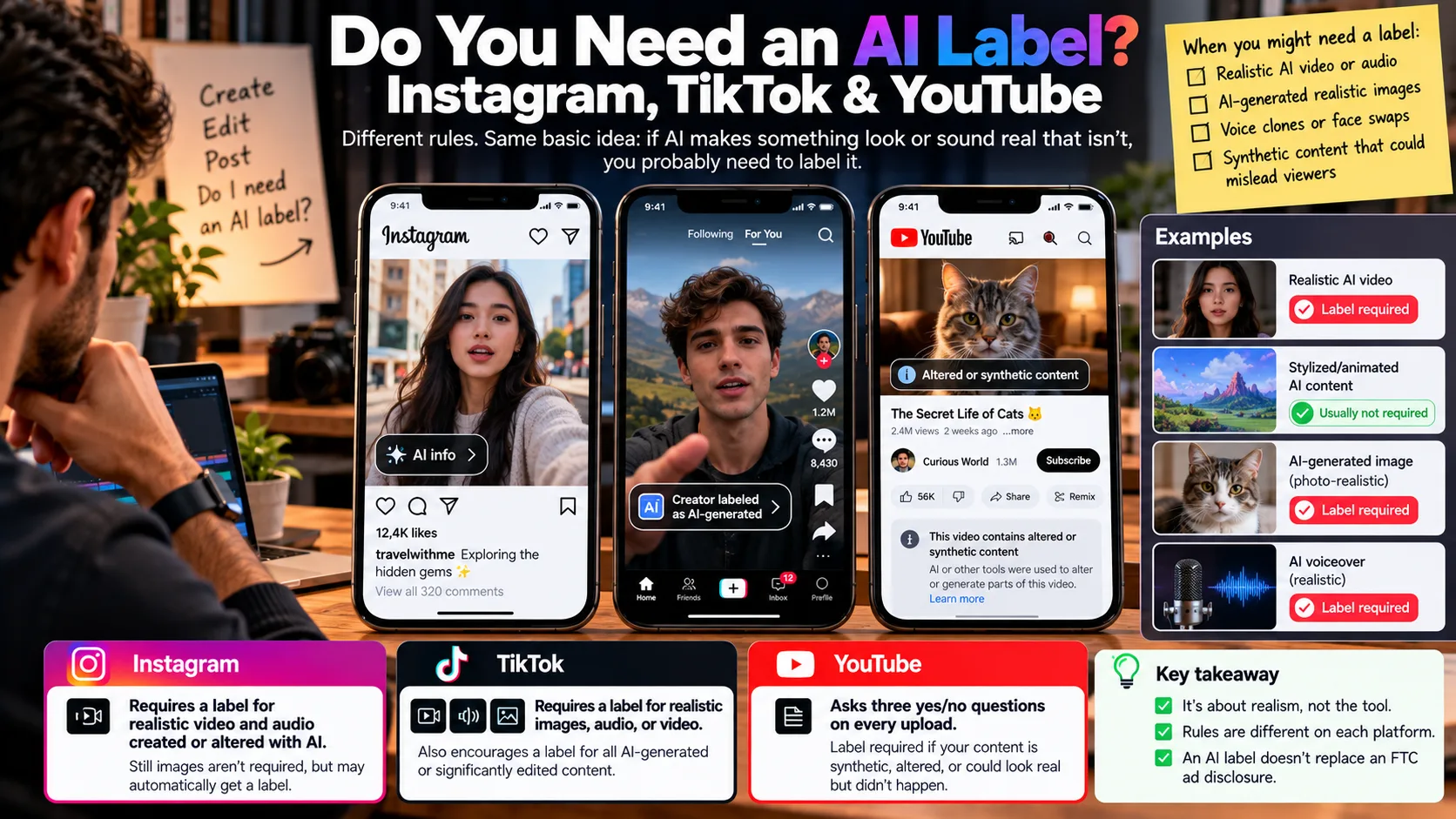
Instagram, TikTok & YouTube AI content labels all hinge on one idea: realism. If AI made something look or sound real that isn’t, each platform wants you to say so.
The details are where creators get caught. Instagram’s rule covers video and audio. TikTok also covers still images. YouTube asks you three yes/no questions every time you upload.
This guide gives you a clear yes/no test for each platform, the exact place to switch the label on, and the part most guides skip: why an AI label doesn’t count as an FTC ad disclosure.
What do AI content labels actually mean?
An AI content label is a visible tag that tells viewers AI generated or meaningfully altered what they’re seeing or hearing. None of the three platforms bans AI content. They just want context on the stuff that could pass for real.
AI-generated, AI-assisted, and realistically altered
These terms get blurred constantly. Here’s the plain version:
- AI-generated means a model created the image, video, or audio from a prompt. A Sora or Veo clip is AI-generated.
- AI-assisted means AI helped you make something you still produced yourself. Brainstorming hooks, writing a script, auto-captions, and noise removal all fall here.
- Realistically altered means real footage or audio was changed so it shows something that didn’t happen. Face swaps, voice clones, and swapping a real background for a fake real-looking one are the common cases.
Most required labels live in the first and third buckets. The second bucket is mostly exempt.
Creator labels vs. automatic labels
A creator label is one you switch on yourself before posting. An automatic label is one the platform adds when it detects AI signals in the file, usually C2PA Content Credentials (an industry metadata standard that tools like Adobe Firefly and OpenAI attach to generated media) or invisible watermarks.
When does Instagram require an AI label?
Instagram requires an AI label on photo-realistic video and realistic-sounding audio that was digitally created or altered, including with AI. Meta’s help center for Instagram, Facebook, and Threads states that requirement and adds that “there may be penalties” for content shared without a label when one is required.
What triggers it
A realistic video of people walking around an outdoor market needs a label, according to Meta’s own examples. So does a Reel narrated with a realistic AI-generated voiceover. A cartoon-style video of outdoor scenery doesn’t.
Notice what’s missing from the requirement: still images. Meta doesn’t require you to label AI-generated photos, but it says images may still get a label if its systems detect AI. In practice, a Mid-journey image carrying metadata can get labeled whether you flag it or not (which surprises people who never touched the toggle).
Created vs. modified
Content with signals showing it was created with AI gets the “AI info” label directly on the post. Content with signals showing it was only modified with AI doesn’t show the label on the post itself. Viewers find that information under the post’s Options menu instead.
If Meta decides altered content carries a particularly high risk of misleading the public on a matter of importance, it says it may add a more prominent label.
How to add the label
When publishing an Instagram post or Reel, look for the AI disclosure option in the sharing settings. Exact wording may vary by app version. See Meta’s official AI labeling announcement.
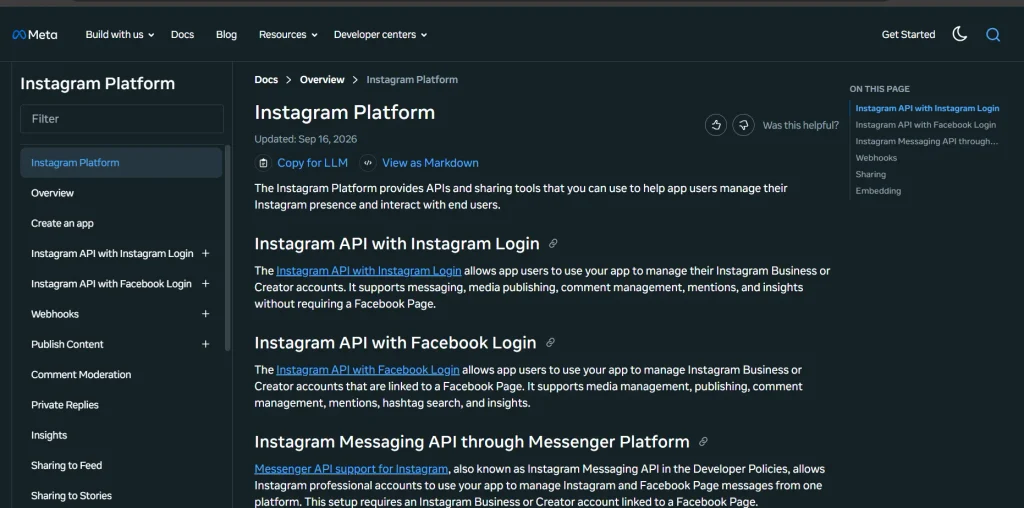
For scheduled posts, check whether your tool supports Meta’s is_ai_generated API parameter. See the Instagram Platform documentation.
The account-level label
Instagram renamed its “AI creator” label to “AI-generated profile” on August 31, 2026. The platform says it will limit the reach of unlabeled profiles featuring AI-generated people. Creators who simply use AI tools to edit photos, create graphics, or polish captions don’t need this profile label.
Summary: Instagram may automatically label AI-generated images, while realistic video and audio may require disclosure. Check Instagram’s official AI-generated profile announcement and Meta’s guide to identifying AI content.
When does TikTok require an AI-generated content label?
TikTok requires a label on AI-generated content that contains realistic images, audio, or video. It also encourages, but doesn’t require, a label on anything completely generated or significantly edited with AI, even when it’s not realistic.
Required vs. encouraged
That’s the key difference from Instagram. A photo-realistic AI product image in a TikTok carousel needs a label. A stylized anime clip doesn’t, though TikTok would like one anyway.
Creator labels and auto labels
TikTok runs two labels side by side. Turn on the setting yourself and viewers see “creator labeled as AI-generated.” TikTok’s auto label reads “AI-generated” and may appear when you use TikTok’s own AI effects or upload a file with C2PA Content Credentials attached.
Here’s the catch. TikTok’s support page says that once an auto label is applied, you can’t remove it from the post.
How to add the label
In the TikTok app, create or upload a video, tap Next, then More options, and turn on AI-generated content before posting. For photos, look under Post settings. Menu wording may vary by app version.
See TikTok’s official AI-generated content labeling guide for the latest instructions.
Will it hurt your reach?
No, according to TikTok. Its support page says turning on the AI-generated content setting won’t affect the distribution of your video as long as it doesn’t violate the Community Guidelines.
What happens if you skip it
TikTok says it may remove content that goes against its Integrity and Authenticity guidelines, and it asks viewers to report undisclosed realistic AI content. Some third-party guides claim TikTok now issues an immediate strike for missing labels. I couldn’t find that in TikTok’s official documentation, so treat it as unconfirmed.
Summary: On TikTok, the label is required for realistic AI images, audio, and video, and encouraged for everything else made mostly with AI. Self-label early, because auto labels are permanent.
When does YouTube require you to disclose altered or synthetic content?
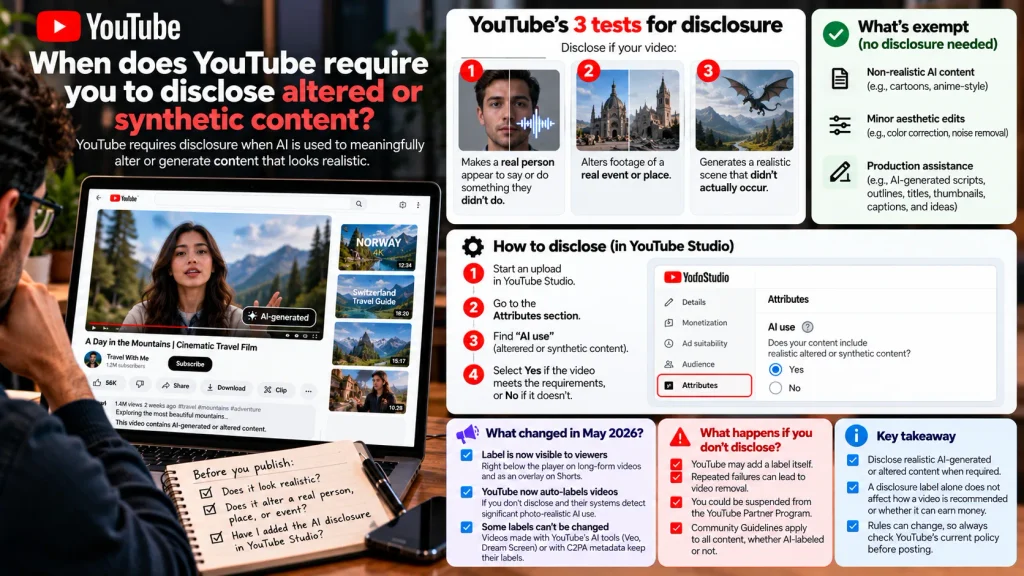
YouTube requires disclosure when AI is used to meaningfully alter or generate content that looks realistic. Its help page, now titled “Disclosing use of GenAI content,” spells out three tests. Disclose if your video:
- Makes a real person appear to say or do something they didn’t do.
- Alters footage of a real event or place.
- Generates a realistic scene that didn’t actually occur.
If any answer is yes, you disclose.
What’s exempt
YouTube doesn’t require disclosure for non-realistic AI content, minor aesthetic edits, or production assistance such as AI-generated scripts, outlines, titles, thumbnails, captions, and ideas. Realistic AI-generated or meaningfully altered content may still require disclosure.
Read YouTube’s official AI content disclosure policy.
How to disclose
In YouTube Studio, start an upload. In the Attributes section, find “AI use” and select Yes if the video meets the requirements or No if it doesn’t. Older guides call this setting “altered or synthetic content.”
What changed in May 2026
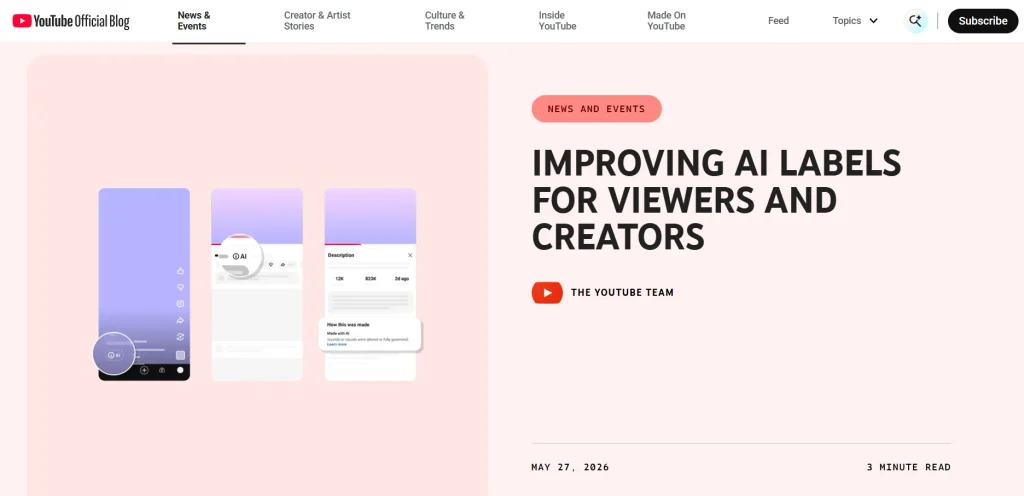
YouTube announced two changes in a May 27, 2026 blog post. The label moved somewhere viewers actually see it: right below the player on long-form videos, and as an overlay on Shorts.
YouTube also started labeling videos itself. If a creator doesn’t say whether they used AI and YouTube’s systems detect significant photo-realistic AI use, a label gets applied automatically.
Some labels also can’t be changed. Content made with YouTube’s own AI tools like Veo or Dream Screen, and content with C2PA metadata showing it was fully AI-generated, keep their labels.
The same post answers the reach question: YouTube says a disclosure label alone doesn’t change how a video is recommended or whether it can earn money.
What happens if you don’t disclose
YouTube may add a label itself or penalize creators who repeatedly fail to disclose qualifying AI-generated content, including removing videos or suspending them from the YouTube Partner Program. Community Guidelines apply to all content, whether AI-labeled or not.
Summary: Disclose realistic AI-generated or altered content when required. YouTube says the disclosure label alone does not affect recommendations or monetization eligibility.
Sources: YouTube disclosure policy · YouTube AI label update
Which AI edits need a label, and which usually don’t?
Most AI-assisted production work doesn’t need a label. Realistic synthetic people, voices, and scenes almost always do. Anywhere the table says “gray area,” label it.
| What you made | TikTok | YouTube | |
| Caption, script, or hashtags written with ChatGPT or Claude | No | No | No |
| Color correction, noise removal, auto-captions | No (may show under Options if detected) | No | No (minor edit) |
| Photorealistic AI B-roll of a street or crowd | Yes | Yes | Yes |
| Realistic AI voiceover cloned from your own voice | Yes | Yes | Gray area: disclose |
| AI voice or face of a real public figure | Yes | Yes | Yes |
| Real footage with a realistic AI background swap | Yes (video) | Yes | Likely yes |
| Photorealistic AI product photo (still image) | Not required, may auto-label | Yes | Not applicable |
| Cartoon or anime-style AI animation | No | Encouraged, not required | No |
| AI-generated thumbnail | Not addressed | Not addressed | Gray area |
The product photo row is the sneaky one. Say a skincare brand generates a photo-realistic serum shot in Mid-journey and posts it everywhere. As an Instagram feed image, it doesn’t require a label. Post the same shot in a TikTok photo carousel and it does.
Satire, parody, and fiction
Clearly fictional AI content may be exempt from labeling, but realistic deepfakes of politicians or celebrities can still require disclosure under platform rules. A parody label does not automatically resolve impersonation, publicity-rights, or other legal concerns.
The federal TAKE IT DOWN Act addresses certain non-consensual intimate images, including qualifying AI-generated deepfakes. State laws may separately regulate commercial use of a person’s likeness, so check the applicable rules before publishing.
Why you can’t rely on automatic AI labels
Automatic labels depend on metadata. Metadata breaks easily. Screenshot an AI image, or re-export a Veo clip through CapCut or Premiere, and the C2PA Content Credentials that would have triggered detection may not survive. Meta’s own help page concedes that not all AI content contains the information needed to identify it.
Here’s the thing — a missing auto label tells you nothing. The rule is about what’s in the video. Whether Meta or YouTube happened to catch it is a separate question.
It cuts the other way too. Auto labels on TikTok can’t be removed, and some YouTube labels can’t be changed. If you want control over how a post is framed, label it yourself before you publish.
Instagram, TikTok & YouTube AI content labels compared
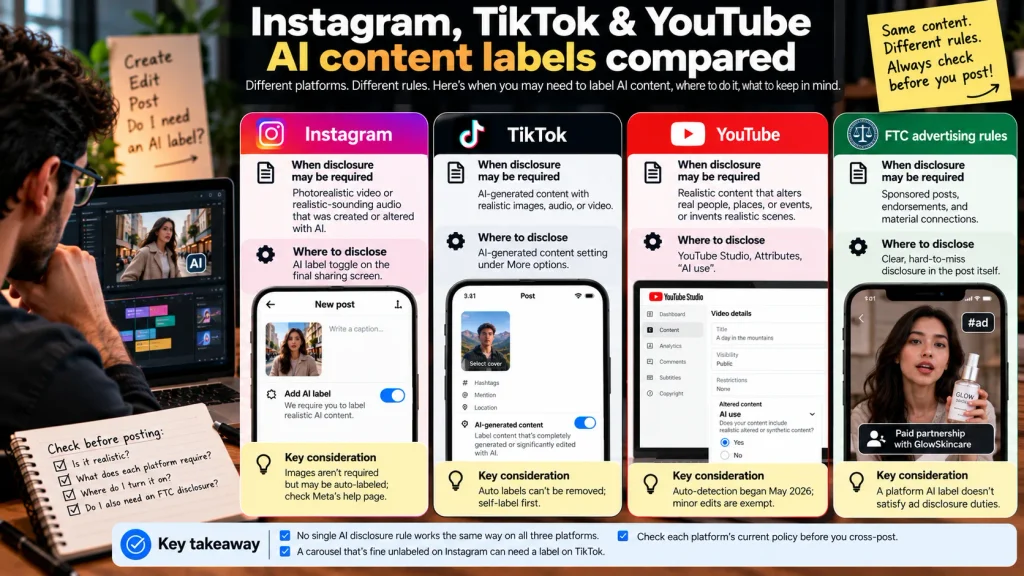
| Platform | When disclosure may be required | Where to disclose | Key consideration |
| Photorealistic video or realistic-sounding audio that was created or altered | AI label toggle on the final sharing screen | Images aren’t required but may be auto-labeled; check Meta’s help page | |
| TikTok | AI-generated content with realistic images, audio, or video | AI-generated content setting under More options | Auto labels can’t be removed; self-label first |
| YouTube | Realistic content that alters real people, places, or events, or invents realistic scenes | YouTube Studio, Attributes, “AI use” | Auto-detection began May 2026; minor edits are exempt |
| FTC advertising rules | Sponsored posts, endorsements, and material connections | Clear, hard-to-miss disclosure in the post itself | A platform AI label doesn’t satisfy ad disclosure duties |
No single AI disclosure rule works the same way on all three platforms. A carousel that’s fine unlabeled on Instagram can need a label on TikTok, so check each platform’s current policy before you cross-post.
Is an AI label the same as an FTC ad disclosure?
No. A platform AI label tells viewers the content isn’t real. An FTC disclosure tells them you have a relationship with a brand. Plenty of posts need both. (This is general information, not legal advice.)
Brand deals and affiliate posts
The FTC’s Endorsement Guides require you to disclose any “material connection” with a brand: payment, free products, affiliate commissions, or a personal or employment relationship. The FTC’s guide “Disclosures 101 for Social Media Influence’s” says disclosures should be hard to miss and written in plain language.
So an AI-made sponsored Reel needs two labels: the AI label, plus the paid partnership label or a clear “#ad.” Same logic for TikTok’s commercial content toggle and YouTube’s paid promotion checkbox.
One detail people miss: if the endorsement is spoken in a video, the FTC’s 2023 guidance says the disclosure should be spoken too.
AI avatars, virtual influence’s, and fake reviews
The FTC’s June 2023 update to its Endorsement Guides clarified that endorsements can include virtual influence’s. AI avatars promoting products must not make deceptive claims, and endorsements must comply with applicable truthfulness and disclosure requirements. Source: FTC Endorsement Guides update.
In August 2024, the FTC finalized a rule prohibiting certain fake or false consumer reviews and testimonials, explicitly including those generated by AI when they falsely imply that a real person exists or had experience with a product or service. The rule does not prohibit AI avatars outright, but using them to present fabricated customer experiences can be deceptive. Source: FTC’s final-rule announcement · FTC guidance on AI avatars.
How I’d set up an AI disclosure workflow today
I’d skip the policy binder and add one short checklist to the publishing step. Eight questions. Answered before anything goes live.
For a more efficient publishing process, you can automate social media posting with AI while keeping a human review step for AI labels and advertising disclosures.
Imagine a brand is preparing an Instagram Reel featuring an AI-generated spokesperson holding its product. Before publishing, the team checks two things separately: whether the realistic AI-generated content needs an AI label, and whether the paid promotion needs a clear advertising disclosure such as “Ad.” The editor flags both questions in the approval checklist, and the marketing lead confirms the correct labels before the Reel goes live.
That small review step helps prevent a common mistake: assuming an AI label automatically satisfies advertising-disclosure requirements.
Here they are:
- Does any part of this show a realistic person, voice, place, or event that AI created or changed?
- If yes, did I turn on the label on this specific platform? (Cross-posting doesn’t carry labels between apps.)
- Is any still image photo-realistic AI? If it’s going to TikTok, label it.
- On YouTube, does it pass or fail the three tests?
- Does it feature a real public figure’s likeness or voice? If yes, do I have permission?
- Is there a brand, affiliate link, or gifted product involved? If yes, add the paid partnership label or “#ad” as well.
- Is the endorsement spoken? If yes, say the disclosure out loud too.
- Did I keep a note of which AI tools I used, in case a client or platform asks?
Then reread the three official help pages once a quarter. Labels on YouTube and Instagram both changed in 2026, and the next change probably won’t come with an email.
FAQ
Do I have to label AI-generated content on Instagram?
You have to label photo-realistic video and realistic-sounding audio that was created or altered with AI. Meta doesn’t require labels on AI-generated still images, but it may add the “AI info” label automatically when it detects AI signals. Meta says there may be penalties for skipping a required label.
Does TikTok require an AI-generated content label?
Yes, for AI-generated content with realistic images, audio, or video. TikTok also encourages labeling anything completely generated or significantly edited with AI. Turn on the AI-generated content setting under More options before you post.
Does YouTube require disclosure of AI-generated videos?
YouTube requires disclosure when AI makes a real person appear to say or do something they didn’t, alters footage of a real event or place, or creates a realistic scene that never happened. Clearly unrealistic content and minor edits don’t need it. You disclose under “AI use” in the Attributes section of YouTube Studio.
Do I need to label AI-generated images and voiceovers?
Realistic AI voiceovers need a label on Instagram and TikTok, and on YouTube when they make a real person appear to say something they didn’t. Photo-realistic AI images need a label on TikTok. On Instagram, images aren’t required but may be labeled automatically.
Do AI content labels affect reach or monetization?
TikTok says the AI-generated content setting won’t affect distribution if the video follows its Community Guidelines. YouTube says a disclosure label alone doesn’t change recommendations or monetization eligibility. Meta hasn’t published a reach penalty for correctly labeled posts.
Is an AI content label the same as an FTC sponsorship disclosure?
No. An AI label tells viewers content is synthetic, while an FTC disclosure tells them you have a material connection to a brand. A sponsored post made with realistic AI needs both.
The bottom line
If AI made it look or sound real, label it the way each platform asks. If a brand is involved, add the ad disclosure on top. Two separate jobs.
Your next move takes five minutes. Paste the eight-question checklist into whatever tool you publish from, and bookmark the help pages from Meta, TikTok, and YouTube. Instagram, TikTok & YouTube AI content labels will change again, and those three pages are where the changes show up.
So which of your last ten posts would have passed it?