FluxGrowth is reader-supported. Some links in our guides are affiliate links — if you buy through one we may earn a commission, at no extra cost to you. It never changes which tools we recommend. How we test tools.
Picture an Austin bakery that posts a Reel every single day. The cakes look incredible. But when someone in Austin opens Instagram and types “custom birthday cakes,” the bakery never shows up, because those words don’t appear anywhere on its profile or in its captions.
That’s the problem Instagram SEO solves. Instagram SEO is the practice of putting the right words where Instagram Search and Google can read them: your name field, bio, captions, hashtags, and alt text.
The stakes went up in July 2025, when public posts from professional accounts started appearing in Google and Bing results. One good caption can now get you found in two places. Below: how Instagram Search ranks results, what to fix first, and how to check that it’s working.
What is Instagram SEO?
Instagram SEO is the process of optimizing the text attached to your Instagram account and content so people find you when they search for a topic, product, or place. It covers your username, name field, bio, captions, hashtags, alt text, and location tags.
Explore and the Reels feed push your content to people who never asked for it. Search works the other way: someone types “brunch Chicago” and picks from what comes back.
Instagram SEO is about that second route. And it’s the one you control most directly, because it starts with words you write.
Why does Instagram SEO matter more in 2026?
Instagram SEO matters more in 2026 because of two changes. Since July 2025, eligible public posts from professional accounts can appear in Google and Bing search results, as reported by Social Media Today. Since December 2025, Instagram has been gradually introducing a five-hashtag limit for posts and Reels, replacing the previous 30-tag allowance, according to Social Media Today. Fewer hashtags means your caption now does more of the explaining.
Your posts can now show up on Google
Starting July 10, 2025, Instagram began letting Google and Bing index public content from professional accounts run by users over 18, according to Meta’s announcement as reported by Social Samosa. Personal accounts, private profiles, and anything posted before January 1, 2020 are excluded.
Hashtags got capped at five
In December 2025, Instagram announced it would gradually limit captions on posts and Reels to five hashtags, replacing the 30-tag allowance that had stood for years. Its reasoning, posted to the @creators account and covered by Social Media Today, was that a few targeted tags beat a long list of generic ones. The Verge also covered Instagram’s five-hashtag limit.
Five. That’s the whole budget now.
Instagram head Adam Mosseri has said for a while that hashtags help Instagram understand a post but don’t increase reach. So the topic has to live in your caption, not your tag list.
How does Instagram Search rank results?
Instagram Search ranks results using three signals Instagram has described publicly: the text you type, your own activity, and popularity. Text matters most. Instagram matches a search against usernames, bios, captions, hashtags, and places, according to its official explainer on how Instagram Search works.
- Your text in Search. Someone types “pilates west holly-wood,” and Instagram looks for those words in account names, bios, captions, hashtags, and location tags.
- Your activity. Accounts you follow and content you’ve viewed tend to rank higher for you. Two people typing “running shoes” can see different results.
- Popularity. When there are lots of matches, Instagram looks at clicks, likes, shares, and follows to decide the order.
One caveat. That explainer dates from 2021, and Instagram hasn’t published a newer search-specific version, so treat it as the latest official word rather than a guarantee.
You can’t change what a searcher follows. Popularity takes months of likes and follows. The text signal, though, you can fix this afternoon.
How do you optimize your Instagram profile for search?
Put one keyword phrase in your name field, then write a bio that says what you do, who it’s for, and where. Those two fields are what Instagram matches against when someone searches for accounts. Links, buttons, and pinned posts don’t change your ranking, but they decide whether a searcher becomes a customer.
Username and name-field keywords
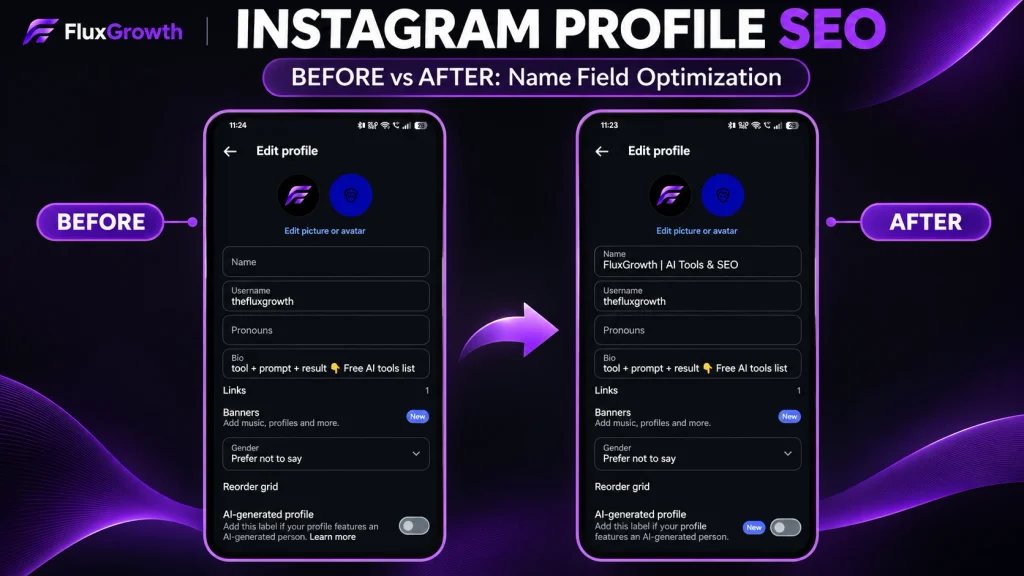
The name field is the display name above your bio (separate from your @handle), and it’s searchable. Mosseri has pointed creators to their handle and profile name as the first places to think about search terms.
The simplest pattern is “Name | Keyword”:-
- Sweet Oak Bakery | Austin Custom Cakes
- Peak Studio | LA Pilates
- Dana Reed | B2B LinkedIn Coach
I wouldn’t rename your @handle just for SEO. People have already tagged it, linked to it, and memorized it. The name field is the cheaper change, and one keyword phrase there beats five crammed together.
Bio optimization
A searchable bio answers three questions in plain words: what you do, who it’s for, and where. “Custom birthday and wedding cakes in Austin, TX. Order 2 weeks ahead.” does all three in one line.

Compare that with “Cakes | Bakery | Desserts | Austin | Custom | Wedding.” Same keywords. Nobody wants to order from it.
Profile links and contact buttons
Links and contact buttons don’t affect search ranking, as far as Instagram has said. They decide what happens after someone finds you. If your bio says “order cakes,” the link should open an order form, not your homepage.
Pinned posts and Story Highlights
There’s no evidence that pinned posts or highlights change where you rank. They do shape what a searcher sees first. Pin a post with your prices, one with a customer review, and one showing how to order. Name Highlights the same way: “Prices,” “Reviews,” “How to order.”
How do you optimize Instagram posts and Reels for search?
Start every caption with the phrase someone would search, use up to five specific hashtags, write your own alt text, and keep each Reel or carousel about one topic. Instagram matches search queries against caption text, so a caption that opens with “Friday vibes” gives it nothing to work with.
Caption keywords
Lead with the phrase someone would actually type. Instagram cuts captions off after a line or two in the feed, so that opening line does two jobs: it tells Instagram the topic, and it tells the viewer whether to keep reading.
Compare these two openings for a Los Angeles fitness studio:
- Before: “Monday energy is unmatched!! who’s in??”
- After: “Reformer Pilates for beginners in Los Angeles: here’s what your first class looks like.”
Only the second one matches a real search.
Reels SEO
Reels get found in search through the same text fields: caption, hashtags, and location. Put the topic in the caption’s first line. Then add a short title to the cover, like “First Pilates class: what to expect,” so the Reel makes sense in your profile grid.
Instagram hasn’t confirmed whether it reads on-screen text or spoken words for search. Say the topic out loud in the first few seconds anyway. It tells viewers they’re in the right place, and people who know they’re in the right place keep watching.
Carousel optimization
Carousels suit “how to” and list searches, like “how to store a wedding cake overnight.” Put that phrase in large text on slide one. Then summarize the steps in the caption, so the post still makes sense to someone who never swipes.
Hashtag strategy
With a five-tag cap, every hashtag needs a job. A mix that works for most small businesses:
- One or two topic tags (#austincakes, not #cake)
- One location tag (#austintx)
- One community or audience tag (#austinweddings)
- Optionally, one branded tag
Build one five-tag set per [content pillar] and adjust it monthly. Hashtags help Instagram categorize a post. They won’t push it to more people on their own.
Alt text and accessibility
Alt text is a written description of an image for people using screen readers. Instagram writes alt text automatically using object recognition, and its Help Center explains that you can replace it with a better description.
To add your own: create a post, tap Next, open Advanced Settings, tap Write Alt Text, and save. You can also add it to posts you’ve already published.
Describe what’s actually there: “Three-tier lemon cake with fresh berries on a wood stand at an Austin bakery.” Accuracy first. If a keyword fits because it’s true, great; if you have to force it, leave it out.
How do you get Instagram posts to show up on Google?
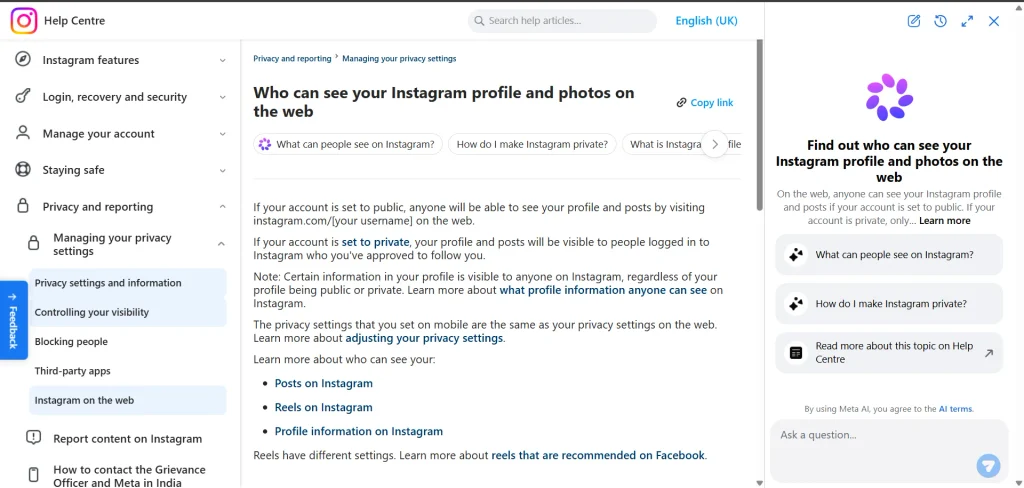
Instagram posts can appear on Google when they come from a public professional account (Business or Creator), the account holder is 18 or older, and the post went up on or after January 1, 2020. Indexing is on by default for eligible accounts. Most businesses already qualify without changing a thing.
Check your eligibility and settings
Run through this list:
- Your account type is Business or Creator.
- Your account is public.
- The account holder is 18 or older.
- In Settings, under Account privacy, the toggle “Allow public photos and videos to appear in search engine results” is on.
If the menu has moved (Instagram reshuffles Settings often), search your Settings for “search engine.”
Write one caption that works for Instagram and Google
Here’s the thing — a Google searcher arrives with zero context. They haven’t seen your Stories or your last five posts. So the first sentence of your caption has to explain itself.
Take a hypothetical Chicago restaurant post:
- Before: “Friday vibes!! Who’s coming?? #pizza #foodie #chicago #yum #food”
- After: “Chicago deep-dish pizza in Wicker Park, baked to order. This week’s special is spinach and ricotta. Book a table at the link in our bio. #chicagodeepdish #wickerparkeats #chicagofood”
The “after” version names the dish, the neighborhood, and the next step. It works in the feed and as a search result.
Being indexed isn’t the same as ranking, though. Google decides what shows up based on multiple factors, including relevance and other ranking systems. You can learn more in Google’s explanation of how Search works. An Instagram post probably won’t beat your website for “Chicago pizza.” Where it has a real shot is narrower searches, like “deep dish Wicker Park” or your restaurant’s name.
Stories never get indexed. Anything that matters for discovery belongs in a feed post or Reel.
Which engagement signals affect Instagram discovery?
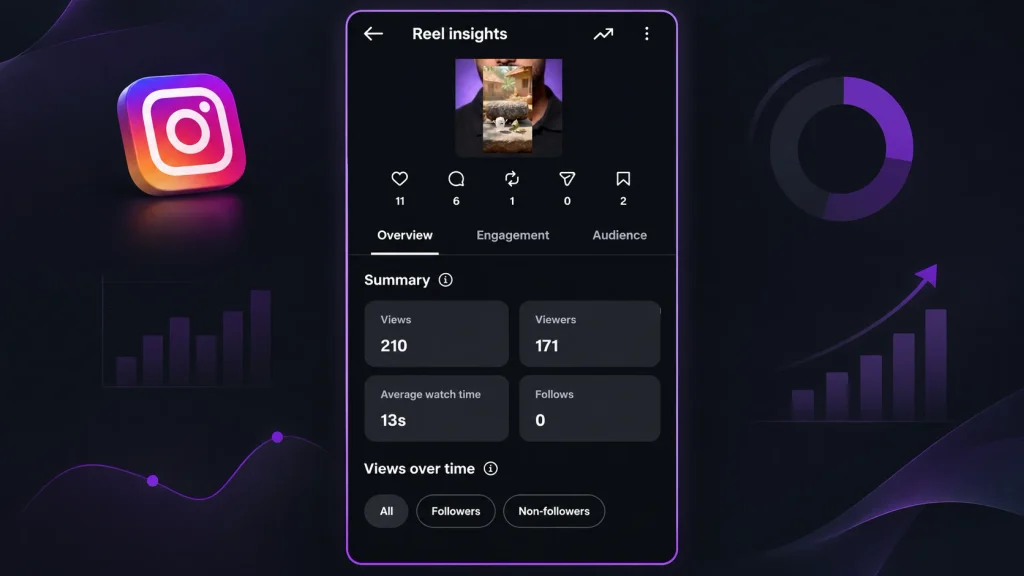
Adam Mosseri has named watch time, likes, and sends as the three signals that matter most for ranking, according to Social Media Today’s January 2025 report. He told creators to track average watch time, likes per reach, and sends per reach in Insights. Likes count slightly more with followers; sends count slightly more with non-followers.
“Per reach” means a rate, not a total. A Reel seen by 1,000 people with 50 likes has a 5% like rate. A Reel seen by 10,000 people with 100 likes has 1%, even with twice the likes.
You’ll also see blogs claim it sends count “3 to 5 times” more than likes. I couldn’t find a source for that number. Mosseri said “slightly more important,” and that’s what I’d go by.
Why this belongs in an SEO guide: search gets someone to your Reel once. Watch time and send are what gets shown to the next person.
Instagram SEO elements at a glance
| Instagram SEO element | Read by | Best practice | Realistic benefit |
| Name field | Instagram Search | One clear keyword phrase after your name | Shows up in keyword searches for accounts |
| Bio | Instagram Search, Google | What you do, who it’s for, where | Visitors understand you faster |
| Captions | Instagram Search, Google | Search phrase in the first line | Posts become findable by topic |
| Hashtags (max 5) | Instagram Search | Specific over generic | Better categorization, not extra reach |
| Alt text | Screen readers, likely search | Accurate description first | Accessibility, plus possible discovery |
The takeaway: your name field and the first line of your caption do more for Instagram SEO in 2026 than any hashtag set.
What does Instagram SEO look like for different businesses?
Instagram SEO depends on what your customers type. A bakery’s customers type a city. A clothing brand’s customers type a product. A consultant’s clients type a problem they want solved. The three scenarios below are hypothetical.
Local business: an Austin bakery. Name field: “Sweet Oak Bakery | Austin Custom Cakes.” Every post tags the shop’s location. Captions open with occasion plus city: “Graduation cakes in Austin, ready for pickup in 48 hours.”
E-commerce: a New York clothing brand. Nobody searches “New York” for pants. Captions lead with item and style instead: “Linen wide-leg pants for summer, made in New York.”
Personal brand: an independent consultant. Name field: “Dana Reed | B2B LinkedIn Coach.” Reels are titled after questions clients actually ask, like “How often should a founder post on LinkedIn?”
How do you measure Instagram SEO performance?
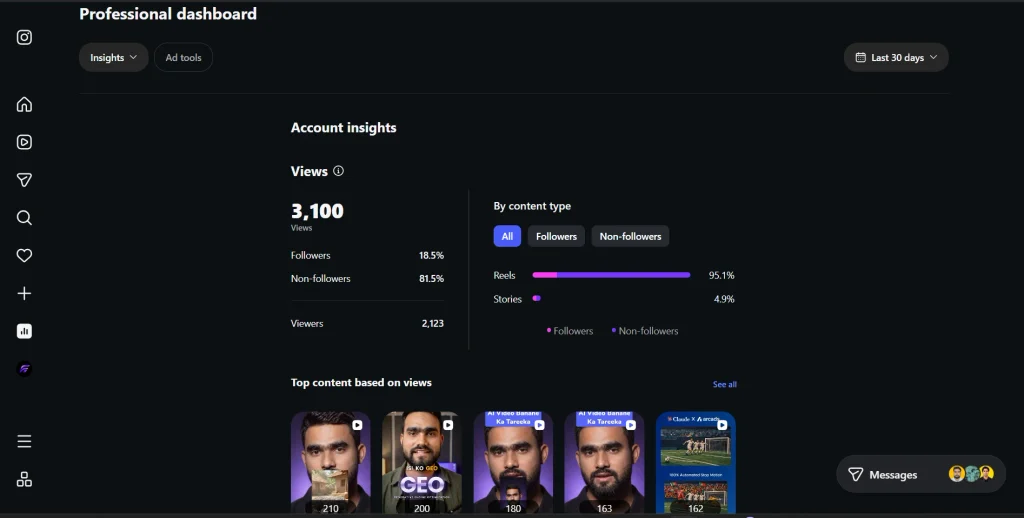
Instagram Insights doesn’t show exactly which search terms brought people to your profile, so measure SEO indirectly. Track non-follower reach, profile visits, and website taps over time.
A simple monthly routine:
- Record your baseline using Accounts reached, non-follower reach, Profile visits, and Website taps in Instagram Insights.

- Make one change, such as updating your profile name or bio keywords, and compare results after 2–4 weeks.
- Search your business name and main keyword on Google monthly to check whether your public Instagram content appears.
- If you own a website, use Google Search Console to monitor branded search queries and website clicks. Remember, increased branded searches may indicate growing brand awareness, but they don’t prove Instagram caused the increase.
Which AI tools help with Instagram SEO?
AI tools help with the writing and testing side of Instagram SEO: keyword-led captions, hashtag sets, alt text, and scheduling. You may not need a paid scheduler at all. Instagram’s app schedules posts and Reels up to 75 days ahead for professional accounts.
- Captions and scripts. ChatGPT or Claude can turn ” (or any of the best AI tools in 2026) new lemon cake, Austin, order link” into three caption openings that lead with a search phrase. Edit the one you like for your voice. Our free [Instagram caption generator] and [Reels script generator] do the same with Instagram-specific formatting.
- Native scheduling. According to Instagram’s Help Center, professional accounts can schedule posts and Reels in the app up to 75 days in advance, with up to 25 scheduled posts a day.
- Trial Reels. Trial Reels show a Reel only to non-followers first, so you can test a hook before your followers see it. Eligibility has shifted since the December 2024 launch. If the “Trial” toggle shows up when you create a Reel, you have it.
- AI labels. Instagram may add a “Made with AI” or “AI info” label when it detects AI signals, and it asks you to label realistic AI-generated content yourself. A caption you drafted with ChatGPT isn’t the same as a realistic AI video, but check Meta’s current rules before posting synthetic images or video.
Read every AI draft out loud before you post it. You’ll hear the robotic bits fast.
What are the most common Instagram SEO mistakes?
The most common Instagram SEO mistakes are stuffing the name field, copying old hashtag habits, and writing captions that make no sense without context. Most take five minutes to fix.
- Cramming three or four keywords into the name field until it reads like spam
- Pasting the same 30-hashtag block from 2023 (it won’t even fit now)
- Opening every caption with emojis or inside jokes instead of words someone would search
- Keeping a business account private, which blocks Google indexing entirely
- Skipping alt text and relying on Instagram’s automatic guesses
- Changing five things in one week, then not knowing which worked
What I’d do if I were starting today: a 30-day Instagram SEO plan
If I were starting from zero, I’d spend 30 days on text before anything else.
Week 1: Profile. Pick one primary keyword phrase. Add it to your name field. Rewrite your bio with what, who, and where. Check that your account is public, professional, and set to allow search engine indexing.
Week 2: Caption system. Write a caption template: search phrase first, one useful sentence, one call to action, then up to five hashtags. Build a five-tag set for each content pillar.
Week 3: Content tests. Publish two Reels and one carousel built around real searches. Add custom alt text to every image. If you have Trial Reels, test two hooks on non-followers.
Week 4: Measure. Compare non-follower reach, profile visits, and link taps against your baseline. Search your keyword on Google in a private window. Keep what moved the numbers. Drop what didn’t.
Instagram SEO FAQs
What is Instagram SEO?
Instagram SEO is the practice of optimizing your Instagram profile and content so people find you through Instagram Search and search engines like Google. It focuses on the text Instagram can read: your name field, bio, captions, hashtags, and alt text.
How do I rank higher in Instagram Search?
Put the keyword people actually search in your name field, bio, and the first line of your captions. Instagram says the text someone types is its most important search signal, matched against usernames, bios, captions, hashtags, and places. Engagement and the searcher’s own activity also affect order.
Can Instagram posts show up on Google?
Yes. Since July 2025, public posts and Reels from professional accounts run by users 18 or older can be indexed by Google and Bing, as long as they were posted after January 1, 2020. Indexing is on by default and can be turned off in privacy settings.
How many hashtags should I use on Instagram in 2026?
Use up to five, because Instagram began limiting captions to five hashtags in December 2025. Choose specific topic and location tags over generic ones like #reels. Hashtags help Instagram categorize your post but don’t increase reach on their own.
How do I add keywords to my Instagram profile?
Edit your profile and add one keyword phrase to the name field, for example “Sweet Oak Bakery | Austin Custom Cakes.” Then rewrite your bio to state what you do, who it’s for, and where. Avoid renaming your @handle unless it’s genuinely confusing, since people already tag and link it.
How do I optimize Instagram Reels for search?
Start the Reel’s caption with the search phrase, add a short title to the cover, and use up to five relevant hashtags plus a location tag. Say the topic clearly in the first few seconds. Watch time matters too, since Instagram’s head has named it one of the top ranking signals.
How long does Instagram SEO take to work?
You can usually judge a profile or caption change within two to four weeks by comparing non-follower reach and profile visits against your baseline. Google indexing of new posts can take longer, and Google doesn’t guarantee that indexed posts will rank.
The bottom line
Write the words your customers search, in the places Instagram and Google can read them. Hashtags shrank to five and Google started indexing professional accounts, so your captions now carry most of the weight.
Here’s your action for today: rewrite your name field and the first line of your next caption around one search phrase. Then check back in two weeks. Which phrase would your best customer actually type?