FluxGrowth is reader-supported. Some links in our guides are affiliate links — if you buy through one we may earn a commission, at no extra cost to you. It never changes which tools we recommend. How we test tools.
Count the AI subscriptions on your last card statement. If ChatGPT Plus, Claude Pro, and a writing app are all there, you’re paying three times for the same email draft.
The best AI tools in 2026 are the ones matched to one job you do every week, like research, automation, design, or code, at a price that fits how often you’ll use them.
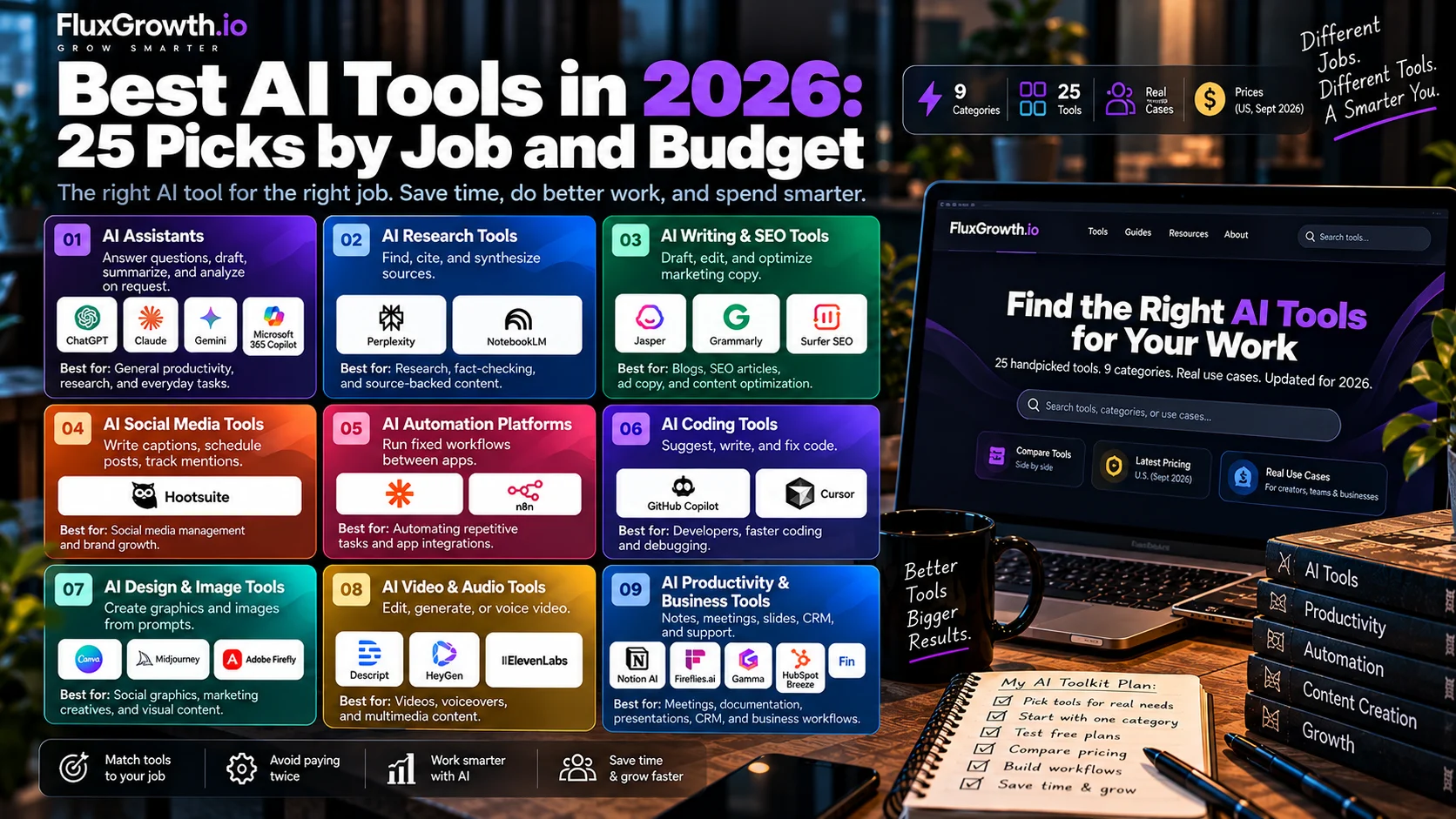
This guide covers 25 AI tools across nine categories. For each one you’ll get what it does, who it fits, where it falls short, and what it costs in the U.S. as of September 2026. The numbers are for navigation, not a ranking, because a ranking pretends everyone has the same workflow.
Updated September 30, 2026: NotebookLM is now Gemini Notebook, ChatGPT Pro $200 sign-ups reopen today, and we refreshed pricing for HeyGen, Adobe Firefly, Descript, ElevenLabs, Fireflies.ai, and Gamma.
The 25 best AI tools at a glance
Click a tool to jump to its full entry. Prices are U.S. list prices, checked September 30, 2026.
| # | Tool | Best for | Free plan | Paid from (U.S.) |
| 1 | ChatGPT | All-round writing and analysis | Yes | Go $8/mo |
| 2 | Claude | Long documents, writing, code | Yes | Pro $17/mo yearly ($20 monthly) |
| 3 | Google Gemini | Gmail, Docs, and Drive users | Yes | Google AI Plus $9.99/mo |
| 4 | Microsoft 365 Copilot | Microsoft 365 teams | No | $21/user/mo yearly |
| 5 | Perplexity | Web research with citations | Yes | Pro $20/mo |
| 6 | Gemini Notebook (formerly NotebookLM) | Research in your own documents | Yes | Higher limits with Google AI plans |
| 7 | Jasper | On-brand marketing content | Trial only | Pro $59/mo yearly |
| 8 | Grammarly | Polishing writing in any app | Yes | Pro $12/member/mo yearly |
| 9 | Surfer SEO | SEO content optimization | No | Discovery $49/mo yearly |
| 10 | Hootsuite | Managing many social accounts | Trial only | Standard $99/user/mo yearly |
| 11 | Zapier | No-code app automation | Yes (100 tasks) | Professional $19.99/mo yearly |
| 12 | n8n | Technical and self-hosted automation | Self-hosted | Cloud €20/mo yearly |
| 13 | GitHub Copilot | Coding in your current IDE | Yes | Pro $10/mo |
| 14 | Cursor | AI-first code editor | Yes | Pro $20/mo |
| 15 | Canva | Social and marketing design | Yes | Pro $144/yr |
| 16 | Midjourney | Stylized AI images | No | Basic $10/mo |
| 17 | Adobe Firefly | Commercial-safe images for Adobe users | Yes | Standard $9.99/mo |
| 18 | Descript | Editing podcasts and talking video | Yes | Hobbyist $16/mo yearly |
| 19 | HeyGen | AI avatar and translated video | Yes | Creator $24/mo yearly |
| 20 | ElevenLabs | AI voiceovers and dubbing | Yes | Starter $6/mo |
| 21 | Notion AI | Teams working in Notion | Limited | Business $20/member/mo |
| 22 | Fireflies.ai | Meeting notes and summaries | Yes | Pro $10/seat/mo yearly |
| 23 | Gamma | Fast decks and one-pagers | Yes | Plus, Pro, Ultra tiers |
| 24 | HubSpot Breeze | AI inside HubSpot CRM | Limited | Varies by HubSpot plan |
| 25 | Fin | AI customer support | No | $0.99 per resolved outcome |
What counts as an AI tool?
An AI tool is software that uses a machine-learning model to generate, analyze, or act on information based on your instructions (source: IBM’s AI definition). That covers everything from a chatbot drafting an email to a support agent closing tickets on its own.
Start with the category, not the brand. The category tells you what kind of work the tool can take off your plate.
| Category | What it does | Tools in this guide |
| AI assistants | Answer questions, draft, summarize, and analyze on request | ChatGPT, Claude, Gemini, Microsoft 365 Copilot |
| AI research tools | Find, cite, and synthesize sources | Perplexity, Gemini Notebook |
| AI writing and SEO tools | Draft, edit, and optimize marketing copy | Jasper, Grammarly, Surfer SEO |
| AI social media tools | Write captions, schedule posts, track mentions | Hootsuite |
| AI automation platforms | Run fixed workflows between apps | Zapier, n8n |
| AI coding tools | Suggest, write, and fix code | GitHub Copilot, Cursor |
| AI design and image tools | Create graphics and images from prompts | Canva, Midjourney, Adobe Firefly |
| AI video and audio tools | Edit, generate, or voice video | Descript, HeyGen, ElevenLabs |
| AI productivity and business tools | Notes, meetings, slides, CRM, support | Notion AI, Fireflies.ai, Gamma, HubSpot Breeze, Fin |
AI assistant vs. AI automation vs. AI agent: what’s the difference?
An AI assistant answers when you ask. An AI automation runs a fixed workflow you designed, every time a trigger fires. An AI agent gets a goal and decides for itself which steps and tools to use to reach it. Autonomy rises in that order. So does the chance of something going wrong with nobody watching.
| Technology | What it does | Autonomy | Best use |
| AI assistant | Responds to your instructions, one request at a time | Low | Questions, drafts, analysis |
| AI automation | Follows predefined workflow rules when a trigger fires | Medium | Repetitive, predictable workflows |
| AI agent | Picks its own tools and actions to reach a goal | Higher | Multistep tasks where the path varies |
Here’s the thing: most small businesses reach for an agent when a two-step automation would do.
“When a form comes in, add the lead to the CRM and send a welcome email” never changes. A two-step Zap handles that predictably, and at low volume it fits inside Zapier’s free plan of 100 tasks a month. Save agents for work where the path really does vary, like researching a new prospect and deciding which details matter.
How we selected these 25 AI tools
Every tool here passed three gates. It had to be available to U.S. buyers in September 2026. It had to publish its pricing or offer a clear sales path. And it had to do a job a general-purpose assistant doesn’t already cover well (unless it is the general-purpose assistant).
Past those gates, we compared finalists on output quality, learning curve, integrations, free-plan limits, team features, and how plainly each vendor explains what happens to your data.
We also kept four kinds of claims separate. Pricing and plan details come from vendor pages, checked in September 2026. Third-party findings are named inline. Verdicts are our editorial judgment. Hands-on testing is marked as such, and where we haven’t tested a tool ourselves, we don’t pretend we have.
One more rule: no forced picks. When two tools did the same job for the same buyer, only one made the list.
The 25 best AI tools in 2026, grouped by what they do
General-purpose AI assistants
If you only pay for one AI subscription, it’ll probably be one of these four. They overlap heavily, so choose by where your files already live.
1. ChatGPT
Best for: General-purpose writing, analysis, brainstorming, file analysis, and everyday AI work.
What it does: ChatGPT combines conversational AI with tools for writing, analysis, file handling, image generation, research, and multi-step tasks.
Best use cases: Drafting emails and proposals, analyzing spreadsheets, summarizing documents, and creating marketing content.
Limitations: Features and model access vary by plan.
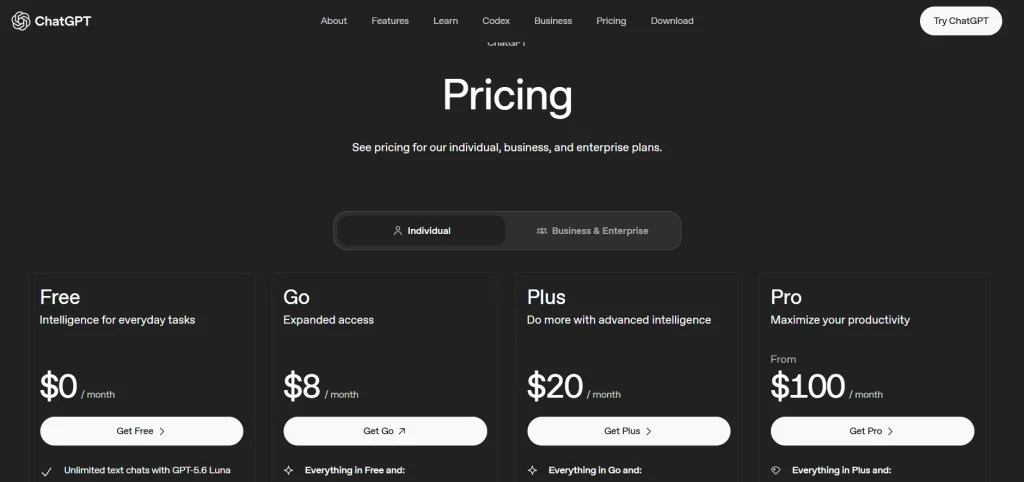
Pricing (U.S.): Free; Go $8/month; Plus $20/month; Pro $100/month or $200/month; Business and Enterprise pricing varies by plan and agreement. New Pro $200 sign-ups, paused on September 10, reopen on September 30, 2026. See pricing
Who it fits: Individuals, freelancers, businesses, and teams wanting a broad AI assistant.
Verdict: A strong general-purpose option, but specialized tools can be better for specific research, SEO, or brand-governance workflows.
2. Claude
Best for: Long documents, careful writing, analysis, and software development with Claude Code.
What it does: Claude is Anthropic’s AI assistant for writing, analysis, coding, research, and multi-step tasks.
Best use cases:
- Summarizing long reports and documents
- Editing and improving drafts
- Writing and reviewing code with Claude Code
Limitations: Usage limits vary by plan, and Claude does not natively generate images in the same way as dedicated image-generation tools.
Pricing: Free; Pro $20/month or $17/month when billed annually; Max plans are $100/month and $200/month, with Team and Enterprise options also available.Official Claude pricing
Who it fits: Writers, analysts, consultants, developers, and knowledge workers.
Verdict: A strong choice if your work involves long-form writing, document analysis, or coding.
3. Google Gemini
Best for: People and teams already using Gmail, Docs, Drive, and other Google services.
What it does: Gemini is Google’s AI assistant, available as a standalone app and integrated into Google apps. Paid Google AI plans add features such as Deep Research and expanded access to Google’s AI models.
Best use cases:
- Summarizing Gmail conversations
- Drafting and editing Google Docs
- Researching markets and competitors
- Working with Google Workspace content
Limitations: Its biggest advantage is the Google ecosystem, so it may be less useful if your workflow is mainly outside Google.
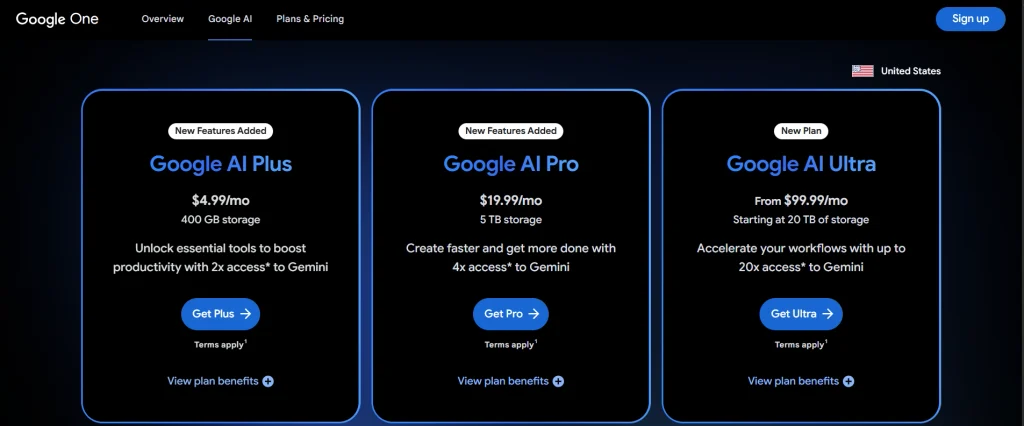
Pricing (U.S.): Free; Google AI Plus $9.99/month; Google AI Pro $19.99/month; Google AI Ultra is the higher-tier plan with pricing shown on Google’s current U.S. plan page. See pricing
Who it fits: Google Workspace users, professionals, creators, and small teams.
Verdict: A strong choice when Gmail, Docs, Drive, and Google Search are central to your workflow.
4. Microsoft 365 Copilot
Best for: Businesses already using Word, Excel, Outlook, Teams, and other Microsoft 365 apps.
What it does: Copilot integrates AI into Microsoft 365 apps for drafting, analysis, meeting summaries, and business workflows.
Best use cases:
- Summarizing Teams meetings
- Analyzing Excel data
- Drafting Word documents and PowerPoint presentations
Limitations: The standalone Copilot Business plan requires an eligible Microsoft 365 subscription.
Pricing (U.S.): Microsoft 365 Copilot Business is $21/user/month paid yearly, currently shown at $18/user/month with the listed offer. Microsoft 365 Business Standard with Copilot is $23.50/user/month paid yearly.
Who it fits: Small and midsize businesses already standardized on Microsoft 365.
Verdict: Most useful when your team’s files, email, meetings, and workflows already live inside Microsoft 365.
AI research tools
Assistants can research, but these two are built for it. One searches the web and shows its sources. The other works only from the documents you give it.
5. Perplexity
Best for: Fast, source-backed web research.
What it does: Perplexity searches the web and provides answers with inline citations that you can check.
Best use cases:
- Researching competitors and markets
- Checking statistics and sources
- Preparing for client or industry research
Limitation: Citations should still be opened and verified before publication.
Pricing (U.S.): Free; Pro $20/month or $200/year; Max $200/month or $2,000/year; Enterprise Pro $40/seat/month; Enterprise Max $325/seat/month. Check current Perplexity pricing
Who it fits: Marketers, researchers, consultants, founders, and analysts.
Verdict: A strong research tool when you want answers with sources you can verify.
6. Gemini Notebook (formerly NotebookLM)
Best for: Research and Q&A based on your own documents.
What it does: Gemini Notebook (Google renamed it from NotebookLM on July 16, 2026) lets you add sources such as PDFs, Google Docs, and web pages, then ask questions and create summaries, reports, Audio Overviews, and other study materials.
Best use cases:
- Analyzing customer interviews
- Building Q&A from company documents
- Summarizing long reports
Limitation: Results depend heavily on the quality and completeness of the sources you provide.
Pricing: A free Standard tier is available. Google AI Plus, Pro, and Ultra provide progressively higher Gemini Notebook limits.
Who it fits: Students, researchers, consultants, analysts, and teams working with document-heavy research.
Verdict: A strong choice when your answers need to stay grounded in a specific set of sources.
AI writing, SEO, and social media tools
General assistants can write. These tools earn their place with brand controls, editing inside every app, SEO scoring, or publishing. If you don’t need those extras, skip this category and save the money.
7. Jasper
Best for: Marketing teams creating high-volume, on-brand content.
What it does: Jasper provides AI tools for campaign content, brand voice, marketing workflows, and content creation.
Best use cases:
- Creating multi-channel campaign content
- Maintaining consistent brand voice
- Producing marketing copy at scale
Limitation: It is more specialized and can cost more than general-purpose AI assistants.
Pricing: Jasper currently lists Pro at $69/month or $59/month when billed annually. Business pricing is custom. (jasper.ai)
Who it fits: Marketing teams, agencies, and businesses with strong brand-governance needs.
Verdict: Most useful when brand consistency and marketing workflows justify a dedicated platform.
8. Grammarly (Superhuman)
Best for: Polishing writing wherever you type.
What it does: Grammarly provides grammar, tone, rewriting, and writing assistance across apps and websites. Grammarly became part of the Superhuman suite in October 2025.
Best use cases:
- Improving client emails
- Adjusting tone
- Polishing proposals and social posts
Limitation: It focuses primarily on writing improvement rather than deep research or content strategy.
Pricing: Grammarly Pro is $12/member/month billed annually or $30/month. See pricing
Who it fits: Freelancers, professionals, marketers, and teams that write frequently.
Verdict: Useful for frequent writing and editing, especially if you want assistance directly inside the apps you already use.
9. Surfer SEO
Best for: SEO writers and content teams optimizing articles for search.
What it does: Surfer analyzes search results and provides real-time content optimization, SEO guidelines, content audits, and AI-search visibility features.
Best use cases:
- Optimizing articles before publishing
- Refreshing existing content
- Creating SEO content briefs
Limitation: A content score should support editorial judgment, not replace it.
Pricing: Current annual pricing starts at $49/month for Discovery, $99/month for Standard, and $182/month for Pro. See pricing
Who it fits: SEO writers, content marketers, agencies, and teams.
Verdict: Useful when SEO is a major traffic channel; probably unnecessary for occasional publishing.
10. Hootsuite
Best for: Teams managing multiple social accounts from one dashboard.
What it does: Hootsuite combines scheduling, publishing, analytics, social listening, inbox management, and AI content creation. Its AI assistant, Wisdom, can generate captions and content ideas.
Best use cases:
- Scheduling content across multiple networks
- Creating AI-assisted captions
- Monitoring brand mentions and performance
Limitation: It can be expensive for solo creators who only need basic caption generation.
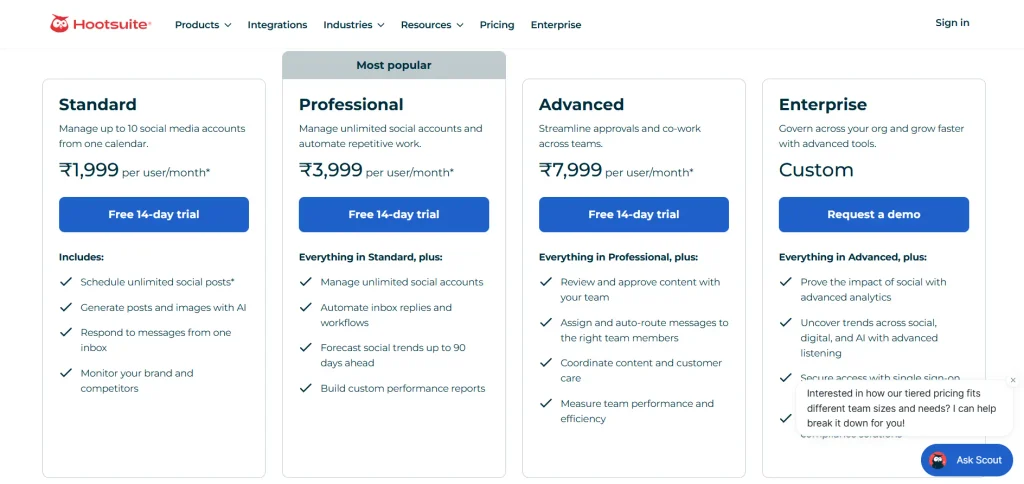
Pricing: Hootsuite currently lists Standard at $99/user/month when billed annually. Higher-tier plans and Enterprise pricing vary. Check Hootsuite’s current pricing
Who it fits: Social media managers, agencies, and teams managing several accounts.
Verdict: Most useful when you need scheduling, analytics, engagement, and listening—not just AI-generated captions.
AI automation and agent platforms
These tools connect your apps so work moves without you. For the full comparison, see our AI automation software guide.
11. Zapier
Best for: No-code automation across thousands of apps.
What it does: Zapier connects apps through trigger-and-action workflows called Zaps and also offers AI-powered workflow features and Agents.
Best use cases:
- Sending form leads to a CRM
- Connecting Shopify orders to Slack
- Classifying and routing support messages with AI
Limitation: Zapier uses task-based pricing. Most successful action steps consume one task, although AI and some advanced features can use multiple tasks.
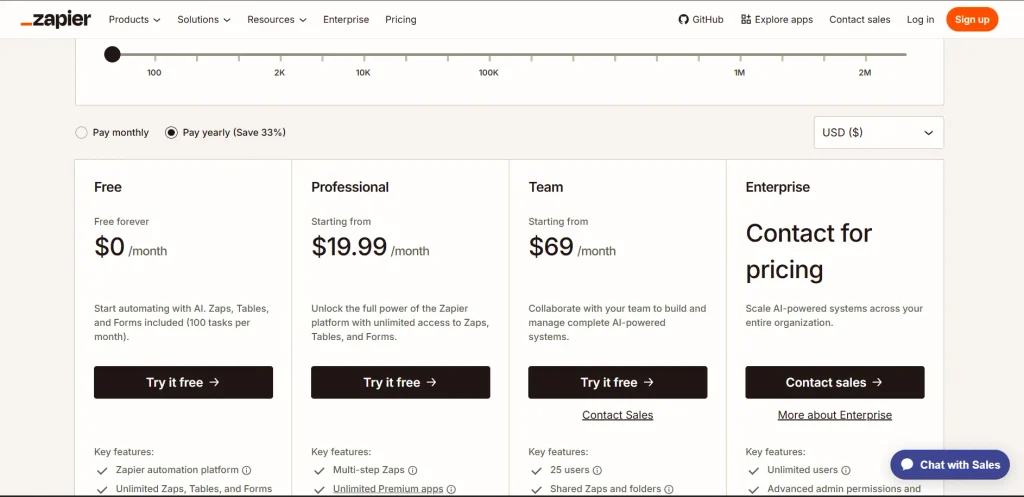
Pricing (U.S.): Free with 100 tasks/month; Professional starts at $19.99/month billed annually with 750 tasks/month; Team starts at $69/month billed annually.
Who it fits: Small businesses, marketers, and teams that want no-code automation.
Verdict: A straightforward starting point for app automation; at higher volumes, compare task costs with alternatives such as Make or n8n.
12. n8n
Best for: Technical teams that need flexible, customizable automation.
What it does: n8n offers visual workflows, code steps, API integrations, AI agents, and self-hosting.
Best use cases:
- AI-agent workflows
- API-heavy automation
- High-volume processes
- Self-hosted data
Limitation: More technical than Zapier, especially when self-hosting.
Pricing: Cloud starts at €20/month billed annually for 2,500 executions. Community Edition is available for self-hosting, excluding infrastructure costs.
Who it fits: Developers, SaaS teams, and technical marketers.
Verdict: A good choice when you need more control and flexibility than basic no-code automation.
AI coding tools
Both of these write and fix code alongside you. The difference is whether you keep your current editor or switch to a new one. For more options, see our AI coding tools ranked by workflow.
13. GitHub Copilot
Best for: AI coding help inside your existing IDE.
What it does: GitHub Copilot is GitHub’s AI coding assistant. It suggests code as you type, answers questions in chat, and runs agent tasks across files inside VS Code, JetBrains IDEs, and other editors.
Best use cases:
- Code completion
- Debugging and tests
- Codebase questions
- Multi-file agent tasks
Limitation: Advanced usage can consume AI Credits.
Pricing: Free; Pro $10/month; Pro+ $39/month; Business $19/user/month; Enterprise $39/user/month.
Who it fits: Individual developers and GitHub-based teams.
Verdict: A practical choice if you want AI assistance without changing your IDE.
14. Cursor
Best for: Developers who want an AI-first code editor.
What it does: Cursor is a code editor built on VS Code, with AI built into editing, chat, and agents that can read and change your whole codebase.
Best use cases:
- Multi-file refactoring
- Codebase-wide questions
- Rapid prototyping
- AI agent workflows
Limitation: Requires switching editors and has usage limits.
Pricing: Pro $20/month; Pro+ $60/month; Ultra $200/month. See pricing
Who it fits: Developers, startups, and AI-heavy coding teams.
Verdict: A strong option if you want deeper AI integration in your editor.
AI design and image tools
Pick by what you make. Templates and resized social posts point to Canva, art-quality images to Midjourney, and assets for cautious commercial clients to Adobe Firefly.
15. Canva
Best for: Easy marketing and social-media design.
What it does: Canva is a browser-based design platform. Its AI features generate designs, images, and copy, remove backgrounds, and resize one design into several formats.
Best use cases:
- Social posts and graphics
- Background removal
- Brand kits and templates
Limitation: Advanced features and AI usage depend on the plan.
Pricing: Free; Pro $144/year; Business $250/person/year.
Who it fits: Creators, marketers, small businesses, and teams.
Verdict: A simple, versatile design tool for non-designers.
16. Midjourney
Best for: High-quality, stylized AI images.
What it does: Midjourney turns text prompts into high-quality images through its web app and Discord, with controls for style, aspect ratio, and variations.
Best use cases:
- Blog hero images
- Brand visuals
- Social-media graphics
Limitation: No free plan; Stealth Mode requires Pro or Mega.
Pricing: Basic $10/month; Standard $30; Pro $60; Mega $120.
Who it fits: Creators, designers, and marketers.
Verdict: Best suited for striking AI visuals and creative image generation.
17. Adobe Firefly
Best for: AI images and design inside Adobe tools.
What it does: Adobe Firefly is Adobe’s generative AI app for images, video, and audio. It also powers features such as Generative Fill in Photoshop.
Best use cases:
- Product-photo editing
- Ad creatives
- Concept visuals
Limitation: Most useful if you already use Adobe Creative Cloud.
Pricing: Free tier with limited generations; Standard $9.99/month (2,000 generative credits); Pro $19.99/month (4,000 credits); Pro Plus $49.99/month; Premium $199.99/month.
Who it fits: Creative teams, agencies, and businesses.
Verdict: A good choice for Adobe users who need AI-powered creative tools.
AI video and audio tools
Test each of these on 10 minutes of your own footage or script before paying for a year. Demo reels are chosen to look good. Your recordings weren’t.
18. Descript
Best for: Text-based podcast and video editing.
What it does: Descript transcribes your audio or video so you can edit the recording by editing the text, with AI tools for filler-word removal, audio cleanup, and short clips.
Best use cases:
- Podcast editing
- Removing filler words
- Creating short clips
- Audio cleanup
Limitation: Less suitable for cinematic, effects-heavy videos.
Pricing: Free (1 media hour a month); Hobbyist $16/month billed annually; Creator $24/month billed annually; Business $50/month billed annually.
Who it fits: Podcasters, creators, and marketers.
Verdict: Great for fast dialogue-focused video and audio editing.
19. HeyGen
Best for: AI avatar and presenter videos.
What it does: HeyGen makes videos with AI avatars that read your script, and it can translate existing videos into other languages with lip-synced voices.
Best use cases:
- Training videos
- Product explainers
- Video translation
Limitation: Avatars may look less authentic than real presenters.
Pricing: Free (3 videos a month, up to 1 minute each); Creator $29/month or $24/month billed annually; Pro $49/month; Business $149/month plus $20 per extra seat.
Who it fits: Sales, training, education, and marketing teams.
Verdict: Useful for creating presenter-style videos without filming.
20. ElevenLabs
Best for: Realistic AI voiceovers.
What it does: ElevenLabs turns text into lifelike speech, clones voices, and dubs audio into other languages.
Best use cases:
- Video narration
- Podcasts and courses
- Voice dubbing
Limitation: Use voice cloning only with proper permission.
Pricing: Free (10,000 credits a month); Starter $6/month; Creator $11/month; Pro $99/month; Scale $299/month.
Who it fits: Creators, educators, and marketers.
Verdict: Great for natural-sounding AI voiceovers.
AI productivity, meeting, and business tools
These tools add AI to where team work already happens: notes, meetings, slides, the CRM, and the support inbox.
21. Notion AI
Best for: Teams already using Notion.
What it does: Notion AI works inside your Notion workspace. It searches and summarizes your pages, drafts documents, and writes up meeting notes.
Best use cases:
- Workspace search & summaries
- Meeting notes
- Specs and SOPs
Limitation: Full AI features require eligible paid plans.
Pricing: Plus $10/member/month; Business $20/member/month.
Who it fits: Startups and Notion-based teams.
Verdict: Best when your team’s work already lives in Notion.
22. Fireflies.ai
Best for: Automated meeting notes and summaries.
What it does: Fireflies.ai joins your Zoom, Google Meet, or Microsoft Teams calls, then records, transcribes, and summarizes them.
Best use cases:
- Meeting transcripts
- Action items
- Sales-call summaries
- Searching past meetings
Limitation: Consider recording consent and privacy requirements.
Pricing: Free; Pro $10/seat/month billed annually ($18 monthly); Business $19/seat/month billed annually ($29 monthly); Enterprise $39/seat/month.
Who it fits: Sales teams, consultants, and meeting-heavy teams.
Verdict: Useful for teams that have frequent meetings.
23. Gamma
Best for: Fast AI-generated presentations and one-pagers.
What it does: Gamma turns a prompt, outline, or document into a designed presentation, document, or simple web page.
Best use cases:
- Client decks
- Reports
- Simple webpages
Limitation: Less design control than PowerPoint or Keynote.
Pricing: Free (up to 10 slides per prompt); paid Plus, Pro, and Ultra plans raise slide limits, remove Gamma branding, and add premium AI models.
Who it fits: Founders, marketers, and consultants.
Verdict: Great for creating a polished first draft quickly.
24. HubSpot Breeze
Best for: Sales and marketing teams using HubSpot.
What it does: Breeze is the AI layer across HubSpot’s CRM, with a copilot, AI agents, and data enrichment.
Best use cases: CRM summaries, personalized emails, lead research, and AI agents.
Limitation: Works best with clean, complete CRM data.
Pricing: Available across HubSpot plans, with advanced features on higher-tier plans.
Who it fits: Small and midsize HubSpot teams.
Verdict: Best if HubSpot is already your CRM.
25. Fin (the company formerly called Intercom)
Best for: AI customer support.
What it does: Fin is an AI customer service agent. It answers customer questions over chat, email, and other channels using your help content, and hands off to a human when it can’t resolve the issue.
Best use cases: FAQs, order questions, and repetitive support tasks.
Limitation: Costs increase with support volume.
Pricing: Starts at $0.99 per outcome plus eligible Intercom plan costs.
Who it fits: SaaS, e-commerce, and support teams.
Verdict: Best for teams with high volumes of repetitive support questions.
Which AI tools fit your use case?
Short answers by job. Each one points back to a full entry above.
Best AI tools for small businesses
Start with the assistant that matches your office suite: Gemini for Google Workspace, Microsoft 365 Copilot for Microsoft 365, or ChatGPT if you use neither. Add Zapier when the same copy-paste task happens more than a few times a week.
Best AI tools for marketing
A general assistant (ChatGPT or Claude) covers most drafting. Add Jasper only when brand governance across several writers becomes a real problem, and Canva for visuals. See our 10 best AI marketing tools
Best AI tools for SEO
Surfer SEO for content optimization, Perplexity for fast source-checked research, and an assistant for outlines and drafts.
Best AI tools for content creation
Descript for editing spoken content, Canva or Midjourney for visuals, and ElevenLabs if you need voiceovers without recording. Compare the best content creation tools
Best AI tools for productivity
Your office-suite assistant, plus Fireflies.ai if you spend much of your day in calls.
Best AI tools for research
Perplexity for the open web, Gemini Notebook for your own documents. See our best AI research tools
Best AI tools for automation
Zapier if you want no-code, n8n if you have technical help and higher volume.
Best AI tools for coding
GitHub Copilot if you want to keep your editor, Cursor if you’ll switch for deeper AI features, Claude Code if you want coding help bundled with a general assistant. Compare AI coding tools by workflow
Best AI tools for design
Canva for layouts and templates, Midjourney for image quality, Adobe Firefly if your team already works in Adobe apps.
Best AI tools for teams
Choose business tiers that exclude your data from training by default, such as ChatGPT Business, Claude Team, or Perplexity Enterprise Pro, and add Notion AI or Microsoft 365 Copilot if your team already works in those tools.
AI tools compared: 5 picks side by side
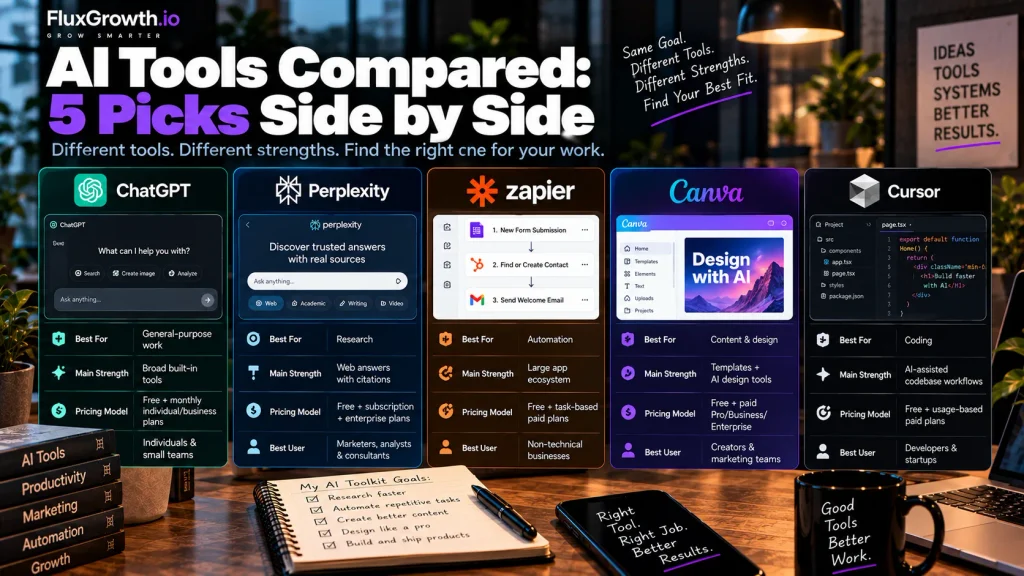
| AI Tool | Best For | Main Strength | Pricing Model | Best User |
| ChatGPT | General-purpose work | Broad built-in tools | Free + monthly individual/business plans | Individuals & small teams |
| Perplexity | Research | Web answers with citations | Free + subscription + enterprise plans | Marketers, analysts & consultants |
| Zapier | Automation | Large app ecosystem | Free + task-based paid plans | Non-technical businesses |
| Canva | Content & design | Templates + AI design tools | Free + paid Pro/Business/Enterprise | Creators & marketing teams |
| Cursor | Coding | AI-assisted codebase workflows | Free + usage-based paid plans | Developers & startups |
How do you choose the right AI tool?
Choose an AI tool by starting from one specific task, not from a list of popular tools. Steps 1–6 are desk research you can finish in an afternoon. Steps 7 and 8 take a week of real use.
- Define the task. Write it down in one sentence: “Summarize every sales call and add notes to HubSpot,” not “use AI for sales.”
- Decide what kind of help it needs. Generation (writing, images), research (finding and citing), automation (moving data between apps), or reasoning (analysis, decisions).
- Check integrations. The best tool is often the one that already connects to your CRM, inbox, or file storage.
- Compare usage limits. Message caps, credits, tasks, and GPU hours matter more than the headline price for heavy users.
- Check real pricing. Look for per-seat minimums, add-on requirements (like Microsoft 365 Copilot’s base license), and usage-based charges.
- Review privacy and data handling. Read whether your plan’s data is used for model training and how long it’s retained.
- Test the free version. Run your actual task, with real data you’re allowed to share, for a week.
- Measure the result. Track minutes saved or cost avoided. If you can’t point to a number, cancel.
One warning about overlap. ChatGPT Plus, Claude Pro, and Perplexity Pro cost $20 a month each at September 2026 list prices. That’s $720 a year. If you can’t name one weekly task the second and third subscriptions do better than the first, cancel them.
Should you pay for AI tools?
Pay for an AI tool when you’ve hit a limit that’s costing you time, or when you need a feature the free plan doesn’t include. Don’t upgrade because a paid tier exists.
When a paid plan earns its cost
- You regularly hit message, credit, or task limits in the middle of work.
- You need a stronger model or a feature like deep research, agent mode, or multi-step automations.
- Your team needs shared workspaces, admin controls, and single sign-on.
- You need business-plan data terms, such as training exclusion by default.
- You’re using outputs commercially and need the plan whose license covers that.
When the free tier is enough
- You use AI a few times a week for drafts and quick questions.
- Your automations are simple two-step workflows under Zapier’s 100 free tasks.
- You’re still testing whether a tool fits your workflow.
Want to see how far free plans actually go? Our tested list of the best free AI tools breaks down what each free tier includes.
What does a lean AI tool stack look like?
A lean AI stack is the smallest set of tools that covers your weekly work, usually two to four. You don’t need all 25 tools on this list, and most of the stacks below start with a single general assistant. More AI small-business workflows live in our AI automation hub.
Solo entrepreneur
ChatGPT or Claude, Canva’s free plan, and Zapier’s free plan. That covers drafting, visuals, and your first automations for the price of one subscription.
Marketing professional
Claude or ChatGPT for drafting, Perplexity for research, and Surfer SEO if organic search is a core channel.
Small business
The assistant built into your office suite (Gemini or Microsoft 365 Copilot), Zapier, and Fin once support volume justifies it.
Content creator
ChatGPT, Descript, and Canva. Add ElevenLabs if you publish voiceover-driven video.
Developer
GitHub Copilot or Cursor, plus Claude with Claude Code for larger reasoning and refactoring tasks.
SaaS startup
Cursor, Notion AI, Fireflies.ai, and Fin as your support queue grows.
Marketing team
ChatGPT Business or Claude Team, Canva Business, and Hootsuite for scheduling and listening.
What I’d use if I were starting today
If I were building a lean AI stack today, I’d start with ChatGPT for general research, drafting, analysis, and everyday tasks. I’d use Perplexity when I need web research with sources I can verify, Canva for social graphics and marketing assets, Cursor for coding and repository work, and Zapier for straightforward business automation. I wouldn’t subscribe to every tool at once. I’d start with one general-purpose assistant, then add specialist tools only when they solve a recurring problem that the existing stack cannot handle efficiently. The goal is a small, reliable stack—not a collection of AI subscriptions.
Is it safe to put business data into AI tools?
It can be, but only on the right plan with the right settings. Consumer and business plans often treat your data differently, so the plan you pay for matters as much as the tool you pick. Check each provider’s current privacy and data-processing documentation before entering sensitive information.
Consumer plans vs. business plans
The key difference is data handling and training policies. ChatGPT personal plans use data for training by default, with an opt-out; Business and Enterprise data isn’t used for training by default. Anthropic commercial Claude plans and Perplexity Enterprise Pro also state that customer data isn’t used for model training by default.
What to keep out of AI tools
On any plan, think twice before pasting in:
- Customer personal information, such as names with addresses, phone numbers, or order histories
- Payment card or bank details
- Health information (if you’re a HIPAA-covered entity, you need a vendor that will sign a business associate agreement)
- Unreleased financials, contracts, or passwords
Retention, APIs, and enterprise controls
Check data retention, API terms, and admin controls before choosing a plan. Enterprise plans may add SSO, audit logs, and custom retention; Notion Enterprise also states that its default AI providers use zero data retention.
FAQ
What are the best AI tools in 2026?
The best AI tools in 2026 depend on the job. For general work, ChatGPT, Claude, and Gemini are the leading assistants. For research, Perplexity and Gemini Notebook (formerly NotebookLM) stand out. Zapier and n8n lead automation, and Canva and Midjourney cover most design needs.
What is the best AI tool for business?
The best AI tool for most businesses is the assistant built into the office suite they already use: Gemini for Google Workspace or Microsoft 365 Copilot for Microsoft 365. Add Zapier for automation once repetitive tasks pile up. Businesses outside either ecosystem often start with ChatGPT Business or Claude Team.
What is the best AI tool for marketing?
For most marketers, a general assistant like ChatGPT or Claude handles drafting, while Canva covers visuals and Perplexity covers research. Jasper becomes worth its higher price when several writers need to follow one brand voice. SEO-focused teams often add Surfer SEO.
What is the best free AI tool in 2026?
The most versatile free AI tool is the free tier of a major assistant like ChatGPT, Claude, or Gemini. For specific jobs, Gemini Notebook (formerly NotebookLM) is free with a Google account, Canva’s free plan covers everyday design, and Zapier’s free plan runs simple two-step automations. Free tiers have usage limits, so check them against how often you’ll use the tool.
Are AI tools worth paying for?
AI tools are worth paying for when a paid plan saves more time than it costs, or when you need business-plan features like admin controls and data-training exclusions. If you use AI only occasionally, free tiers are often enough. Test the free version on a real task before upgrading.
What’s the difference between an AI assistant and an AI agent?
An AI assistant responds to each instruction you give it, while an AI agent takes a goal and chooses its own steps and tools to reach it. Agents are more autonomous but harder to predict. For repetitive tasks with fixed steps, a simple automation is usually cheaper and more reliable than an agent.
How do I choose the right AI tool for my business?
Start with one specific, repetitive task, and pick the tool category that fits it: generation, research, automation, or reasoning. Check integrations, usage limits, pricing, and data policies, then test the free version for a week. Keep the tool only if you can measure the time or money it saves.
The bottom line
The best AI tools in 2026 are the ones that fit a specific task, your workflow, your budget, and how much automation you actually need. Popularity isn’t on that list.
Here’s a one-week test. Pick one repetitive task from this week, like writing up call notes or resizing social graphics.
Choose one tool from this list that fits it, use it every time that task comes up for seven days, and log the minutes saved. If the number justifies the subscription, keep it. If it doesn’t, cancel before the renewal date.
Start with the task you’d most like to never do again.