FluxGrowth is reader-supported. Some links in our guides are affiliate links — if you buy through one we may earn a commission, at no extra cost to you. It never changes which tools we recommend. How we test tools.
Last updated: August 2026
Every AI coding tool roundup treats “AI coding assistant” like it means one thing. It doesn’t. Codex CLI is OpenAI’s terminal-based coding agent, and whether it’s worth adding to your stack comes down to details; most reviews skip how it authenticates, what’s locked behind cloud features, what it actually costs once you’re past the free tier.
This review pulls every pricing and feature claim straight from OpenAI’s developer docs. Not secondhand blog posts. Anything that couldn’t be verified gets flagged, not guessed at.
AI Coding Assistant, Agent, or IDE? The Terms Everyone Mixes Up
Before comparing anything, it helps to know what you’re actually comparing. People throw these terms around loosely, and that’s exactly what makes a first-time buyer’s decision harder than it needs to be.
An AI coding assistant suggests code as you type. Think autocomplete with context GitHub Copilot in its original form. You stay in the driver’s seat; it fills in lines and functions.
An AI coding agent works differently. It doesn’t just suggest it plans a task, executes it across multiple steps, runs commands, checks its own work, and iterates until the task’s done or it hits a wall. Codex CLI and Claude Code are both agents in this sense.
An AI-powered IDE builds agent capability directly into a code editor. Cursor and Windsurf are the well-known examples. You get agent behavior, but it lives inside a visual editor instead of a terminal window.
A terminal-based coding agent which is what Codex CLI is runs entirely in your shell. No graphical interface. You type a goal, it works, you watch the output scroll by.
Repository-aware means the tool can read and reason about your whole code base, not just the file you have open, so it can trace how a change in one file ripples into another.
Assistants suggest. Agents act. And the interface (terminal, IDE, or chat) is a separate question entirely from how autonomous the tool is.
What Is Codex CLI? (And How It’s Different from Copilot, Cursor, and Claude Code)
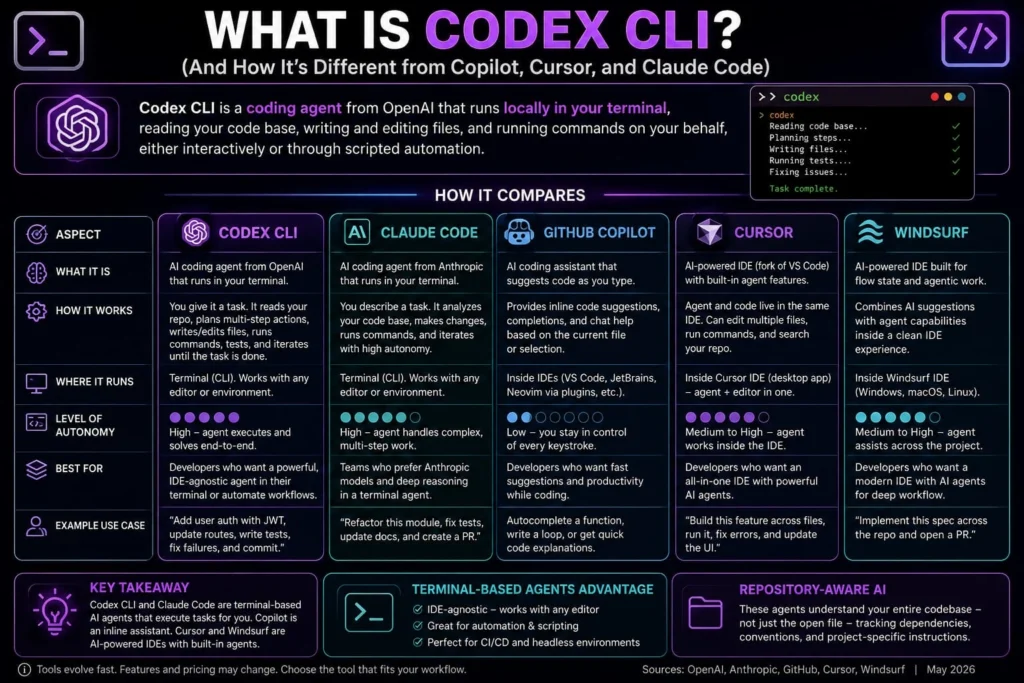
Codex CLI is a coding agent from OpenAI that runs locally in your terminal, reading your code base, writing and editing files, and running commands on your behalf, either interactively or through scripted automation. That’s the whole definition. Everything else is detailed.
The confusion starts because “AI coding tool” now covers five genuinely different categories, and vendors blur the lines on purpose:
- AI coding assistants (like GitHub Copilot’s autocomplete) suggest code as you type, inline, inside your editor. You stay in control of every keystroke.
- AI coding agents (Codex CLI, Claude Code) take a task description and go do multi-step work, read files, write code, run tests, fix what breaks with varying levels of autonomy.
- AI-powered IDEs (Cursor, Windsurf) bake agent behavior directly into a forked code editor, so the agent and your file tree live in the same window.
- Terminal-based agents run outside any IDE, in your shell, which means they work the same way whether you’re in VS Code, Vim, or a headless CI server.
- Repository-aware AI understands your whole code base, not just the open file, tracking dependencies, conventions, and project-specific instructions.
Codex CLI sits at the intersection of two of those: it’s an agent, and it’s terminal-native. That matters more than it sounds like it should.
A terminal-first tool doesn’t care what editor you use. Your team splits across VS Code, JetBrains, and Vim? Doesn’t matter Codex CLI runs the same in all three. Same story if you want identical agent behavior on your laptop and inside a CI pipeline.
Installing and Setting Up Codex CLI
Getting Codex CLI running takes a few minutes, and OpenAI keeps the install path deliberately simple.
Installation methods
You’ve got three options, all documented on OpenAI’s GitHub repository:
- npm: npm i -g @openai/codex
- home brew (macOS/Linux): brew install codex
- Direct installer script (macOS/Linux): curl -fsSL https://chatgpt.com/codex/install.sh | sh
Windows users run a PowerShell equivalent. Once installed, codex –version confirms it’s live, and typing codex alone drops you into an interactive session.
Authentication: ChatGPT sign-in vs. API key
This is the fork in the road that decides what you can and can’t do with Codex CLI, and it’s where a lot of reviews get sloppy.
ChatGPT sign-in ties Codex CLI to your existing ChatGPT plan (Free, Go, Plus, Pro, Business, or Enterprise) and unlocks cloud-based features: automatic GitHub PR reviews, Slack integration, cloud task delegation. Usage draws from your plan’s shared local-message and cloud-task allowance.
API key authentication skips ChatGPT entirely and bills per token at standard OpenAI API rates. It’s built for CI/CD pipelines, shared automation environments, and scripted workflows where you don’t want a human-tied login. The trade off: no cloud features. No GitHub code review, no Slack integration API-key access is scoped to the CLI, SDK, and IDE extension only.
Bottom line: if you’re a solo developer or want GitHub-native review baked in, sign in with ChatGPT. If you’re wiring Codex into automation or CI, use an API key and budget for token costs separately.
How Codex CLI Actually Works: Repository Understanding, AGENTS.md, and Automation
Codex CLI reads your project’s structure automatically: package manager, lock file, test runner without needing a configure file to get started. The CLI just auto-detects those on launch.
For project-specific instructions, it uses a file called AGENTS.md at your repo root: a plain-markdown file where you describe coding conventions, build commands, and things the agent should never touch. This isn’t unique to Codex, by the way AGENTS.md has become something close to an open standard, with Cursor, Aider, and other agent tools reading the same file format.
Safety is handled through sand boxing and approval modes. Codex runs with OS-level sand boxing, and you choose how much autonomy to grant it from “ask before every change” up to “run without stopping to check in.” Tighter setting, safer for production code. Looser setting, faster for routine, low-stakes work.
Codex also supports MCP (Model Context Protocol), a standard that lets it connect to external tools a database, a project-tracking app, a documentation source without custom integration work on your end.
Core Features — What Codex CLI Actually Does
Code generation and agent task execution
Give Codex CLI a plain-language task “add unit tests for the payment module,” “fix the layout bug in the checkout page” and it reads the relevant files, writes the change, and (depending on your permission settings) runs it. You can launch it with an initial prompt directly, attach a screenshot for visual context, or run it in exec mode for CI pipelines, which supports JSON output for machine parsing.
Debugging and refactoring
Codex CLI holds repository context instead of working file-by-file. That’s the difference between an agent that traces a bug through three connected files and one that only sees whatever currently open. It proposes the fix and shows you the diff before touching anything.
sand boxing and permission controls which decide what the agent can touch without asking first ship on every individual tier, Free included.
Repository understanding
Codex CLI reads project-specific instructions from an AGENTS.md file. You can nest these at different folder levels, so a Moreno with five services carries five focused rule sets instead of one bloated file trying to cover everything. That’s how the agent learns your team’s conventions instead of guessing at them every session.
One catch: a heavier AGENTS.md (and more connected MCP servers) adds context weight, which eats into your usage limits faster. Worth knowing before you write a 2,000-word instructions file and wonder why your allowance disappeared by lunch.
GitHub integration
Tag @codex on a pull request and it can review the change or take on a follow-up task directly from the issue tracker. Automatic PR reviews can also run on a schedule.
Here’s the catch: this integration is a cloud feature. It’s available on Plus, Pro, Business, and Enterprise plans through ChatGPT sign-in, but explicitly unavailable to API-key-only users. If your workflow depends on Codex reviewing pull requests automatically, an API key alone won’t get you there.
MCP, skills, and sub agents
Codex CLI supports Model Context Protocol (MCP), which lets Codex connect to external tools and data sources. For example, an MCP server can give Codex access to third-party documentation or allow it to interact with external tools and services without requiring you to manually copy information into the prompt.
Skills package reusable instructions, resources, and scripts into repeatable workflows, so you can teach Codex how to perform specialized tasks consistently.
sub agents let Codex delegate parts of a larger task to specialized agents that can work in parallel and return their results to the main workflow
Codex CLI for Core Dev Tasks: Code Generation, Debugging, Refactoring, and Testing
Code generation
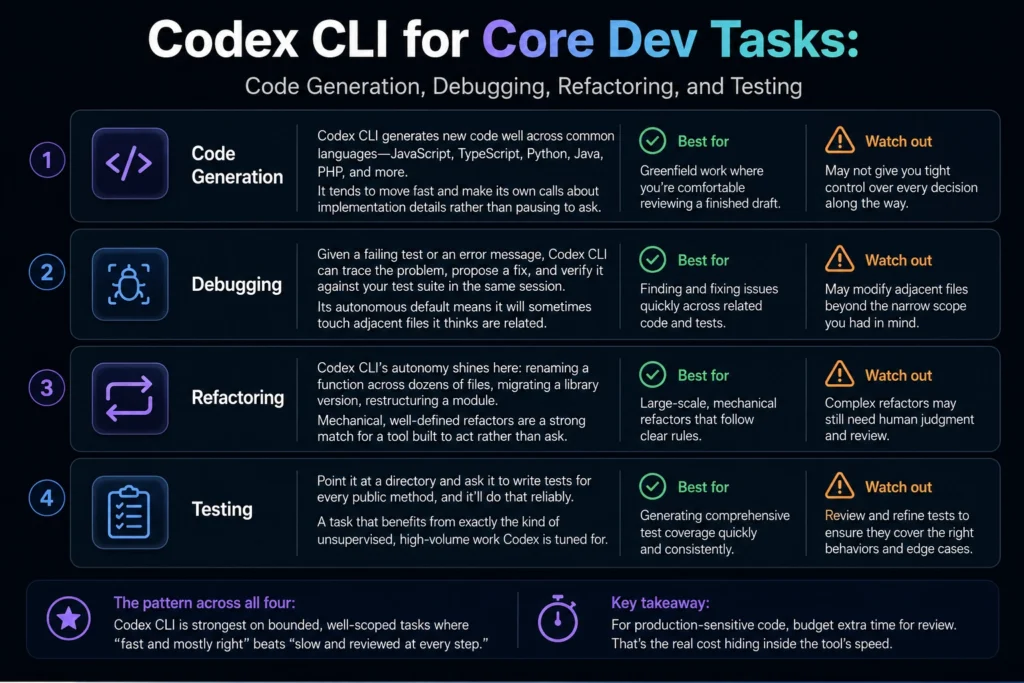
Codex CLI generates new code well across common languages JavaScript, TypeScript, Python, Java, PHP, and more. It tends to move fast and make its own calls about implementation details rather than pausing to ask. That’s a feature for greenfield work where you’re comfortable reviewing a finished draft, and a liability if you wanted tighter control over every decision along the way.
Debugging
Given a failing test or an error message, Codex CLI can trace the problem, propose a fix, and verify it against your test suite in the same session. Its autonomous default means it will sometimes touch adjacent files it thinks are related worth watching if you want a narrowly scoped fix.
Refactoring
This is where Codex CLI’s autonomy tends to shine: renaming a function across dozens of files, migrating a library version, restructuring a module. Mechanical, well-defined refactors are a strong match for a tool that’s built to act rather than ask.
Testing
Point it at a directory and ask it to write tests for every public method, and it’ll do that reliably, a task that benefits from exactly the kind of unsupervised, high-volume work Codex is tuned for.
The pattern across all four: Codex CLI is strongest on bounded, well-scoped tasks where “fast and mostly right” beats “slow and reviewed at every step.” For production-sensitive code, budget extra time for review. That’s the real cost hiding inside the tool’s speed.
GitHub Integration and Working With a Real Repository
Codex CLI works directly against your local git repo. It stages changes and, depending on your approval mode, can open a pull request once the task’s done.
Here’s the thing because it’s terminal-based, it doesn’t care whether you’re on your laptop or SSH’d into a headless server at 2am fixing a production issue. Try that with an IDE-based tool and you’re stuck. That’s a real edge for anyone doing DevOps work or managing remote boxes.
For teams, this means Codex can slot into existing CI/CD pipelines and PR-review workflows without much extra tooling. The agent produces a diff like any other contributor would. Your existing review process still applies.
Codex CLI Pricing in the U.S. (2026) — What Each Plan Actually Includes
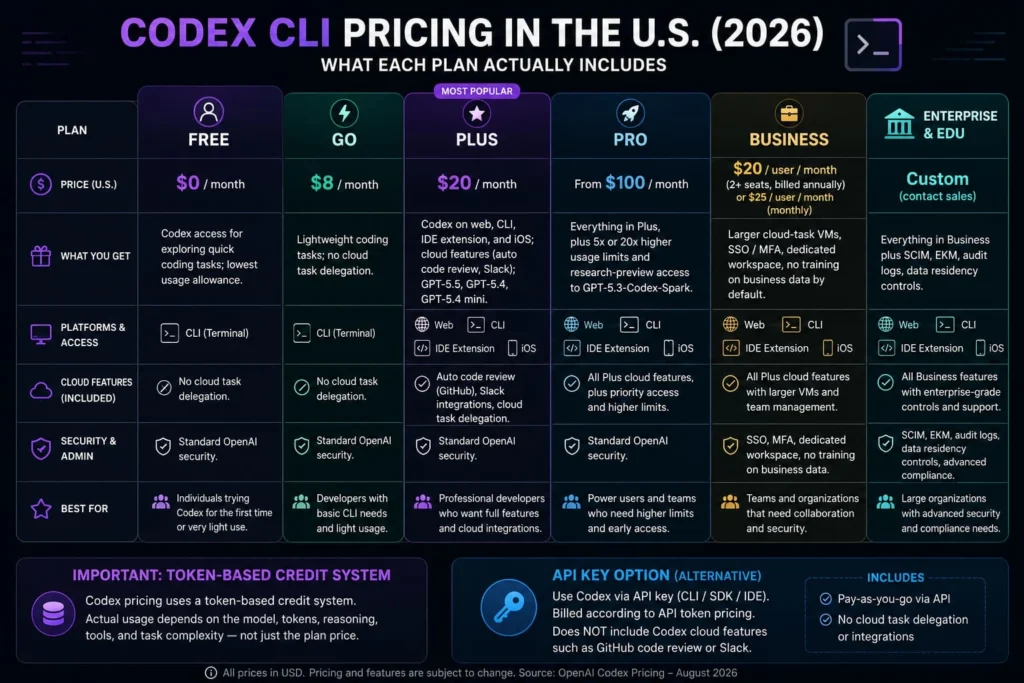
Pricing verified directly against OpenAI’s Codex pricing documentation as of August 2026.
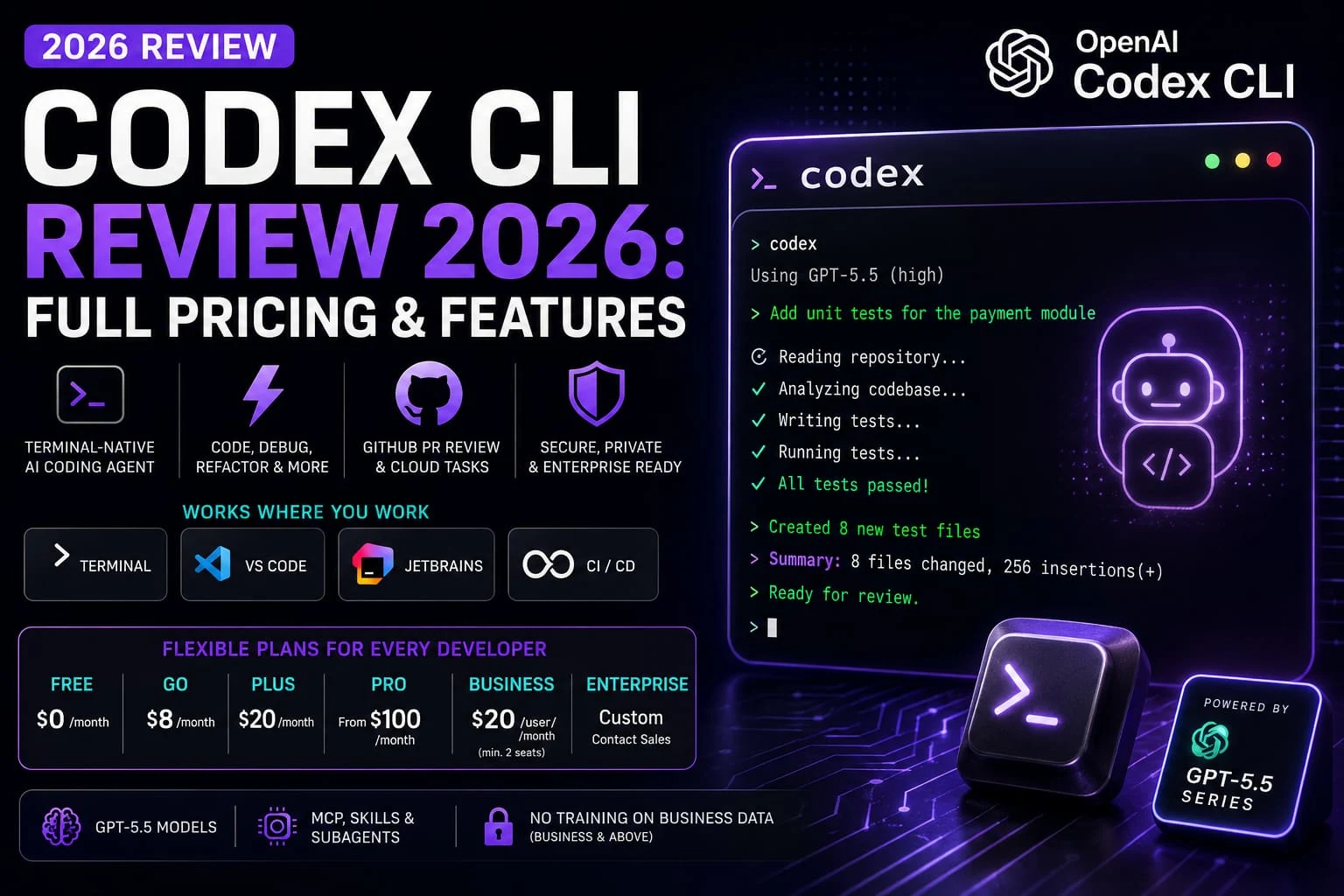
| Plan | Price | What you get |
| Free | $0/month | Codex access for exploring quick coding tasks; lowest usage allowance |
| Go | $8/month | Lightweight coding tasks; no cloud task delegation |
| Plus | $20/month | Codex on web, CLI, IDE extension, and iOS; cloud features (auto code review, Slack); the GPT-5.6 model family (Sol, Terra, Luna) |
| Pro | From $100/month | Everything in Plus, plus 5x or 20x higher usage limits and research-preview access to GPT-5.3-Codex-Spark |
| Business | $20/user/month (2+ seats, billed annually) or $25/user/month monthly | Larger cloud-task VMs, SSO/MFA, dedicated workspace, no training on business data by default |
| Enterprise & Edu | Custom (contact sales) | Everything in Business plus SCIM, EKM, audit logs, data residency controls |
One thing worth flagging up front: there’s no standalone Codex subscription. Every plan above is a ChatGPT plan that happens to include Codex (you’re not paying for two separate products, in other words).
How usage limits actually work
OpenAI moved Codex from per-message billing to token-based credit pricing on April 2, 2026. That’s a real change. Usage now depends on factors such as the model, task size and complexity, input and output tokens, number of instances, automation, and whether Fast mode is enabled.
On Plus and Pro, Codex usage can vary significantly depending on the task. OpenAI says a small script may use only a fraction of your allowance, while larger code bases, long-running tasks, and extended sessions can consume more. The current rate card also says a typical Codex task using GPT-5.6-Sol may consume 5–40 credits per task.
If you hit your included limit during an active turn, Codex can continue working on that turn, subject to fair-use limits. After the turn, eligible Plus and Pro users can purchase additional credits instead of immediately upgrading; other users may need to wait for the limit to reset or upgrade, depending on their plan.
OpenAI currently says Codex costs about $100–$200 per developer per month on average, although there is substantial variation based on the model used, number of instances, automation, and Fast mode. Treat that as an OpenAI-published average, not a guaranteed monthly cost.
Privacy and Data Security: What Happens to Your Code
Privacy matters if you’re a freelancer working under a client NDA or a startup protecting proprietary source code. Codex data handling depends on your access method, plan, and data-control settings.
If you’re using ChatGPT Plus or Pro, OpenAI says conversations and Codex content may be used to improve its models unless you turn off training in ChatGPT’s Data Controls. Codex also has separate controls for training on full environments.
If you’re using the OpenAI API, ChatGPT Business, or ChatGPT Enterprise, OpenAI says inputs and outputs are not used to train models by default. API organizations can explicitly opt in to data sharing, and eligible organizations can configure additional retention controls, including Zero Data Retention for supported API use cases.
Don’t assume every Codex access method has the same privacy terms. If you’re handling confidential client code, check the specific terms and data controls for your ChatGPT plan, Codex configuration, or API organization before sending proprietary code to the service.
Sources: OpenAI — How your data is used to improve model performance · OpenAI — Using Codex with your ChatGPT plan · OpenAI — Business data privacy and security
Is Codex CLI Safe for Proprietary Code?
This depends heavily on how you access Codex CLI and which data controls apply. OpenAI’s current documentation distinguishes between personal ChatGPT plans and business/API usage.
ChatGPT-plan access (Plus, Pro): OpenAI says Codex content may be used to improve its models by default, but personal users can turn off training through ChatGPT’s Data Controls. Codex also has separate controls for training on full environments.
API-key access: OpenAI says API inputs and outputs are not used to train models by default. Organizations can separately opt in to data sharing through their API data controls.
Business and Enterprise plans: OpenAI says Business, Enterprise, and Edu data is not used to train models by default, and qualifying organizations can use additional data-retention controls.
Practical takeaway for freelancers and teams: If you’re working under an NDA or handling proprietary client code, don’t assume every Codex access method has identical protections. Check your authentication method, plan, training settings, and retention controls before using Codex with confidential code.
Codex CLI vs. Other AI Coding Tools
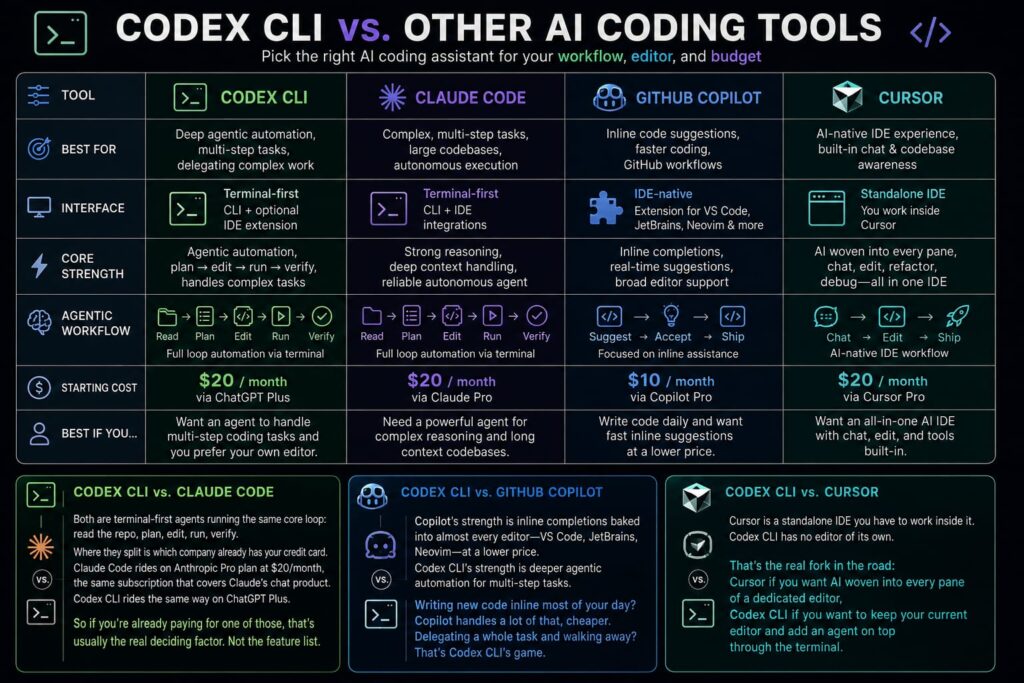
Codex CLI vs. Claude Code
Both are terminal-first agents running the same core loop: read the repo, plan, edit, run, verify. Where they split is which company already has your credit card.
Claude Code rides on Anthropic Pro plan at $20/month, the same subscription that covers Claude’s chat product. Codex CLI rides the same way on ChatGPT Plus. So if you’re already paying for one of those, that’s usually the real deciding factor. Not the feature list.
Codex CLI vs. GitHub Copilot
Copilot’s strength is inline completions baked into almost every editor VS Code, JetBrains, Neovim at a lower price. Codex CLI’s strength is deeper agent automation for multi-step tasks.
Writing new code inline most of your day? Copilot handles a lot of that, cheaper. Delegating a whole task and walking away? That’s Codex CLI’s game.
Codex CLI vs. Cursor
Cursor is a standalone IDE you have to work inside it. Codex CLI has no editor of its own. That’s the real fork in the road: Cursor if you want AI woven into every pane of a dedicated editor, Codex CLI if you want to keep your current editor and add an agent on top through the terminal.
Comparison Table
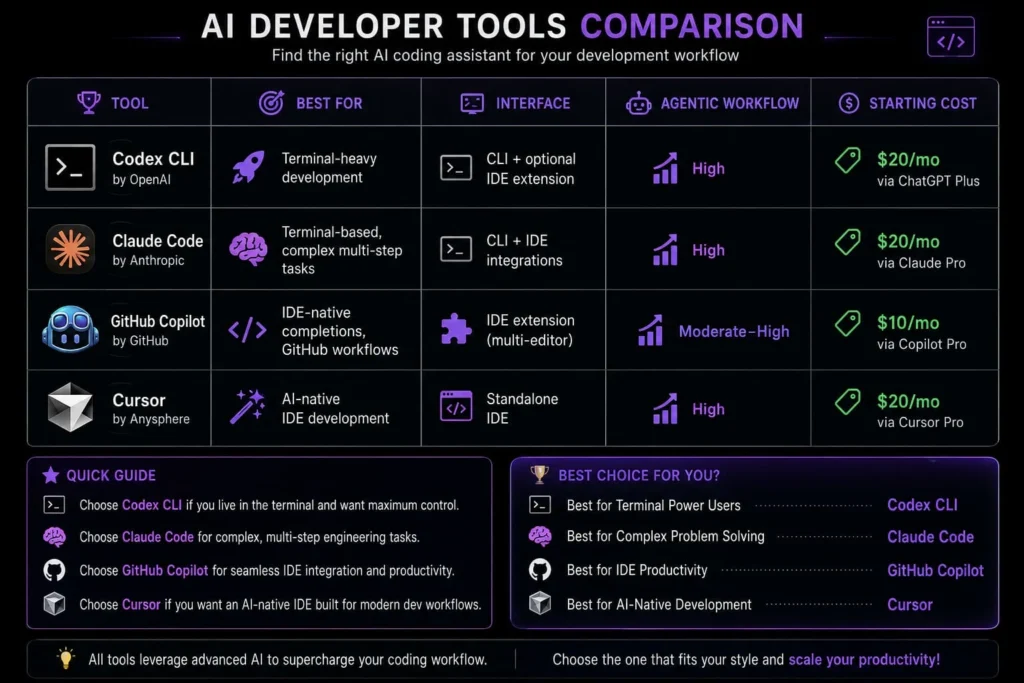
| Tool | Best For | Interface | Agentic Workflow | Starting Cost |
| Codex CLI | Terminal-heavy development | CLI + optional IDE extension | High | $20/mo via ChatGPT Plus |
| Claude Code | Terminal-based, complex multi-step tasks | CLI + IDE integrations | High | $20/mo via Claude Pro |
| GitHub Copilot | IDE-native completions, GitHub workflows | IDE extension (multi-editor) | Moderate–High | $10/mo via Copilot Pro |
| Cursor | AI-native IDE development | Standalone IDE | High | $20/mo via Cursor Pro |
Winner by use case (editorial recommendation, not a benchmark result):
- Terminal-first workflow: Codex CLI
- Terminal-centered alternative: Claude Code
- GitHub/IDE workflow: GitHub Copilot
- AI-native IDE: Cursor
These are editorial calls based on how each tool is designed to be used, not head-to-head benchmark scores treat them as a starting point for your own trial, not a verdict.
Codex CLI for Different Types of Developers
Front-End Developers
For React and TypeScript projects, Codex CLI can help refactor components, update props across files, and write tests.
Example: Ask Codex CLI to rename a React prop across the project, update TypeScript types, fix affected components, and run tests.
Back-End Developers
Python, Java, and PHP developers can point it at API endpoints, server-side logic, or a flaky test suite and let it trace an error across the service layer instead of one file at a time.
Full-Stack Developers
This is where the repository-aware angle matters most. A change that touches both a fronted component and its back-end endpoint is exactly the kind of cross-file task Codex CLI is built to handle in one pass, rather than two separate manual edits.
DevOps Engineers
Codex CLI can help with shell scripting, configuration file edits, and automating repetitive command-line tasks. It’s not a specialized DevOps platform, though it treats it as a general coding agent that happens to be comfortable in a terminal, not a replacement for dedicated infrastructure tooling.
Freelancers and Startup Teams
Say you’re scaffolding the same auth flow for the third client this quarter. That’s exactly the kind of repetitive setup Codex CLI is good at automating.
One catch, though if you’re under an NDA or touching code you don’t own, don’t skip the privacy section below. Which access method you use actually changes what OpenAI does with that code.
Section takeaway: The value scales with how much of your work spans multiple files and repositories solo single-file edits benefit less than cross-cutting changes.
Who Should Actually Use Codex CLI? A Workflow-Based Decision Framework
Rather than a generic “yes or no,” here’s how the fit changes based on your actual situation:
By coding workflow. If you’re comfortable living in a terminal and delegating well-scoped tasks, Codex CLI matches your habits. If you prefer visual feedback while code changes especially for UI work you’ll fight the tool more than it helps you.
By programming language. Codex CLI works across mainstream languages, including JavaScript, TypeScript, Python, Java, and PHP. It’s not language-limited the way some specialized tools are.
By project size. Small-to-mid-sized projects and well-organized larger code bases both work fine. Extremely large, tangled legacy code bases the ten-year-old monolith nobody fully understands anymore benefit more from a tool with a longer context window and more conservative editing behavior.
By experience level. Intermediate and senior developers get the most value here, because reviewing Codex’s autonomous decisions means knowing what “correct” looks like in the first place. If you’re a coding student or beginner, Codex CLI can still teach you a lot. Just treat every change it makes as something to read and understand, not something to accept blindly. Starting with an in-editor assistant like Copilot where you see suggestions inline before accepting them is a gentler on-ramp before you hand off to a fully autonomous terminal agent.
By terminal usage and IDE preference. If you’ve never used a command line comfortably, there’s a real learning curve before Codex CLI feels natural. If your whole workflow lives in VS Code or a similar editor, weigh whether an IDE-native agent gets you most of the benefit with less friction.
By monthly budget. Match your usage pattern to a plan tier rather than defaulting to the most expensive option see the pricing breakdown above.
By individual vs. team use. Solo developers get straightforward value from Codex’s speed on bulk tasks. Teams get additional benefit from its GitHub-native PR workflow and the way it integrates into existing CI pipelines without much extra setup.
Who Should Skip Codex CLI?
- Developers who strongly prefer a visual, all-in-one AI IDE Cursor fits that better
- Beginners who benefit from heavy visual guidance rather than a command-line interface
- Teams whose data-handling requirements don’t match their intended access path resolve that before adopting, not after
- Anyone whose workflow is mostly single-file, low-complexity edits, where a lighter tool like Copilot’s inline completions may be enough
Honest Limitations
No tool is a universal fix. A few limitations are worth knowing before you sink an afternoon into setup.
Codex CLI doesn’t like to stop and ask. It’ll install a package, touch a file you never mentioned, and make an architectural call on its own to get the task across the finish line. Most of the time that’s fine. When it’s not, you’re untangling a diff that’s way bigger than the task called for. Treat anything it ships as a first draft not something you merge on faith.
It’s also OpenAI-only. You can’t swap in a different model provider through Codex CLI the way some IDE tools let you. Found that a different model handles a specific kind of task better? Too bad you’re switching tools entirely, not just switching models within the same one.
And it’s terminal-only. No visual interface. That’s a real drawback for fronted work, where you actually want to watch the UI update as the agent edits components instead you’re flipping between terminal and browser, piecing it together.
What I’d Do If I Were Starting Today
If you’re evaluating Codex CLI without having used it yet, the lowest-risk approach is to start with the Free plan and run one real task against a repository you actually maintain. Don’t use a toy project. Give Codex a task such as fixing a real bug, refactoring several files, adding tests, or investigating an existing issue, then see how well it handles the repository and how quickly it consumes your available usage. OpenAI confirms that Codex is available on Free, although usage limits vary by plan.
Don’t make the upgrade decision based on a fixed number of messages. Codex now uses token-based pricing, so usage depends on the model, input and output tokens, task complexity, and other factors. You can monitor your usage from the Codex Usage panel.
If you regularly hit your included limit, Plus or Pro users can purchase additional credits without changing plans. That makes it worth measuring your actual usage first rather than paying for a higher tier before you know you need it
FAQ
Is Codex CLI free to use?
Yes. Codex is included in ChatGPT’s Free plan at $0/month, and Codex CLI works with ChatGPT sign-in on that tier. The Free plan carries the lowest usage allowance of any tier, so it’s suited to exploring the tool on quick coding tasks rather than daily production use.
What’s the difference between Codex CLI and the Codex app or Codex Cloud?
Codex CLI is the terminal-based version that runs locally on your machine. The Codex app is a desktop application for local tasks, and Codex Cloud (also called Codex web) runs tasks remotely for delegation and background work. All three are part of the same Codex product family and, depending on your plan, share the same usage allowance.
Does Codex CLI work with an OpenAI API key instead of a ChatGPT subscription?
Yes. API-key authentication lets you use Codex CLI, the SDK, and the IDE extension, billed per token at standard OpenAI API rates. You lose cloud-only features like automatic GitHub PR review and Slack integration, but you also skip ChatGPT plan limits entirely and usage scales directly with what you spend.
How much does Codex CLI cost for a small team?
Team pricing runs through the Business plan at $20 per user per month on annual billing (minimum 2 seats), or $25 per user per month billed monthly. That gets you larger cloud-task virtual machines, SSO/MFA, and a workspace with no training on your business data by default, on top of everything in Plus.
Can Codex CLI review GitHub pull requests automatically?
Yes, but only through cloud-based ChatGPT plans Plus, Pro, Business, or Enterprise. Tagging @codex on a pull request or enabling automatic reviews on a repository triggers this feature. It is not available to users authenticating with an API key only, since that path excludes cloud-based integration.
Is Codex CLI better than Claude Code?
There’s no verified head-to-head benchmark proving Codex CLI is universally better than Claude Code, so this review won’t manufacture one. Both are terminal-native coding agents, but Codex now offers CLI, IDE, web, GitHub, Slack, cloud tasks, MCP, Skills, and multi-agent workflows, while Claude Code focuses heavily on terminal-based agent coding with integration and collaborative workflows. The better choice depends on your preferred model ecosystem, pricing, usage limits, and workflow needs.
Does Codex CLI support languages beyond JavaScript and Python?
Yes. Codex CLI supports multiple programming languages, frameworks, and libraries—not just JavaScript and Python. Because it works directly with your repository, files, and development tools, you can use it across a wide range of software projects. OpenAI does not publish a fixed list of every supported language.
The Bottom Line
Codex CLI earns a real look if your team is terminal-first and wants an agent that works the same whether you’re at your desk or in a CI pipeline but the cloud features that make it genuinely powerful, like automatic GitHub review, live behind a ChatGPT subscription, not the API-key path. Install it free today, run one task against a real repository, and let that tell you which paid tier if any actually fits your workflow.