FluxGrowth is reader-supported. Some links in our guides are affiliate links — if you buy through one we may earn a commission, at no extra cost to you. It never changes which tools we recommend. How we test tools.
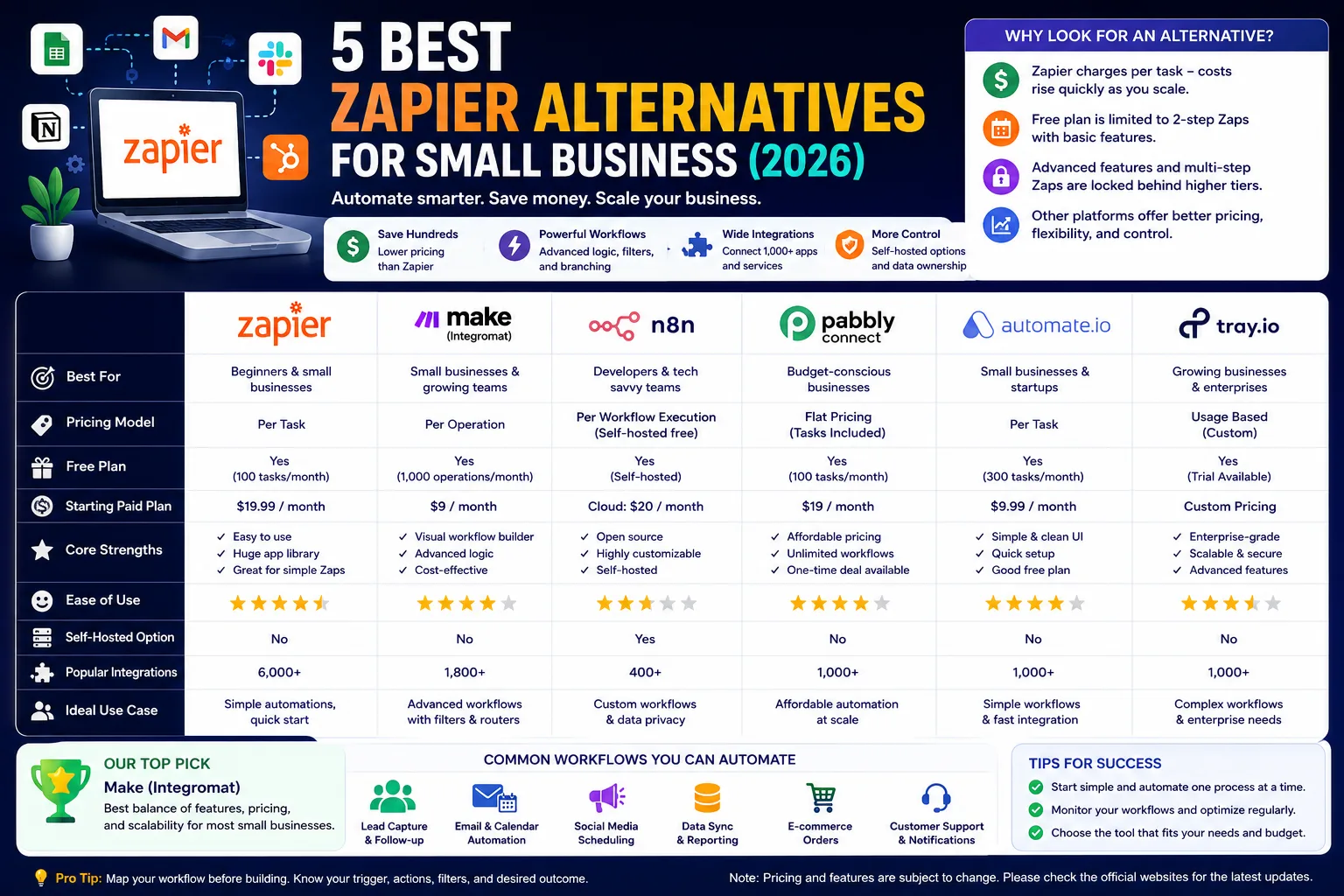
If you’ve ever opened your Zapier bill and felt your stomach drop, you’re not alone. Zapier charges per task, which means a simple five-step workflow can burn through your monthly allowance in days instead of weeks. The good news: the best Zapier alternatives for small business now match or beat Zapier’s capabilities, often for a fraction of the price. If you’re also exploring AI-powered automation beyond workflow builders, check out our guide to the best AI tools for business productivity and automation. This guide breaks down the top picks, how their pricing actually works, and which one fits your setup.
This guide is part of our AI Automation hub – everything we have published on automating a small business with AI, in one place.
Why Small Businesses Look for a Zapier Alternative in the First Place
Zapier built the no-code automation category. It deserves credit for that. But three problems show up as soon as a small business scales past basic use.
The first challenge is cost. Zapier charges based on the number of tasks your automations use, not simply the number of workflows you create. A workflow with multiple actions consumes multiple tasks every time it runs, so businesses with growing automation needs can quickly exceed the limits of lower-tier plans. Zapier offers a Free plan, while paid plans start with Professional and scale through Team and Enterprise tiers. Because pricing, task allowances, and included features change periodically, it’s best to check Zapier’s official pricing page before making a decision.
The second is the free plan ceiling. Zapier’s free tier limits you to two-step Zaps, only no multi-step logic, no branching, no filters. That’s fine for testing the water. It’s not fine for running an actual business process.
The third is flexibility. Complex workflows with conditional branching or error handling get locked behind higher-priced tiers, or they’re just clunky to build in Zapier’s linear, step-by-step interface.
Share your own experience here. For example, mention the workflow you built, when you outgrew Zapier, why you switched tools, how much time or money you saved, and one limitation you encountered. Authentic first-hand experience strengthens both credibility and Google’s Helpful Content signals.
None of this means Zapier is a bad product. In fact, it’s still one of the easiest automation platforms for beginners. But if you’re a small business trying to control costs, build more complex workflows, or scale automation over time, it’s worth comparing Zapier with newer alternatives before committing to a long-term subscription.
What to Look for in a Zapier Alternative
A workflow automation platform connects two or more apps so that an action in one triggers an action in another, without you manually copying data between them. That’s the whole category in one sentence. Once you understand that, the differences between tools come down to four things.
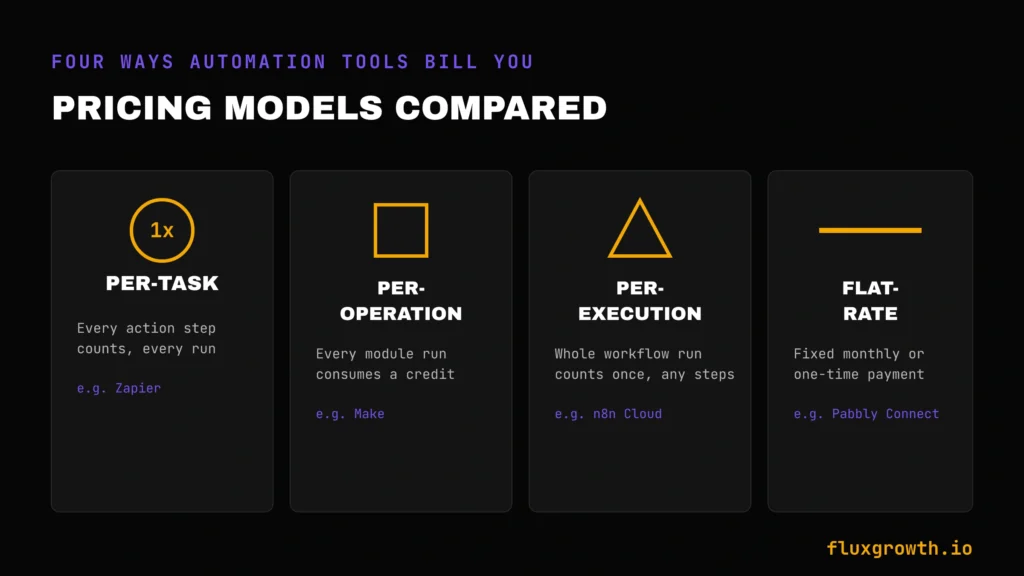
- Pricing model. Some tools bill per task (Zapier), some bill per operation (Make), some bill per workflow execution regardless of steps (n8n), and some use a flat-rate or one-time model (Pabbly Connect). This single difference can change your monthly cost by hundreds of dollars depending on how complex your workflows are.
- No-code vs. technical. Drag-and-drop builders suit non-technical solo operators. Self-hosted, code-friendly tools suit teams with someone comfortable managing a server.
- Integration count vs. integration depth. A tool with 2,000 app integrations sounds impressive, but what matters is whether it deeply supports the five or six tools you actually use every day.
- Where your data lives. Cloud-only tools are simpler to start with. Self-hosted tools give you control over data privacy and compliance, which matters more than people expect once you’re handling customer information.
Keep those four in mind as you read through the options below; they’re the actual decision points, not the integration count on a marketing page.
Make (Integromat) — Best Overall Zapier Replacement
Make, formerly known as Integromat, is the alternative most small businesses land on first, and for good reason. Instead of Zapier’s linear step-by-step builder, Make gives you a visual canvas where you drag modules onto a workspace and connect them with lines showing exactly how data flows between apps.
That visual layout isn’t just prettier. It lets you see your whole automation logic at a glance, which matters once a workflow has branching paths, loops, or error handling. Zapier hides that complexity in a scroll of steps. Make shows you the whole map.
Another key benefit is pricing. Make uses a usage-based credit system rather than charging per workflow, and many small businesses find it more cost-effective than Zapier for advanced automations. Make offers a free plan for getting started, while paid plans begin with the Core tier and scale based on usage and features. Because both platforms update their plans regularly, compare Make’s official pricing page with Zapier’s official pricing page before deciding which platform offers the best value for your workflow.
Best for: small businesses moving off Zapier who want the closest match in app breadth, plus more control over complex logic, without a steep learning curve.
Limitation: the visual builder takes a bit longer to learn than Zapier’s simpler linear format, especially if you’ve never worked with flowchart-style tools before.
n8n — Best for Technical Teams and Self-Hosting
n8n is one of the best Zapier alternatives for technical teams because it offers full workflow control, self-hosting, and flexible pricing. Unlike most no-code automation platforms, n8n lets you run workflows on your own infrastructure or use its managed cloud service.
Related: AI automation software tools compared for 2026
One of n8n’s biggest advantages is its Community Edition, which is free to self-host. According to n8n’s official self-hosting documentation, you can deploy n8n on your own infrastructure while maintaining full control over your data and workflows. Your only ongoing costs are the server and maintenance required to run it, which vary depending on your hosting provider and usage.
If you prefer a managed solution, n8n Cloud eliminates the need to manage servers. It offers paid cloud plans with usage limits based on workflow executions, where each completed workflow counts as one execution regardless of the number of steps it contains. Because pricing and execution allowances change over time, always check n8n’s official pricing page before choosing a plan.
One detail worth knowing: n8n counts entire workflow runs, not individual steps, when it measures usage. That’s a fundamentally different math than Zapier’s per-task billing, and it’s part of why n8n gets cited as dramatically cheaper for high-volume automations.
Best for: teams with someone comfortable handling basic server maintenance, or businesses running high automation volume where per-task pricing from Zapier or Make would add up fast.
Limitation: self-hosting means you’re the one patching updates, managing backups, and fixing things when they break. That’s real time, even if the software itself is free.
Pabbly Connect — Best Budget Pick for Small Teams
Pabbly Connect is a strong Zapier alternative for small businesses that want predictable pricing and generous automation limits. Its biggest differentiator is that, in addition to recurring subscription plans, it also offers one-time lifetime payment options, allowing customers to pay once and receive a fixed monthly task allocation without an ongoing subscription.
For a solo operator or small team with a predictable, moderate automation volume, that one-time payment can work out far cheaper than years of a Zapier subscription. The trade-off is that lifetime plans come with a fixed task ceiling, so if your usage grows well past what you bought, you’ll need to stack a second plan or upgrade.
Pabbly also doesn’t charge for internal tasks like filters and routers, which is where competitors sometimes sneak in extra costs.
Because Pabbly frequently updates its pricing, discounts, and lifetime offers, always check the official pricing page before purchasing rather than relying on third-party comparisons.
Best for: cost-conscious small businesses and solo operators who want Zapier-style workflows without a recurring bill eating into margins.
Limitation: the interface and template library are less polished than Zapier’s or Make’s, and support response times can lag during high-demand periods.
Microsoft Power Automate — Best for Microsoft 365 Shops
If your business already runs on Microsoft 365, Power Automate deserves a look before anything else on this list. It connects natively to Excel, Outlook, Teams, and Dynamics, and includes desktop RPA (robotic process automation) options for automating tasks on your actual desktop, not just cloud apps.
The trade-off is licensing complexity. Microsoft offers multiple licensing options for individuals, organizations, and unattended automation, so choosing the right plan can be confusing. Features such as desktop RPA, AI capabilities, and enterprise automation may require different licences depending on your use case. Because Microsoft updates its plans and pricing periodically, always check the official pricing page before choosing a licence.
Best for: small businesses already deep in the Microsoft ecosystem who want automation that plugs directly into tools they’re already paying for.
Limitation: the interface feels less polished than newer competitors, and licensing needs more up-front homework than a simple monthly plan.
Two More Worth a Quick Look — Pipedream and Activepieces
Pipedream is a developer-friendly automation platform with a generous free tier, built for teams comfortable writing a bit of code alongside no-code steps. It’s less of a fit for a fully non-technical small business, but worth checking if someone on your team has development experience.
Activepieces is open-source and self-hostable, similar in spirit to n8n but with a stronger focus on simplicity for no-code users. It’s newer and has a smaller integration library, but it’s actively adding support and worth monitoring if you like the idea of open-source tools without n8n’s steeper learning curve.
Zapier Alternatives Compared
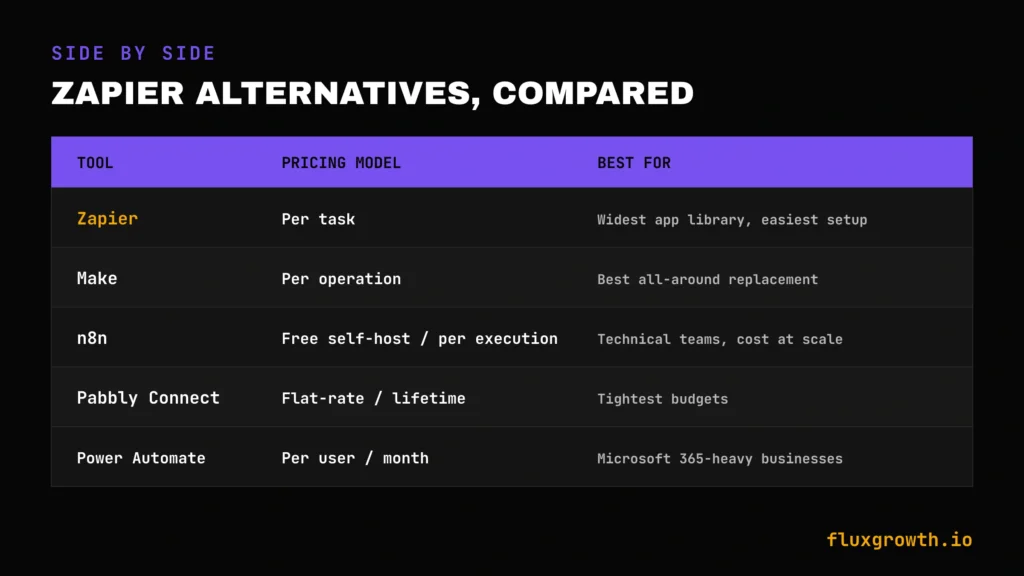
| Tool | Pricing model | Starting price | Best for |
| Zapier | Per task | $0 free (100 tasks/mo) / from $19.99/mo | Widest integration library, least technical setup |
| Make | Per operation (credits) | $0 free (1,000 credits/mo) / from $9/mo | Best all-around replacement |
| n8n | Free (self-hosted) / per execution (Cloud) | Free self-hosted / ~$20–24/mo (Cloud) | Technical teams, cost control at scale |
| Pabbly Connect | Flat-rate / one-time lifetime option | Paid plans and lifetime options available | Tightest budgets |
| Power Automate | Per user/month | From $15/user/mo (Premium) | Microsoft 365-heavy businesses |
The takeaway: if you want the single easiest swap from Zapier, start with Make. If cost at scale matters more than convenience, n8n’s self-hosted option is hard to beat. If you just want the cheapest possible fixed bill, Pabbly Connect’s lifetime plan is worth pricing out.
What I’d Do If I Were Starting Today
If I were picking a Zapier replacement from scratch in 2026, I’d start by counting my actual monthly task volume not guessing, actually pulling the number from my current Zapier dashboard. That number decides everything else.
Under a few thousand tasks a month and non-technical? Make. It’s the safest first move: similar interface logic to Zapier, better pricing at that volume, and a free plan to test before you commit.
Running high volume and have anyone on the team who can handle basic server upkeep? n8n self-hosted. The cost difference at scale is too large to ignore once you’re past a few thousand executions a month.
Tight, predictable budget and don’t want a recurring bill at all? Price out Pabbly Connect’s lifetime option and do the break-even math against what you’re currently paying Zapier annually.
Already all-in on Microsoft 365? Don’t even shop around Power Automate’s native integration with tools you’re already paying for usually wins on convenience alone.
Frequently Asked Questions
What is the cheapest Zapier alternative for small business?
n8n’s self-hosted Community Edition is the cheapest option if you have the technical skills to manage your own server. For non-technical users, Pabbly Connect is one of the most affordable paid alternatives, offering both subscription and lifetime plans. Always check the official pricing pages for the latest plans and pricing.
Is Make better than Zapier?
Make isn’t strictly “better” it’s a different trade-off. Make’s visual canvas and per-operation pricing make it cheaper and more flexible for complex, multi-step workflows, while Zapier’s simpler linear builder and larger app marketplace still make it easier for absolute beginners.
Can I self-host an automation tool instead of using Zapier?
Yes. n8n and Activepieces both offer free, open-source, self-hosted versions with no execution limits. You’ll need a basic server (often a few dollars a month) and someone comfortable handling updates and backups.
Does Pabbly Connect really have a lifetime deal?
Yes. Pabbly Connect offers one-time lifetime plans alongside its regular subscription plans. With a lifetime plan, you pay once and receive a fixed monthly task allowance instead of paying a recurring monthly fee. Because pricing, task limits, and promotional offers change periodically, always check Pabbly’s official pricing page before purchasing.
What’s the difference between Zapier’s per-task pricing and Make’s per-operation pricing?
Zapier charges based on tasks, while Make charges based on operations (credits). In Zapier, each action in a workflow counts as a separate task. In Make, each module executed counts as an operation (or credit). For complex, multi-step automations, many small businesses find Make offers better value, although the total cost depends on your workflow design and usage. Because both platforms update their pricing and usage limits periodically, check their official pricing pages before deciding.
Is n8n hard to learn for non-technical users?
n8n has a steeper learning curve than Zapier or Make, especially if you’re self-hosting and need to handle basic server setup. If you’re fully non-technical, n8n Cloud (the hosted version) is more approachable, though you’ll still find the interface less beginner-friendly than Zapier’s.
The Bottom Line
Zapier isn’t going anywhere, and it’s still the easiest on-ramp for a business with zero technical comfort and low automation volume. But once your task count or your bill starts climbing, Make, n8n, and Pabbly Connect all offer real paths to lower costs without giving up automation power. Pull your current Zapier task count today, compare it against the pricing models above, and pick the tool that matches your actual usage, not the one with the biggest marketing budget.