FluxGrowth is reader-supported. Some links in our guides are affiliate links — if you buy through one we may earn a commission, at no extra cost to you. It never changes which tools we recommend. How we test tools.
Last updated: July 2026
This guide is part of our Social Growth hub – everything we have published on growing on social with AI, in one place.
You’ve got five platforms to feed, one calendar, and about 40 minutes between client calls to make it happen. That’s the reality for most solopreneurs and small marketing teams right now, and it’s exactly why so many people are trying to automate social media posting with AI this year.
Here’s the catch: automate it wrong, and your feed reads like a robot took over. Automate it right, and you get your evenings back without losing your voice. This guide walks through exactly how to do the second one: the workflow, the tools, and the mistakes that give automation away. If you’re also looking to automate tasks beyond social media, check out our guide to the 5 Best Zapier Alternatives for Small Business in 2026, which compares the top no-code automation platforms for connecting your apps and workflows.
What “AI social media automation” actually means
AI social media automation means using AI to handle the repetitive parts of posting: writing captions, resizing content per platform, picking send times, publishing on schedule. The stuff that used to eat your Tuesday afternoon.
That’s a broader definition than most people expect. A lot of creators think “automation” just means scheduling. But by 2026, scheduling is the easy part. The real automation layer now covers three separate jobs:
- Content generation — drafting captions, hooks, and hashtag sets
- Scheduling and publishing — queueing and posting at the right time, on every platform
- Optimization — adjusting send times and formats based on what’s actually performing
Most tools do at least two of the three. Fewer do all three well.
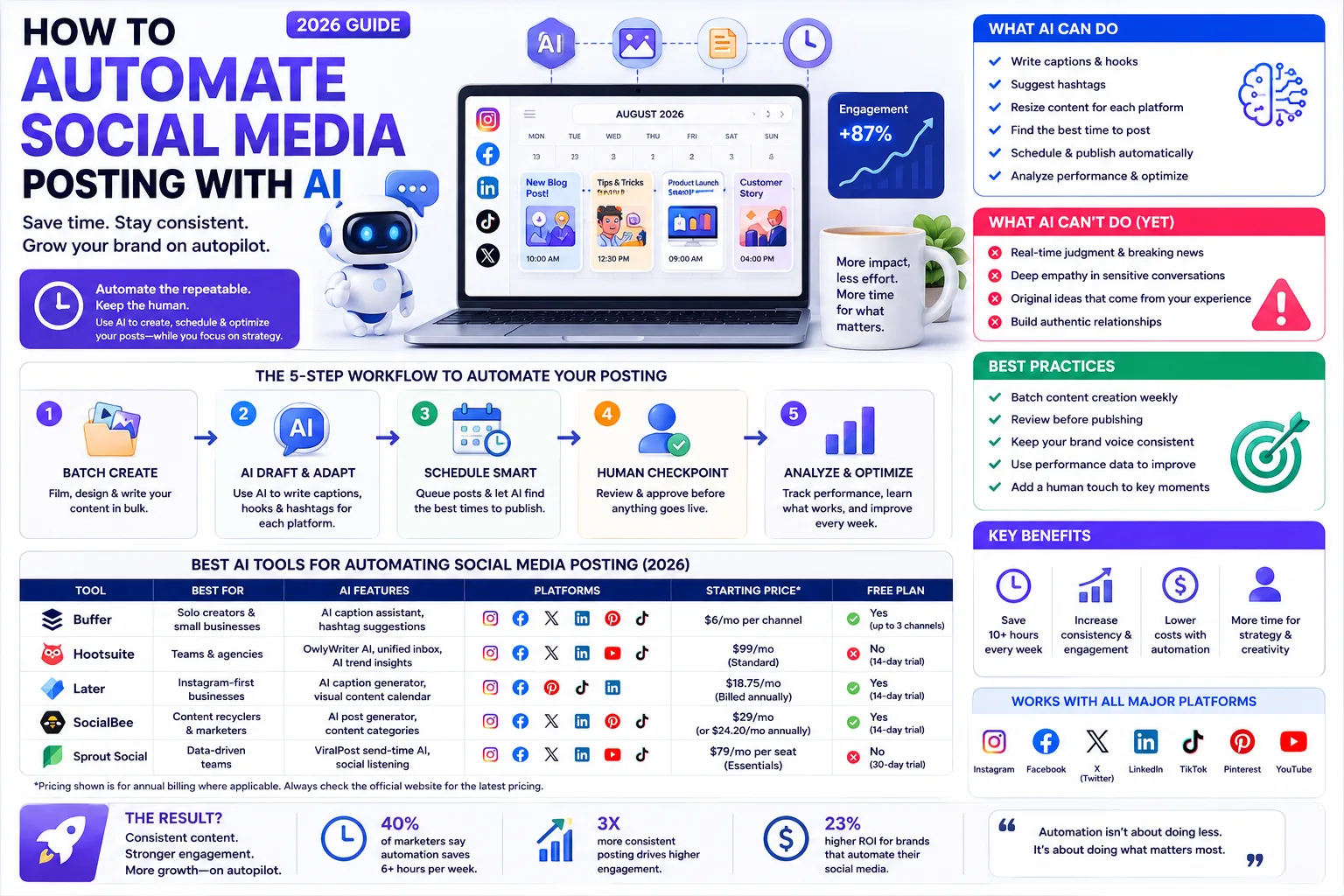
What AI can’t do for you yet
Most “automate everything” guides skip this part. Automation has a ceiling. Pretend it doesn’t, and that’s how brands get burned.
Nearly a third of consumers say they’re less likely to choose a brand that uses AI ads, according to Hootsuite’s 2026 social trends research. That’s not a fringe opinion, it’s a third of the people you’re trying to reach.About half of people can correctly spot AI-written copy, and 52% say they become less engaged with content once they suspect it’s AI-generated.
So here’s the line: automate the workflow, never the judgment. Let AI draft, resize, and queue. Keep a human making the actual calls on:
- Anything posted during a breaking-news moment or PR situation
- Captions that reference current events, humor, or brand voice nuance
- Comment replies that need empathy, not a canned response
Skip that, and you’re not automating, you’re gambling with your reputation on autopilot.
The 5-step workflow to automate your posting
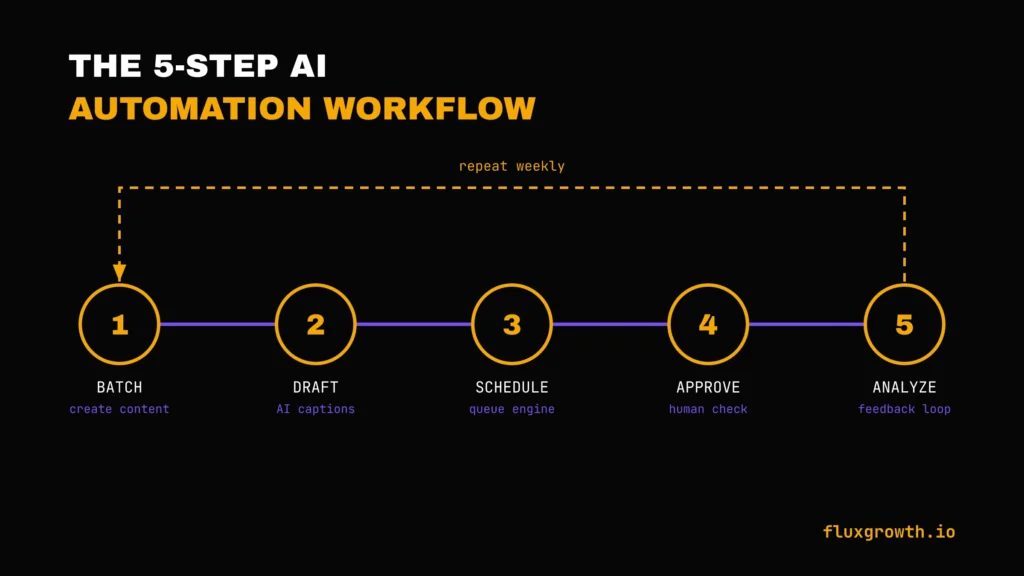
This is the actual sequence, not a tool list. Get this right and the tool you pick matters a lot less.
1. Batch-create your source content. Pick one day a week (or every two weeks) to write, film, or design everything at once. Automation only works on content that already exists; it can’t generate your ideas or your camera footage for you.
If you’re starting from zero, aim for one week’s worth of raw material per session: a handful of short videos, a few graphics, three or four written posts. Not a month’s worth (trust me content planned that far ahead stops feeling current by the time it actually goes live).
2. Use AI to draft and adapt captions per platform. Feed your source content into an AI writing tool such as Buffer AI Assistant, Hootsuite’s OwlyWriter AI, or ChatGPT to generate platform-specific captions. A LinkedIn post, an Instagram caption, and a TikTok description should never be identical because each audience expects a different style.
3. Set up the scheduling engine. Load the drafted posts into your scheduler and set the queue. Most platforms now let you auto-fill optimal send times instead of guessing Sprout Social’s ViralPost, for example,uses patented AI to analyze your specific audience’s engagement history and identify the optimal times to post, not global averages.
4. Build a light human-approval checkpoint. Even solo creators should build in one review pass before anything goes live. Five minutes scanning a week’s queue catches tone-deaf timing or a caption that reads wrong out of context. For teams, this is a formal approval step; for solo operators, it’s just not hitting “auto-approve” blind.
5. Close the loop with analytics. Check what actually performed weekly, not monthly. Feed that back into what you batch-create next. Automation without a feedback loop just automates guessing faster; you’ll keep generating the same low-performing post format because nothing tells the system, or you, to stop.
Quick summary: batch your content, let AI draft and adapt captions, schedule with performance-based timing, keep a human checkpoint, and review results weekly. Skip step 4 and step 5, and you’re running on autopilot with no steering wheel.
Related: the best AI automation software for 2026
The best AI tools for automating social media posting
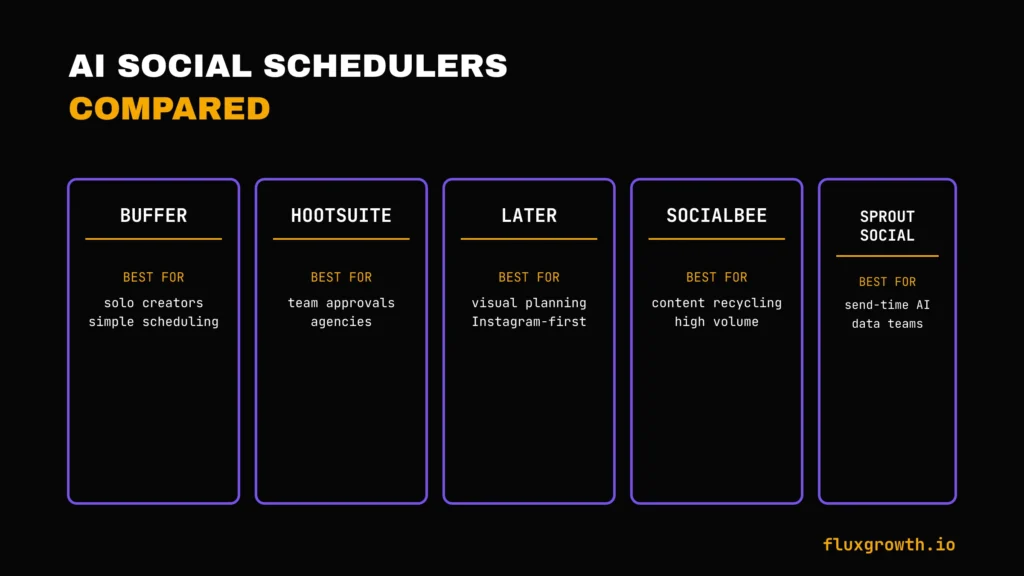
Every tool below handles the workflow above differently. Pricing is volatile in this category; every figure here is flagged for a pre-publish check against the vendor’s own pricing page.
| Tool | Best for | AI features | Starting price |
| Buffer | Solo creators, simple multi-platform scheduling | AI caption assistant, hashtag suggestions | Free plan available (up to 3 channels). Paid plans start at $6/month per channel. |
| Hootsuite | Teams needing approval workflows and analytics | OwlyWriter AI captions, unified inbox, AI trend insights | No permanent free plan; Standard starts at $99/month (annual billing), Professional at $199/month |
| Later | Instagram-first, visual content planners | AI caption generator, visual content calendar | The starter plan starts at $18.75/month (billed annually) with a 14-day free trial. |
| SocialBee | Category-based content recycling at volume | AI post generator, content categories for evergreen recycling | Plans start at $29/month (or $24.20/month billed annually). Includes a 14-day free trial. |
| Sprout Social | Data-driven teams that need send-time optimization | ViralPost send-time AI, social listening | Essentials from $79/seat/month; Standard from $199/seat/month (annual billing) |
The best tool depends on your workflow. Buffer is the best value for solo creators and small businesses. Later is ideal if Instagram is your primary channel. SocialBee excels at evergreen content and AI-assisted publishing. Hootsuite is a better fit for larger teams that need approvals and collaboration, while Sprout Social is designed for organizations that need advanced analytics, AI-powered scheduling, and social listening. Always verify pricing on each vendor’s official website before publishing, as plans and features change regularly.
A quick walkthrough of who each tool actually fits:
Buffer keeps its pricing simple: you pay per connected channel, not per seat, which is why it’s the default pick for creators managing their own accounts. The tradeoff is that its AI features are lighter than the competition; it’s a scheduler with caption help bolted on, not a full content-generation suite.
Hootsuite goes the other direction. OwlyWriter AI drafts captions and repurposes old posts on its own, and the unified inbox means you’re not toggling between five apps just to answer comments. That depth is exactly why agencies with several client accounts lean on it. It’s also exactly why a solo creator opens the pricing page, winces, and closes the tab.
Later built its reputation on Instagram, and it still shows: the visual content calendar makes it easy to see how a grid will look before anything goes live, which matters if your feed’s aesthetic is part of your brand. Its AI caption tool is decent but not the reason to choose it the visual planning is.
SocialBee’s angle is different again. Instead of just scheduling new posts, it organizes content into categories (tips, promotions, testimonials) and automatically recycles evergreen posts on a rotation. That’s a strong fit if a chunk of your content like FluxGrowth’s own evergreen tool guides doesn’t go stale and is worth reposting on a loop.
Sprout Social is built for teams that need to prove ROI to a client or a boss. Its ViralPost send-time AI and social listening tools go deeper than anything above, but the price tag reflects that. It’s overkill for a solo creator and close to essential for a mid-size agency.
A quick example of how this plays out: picture a freelance social media manager running five client accounts across Instagram, LinkedIn, and TikTok. Doing it manually means logging into fifteen different dashboards a week.
Batch-creating content every Sunday, running captions through an AI drafting tool per platform, and scheduling everything Monday morning in one dashboard turns that into roughly two focused hours plus a daily five-minute check on the queue and inbox. The time saved isn’t from AI writing better captions than a human could. It’s from not re-doing the same manual steps fifteen times over.
Common mistakes that make automation obvious
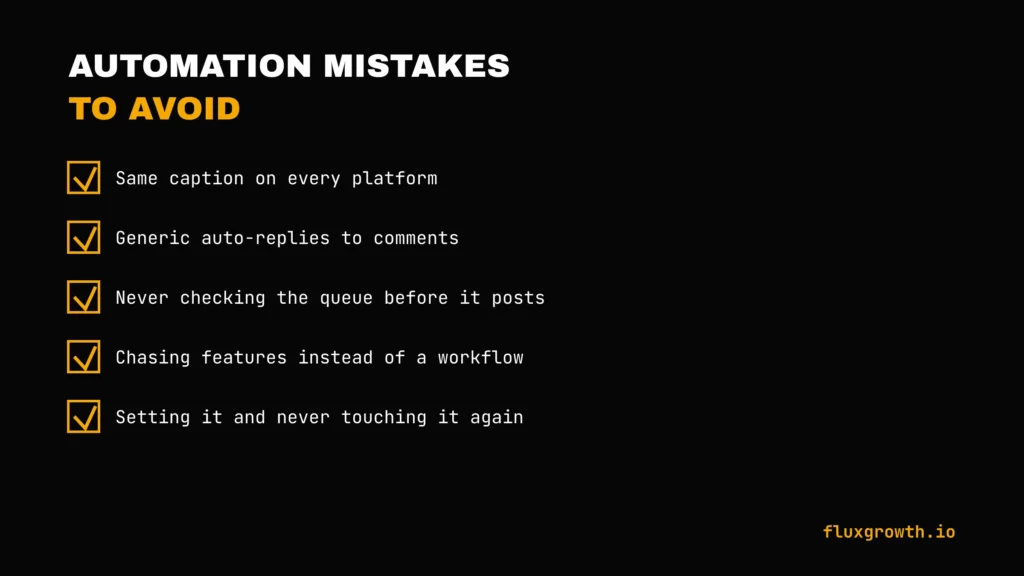
- Posting the exact same caption everywhere. A cross-post with zero platform adaptation is the fastest tell that nobody’s home.
- Auto-replying to comments with generic text. Readers notice a bot reply within one exchange it kills the “community” part of social media instantly.
- Never checking the queue before it goes live. Scheduled posts don’t know when the news changes. A queued post landing next to a real crisis is a brand-safety problem, not a scheduling glitch.
- Chasing every new AI feature instead of a workflow. Social media marketers’ top priorities in 2026 are AI-powered analytics and AI-driven ideation, tied at 59.5%, ahead of caption writing at 45.9% meaning most of the real value is in planning and measurement, not just generating more posts faster.
- Setting it and never touching it again. A scheduler loaded once in January and left running through a product change, a rebrand, or a price update will happily keep posting outdated information. Automation removes the daily manual step, not the responsibility to check in.
What I’d do if I were starting today
Start with one tool. Not five.
Pick a scheduler with a genuine free tier Buffer’s free plan covers three channels, which is enough to test the whole workflow before paying for anything. Batch one week of content, let AI draft the platform-specific captions, and manually review the queue before it goes live.
Only add a second tool (send-time optimization, category recycling) once the basic loop is actually saving you time, not before. Most people buy the advanced tool before they’ve proven the simple workflow works, and end up paying for automation they never use.
FAQ
Can AI post to social media for me automatically?
Yes. Tools like Buffer, Hootsuite, and Later connect directly to your social accounts and publish on a schedule you set, with AI handling caption drafting and send-time suggestions. You still need to create the underlying content and approve what goes out.
What’s the best AI tool to automate social media posts?
It depends on your setup. Buffer works best for solo creators on a budget, Hootsuite and Later suit teams that need approval workflows, and SocialBee fits high-volume content recycling. There’s no single “best” match to the tool to your posting volume and team size.
Is it safe to fully automate social media with AI?
Not entirely.Nearly a third of consumers say they’re less likely to choose a brand that uses AI ads, so fully hands-off automation carries real reputational risk. Keep a human checkpoint for anything tied to current events, tone, or comment replies.
How much does AI social media automation cost?
AI social media automation can cost anywhere from free to several hundred dollars per month, depending on the platform and team size. Buffer offers a free plan for up to three social channels, with paid plans starting at $6 per channel/month (or $5 per channel/month when billed annually). Hootsuite does not offer a permanent free plan; its Standard plan starts at $99 per user/month (annual billing), while Advanced starts at $249 per user/month. Enterprise plans are available with custom pricing. Because pricing changes regularly, always check each vendor’s official pricing page before subscribing.
Will automated AI posts hurt my engagement?
Only if they look automated.About half of people can spot AI-written copy, and over half say they engage less once they suspect it. Platform-specific captions and a human review pass keep automated posts from reading as generic.
Can I automate Instagram and TikTok posting with AI?
Yes, most major schedulers support both. Threads scheduling is now available across most major tools since Meta opened the Threads API to all developers in 2024, and Instagram and TikTok have been standard scheduler integrations for longer.
The bottom line
Automating your social media posting with AI isn’t about replacing yourself. It’s about clearing the repetitive work so you can spend time on what a tool still can’t do: judgment, timing, actually talking to your audience.
Pick one tool. Run the five-step workflow above for two weeks. See what it actually frees up before you add anything else. If you haven’t tested a scheduler yet, start with Buffer’s free tier this week. There’s no reason to pay before you know the workflow fits how you post.