FluxGrowth is reader-supported. Some links in our guides are affiliate links — if you buy through one we may earn a commission, at no extra cost to you. It never changes which tools we recommend. How we test tools.
Most businesses don’t have an AI problem. They have a too-many-tools problem.
This guide is part of our AI Automation hub – everything we have published on automating a small business with AI, in one place.
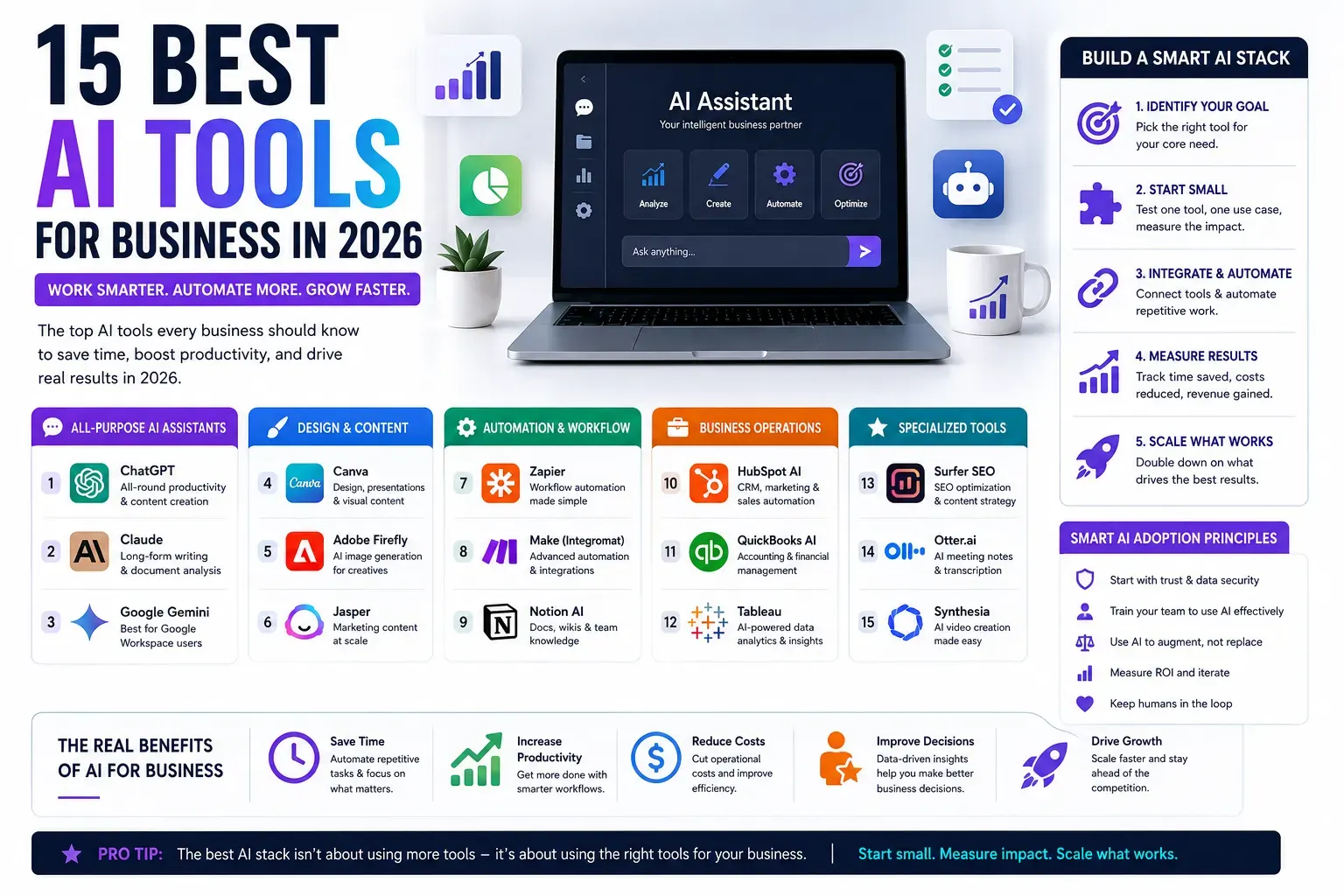
The best AI tools for business in 2026 come down to four picks for most teams: an all-purpose assistant (ChatGPT or Claude), a design tool (Canva), an automation layer (Zapier), and one specialist for your core job SEO, CRM, or accounting. That’s the starter stack. Everything else earns its place later, or not at all.
Here’s the part that doesn’t make the headlines. 88% of organizations now use AI in at least one business function, up from 78% a year earlier, according to McKinsey’s State of AI 2025 report. But only about 6% are seeing meaningful financial impact from it. So adoption is basically solved. Getting paid back is where almost everyone is stuck.
This guide fixes that. I’ll walk through 15 tools I’d actually put in front of a small team, what each one is genuinely good at, where it breaks, and roughly what it costs. Then I’ll show you how to build a stack without buying a dozen subscriptions you’ll forget to cancel.
What AI tools for business actually are (and what they’re not)
An AI tool for business is software that uses machine learning or large language models to do work a person used to do by hand writing a first draft, cleaning a spreadsheet, answering a support ticket, or routing a lead. The useful ones sit inside a job you already do and cut the boring middle out of it.
They are not a strategy. And they’re not employees, no matter what the pricing page implies. A tool that drafts your emails still needs you to know which emails are worth sending.
Most of these tools work the same way under the hood. You give them context, a prompt, a document, a data set and they predict the most useful response from patterns learned across huge amounts of text or images. That’s why they’re strong on first drafts and pattern-heavy work, and shaky on anything that needs real-world judgment or a fact they’ve never seen.
Why are businesses paying for them? Time. When a task is repetitive and language-based, AI does the first 80% in seconds, and you spend your hours on the 20% that actually needs you.
Why your business needs AI in 2026 the honest version
AI adoption among small businesses has roughly doubled in two years. 58% of small businesses reported using generative AI in 2025, up from 40% in 2024 and 23% in 2023, according to the U.S. Chamber of Commerce’s Empowering Small Business report. And 96% of small business owners say they plan to adopt emerging tech, including AI, in the years ahead.
Be careful with that 58%, though. A stricter U.S. Census Bureau survey which only counts AI used directly in producing goods or services put small-firm adoption at 8.8% as of August 2025. Both numbers are real. They just measure different things: casual ChatGPT use versus AI baked into operations. Most small businesses are still in the casual bucket.
Many small businesses report saving several hours each week on repetitive marketing work such as social media content, email campaigns, and first-draft copywriting after adopting AI tools, although the exact time savings vary by business and workflow.
Now the honest part. Using AI and profiting from AI are not the same thing. McKinsey found only about 6% of organizations qualify as “high performers” seeing significant value, and just 39% report any measurable EBIT impact. The gap isn’t tooling. It’s a discipline where the businesses seeing real returns tend to pick one workflow, wire AI into it properly, and actually measure what changed.
For a small team, that’s the whole thing. Pick one workflow, prove it pays, and only then reach for the next tool.
The 15 best AI tools for business in 2026
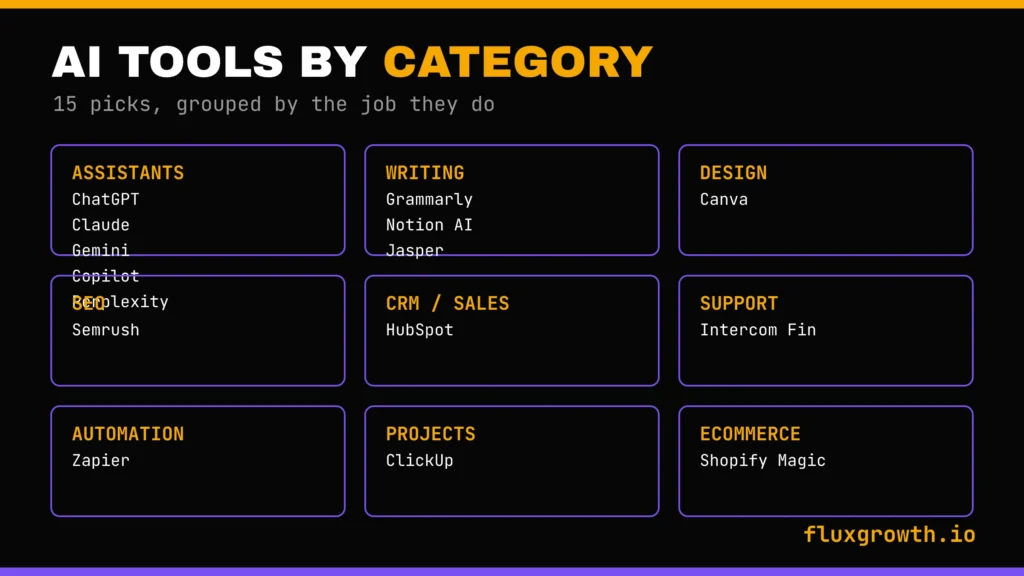
I’ve grouped these by the job they do. For each, you get what it’s for, where it wins, rough pricing, the free plan, who it fits, and one honest limitation because every one of these has a catch.
All prices are monthly, billed to a single user unless noted, and are accurate at publication. AI pricing shifts constantly, so check the official page before you buy.
All-purpose AI assistants
1. ChatGPT is best for all-round productivity ChatGPT is the default AI assistant for a reason: it does a bit of everything writing, brainstorming, summarizing, coding assistance, data analysis, and web research. For many freelancers, startups, and small businesses, it’s the only AI tool they need to get started. One login can help with content creation, customer support, marketing, and everyday problem-solving. OpenAI offers a free plan, while ChatGPT Plus costs $20/month and includes higher usage limits, faster responses, advanced reasoning models, image generation, file analysis, Deep Research, and custom GPTs.
2. Claude — best for long-form writing and document analysis Claude is the AI assistant I reach for when the work is long or the document is dense. It handles large files well, maintains a consistent writing style across thousands of words, and generally produces cleaner first drafts than many competitors. Its biggest strength is its long context window where you can upload lengthy reports, research papers, or meeting transcripts and ask detailed questions without constantly breaking the conversation into smaller chunks.
Anthropic offers a free plan, while Claude Pro costs $20/month (or $200/year with annual billing) and provides higher usage limits, access to advanced models and research features, unlimited projects, and additional productivity tools.
3. Google Gemini — best for Google Workspace users If your business already runs on Gmail, Google Docs, Sheets, Drive, and Meet, Gemini is the natural fit. It integrates directly into Google Workspace, letting you summarize email threads, draft documents, analyze spreadsheets, generate formulas, and take meeting notes without leaving the apps your team already uses. Its biggest advantage is seamless Workspace integration. The AI comes to your workflow instead of forcing you into a separate interface.
Gemini has a free tier for individual users. For businesses, Google Workspace plans with Gemini start at $14 per user/month (Business Starter with Gemini included), while higher tiers such as Business Standard ($17.60/user/month) and Business Plus ($26.40/user/month) include additional storage and collaboration features. Google also offers a free trial for eligible customers
4. Microsoft Copilot — best for Microsoft 365 teams Copilot is to Microsoft 365 what Gemini is to Google Workspace. It’s built directly into Word, Excel, Outlook, Teams, PowerPoint, and other Microsoft apps, allowing you to summarize meetings, draft emails, analyze spreadsheets, generate presentations, and automate repetitive tasks without switching tools. Its biggest strengths are Excel for data analysis and Teams for meeting summaries and action items.
Pricing: Microsoft 365 Copilot is available as an add-on for $30 per user/month (annual commitment) for eligible Microsoft 365 business and enterprise plans. Microsoft also offers Copilot Chat, a free AI chat experience for Microsoft 365 users, with optional pay-as-you-go AI agents.
5. Perplexity — best for research and competitive analysis Perplexity is an answer engine rather than a traditional chatbot. Instead of generating responses from memory alone, it searches the web in real time and provides answers with clickable citations, making it one of the most reliable AI tools for research, fact-checking, and competitive analysis. Its biggest strength is transparency; you can verify the sources behind nearly every claim.
Pricing: A free plan is available for everyday use. Perplexity Pro costs $20/month (or $200/year) and includes more daily Pro searches, access to advanced AI models (such as GPT-5, Claude, Gemini, and others as available), Deep Research, file uploads, and Spaces for organizing projects.
Writing and productivity
6. Grammarly — best for business communication Grammarly quietly improves how your entire team writes. Beyond catching grammar and spelling mistakes, it now provides tone suggestions, clarity improvements, sentence rewrites, plagiarism detection, and AI-assisted writing to help create more professional communication. One of its biggest advantages is that it works across email, documents, browsers, messaging apps, social media, and many CRM platforms, so you get consistent writing assistance almost everywhere you type.
Pricing: Grammarly offers a free plan with core writing assistance. Grammarly Pro starts at $12/month when billed annually (or $30/month on monthly billing) and adds advanced rewrites, tone adjustment, plagiarism detection, brand tones, and significantly more AI prompts. Enterprise plans are available with custom pricing.
7. Notion AI — best for knowledge management Notion AI turns your team’s documents, SOPs, meeting notes, and internal wiki into something you can actually talk to. It can summarize meeting notes, extract action items, answer questions about your workspace, draft content, and search across pages and databases with its Ask AI and enterprise search capabilities. Its biggest strength is centralizing company knowledge so employees spend less time hunting for information.
Pricing: Notion offers a free plan and a Plus plan ($10/user/month billed annually), but full Notion AI is included only with the Business plan, which starts at $20/user/month (annual billing). Enterprise pricing is available on request.
8. Jasper — best for marketing teams Jasper is built specifically for marketing teams, with features like Brand Voice, campaign templates, AI marketing agents, and workflows designed for content operations rather than general-purpose chat. Its biggest advantage is brand consistency: you can train Jasper on your company’s tone, style guide, and messaging so it generates on-brand content across blog posts, emails, landing pages, ads, and social campaigns.
Pricing: Jasper does not offer a permanent free plan, but it provides a 7-day free trial. The Pro plan costs $69/month on monthly billing or $59/month when billed annually. Enterprise customers can choose the Business plan, which has custom pricing and adds advanced AI agents, API access, governance, and enterprise security.
Design and visuals
9. Canva AI (Magic Studio) — best for marketing graphics Canva has integrated AI directly into the design platform many businesses already use. Magic Studio includes features like Magic Write for AI-assisted copywriting, Magic Design for generating branded designs from prompts, Magic Media for AI image generation, Background Remover, and other AI-powered editing tools. Its biggest advantage is speed; non-designers can create professional-looking social posts, presentations, ads, and marketing assets without learning complex design software.
Pricing: Canva offers a free plan with access to basic AI features and limited Magic Studio usage. Canva Pro starts at $15/month (or $120/year for one user) and unlocks the full Magic Studio feature set, Brand Kit, premium templates, and higher AI usage limits. Canva Teams and Enterprise plans provide additional collaboration and brand management features.
Related: the best AI tools we tested in 2026
Marketing and SEO
10. Semrush — best for SEO Semrush remains one of the most comprehensive SEO platforms for businesses. Its AI-powered features help speed up keyword research, content brief creation, competitor analysis, content optimization, and SEO recommendations. If you’re exploring dedicated AI-powered optimization platforms alongside Semrush, check out our guide to the best AI SEO tools for a detailed comparison of the top AI SEO solutions available today. Its biggest advantage is the depth of its data; few platforms match Semrush for keyword intelligence, backlink analysis, technical SEO, and competitive research
Pricing: Semrush offers a free account with limited daily usage. Paid plans start with Pro at $139.95/month, followed by Guru at $249.95/month and Business at $499.95/month. Annual billing provides a discount compared with monthly pricing.
Sales and CRM
11. HubSpot — best for SMB CRM and sales automation HubSpot combines CRM, marketing, sales, and customer service into one platform, with AI-powered Breeze features helping teams draft emails, summarize calls, generate reports, score leads, and automate routine sales tasks. Its biggest advantage is accessibility. You can start with a capable free CRM and add more advanced AI and automation features as your business grows.
Pricing: HubSpot offers a free CRM with core contact management, email marketing, forms, and basic AI features. Paid plans vary by Hub and business size. Starter Customer Platform begins at $15/month per seat (annual billing), while Professional and Enterprise plans add advanced automation, AI capabilities, and reporting at significantly higher prices.
Enterprise pick: Salesforce Einstein / Agentforce. For larger companies already on Salesforce, Einstein layers AI across the CRM and Agentforce adds autonomous agents for service and sales. It’s powerful and deeply customizable and priced and scoped for teams with dedicated admins, not a three-person shop. If you’re an SMB, start with HubSpot and revisit Salesforce when you outgrow it.
Customer support
12. Intercom Fin — best for AI customer service Fin is Intercom’s AI customer support agent, designed to resolve customer questions before they ever reach a human agent. It answers support requests using your company’s help center, knowledge base, and documentation, helping teams automate repetitive conversations while handing more complex issues to human agents. Its biggest advantage is resolution rate Fin can handle a significant share of routine support tickets without escalation when backed by high-quality documentation.
Pricing: Intercom offers a 14-day free trial, but Fin is not included in the standard plans. Fin is priced at $0.99 per successful AI resolution, while access to the Intercom platform starts with the Essential plan at $29 per seat/month (annual billing). Advanced plans (Advanced and Expert) provide additional automation, reporting, and workflow capabilities.
Automation
13. Zapier — best for connecting your tools Zapier is the glue that connects nearly every business app you use. With support for 8,000+ apps, it lets you automate repetitive workflows without writing code. Its AI features including Zapier Copilot and Zapier Agents allow you to describe automation in plain English, generate workflows automatically, and even create AI agents that can perform multi-step tasks across your connected tools.
Pricing: Zapier offers a free plan with 100 tasks per month and unlimited Zaps for basic automation. Professional starts at $19.99/month (annual billing) and unlocks multi-step Zaps, premium apps, AI features, and higher task limits. Team and Enterprise plans are also available for larger organizations.
Project management
14. ClickUp — best for project management ClickUp combines project management, documents, goals, chat, whiteboards, and AI into a single platform. Its AI assistant, ClickUp Brain, can summarize projects, draft status updates, generate subtasks from meeting notes or briefs, answer questions about your workspace, and automate repetitive project management tasks. Its biggest strength is consolidation: you can manage tasks, documentation, and AI workflows without switching between multiple apps.
Pricing: ClickUp offers a free plan that’s suitable for individuals and small teams. Unlimited starts at $7/user/month (annual billing), Business starts at $12/user/month, and ClickUp Brain is available as a paid AI add-on for $7 per user/month on eligible plans. Enterprise pricing is available on request.
Ecommerce
15. Shopify Magic — best for online stores Shopify Magic brings AI directly into the Shopify platform, helping merchants generate product descriptions, email campaigns, FAQ content, blog posts, and customer responses without leaving the Shopify admin. Its biggest advantage is convenience if you’re already using Shopify, the AI features are built in, so there’s no extra software to install or integrate.
Pricing: Shopify Magic is included with all Shopify plans. Shopify plans currently start at Basic ($39/month), followed by Grow ($105/month) and Advanced ($399/month) when billed monthly. Enterprise users can choose Shopify Plus with custom pricing.
AI tools for business compared
Here’s the whole list in one view. Prices are starting paid tiers and get verified before publishing.
| Tool | Category | Free plan | Starting price | Best for |
| ChatGPT | All-purpose assistant | Yes | $20/month (Plus) | All-round productivity |
| Claude | All-purpose assistant | Yes | $20/month (Pro) | Long-form writing, analysis |
| Google Gemini | All-purpose assistant | Yes | Google AI Pro: $19.99/month | Google Workspace teams |
| Microsoft Copilot | All-purpose assistant | Limited | Microsoft 365 Copilot: $30/user/month | Microsoft 365 teams |
| Perplexity | Research | Yes | $20/month (Pro) | Research, competitive analysis |
| Grammarly | Writing | Yes | $12/month (annual billing) | Business communication |
| Notion AI | Productivity | Yes | $20/user/month (AI included) | Knowledge management |
| Jasper | Marketing content | Trial | $59/month (annual) or $69/month (monthly) | Marketing teams |
| Canva | Design | Yes | Canva Pro: $15/month | Marketing graphics |
| Semrush | SEO | Trial | Pro: $139.95/month | SEO and organic traffic |
| HubSpot | CRM / sales | Yes | Starter: $15/seat/month | SMB CRM and sales |
| Intercom Fin | Customer support | Trial | Essential: $29/seat/month + Fin: $0.99 per AI resolution | AI customer service |
| Zapier | Automation | Yes | Professional: $19.99/month | Connecting your tools |
| ClickUp | Project management | Yes | Unlimited: $7/user/month (+ ClickUp Brain $7/user/month) | Project management |
| Shopify Magic | Ecommerce | With plan | Included in Shopify plans (Basic starts at $39/month) | Online stores |
Which AI tools fit your business
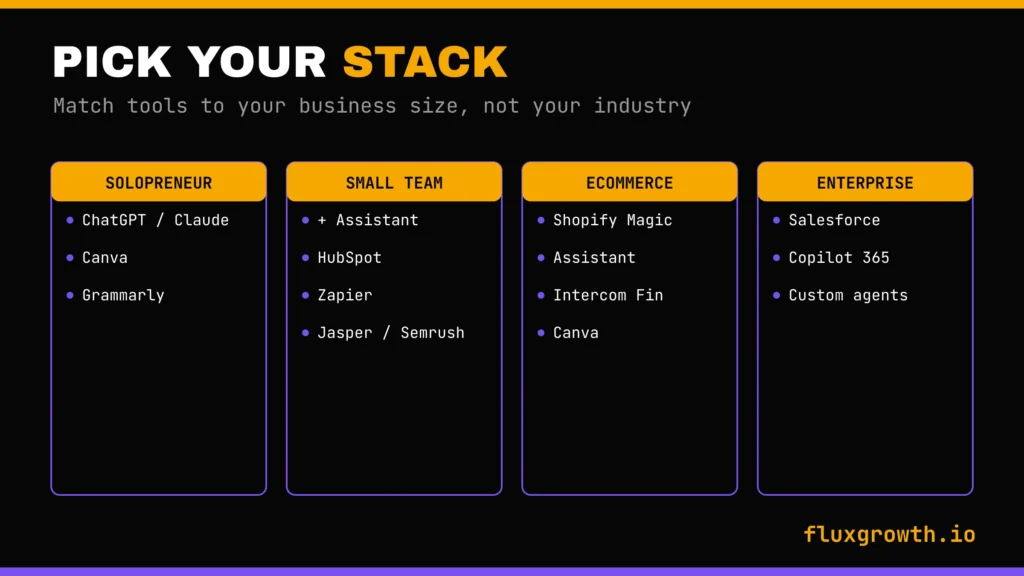
Description: FluxGrowth graphic matching AI tool stacks to business size.
The right stack depends less on your industry and more on your size and where your time goes. Here’s how I’d match tools to team type.
Solopreneurs and freelancers
You need range, not depth. Start with one assistant (ChatGPT or Claude), add Canva for visuals, and use Grammarly to keep your writing sharp. That’s it. You don’t need a CRM or an automation platform until you have enough clients to lose track of them. Total spend: roughly $20 to $40 a month.
Small teams and agencies
Now coordination matters. Keep the assistant, add HubSpot to manage clients and leads, and bring in Zapier to stop your team from copy-pasting between tools. If you produce a lot of content, Jasper or Semrush earns its slot. This is where a real “stack” starts to make sense.
Ecommerce businesses
Your money is in product content and support. Shopify Magic handles store copy, an assistant drafts your email campaigns, and an AI support tool like Intercom Fin catches the flood of “where’s my order” tickets. Canva covers your ad and social creative.
Enterprise teams
Bigger companies play a different game. This is where Salesforce Einstein, Microsoft Copilot across 365, and custom agent deployments fit tools that need admins, security review, and budget most SMBs don’t have. If that’s you, the deciding factors shift to compliance, data governance, and integration depth, which I cover next.
Free vs paid AI tools — is the upgrade worth it?
For many small businesses, the free tiers are genuinely enough. ChatGPT Free, Canva Free, HubSpot’s Free CRM, and Perplexity Free can support a solo business or startup for quite a while. Don’t pay for an AI tool until the free version actually slows you down.
You’ll know it’s time to upgrade when you hit a real limitation: usage caps interrupt your workflow, you need team collaboration, advanced AI models, API access, stronger security, or better integrations. Those are upgrades that usually deliver measurable value. Paying just for slightly better outputs rarely does.
One cost many businesses overlook isn’t the subscription, it’s the time required to implement the tool effectively. Even the best AI software requires onboarding, workflow changes, prompt development, and employee training before it consistently saves time. Budget for those hours alongside the monthly subscription.
So how do you know whether an upgrade is worth it? Keep it simple. Estimate how many hours the tool saves each week, multiply that by the value of an hour of your work, and compare it with the monthly subscription. If a $20/month AI tool saves three hours every week, the return on investment is usually obvious. If you can’t identify any measurable time savings after using it for a few weeks, the paid plan probably isn’t worth it yet.
How to choose the right AI tool (without buying 12 you won’t use)
Before you sign up for anything, do a quick audit. Where does your week actually leak time? Not where AI could help in theory where you personally lose hours right now. That bottleneck is your first tool. Everything else can wait.
Then run each candidate through a short checklist. Does it fit your budget once you include training time? Can a normal person on your team use it without a tutorial marathon? Does it connect to the tools you already run? And can it grow with you, or will you outgrow it in six months?
For anything touching customer or financial data, security is not optional. Check whether the tool is SOC 2 compliant and GDPR-ready, and read how it uses your inputs, some train on your data unless you opt out. A cheap tool that leaks client data is the most expensive mistake on this list.
One rule keeps most teams sane: adopt one tool at a time. Wire it into a real workflow, use it for a month, and only then consider the next one. The businesses that buy ten tools in a weekend use two and pay for ten.
The mistakes that waste your AI budget
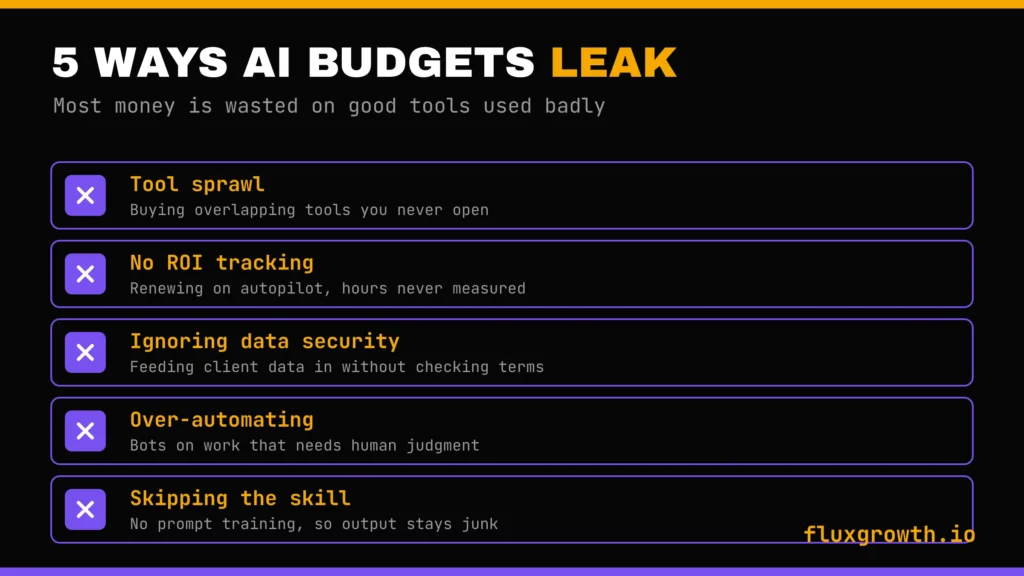
This is the section the other guides skip, so slow down here. Most AI money isn’t wasted on bad tools. It’s wasted on good tools used badly.
Tool sprawl. The most common failure is buying too many overlapping tools. You end up with three writing assistants, two design apps, and no idea which does what. The 90% of small businesses that plan to add more AI tools should probably consolidate first. More tools rarely means more output, usually just more subscriptions and more confusion.
No ROI tracking. If you can’t say how many hours a tool saves, you can’t say whether to keep it. Most teams never measure this, so they renew everything out of habit. Pick one metric per tool hours saved, tickets deflected, drafts produced and actually watch it.
Ignoring data security. Small businesses feed customer lists, financials, and private docs into AI tools without checking the terms. Some of that data may be used to train the model. For a solo creator that’s a risk; for a business handling client data, it can be a breach.
Over-automating the human parts. AI is great at first drafts and terrible at judgment. Teams that automate customer-facing replies wholesale find out fast when a bot mishandles an upset customer. Keep a human on anything where tone and trust matter. McKinsey’s high performers are far more likely to keep defined human-in-the-loop checks, not fewer.
Skipping the skill. The same tool produces junk for one person and gold for another, and the difference is prompting. Nobody’s team is born knowing this. A few hours of real training beats another subscription almost every time.
What I’d do if I were building an AI stack today
If I were starting a lean business from scratch today, I’d resist the urge to subscribe to every AI tool that goes viral. Most businesses don’t have an AI problem, they have a workflow problem. I’d rather master a handful of tools than pay for twenty that barely get used.
The first tool I’d buy would be ChatGPT. It’s the AI assistant I use every day while building FluxGrowth. I rely on it for keyword research, outlining articles, brainstorming content ideas, improving drafts, debugging code, and speeding up repetitive writing tasks. It saves me more time than any other AI tool because it touches almost every part of my workflow.
For design, I’d pair it with Canva AI. Most of my blog graphics, social media visuals, featured images, and presentation assets can be created without opening professional design software. To keep everything polished before publishing, I’d use Grammarly for grammar, clarity, and tone. Those three tools alone would cover the majority of what a new business needs for content creation and marketing.
The first automation I’d build would be simple: create a blog post with ChatGPT, design the featured image in Canva AI, publish it on WordPress, then automatically share it across my social channels using Zapier. That single workflow removes several repetitive tasks from every article I publish and lets me focus on creating better content instead of repeating the same manual steps.
I’d add automation only after I noticed myself repeating the same work every day. That’s when Zapier becomes valuable. Likewise, I’d only invest in specialist platforms like Semrush when SEO becomes a significant growth channel, or HubSpot when I have enough leads and customers to justify a dedicated CRM. One mistake I see businesses make is buying enterprise-level tools before they actually have enterprise-level problems.
The metric I’d watch from day one is ROI. Every AI subscription should either save measurable hours, improve content quality, increase revenue, or eliminate repetitive work. If a tool can’t justify its monthly cost after a few months, I’d cancel it without hesitation. AI should simplify running a business not create another list of subscriptions you keep meaning to cancel.
The future of AI in business
The next shift is already underway, and it has a name: agents. These are AI systems that don’t just answer they act, taking multiple steps across your tools to finish a task on their own.
This isn’t a prediction; it’s happening now. According to McKinsey’s State of AI 2025 report, 23% of organizations are already scaling an agentic AI system somewhere in their business, with another 39% experimenting. Zapier Agents and Salesforce Agentforce are early versions you can use today.
For small businesses, the honest read is: watch closely, adopt carefully. Agents are powerful, but they’re new, and handing autonomous control to a tool that still makes mistakes carries real risk. Start them on low-stakes, repetitive jobs research, data cleanup, first-draft outreach where an error is cheap to catch.
Here’s the thing a pile of agents doing the wrong jobs is just faster chaos. One agent wired into a workflow that matters beats ten running loose.
Frequently asked questions
What are the best AI tools for business?
For most teams, the core four are an all-purpose assistant (ChatGPT or Claude), Canva for design, Zapier for automation, and one specialist for your main job Semrush for SEO, HubSpot for CRM, or QuickBooks for finance. Start with the assistant and add the rest as you need them.
Which AI tool is best for small businesses?
ChatGPT is the best starting point for most small businesses because one tool covers writing, research, customer replies, and brainstorming. Its free plan lets you test AI with zero upfront cost, and you can upgrade once it starts hitting limits.
What’s the best free AI tool for business?
ChatGPT’s free plan is the most versatile, followed by Canva’s free design suite and HubSpot’s free CRM. Together, those three can run a solo business for a long time before you need to pay for anything.
Which AI tool saves the most time?
It depends on where your time goes, but automation tools like Zapier often save the most because they remove repetitive manual work entirely. For content-heavy teams, an AI assistant that drafts and repurposes content is usually the bigger time-saver.
Is ChatGPT good for business use?
Yes ChatGPT is one of the most widely used business AI tools because it’s flexible across departments and easy to start with. Just verify anything factual, since it can state wrong information confidently, and check your data policy before feeding it sensitive information.
Are AI business tools secure?
It varies by tool, so check each one. Look for SOC 2 compliance and GDPR readiness, and read whether the tool trains on your inputs. Never feed customer or financial data into a tool until you’ve confirmed how that data is handled.
Can AI replace employees?
Not for most roles. AI handles repetitive, language-based tasks well, but it lacks judgment, accountability, and real-world context. The realistic outcome is that AI handles the busywork so your team spends more time on work that needs a human.
How much do AI business tools cost?
Many strong tools are free to start. Most paid business plans run about $20 per user per month, though specialist tools like Semrush and enterprise CRMs cost more. A lean starter stack for a solo business can stay under $60 a month.
How do I choose the right AI tool for my business?
Start by finding where you personally lose the most time each week, then pick the one tool that fixes that bottleneck. Check it for fit, integrations, and security, adopt it for a month before adding anything else, and track whether it actually saves you time.