FluxGrowth is reader-supported. Some links in our guides are affiliate links — if you buy through one we may earn a commission, at no extra cost to you. It never changes which tools we recommend. How we test tools.
Last updated: August 2026
This guide is part of our AI Automation hub – everything we have published on automating a small business with AI, in one place.
You don’t need another AI tool. You need the right one and right now that’s genuinely hard to figure out. Every vendor claims to be “the platform that does it all,” and none of them publish pricing that actually makes sense until you’re three menus deep.
The best AI platform for business isn’t a single winner. It’s whichever tool matches your actual workflow, your existing software stack, and your budget’s tolerance for surprise usage bills. This guide breaks down eight platforms I’d actually put in front of a client, what each one costs, where it wins, and where it quietly falls apart.
Pricing note: AI platform pricing, AI credits, usage limits, and subscription tiers change frequently. Every pricing figure in this guide should be verified against the vendor’s official pricing page before publication.
How to Actually Choose
Skip the “best overall” trap. Start with three questions instead.
What’s the primary job?
Writing and general reasoning, coding, customer-facing chat, internal automation, or research are different jobs, and the platform that wins one usually isn’t the platform that wins another.
Are you already locked into an ecosystem?
If your team lives in Microsoft 365, Copilot has a home-field advantage no outside tool can match. Same story for Google Workspace and Gemini. Fighting your existing stack costs more than the subscription ever will.
What’s your compliance floor?
HIPAA, SOC 2, SSO, audit logs these gates which tier you need, and the gate is usually more expensive than the sales page suggests.
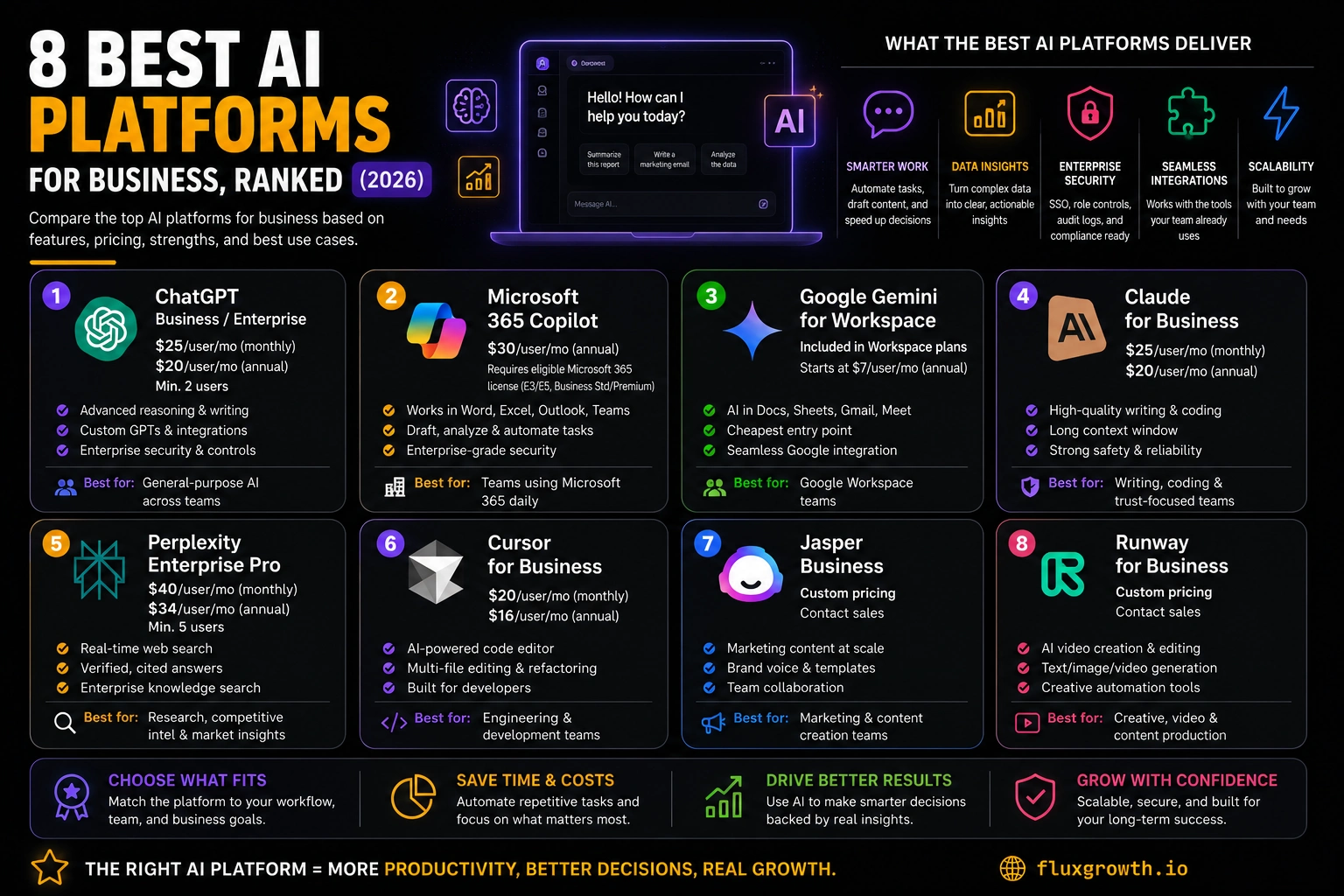
1.ChatGPT Business/Enterprise (OpenAI)
Best for: general-purpose AI across writing, research, coding, and analysis.
ChatGPT is still the default most people reach for first, and for a broad mix of use cases, that instinct holds up.
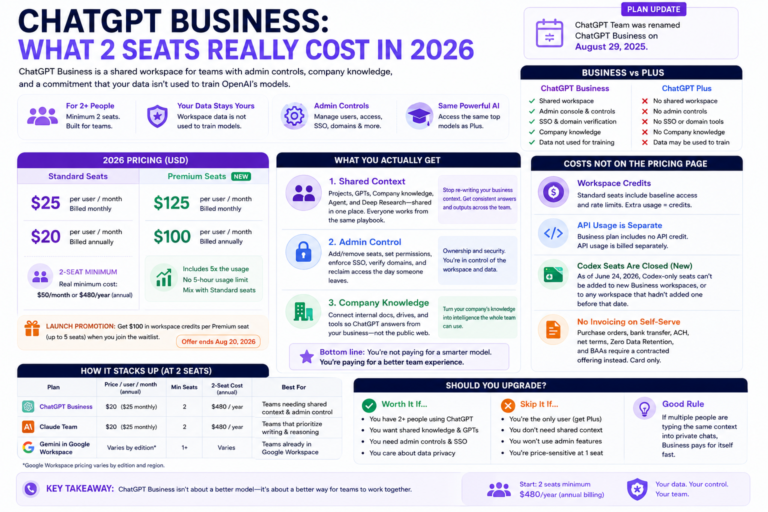
Pricing : ChatGPT Business costs $25 per user/month when billed monthly or $20 per user/month on an annual plan (see OpenAI Business pricing), with a minimum of two users.. Enterprise pricing is not publicly available and requires contacting OpenAI’s sales team for a custom quote. Enterprise pricing varies based on organization size, usage, and deployment requirements.
The biggest strengths are its mature ecosystem, excellent reasoning capabilities, strong coding support through Codex, custom GPTs, enterprise security controls, and wide integration support. Most employees are already familiar with ChatGPT, which significantly reduces onboarding time compared with newer AI platforms.
The biggest limitation is the gap between Business and Enterprise. While Business is suitable for most small and midsize teams, organizations requiring advanced administration, larger usage limits, enterprise governance, or compliance features including a HIPAA Business Associate Agreement (BAA) must upgrade to Enterprise. Businesses handling protected health information or operating in highly regulated industries should consider Enterprise from the outset.
Honest limitation: Business doesn’t include a HIPAA BAA. If you’re in healthcare or handle regulated health data, Enterprise is non-negotiable, not optional.
2.Microsoft 365 Copilot
Best for: teams already running Word, Excel, Outlook, and Teams as their daily tools.
Copilot isn’t a standalone product. It’s an add-on you need a Microsoft 365 license underneath before you can even buy it.
Pricing: Microsoft 365 Copilot costs $30 per user/month (annual commitment) and requires an eligible Microsoft 365 subscription, such as Business Standard, Business Premium, Office 365 E3/E5, or Microsoft 365 E3/E5. See Microsoft’s official pricing page for the latest licensing requirements and promotional offers before purchasing.
The biggest adReal cost is base license plus add-on, often $50 to $90 per user per month once E3 or E5 pricing is factored in. For teams that live inside Word, Excel, and Outlook daily, that’s worth it: Copilot drafts, summarizes, and analyzes inside the exact tools your staff already open every morning, with none of the copy-paste friction of a separate chat window.
The trade-off is cost transparency. Between base license tiers, add-on pricing, and rotating promotional windows, working out your actual per-seat cost takes real spreadsheet time before you sign anything.
3.Google Gemini for Workspace
Best for: Google-native teams and the lowest entry price on this list.
Google folded Gemini directly into Workspace pricing instead of selling it as a separate add-on.
Pricing: Gemini AI features are included with eligible Google Workspace Business and Enterprise plans. Business plans start at approximately $7/user/month (Business Starter), $14/user/month (Business Standard), and $22/user/month (Business Plus) on annual billing in the United States. AI capabilities vary by plan, with more advanced Gemini features available in higher-tier subscriptions. Always verify current pricing and include AI features on Google’s official Workspace pricing page.
This is the cheapest way onto this list if your team already runs Docs, Sheets, and Gmail. No separate AI line item, no add-on math, no seat-minimum negotiation. The trade-off is depth Gemini handles drafting and summarizing well but feels thinner than Copilot for complex spreadsheet work, or ChatGPT for open-ended reasoning.
Summary: if your business already runs on Google Workspace, Gemini is close to free money. You’re likely already paying for it and just haven’t turned it on.
4.Claude for Business (Anthropic)
Best for: writing quality, coding work, and teams that weigh trust and safety alongside capability.
Claude for Business is Anthropic’s enterprise AI platform, designed for organizations that need strong reasoning, long-context document analysis, and enterprise-grade security. It’s particularly popular among legal teams, consultants, developers, and knowledge workers who regularly work with lengthy documents and complex workflows.
Pricing: Claude Team costs $30 per user/month when billed monthly or $25 per user/month on an annual plan (see Anthropic’s official pricing page), with a minimum of five users. Claude Enterprise uses custom pricing and requires contacting Anthropic’s sales team for a quote. Anthropic does not publicly list Enterprise pricing or publish a per-seat rate, so any figures suggesting Enterprise starts around $20 per seat/month are not officially confirmed.
Team plans bundle usage into the flat fee, so costs stay predictable. Enterprise removes that cap entirely which is the thing most buyers miss until the first invoice lands.
Anthropic recommends Enterprise once you pass roughly 150 users, or need SCIM provisioning, audit logs, or HIPAA compliance. Below that, Team covers nearly every small-business need, and it’s also the only tier with Claude for Small Business, a free toggle that connects Claude to tools like QuickBooks, HubSpot, and Slack.
5.Perplexity Enterprise
Best for: research-heavy work where every claim needs a traceable source.
Perplexity’s whole pitch is that it shows its work every answer comes with inline citations to the live web pages it pulled from. That matters if your team is fact-checking, doing competitive research, or building anything client-facing that needs to survive a “where did you get that number” question.
Pricing: Perplexity Enterprise Pro costs $40 per user/month or $400 per user/year (annual billing) (see Perplexity’s official pricing page). Organizations interested in larger deployments, additional security controls, or custom integrations should contact Perplexity Enterprise for custom pricing. Earlier reports suggesting lower pricing are outdated and should not be used.
Perplexity isn’t built to run your workflows or draft your Slack replies. It’s an answer engine, not an automation platform, and treating it like one wastes its strength. Use it where the job is genuinely “find this fact and prove it,” and it earns its seat price fast.
6.Zapier (AI by Zapier)
Best for: connecting your existing tools and automating the busywork between them.
Zapier isn’t a chatbot. It’s the plumbing that moves data between the apps you already use, now with an AI layer that can build and troubleshoot automations for you. If you’re looking for practical examples of AI automation in marketing, see our guide on How to Grow Instagram Followers with AI in 2026.
Pricing : Zapier offers a Free plan for basic automations. Paid plans start with Professional at $29.99/month (or $19.99/month billed annually) (see Zapier’s official pricing page), followed by Team at $103.50/month (or $69/month billed annually). Enterprise pricing is custom and requires contacting Zapier’s sales team. Pricing depends on the number of tasks, users, and advanced workflow features.
The value isn’t the AI chat window. It’s the 7,000-plus app integrations that let a Zap pull a new lead from a form, log it in your CRM, and send a Slack alert without a human touching any of it. The AI layer adds natural-language Zap building on top, but the automation is the product.
Watch the task math. A single multi-step Zap can burn through a monthly quota far faster than the plan name implies every action step counts as a task, not every automation run.
7.Notion AI
Best for: teams that already keep their docs, wikis, and project tracking in one shared workspace.
Notion retired its standalone AI add-on in 2025.
Notion AI is built directly into Notion, combining AI-powered writing, meeting notes, enterprise search, and workspace assistance with project management and documentation. Rather than acting as a standalone chatbot, it helps teams find information, summarize documents, generate content, and answer questions using knowledge stored across their workspace.
Pricing: Notion offers a Free plan with limited AI responses. Paid plans include Plus at $10 per user/month, Business at $20 per user/month, and Enterprise with custom pricing (annual billing). See Notion’s official pricing page for the latest plan details. Advanced AI capabilities including Notion AI, AI Meeting Notes, enterprise search, and AI agents are available through Notion AI, which may be included with eligible plans or available as an add-on depending on your subscription. Always verify the latest AI availability and pricing, as Notion has updated its AI packaging multiple times.
If your team already treats Notion as the source of truth for documentation and project tracking, the AI layer earns its keep by searching across every page you’ve ever written instead of making you dig. If you don’t already live in Notion, this isn’t the platform to adopt for AI alone; the $20 seat price assumes you want the whole workspace, not just the assistant.
8.Salesforce Agentforce
Best for: large, CRM-centric organizations building customer-facing or sales agents inside Salesforce.
Salesforce Agentforce is an enterprise AI platform built on Salesforce that enables businesses to deploy autonomous AI agents across sales, customer service, marketing, and internal operations. It integrates with Salesforce Data Cloud, CRM data, and business workflows to automate customer interactions and employee tasks.
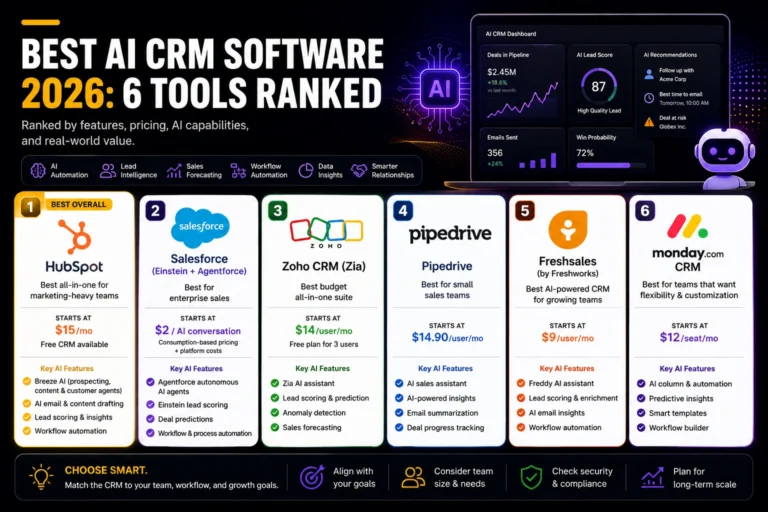
Pricing: Salesforce Agentforce uses consumption-based pricing rather than a traditional per-seat subscription. Salesforce’s public pricing starts at $2 per AI agent conversation (see Salesforce Agentforce pricing). Organizations with larger deployments can also use Flex Credits, with pricing determined by usage and deployment requirements. Salesforce provides custom enterprise pricing for large implementations through its sales team.
Real Year 1 cost for a mid-market deployment commonly lands between $150,000 and $600,000 once Data Cloud, setup, and knowledge base configuration are added in and most Salesforce customers report a 5-to-11-month rollout before it’s live. This is enterprise infrastructure, not something you bolt on over a weekend. If you’re not already deep in the Salesforce ecosystem with budget to match, this isn’t the platform for you.
What Nobody Tells You About AI Platform Pricing
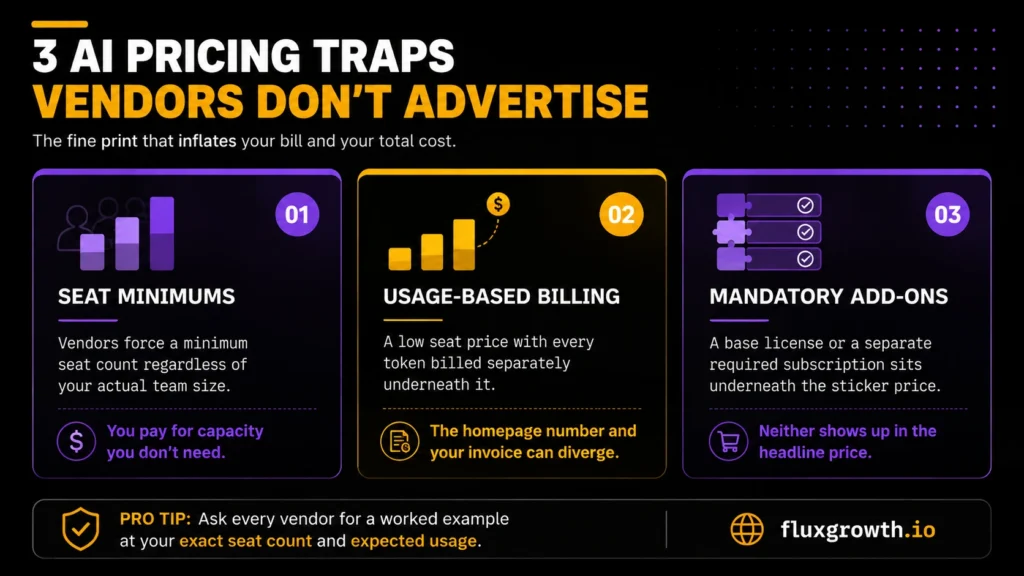
Every vendor on this list has at least one pricing trap that never makes it onto the marketing page.
Here’s the thing: seat minimums quietly force small teams to buy capacity they don’t need. Claude Team requires 5 seats. ChatGPT Enterprise reportedly requires 150, whether you have 150 people who’ll use it or not.
Usage-based billing is the sneakier one. Claude Enterprise and Perplexity’s API both charge a low seat price, then bill every token on top so the number on the pricing page and the number on your invoice can be two very different things.
Then there’s the add-on stack. Copilot needs a Microsoft 365 license underneath it. Agentforce needs a Data Cloud subscription that alone starts at $108,000 a year. Neither shows up in the headline price.
Before you sign anything, ask each vendor for a worked example at your exact seat count and expected usage, not the number on the homepage.
What I’d Do If Starting Today
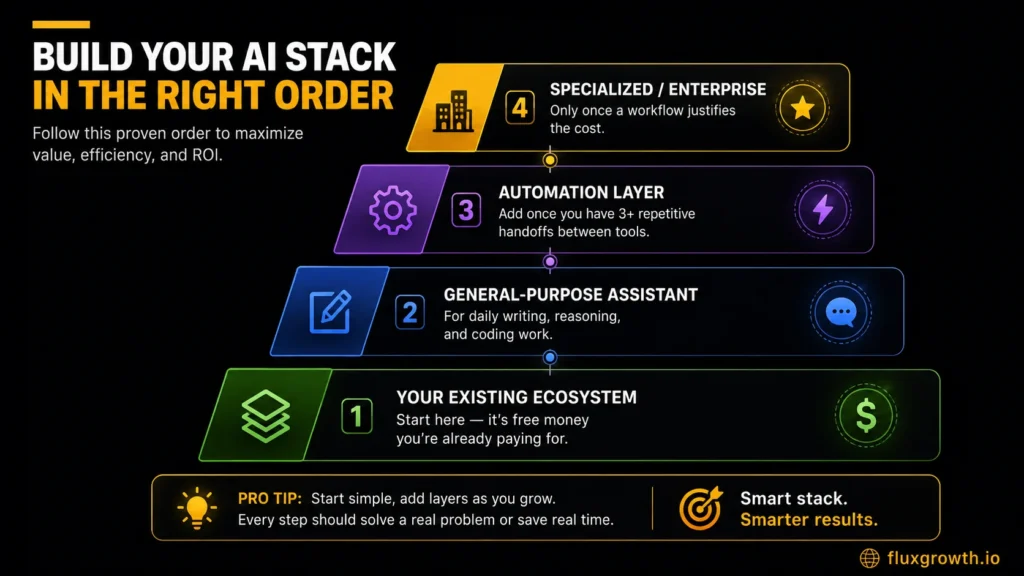
If I were building an AI stack from scratch today, I’d start with the productivity suite my business already uses. If your team runs on Microsoft 365, choose Microsoft 365 Copilot. If you’re already using Google Workspace, Google Gemini is the obvious first step because AI is built into the tools your team already uses. There’s no reason to pay for a second AI platform before getting value from the one you’re already licensing.
For everyday writing, research, coding, and problem-solving, I’d add ChatGPT Business as the primary AI assistant. It offers the best balance of reasoning, integrations, coding support, and overall versatility for most small businesses. If long-form writing, document analysis, or code quality matter more than integrations, Claude Team is an excellent alternative.
I’d add Perplexity Enterprise Pro for research-heavy work where every answer needs a verifiable source, and Zapier only after my business had several repetitive workflows worth automating. Automation delivers the biggest return once processes are stable not while you’re still figuring them out.
I wouldn’t invest in Salesforce Agentforce unless my company was already deeply committed to the Salesforce ecosystem and had the budget for an enterprise AI deployment. For most startups and small businesses, the combination of ChatGPT Business, the AI features included with Microsoft 365 or Google Workspace, and Zapier provides far more value at a fraction of the cost.
Platform Comparison
| Platform | Best For | Starting Price | Seat Minimum | Watch-Out |
| ChatGPT Business | General-purpose AI | $20/user/month (annual) or $25/monthly | 2 seats | Enterprise jump is steep and quote-only |
| Microsoft 365 Copilot | Microsoft-native teams | $30/user/month (plus qualifying Microsoft 365 license) | None published | Requires a paid base license on top |
| Google Gemini (Workspace) | Google-native teams | None | Full features need Standard tier or above | |
| Claude Team/Enterprise Perplexity Enterprise Pro | Writing & coding quality Research & cited answers | $25/user/month (annual) $40/user/month or $400/year | 5 seats $40/user/month or $400/year | Enterprise bills usage on top of the seat fee Best for research, not a complete business AI suite. |
| Zapier | Workflow automation | $19.99/month (annual) or $29.99/month | None | Task-based billing burns quota fast on multi-step Zaps |
| Salesforce Agentforce | Enterprise CRM agents | $2 per AI conversation | None (consumption-based) | Requires Data Cloud, $108K+/year minimum |
Takeaway: If your AI budget is under $50 per user per month, ChatGPT Business, Google Gemini for Workspace, Claude Team, Notion AI, and Zapier will cover the needs of most small and midsize businesses. Salesforce Agentforce is designed for enterprise organizations that already rely on Salesforce and should be evaluated as a strategic platform investment rather than a simple software subscription.
Frequently Asked Questions
What is the best AI platform for a small business?
For most small businesses, the platform you’re already paying for wins Gemini if you’re on Google Workspace, Copilot if you’re on Microsoft 365. If you’re not locked into either, ChatGPT Business or Claude Team at $20–25 per seat per month cover the broadest range of daily tasks without a steep learning curve.
Is ChatGPT or Claude better for business use?
Neither is universally better; they’re strong at different things. ChatGPT has the wider plugin ecosystem and broader name recognition among staff, while Claude tends to produce cleaner, more reliable long-form writing and coding output. Test both on your actual work before committing to a seat license for a full team.
Do I need Microsoft Copilot if my team already uses ChatGPT?
Not necessarily. If your team’s real workflow lives inside Word, Excel, and Outlook, Copilot’s in-app integration saves real friction that a separate ChatGPT tab can’t match. If your work happens mostly in chat-style research and drafting outside those apps, ChatGPT alone may cover it without the added Microsoft licensing cost.
How much does an AI platform cost per employee?
Seat-based platforms on this list range from roughly $7 per user per month (Gemini’s Business Starter tier) to $125 per seat (Claude Team Premium), with enterprise tiers running $45–75 per seat and up once negotiated. Consumption-based platforms like Salesforce Agentforce don’t price per employee at all cost scales with usage instead.
Which AI platform is best for automation?
Zapier remains the strongest general-purpose automation layer because of its integration breadth over 7,000 connected apps even though its AI features are secondary to the automation engine itself. For CRM-specific automation at enterprise scale, Salesforce Agentforce is purpose-built, but it carries a much higher budget floor.
Is Google Gemini included free with Workspace?
Gemini isn’t a separate charge, but it isn’t free either; it’s bundled into every paid Workspace tier, with full features starting at Business Standard. Google raised Workspace base prices to absorb the cost when it discontinued the standalone Gemini add-ons in 2025.
Conclusion
There’s no single “best” AI platform for business in 2026. There’s only the platform that fits the job you need done, at a price you’ve actually confirmed, not a number from a blog post that’s six months stale (this one included, so check it).
Start with your existing software ecosystem. Layer in one general-purpose assistant for writing and reasoning. Add specialized tools only once a repeatable workflow justifies the cost.
Still not sure where to start? Open whatever app your team already has pinned to their taskbar. That’s your answer.