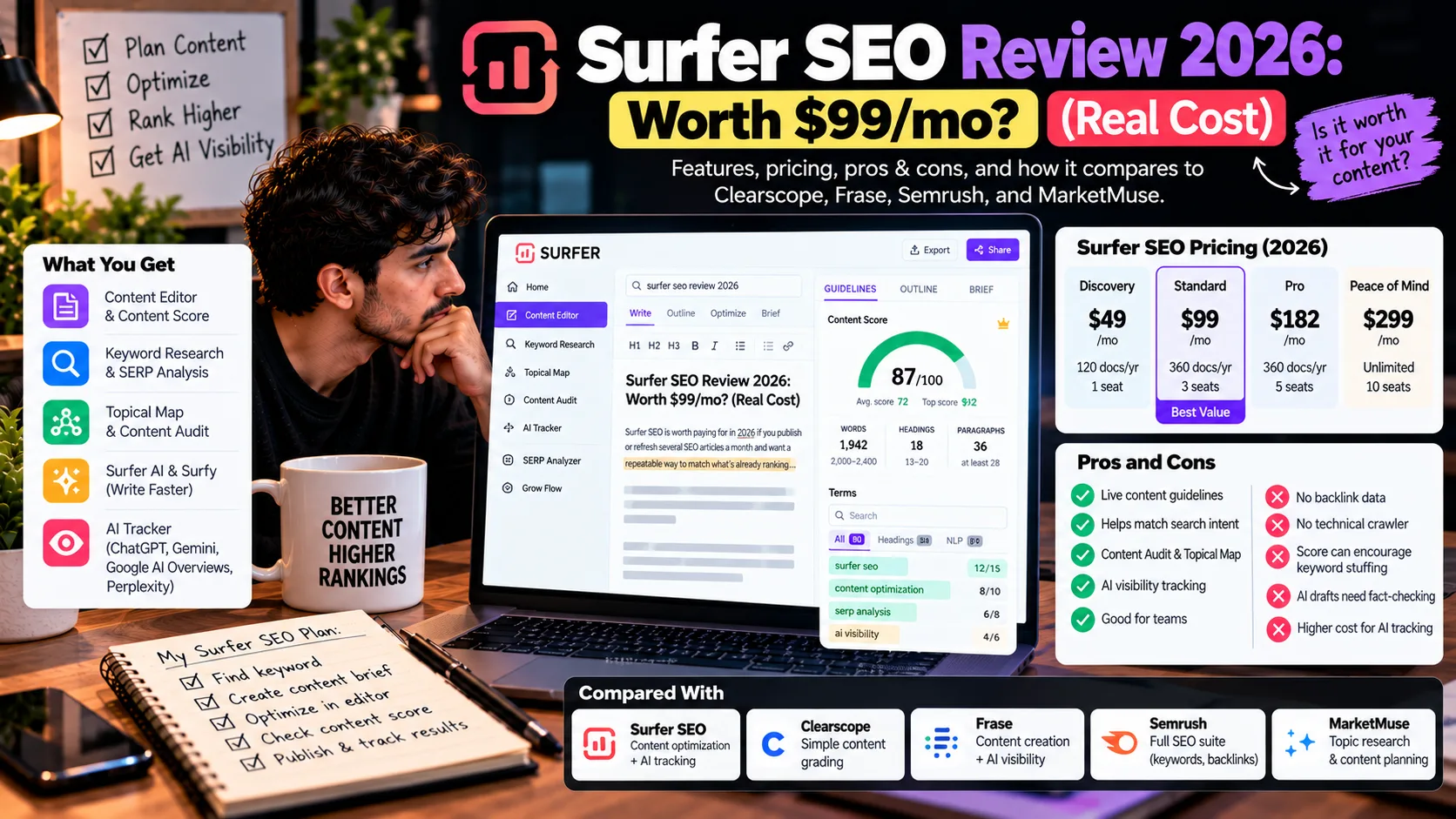
Surfer SEO is worth paying for in 2026 if you publish or refresh several SEO articles a month and want a repeatable way to match what’s already ranking. It’s a harder sell if you need keyword databases, back-link data, or technical audits. Surfers don’t do those.
In plain English, Surfer compares your draft against the pages ranking for your keyword (and now against AI answers), then shows which topics, terms, and facts you’re missing. Below: the features, real plan costs, the downsides, and how Clear-scope, Frase, Semrush, and MarketMuse compare in this Surfer SEO review 2026.
One thing first: the document cap, not the sticker price, decides what you really pay.
What is Surfer SEO, and what problem does it solve?
Surfer SEO is a content optimization platform made by Surfer Sp. z o.o., a company based in Wrocław, Poland, that has operated since 2018. It analyzes the pages ranking for your target keyword, turns that into writing guidelines, and scores your draft as you write.
In 2026, it also tracks how AI answer engines mention your brand.
The problem it solves is the 10-open-tabs routine. You’d normally skim every top result to see what they cover that you don’t. Surfer runs that comparison for you inside one editor.
Surfer now markets itself as an “AI Visibility Platform.” Fair enough, but for most buyers the content editor is still the reason to subscribe. AI tracking is the newer, pricier layer on top.
How is content optimization different from keyword research and technical SEO?
People lump these three together, and that’s how they end up buying the wrong tool.
- Keyword research finds what people search and how competitive it is. Semrush and Ahrefs are built for this.
- Content optimization makes one page cover a topic as well as (or better than) the pages already ranking. This is Surfer’s core.
- Technical SEO makes sure Google can crawl, render, and index your site quickly. Think site speed, broken links, and indexing errors.
For a broader comparison of tools that support these tasks, explore our guide to the best AI SEO tools in 2026.
What features do you get with Surfer SEO in 2026?
Surfer’s 2026 features split into two jobs: creating and optimizing content, and tracking AI visibility. The content tools (Content Editor, Surfer AI, Surfy, Content Audit, Topical Map) come with every plan. AI tracking, seats, and integration’s scale with price.
Content Editor and the Content Score
The Content Editor pulls guidelines from live search results: terms, headings, length, facts, and an “Intent Alignment” check for your intro. Auto-Optimize applies fixes in one click.
The score is one split bar. SEO ranking signals sit on one side, estimated AI citation likelihood on the other.
Every plan includes it. The limitation is that the score is relative. A page that copies every term the top five use, but adds no original data or opinion, can still score in the 90s.
Keyword research and SERP analysis
Every plan lists keyword research, Peace of Mind adds “Advanced SERP Analysis,” and the free Keyword Surfer Chrome extension shows keyword data inside Google results.
That’s enough to pick a target term and see who ranks. It isn’t a full keyword database with back-link profiles, so agencies doing deep competitor research will still want Semrush or Ahrefs.
Topical Map and Content Audit
Topical Map groups ideas into clusters and shows subtopics you haven’t covered. Content Audit reviews your published pages and flags ones worth refreshing.
Both lean on your Google Search Console data. A brand-new blog with 12 posts and no traffic gets far less from them. Content Audit also checks content only, not backlinks or page speed.
Surfer AI, Surfy, and the Humanizer
Surfer AI writes a fully optimized draft in about three minutes, by Surfer’s estimate. Surfy, the in-editor assistant, expands or rewrites passages in your custom voice. Every plan includes an AI detector and humanizer.
Here’s the catch. A humanizer changes how text reads, not whether it’s true. If Surfer AI gets a competitor’s price wrong, the humanized version gets it wrong more convincingly.
The pricing page also doesn’t state how many Surfer AI articles each plan includes. [VERIFY: Surfer AI article quota per plan]
AI Tracker
AI Tracker monitors how often five engines mention your brand: ChatGPT, Gemini, Google AI Overviews, Google AI Mode, and Perplexity. It reports mention rate, position, sentiment, share of voice, and cited pages.
It doesn’t track Claude, despite what some reviews claim. Claude only connects to Surfer as an agent through MCP. Surfer also says it reads the answers users actually see in each engine, not API output.
Access depends heavily on plan: zero prompts on Discovery, 25 weekly on Standard (ChatGPT only), 50 daily across all five engines on Pro, and 100 on Peace of Mind.
Integrations, team features, and MCP
Standard adds WordPress and Google Docs plus team collaboration. Pro adds Contentful, five brand work-spaces, templates, custom voices, a cannibalization report, and MCP. Peace of Mind adds Zapier and the API.
Seats run 1, 3, 5, and 10 across the four plans. Version history runs from one day on Discovery to six months on Peace of Mind. That matters more than it sounds the first time an editor overwrites a good draft.
How does Surfer SEO work, step by step?
Surfer turns a keyword into writing guidelines, then scores your draft against them as you edit. A typical article runs through seven steps:
- Pick a target keyword. Then check the live results yourself to confirm the intent. Listicle, how-to, comparison?
- Create a Content Editor. Surfer analyzes the competing pages and builds guidelines.
- Write or import your draft. Work in Surfer, or in Google Docs and WordPress on Standard and up.
- Review the recommendations: terms, headings, facts, and the intro’s intent alignment.
- Edit for the reader, not the bar. Add what fills a real gap. Skip terms that read awkwardly.
- Review manually. Fact-check, add your own experience, fix links, and read it aloud.
- Publish and monitor. Watch Search Console, and use Content Audit to catch drops later.
A high Content Score is guidance, not a ranking guarantee. Backlinks, authority, and technical health sit outside it.
How much does Surfer SEO cost in 2026?
Surfer SEO costs $49 to $299 per month billed yearly, or $59 to $359 billed monthly, across four self-serve plans. Enterprise pricing is custom.
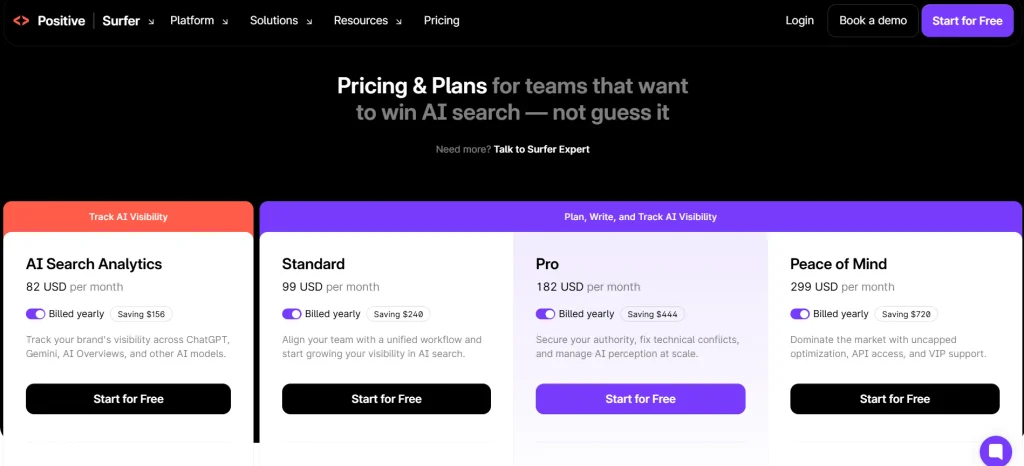
The figures below come from Surfer’s pricing page as of October 2026.
| Plan | Billed yearly (per mo) | Billed monthly | Documents | Seats | AI prompts tracked | Best for |
| Discovery | $49 | $59 | 120 per year | 1 | None | Testing Surfer solo |
| Standard | $99 | $119 | 360 per year | 3 | 25, weekly (ChatGPT only) | Small teams, steady publishers |
| Pro | $182 | $219 | 360 per year | 5 | 50, daily (5 engines) | Multi-brand teams, AI tracking |
| Peace of Mind | $299 | $359 | Unlimited (fair use) | 10 | 100, daily (5 engines) | Agencies, high volume, API |
| Enterprise | Custom | Custom | Custom | Custom | Custom | SSO, white-label, compliance |
Four restrictions to know before you buy:
- Yearly plans are charged upfront for the full year, at up to 17% off monthly pricing.
- Credits on yearly plans reset yearly, not monthly. You can front-load a content sprint. You can also burn the whole year’s allowance by June.
- “Unlimited” falls under Surfer’s fair usage policy. Read it before planning a 1,000-article quarter.
- Payment is by card, or bank transfer on yearly plans. No PayPal.
What does one Surfer document actually cost you?
Divide Surfer SEO’s subscription price by the number of documents included to compare its value:
| Plan | Cost per document (yearly billing) | Cost per document (monthly billing) |
| Discovery | $4.90 | $5.90 |
| Standard | $3.30 | $3.97 |
| Pro | $6.07 | $7.30 |
| Peace of Mind | $5.98 at 50 docs/month; $2.99 at 100 docs/month | Depends on usage |
Calculations use published plan prices and document allowances. Monthly figures assume 10 documents for Discovery and 30 each for Standard and Pro. Peace of Mind calculations assume the stated monthly output volume.
Look at Pro: it costs about 84% more per document than Standard, even though both plans include 360 documents annually.
The extra $83 per month on annual billing adds features such as daily AI visibility tracking across five AI platforms, two additional team seats, and more brand work-spaces. If you don’t need these extras, Standard offers better value for content production alone.
The bottom line: Standard costs about $3.30 per document with annual billing. Peace of Mind becomes marginally cheaper per document at approximately 91 documents per month, assuming its fair-use policy permits that usage. Check Surfer’s official pricing and Fair Usage Policy before choosing a plan.
Trials, refunds, and add-ons
Surfer offers a 7-day free trial that automatically converts to a paid subscription unless you cancel before it ends. Check the official trial terms.
If you only need AI tracking, AI Search Analytics costs $82/month billed yearly and includes 50 daily AI prompts across five AI platforms, without the content editor. Check Surfer’s pricing for current details.
You can change or cancel your plan through your account settings. Cancellation stops renewal, but access continues until your billing period ends. Don’t assume you’re eligible for a refund; check the official pricing FAQ.
What are Surfer SEO’s pros and cons?
Surfer gives you a repeatable way to match search intent and coverage, and it charges premium prices for covering one slice of SEO. These points are my editorial read of the documented features, not results from a controlled test.
Pros:
- A live checklist for every article, useful for writers who don’t think in SEO terms.
- Guidelines come from current results, so they shift when the results do.
- Content Audit and Topical Map give existing sites a refresh queue.
- Comments, live collaboration, and version history suit editor-and-writer teams.
- AI-answer monitoring without paying a second vendor.
Cons:
- No back-link data, technical crawling, or deep keyword database.
- Daily five-engine AI tracking starts at $182 a month billed yearly.
- The score can pull writers toward stuffing terms and cloning competitors.
- AI drafts still need human fact-checking.
- New sites get less from the Search Console–based features.
How Does Surfer SEO Compare to Clear-scope, Frase, Semrush, and MarketMuse?
These tools serve different needs. Surfer and Clear-scope focus on content optimization, Frase combines content creation with AI search visibility, Semrush offers a broader SEO toolkit, and MarketMuse specializes in topic research and content planning.
Clear-scope offers Essentials for $129/month and Business for $399/month. Both include 20 monthly drafts, while higher tiers provide more tracked queries, pages, and topic explorations. Check Clear-scope pricing.
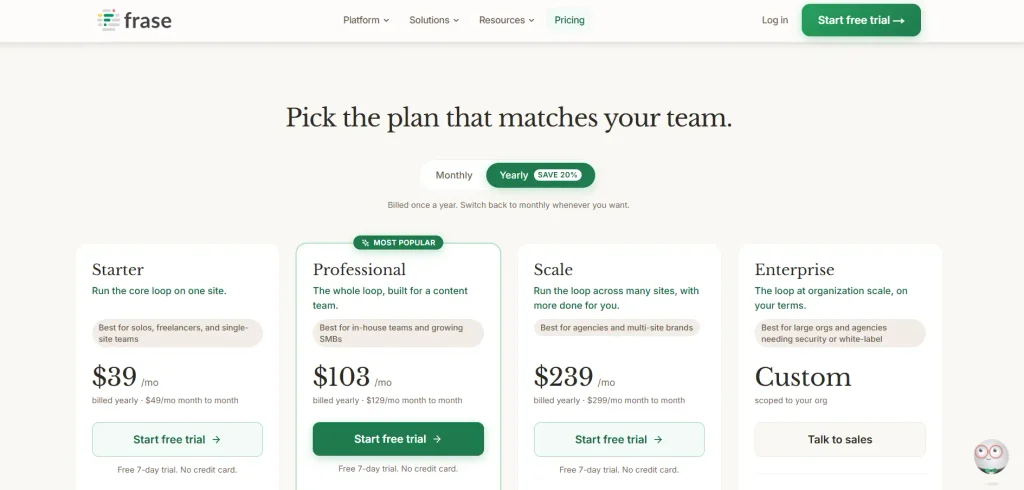
Frase costs $49/month for Starter, $129 for Professional, and $299 for Scale with monthly billing. Annual billing lowers these to $39, $103, and $239 per month, respectively. All plans include a 7-day free trial without a credit card and AI visibility tracking, with different usage limits and platform coverage. Check Frase pricing.
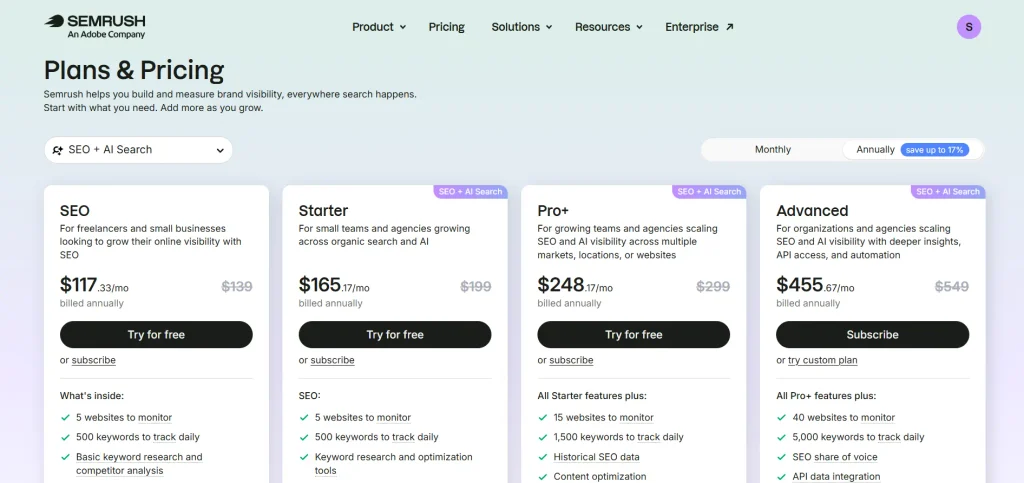
Semrush is the tool you buy when content is one of many jobs. Its “SEO + AI Search” plans run $139 (SEO), $199 (Starter), $299 (Pro+), and $549 (Advanced) per month, or $117.33 to $455.67 per month billed annually.
Content optimization shows up from Pro+, so a Surfer-style workflow on Semrush starts around $248 a month billed yearly. In return, you get keyword databases, backlinks, site audits, and rank tracking that Surfer doesn’t offer.
MarketMuse offers a free plan and paid tiers focused on content optimization, topic research, and content strategy. Its current official pricing page lists plan features but does not clearly display the $99, $249, and $499 monthly prices, so confirm current pricing directly with MarketMuse before publishing specific amounts. Check MarketMuse pricing.
Surfer SEO vs. Alternatives: Comparison Table
| Tool | Best For | Main Strength | Main Limitation | Pricing Approach |
| Surfer SEO | Teams publishing SEO content regularly | Content Editor and AI visibility tracking | Not a full backlink and technical SEO suite | Tiered plans with document limits |
| Clearscope | Teams wanting a straightforward optimization editor | Simple workflow and content grading | Higher starting price | Monthly plans with usage limits |
| Frase | Freelancers and small content teams | Content creation, audits, and AI visibility | Usage limits vary by plan | Tiered plans with annual discounts |
| Semrush | SEO professionals and agencies | Keyword research, backlinks, audits, and rank tracking | Content tools may cost extra | SEO Toolkit plus optional add-ons |
| MarketMuse | Content strategists planning topic clusters | Topic modeling and content planning | Advanced planning features may require a paid tier | Free and paid plans; verify current pricing |
Which Tool Should You Choose?
- Writing and refreshing SEO articles: Surfer SEO.
- Affordable content creation with AI visibility tracking: Phrase Starter.
- Keyword research, backlinks, and technical audits: Semrush.
- Planning large topic clusters: MarketMuse.
- A simple content optimization editor: Clear-scope.
Is Surfer SEO good for bloggers, agencies, and businesses?
Surfer pays off when content volume is steady and someone actually edits the output. If you publish twice a month, or your real problem is links, save the money.
Solo bloggers and affiliate sites
Standard’s 360 yearly documents fit a blogger publishing two or three posts a week, with some room for refreshes. Discovery’s 120 works out to about 10 a month. That disappears fast once you start updating old posts.
Affiliate sites get real value from Content Audit, since refreshing aging reviews is half the job. Still, pair it with a cheap keyword tool. Surfers alone won’t tell you whether a keyword is worth chasing.
Freelance SEO consultants and agencies
Freelancers handing briefs to writers get shared editor links and comments on Standard. That’s usually enough for one or two clients.
At three or more clients, Standard’s single brand workspace gets cramped. Pro (five work-spaces) or Peace of Mind (unlimited, plus API access) fits better.
SaaS teams, small businesses, and large content teams
SaaS teams whose buyers research in ChatGPT get the most from Pro’s daily tracking across five engines.
A local plumber or bakery publishing one post a month probably doesn’t need Surfer at all. Search Console plus a manual look at the top results gets you most of the way, for free.
Teams that need SSO or white-label reports have to go to Enterprise.
Can Surfer SEO help you show up in Google AI Overviews and ChatGPT?
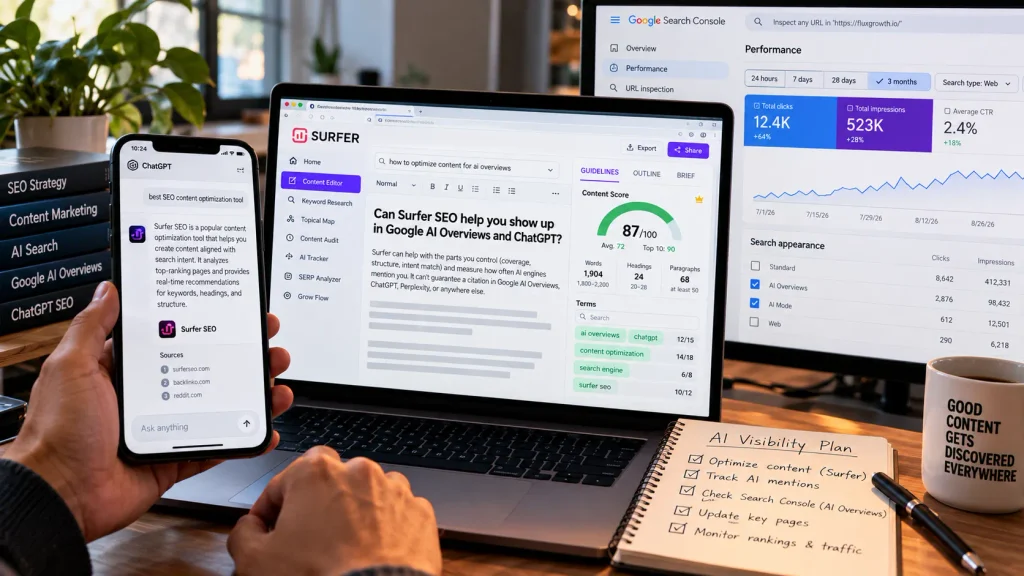
Surfer can help with the parts you control (coverage, structure, intent match) and measure how often AI engines mention you. It can’t guarantee a citation in Google AI Overviews, ChatGPT, Perplexity, or anywhere else. For a deeper look at practical strategies, read our guide to AI Search Engine Optimization: What Actually Works.
Google’s own guidance is blunt about this. Its Search Central documentation says AI Overviews and AI Mode don’t require special optimization or special schema, and normal SEO fundamentals still apply.
A page also has to be indexed and snippet-eligible before it can appear as a supporting link. No exceptions.
Google says these features may use “query fan-out,” running several related searches across subtopics before answering. That’s a solid argument for covering subtopics thoroughly, which is what a content editor pushes you to do anyway.
Surfer’s own 2026 research reports that 38% of AI citations come from a page’s first 100 words. It also found that 80% of AI Overview citations go to pages already ranking in the top 3 organic results.
Here’s the thing — that’s vendor data, so treat it with care. But if the second number holds, ranking well in regular search is still the main road into AI Overviews.
To measure AI visibility without guessing:
- Check Search Console. Google counts AI Overviews and AI Mode traffic in the Performance report under the “Web” search type.
- Track a fixed set of 20–50 prompts over time, with AI Tracker or a spreadsheet.
- Read trends as correlation, not proof. AI answers shift daily on their own.
What mistakes do people make with Surfer SEO?
The most common mistake is writing for the score instead of the reader.
- Chasing 100. A score in the 70s with real insight beats a padded 95.
- Stuffing terms. If a suggested term reads awkwardly, leave it out.
- Cloning competitor structure. Cover what they cover, then add what none of them have.
- Publishing AI drafts unchecked. Verify every price and statistic at the source.
- Ignoring technical SEO and backlinks. A perfect page on a slow, unlinked site still struggles.
- Treating the score as a forecast. It measures similarity to current results, not your future position.
- Never measuring. Log position and clicks before optimizing, then recheck after 4–8 weeks.
What I’d do if I were starting with Surfer today
I’d start on monthly billing. A one-month test on Standard ($119) is cheaper than a wrong annual commitment paid upfront.
Then I’d skip new content for month one. Pull the five pages in Search Console with the most impressions in positions 8–20, log their position and clicks, and refresh only what the guidelines flag as genuinely missing.
After four to eight weeks, compare. If those pages moved, go annual on Standard. If they didn’t, the problem probably isn’t content coverage, and Surfer won’t fix it.
I wouldn’t touch Pro unless a client is actually asking about ChatGPT and Perplexity mentions. That’s what most of the extra money buys.
For creators and solo bloggers, I’d prioritize improving existing articles that already attract impressions before paying for more content tools.
Is Surfer SEO worth it in 2026?
Surfer SEO is worth it in 2026 for writers and teams who publish or refresh roughly 15–30 SEO articles a month and already handle keyword research and technical SEO elsewhere.
Standard at $99 a month billed yearly is the best value for most of them.
It’s not worth it if you publish a handful of posts a month, run a brand-new site with no Search Console history, or mainly need back-link and keyword data. Phrase is the closer budget match. Semrush covers the broader SEO work.
Before you subscribe, answer two questions. How many articles will you optimize per month? And do you need AI tracking across five engines, or is ChatGPT alone enough?
Frequently asked questions
Is Surfer SEO worth it in 2026?
Yes, if you produce or refresh SEO content every week and want consistent, results-based guidelines. It’s less useful for occasional publishers or anyone mainly needing keyword, back-link, or technical data.
How much does Surfer SEO cost per month?
Surfer SEO costs $49 (Discovery), $99 (Standard), $182 (Pro), or $299 (Peace of Mind) per month billed yearly. Billed monthly, the same plans cost $59, $119, $219, and $359. Enterprise pricing is custom.
Is Surfer SEO good for beginners?
Yes, mostly. The Content Editor shows a clear checklist as you write, but beginners need to treat the score as guidance, not a goal, or they’ll end up stuffing keywords.
What are the best alternatives to Surfer SEO?
The main alternatives are Frase, Clear-scope, MarketMuse, and Semrush. Frase is the closest match on price and features, Clear-scope offers a simpler editor, MarketMuse focuses on content planning, and Semrush is a full SEO suite.
Does Surfer SEO guarantee higher Google rankings?
No. Surfer SEO improves how well a page matches search intent and topic coverage, but rankings also depend on backlinks, site authority, technical health, and competition.
Can Surfer SEO help with Google AI Overviews?
Surfer SEO can help you cover a topic in ways that suit AI Overviews, and AI Tracker can monitor whether you’re mentioned. Google says no special optimization is required, so Surfer can’t guarantee a citation.
Is Surfer SEO better than Semrush?
Surfer SEO is better than Semrush for live, in-editor content optimization. Semrush is better for keyword research, back-link analysis, rank tracking, and technical audits. Plenty of teams pay for both.
The bottom line
This Surfer SEO review 2026 comes down to volume. If you publish every week, Surfer’s editor earns its fee, and Standard billed yearly is where the value sits. If you don’t, it’s an expensive checklist.
Either way, you’ll still need something else for keywords, links, and technical health.
Your next step: count the articles you’ll optimize next month, divide the plan price by that number, and ask whether that cost per article makes sense for your work.