FluxGrowth is reader-supported. Some links in our guides are affiliate links — if you buy through one we may earn a commission, at no extra cost to you. It never changes which tools we recommend. How we test tools.
ChatGPT Business is worth paying for when two or more people need a shared workspace, admin controls, and a written commitment that your work isn’t used to train OpenAI’s models. It costs $25 per user per month, or $20 per user per month billed annually, with a two-seat minimum. The model itself isn’t smarter than the one you get on Plus.
This guide is part of our AI Automation hub – everything we have published on automating a small business with AI, in one place.
That last part trips up a lot of buyers. You’re not upgrading the AI. You’re upgrading the account structure around it.
So this breakdown covers what ChatGPT Business actually costs in 2026, including two pricing changes most articles ranking for this term still haven’t caught. Then the honest part: when the spend is wasted, and how the plan holds up against Claude Team and Gemini in Google Workspace before you hand over a card.
What is ChatGPT Business, and how is it different from ChatGPT Plus?
ChatGPT Business is OpenAI’s self-serve team plan, a shared ChatGPT workspace with centralized billing, admin controls, and workspace data that isn’t used for model training by default.
ChatGPT Plus is a personal subscription. One login, one chat history, one credit card.
Business is the opposite shape: a container several people work inside, owned by someone who can pull a seat back the day a freelancer’s contract ends.
If the name looks unfamiliar, that’s because it changed. OpenAI renamed ChatGPT Team to ChatGPT Business on August 29, 2025. Same plan, new label which is why half the internet still calls it Team.
The three things ChatGPT Plus can’t do at any price
OpenAI’s own plan table tells the story. Plus and Pro show “no” on every administrative row.
- No dedicated workspace. Plus users can create and share GPTs, but not with a company workspace. Everyone’s work sits in a personal account you don’t control.
- No admin console, same SO, or domain verification. No way to see who’s using what, no single sign-on, no way to reclaim an account when someone quits.
- No Company knowledge. This is the feature that connects ChatGPT to your internal tools and docs, so answers come from your business instead of the open web. It isn’t available on Free, Go, Plus, or Pro.
Pro costs far more per user than Business and still gets none of it (yes, even the Pro plan). Admin capability is a plan-type thing, not a price thing.
Short version: Plus buys one person more usage. Business buys a team shared context and an owner who can manage it. Nobody gets a better model out of the upgrade.
How much does ChatGPT Business cost in 2026?
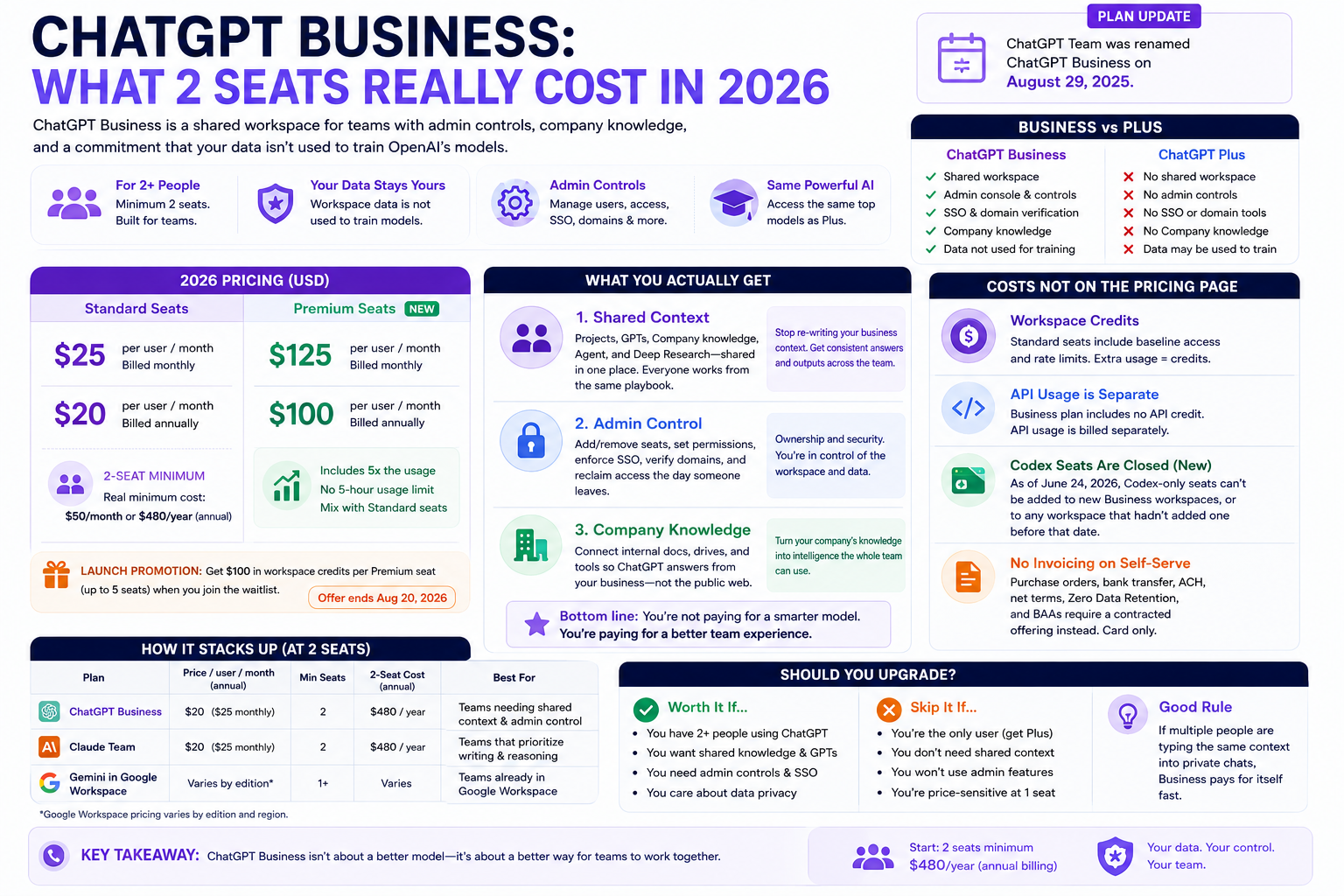
ChatGPT Business standard seats cost $25 per user per month billed monthly, or $20 per user per month billed annually. You have to buy at least two.
So the real floor is $50 a month, or $480 a year on annual billing. Not $25.
Two things changed this year that most comparison posts missed. First, OpenAI cut the standard seat price by $5 per month on April 2, 2026 it used to be $25 annual and $30 monthly. If a post still quotes those numbers, nobody has touched it in months. Second, a whole new seat type is arriving.
Standard seats vs Premium seats
OpenAI announced Premium seats for ChatGPT Business at $125 per user per month, or $100 per user per month billed annually. Premium includes five times the usage of a standard seat, removes the five-hour usage limit, and can sit alongside standard seats in the same workspace.
That mix-and-match part is the useful bit for a small team. Your two heaviest users take Premium, everyone else stays on Standard, and you skip the “everyone gets the expensive plan” problem.
There’s also a launch promotion: eligible workspace owners who join the wait list get $100 in workspace credits per Premium seat, up to five seats. That offer closes on August 20, 2026, so if you’re reading this later, treat it as expired.
The costs that aren’t on the pricing page
Four line items catch people out.
- Workspace credits. Standard seats include baseline access and rate limits. Go past them and you’re buying credits on top of the seat price.
- API usage is separate. A Business subscription includes no API credit at all. If your developer is calling the API, that’s a different bill entirely.
- Codex seats are closed to new workspace. As of June 24, 2026, Codex-only seats can’t be added to new Business workspace, or to any workspace that hadn’t already added one before that date. Standard seats still include Codex access but if you planned to buy cheap usage-based coding seats for contractors, that door shut.
- No invoicing on self-serve. Purchase orders, bank transfer, ache, net terms, Zero Data Retention, and bass all require a contracted offering instead. Card only.
What do you actually get for the extra money?
Three things. Only one of them is likely to change your week.
Shared context, so the team stops re-explaining the business
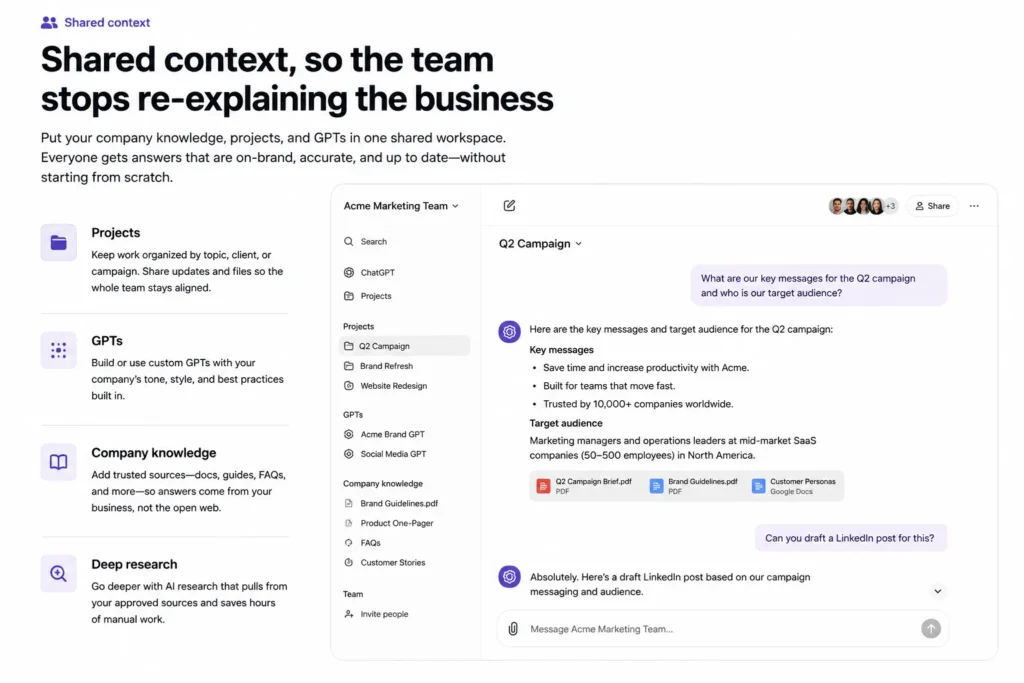
Standard seats put GPTs, Projects, Company knowledge, ChatGPT Agent, and Deep Research inside one shared workspace. Which reads like a feature list until you notice what it kills: five people pasting the same style guide into five private chats every Monday.
Your positioning, your offers, your tone rules, your last twelve approved posts. Loaded once, reused by everyone.
Picture a four-person content team. One shared project holds the client’s brand guidelines and past approved work. One shared GPTs turns a rough brief into an outline in that voice.
A junior writer joins in March and ships on-brand drafts in week one because the context lives in the workspace, not in a senior writer’s private chat history. That’s what you’re buying. Not better sentences. Faster on boarding.
Company knowledge is the piece to test first, since nothing on any personal plan matches it. Connect the tools your work already lives in, ask something you’d normally answer by digging through Drive, and judge the answer. If it holds up, the plan pays for itself in search time alone.
For example, I’d build one shared GPTs for content briefs and brand voice, then keep the approved guidelines and past content in a shared Project. Instead of rewriting the same instructions for every article or handing a new writer a long document of rules, the team starts from the same context. The biggest saving isn’t writing time; it’s the repeated setup and correction work that happens before the actual writing begins.
Admin control, so the account survives turnover
The owner runs the account. Seats, roles, usage visibility, spend limits one place, plus SO and multi-factor authentication.
Here’s the thing: nobody buys a plan for an admin console. You buy it the first time a contractor vanishes with three months of prompt work locked inside their personal login.
A different data posture
OpenAI says it won’t train on your Business workspace data by default, under its Business Terms. On individual plans, training is opt-out. The control exists, sure. But someone has to go find the toggle and flip it, and nobody is auditing whether your intern did.
So, the honest framing: ChatGPT Business buys shared context, account governance, and a data setting you don’t have to police. Not a better model. If none of those three describe a problem you have right now, the upgrade will feel like nothing changed.
When is ChatGPT Business not worth paying for?
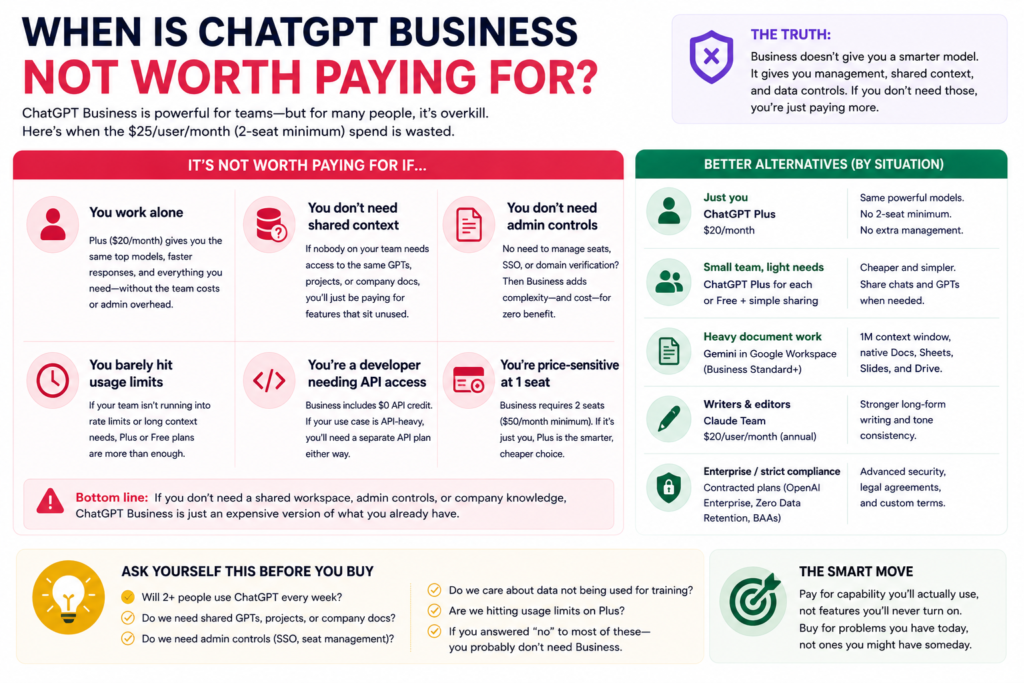
Here’s the part most reviews skip, because it doesn’t convert.
Skip it if you’re a team of one
The two-seat minimum means a solo freelancer pays $40 to $50 a month for a workspace with one human in it. Admin tools you’ll never open, and a seat you’ll never fill.
Plus at $20 covers a solo operator’s real needs. The exception is a client contract if the paperwork says your vendor can’t train on their material, the Business default is easier to point at than a toggle buried in your settings.
There’s a middle path worth knowing about, though. If you work with one regular collaborator a VA, an editor, a designer you brief every week the second seat stops being dead weight and the math flips.
The plan is priced for exactly that shape of business. It just isn’t priced for one person with ambitions.
Skip it if you have a real compliance requirement
This is where Business quietly fails. scum provisioning, role-based access controls, data residency, IP allow listing, HIPAA bass, and Zero Data Retention are not on the self-serve plan OpenAI points you to sales for those.
So if you’re in healthcare, finance, or anywhere a security questionnaire lands on your desk, Business will pass the vibe check and fail the audit. Budget for Enterprise, or don’t start.
Skip it if the bottleneck is your process, not your tools
Buying seats doesn’t create a workflow. A five-person team with no documented brief format, no shared prompt library, and nobody owning output quality will produce the same scattered work at $100 a month that it did at $0.
A common example is a team that buys several AI seats before deciding how those seats will actually be used. One person uses ChatGPT for blogs, another for social posts, and another for research, but nobody shares prompts, documents the process, or reviews the final output. The team has paid for more access without creating a better workflow.
Cheap test before you spend: pick one repeatable task, write the prompt once, and see whether anyone else picks it up. If nobody does, seats won’t fix that.
How does ChatGPT Business compare with Claude Team and Gemini in Google Workspace?
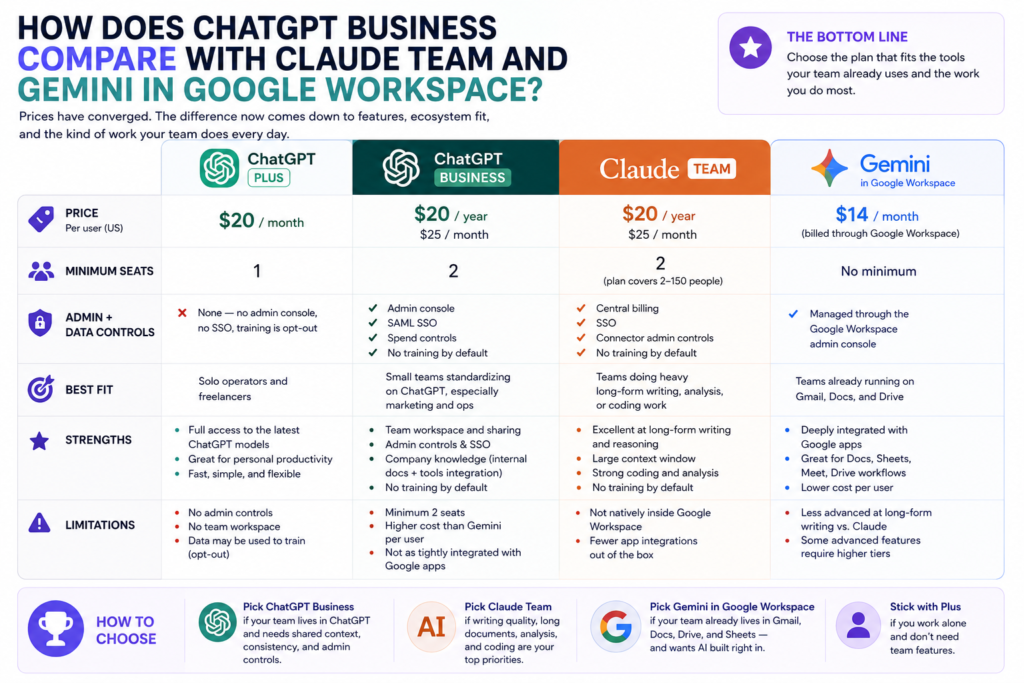
Prices have converged. ChatGPT Business and Claude Team both sit at $20 per user annually and $25 monthly, both start at two seats, and both promise no model training by default.
So price isn’t the tiebreaker anymore. The tiebreaker is which app your team already opens without being told to.
| Plan | Price per user (US) | Minimum seats | Admin + data controls | Best fit |
| ChatGPT Plus | $20/month | 1 | None no admin console, no SSO, training is opt-out | Solo operators and freelancers |
| ChatGPT Business | $20 annual / $25 monthly | 2 | Admin console, SAML SSO, spend controls, no training by default | Small teams standardizing on ChatGPT, especially marketing and ops |
| Claude Team | $20 annual / $25 monthly | 2 (plan covers 2–150 people) | Central billing, SSO, connector admin controls, no training by default | Teams doing heavy long-form writing, analysis, or coding work |
| Gemini in Google Workspace | $14/month | No minimum | Managed through the Google Workspace admin console | Teams already running on Gmail, Docs, and Drive |
One takeaway per use case. ChatGPT Business wins if your team already defaults to ChatGPT and you want shared GPTs. Claude Team can be the better fit for teams focused heavily on long-form writing, research, analysis, and coding. Gemini wins on cost if you already pay for Google Workspace and want AI built directly into your existing workflow.
That last one matters more than people expect. You may already be paying for Gemini and not know it. Since the AI is bundled into the base Workspace subscription now, there’s no clean per-seat AI price to compare so check your own admin console instead of trusting a number from a comparison post, this one included.
How to decide in 10 minutes
Run these four questions in order and stop at the first one that disqualifies a plan.
- How many people would genuinely share the workspace? One? Stay on Plus. Two or more using the same GPTs and projects? Business earns its keep.
- What stack are you already paying for? On Google Workspace, check what Gemini gives you before adding a second AI bill. On Microsoft 365, price Copilot the same way.
- Does anyone send you security questionnaires? If yes, skip self-serve entirely and get an Enterprise quote. Business will waste your time.
- What’s your monthly ceiling? Two Business seats run $40 to $50. Compare that against the scattered personal Plus subscriptions your team already spends, often it’s a wash, and the admin controls come free.
What I’d do if I were starting today: For a two-to-five-person content team, I’d start with ChatGPT Business rather than buying multiple AI subscriptions at once. The deciding factor would be shared workspace and team context, not a small difference in writing quality. ChatGPT Business is designed for teams of two or more and provides a shared workspace with business-focused controls and collaboration features.
For a two-person team, the choice is especially straightforward because ChatGPT Business supports two or more users, while Claude Team also currently supports two or more standard seats. If the team is already heavily invested in Claude for long-form writing or coding, I’d test Claude Team before switching. Otherwise, I’d choose the platform the team is most likely to use consistently and build one repeatable workflow around it.
FAQ
Is ChatGPT Business worth it for a small team?
For most teams of two or more, yes but you’re buying governance, not intelligence. ChatGPT Business gives you a shared workspace, an admin console, spend visibility, and no model training on your data by default. The model underneath is the same one Plus users get, so nobody’s output gets smarter on Monday.
How much is ChatGPT Business per user?
ChatGPT Business standard seats cost $25 per user per month billed monthly, or $20 per user per month billed annually. The number that actually matters is the two-seat minimum, which puts the real entry cost at $50 a month or $480 for the year. OpenAI has also announced Premium seats at $125 monthly or $100 annually.
What is the difference between ChatGPT Plus and ChatGPT Business?
ChatGPT Plus is a single-user plan with no administrative features at all. ChatGPT Business adds a shared workspace, an admin console, same SO, domain verification, Company knowledge, and workspace data that isn’t used for training by default. Both plans reach the same models — the difference is the account, not the AI.
Does ChatGPT Business train on your data?
No. OpenAI states it won’t train on your work space’s data by default under its Business Terms. On Free, Go, Plus, and Pro, training happens unless a user opts out which means it only stops if somebody actually goes and flips the toggle.
Can one person use ChatGPT Business?
Technically yes, economically no. The two-seat minimum means a solo user pays $40 to $50 a month for a workspace with one person in it. Stay on ChatGPT Plus unless a client contract specifically requires the Business data terms.
Is ChatGPT Business the same as ChatGPT Team?
Yes. OpenAI renamed ChatGPT Team to ChatGPT Business on August 29, 2025. The rename didn’t change the plan itself, though pricing and seat options have moved since which is why so many older articles still quote the wrong numbers.
The one thing to remember
ChatGPT Business sells governance and shared context. Not a smarter assistant.
Which makes the call simple. Two or more people working inside the same workspace, and data terms you’d rather set once at the account level? It’s cheap. Solo, or stuck because nobody has decided how your team uses AI? Then it’s $480 a year for a tidier login screen.
Do this today: count how many people on your team already pay for a personal ChatGPT subscription, out of pocket or on expenses. Multiply by $20. Compare it to two Business seats.
Most small teams find they’re already spending the money. Just without any of the controls.