FluxGrowth is reader-supported. Some links in our guides are affiliate links — if you buy through one we may earn a commission, at no extra cost to you. It never changes which tools we recommend. How we test tools.
It’s 9 p.m., and the owner of a three-truck plumbing company is still at the kitchen table, typing up estimates from notes scribbled on job sites. That’s exactly the kind of work AI for small business handles well: turning rough notes into a clean first draft that a person checks and sends.
This guide is part of our AI Automation hub – everything we have published on automating a small business with AI, in one place.
In practice, that means using ChatGPT, Gemini, or Microsoft Copilot to draft, summarize, sort, and answer routine work, with a human reviewing the output. You don’t need a big budget. You need one repetitive task, a tool you may already pay for, and a way to tell whether it helped.
Below: eight uses, five tools, what they cost as of October 2026, the FTC rules that apply, and a two-week test you can run for $0.
What does AI actually mean for a small business?
For most small businesses, AI means generative AI: software that writes, summarizes, and answers questions in plain language. Generative AI is different from traditional automation, which follows fixed rules you set in advance. You’ll probably use both, so it helps to know which one you’re paying for.
Generative AI vs. traditional automation
A Zapier rule that copies every new website form into a Google Sheet is traditional automation. No judgment, no writing, no surprises. Generative AI makes a judgment call each time, like drafting a reply based on what the customer actually asked. More useful. Also less predictable, which is why a person checks the output.
Assistants, chatbots, and agents
An AI assistant (ChatGPT, Gemini, Copilot) works with you in a chat window. An AI chatbot sits on your website and answers customers from a knowledge base you provide. An AI agent takes several steps on its own, such as reading an email, looking up the order, and drafting a response.
Agents need closer supervision because they can take actions—and make mistakes. For examples of AI shopping assistants, see 12 AI Shopping Assistants to Consider in 2026.
Subscriptions vs. usage-based billing
AI assistants usually charge per user per month. Automation and chatbot tools often charge by usage instead (per task, per conversation, or per API call), so the bill grows with volume.
How are small businesses really using AI today?
The U.S. Chamber of Commerce’s 2025 report found that 58% of small businesses use generative AI, up from 40% in 2024 and 23% in 2023.
A Goldman Sachs survey conducted in early 2026 found that 76% of surveyed small-business owners use AI, but only 14% have fully integrated it into core operations. Because respondents participate in Goldman Sachs’ business-education program, the results may not represent all U.S. small businesses.
In my work with FluxGrowth, one common pattern to watch for is business owners using AI to generate content but still handling scheduling, follow-ups, and repetitive tasks manually.
The takeaway: trying AI isn’t the same as integrating it. Choose one recurring task, assign someone to review the results, and measure whether it saves time or improves outcomes.
8 practical ways to use AI for small business
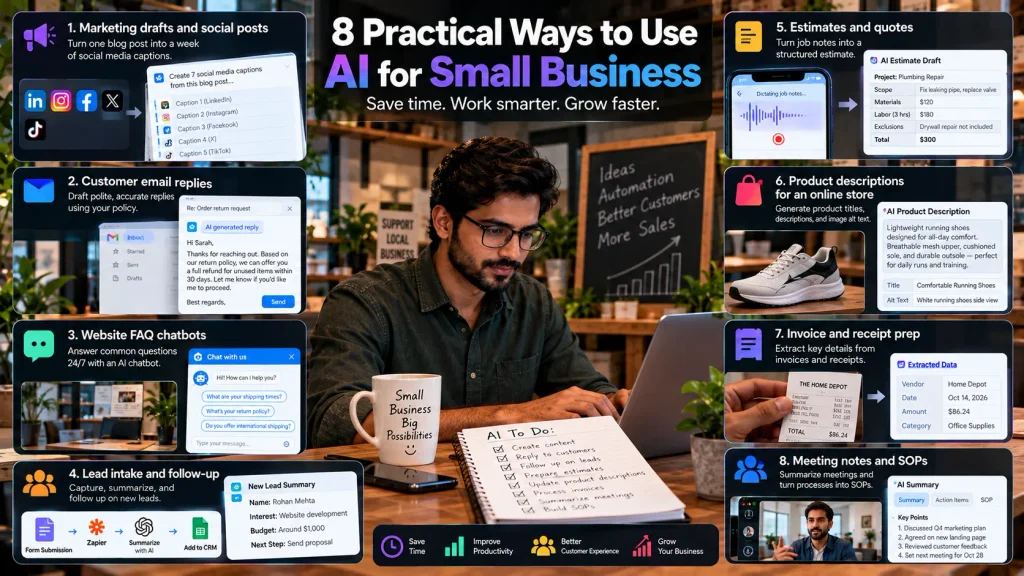
The most reliable small-business uses of AI are drafting, summarizing, and sorting: jobs where a first draft saves real time and a person can quickly spot mistakes. Here are eight, each with the check a human still has to do.
1. Marketing drafts and social posts
A small marketing agency can turn one client blog post into a week of LinkedIn and Instagram caption drafts in ChatGPT or Gemini. Check brand voice, facts, and any claim about results. The first drafts will sound generic. Paste in three past posts the client liked and ask the tool to match them.
2. Customer email replies
Paste in a customer question plus your refund policy, and you get a polite, accurate-sounding reply in seconds. That “accurate-sounding” part is the risk. If the draft promises a refund your policy doesn’t offer, you’re the one who honors it (or eats the angry review). Read every reply before it goes out.
3. Website FAQ chatbots
Tidio’s Lyro AI agent, for example, answers customer questions from a knowledge base you upload: hours, shipping times, return rules. The bot is only as current as those documents. Change your holiday hours, forget to update the doc, and it’ll cheerfully give out the old ones. Review the knowledge base monthly and set a clear handoff to a human.
4. Lead intake and follow-up
Zapier can catch a new contact-form submission, add it to a Google Sheet or your CRM, and use an AI step to summarize what the lead wants. You review a drafted follow-up instead of starting from a blank screen. Keep the send button human until the drafts stop needing edits.
5. Estimates and quotes
Back to the plumber. He dictates job notes into his phone in the truck, then asks an AI assistant to turn them into a structured estimate: scope, materials, labor, exclusions. The catch? AI doesn’t know his prices. He gives it his price sheet and still checks every number before the customer sees it.
6. Product descriptions for an online store
An e-commerce shop can paste a supplier’s spec sheet into ChatGPT and get a draft product description, title, and image alt text. Check materials, sizes, and performance claims. The FTC expects marketing claims to be backed up, and “AI wrote it” isn’t a defense.
7. Invoice and receipt prep
General assistants can read a PDF invoice or a receipt photo and pull vendor, date, and amount into a table for your bookkeeper. Handy for data entry. Totals and tax categories still need a human, ideally your accountant.
8. Meeting notes and SOPs
Google Workspace Business Standard and Microsoft 365 plans with Copilot can summarize meetings and draft action items. The less obvious use: record yourself walking through a process once, like closing out the register or on-boarding a client, then ask AI to turn the transcript into a standard operating procedure (SOP) a new hire can follow.
Which AI tools should a small business try first?
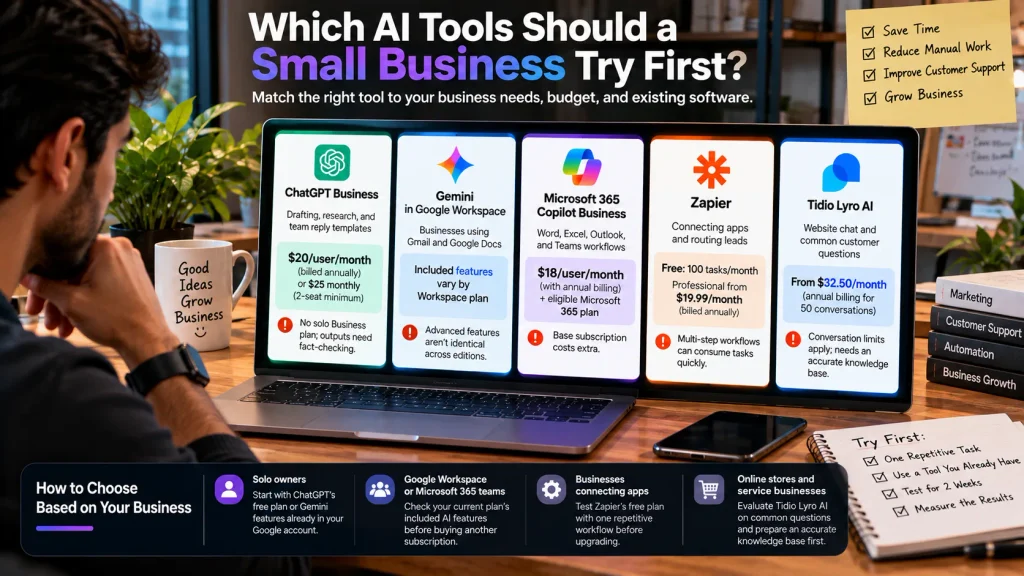
Start with the AI tool that fits the software your business already uses. Businesses using Google Workspace should evaluate Gemini, while Microsoft 365 users should check Copilot options before paying for another tool.
| Tool | Best for | Price (public list, Oct. 2026) | Main limitation |
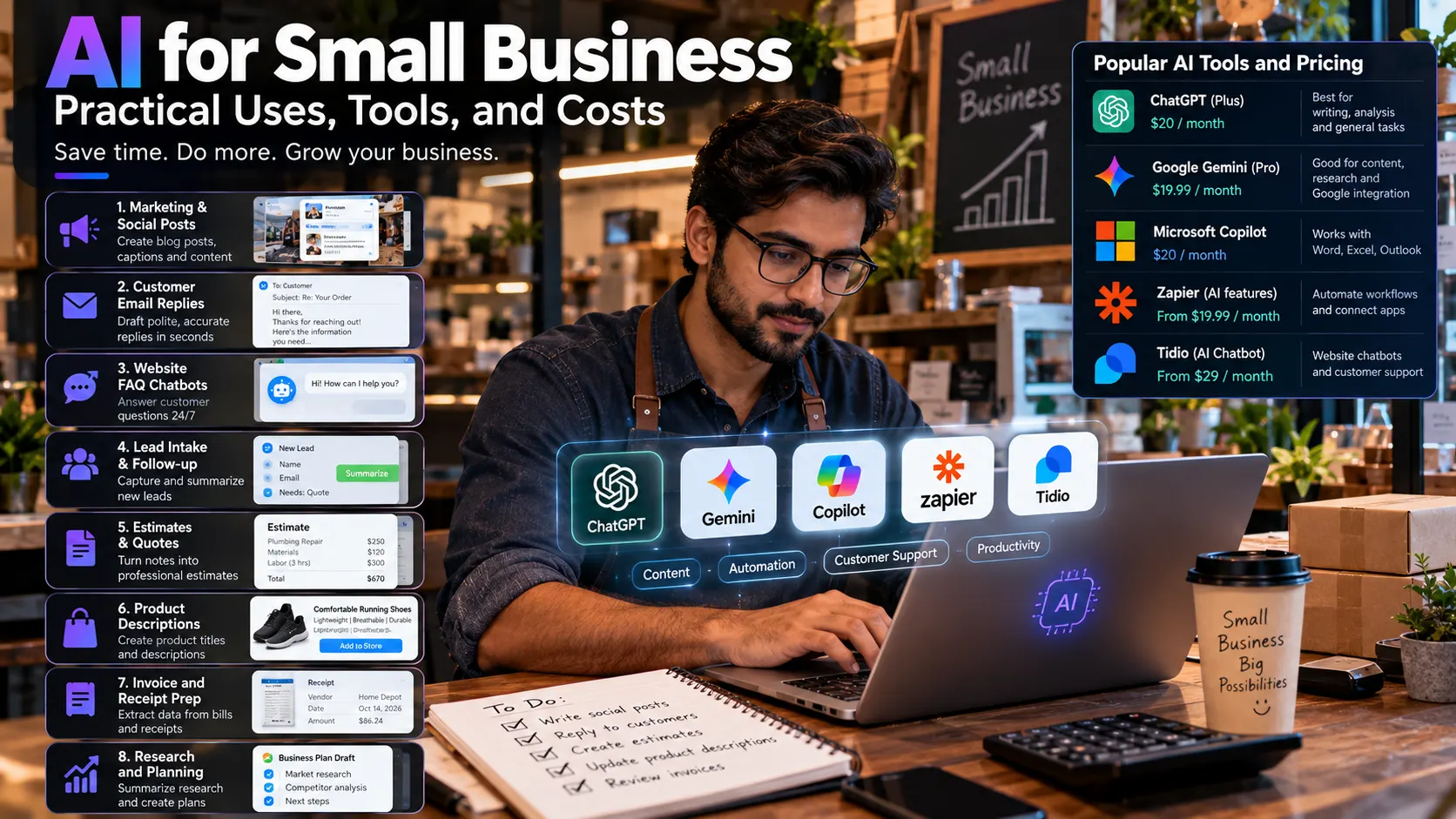
| ChatGPT Business | Drafting, research, and team reply templates | $20/user/month billed annually or $25 monthly; 2-seat minimum | No solo Business plan; outputs need fact-checking |
| Gemini in Google Workspace | Businesses using Gmail and Google Docs | Included features vary by Workspace plan | Advanced features aren’t identical across editions |
| Microsoft 365 Copilot Business | Word, Excel, Outlook, and Teams workflows | $18/user/month with annual billing, plus an eligible Microsoft 365 plan | Base subscription costs extra |
| Zapier | Connecting apps and routing leads | Free plan: 100 tasks/month; Professional from $19.99/month billed annually | Multi-step workflows can consume tasks quickly |
| Tidio Lyro AI | Website chat and common customer questions | From $32.50/month with annual billing for 50 conversations | Conversation limits apply; needs an accurate knowledge base |
No single tool wins for every business. Here’s how I’d match them:
- Solo owners: Start with ChatGPT’s free plan or Gemini features already available in your Google account. Upgrade when you need more capabilities.
- Google Workspace or Microsoft 365 teams: Check your current plan’s included AI features before buying an additional subscription.
- Businesses connecting apps: Test Zapier’s free plan with one repetitive workflow before upgrading.
- Online stores and service businesses: Evaluate Tidio Lyro AI on a limited set of common customer questions, and prepare an accurate knowledge base first.
Want a wider shortlist? Compare our 15 best AI tools for business, or see how to connect them in our AI automation guide.
How much does AI cost for a small business?
AI costs a small business anywhere from $0 for free plans to roughly 20–45 per user per month for business-grade assistants, plus usage fees for automation and chatbots. The cost most owners miss is time: setting up, writing prompts, and reviewing what the AI produces.
Check what you already pay for
Google Workspace Business Standard includes Gemini AI features. Eligible Microsoft 365 business users can also access Copilot Chat at no extra cost, although advanced features may require a paid license. Check your existing plan before buying another tool.
Do the per-seat math
A three-person team on ChatGPT Business pays $60 per month, or $720 per year, at the annual rate of $20 per user. Because Business requires at least two paid seats, solo owners may prefer ChatGPT Plus at $20/month or the Free plan.
Check ChatGPT Business pricing and ChatGPT Plus pricing.
Watch usage-based billing
In Zapier, every completed action step counts as one task. A lead workflow with four action steps, handling 30 leads a day, uses about 3,600 tasks a month (4 × 30 × 30). That’s nearly five times the 750 tasks in Zapier’s entry Professional tier. Price the volume you’ll actually run, not the plan in the ad.
Look for free credit programs
Perplexity and the U.S. Small Business Administration announced the Main Street AI Accelerator, offering $250 in Perplexity Computer credits to up to 100,000 eligible businesses with SBA 7(a), 504, or microloans.
Applications aren’t open yet. Check the official program page for updates. If you don’t qualify, contact your local Small Business Development Center (SBDC) to explore business and AI training resources.
Is AI safe for small businesses to use?
AI is safe for a small business to use when you control what data goes in and check what comes out. The real risks are pasting sensitive customer data into the wrong plan, publishing unchecked claims, and using AI in ways the FTC already treats as deceptive.
Protect customer data
Use business AI accounts with appropriate privacy protections. OpenAI, Google Workspace, and Microsoft state that business data isn’t used for AI training by default under applicable terms.
Avoid uploading sensitive customer information unless approved. Healthcare businesses should confirm a signed HIPAA Business Associate Agreement (BAA) is in place before sharing protected health information.
Follow the FTC rules
The Federal Trade Commission (FTC) makes clear that AI is not an exemption from consumer protection laws. Its Operation AI Comply initiative targeted deceptive AI practices, including allegations involving AI-generated fake reviews.
The FTC’s rule banning fake reviews and testimonials took effect on October 21, 2024, and covers fake AI-generated reviews. Never fabricate customer reviews or testimonials, and verify marketing claims before publishing them.
Note: The FTC later set aside its specific Rytr order in December 2025, so avoid implying that the order remains in force. Read the FTC update.
Know your state’s rules
AI regulations are evolving quickly. In March 2026, lawmakers in 45 states had introduced 1,561 AI-related bills, according to MultiState’s tracker.
Colorado illustrates how quickly rules can change: on May 14, 2026, Governor Jared Polis signed SB 26-189, replacing the state’s 2024 AI law with revised requirements effective January 1, 2027. If you use AI for hiring, credit, or housing decisions, check your state’s current rules and the NCSL AI legislation database.
How do you start using AI without wasting money?
The cheapest way to start with AI is a two-week test on one repetitive task, using a tool you already have, with a written rule for human review. Here’s how that works for customer email replies at a local service business.
- Pick one task. Choose something weekly and patterned, like answering “Do you service my area?” emails.
- Measure your baseline. For one week, note how many replies you write and how long they take.
- Use what you already have. Gemini in Gmail or a free ChatGPT account keeps the test at $0.
- Write a short reference doc. List your service area, prices, hours, and policies in one document.
- Set a review rule. Nobody sends an AI draft unread, and anything about money gets a second look.
- Run it for two weeks. Track drafting time, editing time, and every mistake you caught.
- Decide. Keep it, expand it to a second task, or drop it. All three are fine outcomes.
A simple ROI check
Return on investment (ROI) for an AI tool is hours saved per month, times what an hour of your time is worth, minus what the tool costs. Subtract your review time from the hours saved, or the math lies to you.
An illustration, not a prediction: if replies drop from 5 hours a week to 3, that’s about 8 hours a month. At $40 an hour, you’ve bought back $320 of time with a $20 subscription. If your test shows 30 minutes saved, the answer changes. That’s the whole point of measuring.
Common mistakes to avoid
Watch for four: buying a tool before picking the task, skipping review once drafts look good, pasting customer data into a personal account, and paying for seats nobody opens. On day 30, open the usage report and cancel any seat nobody has touched.
What I’d do if I were starting today
I’d pick the most repetitive task in my week, test it for two weeks using AI tools I already have, and spend nothing until the results justify it.
For example, at FluxGrowth, an AI appointment assistant could handle initial inquiries, collect booking details, and send requests to reception. I’d measure time saved, response time, and completed bookings before and after the test to see whether automation actually improves the process.
Frequently asked questions
How can a small business use AI?
A small business can use AI to draft marketing posts, reply to customer emails, answer website questions with a chatbot, organize leads, and turn notes into estimates or SOPs. Start with one repetitive weekly task, and have a person review everything before it reaches a customer.
What is the best AI tool for a small business?
The best AI tool for a small business is usually the one built into software it already uses: Gemini for Google Workspace and Copilot for Microsoft 365. ChatGPT is a strong standalone option for drafting and research.
Is there free AI for small businesses?
Yes. ChatGPT, Gemini, Zapier, and Tidio all offer free plans with usage limits, and Google Workspace plans include Gemini features at no extra charge. Free plans are good for testing one workflow, but customer data belongs on a paid business plan.
How much does AI cost for a small business?
As of October 2026, business-grade AI assistants cost roughly $20 to $45 per user per month, while automation and chatbot tools often charge by usage. ChatGPT Business, for example, lists at $20 per user per month billed annually with a two-seat minimum.
Is AI safe for small businesses to use?
AI is safe for small businesses that use business plans for customer data, keep sensitive personal information out of AI tools, and review all output. The FTC applies existing consumer protection law to AI, including its ban on AI-generated fake reviews.
Can AI help a small business get more customers?
AI can help a small business respond to leads faster, publish marketing content more consistently, and answer customer questions after hours. It doesn’t guarantee more customers, because your offer, pricing, and service still decide who buys.
The bottom line
AI for small businesses works best on one boring, clearly defined job. Pick that job this week, test it on software you already pay for, and track the time it saves after your review. Good numbers? Add a second task. Bad ones? Drop it. Two weeks is a cheap experiment.
So which task on your list would you hand off first?