FluxGrowth is reader-supported. Some links in our guides are affiliate links — if you buy through one we may earn a commission, at no extra cost to you. It never changes which tools we recommend. How we test tools.
Every CRM vendor now calls itself an “AI CRM.” Half of them bolted a chat bot onto a contact database and updated the homepage. That makes shopping for one genuinely confusing; you’re comparing marketing copy, not features.
This guide is part of our AI Automation hub – everything we have published on automating a small business with AI, in one place.
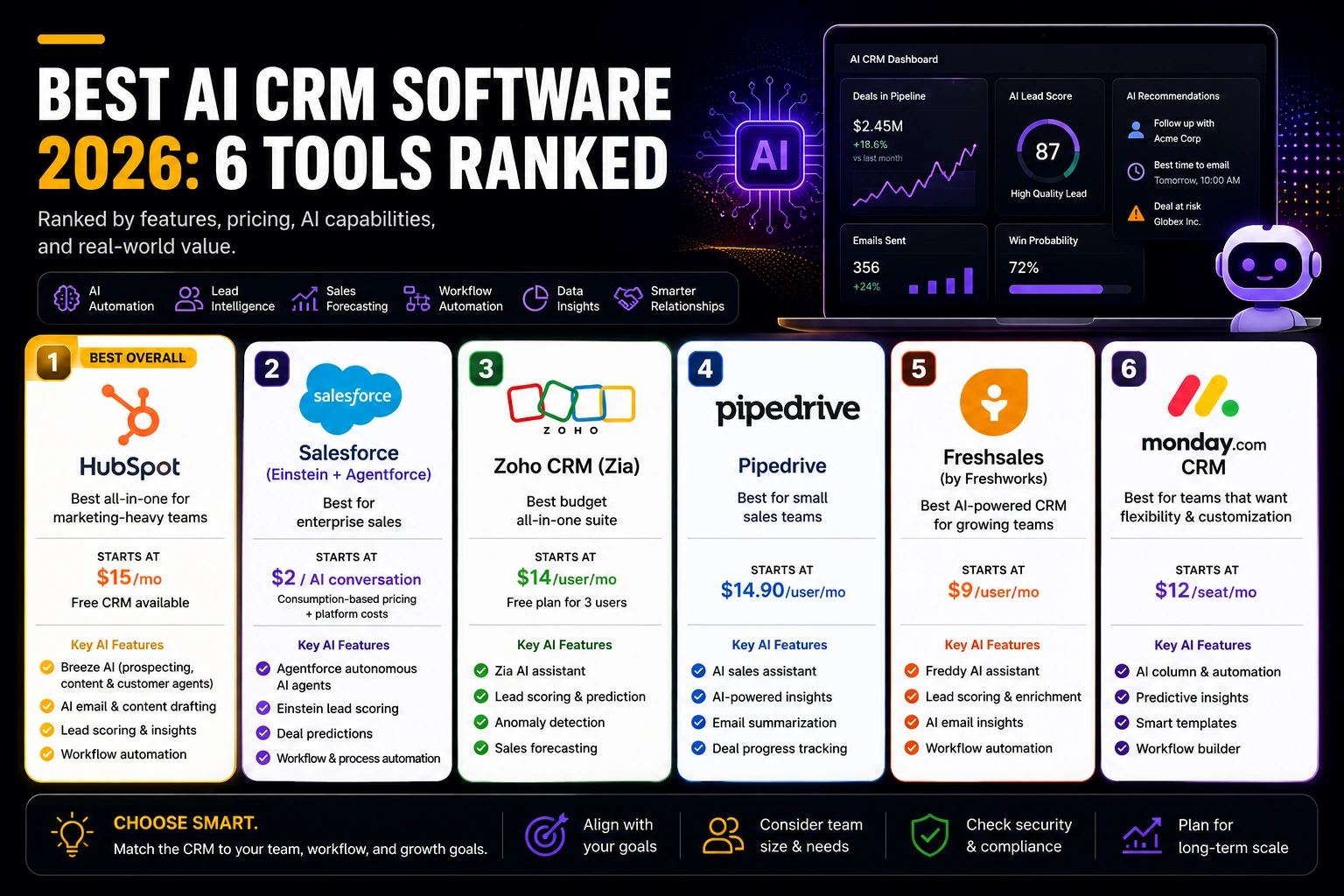
This guide breaks down six AI CRM platforms that actually do something with AI: HubSpot, Salesforce, Zoho CRM, pipe drive, fresh sales, and monday CRM. You’ll get real pricing tiers, what the AI actually does in each one, and more importantly who each platform is a bad fit for.
Skip to the comparison table if you’re in a hurry. If you’ve got five minutes, the breakdown below will save you from picking Salesforce when you need pipe drive (it happens more than you’d think).
What Is an AI CRM?
An AI CRM is customer relationship management software that uses machine learning to score leads, predict deal outcomes, and draft outreach. It does this on top of the contact and pipeline tracking a traditional CRM already handles.
The difference from a regular CRM isn’t cosmetic. A traditional CRM stores what happened. An AI CRM tries to tell you what’s likely to happen next. Increasingly, it acts on its own sending a follow-up email before you think to, flagging a deal that’s gone quiet, or reassigning a lead when it’s sitting with the wrong rep.
How We Evaluated These Platforms
We looked at five things for each tool: pricing transparency, depth of the AI features, ease of adoption for a non-technical team, integration breadth, and security/compliance posture. On pricing transparency specifically, we checked whether the AI lives behind a paywall the vendor doesn’t advertise clearly.
Every price below reflects what public vendor documentation showed at time of writing. CRM pricing changes often. Treat every number here as a starting point to confirm, not a quote.
1. HubSpot — Best All-in-One for Marketing-Heavy Teams
HubSpot CRM built its reputation on a genuinely useful free tier, and that hasn’t changed. What has changed is HubSpot’s Agent Hub, HubSpot’s AI platform, which includes Breeze AI and AI-powered agents that work across the CRM, Marketing Hub, Sales Hub, and Service Hub. The platform helps businesses automate prospecting, content creation, customer support, and other repetitive workflows.
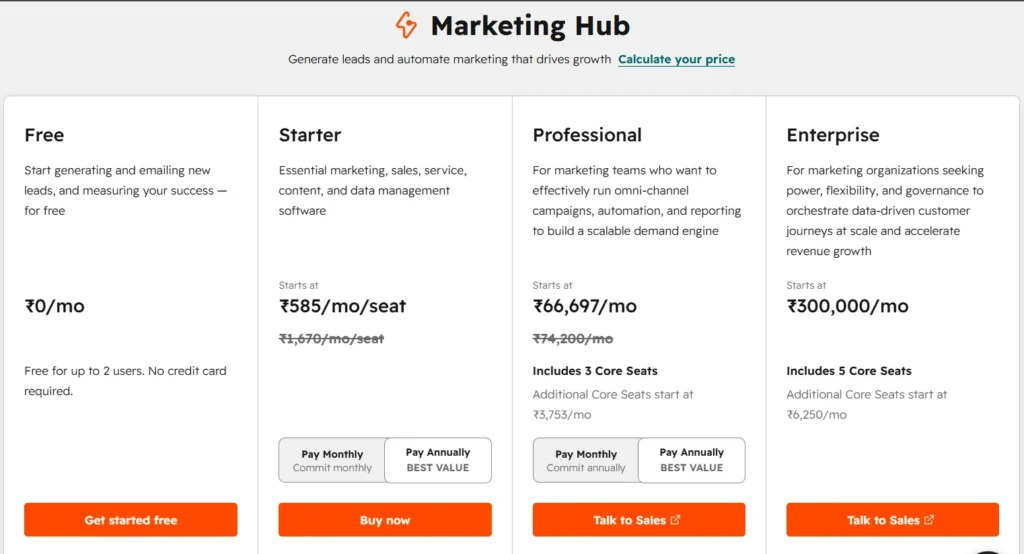
HubSpot offers a Free CRM with core features. Paid plans start with Starter Customer Platform at $15/month (includes one paid seat), Professional Customer Platform starts at $1,170/month (includes five seats), and Enterprise Customer Platform starts at $4,300/month (includes seven seats). Individual Hub products can also be purchased separately, with pricing varying by product and seat requirements. Breeze AI features are included in many HubSpot plans, while advanced AI capabilities may require higher-tier subscriptions or usage-based credits.
The AI itself is genuinely broad. Breeze’s content agent drafts landing pages and emails. The prospecting agent researches and qualifies leads. The customer agent handles support tickets. If your team already runs marketing and sales out of HubSpot, that’s real value you’re not stitching together three separate AI tools.
The honest limitation: HubSpot’s pricing jumps are steep. Several reviewers flag the move from Starter to Professional as more than 4x the cost, and that catches teams off guard right when they’re outgrowing the free tier.
Best for: small-to-mid teams that want marketing and sales AI under one roof and can absorb the Professional-tier price jump.
2. Salesforce (Einstein + agent force) — Best for Enterprise Sales
Salesforce is the CRM enterprise buyers already know. agent force is its answer to autonomous AI agents bots that can resolve a support ticket or qualify a lead end-to-end, not just suggest what a human should do next
Pricing: Salesforce Foundations is available at no additional cost for eligible Salesforce customers. agent force uses consumption-based pricing, with public pricing starting at $2 per AI agent conversation. Organizations with larger deployments can also purchase Flex Credits, while enterprise pricing varies depending on products, usage, Data Cloud, and implementation requirements. Salesforce provides custom quotes for larger AI deployments.
Three pricing models. Same product. These models can’t always be combined in the same org, so the “starting price” you see quoted depends entirely on which buying structure a vendor rep puts in front of you.
Many comparisons overlook the total cost: agent force often requires Salesforce products such as Service Cloud and may also involve Data Cloud, along with implementation, integration, and ongoing administration. For most businesses, it’s a long-term enterprise investment rather than a plug-and-play AI tool.
Industry reporting suggests fewer than 10% of Salesforce customers have scaled agent force past a pilot so far. That’s not a knock on the technology, it’s a real signal about the commitment required to get value from it.
Best for: enterprise sales org already invested in the Salesforce ecosystem, with the budget and implementation runway to match. Not a fit for a lean five-person sales team.
3. Zoho CRM (Zia) — Best Budget All-in-One Suite
Zoho CRM offers a Free plan for up to three users, making it one of the most generous free CRM options for small teams. Zia, Zoho’s AI assistant, is available on higher-tier plans and helps with lead scoring, sales predictions, workflow recommendations, anomaly detection, email intelligence, and forecasting.
Pricing: Zoho CRM’s Enterprise plan starts at $40 per user/month (annual billing) and includes Zia AI. The Ultimate plan offers additional AI and analytics capabilities for larger organizations.
Zia isn’t as sophisticated as Salesforce Einstein in any single category. But it’s woven across more than 45 Zoho apps — if you’re on the Zoho One bundle CRM, Desk, Books, Analytics, all sharing one AI layer. For a business already living in Zoho, that consistency is worth something. For everyone else, it’s not a reason to switch.
Best for: budget-conscious SMBs that want one AI layer across CRM, support, and finance instead of stitching tools together.
4. pipe drive — Best Pure Sales-Pipeline Tool
pipe drive doesn’t try to be an all-in-one platform, and that focus shows. It’s built for teams that live in their deal pipeline and want AI that supports selling, not marketing or service.
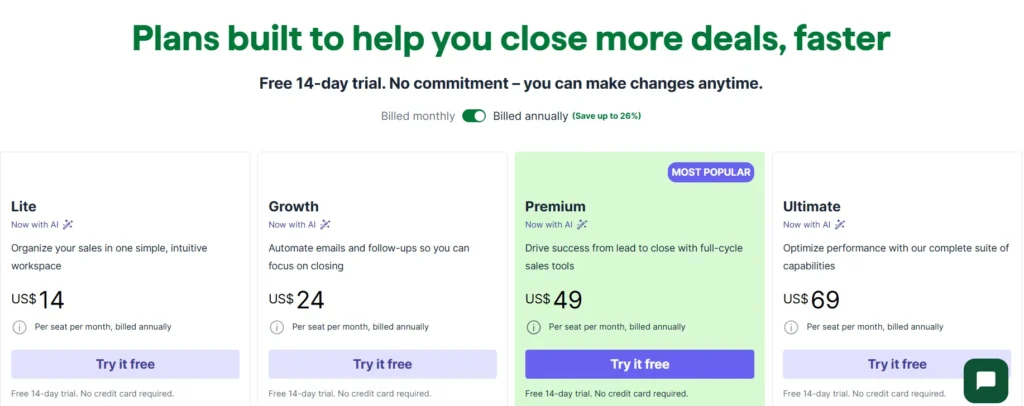
pipe drive offers Lite from $14/user/month, Growth from $39/user/month, Premium from $49/user/month, and Ultimate from $79/user/month when billed annually. Pricing may vary by region, billing cycle, and promotional offers, so verify current rates on pipe drive’s official pricing page before purchasing.
A basic AI Sales Assistant ships even on Lite. The deeper features AI-drafted emails, win-probability predictions, lead enrichment start around Premium.
One thing worth flagging honestly: a few implementation guides note that teams using AI features daily should budget extra for AI credits on top of the listed seat price. That’s an easy line item to miss when you’re comparing sticker prices across CRMs.
Best for: small-to-mid sales teams who want a fast, visual pipeline tool and don’t need marketing or service features bundled in.
5. fresh sales (Freddy AI) — Best Budget Entry Point
fresh sales is part of fresh works, and its standout feature isn’t really the AI it’s built-in telephony, which most CRMs on this list require a third-party integration to get. Freddy AI, fresh works’ assistant, layers lead scoring, deal-health signals, and next-best-action suggestions on top.
Pricing: fresh sales offers a Free plan for up to 3 users. Paid plans start with Growth at $9/user/month, while Pro starts at $39/user/month (annual billing) and includes advanced AI capabilities through Freddy AI. Enterprise plans add additional security, governance, and customization features.
The honest limitation here: Freddy only knows what’s inside fresh sales itself. It can’t factor in buyer-intent signals from outside your CRM, or competitor research the way some newer, pricier tools can.
Best for: phone-heavy sales teams on a tight budget who want built-in calling without stacking a separate dialer subscription.
6. monday CRM — Best for Flexible, Visual Workflows
monday CRM comes out of monday.com’s broader work-management platform, and that heritage shows. Every pipeline, field, and status can be rebuilt without a developer.
Its AI Sales Agent (branded “Lexi” in some releases) autonomously sources and qualifies leads. No-code “AI Blocks” let you build custom automations sentiment analysis, automatic task generation directly into your sales boards, no third-party plug-in required. That’s a genuinely different approach: instead of pre-built AI features, you’re assembling your own.
The trade-off is depth. Reviewers consistently note Monday’s AI is broader across the whole platform but less mature than dedicated sales AI when it comes to lead-scoring accuracy or forecasting. It’s a workflow AI wearing a sales hat, not a purpose-built sales AI.
Paid plans typically require a minimum of three seats worth knowing if you’re a true solo operator.
Best for: teams that already value monday’s visual, customizable interface and want AI automation without abandoning that flexibility.
Comparison Table
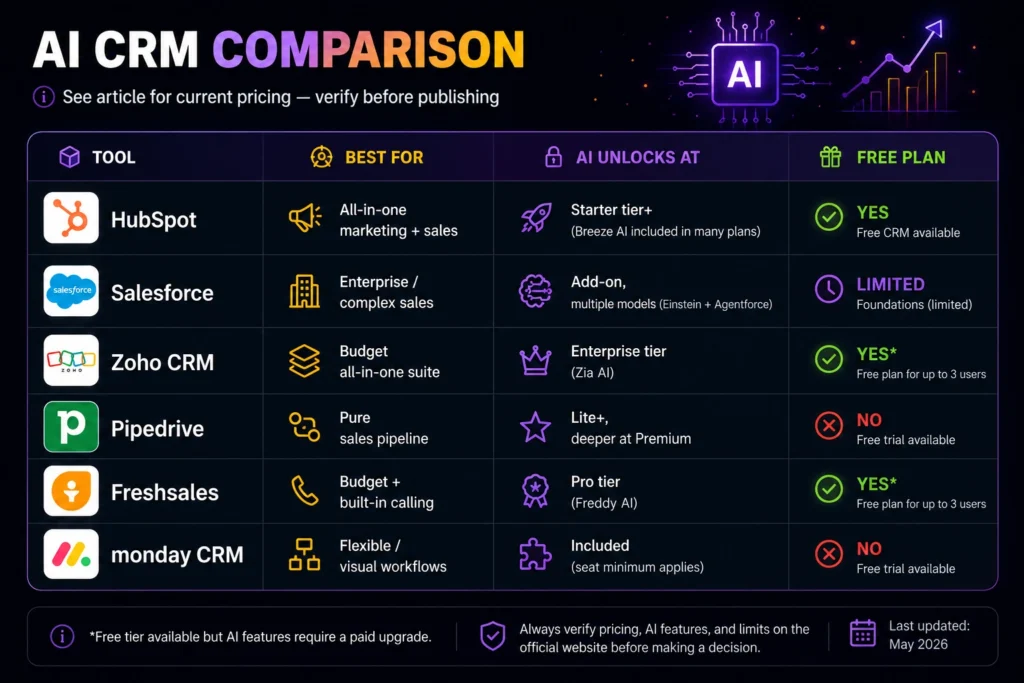
| Platform | Best For | Where AI Unlocks | Starting Price | Free Plan? |
| HubSpot | All-in-one marketing + sales | Starter tier and up | $15/month (Starter Customer Platform) | Yes |
| Salesforce | Enterprise/complex sales orgs | Add-on, multiple pricing models | Foundations available for eligible customers; Agentforce starts at $2 per conversation | Limited |
| Zoho CRM | Budget all-in-one suite | Enterprise tier | $40/user/month (annual) | Yes (3 users, no AI) |
| Pipedrive | Pure sales pipeline | Basic AI from Lite; deeper AI from Premium | $14/user/month (Lite, annual) | No |
| Freshsales | Budget + built-in calling | Pro tier | $9/user/month (Growth); Pro $39/user/month for advanced AI | Yes (3 users, no AI) |
| monday CRM | Flexible/visual workflows | Included, seat minimums apply | From $12/user/month (Basic, annual; 3-user minimum) | No |
Takeaway: if budget is the deciding factor, Zoho or fresh sales win. If you need autonomous, enterprise-grade agents and have the implementation runway, Salesforce is the only real option here. Everyone else lands somewhere between those two poles.
How to Choose an AI CRM for Your Business
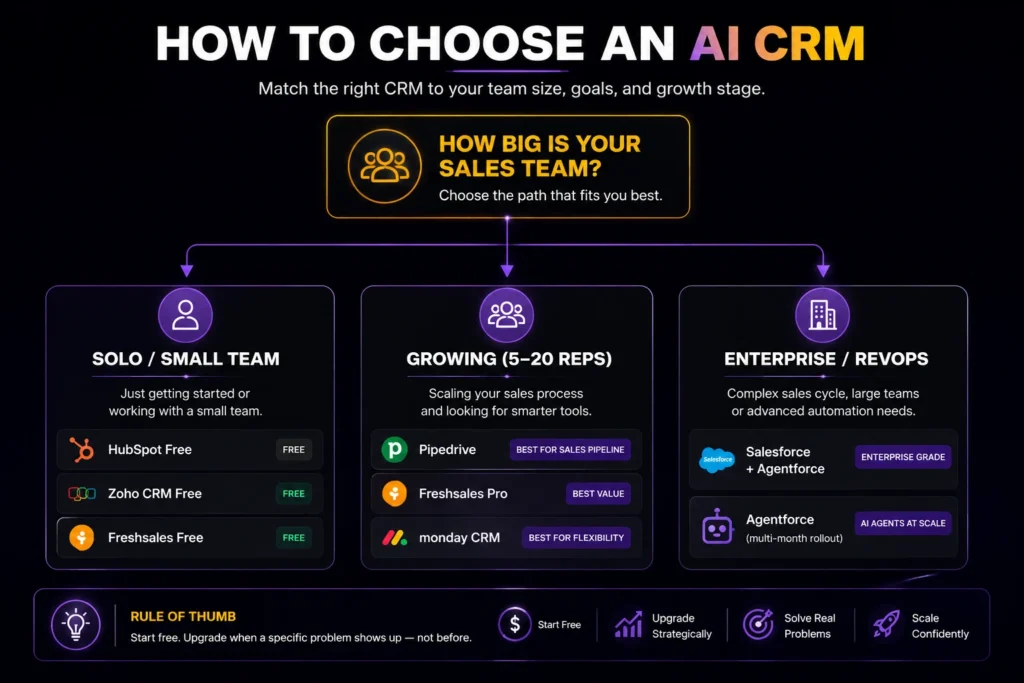
By company size. Solo operators and very small teams should start with a free tier HubSpot, Zoho, or fresh sales and resist upgrading until the AI features actually solve a problem you’re hitting weekly, not one you might hit someday.
Growing sales teams of 5–20 reps are the sweet spot for pipe drive, fresh sales Pro, or Monday CRM. Enterprise org with dedicated RevOps staff are really the only buyers who should be evaluating Salesforce agent force seriously; the implementation timeline alone rules it out for smaller teams.
By budget. Don’t choose an AI CRM based on the lowest monthly price alone. Compare the AI features you’ll actually use, the number of users you need, integration requirements, and the cost of implementation. As a rule of thumb, upgrade to a higher AI tier only when the automation saves enough time or improves sales performance to justify the additional subscription cost.
By sales complexity. A short, high-volume sales cycle—such as e-commerce or SMB software—usually doesn’t need Salesforce-level AI. It needs speed and low friction, which points toward pipe drive or fresh sales. If your sales process relies heavily on prospecting, lead qualification, and sales automation, it’s also worth comparing dedicated AI sales tools alongside your CRM. See our guide to the best AI sales tools to find platforms built specifically for modern sales teams.
A long, multi-stakeholder enterprise sales cycle is where predictive deal scoring and autonomous agents actually pay for themselves. That’s Salesforce or HubSpot Enterprise territory.
One pattern held across every platform we looked at: AI CRM features get more accurate the more clean data you feed them. Zia needs 3–6 months of historical data. Freddy only sees what’s inside fresh sales. None of these tools are magic on day one. They’re most useful for teams that already log activity consistently, and least useful for teams hoping AI will fix a messy pipeline for them.
FAQ
What’s the difference between a CRM and an AI CRM?
A regular CRM stores customer data and tracks interactions. An AI CRM uses that same data to predict outcomes which deals are likely to close, which leads are worth calling first and, increasingly, takes action automatically: drafting a follow-up, flagging a deal that’s stalled.
Is HubSpot’s AI free?
Partially. HubSpot’s Free CRM includes limited AI-powered features, while more advanced Breeze AI capabilities depend on your HubSpot subscription, selected products, and available AI credits. Before purchasing, check HubSpot’s official pricing page to confirm which AI features are included with your plan, as AI availability and usage limits may vary.
Which AI CRM is best for a small business?
Zoho CRM or fresh sales, for most small businesses. Both start free, and their paid AI tiers run well under $50 per user per month. pipe drive is the better fit if you’re purely sales-pipeline focused with no marketing or service needs.
Can an AI CRM replace a sales rep?
No. Even the most autonomous tools here, like Salesforce agent force, are built to handle specific tasks: qualifying a lead, resolving a routine ticket and escalating to a human when things get complex. Industry reporting shows a majority of enterprise agent force deployments are still in pilot phase, which tells you these tools augment reps rather than replace them.
Are AI CRMs compliant with data privacy regulations like GDPR?
Many AI CRM platforms support GDPR compliance, but compliance depends on the vendor, plan, and how the software is configured. Vendors such as Salesforce, HubSpot, Zoho, fresh works, pipe drive, and monday.com provide security, privacy, and compliance documentation, including GDPR-related information. Businesses should always verify the latest certifications, data residency options, and compliance features through each vendor’s official Trust Center before handling regulated or sensitive customer data.
How much does an AI CRM cost per month?
AI CRM pricing varies by platform and features. Entry-level plans start at around $9–15 per user/month, while AI-enabled business plans typically range from $20–40 per user/month. Enterprise platforms such as Salesforce use custom pricing based on products, AI usage, implementation, and organization size, so total costs can vary significantly.
Do I need AI features in my CRM at all?
Not necessarily. If your team is small, your pipeline is simple, and you’re consistently following up on leads without help, a traditional CRM might serve you just as well at a lower cost. AI CRM features earn their keep once volume or complexity makes manual prioritization genuinely hard to keep up with.
What I’d Do If Starting Today
If I were choosing an AI CRM today, I’d start with HubSpot for the best balance of ease of use, AI features, and long-term scalability. If budget were the top priority, I’d choose Zoho CRM or fresh sales because they offer strong value for small businesses. For enterprise organizations already invested in the Salesforce ecosystem, Salesforce agent force would be the clear choice but only if the business has the budget and resources for implementation. The best AI CRM isn’t the one with the most features; it’s the one your team will actually use every day.
The Bottom Line
Start with a free or entry-level AI CRM such as HubSpot, Zoho CRM, or fresh sales, and use it with real customer data for 60–90 days before investing in premium AI features. Upgrade only when you identify a clear business need such as improving lead follow-up, sales forecasting, or workflow automation not simply because a vendor offers more AI capabilities.
If your business already relies on Salesforce, plan for implementation, data migration, and user adoption before focusing on AI features. In most enterprise CRM projects, deployment complexity has a bigger impact on success than the AI itself.
Want to compare more business AI tools? Read our guide to the Best AI Platforms for Business in 2026 to see how leading AI platforms compare for automation, productivity, customer support, and business growth:
Every CRM vendor now calls itself an “AI CRM.” Half of them bolted a chat bot onto a contact database and updated the homepage. That makes shopping for one genuinely confusing; you’re comparing marketing copy, not features.
This guide breaks down six AI CRM platforms that actually do something with AI: HubSpot, Salesforce, Zoho CRM, pipe drive, fresh sales, and monday CRM. You’ll get real pricing tiers, what the AI actually does in each one, and more importantly who each platform is a bad fit for.
Skip to the comparison table if you’re in a hurry. If you’ve got five minutes, the breakdown below will save you from picking Salesforce when you need pipe drive (it happens more than you’d think).
What Is an AI CRM?
An AI CRM is customer relationship management software that uses machine learning models to score leads, predict deal outcomes, draft outreach, and automate follow-up on top of the contact and pipeline tracking a traditional CRM already does.
The difference from a regular CRM isn’t cosmetic. A traditional CRM stores what happened. An AI CRM tries to tell you what’s likely to happen next. Increasingly, it acts on its own sending a follow-up email before you think to, flagging a deal that’s gone quiet, or reassigning a lead when it’s sitting with the wrong rep.
How We Evaluated These Platforms
We looked at five things for each tool: pricing transparency (does the AI live behind a paywall the vendor doesn’t advertise clearly?), depth of the AI features, ease of adoption for a non-technical team, integration breadth, and security/compliance posture.
Every price below reflects what public vendor documentation showed at time of writing. CRM pricing changes often. Treat every number here as a starting point to confirm, not a quote.
1. HubSpot — Best All-in-One for Marketing-Heavy Teams
HubSpot CRM built its reputation on a genuinely useful free tier, and that hasn’t changed. What has changed is Breeze, HubSpot’s AI layer a prospecting agent, a content agent, and a customer agent that work across the CRM, marketing, and service hubs at once.
Pricing: HubSpot offers a Free CRM with core features. Paid plans start with Starter Customer Platform at $15/month (includes one paid seat), Professional Customer Platform starts at $1,170/month (includes five seats), and Enterprise Customer Platform starts at $4,300/month (includes seven seats). Individual Hub products can also be purchased separately, with pricing varying by product and seat requirements. Breeze AI features are included in many HubSpot plans, while advanced AI capabilities may require higher-tier subscriptions or usage-based credits.
The AI itself is genuinely broad. Breeze’s content agent drafts landing pages and emails. The prospecting agent researches and qualifies leads. The customer agent handles support tickets. If your team already runs marketing and sales out of HubSpot, that’s real value you’re not stitching together three separate AI tools.
The honest limitation: HubSpot’s pricing jumps are steep. Several reviewers flag the move from Starter to Professional as more than 4x the cost, and that catches teams off guard right when they’re outgrowing the free tier.
Best for: small-to-mid teams that want marketing and sales AI under one roof and can absorb the Professional-tier price jump.
2. Salesforce (Einstein + agent force) — Best for Enterprise Sales
Salesforce is the CRM enterprise buyers already know, and agent force is Salesforce’s answer to autonomous AI agents bots that can resolve a support ticket or qualify a lead end-to-end, not just suggest what a human should do next.
Pricing: Salesforce Foundations is available at no additional cost for eligible Salesforce customers. agent force uses consumption-based pricing, with public pricing starting at $2 per AI agent conversation. Organizations with larger deployments can also purchase Flex Credits, while enterprise pricing varies depending on products, usage, Data Cloud, and implementation requirements. Salesforce provides custom quotes for larger AI deployments.
Three pricing models. Same product. These models can’t always be combined in the same org, so the “starting price” you see quoted depends entirely on which buying structure a vendor rep puts in front of you.
Many comparisons overlook the total cost: agent force often requires Salesforce products such as Service Cloud and may also involve Data Cloud, along with implementation, integration, and ongoing administration. For most businesses, it’s a long-term enterprise investment rather than a plug-and-play AI tool.
Industry reporting suggests fewer than 10% of Salesforce customers have scaled agent force past a pilot so far. That’s not a knock on the technology, it’s a real signal about the commitment required to get value from it.
Best for: enterprise sales org already invested in the Salesforce ecosystem, with the budget and implementation runway to match. Not a fit for a lean five-person sales team.
3. Zoho CRM (Zia) — Best Budget All-in-One Suite
Zoho CRM offers a Free plan for up to three users, making it one of the most generous free CRM options for small teams. Zia, Zoho’s AI assistant, is available on higher-tier plans and helps with lead scoring, sales predictions, workflow recommendations, anomaly detection, email intelligence, and forecasting.
Pricing: Zoho CRM’s Enterprise plan starts at $40 per user/month (annual billing) and includes Zia AI. The Ultimate plan offers additional AI and analytics capabilities for larger organizations.
Zia isn’t as sophisticated as Salesforce Einstein in any single category. But it’s woven across more than 45 Zoho apps if you’re on the Zoho One bundle CRM, Desk, Books, Analytics, all sharing one AI layer. For a business already living in Zoho, that consistency is worth something. For everyone else, it’s not a reason to switch.
Best for: budget-conscious SMBs that want one AI layer across CRM, support, and finance instead of stitching tools together.
4. pipe drive — Best Pure Sales-Pipeline Tool
pipe drive doesn’t try to be an all-in-one platform, and that focus shows. It’s built for teams that live in their deal pipeline and want AI that supports selling, not marketing or service.
Pricing: pipe drive offers Lite from $14/user/month, Growth from $39/user/month, Premium from $49/user/month, and Ultimate from $79/user/month when billed annually. Pricing may vary by region, billing cycle, and promotional offers, so verify current rates on pipe drive’s official pricing page before purchasing.
A basic AI Sales Assistant ships even on Lite. The deeper features AI-drafted emails, win-probability predictions, lead enrichment start around Premium.
One thing worth flagging honestly: a few implementation guides note that teams using AI features daily should budget extra for AI credits on top of the listed seat price. That’s an easy line item to miss when you’re comparing sticker prices across CRMs.
Best for: small-to-mid sales teams who want a fast, visual pipeline tool and don’t need marketing or service features bundled in.
5. fresh sales (Freddy AI) — Best Budget Entry Point
fresh sales is part of fresh works, and its standout feature isn’t really the AI — it’s built-in telephony, which most CRMs on this list require a third-party integration to get. Freddy AI, fresh works’ assistant, layers lead scoring, deal-health signals, and next-best-action suggestions on top.
Pricing: fresh sales offers a Free plan for up to 3 users. Paid plans start with Growth at $9/user/month, while Pro starts at $39/user/month (annual billing) and includes advanced AI capabilities through Freddy AI. Enterprise plans add additional security, governance, and customization features.
The honest limitation here: Freddy only knows what’s inside fresh sales itself. It can’t factor in buyer-intent signals from outside your CRM, or competitor research the way some newer, pricier tools can.
Best for: phone-heavy sales teams on a tight budget who want built-in calling without stacking a separate dialer subscription.
6. monday CRM — Best for Flexible, Visual Workflows
monday CRM comes out of monday.com’s broader work-management platform, and that heritage shows. Every pipeline, field, and status can be rebuilt without a developer.
Its AI Sales Agent (branded “Lexi” in some releases) autonomously sources and qualifies leads. No-code “AI Blocks” let you build custom automations sentiment analysis, automatic task generation directly into your sales boards, no third-party plug-in required. That’s a genuinely different approach: instead of pre-built AI features, you’re assembling your own.
The trade-off is depth. Reviewers consistently note Monday’s AI is broader across the whole platform but less mature than dedicated sales AI when it comes to lead-scoring accuracy or forecasting. It’s a workflow AI wearing a sales hat, not a purpose-built sales AI.
Paid plans typically require a minimum of three seats worth knowing if you’re a true solo operator.
Best for: teams that already value monday’s visual, customizable interface and want AI automation without abandoning that flexibility.
Comparison Table
| Platform | Best For | Where AI Unlocks | Starting Price | Free Plan? |
| HubSpot | All-in-one marketing + sales | Starter tier and up | $15/month (Starter Customer Platform) | Yes |
| Salesforce | Enterprise/complex sales orgs | Add-on, multiple pricing models | Foundations available for eligible customers; Agentforce starts at $2 per conversation | Limited |
| Zoho CRM | Budget all-in-one suite | Enterprise tier | $40/user/month (annual) | Yes (3 users, no AI) |
| Pipedrive | Pure sales pipeline | Basic AI from Lite; deeper AI from Premium | $14/user/month (Lite, annual) | No |
| Freshsales | Budget + built-in calling | Pro tier | $9/user/month (Growth); Pro $39/user/month for advanced AI | Yes (3 users, no AI) |
| monday CRM | Flexible/visual workflows | Included, seat minimums apply | From $12/user/month (Basic, annual; 3-user minimum) | No |
Takeaway: if budget is the deciding factor, Zoho or fresh sales win. If you need autonomous, enterprise-grade agents and have the implementation runway, Salesforce is the only real option here. Everyone else lands somewhere between those two poles.
How to Choose an AI CRM for Your Business
By company size. Solo operators and very small teams should start with a free tier HubSpot, Zoho, or fresh sales and resist upgrading until the AI features actually solve a problem you’re hitting weekly, not one you might hit someday.
Growing sales teams of 5–20 reps are the sweet spot for pipe drive, fresh sales Pro, or Monday CRM. Enterprise org with dedicated RevOps staff are really the only buyers who should be evaluating Salesforce agent force seriously; the implementation timeline alone rules it out for smaller teams.
By budget. Don’t choose an AI CRM based on the lowest monthly price alone. Compare the AI features you’ll actually use, the number of users you need, integration requirements, and the cost of implementation. As a rule of thumb, upgrade to a higher AI tier only when the automation saves enough time or improves sales performance to justify the additional subscription cost.
By sales complexity. A short, high-volume sales cycle e-commerce, SMB software usually doesn’t need Salesforce-level AI. It needs speed and low friction, which points toward pipe drive or fresh sales.
A long, multi-stakeholder enterprise sales cycle is where predictive deal scoring and autonomous agents actually pay for themselves. That’s Salesforce or HubSpot Enterprise territory.
One pattern held across every platform we looked at: AI CRM features get more accurate the more clean data you feed them. Zia needs 3–6 months of historical data. Freddy only sees what’s inside fresh sales. None of these tools are magic on day one. They’re most useful for teams that already log activity consistently, and least useful for teams hoping AI will fix a messy pipeline for them.
FAQ
What’s the difference between a CRM and an AI CRM?
A regular CRM stores customer data and tracks interactions. An AI CRM uses that same data to predict outcomes which deals are likely to close, which leads are worth calling first and, increasingly, takes action automatically: drafting a follow-up, flagging a deal that’s stalled.
Is HubSpot’s AI free?
Partially. HubSpot’s Free CRM includes limited AI-powered features, while more advanced Breeze AI capabilities depend on your HubSpot subscription, selected products, and available AI credits. Before purchasing, check HubSpot’s official pricing page to confirm which AI features are included with your plan, as AI availability and usage limits may vary.
Which AI CRM is best for a small business?
Zoho CRM or fresh sales, for most small businesses. Both start free, and their paid AI tiers run well under $50 per user per month. pipe drive is the better fit if you’re purely sales-pipeline focused with no marketing or service needs.
Can an AI CRM replace a sales rep?
No. Even the most autonomous tools here, like Salesforce agent force, are built to handle specific tasks: qualifying a lead, resolving a routine ticket and escalating to a human when things get complex. Industry reporting shows a majority of enterprise agent force deployments are still in pilot phase, which tells you these tools augment reps rather than replace them.
Are AI CRMs compliant with data privacy regulations like GDPR?
Many AI CRM platforms support GDPR compliance, but compliance depends on the vendor, plan, and how the software is configured. Vendors such as Salesforce, HubSpot, Zoho, fresh works, pipe drive, and monday.com provide security, privacy, and compliance documentation, including GDPR-related information. Businesses should always verify the latest certifications, data residency options, and compliance features through each vendor’s official Trust Center before handling regulated or sensitive customer data.
How much does an AI CRM cost per month?
AI CRM pricing varies by platform and features. Entry-level plans start at around $9–15 per user/month, while AI-enabled business plans typically range from $20–40 per user/month. Enterprise platforms such as Salesforce use custom pricing based on products, AI usage, implementation, and organization size, so total costs can vary significantly.
Do I need AI features in my CRM at all?
Not necessarily. If your team is small, your pipeline is simple, and you’re consistently following up on leads without help, a traditional CRM might serve you just as well at a lower cost. AI CRM features earn their keep once volume or complexity makes manual prioritization genuinely hard to keep up with.
What I’d Do If Starting Today
If I were choosing an AI CRM today, I’d start with HubSpot for the best balance of ease of use, AI features, and long-term scalability. If budget were the top priority, I’d choose Zoho CRM or fresh sales because they offer strong value for small businesses. For enterprise organizations already invested in the Salesforce ecosystem, Salesforce agent force would be the clear choice but only if the business has the budget and resources for implementation. The best AI CRM isn’t the one with the most features; it’s the one your team will actually use every day.
The Bottom Line
Start with a free or entry-level AI CRM such as HubSpot, Zoho CRM, or fresh sales, and use it with real customer data for 60–90 days before investing in premium AI features. Upgrade only when you identify a clear business need such as improving lead follow-up, sales forecasting, or workflow automation not simply because a vendor offers more AI capabilities.
If your business already relies on Salesforce, plan for implementation, data migration, and user adoption before focusing on AI features. In most enterprise CRM projects, deployment complexity has a bigger impact on success than the AI itself.
Want to compare more business AI tools? Read our guide to the Best AI Platforms for Business in 2026 to see how leading AI platforms compare for automation, productivity, customer support, and business growth: