FluxGrowth is reader-supported. Some links in our guides are affiliate links — if you buy through one we may earn a commission, at no extra cost to you. It never changes which tools we recommend. How we test tools.
You didn’t start your business to spend Tuesday copying names from a contact form into your CRM. Or Wednesday chasing an invoice that’s three weeks late. Or every evening answering the same three questions in your inbox.
This guide is part of our AI Automation hub – everything we have published on automating a small business with AI, in one place.
Small business automation is how you hand those repeating tasks to software, so your hours go back to the work only you can do. But here’s the part most guides skip: you don’t need to automate everything. Trying to is exactly how people end up with a tangle of half-working workflows that breaks on a Friday afternoon and eats the whole weekend.
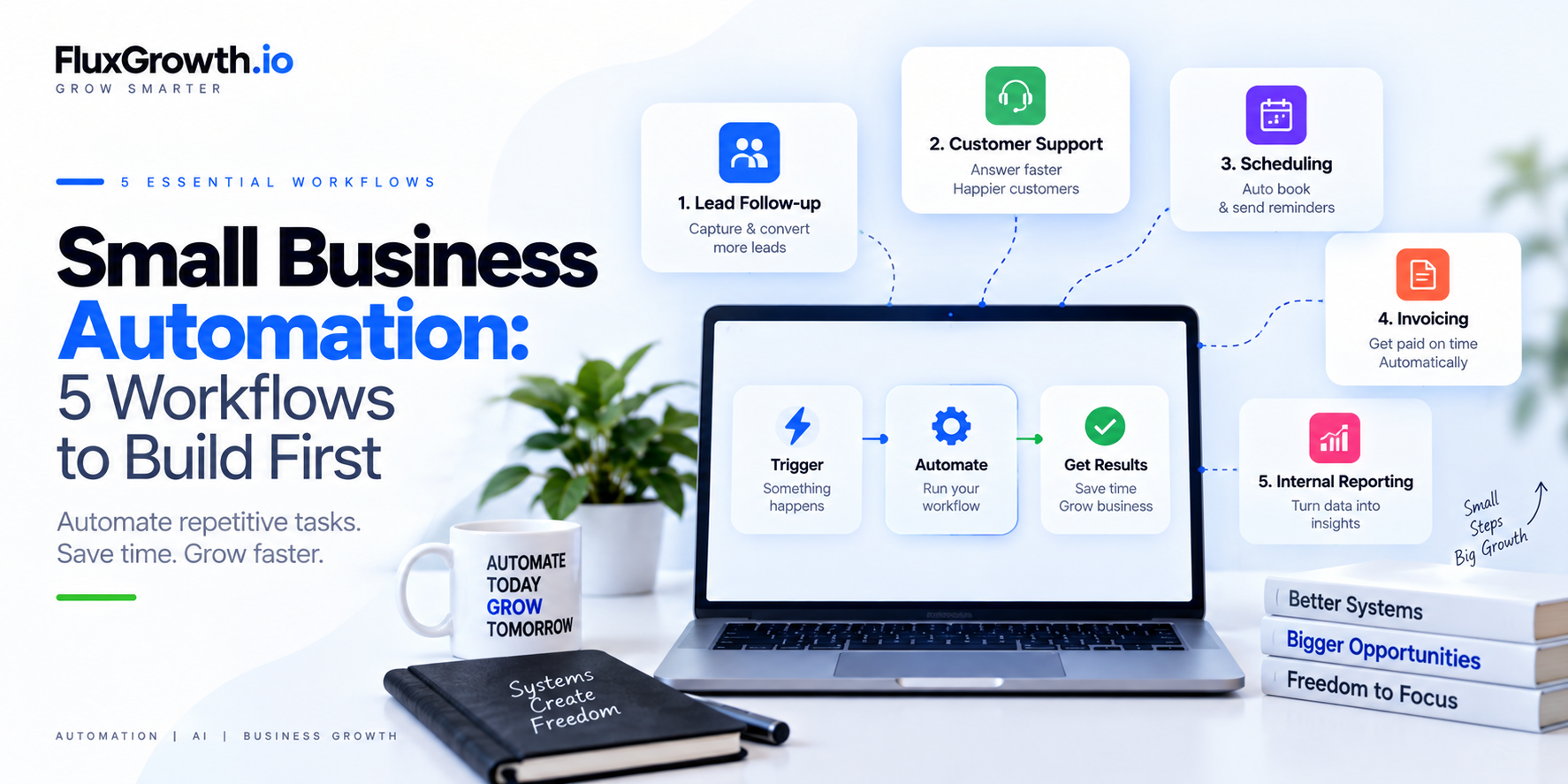
This guide covers the five workflows worth building first lead follow-up, customer support, scheduling, invoicing, and internal reporting. Plus how to choose, build, and measure them without adding complexity you’ll regret.
What is small business automation?
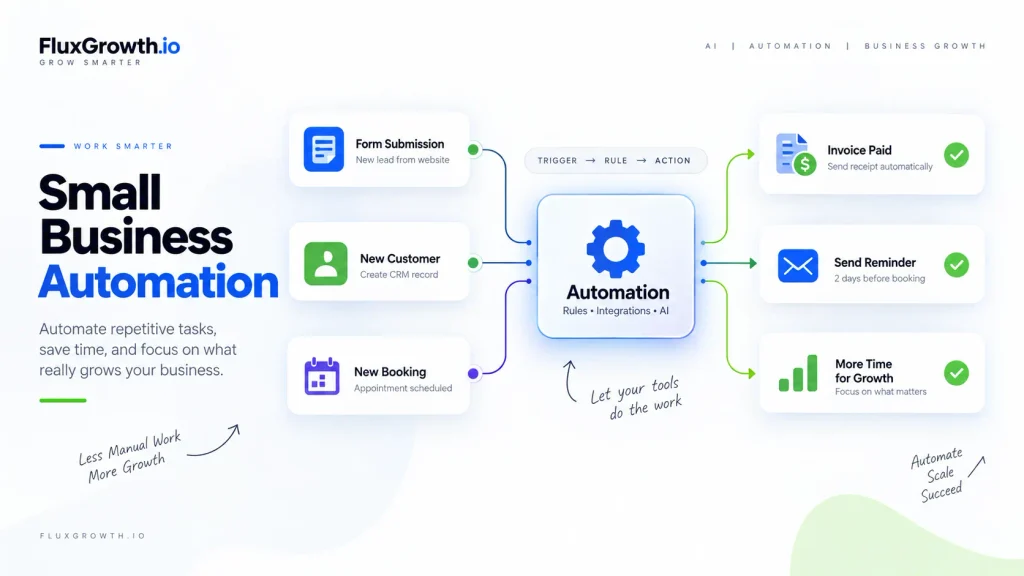
Small business automation is the use of software, rules, integration, or AI to perform repetitive business tasks with less manual work. A form submission creates a CRM record. A paid invoice triggers a receipt. A new booking sends a reminder two days out. The work still happens; nobody has to do it by hand.
Most automation runs on a simple pattern: a trigger (something happens), a rule (a condition to check), and an action (what to do next). String a few of those together across your tools and you’ve got a workflow that runs on its own.
Two flavors, and the difference matters. Traditional automation is rule-based: if this, then that, the same way every time a receipt that fires the second an invoice is paid. AI automation drops a model into the middle so the workflow can read a messy email, sort free form feedback, or draft a reply. Handy. But you won’t need it for most of what follows, and where AI actually earns its spot, I’ll flag it.
You can build all of this without writing code. No-code tools like Zapier and Make cover most everyday workflows through drag-and-drop builders. Custom development only becomes worth it when your process is genuinely unusual or connects to systems the no-code tools can’t reach.
The short version: automation pays off when a task is repetitive, predictable, and measurable — and it’s a trap when the underlying process is a mess you haven’t fixed yet.
How to choose what to automate first
Start with tasks that are repetitive, predictable, measurable, and low-risk. That combination is the sweet spot.
Repetitive means it happens often enough to be worth the setup. Predictable means the steps don’t shift from run to run. Measurable, so you’ll actually know whether it worked. And low-risk because when an automation misfires, and one eventually will, you don’t want a lost customer or a compliance headache as the bill.
Score each candidate task against a few questions:
- How often does it happen daily, weekly, or twice a year?
- How much manual effort does one run take?
- What’s the cost of a mistake?
- How sensitive is the data involved?
- How many separate tools does it touch?
High frequency, high effort, low error-cost, low sensitivity, few tools that’s your first automation.
One question saves more projects than any tool choice: is this process actually defined, or does it live half in someone’s inbox, half in a spreadsheet, and half in your head? Automation makes an unclear process run faster, not better. If you can’t draw the steps on a napkin, map and fix them before you automate anything. Otherwise you’re just speeding up the mess.
The honest math: what automation really saves
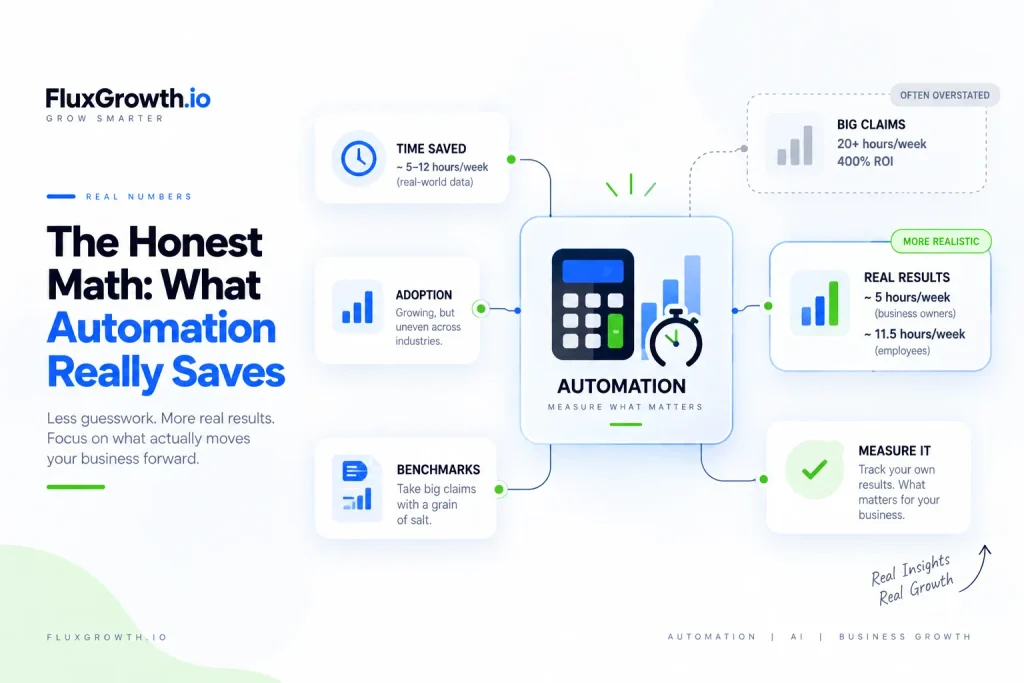
Here’s where I’ll go against the grain of most articles on this topic. The eye-popping automation statistics you see everywhere are mostly vendor self-reports, and the honest numbers are more modest.
Adoption itself is real but uneven. Using bank-transaction data rather than surveys, the JPMorgan Chase Institute found that AI use among U.S. small businesses is climbing steadily, with newer firms adopting fastest.
The U.S. Census Bureau’s Business Trends and Outlook Survey adds the texture: adoption runs in the high teens for information and professional-services firms, and in the low single digits for construction and food service. So “everyone’s automating” isn’t quite true. It depends heavily on what business you’re in.
On time savings, treat the big claims with a raised eyebrow. Zapier’s own research reports business owners save a median of around five hours a week, and employees closer to eleven and a half — useful, but a long way from the “20 hours a week, 400% ROI” numbers on agency landing pages (the ones that never cite a source).
There’s a deeper reason to measure your own results instead of trusting benchmarks. In a 2025 randomized trial by METR, experienced developers believed AI tools made them about 20% faster but were measurably slower. The gap between how much time we feel we’re saving and how much we actually save is the whole reason to track real outcomes, which we’ll get to at the end.
None of this means automation isn’t worth it. It means the win comes from picking the right few tasks and measuring them not from chasing a number someone made up.
Automation #1 — Lead capture and follow-up
Lead follow-up is the automation with the clearest payoff, because slow follow-up quietly costs you deals. A lead who fills out your form at 9 p.m. and hears nothing until Thursday has usually moved on (probably to whoever replied in ten minutes).
Example workflow (illustrative): website form → create a record in your CRM → send an instant acknowledgment email → notify you or your rep in Slack or by text → create a follow-up task due the same day. If you want, add a step that tags or scores the lead based on what they submitted.
Automate the plumbing, keep the judgment human. The capture, the CRM entry, the instant “we got your message,” the internal alert all safe to automate. The actual sales conversation, the pricing, the read on whether this is a good-fit client that stays with a person. Automating the acknowledgment buys you time to respond well. It shouldn’t replace responding.
Tools: for most businesses this is a no-code job Zapier or Make connecting your form (Type form, your website, a Facebook lead ad) to your CRM and your inbox. Plenty of CRMs do it naively too.
Common mistake: blasting a generic auto-reply that reads like a robot wrote it. A short, human “Thanks I’ll get back to you today” beats a five-paragraph template every time.
How to measure it: track your average response time before and after, plus your lead-to-reply rate. If leads are getting a same-day response that used to take two days, it’s working.
Automation #2 — Customer communication and support
Support automation works best when you separate the repetitive questions from the ones that need a human. Roughly the same handful of questions hours, pricing, “where’s my order,” how to reset something make up most of your inbox. Those are automatize. The frustrated customer with an unusual problem is not.
Example workflow (illustrative): contact form or chat message comes in → check it against a list of common questions → if it matches, send the relevant answer or help article → if it doesn’t, create a ticket and route it to the right person with the customer’s history attached.
This is where the AI-versus-rules choice actually matters. A rule-based setup is fine when questions arrive in predictable formats—a drop-down that routes “billing” to billing. An AI-assisted layer earns its keep when people ask the same thing fifteen different ways and you want the system to understand intent and draft a reply. If you’re exploring AI tools for broader business workflows, see our guide to 15 Best AI Tools for Business in 2026. If you add AI here, keep a human in the loop for anything the model isn’t sure about, and never let it invent policy. An AI that confidently makes up your refund terms is worse than no automation at all.
Tools: your help desk or shared inbox (most have built-in rules), plus an AI layer only if volume justifies it.
How to measure it: first-response time, the share of tickets resolved without a human, and — the one people skip — customer satisfaction on the automated replies. Fast and wrong is not a win.
Automation #3 — Appointments and scheduling
Scheduling automation removes an entire category of back-and-forth: the “does Tuesday work / no, how about Thursday” email chain. A booking tool that shows your real availability and lets people pick a slot replaces all of it.
Example workflow (illustrative): client books a time on your scheduling page → the event drops onto your calendar → a confirmation goes out → reminders sent 24 hours and 1 hour before → after the meeting, a follow-up or review request goes out. No-show? A re booking sequence offers a fresh link.
Keep human control where it counts. Let the tool handle confirmations and reminders. But think twice before automating rescheduling and cancellations for high-value clients. Sometimes a quick personal message keeps a relationship warm in a way an automated “click here to rebook” never will.
Tools: dedicated schedulers like Candle or Acuity handle most of this out of the box, calendar sync and reminders included. No custom build required.
How to measure it: no-show rate and the number of scheduling emails you send per week. Reminders alone usually put a visible dent in no-shows.
Automation #4 — Invoicing, payments, and admin
Invoicing and admin automation handles the repetitive paperwork around getting paid generating the invoice, sending the receipt, nudging the client who’s gone quiet on a net-30. It makes zero financial decisions, and that line matters. Say you wrap a $4,200 project: the automation can send the invoice and chase it on day 31, but whether to offer that client a payment plan is still your call.
Example workflow (illustrative): project marked complete → invoice generated from a template → sent to the client → payment reminder scheduled if it’s unpaid after a set number of days → receipt sent automatically on payment → your bookkeeping spreadsheet or accounting tool updated.
Automate the workflow, not the judgment. Generating and sending invoices, chasing overdue ones on a schedule, issuing receipts, syncing records all fair game. What to charge, whether to extend a payment plan, how to categorize an odd expense human call. Automation moves the paperwork; it doesn’t make financial decisions.
Tools: start with what your invoicing or accounting platform (QuickBooks, FreshBooks, Wave) already automates before wiring up anything external. Most handle recurring invoices and reminders naively.
Common mistake: an overly aggressive reminder sequence that annoys good customers. Match the tone to the relationship — gentle for reliable clients, firmer for repeat late payers.
How to measure it: average days-to-payment and hours spent on invoicing admin per month.
Automation #5 — Reporting, data entry, and internal workflows
Internal automation moves information between your tools so nobody has to re-type it. It’s the least glamorous category and often the highest-value, because manual data entry is both mind-numbing and error-prone.
Example workflows (illustrative): form response → spreadsheet row. New customer → on-boarding checklist created and assigned. Completed task → Slack notification to the team. Weekly sales data → a summary emailed every Monday morning.
The thing separating a reliable internal workflow from a fragile one is validation and error handling. What happens when a field is blank, a date is malformed, or a tool is down for an hour? Build in a check — flag the bad record, retry the failed step, alert someone so a small hiccup doesn’t silently corrupt your data for a week before you notice.
Tools: no-code sync between your apps (Zapier, Make) covers most of it; add an AI step only if you need something summarized or classified.
How to measure it: the number of manual data-entry hours removed, and your error rate. Fewer typos in the CRM is a real, countable win.
AI vs. traditional automation — and how to build it
Use the simplest tool that does the job. Rule-based automation when the logic is fixed and the input is clean: if invoice paid, send receipt. AI automation when you need to interpret, classify, summarize, or generate from messy input: drafting a reply, sorting free form feedback, pulling the key points out of a long form.
AI isn’t automatically better. It costs more, it can be wrong in confident-sounding ways, and it needs oversight. For a predictable if-this-then-that task, a plain rule is cheaper, faster, and won’t hallucinate.
Then there’s how you build it. No-code tools Zapier, Make suits most small business owners: you snap blocks together and the only thing to maintain is your own logic. Low-code platforms like n8n hand you more control and let you self-host, but you pay for that flexibility with a steeper learning curve. Custom development? Save it for the genuinely weird or proprietary stuff off-the-shelf tools can’t reach and go in knowing you now own the maintenance and the 2 a.m. failures.
How to build your first automation, step by step:
- Identify one repetitive task with a clear trigger and outcome.
- Write down how it works now, start to finish.
- Define the trigger as the exact event that kicks it off.
- Define the outcome of what “done” looks like.
- Pick the simplest tool that connects the systems involved.
- Connect those systems.
- Add validation and error handling for the obvious failure cases.
- Test with sample data before it touches anything real.
- Run it live with human oversight for the first stretch.
- Measure the result against how you did it before.
- Improve one thing, then leave it alone.
Which automation should you build first?
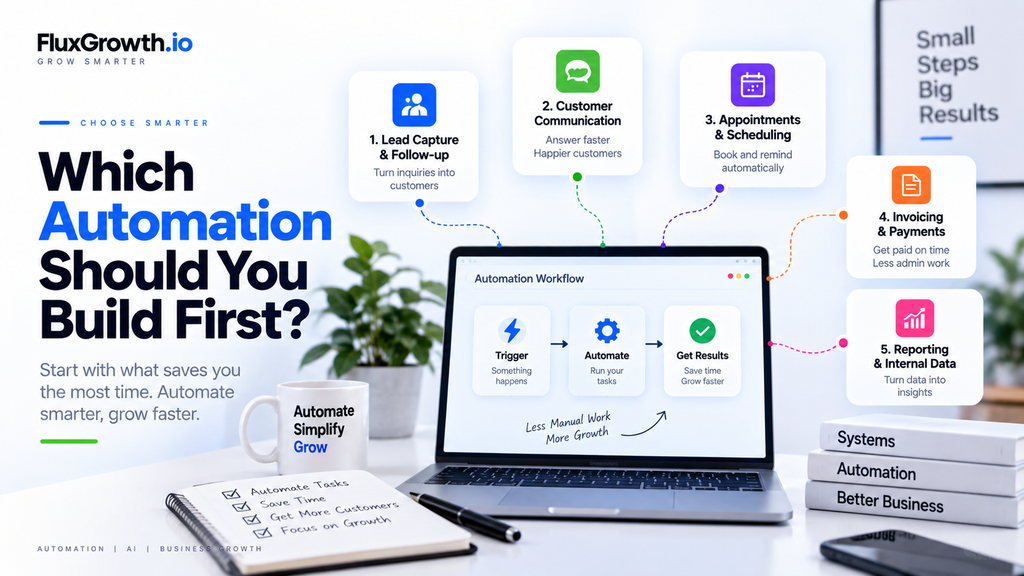
The table below is a starting map, not a verdict. The right first automation depends on where your time is actually going.
| Automation | Best for | Complexity | AI required? | Best starting approach |
| Lead capture & follow-up | Any business that gets inquiries | Low–Medium | No (optional for scoring) | No-code: form → CRM → alert |
| Customer communication & support | High volume of repeat questions | Medium | Sometimes (FAQs, triage) | Rule-based first, add AI later |
| Appointments & scheduling | Service & consulting businesses | Low | No | Dedicated scheduler + reminders |
| Invoicing, payments & admin | Anyone who bills clients | Low–Medium | No | Your billing tool’s built-in automations |
| Reporting & internal data | Teams juggling several tools | Medium | Optional (summaries) | No-code sync + scheduled reports |
A few editorial recommendations by business type:
- Solopreneurs and freelancers: start with lead follow-up or scheduling the two that protect revenue and your calendar.
- Local service businesses: scheduling and reminders, to kill no-shows.
- Agencies: lead follow-up and internal reporting, since client work multiplies fast.
- Ecommerce: customer support (order-status questions) and admin.
- SaaS startups and small sales teams: lead routing and follow-up.
- Small support teams: support triage, starting rule-based.
These are reasoned starting points, not rules. Track your own week and let your biggest time-sink decide.
The mistakes that quietly cost more than the problem
- Automating a broken process. Fix and map it first, or you just speed up the mess.
- Automating too much at once. Wire up ten workflows in a week and you won’t know which one broke or why. Go one at a time.
- Picking the tool before defining the workflow. The workflow decides the tool, not the other way around.
- No human fallback. Every automation needs an off-ramp for the case it wasn’t built for.
- Skipping error handling. A workflow that fails silently corrupts data for weeks before anyone notices.
- Trusting AI output blindly. Models are confidently wrong sometimes. Keep reviewing where the stakes are real.
- Forgetting maintenance. Tools update, accounts expire, edge cases appear. A workflow that ran fine for six months can fail quietly in month seven. Check on them.
And the big one is not to automate. Anything that needs real judgment, carries legal or financial weight, or is core to a customer relationship. Automate the reminder; write the apology yourself.
Privacy and security basics
Automation moves your data between tools, so a few habits matter more once workflows are running.
A few habits do most of the work here. Keep API keys and passwords in your tool’s secrets manager never pasted into a workflow where the next person to open it can read them. Give each integration only the access it actually needs; read-only is plenty for a tool that just reports numbers. And prune ruthlessly. Every third-party app you connect is a door into your data, so vet new ones before they touch payment info, and disconnect the ones you wired up six months ago and forgot.
Two honest caveats. No tool is “100% secure,” and anyone who tells you otherwise is selling something. And on regulations general security best practices are not the same as legal requirements. If you handle health data, payment data, or personal data from specific regions, check the actual rules that apply to you. The FTC publishes practical data-security guidance for small businesses that’s a sensible starting point. Starting point, not legal advice.
How to tell if an automation is actually working
Judge an automation by the business outcome, not by whether it technically runs. Here’s the thing: a workflow can fire perfectly every day and still deliver nothing worth having.
Pick one or two metrics per automation and compare before and after: response time, no-show rate, days-to-payment, hours of manual work removed, error rate, failed-workflow rate. Track how often a human still has to step in if that number’s high, the automation isn’t done. And remember the METR finding: we routinely feel like we’re saving more time than we are. Measure it. Don’t estimate it.
If an automation isn’t moving a real number, it’s decoration. Fix it or retire it.
FAQ
What is small business automation?
Small business automation is using software, rules, integration, or AI to handle repetitive business tasks with less manual work. Common examples include sending an invoice when a project is complete, adding form submissions to a CRM, or texting appointment reminders. It’s meant to reduce repetitive work, not replace human judgment.
What should a small business automate first?
Automate a task that’s repetitive, predictable, measurable, and low-risk. For most businesses that means lead follow-up or appointment scheduling, because both save time immediately and are easy to measure. Track your own week first, the task you repeat most is usually the best place to start.
How much does small business automation cost?
Costs vary widely and depend on how many tools and how much volume you’re connecting. Many no-code platforms offer a free tier for light use, with paid plans that commonly start in the low tens of dollars per month and scale with the number of tasks or operations. Check current pricing on each provider’s official page, since plans change often.
Is AI automation worth it for a small business?
AI automation is worth it when a task involves messy input or light judgment like drafting replies, sorting free form feedback, or answering FAQs asked in many different ways. For predictable, rule-based tasks, traditional automation is cheaper, faster, and more reliable. Add AI where it clearly helps, and keep human review where mistakes carry real cost.
What business processes should you not automate?
Don’t automate anything that needs genuine judgment, carries legal or financial weight, or is central to a customer relationship. Pricing decisions, sensitive customer conversations, and one-off exceptions are better kept human. A good rule: automate the reminder, but write the apology yourself.
Do I need to know how to code to automate my business?
No. No-code platforms like Zapier and Make let you build most small business workflows with drag-and-drop tools and no programming. Coding or a developer only becomes necessary for unusually complex or custom workflows that off-the-shelf tools can’t handle.
Start with one
The most important thing about small business automation is that it rewards focus, not volume. The businesses getting real value aren’t the ones with the most workflows, they’re the ones who picked a few repetitive, measurable tasks and got them right.
You’ve got five strong candidates: lead follow-up, customer support, scheduling, invoicing, and internal reporting. Don’t build all five. Build one.
Here’s your action for today: track your week for five days and note the task you do most often that follows the same steps every time. That’s your first automation. Build it, measure it against how you used to do it, and only then move to the next.
What’s the one task you’d hand off first if you could?