FluxGrowth is reader-supported. Some links in our guides are affiliate links — if you buy through one we may earn a commission, at no extra cost to you. It never changes which tools we recommend. How we test tools.
Every agency owner knows the new-client scramble. A contract gets signed, and the same 15 tasks fire off by hand: create the CRM record, send the welcome email, spin up a project workspace, chase brand assets, ping the team, book the kickoff. Do it once, it’s fine. But do it forty times a year across a distributed team, and things slip — a welcome email never goes out, an asset request gets buried, a kickoff drifts a week.
This guide is part of our AI Automation hub – everything we have published on automating a small business with AI, in one place.
AI automation for agencies fixes the repeatable parts of that scramble the record-creation, the emails, the notifications. Not all of it. Some steps still need a human, and pretending otherwise is how agencies end up with automatons that embarrass them in front of a client. But the mechanical majority can run itself. Here’s how to build the version that works, without wiring together a tangle of half-broken tools you’re scared to touch.
What Is AI Automation for Agencies?
AI automation for agencies uses artificial intelligence inside an automated workflow to interpret information, generate content, or route work steps a plain automation can’t handle on its own. A standard automation follows fixed rules: when X happens, do Y. By contrast, AI automation adds a layer that can read a messy intake form, summarize it, and decide what to do with it.
Here’s the agency version. A new client fills out your on-boarding form with a rambling paragraph about their goals. Plain automation can move that text into your project tool. But an AI step can read it, pull out the three deliverables they actually asked for, flag what’s missing, and draft a one-paragraph brief your account manager reviews.
AI Automation vs. Traditional Workflow Automation
Traditional workflow automation moves data and triggers actions on fixed rules. It’s reliable, cheap, and predictable — perfect for “when a form is submitted, create a task.” AI automation, on the other hand, is for the steps where the input varies every time and a human would normally have to read, judge, or write something.
Most of your on-boarding is workflow automation. In fact, only a few steps genuinely need AI.
AI Assistants vs. AI Agents
An AI assistant does one job when you ask: summarize this form, or draft this email. You call it, it answers. An AI agent gets a goal instead of a task and figures out the steps itself — checking a trigger, deciding what to do next, calling other tools, running until it’s done. Assistant: you hold the reins. Agent: you hand them over.
For client on-boarding, assistants cover almost everything. Agents matter only when the process branches in ways you can’t map in advance. Zapier, Make, and n8n all now offer agent features, but you rarely need them just to onboard a client.
Where AI Actually Adds Value
Not every on-boarding task needs AI. Many just need dependable automation:
- Sending a welcome email
- Creating a project or task
- Sending a Slack notification
- Creating a calendar event
- Copying form answers into your CRM
AI earns its place where interpretation or generation is required:
- Summarizing long on-boarding responses into a brief
- Classifying an incoming request by service type or urgency
- Extracting details from an uploaded document or brief
- Spotting missing information before the kickoff
- Drafting an internal project summary for the team
Section takeaway: Automate the mechanical steps with plain workflow tools. Add AI only where a human would otherwise have to read, decide, or write.
What Is a Client-On-boarding Stack?
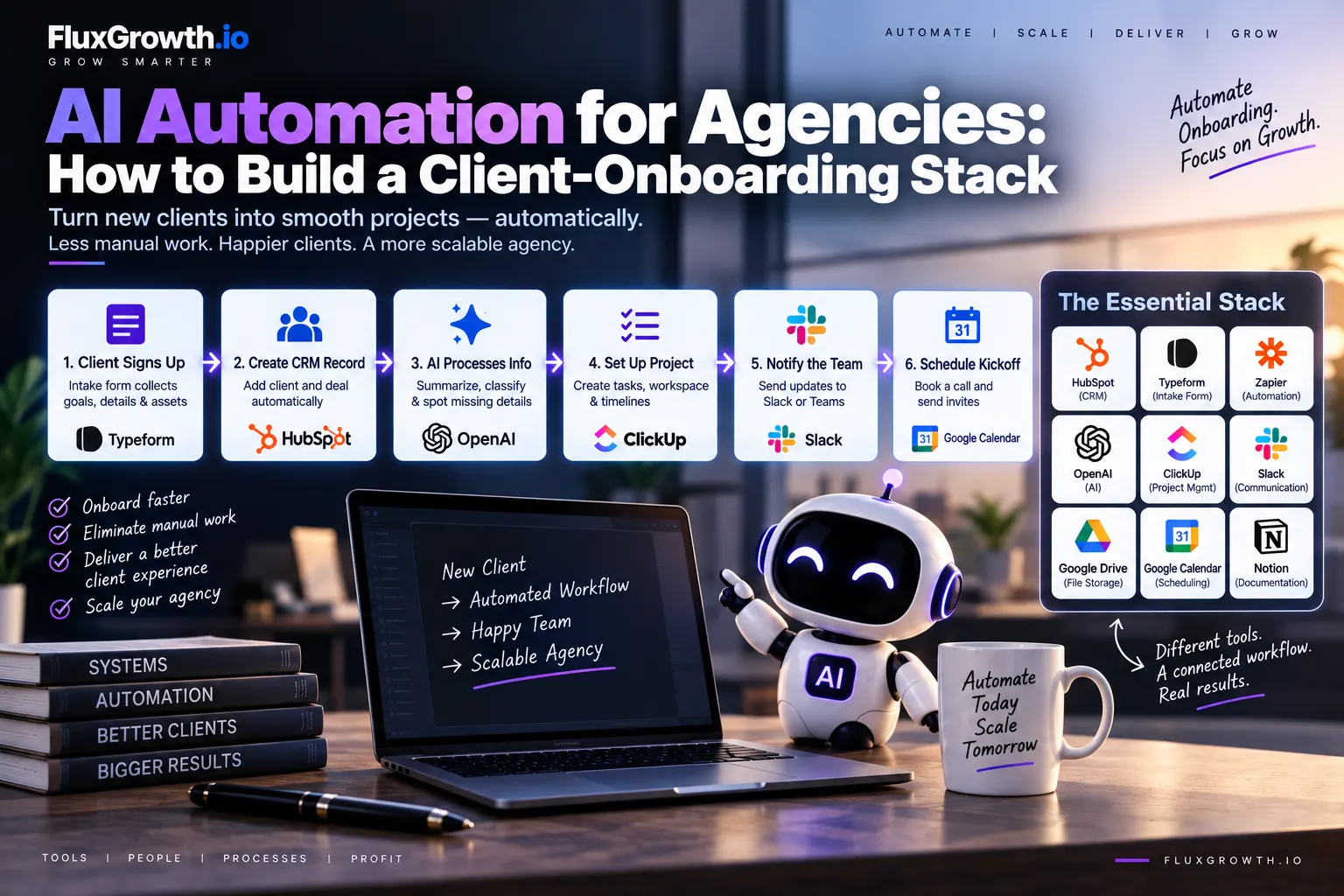
A client-on-boarding stack is the connected set of tools that collects client information, organizes it, and prepares the project with less manual work. It’s not one app, it’s several systems wired together. The point is that a signed HubSpot deal can flow into a live ClickUp project without anyone copying data between tabs at 9pm.
The Core Components
A typical agency stack pulls from these categories:
- CRM — the record of the client and deal
- Intake form — how you collect goals, assets, and details
- Automation platform — the wiring that connects everything
- AI model — the interpretation and drafting layer
- Project management — where the work actually lives
- Communication — Slack, Teams, or email for notifications
- File storage — where brand assets and documents land
- Calendar — for scheduling the kickoff
- Documentation — a home for the brief and the process itself
Not every agency uses all of these, and none of it has to be built at once.
Tool Stack vs. Workflow — Why “Connected” Is the Whole Point
Here’s the thing: owning HubSpot, ClickUp, and Slack isn’t a workflow. It’s a tool stack. A workflow is what happens when those three actually talk to each other without you in the middle. With a disconnected stack, someone on your team is still doing it by hand: copying a client’s answers out of the form, into the CRM, then into the project tool. Connect them, and the automation platform carries that data itself stopping only when there’s a real decision for a human to make.
Section takeaway: A client-on-boarding stack is a set of tools connected by an automation platform. The value comes from the connections, not the tools themselves. A pile of good software with no wiring still runs on manual effort.
The Client-On-boarding Workflow, Step by Step
Here’s the full path from signed contract to kickoff. Each step lists its trigger, the automation, whether AI is involved, the output, and what a human still needs to check.
- Client signs the agreement. Trigger: e-signature completed. Automation: the signed contract lands in file storage. AI: none. Output: a stored, dated agreement. Human review: confirm terms match what was sold.
- Trigger the on-boarding workflow. Trigger: the signed status. Automation: the platform starts the sequence. AI: none. Output: the workflow begins. Human review: none if the trigger is clean.
- Send the client intake form. Trigger: workflow start. Automation: an intake form is emailed automatically. AI: none. Output: form delivered. Human review: none.
- Collect brand assets and documents. Trigger: form includes an upload field. Automation: files route to a client folder. AI: optional flag file types received. Output: organized assets. Human review: confirm nothing critical is missing.
- Create or update the CRM record. Trigger: form submitted. Automation: a CRM record is created or updated. AI: none. Output: a clean client record. Human review: spot-check for duplicates.
- Use AI to summarize the client information. Trigger: form data received. Automation: the text is sent to an AI step. AI: yes summarize goals, scope, and constraints. Output: a short summary. Human review: required AI summaries can miss nuance or misread intent.
- Create the internal project brief. Trigger: summary generated. Automation: the summary populates a brief template. AI: Yes, draft the brief. Output: a draft brief. Human review: the account manager edits before it’s shared.
- Create the project workspace. Trigger: brief approved. Automation: a project is created from a template. AI: none. Output: a ready workspace. Human review: none if the template is solid.
- Assign internal tasks. Trigger: project created. Automation: tasks are generated and assigned by role. AI: optional suggest tasks from the brief. Output: an assigned task list. Human review: confirm the right owners.
- Notify the team. Trigger: project ready. Automation: a Slack or Teams message posts with project context. AI: none. Output: the team is looped in. Human review: none.
- Schedule the kickoff meeting. Trigger: project ready. Automation: a scheduling link or calendar hold is sent. AI: none. Output: a booked kickoff. Human review: confirm attendees.
- Send the client confirmation. Trigger: kickoff booked. Automation: a confirmation email with next steps goes out. AI: optional personalize the copy. Output: the client knows what’s next. Human review: required for anything client-facing.
Notice how few steps actually need AI. Steps 6 and 7 are the real payoff. The rest is dependable workflow automation.
The AI Client-On-boarding Stack: Tools by Category
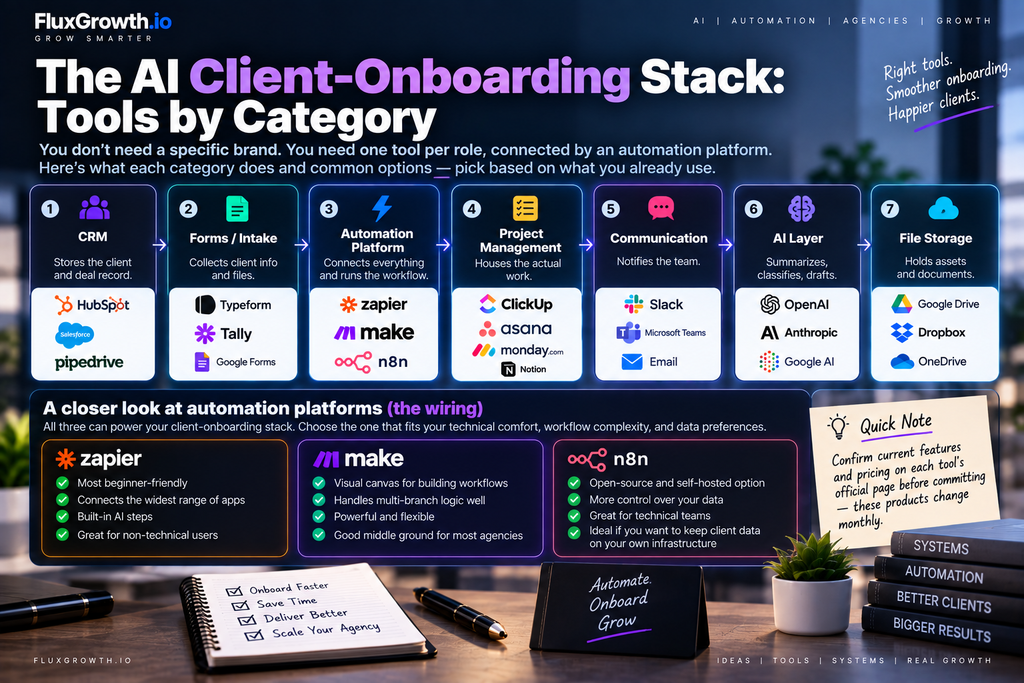
You don’t need a specific brand. You need one tool per role, connected by an automation platform. Here’s what each category does and common options pick based on what you already use.
| Category | What it does | Common tools |
| CRM | Stores the client and deal record | HubSpot, Salesforce, Pipedrive |
| Forms / intake | Collects client info and files | Typeform, Tally, Google Forms |
| Automation platform | Connects everything and runs the workflow | Zapier, Make, n8n |
| Project management | Houses the actual work | ClickUp, Asana, Monday.com, Notion |
| Communication | Notifies the team | Slack, Microsoft Teams, email |
| AI layer | Summarizes, classifies, drafts | OpenAI, Anthropic, Google AI |
| File storage | Holds assets and documents | Google Drive, Dropbox, OneDrive |
A quick note on the automation platforms, since they’re the wiring. Zapier is the most beginner-friendly and connects the widest range of apps, with built-in AI steps for non-technical users. Make uses a visual canvas that handles multi-branch logic well. n8n is open-source and can be self-hosted, which appeals to agencies that want to keep client data on their own infrastructure. Confirm current features and pricing on each tool’s official page before committing these products change monthly.
Where Should AI Be Used — and Where It Shouldn’t?
Use AI in client on-boarding where a task requires interpreting varied input or generating text not simply because AI is available. The strongest use cases are reading, judging, and drafting. The weakest are anything final, sensitive, or hard to reverse.
Good Use Cases for AI
- Stigmatization — turning a long intake form into a tight brief
- Classification — sorting requests by service line or priority
- Extraction — pulling key details out of an uploaded document
- Draft generation — a first-pass internal brief or confirmation email
- Missing-info detection — flagging that the client never sent their logo files
- Routing — sending a request to the right team based on its content
Keep These Human
AI should not autonomously handle decisions that carry real consequences. Keep a person responsible for:
- Interpreting contract terms
- Financial decisions and pricing
- Sensitive or legal communications
- Approving AI-generated summaries and briefs
- Handling exceptions the workflow didn’t anticipate
- Any high-impact, client-facing message
This is human-in-the-loop automation: the workflow does the heavy lifting, then pauses for a person to approve before anything important goes out. It’s the pattern that keeps automation from embarrassing you in front of a client.
Which approach fits your agency?
| Approach | Best for | AI required? | Technical complexity | Human oversight |
| Manual onboarding | Very small client volume | No | Low | High |
| Basic workflow automation | Repetitive agency processes | No | Low–Medium | High |
| AI-assisted onboarding | Agencies handling varied client information | Sometimes | Medium | High |
| AI-agent workflow | Complex, multi-step processes | Yes | Medium–High | High |
There’s no universal winner. Manual on-boarding is fine at very low volume. Workflow automation handles predictable, repetitive processes. AI-assisted on-boarding pays off when client information varies a lot from project to project. An AI-agent workflow suits complex, branching processes and demands the most oversight. The right choice depends on your client volume, your risk tolerance, and how much your team can maintain.
A No-Code Example Workflow (Illustrative)
Here’s how the pieces fit in a real sequence. This is an illustrative example, not tested performance data build and test your own version before trusting it with live clients.
The flow: new client → CRM → on-boarding form → AI summary → project creation → Slack notification → welcome email → kickoff scheduling.
- Trigger — a deal is marked “won” in the CRM.
- Data collection — an intake form goes to the client automatically.
- Data transformation — form answers are mapped to clean fields.
- AI processing — an AI step summarizes the responses into a brief and flags missing items.
- Conditional logic — if required fields are blank, the workflow pauses and asks a human to follow up instead of proceeding.
- Output actions — a project is created, the team is notified in Slack, and a welcome email plus a scheduling link go to the client.
- Human review — the account manager approves the AI brief and the client-facing email before either is used.
Every one of these steps can be built without code in Zapier or Make. The only judgment call is where to place the human approval and step 5 shows why it matters.
Privacy and Security for Agency Client Data
Before you automate client information, know exactly what data enters each tool and who can see it. When you route intake forms, contracts, or brand documents through third-party AI services, you’re sending client data outside your walls. That’s manageable but only if you’ve looked at it deliberately. This isn’t legal advice; it’s the operational checklist.
What Client Data Reaches Each Tool
Map the sensitive fields first. On-boarding often collects logins, financial details, customer lists, or brand strategy that a client would not want leaking. Decide which of those fields actually need to pass through an AI step and which can stay in storage the AI never touches. Don’t send an AI model more than the task requires.
Access, Retention, and Vendor Terms
Limit who on your team can open client folders and CRM records — role-based access, not everyone-sees-everything. Check how long each tool retains data and whether AI providers use your inputs for training; many offer settings or business tiers that exclude your data from training. Read each vendor’s privacy policy, terms of service, and data-processing agreement before sensitive information flows through their systems.
Human Review and Audit Trails
Keep a record of what the automation did and who approved each client-facing step. An audit trail helps you catch errors and answer a client who asks how their data was handled. The U.S. Federal Trade Commission’s Protecting Personal Information: A Guide for Business lays out a practical framework: take stock of what you hold, keep only what you need, lock it down, dispose of the rest, and plan for incidents. Review your vendor terms, data-processing agreements, security documentation, and client contracts before automating anything sensitive.
What It Costs and How the Stack Scales by Agency Size
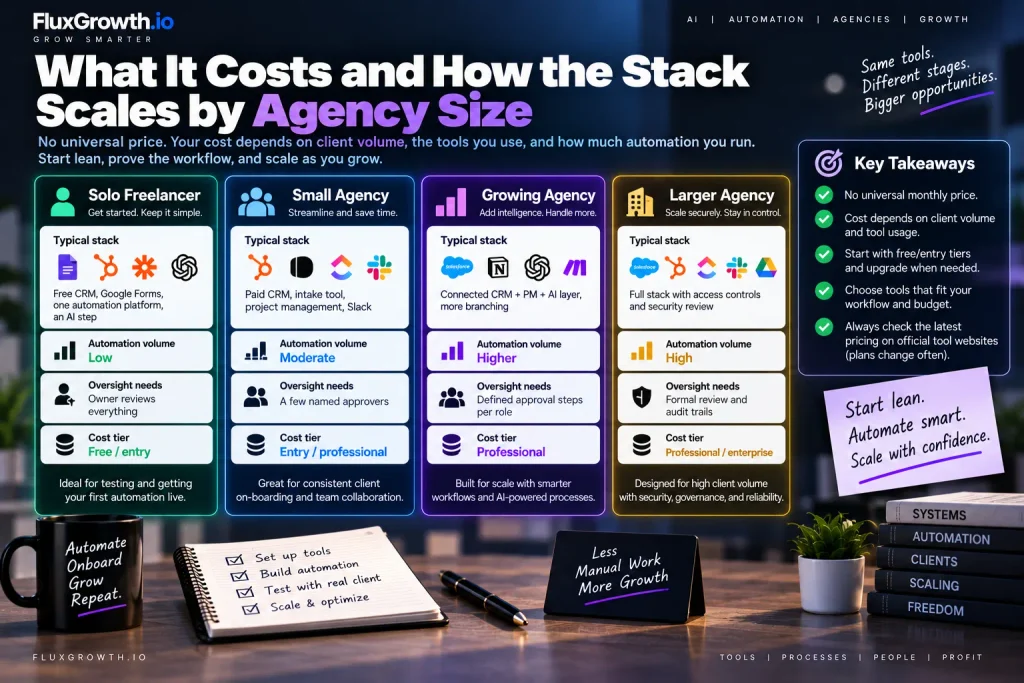
There’s no universal monthly price for an AI client-on-boarding stack, and anyone who quotes you is guessing. What you pay tracks your client volume and how much you run through each tool. A solo freelancer can often run the whole thing on free and entry tiers — Google Forms, a free CRM, one automation platform. A ten-person agency on-boarding clients every week is paying for professional plans across several tools, plus whatever the AI steps consume. Size changes the shape of the stack, not just the bill:
Agency size | Typical stack | Automation volume | Oversight needs | Cost tier |
| Solo freelancer | Free CRM, Google Forms, one automation platform, an AI step | Low | Owner reviews everything | Free / entry |
| Small agency | Paid CRM, intake tool, project management, Slack | Moderate | A few named approvers | Entry / professional |
| Growing agency | Connected CRM + PM + AI layer, more branching | Higher | Defined approval steps per role | Professional |
| Larger agency | Full stack with access controls and security review | High | Formal review and audit trails | Professional / enterprise |
Where you discuss actual numbers, check the tool’s official pricing page plans for Zapier, HubSpot, and the rest shift often, and older articles quote figures that are already wrong. Start with free and entry tiers to prove the workflow, then upgrade only where volume forces it.
Common Mistakes to Avoid
Most failed automation’s trace back to the same handful of errors. Watch for these:
- Automating a broken process. Automation makes a bad workflow run faster, not better. Fix the process on paper first.
- Using AI where simple automation is better. An AI step to “create a task” is slower, pricier, and less reliable than a plain rule.
- Too many tools. Every extra app is another thing to connect, pay for, and troubleshoot. Fewer, connected tools beat more, disconnected ones.
- No error handling. When a step fails silently, a client falls through the cracks. Build alerts for failures.
- No human review. AI-generated briefs and emails need a person’s sign-off before they reach a client.
- Poor data mapping. If fields don’t line up between tools, you get garbled records. Test the mapping with sample data.
- Ignoring privacy. Sending sensitive client data through AI without checking vendor terms is a real risk.
- Building without documentation. An undocumented workflow becomes unmaintainable the moment the person who built it is out.
- Vendor dependency. Wiring everything to one platform’s proprietary features makes switching painful later. Know your exit.
How to Build Your First AI On-boarding Workflow
Start small, prove it works, then expand. Here’s the order that keeps you from building a mess:
- Map the current process. Write out every on-boarding step you do by hand today.
- Identify repetitive tasks. Mark the ones that are identical every time those are your automation candidates.
- Separate automation from AI. Sort each step into “fixed rule” or “needs interpretation.” Most will be fixed rules.
- Choose the minimum required tools. One CRM, one form, one automation platform, one AI provider. No more.
- Build one workflow. Just contract-to-kickoff. Resist adding more until this runs clean.
- Add error handling. Set up failure alerts so nothing dies quietly.
- Add human approval. Insert a review step before anything AI-generated or client-facing goes out.
- Test with sample clients. Run fake clients through it and watch where it breaks.
- Document the workflow. Write down what each step does and why, so someone else can maintain it.
- Expand only after the first workflow works. Add the next process once this one is boring and reliable.
If you’re starting today, build steps 1 through 5 this week. That alone removes most of the manual scramble — before you add a single AI feature.
Frequently Asked Questions
What is AI automation for agencies?
AI automation for agencies is the use of artificial intelligence inside automated workflows to interpret information, generate content, or route work without a person doing every step. It combines standard automation moving data and triggering actions with AI steps that read, summarize, or draft. Agencies use it most often to speed up repetitive operations like client on-boarding.
How can AI automate client on-boarding?
AI can automate client on-boarding by reading intake forms, summarizing client goals into a brief, flagging missing information, and drafting internal documents and confirmation emails. Standard automation handles the mechanical steps creating records, sending emails, notifying the team while AI handles the parts that require interpreting varied input. A person still reviews AI output before it reaches the client.
What tools do agencies need for AI client on-boarding?
Agencies typically need a CRM, an intake form tool, an automation platform, a project management tool, a communication channel, file storage, and an AI provider. Common choices include HubSpot or Pipedrive for CRM, Typeform or Tally for forms, Zapier or Make for automation, and OpenAI or Anthropic for the AI layer. You don’t need every category on day one to start with what connects your current tools.
Can I automate client on-boarding without coding?
Yes. Platforms like Zapier and Make let you build client-on-boarding workflows visually, without writing code, by connecting apps and adding AI steps through a drag-and-drop interface. n8n offers similar no-code building and can also be self-hosted for more control. Coding becomes useful only for custom integrations or complex logic that no-code tools can’t handle.
How do I build an AI client on-boarding workflow?
Start by mapping your current on-boarding process and marking the repetitive steps. Separate the steps that follow fixed rules from the ones that need AI interpretation, then build a single workflow from signed contract to kickoff in a no-code platform. Add error handling and a human approval step before testing with sample clients and documenting the result. Expand only after the first workflow runs reliably.
Is AI client on-boarding secure?
It can be, but security depends on how you set it up. Review each vendor’s privacy policy, terms of service, and data-processing agreement, limit who can access client data, and check whether AI providers use your inputs for training. Send AI models only the data a task actually needs, and keep an audit trail of automated actions. Agencies handling sensitive client information should confirm their setup against applicable contracts and their own data-handling policies.
How much does AI automation for an agency cost?
Cost varies widely based on agency size, client volume, automation volume, AI usage, and the number of tools and users. A solo freelancer can often start on free and entry-level plans, while a larger agency with high volume pays for professional or enterprise tiers across several tools plus AI usage. Check each tool’s official pricing page for current numbers, since plans change frequently.
Start With One Workflow
The single most important move is to automate the process before adding AI — most of client on-boarding is dependable workflow automation, and only a couple of steps genuinely need AI to read or draft. Get the mechanical path from signed contract to kickoff running reliably first. Then add an AI summary step where it saves real time, keep a human approving anything client-facing, and check your vendor terms before sensitive data flows through. AI automation for agencies works best as a reliable system you trust, not a pile of clever features you don’t. Pick your messiest on-boarding step this week and automate just that one. Build from there.