FluxGrowth is reader-supported. Some links in our guides are affiliate links — if you buy through one we may earn a commission, at no extra cost to you. It never changes which tools we recommend. How we test tools.
If you’ve spent any time on X or LinkedIn this year, you’ve seen the claim: AI agents are about to replace half your software stack.
This guide is part of our AI Automation hub – everything we have published on automating a small business with AI, in one place.
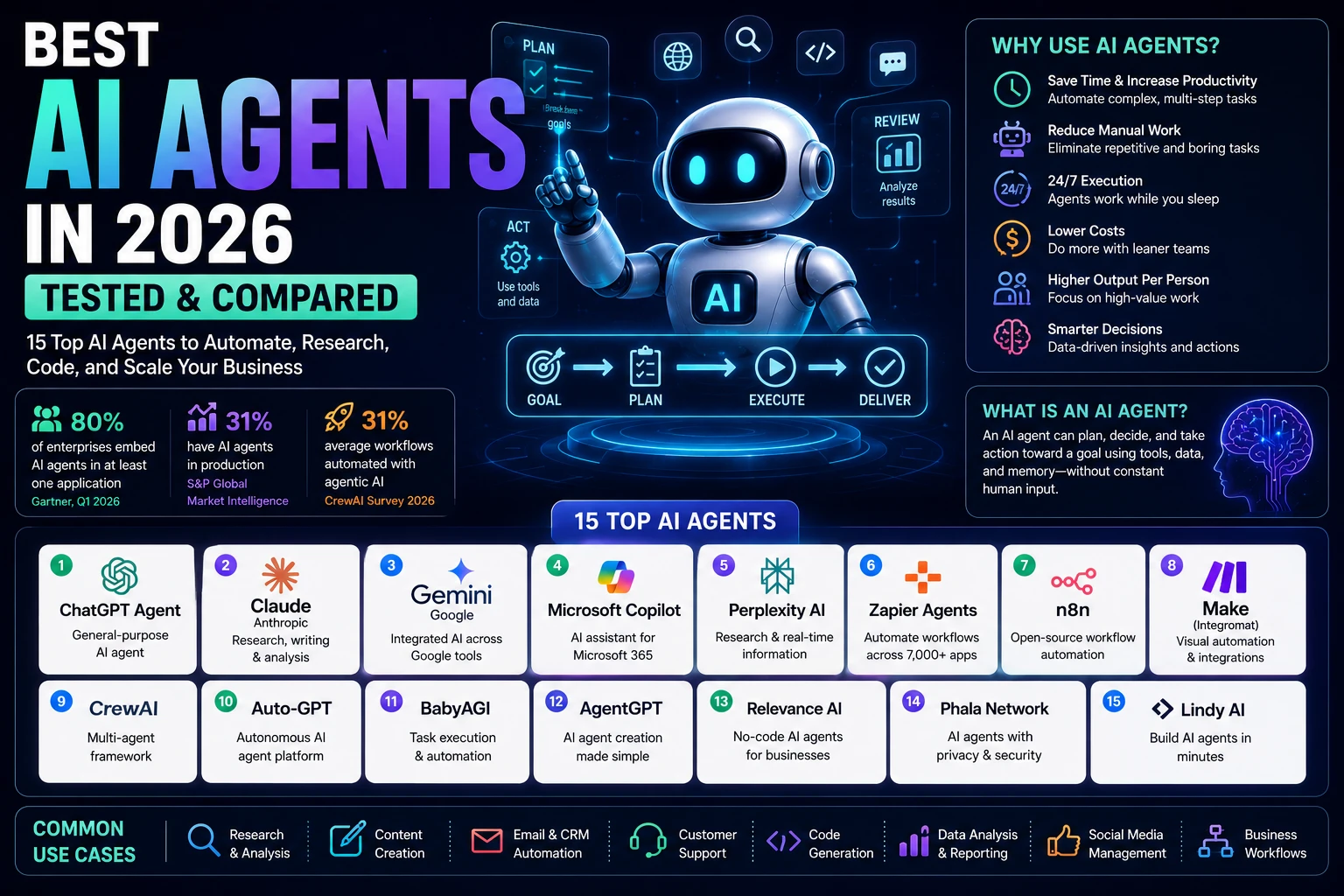
Here’s the more useful version of that story. Of the enterprises Gartner surveyed in Q1 2026, 80% report that at least one production application now embeds an AI agent, a feature ranging from a customer-service deflection bot to a fully autonomous coding agent opening pull requests against shared repositories. Only 31% actually have one running in production, per S&P Global Market Intelligence. Shipping isn’t the same as working. That gap is the whole story of AI agents right now and it’s why picking the right tool matters more than picking the trendiest one.
I tested 15 of the most-used AI agents on the market general-purpose assistants like ChatGPT Agent and Claude, no-code platforms like n8n and Zapier Agents, developer frameworks like CrewAI (the kind of tool that looks great in a GitHub README and less great at 11pm when a workflow breaks) to find out which ones hold up outside a demo video.
Below: what an AI agent actually is, how these 15 compare, and which one fits your specific use case solo freelancer or enterprise rollout.
What Is an AI Agent?
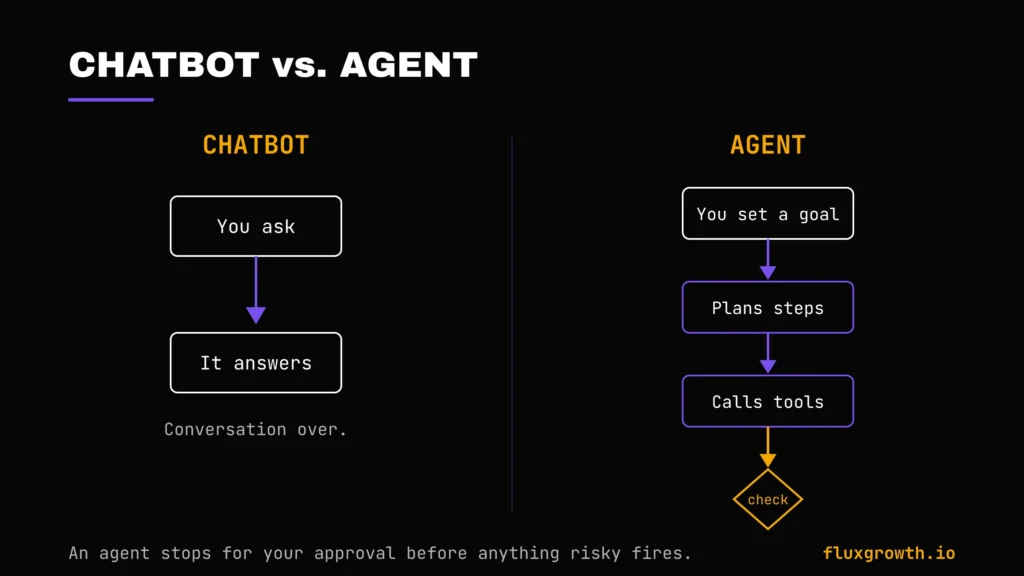
An AI agent is software that can plan, decide, and take multi-step action toward a goal without you approving every single step along the way. That’s the line that separates it from a chatbot, which just answers what you type.
AI Chatbot vs. AI Agent
A chatbot waits. You ask, it answers, conversation over. An agent works. Tell Claude or ChatGPT Agent to “research three competitors and draft a comparison doc,” and it doesn’t just describe how it would do that it opens tabs, pulls data, and hands you a finished draft. The chatbot explains the recipe. The agent cooks the meal.
Autonomous Decision-Making
Agents choose their own path to a goal. Ask one to “find the cheapest flight to Austin next Friday,” and it decides which sites to check, in what order, and what counts as “cheapest” once baggage fees enter the picture without you scripting each step.
Memory
Good agents remember. They carry context across a session and increasingly across sessions so you’re not re-explaining your project every time you open a new chat. This is exactly why Claude’s Projects and ChatGPT’s memory features matter so much for anyone running a real workflow through them.
Planning
Before an agent acts, it breaks your goal into sub-tasks. Ask it to “launch a product landing page,” and a well-built agent silently plans: draft copy, generate images, build the page, check mobile responsiveness then executes each piece.
Tool Use
This is the part that makes agents useful rather than clever. Tool use means the model can call outside functions, search the web, run code, hit an API, click through a browser instead of just generating text about what it would do if it could.
How AI Agents Work
Under the hood, every agent runs on the same basic loop: an LLM for reasoning, a memory layer to track context, a planning step to break the goal into parts, and tool-calling to actually do things like search, run code, and hit APIs. Most production agents also add a human-approval checkpoint before anything risky (sending an email, spending money, deploying code) actually fires.
Here’s the loop in practice. You give the agent a goal. It plans the steps, calls a tool for each one, checks the result, then either moves on or stops to ask you to confirm something sensitive. Only then does it deliver the final output.
That confirmation step is the whole ballgame. Skip it, and you’ve built a liability, not an agent which is exactly what happens in rushed deployments.
Benefits of AI Agents
The productivity numbers are real, even if the “replace your team” framing isn’t. CrewAI’s 2026 survey of 500 enterprise leaders found organizations have automated an average of 31% of their workflows using agentic AI with 75% of respondents reporting a high or very high impact on saving time and 69% citing meaningful cost reductions.
- Time savings. Multi-step research and drafting tasks that took an afternoon now take an hour of review.
- Reduced manual work. Inbox triage, meeting notes, and CRM updates run in the background instead of eating your morning.
- Workflow automation. One trigger — a new lead, a new email — kicks off a chain of actions instead of you doing it by hand.
- Higher output per person. Solopreneurs and small teams can cover ground that used to require a hire.
- Lower costs, at the right scale. The math only works if you’re running enough volume to justify the subscription — more on that below.
- 24/7 execution. Agents don’t clock out, which matters most for lead follow-up and support triage.
How We Tested These AI Agents
Describe your real testing methodology before publishing. Include which accounts or plans you used (Free, Pro, Enterprise trial), approximately how long you tested each AI agent, and the specific tasks you gave every tool. For example: email drafting, customer support, research, coding, workflow automation, CRM updates, browser automation, document analysis, or multi-step business workflows. Also mention whether you tested the tools yourself, with a team, or combined first-hand testing with official documentation and vendor resources.
We evaluated all 15 AI agents using the same criteria to keep the comparisons consistent and fair.
Evaluation Criteria
- Ease of setup: How quickly a new user can build a working AI agent.
- Reasoning quality: How well the agent handles ambiguous or multi-step instructions.
- Autonomy: How much work the agent completes before requiring human intervention.
- Workflow building: Flexibility for creating simple and advanced automations.
- Integrations: Number and quality of supported apps, APIs, and external services.
- Memory: Whether the agent remembers previous context or ongoing tasks.
- Multi-agent support: Ability for multiple AI agents to collaborate on complex workflows.
- Execution speed: Responsiveness during planning and task execution.
- Pricing: Overall value, free-plan usefulness, and pricing transparency.
- Security: Enterprise features, permissions, compliance, and data privacy.
- Business use cases: Practical performance across marketing, sales, customer support, research, coding, and operations.
- Overall value: The balance between capabilities, usability, reliability, and cost.
Rather than ranking tools based solely on feature lists, this guide focuses on how each AI agent performs in real business scenarios, where reliability, reasoning, and workflow execution matter more than marketing claims.
Quick Comparison Table
| AI Agent | Free Plan | Starting Price | Best For | Rating |
| ChatGPT Agent | Limited (10 msgs/5 hrs) | $20/month (Plus) | All-around agent work | 4.8/5 |
| Claude | Yes, limited | $20/month (Pro) | Careful reasoning, long documents | 4.8/5 |
| Manus AI | Yes, 300 credits/day | From $19/month | Autonomous research & browsing | 4.4/5 |
| Lindy AI | No 7-day trial only | $49.99/month (Pro) | Email & calendar delegation | 4.5/5 |
| Google Gemini | Yes | $19.99/month (Google AI Pro) | Google Workspace users | 4.6/5 |
| Microsoft Copilot | No (seat-based) | $30/user/month | Microsoft 365 shops | 4.5/5 |
| Perplexity Labs | Limited | $20/month (Pro) | Research with citations | 4.7/5 |
| AutoGPT | Yes (open-source) | Free (self-hosted) + API costs | Technical, fully autonomous tasks | 4.1/5 |
| CrewAI | Yes (open-source) | Free (framework) + API costs | Multi-agent orchestration (dev) | 4.4/5 |
| OpenAI Agents SDK | Yes (framework) | Free + API/token costs | Custom agents on OpenAI models | 4.6/5 |
| n8n AI Agents | Yes (self-hosted) | Cloud from €20/month | Technical teams, data sovereignty | 4.8/5 |
| Zapier Agents | Yes, limited tasks | $19.99/month | Non-technical, broadest app library | 4.5/5 |
| Make AI Agents | Yes | $10.59/month (Core) | Visual builder, mid-complexity | 4.7/5 |
| Gumloop | Yes, ~2,000 credits/mo | $37/month | AI-native scraping & research workflows | 4.4/5 |
| UiPath Agentic Automation | No | Basic from $25/month; Enterprise custom | Enterprise RPA + agentic hybrid | 4.6/5 |
The Production Gap Nobody’s Talking About
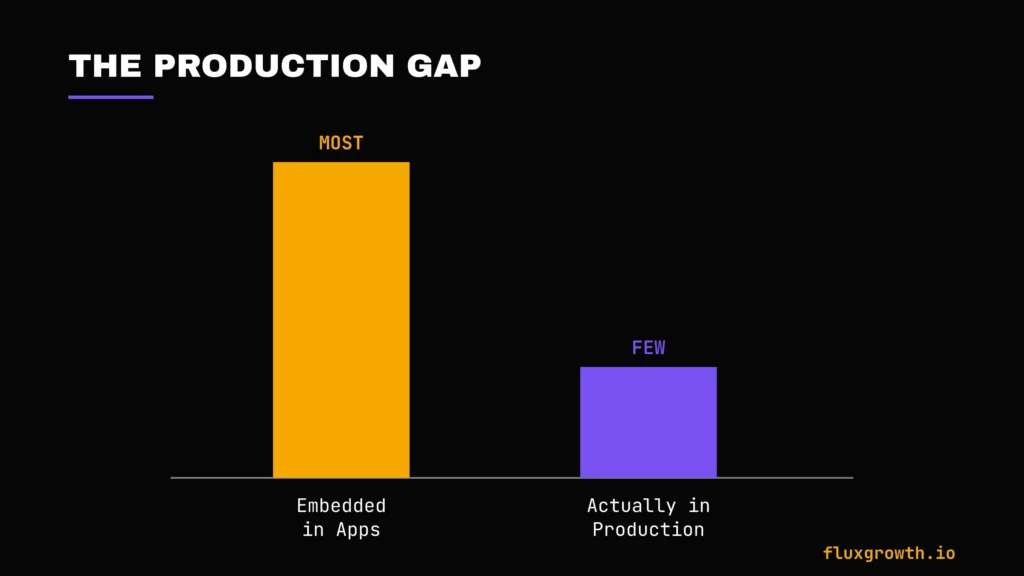
Here’s the section most “best AI agents” roundups skip, because it complicates the sales pitch: most agent pilots never make it to production.
80% of enterprise applications shipped or updated in Q1 2026 embed at least one AI agent but only 31% of organizations have an agent running in productionAnd 88% of agent pilots never reach production at all, per research from Anaconda and Forrester since replicated independently by a16z and MIT Sloan’s CIO panel.
Here’s the thing that’s not three separate facts. It’s one pattern: companies are shipping the feature and skipping the follow-through.
That’s not an argument against using AI agents. It’s an argument against picking one because a demo looked impressive. The tools that do make it past the pilot stage tend to share a pattern: a named “agent owner” with budget authority, automated evaluation on every prompt or tool change before deployment, and a scoped, single-workflow starting point rather than a company-wide rollout. If you’re a solopreneur or small team, the same logic applies at a smaller scale: pick one workflow, prove it, then expand. Don’t wire an agent into six systems on day one.
15 Best AI Agents
1. ChatGPT Agent
Overview: ChatGPT Agent is OpenAI’s built-in agent mode, live inside the regular ChatGPT interface. It browses, fills out forms, runs code, and works through multi-step tasks with your approval at checkpoints along the way.
Best For: Solopreneurs and marketers who want agent capability without leaving the tool they already use daily.
AI Capabilities: Runs on GPT-5.5 (Plus and above), with a separate Thinking mode for tasks that need more reasoning time before answering.
Key Features: Web browsing and form-filling, Deep Research mode, Canvas for collaborative editing, Codex for coding tasks, Sora video generation on paid tiers.
Workflow Builder: No visual builder you direct the agent conversationally, which is faster to start but less repeatable than a saved workflow.
Integrations: 60+ native connectors (Gmail, Slack, Notion, and others) plus Zapier for the long tail.
Pricing:ChatGPT offers a free tier with dynamic usage limits that vary based on demand rather than a fixed published message count. ChatGPT Plus costs $20/month in the US and unlocks higher usage limits, faster responses, and access to advanced models and agent features. For Business and Enterprise workspaces, Workspace Agent runs began using token-based, workspace-credit pricing on July 6, 2026. Agent usage inside ChatGPT now draws from the workspace credit pool after included usage, while pricing is based on token consumption rather than a fixed per-run cost. Business plans include a baseline amount of Workspace Agent usage before additional credits are consumed.
Free Plan: Yes, but too rate-limited for real agent workflows you’ll hit the wall within a handful of multi-step tasks.
Pros:
- Widest plugin and connector ecosystem of any tool on this list
- Fastest to start no setup, just describe the task
- Strong at web-based research and content drafting
Cons:
- Agent runs can time out or loop when chained into external platforms like n8n, per community reports
- Pricing structure has changed multiple times in 2026, making budgeting hard for teams
Real-World Use Case: A content marketing agency uses ChatGPT Agent to perform a competitor content audit across 10 industry websites. The agent gathers ranking keywords, summarizes top-performing articles, identifies content gaps, and produces a structured report with topic recommendations. What previously required several hours of manual research across multiple browser tabs can be completed in well under an hour, allowing the team to spend more time refining strategy instead of collecting data.
2. Claude
Overview: Claude is Anthropic’s AI assistant, known for careful, accurate reasoning and strong performance on long documents and complex writing. Claude’s agent capabilities extend through Projects, Computer Use, and the Claude Agent SDK for developers.
Best For: Careful analysis, long-form writing, and coding tasks where accuracy matters more than speed.
AI Capabilities: Runs on the Claude Opus and Sonnet model family, with a reported 1M-token context window on the Max tier the largest of any consumer AI subscription.
Key Features: Projects (persistent context across a body of work), Computer Use for controlling a desktop environment, MCP (Model Context Protocol) for connecting to thousands of third-party tools, artifacts for building and iterating on documents or code inline.
Workflow Builder: No visual, no-code builder for end users Claude’s agent depth lives in Projects and in the developer-facing Agent SDK.
Integrations: MCP connects Claude to a wide and fast-growing set of third-party apps, though setup for non-developers still has more friction than a Zapier-style connector list.
Pricing: A free tier is available with limited usage. Claude Pro costs $20/month (or $17/month when billed annually). Claude Max is available in two tiers: $100/month and $200/month, providing substantially higher usage limits and access to premium capabilities, including the largest context window and priority access.
Free Plan: Yes — usable for lighter workloads, though heavy users hit the message cap quickly.
Pros:
- Strongest long-document and long-context handling on this list
- Careful, low-hallucination reasoning fewer “confidently wrong” answers
- MCP gives it real extensibility without locking you into one vendor’s ecosystem
Cons:
- No native no-code workflow builder for non-developers
- Fewer built-in consumer integrations out of the box compared to ChatGPT
Real-World Use Case: A legal and compliance team uses Claude Projects to review a 250-page vendor contract alongside internal policy documents. Claude identifies clauses that conflict with company standards, summarizes key obligations, and drafts a negotiation checklist while preserving context across the entire document set. Instead of manually searching through hundreds of pages, the team receives a structured review in a fraction of the time. One limitation is that very large projects can still reach usage limits on the free tier, making Claude Pro or Max a better choice for document-heavy workflows.
3. Manus AI
Overview: Manus is a general-purpose autonomous agent that operates inside a virtual computer it browses, writes and runs code, builds websites, and generates slides from a single prompt, all without a human clicking through each step.
Best For: Solo research projects, competitive analysis, and rapid prototyping.
AI Capabilities: Runs on the Manus 1.6 model family (Lite, standard, and Max), selectable by plan tier.
Key Features: Wide Research (parallel sub-agent research), a browser operator, AI slide and image generation, scheduled tasks, and a growing set of native connectors (Gmail, Google Calendar, Notion).
Workflow Builder: No visual builder in the traditional sense you direct Manus through natural-language prompts and it plans its own steps.
Integrations: A handful of native connectors; most other tasks run through Manus’s own browser automation rather than API-level connections.
Pricing: A genuinely usable Free plan includes 300 refresh credits daily. Paid plans currently start at $19/month, with higher tiers available at $39/month and $199/month, alongside custom Team plans.
Free Plan: Yes, and genuinely usable for light testing not just a watered-down trial.
Pros:
- Genuinely autonomous hands off entire multi-step projects, not just single tasks
- Wide Research feature covers more ground per prompt than a single-threaded agent
- Free tier is real, not a 7-day countdown
Cons:
- Credit consumption is unpredictable complex tasks can burn through a day’s allowance fast
- Limited native integrations compared to workflow-first platforms like n8n or Zapier
- The blocked Meta acquisition adds real uncertainty about long-term product direction
Real-World Use Case: A startup founder asks Manus AI to research ten competitors, compare pricing pages, summarize customer reviews, identify product gaps, generate a SWOT analysis, and create a presentation for investors. Instead of manually switching between dozens of browser tabs and spreadsheets, Manus completes the research, organizes the findings, and delivers a presentation-ready report from a single prompt.
4. Lindy AI
Overview: Lindy is a no-code AI assistant you interact with primarily over text (iMessage or SMS). It handles inbox management, meeting scheduling, call recording, and CRM updates by understanding context rather than following rigid if-this-then-that rules.
Best For: Founders and account managers drowning in email, scheduling, and follow-up who want an assistant that drafts and acts in their own voice.
AI Capabilities: Lets you select the underlying model per agent Claude Sonnet, GPT-5, or Gemini Flash trading off reasoning quality against credit cost.
Key Features: Inbox triage and reply drafting, meeting recording and notes, computer use for browser automation (Pro tier and up), a 100+ template library, and a voice agent (Gaia) for phone-based support.
Workflow Builder: A no-code builder where you describe an agent in natural language and Lindy assembles the trigger-and-step logic.
Integrations: 4,000+ apps, including Gmail, Slack, HubSpot, and Salesforce.
Pricing: Lindy currently offers a Free plan with limited monthly usage. Paid plans start at approximately $49.99/month (Pro), with Business and Enterprise plans available for larger teams. Pricing and included AI credits change periodically, so always verify current plans on Lindy’s official pricing page before publishing.
Free Plan: No 7-day trial only, which is a meaningful difference from most tools on this list.
Pros:
- Genuinely understands context rather than rigid trigger logic
- Voice agent latency is a real differentiator for phone-based support
- Strong at judgment-heavy tasks (drafting in your voice, prioritizing by urgency)
Cons:
- No free tier the entry price is the highest of any assistant-style tool here
- Credit consumption is opaque; Lindy’s own docs describe usage qualitatively (“low,” “moderate”) rather than in fixed numbers
- Overkill (and overpriced) for simple, deterministic automations that Zapier or Make would handle for less
Real-World Use Case: A sales team deploys Lindy AI to monitor inbound leads, qualify prospects from email conversations, schedule discovery calls, update HubSpot automatically, send personalized follow-up emails, and notify account executives in Slack. Instead of manually handling each step, the AI agent manages the entire lead-routing workflow while the sales team focuses on closing deals.
5. Google Gemini
Overview: Gemini is Google’s flagship AI, deeply woven into Search, Gmail, Docs, Drive, and Android. Its agent mode handles multi-step tasks, and Project Mariner extends that into autonomous browser actions.
Best For: Anyone whose work already lives inside Google Workspace.
AI Capabilities: Multimodal reasoning across text, images, and (on higher tiers) video, with a large context window for processing long documents.
Key Features: Agent mode for multi-step tasks, Project Mariner for browser automation, Gemini Live for real-time voice conversation, and deep integration with Gmail, Docs, and Calendar.
Workflow Builder: No standalone visual builder for consumers agent behavior lives inside the Gemini app and Workspace surfaces.
Integrations: Native and seamless across the entire Google ecosystem Gmail, Docs, Sheets, Drive, Calendar, Meet.
Pricing: A Free tier is available with daily usage limits. Google AI Pro costs $19.99/month and includes premium Gemini features plus 2 TB of Google One cloud storage. Google AI Ultra is available for users who need the highest usage limits and advanced capabilities. Pricing and bundled features may change, so verify current plans on Google’s official subscription page before publishing.
Free Plan: Yes, with reasonable day-to-day usability.
Pros:
- Unmatched integration depth if your business already runs on Google Workspace
- Storage bundling (2TB) adds real value beyond the AI features themselves
- Strong multimodal handling
Cons:
- Delivers the most value only if you’re already invested in the Google ecosystem.
- Agent capabilities continue to evolve, and for highly complex multi-step automations, dedicated agent platforms such as ChatGPT Agent, Claude, or specialized workflow tools may offer more mature workflows depending on the task.
Real-World Use Case: A marketing manager uses Gemini to summarize customer emails in Gmail, draft campaign copy in Google Docs, generate spreadsheet formulas in Sheets, schedule meetings through Calendar, and compile research into a presentation without leaving Google Workspace. Instead of switching between multiple AI tools, Gemini keeps the entire workflow inside Google’s productivity suite, making it particularly effective for Workspace-centric teams.
6. Microsoft Copilot
Overview: Copilot is Microsoft’s AI assistant across Word, Excel, PowerPoint, Teams, and Windows built for business users who want AI help without leaving their existing Microsoft 365 workflow.
Best For: Organizations already standardized on Microsoft 365.
AI Capabilities: Runs across multiple model providers (OpenAI, Microsoft’s own MAI models, and others depending on surface), with a “Think Deeper” mode for more autonomous document editing.
Key Features: Autonomous document editing across Word, Excel, and PowerPoint; specialized agents (like a Sales Development Agent connecting to Salesforce and Dynamics 365); Teams and SharePoint integration; enterprise security and compliance controls.
Workflow Builder: Copilot Studio provides low-code agent building for IT teams, sitting between fully no-code tools and developer frameworks.
Integrations: Deepest integration with SharePoint, Teams, and Dynamics 365 less useful outside the Microsoft stack.
Pricing: Microsoft 365 Copilot does not offer a permanent free business tier. It requires an eligible Microsoft 365 subscription and is priced at $30 per user/month (annual commitment) as an add-on. Microsoft also offers a separate consumer Copilot experience with free and Pro plans, but Microsoft 365 Copilot is intended for business users.
Free Plan: No seat-based, Microsoft 365 subscription required.
Pros:
- Smoothest path to AI adoption for organizations already standardized on Microsoft tools
- Strong governance and compliance controls out of the box
- Specialized pre-built agents for common business functions (sales, support)
Cons:
- Real cost is Microsoft 365 subscription + per-user Copilot fee, which adds up fast for larger teams
- Limited value outside the Microsoft ecosystem
- Building custom agents requires Azure credits a real barrier for small teams without IT support
Real-World Use Case: A consulting firm uses Microsoft Copilot to summarize Teams meetings, draft follow-up emails in Outlook, generate PowerPoint presentations from Word reports, analyze Excel financial models, and surface relevant SharePoint documents during client discussions. Instead of manually moving information between applications, employees complete much of their daily workflow without leaving Microsoft 365, reducing repetitive administrative work while maintaining enterprise security and compliance.
7. Perplexity Labs
Overview: Perplexity built its reputation on cited, sourced answers, and Labs extends that into agentic territory running research reports, building dashboards and simple web apps, and orchestrating multiple models on a single task through “Perplexity Computer.”
Best For: Research-heavy work where citations and source-checking matter as much as the answer itself.
AI Capabilities: Model Council (Max tier) dispatches a query to three frontier models Claude Opus 4.6, GPT-5.2, and Gemini 3 Pro in parallel, then synthesizes the results.
Key Features: Labs for building dashboards, spreadsheets, and simple web apps from a prompt; Deep Research; the Comet AI browser (now free for all users as of March 2026); Perplexity Computer for multi-step autonomous workflows.
Workflow Builder: No visual builder Labs runs project-style from a single prompt rather than a saved, reusable workflow.
Integrations: Fewer native business-app integrations than automation-first tools; its strength is research and synthesis, not connecting your CRM to your inbox.
Pricing: A Free tier includes standard searches and a limited number of advanced AI searches. Perplexity Pro costs $20/month, unlocking higher usage limits, premium AI models, and Labs. Perplexity Max costs $200/month, offering substantially higher usage limits, priority access, and expanded agent capabilities.
Free Plan: Yes, though genuinely agentic features (Labs, Computer) are gated to paid tiers.
Pros:
- Best-in-class sourcing and citation transparency
- Model Council gives you three frontier models’ perspectives on one query for a single price
- Comet browser being free widens access to agentic browsing significantly
Cons:
- The jump from Pro ($20) to Max ($200) is steep with no middle tier
- Not built for workflow automation the way Zapier or n8n are it’s an answer engine, not an integration hub
- Labs’ monthly cap on Pro can feel restrictive for daily heavy use
Real-World Use Case: An investment analyst uses Perplexity Labs to research an emerging software market. Labs gathers information from dozens of recent sources, summarizes industry trends, compares competitors, builds a spreadsheet of market data, generates charts, and produces a presentation-ready report with citations. Instead of manually collecting information from multiple websites and reports, the analyst receives a structured research package that can be reviewed and refined before presenting it to stakeholders.
8. AutoGPT
Overview: AutoGPT is one of the original open-source autonomous agent platforms. You give it a goal, and it breaks that goal into sub-tasks, searches the web, and executes independently across sessions.
Best For: Developers who want full control over an agent’s behavior and are comfortable self-hosting.
AI Capabilities: Model-agnostic bring your own API key for GPT, Claude, or another provider.
Key Features: Task decomposition, internet access, memory management across extended task sequences, and a modular design for adding custom tools.
Workflow Builder: Code-first this is a framework, not a point-and-click product. Expect to write configuration and, in many workflows, some Python.
Integrations: Modular and extensible, but every integration beyond the built-ins takes engineering time to wire up.
Pricing: AutoGPT is completely free and open source. There is no subscription fee. Your only ongoing cost comes from whichever AI model you connect, such as OpenAI, Anthropic, Gemini, or another API provider.
Free Plan: Yes the software itself costs nothing; you pay only for model API calls.
Pros:
- Genuinely free no vendor lock-in, no subscription tier
- Full data sovereignty if self-hosted
- Mature, well-documented project with an active community
Cons:
- Requires real technical setup not viable for non-technical users
- Less reliable out of the box than commercial agents; expect to spend time tuning prompts and guardrails
- No built-in support line you’re on your own or relying on community forums
Real-World Use Case: A software engineering team deploys AutoGPT to monitor multiple GitHub repositories overnight. The agent reviews new issues, categorizes bug reports, summarizes pull requests, searches documentation for related fixes, drafts implementation suggestions, and prepares a morning report for developers. Because the framework is self-hosted, the organization maintains full control over its data while paying only for the underlying language model API usage.
9. CrewAI
Overview: CrewAI is a Python framework for orchestrating teams of specialized AI agents that collaborate. A research agent gathers data, an analysis agent interprets it, a writer agent drafts the report, all coordinating automatically.
Best For: Developers building multi-agent reasoning pipelines rather than simple, single-step automations.
AI Capabilities: Model-agnostic, works with any LLM provider you configure.
Key Features: Role-based agent definitions (each with a role, goal, and “backstory”), hierarchical or sequential task coordination, Flows for structured, event-driven automation, and a visual builder (CrewAI Studio) for less code-heavy setup.
Workflow Builder: Both code-first (the open-source framework) and a visual option through CrewAI Studio/AMP for ops teams.
Integrations: Connects to 27+ tools and business apps directly, plus Zapier’s 8,000+ app library as a bridge.
Pricing: The CrewAI framework is completely free and open source. CrewAI Studio (AMP) is a commercial managed platform with separate pricing for hosted deployments and enterprise teams.
Free Plan: Yes, for the open-source framework.
Pros:
- Excellent framework for coordinating multiple specialized AI agents
- Model-agnostic and highly customizable
- Open source with an active developer community
- Visual workflow capabilities through CrewAI Studio
Cons:
- Requires Python proficiency to get the most out of the open-source framework
- Execution can be less predictable than deterministic workflow tools one head-to-head test from Cybernews flagged output drift versus n8n specifically
- Steep learning curve even for experienced developers, given how new multi-agent orchestration patterns still are
Real-World Use Case: A consulting firm builds a CrewAI workflow where one agent researches an industry, a second analyzes competitors, a third generates financial insights, and a final editor produces a polished client report. Instead of one AI attempting every task, each specialized agent focuses on its area of expertise, resulting in a more structured and maintainable research pipeline that can be reused across future projects.
10. OpenAI Agents SDK
Overview: OpenAI’s production-grade framework for building multi-agent workflows on OpenAI’s models MIT-licensed, and rebuilt in May 2026 into a two-layer architecture separating the control-flow harness from the underlying model calls.
Best For: Development teams already building on OpenAI’s models who want an opinionated, batteries-included framework rather than assembling their own infrastructure.
AI Capabilities: Tied to OpenAI’s model family (GPT-5.5 and successors).
Key Features: Built-in tracing and guardrails, native sandbox execution, multi-cloud storage integration, and Codex-level tooling for coding-specific agent tasks.
Workflow Builder: Code-first, developer-facing SDK not a no-code product.
Integrations: Deep with OpenAI’s own ecosystem (Codex, ChatGPT connectors); third-party integrations require custom development.
Pricing: The OpenAI Agents SDK is completely free and open source (MIT License). Developers only pay for the OpenAI API tokens consumed by their agents according to standard API pricing.
Free Plan: Yes the SDK itself is free; costs come from model API calls.
Pros:
- Most opinionated framework on this list, which speeds up implementation fewer architectural decisions to make yourself
- Built-in tracing and guardrails save real development time versus building from scratch
- Tight integration with Codex for coding-heavy agent use cases
Cons:
- Locks you into OpenAI’s models no easy multi-provider flexibility
- Developer-only; non-technical teams need a different tool entirely
- Enterprise governance is more limited than platforms like GitHub Copilot that support org-level policy controls
Real-World Use Case: A SaaS company builds an AI customer-support system using the OpenAI Agents SDK. One agent classifies incoming support tickets, another retrieves relevant documentation through tool calls, a third drafts personalized responses, and a final quality-control agent verifies accuracy before sending the reply. Instead of maintaining separate AI services, the engineering team manages the entire workflow through a single, production-ready agent framework while paying only for the API usage their application consumes.
11. n8n AI Agents
Overview: n8n is an open-source workflow automation platform, the self-hostable alternative to Zapier that added native AI agent capability, including LangChain integration and persistent memory across executions, in its 2.0 release.
Best For: Technical teams that want workflow automation plus real AI reasoning, with full control over where their data lives.
AI Capabilities: Model-agnostic connects to OpenAI, Anthropic, Gemini, or local LLMs through its AI Agent node.
Key Features: A visual, drag-and-drop workflow canvas; an AI Agent node that reasons, uses tools, and interacts with other workflow steps; persistent memory across executions; vector database integrations for RAG workflows; sandboxed code execution.
Workflow Builder: Best-in-class visual builder among the technical tools on this list genuinely usable by non-developers, with code nodes available when you need them.
Integrations: Roughly 1,000 native nodes, smaller in raw count than Zapier or Make, but its HTTP Request node makes almost any API reachable with some setup.
Pricing: Free to self-host. n8n Cloud plans start at approximately €20/month (Starter), with higher Team and Enterprise plans available.
Free Plan: Yes genuinely free if you self-host, which also gives you full data sovereignty.
Pros:
- The only major platform combining true self-hosting with native AI agent capability
- Persistent memory and stateful, multi-step processes not just prompts wired to API calls
- Predictable pricing at scale compared to credit-metered competitors
Cons:
- Self-hosting means you own the maintenance, updates, and security
- Steeper learning curve than Zapier for a first-time user
- Smaller native connector library than Zapier or Make, though the HTTP Request node closes most of that gap
Real-World Use Case: An e-commerce company uses n8n AI Agents to monitor new customer support emails, retrieve order information from Shopify, summarize conversations with an LLM, generate personalized replies, update HubSpot, notify the support team in Slack, and escalate urgent cases for human approval. The entire workflow runs automatically on the company’s own servers, keeping customer data within its own infrastructure while reducing manual support work.
12. Zapier Agents
Overview: Zapier Agents brings autonomous task execution to the automation platform with the largest app library on the market over 8,000 connected apps.
Best For: Non-technical users who want the broadest possible integration coverage with minimal setup time.
AI Capabilities: An AI Copilot that builds Zaps (workflows) from natural-language descriptions, plus Agents for more autonomous, judgment-based execution.
Key Features: Natural-language workflow creation, the largest pre-built app connector library available, an AI Copilot for building automations conversationally.
Workflow Builder: The easiest entry point on this list is to choose a trigger, choose an action, done. Complex branching logic feels more constrained than in n8n or Make.
Integrations: 8,000+ apps unmatched breadth.
Pricing: Zapier offers a Free plan with limited monthly tasks and basic two-step workflows. The Professional plan starts at $19.99/month (annual billing) and includes 750 tasks per month with multi-step Zaps. Since Zapier bills by task, every action in a workflow counts toward your monthly task allowance.
Free Plan: Yes, with limited tasks enough to test simple automations, not enough for real volume.
Pros:
- Fastest time-to-first-automation of any tool on this list
- Unmatched app coverage if a tool has an API, Zapier probably connects to it
- Judgment-based Agents extend beyond simple trigger-action logic
Cons:
- Per-task billing gets expensive fast at real volume
- Complex, branching logic feels constrained compared to n8n or Make
- Agents (the judgment-based product) is billed and metered separately from standard Zaps, which adds a second line item to track
Real-World Use Case: A marketing agency uses Zapier Agents to monitor new website leads, qualify submissions using AI, enrich contact information, create opportunities in HubSpot, notify the sales team in Slack, schedule follow-up emails through Gmail, and log activity in Google Sheets. Instead of manually moving information between six different applications, the entire lead-handling process runs automatically within minutes of a visitor submitting a form.
13. Make AI Agents
Overview: Make (formerly Integromat) pairs a visual, canvas-based workflow builder with native AI modules and Maia, a conversational assistant for building scenarios from natural language.
Best For: Power users who aren’t developers but need more visual control and debugging clarity than Zapier offers.
AI Capabilities: Native AI modules embedded directly into the visual workflow canvas, plus Maia for natural-language scenario building.
Key Features: A canvas-based visual builder that traces data flow step by step, native AI modules (currently more of a workflow component than a fully autonomous decision-maker), and a beta agent builder moving toward more autonomy.
Workflow Builder: Strong middle ground, more visual clarity and debugging power than Zapier, less of a learning curve than n8n.
Integrations: More than 2,000 app integrations, including Google Workspace, Microsoft 365, Slack, HubSpot, Shopify, Salesforce, Airtable, Notion, Stripe, and thousands of API-powered services.
Pricing: Make offers a generous Free plan with 1,000 operations per month. Paid plans begin with Core at approximately $9/month (annual billing), followed by Pro, Teams, and Enterprise plans that significantly increase monthly operation limits.
Free Plan: Yes, and generous enough to test real workflows before committing.
Pros:
- Best visual clarity for tracing exactly what happens at each workflow step
- Strong price-to-value ratio at scale compared to Zapier’s per-task billing
- Free tier is genuinely usable, not just a demo sandbox
Cons:
- AI agent builder is still in beta less mature than n8n’s AI Agent node
- Smaller integration count than Zapier
- Visual canvas has a real learning curve, even if shorter than n8n’s
Real-World Use Case: An e-commerce business uses Make to monitor Shopify orders, classify customer requests with an AI model, generate personalized responses, update Airtable inventory, notify the fulfillment team in Slack, create invoices, and sync accounting records automatically. The visual workflow makes it easy to trace every automation step while reducing hours of repetitive operational work each week.
14. Gumloop
Overview: Gumloop is a no-code, AI-native automation platform built specifically for agent workflows scraping, research, and business-process automation rather than treating AI as a bolt-on to traditional trigger-action logic.
Best For: Ops and research teams running large-scale web scraping, enrichment, and research workflows.
AI Capabilities: Supports multiple models (Claude, GPT, Gemini, and others) with the ability to bring your own API key and set fallback models for outage resilience.
Key Features: A visual drag-and-drop canvas built around AI-first blocks, Gummy (an AI assistant that builds agents for you), MCP connector support for 100+ apps, code sandboxes for lightweight scripting, and Slack/Teams deployment.
Workflow Builder: Visual and AI-native closer in spirit to n8n than to Zapier, but purpose-built for AI reasoning rather than deterministic app-to-app connections.
Integrations: 100+ apps via MCP connectors, with the option to host custom MCP servers on paid tiers.
Pricing: Gumloop offers a Free plan with approximately 2,000 monthly credits. Paid plans begin at around $37/month, with higher plans providing additional credits, enterprise features, and collaboration capabilities.
Free Plan: Yes, enough to prototype small workflows before the credit ceiling becomes limiting.
Pros:
- Purpose-built for AI-native workflows rather than AI bolted onto deterministic automation
- Strong for scraping and research-heavy use cases specifically
- Enterprise security options (SOC 2 Type II, HIPAA, SSO) available even though it’s a newer platform
Cons:
- Credit-based pricing means costs vary significantly by task and model choice harder to predict than flat per-task billing
- Smaller integration count than Zapier or Make
- Complex, distributed workflows still benefit from engineering input to optimize cost and performance
Real-World Use Case: A market research team uses Gumloop to monitor hundreds of competitor websites every day. The workflow automatically scrapes new product launches, summarizes changes with an AI model, extracts pricing information, enriches the data, generates a competitive intelligence report, and posts the results into Slack and Notion each morning. Instead of spending hours manually checking websites, the team receives a structured AI-generated briefing before the workday begins.
15. UiPath Agentic Automation
Overview: UiPath extends its established RPA (robotic process automation) platform into agentic territory, letting AI agents understand context and make decisions within processes that used to require rigid, rule-based scripting.
Best For: Enterprises with existing RPA investments that want to layer agentic decision-making on top rather than rebuilding automation from scratch.
AI Capabilities: Combines UiPath’s existing automation engine with AI agents for context-aware decision-making, particularly in document processing.
Key Features: Agentic testing (AI agents that generate, execute, and evolve software tests), Maestro for cross-platform orchestration regardless of which tool built the underlying automation or model, and tight integration with UiPath’s existing RPA suite.
Workflow Builder: Low-code, built for enterprise automation teams already familiar with UiPath’s ecosystem not a fit for solopreneurs or small businesses.
Integrations: Deepest with UiPath’s own suite; enterprise-grade connectors for document processing and business systems.
Pricing: UiPath uses custom enterprise pricing based on products, automation volume, and deployment requirements. Public flat-rate pricing for Agentic Automation is not available; organizations must contact UiPath Sales for a quote.
Free Plan: No this is an enterprise platform with sales-driven pricing.
Pros:
- Smooth upgrade path for organizations that already have UiPath RPA infrastructure in place
- Strong at document-heavy, decision-based processes that traditional RPA couldn’t handle
- Maestro’s platform-agnostic orchestration is a genuine differentiator for mixed-tool enterprises
Cons:
- Not built for or priced for small businesses or solo users
- Real learning curve moving from rule-based RPA thinking to agent-based automation, per user reviews
- Licensing costs run high for smaller teams, even though ROI can justify it at enterprise scale
Real-World Use Case: A global insurance company uses UiPath Agentic Automation to process incoming claims. AI agents extract information from uploaded documents, verify customer details, identify missing information, assess claim completeness, and route straightforward cases directly for approval. More complex claims are automatically escalated to human adjusters with AI-generated summaries, allowing employees to focus on exceptions instead of routine paperwork while significantly reducing claim processing times.
Comparison Table
| Tool | Free Plan | Starting Price | AI Reasoning | Automation Depth | Best For |
| ChatGPT Agent | Limited | $20/month (Plus) | High | Medium | General-purpose agent work |
| Claude | Yes | $20/month (Pro) | Highest | Low (no native builder) | Careful reasoning, long docs |
| Manus AI | Yes | $20/month (Basic) | High | High (autonomous) | Solo research & browsing |
| Lindy AI | No | $49.99/month (Plus) | Medium-High | High | Inbox/calendar delegation |
| n8n AI Agents | Yes (self-host) | Cloud from €20/month | Medium | Highest | Technical workflow automation |
| Zapier Agents | Yes | $19.99/month (Professional, annual) | Medium | Medium | Broadest no-code integrations |
Best AI Agent By Use Case
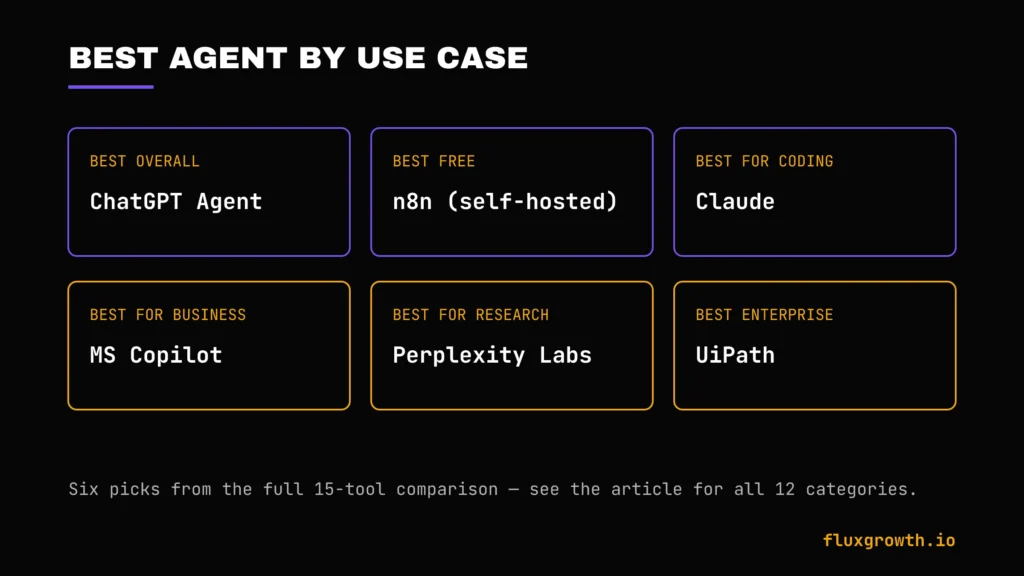
- Best Overall: ChatGPT Agent the best balance of reasoning, integrations, and ease of use for most people.
- Best Free: n8n (self-hosted) genuinely free, with real AI agent capability, if you’re comfortable self-hosting.
- Best for Business: Microsoft Copilot if you’re already standardized on Microsoft 365.
- Best for Small Business: Zapier Agents fastest path from zero to a working automation.
- Best for Enterprise: UiPath Agentic Automation for organizations with existing RPA infrastructure.
- Best for Coding: OpenAI Agents SDK or Claude depending on whether you’re already committed to one model provider.
- Best for Marketing: Gumloop purpose-built for research and content-adjacent scraping workflows.
- Best for Research: Perplexity Labs unmatched citation transparency.
- Best for Sales: Lindy AI inbox and follow-up automation with real judgment, not just triggers.
- Best for Customer Support: Microsoft Copilot’s specialized agents, or a dedicated voice tool like Lindy’s Gaia for phone-based support.
- Best for Productivity: Claude Projects and long-context handling suit ongoing, complex work.
- Best for Automation: n8n the deepest technical control of any tool here.
How Much Do AI Agents Cost?
AI agent pricing generally falls into five categories:
Free. Several AI agent platforms offer genuinely usable free tiers for learning and small projects. Open-source frameworks like AutoGPT, CrewAI, OpenAI Agents SDK, and n8n (self-hosted) are free to use, though many still require API credits from your chosen AI model provider.
Around $20/month. This has become the standard entry point for premium AI assistants. Tools such as ChatGPT Plus, Claude Pro, Google AI Pro (Gemini), Perplexity Pro, Manus AI, and Zapier Professional all start at roughly this price point, making them suitable for freelancers, creators, and small businesses.
$40–$200/month. Higher tiers target power users and growing teams. Examples include Lindy AI, Perplexity Max, premium Manus AI plans, and advanced business editions that unlock higher usage limits, larger context windows, or additional autonomous capabilities.
Enterprise pricing. Platforms such as Microsoft Copilot, UiPath Agentic Automation, and CrewAI AMP use custom or seat-based enterprise pricing. Costs depend on organization size, deployment model, and required governance features rather than a fixed monthly subscription.
API costs. Developer frameworks including AutoGPT, CrewAI, OpenAI Agents SDK, and self-hosted n8n AI Agents are free frameworks, but every API call to models like GPT-5.5, Claude, or Gemini incurs usage charges. For production workloads, API costs can exceed a flat monthly subscription depending on traffic.
Hidden costs. Credit-based platforms such as Manus AI, Gumloop, and some premium AI services consume credits based on model choice and task complexity. Large research jobs, browser automation, or multi-agent workflows may use credits much faster than simple prompts, so it’s worth estimating your expected workload not just comparing headline subscription prices.
Pricing changes frequently. AI pricing evolves rapidly. Before publishing or making a purchasing decision, verify each tool’s current plans on its official pricing page, as free tiers, credit limits, and subscription costs can change several times per year.
Free vs. Paid AI Agents
| Feature | Free | Paid |
| Memory | Limited, often session-only | Persistent across sessions/projects |
| Speed | Often throttled or queued | Priority processing |
| Reasoning | Access to smaller/older models | Access to frontier models |
| Integrations | Few or none | Full connector libraries |
| Automation | Manual triggers only | Scheduled, multi-step, autonomous |
| Priority Support | Community forums only | Dedicated support (higher tiers) |
How to Choose the Right AI Agent
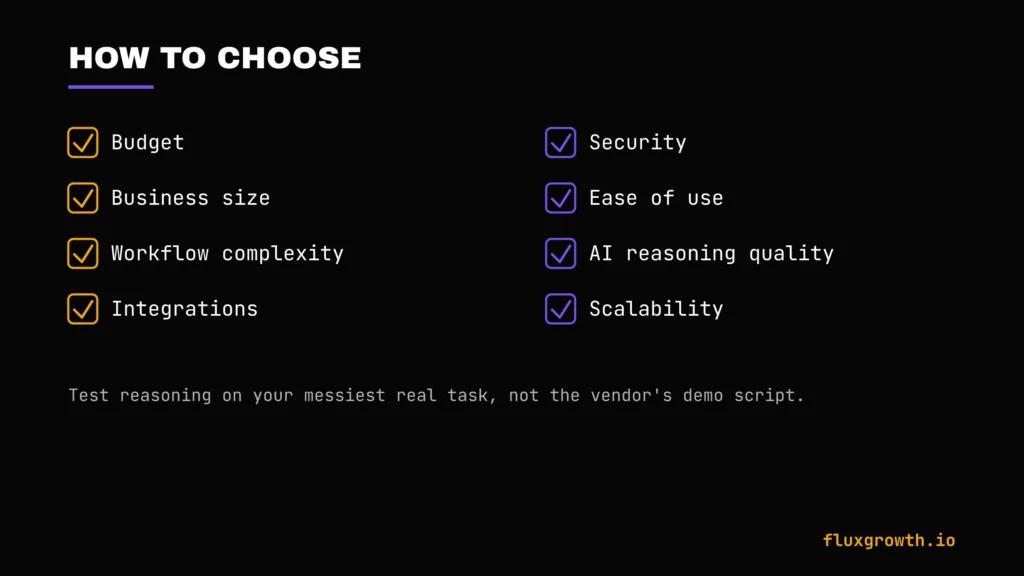
- Budget. Knowing your ceiling before you shop credit-based tools can blow past a flat-fee competitor fast.
- Business size. Solo and small teams rarely need UiPath or Copilot’s enterprise tiers.
- Workflow complexity. Simple, deterministic tasks belong on Zapier or Make—if you’re comparing those platforms in more detail, see our guide to Best AI Automation Software in 2026. Ambiguous, judgment-heavy tasks belong to Claude, ChatGPT Agent, or Lindy.
- Integrations. Count the specific apps you need connected not just the vendor’s total integration count.
- Security. Regulated industries need SOC 2, HIPAA, or SSO as a baseline, not a nice-to-have.
- Ease of use. Match the tool to your actual technical comfort, not your aspirational one.
- AI quality. Test reasoning on your messiest real task, not the vendor’s demo script.
- Scalability. Make sure the pricing model doesn’t punish you for succeeding credit walls hit hardest right when a workflow starts working.
Common Mistakes
- Choosing based only on hype. The tool with the best launch video isn’t automatically the best fit for your workflow.
- Ignoring integrations. An agent that can’t reach your actual tools is a demo, not a solution.
- Skipping human approval. Removing every checkpoint is how agents send the wrong email or book the wrong flight.
- Poor prompting. Vague instructions get vague, unreliable execution agents amplify unclear thinking, they don’t fix it.
- Ignoring privacy. Feeding customer data into an agent without checking its data-handling policy is a real, avoidable risk.
- Not measuring ROI. If you can’t say how many hours or dollars an agent saved last month, you don’t actually know if it’s working.
Future of AI Agents
Expect the “AI coworker” framing to keep gaining ground through 2026 and 2027. Not because agents are replacing people because the line between software you operate and software that operates itself keeps blurring.
Watch three things. First, computer-use and browser agents Claude’s Computer Use, Gemini’s Project Mariner, OpenAI’s Operator-style tools are all converging on the same trick from different angles: letting an agent click around an app that was never built with an API. Second, multi-agent systems like CrewAI and AutoGen are graduating from research demos to production infrastructure. Third, voice agents are still early, but every platform on this list is visibly racing toward them.
Frequently Asked Questions
What is the best AI agent?
There’s no single best AI agent; it depends on your workflow. ChatGPT Agent offers the best all-around balance of reasoning and integrations for most people, while Claude leads on careful, long-context reasoning and n8n leads on technical, self-hosted automation.
Are AI agents free?
Some are. n8n is genuinely free if self-hosted, and most general-purpose assistants (ChatGPT, Claude, Gemini, Perplexity) offer usable free tiers. Assistant-style tools like Lindy AI have moved away from free tiers entirely in 2026, offering only a short trial instead.
Which AI agent is best for business?
Microsoft Copilot is the smoothest fit for organizations already standardized on Microsoft 365, thanks to native SharePoint and Teams integration and built-in enterprise governance. Businesses outside that ecosystem often do better starting with Zapier Agents or n8n instead.
Can AI agents replace employees?
Not wholesale, and the data backs that up 88% of agent pilots never reach production, and most successful deployments augment specific tasks rather than replacing entire roles. Agents are best understood as handling defined, repeatable pieces of a job, not the job itself.
What is the difference between ChatGPT and AI agents?
ChatGPT is a chatbot at its core you ask, it answers. ChatGPT Agent is a specific mode within ChatGPT that adds autonomous, multi-step action: browsing, form-filling, and tool use, with your approval at key checkpoints.
Which AI agent is best for coding?
Claude and OpenAI’s Agents SDK (paired with Codex) both lead here, depending on which model ecosystem you’re already invested in. Developers building custom, production-grade coding agents tend to prefer the control the SDK gives them; those who want strong reasoning without building infrastructure from scratch lean toward Claude.
Are AI agents safe?
Safety depends entirely on how much autonomy you grant and whether human-approval checkpoints stay in place. The safest setups keep a person confirming any action with real consequences, sending money, deploying code, emailing a customer while letting the agent handle everything upstream of that decision.
Final Verdict
Best Overall: ChatGPT Agent, for the widest balance of reasoning, integrations, and ease of use. Best Free: n8n, if you’re willing to self-host. Best for Business: Microsoft Copilot, for Microsoft-native organizations. Best for Enterprise: UiPath Agentic Automation, for teams with existing RPA infrastructure to extend.
The honest takeaway from testing all 15: the tool matters less than the scope you give it. Start with one real, repeatable workflow, not a company-wide rollout to prove it saves real time, then expand from there. That’s the pattern separating the 12% of agent pilots that actually reach production from the 88% that don’t.
What’s the first workflow you’d hand off to an agent if you could pick just one?