FluxGrowth is reader-supported. Some links in our guides are affiliate links — if you buy through one we may earn a commission, at no extra cost to you. It never changes which tools we recommend. How we test tools.
You’ve got a lead form, a CRM, a Slack channel, and a spreadsheet someone updates by hand every Friday. Automation would fix that. Then you open three pricing pages, hit “credits,” “executions,” and “web-hooks,” and close every tab.
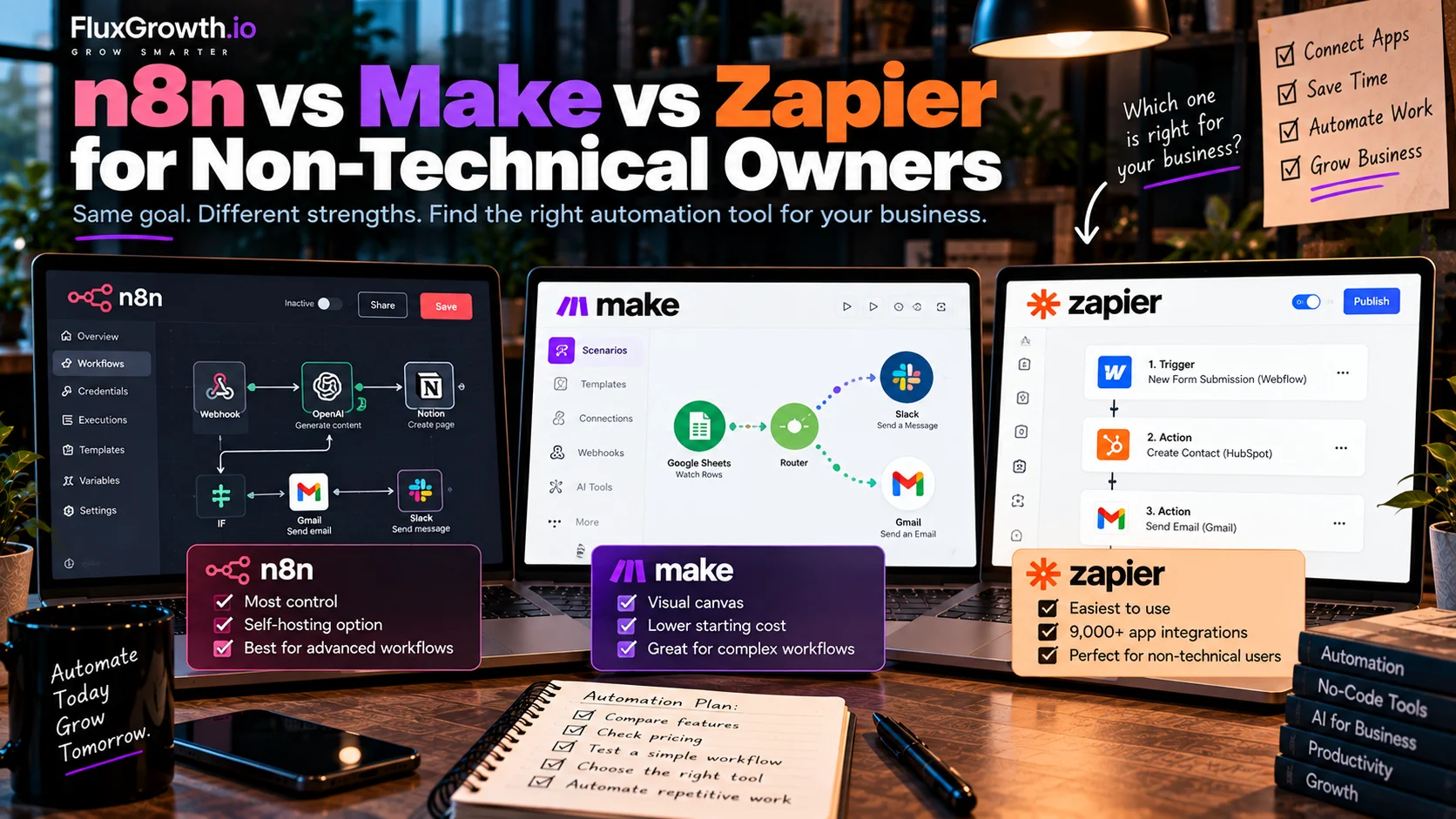
That’s the real problem with n8n vs Make vs Zapier. All three connect your apps. They just bill differently and expect different skills. Zapier is the easiest to start with and connects to 9,000+ apps. Make gives you a visual canvas for branching workflows at a lower entry price. n8n gives you the most control, including running it on your own server, and asks the most of you in return.
This guide compares them on ease of use, pricing, AI, and data control, for owners and marketers who don’t write code.
What are n8n, Make, and Zapier?
All three are workflow automation platforms. They watch for an event in one app, then perform actions in other apps without someone having to do each step manually. The main difference is how you build workflows, how much control you get, and where the automation runs.
A few terms you’ll see on every automation platform:
- Trigger: The event that starts a workflow, such as a new form submission, email, or CRM lead.
- Action: What the workflow does after the trigger, such as creating a CRM contact, sending an email, or updating a spreadsheet.
- Web-hook: A way for one application to send data to another application over the internet when an event occurs. Web-hooks can trigger workflows immediately instead of relying on periodic polling.
- API: A defined interface that allows software applications to communicate with another service and request or send data. See API by Zapier — Zapier Help
- Workflow run: One complete execution of a workflow from its trigger through its configured steps. In Make, for example, a scenario is an automated workflow made up of modules that perform specific tasks.
What is Zapier?
Zapier is a no-code automation platform. Each workflow, called a Zap, is a trigger followed by one or more actions. You build it one step at a time, and the editor asks a plain question at each step. That’s why it’s usually the first tool non-technical teams try.
What is Make?
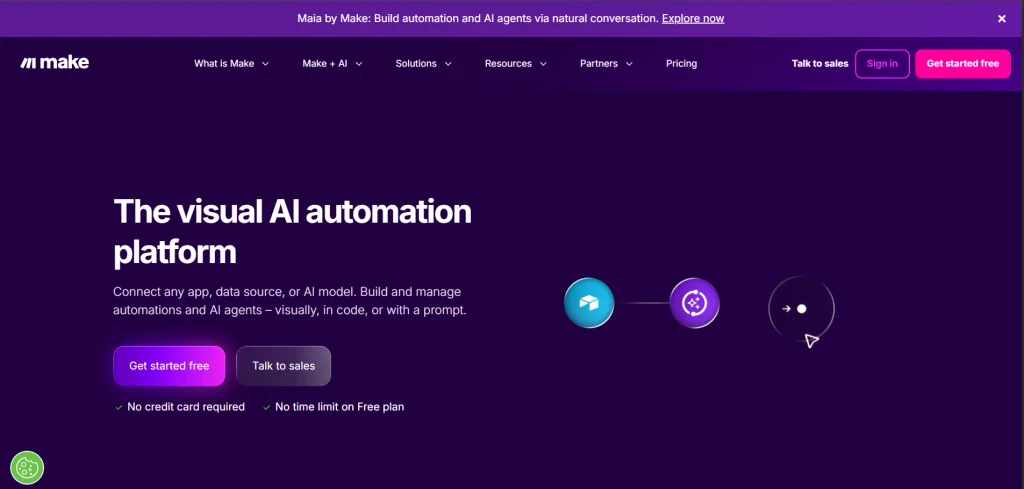
Make (it used to be called Integrate) is a visual automation platform. You build “scenarios” on a canvas, dragging modules together like a flowchart. Even the free plan gets the visual builder, 3,000+ apps, and routers and filters. The payoff: you see every branch on one screen, which matters once a workflow has more than one route.
What is n8n?
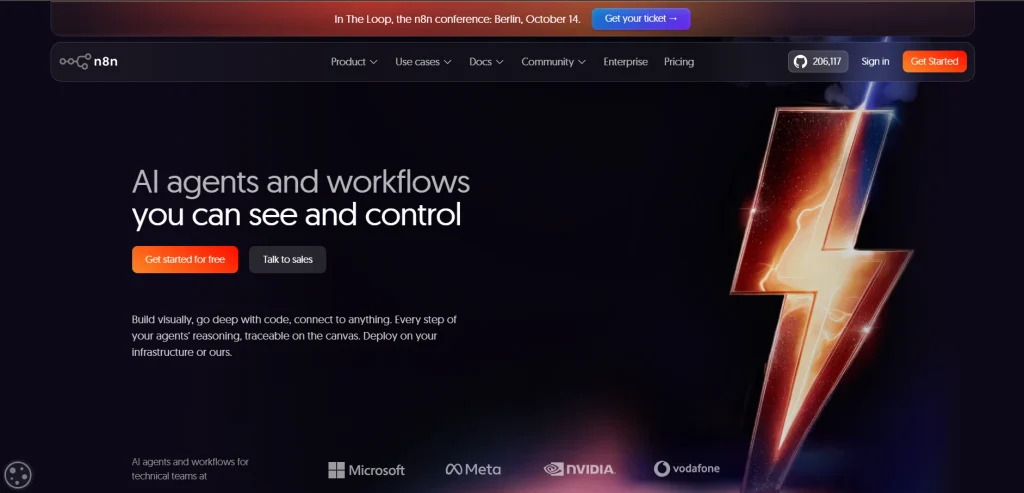
n8n builds workflows from connected “nodes,” and you can run it two ways. n8n Cloud is hosted for you. The self-hosted Community Edition is free with unlimited executions, and you pay only for the server. Every plan includes unlimited users, unlimited workflows, and every integration. It’s also the most technical of the three, so the flexibility costs you learning time.
No-code vs. low-code vs. self-hosted automation
No-code means you build by clicking and filling in fields. Zapier and Make work this way for most jobs.
Low-code means the tool is visual but hands you some technical pieces, like reading raw data, calling an API, or pasting in a short script. That’s n8n’s home.
Self-hosted means the software runs on a server you rent and manage, not on the vendor’s cloud. Of these three, n8n is the one built for it.
In short: Zapier and Make are no-code and hosted for you. n8n can be hosted too, but its real edge is technical control.
n8n vs Make vs Zapier: What are the key differences?
The real difference isn’t the app list. It’s how much technical work each tool leaves on your desk. With Zapier, almost none. With n8n, a fair amount. Make it sit in the middle.
Ease of use and setup time
Zapier’s editor is the gentlest. Pick an app, pick an event, fill in the fields, test.
Make takes an adjustment period. You have to learn how data moves between modules, and that a list of 20 orders gets processed as 20 separate items.
n8n’s canvas looks a lot like Make’s. You’ll just stare at raw data (JSON, mostly) more often, and map fields by hand more often too.
Integration’s and templates
Zapier connects to 9,000+ apps; Make lists 3,000+. n8n doesn’t gate integration’s by plan, but for a niche app you may need to connect through its API yourself.
All three keep template libraries. If your business runs on a less common tool, say a regional booking system, search Zapier’s directory first.
Customization and technical requirements
All three let you drop in code when clicking isn’t enough:
•Zapier: code steps get 1 second of runtime on Free and 30 seconds on Professional and Team.
•Make: the Code app runs JavaScript or Python at 2 credits per second of execution.
•n8n: You can write JavaScript or Python using n8n’s Code node, make HTTP/API requests using the HTTP Request node, and self-host n8n on your own infrastructure.
Scalability and maintenance
Zapier, Make, and n8n Cloud handle hosting, up-time, and updates. Self-hosted n8n hands those jobs to you.
For teams, Zapier’s Team plan covers 25 users with shared Zaps, shared connections, and SAML SSO. Make’s Teams plan adds team roles and shareable scenario templates. n8n includes unlimited users on every plan.
In short: Zapier gets simple workflows live fastest. Make and n8n trade some of that speed for power.
How does n8n vs Make vs Zapier pricing work?
Ignore the sticker price for a minute. The unit each tool counts is what decides your bill once volume doubles.
•Task (Zapier): a successful action. Triggers don’t count, and built-in tools like Filter, For-matter, Paths, Delay, and Looping are free.
•Credit (Make): each module action, like adding a Google Sheet row, is one credit. Routers and error handlers cost nothing.
•Execution (n8n): one full workflow run, billed the same regardless of complexity.
One workflow, three meters
Take a five-step lead workflow: a form is submitted, then the workflow looks up the company, creates a CRM contact, sends a welcome email, and posts a Slack alert. Here’s what 100 leads a month costs on each meter. These are calculations from published billing rules, not test results.
Zapier: 4 actions × 100 leads = 400 tasks. The free plan’s 100 tasks won’t cover it, so you’d need the lowest Professional tier (750 tasks).
Make: about 5 credits per lead, so roughly 500 a month. That fits the 1,000-credit Free plan… on paper.
Catch one: Free allows only 2 active scenarios and a 15-minute minimum between runs.
Catch two: a scheduled trigger checking every 15 minutes can burn about 2,880 credits a month with zero new leads, per one independent analysis. Use an instant (web-hook) trigger instead.
n8n: 100 executions. The Starter plan includes 2,500.
Here’s the thing — a workflow with 8 actions uses 8 tasks per run on Zapier and 1 execution on n8n. The longer your workflows get, the wider that gap grows.
Current U.S. plans at a glance
| Platform | Free option | Entry paid plan | Billing unit |
| Zapier | Free — 100 tasks/month | Professional from $19.99/month, billed annually | Tasks |
| Make | Free — 1,000 credits/month | Core $12/month for 10,000 credits | Credits |
| n8n | Self-hosted Community Edition | Starter €20/month, billed annually, for 2,500 executions | Workflow executions |
Zapier: Professional starts at $19.99/month when billed annually. The team starts at $69/month annually. Zapier’s Free plan includes 100 tasks/month.
Make: At the 10,000-credit level, Core is $12/month, Pro is $21/month, and Teams is $38/month. Make currently describes annual billing as saving 15% or more; avoid the older conflicting annual-price figures unless separately verified.
n8n: Starter is €20/month billed annually for 2,500 workflow executions, Pro is €50/month for 10,000 executions, and Business is €667/month for 40,000 executions. n8n says annual billing saves 17%.
n8n self-hosting: The Community Edition is available as a self-hosted option. The paid Business plan is currently self-hosted only.
n8n Startup Plan: Eligible startups with fewer than 20 employees and under €5 million in funding can receive 50% off Business for one year, subject to n8n’s eligibility requirements.
The costs that don’t show up on the plan card
•Zapier AI: AI steps, code, and the SDK all draw from one shared task pool, and each MCP tool call uses two tasks.
•Zapier Agents: a separate plan. Agents Pro is $33.33/month billed annually for 1,500 activities.
•Zapier overages: once you pass your limit, extra tasks cost more, and Zaps pause at your plan’s maximum.
•Make overages: when credits run out, scenarios stop (incoming web-hooks queue up). Unused credits expire at the end of the term.
•n8n: self-hosting costs a server plus your time (more on that below). For AI steps you connect your own model, so expect a separate bill from your AI provider.
In short: short workflows are cheap anywhere. Long ones are where the meters split apart: Zapier climbs fastest, n8n slowest, Make in between.
Which is easiest for a non-technical business owner?
Zapier is the easiest for most non-technical owners. Make is a close second once the canvas clicks. n8n is the hardest to learn solo.
Sending leads to a CRM. New form entry, new CRM contact: two steps, so Zapier’s free plan can handle it. Make and n8n do it just as well, with more field-mapping.
Automated email responses. A fixed welcome email is easy on all three. If you want AI to draft replies, jump to the AI section, because that changes the pick.
Shopify → Google Sheets. All three can log orders to a sheet. Make’s visual mapping makes it easy to check which order field lands in which column. Watch the meter, though: every order row is a task on Zapier or a credit on Make.
Slack notifications. A “new sale” ping in Slack is the classic first automation. It’s one trigger and one action, so it fits a two-step Zap on Zapier’s free plan.
Marketing reports. Pulling numbers from several tools into one weekly summary means combining lists of data. Make is built for this, since aggregating and iterating data are standard module actions. On Zapier, the free built-in Digest tool can batch updates into one message.
Which is better for complex automation?
Make and n8n both handle complex logic better than Zapier. n8n pulls ahead when you need custom code, unusual APIs, or self-hosting.
Branching and conditional logic
Branching sends data down different routes, such as sending high-value leads to sales.
- Zapier: Uses Paths for conditional branching.
- Make: Uses Routers to split workflows into multiple routes.
- n8n: Uses IF and Switch nodes for conditional logic.
Bottom line: Zapier is simple, Make is highly visual, and n8n offers more technical control.
Data, APIs, web-hooks, and code
Zapier includes web-hooks on paid plans, plus a free For-matter for cleaning data. Make can connect to virtually any app with a public API through custom apps. n8n goes further again: it can use external MCP servers and expose its own tools to outside AI agents.
Error handling
Zapier: Paid plans support Auto-replay for failed Zap runs. Professional, Team, and Company plans also support custom error handling. Zapier error handling
Make: Make provides error handlers such as Skip, Retry, Resume, Commit, and Rollback, giving you different ways to handle failed operations. Make error handlers
n8n: n8n supports separate error-handling workflows using the
Error Trigger, allowing you to create a dedicated workflow for failed executions. n8n Error Trigger
In short: for multi-branch logic you want to see on one screen, Make is the most approachable. For code-heavy or custom-infrastructure work, n8n gives you the most room.
Which is better for AI automation and AI agents?
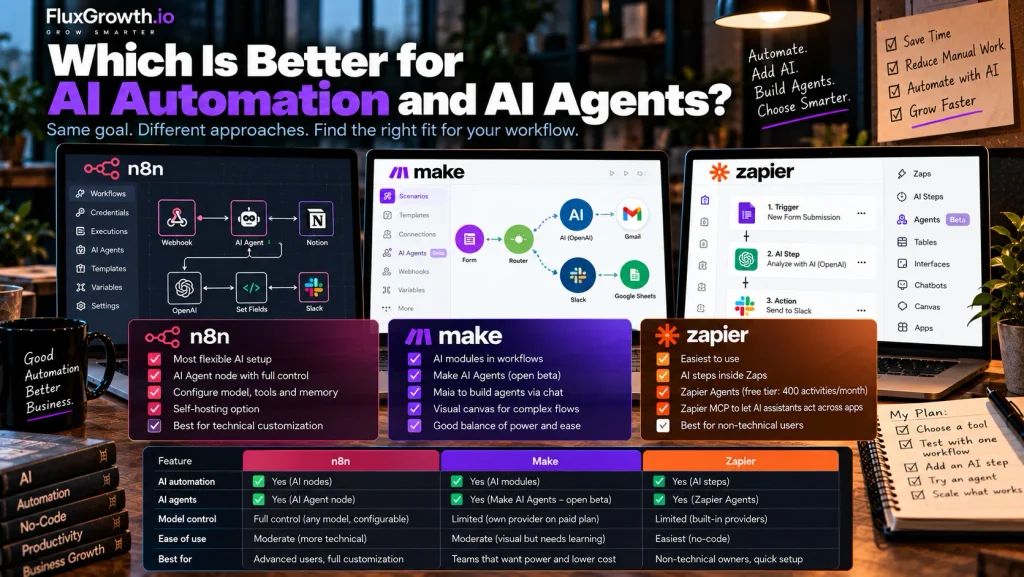
All three support AI, just at different depths. Separate three ideas first:
•Traditional automation: a fixed trigger → action workflow, like “new order → add row.”
•AI-powered workflow: the same fixed workflow with an AI step inside it, like “new support email → AI summary → Slack.”
•AI agent: an AI system that chooses which tools or actions to use, within limits you set.
Zapier covers all three. You can add AI steps inside Zaps, build agents in Zapier Agents, and use Zapier MCP to let AI assistants act across your apps.
Make has AI modules and Make AI Agents. The agents app is in open beta on all plans through Make’s AI provider, and connecting your own AI provider needs a paid plan. The current version shipped February 2, 2026. There’s also Maia, which builds automation and agents from a conversation.
n8n has an AI Agent node. You connect a chat model and one or more tools, and the agent decides which tool to call.
Every AI node in n8n is configurable, down to the model and the memory. That’s the most flexible setup of the three, and the most technical.
One honest limitation applies everywhere. Zapier’s own FAQ admits AI won’t give the same result every time. For anything customer-facing, keep a human approval step until you trust the output.
In short: to just try an agent, Zapier Agents has a free tier with 400 activities a month. For full control over the model and tools, that’s n8n.
Which is best for your type of small business?
These are editorial recommendations based on the pricing and features above, not test results.
•Local businesses (think a salon or HVAC contractor whose stack is Gmail, Google Sheets, and a booking app): start with Zapier. Setup time matters more to you than cost per step.
•E-commerce stores: look hard at Make. Order volume multiplies every step, and Make’s per-step meter is cheaper.
•Marketing agencies: Make suits client workflows you want to see at a glance. n8n’s unlimited users suit agencies with a technical builder on staff.
•Freelancers: Zapier’s or Make’s free plan covers one or two starter workflows. Upgrade only after a workflow proves it saves you time.
•SaaS startups: n8n tends to fit teams with engineers, especially with web-hooks, custom APIs, or the startup discount in play.
•Operations teams: decide on governance. Zapier Team includes SAML SSO, while self-hosted n8n keeps workflow data in-house.
What does self-hosting really mean for data control?
Self-hosting means n8n runs on a server you control, like your own cloud account or a rented VPS, instead of on n8n’s cloud. The payoff is data control: workflow data stays inside your environment. For comparison, Make runs on AWS in the EU and North America, and Zapier is cloud-only.
That control comes with a job description. Someone has to:
•apply security patches and n8n updates
• run backups (and actually test a restore)
•watch up-time and fix outages
•resize the server as volume grows
Free software. Not a free setup.
One guide puts a basic install at a $5–7/month VPS running Docker Compose. Another estimates €50–150/month plus DevOps time for a production setup. And features like SSO live on the paid Business plan, not the free edition.
In short: self-host only if someone on your team wants to own the server. If nobody does, n8n Cloud or Make gives you most of the power without the upkeep.
How do n8n, Make, and Zapier compare side by side?
| Platform | Ease of Use | Pricing Model | Flexibility | AI & Automation | Best Fit |
| Zapier | Guided, step-by-step editor | Per task | Moderate: Paths, webhooks, code steps | AI steps + separately priced Agents | Simple app-to-app automation and broad app coverage |
| Make | Visual canvas with a moderate learning curve | Per credit | High: routers, iterators, custom apps | AI Toolkit + AI Agents | Complex visual workflows with flexible automation |
| n8n | More technical | Per execution | Very high: code, APIs, self-hosting | AI Agent node with model flexibility | Technical teams, high-volume workflows, and data control |
Best fit by use case
- Simple app-to-app automation: Zapier — its guided workflow builder and broad app ecosystem make it suitable for straightforward integration’s.
- Complex visual workflows: Make — its visual canvas, routers, and iterators provide more control over multi-step workflows.
- Technical teams and self-hosting: n8n — its code capabilities, API support, self-hosting options, and execution-based model fit more technical workflows.
Bottom line: Zapier emphasizes simplicity, Make emphasizes visual workflow flexibility, and n8n emphasizes technical control and customization.
Which should you choose?
Choose Zapier if…
you’re not technical and want something working today.
your workflows run two to five steps.
•You rely on niche or long-tail apps.
•You’d rather pay more per step than spend a weekend learning a tool.
Choose Make if…
•You’re fine learning to be a visual builder.
•Your workflows branch, loop through lists, or combine data.
•You run enough volume that per-step costs add up.
•You want AI agents without writing code.
Choose n8n if…
•Your data needs to stay on the infrastructure you control.
•You’ll own the maintenance, or pay for n8n Cloud.
Starting from zero today? Pick your single most annoying manual task and build it on Zapier’s free plan. If you hit the step limit or the bill starts to sting, rebuild that same workflow in Make or n8n and compare.
Frequently asked questions
Is n8n better than Zapier?
n8n is better for technical teams running long or high-volume workflows, because it bills per workflow run instead of per step. Zapier is better for non-technical users who want fast setup and the widest app coverage. Your skills and workflow length decide it, not the brand.
Is Make easier to use than n8n?
For most non-technical users, yes. Make is a no-code visual builder, while n8n more often expects you to work with raw data and APIs. Both use a canvas, but Make hides more of the technical detail.
Which is cheaper, n8n, Make, or Zapier?
It depends on the workflow. n8n’s self-hosted Community Edition is free apart from server costs, and its Cloud plans count one execution per run no matter how many steps it has. Make charges per module action and Zapier per successful action, so long workflows usually cost the most on Zapier.
Is n8n good for non-technical users?
For simple workflows, yes, especially on n8n Cloud, where you don’t manage a server. The learning curve is steeper than Zapier’s or Make’s. If you plan to self-host, get technical help.
Can a small business use n8n without coding?
Yes, for many workflows. n8n’s visual nodes and templates cover common jobs without code. Custom APIs, data transformation, and self-hosting are where coding skills start to matter.
What is the easiest automation tool for beginners?
Zapier is generally the easiest for beginners. Its free plan includes 100 tasks a month with two-step Zaps, and new accounts get a 14-day Professional trial with no credit card.
Can n8n, Make, and Zapier use AI?
Yes, all three can. Zapier offers AI steps and a separate Agents product. Make has AI modules and AI Agents, which are in open beta. n8n has an AI Agent node that connects a chat model to tools you choose.
Start with one workflow, not a migration
The honest answer to n8n vs Make vs Zapier: the workflow picks the tool. A two-step lead alert belongs to Zapier. A 12-branch order router probably belongs on Make or n8n, and choosing between those two comes down to one question. Does anyone on your team want to own a server?
Here’s what to do today. Take one workflow that eats your time every week, like sending new leads to your CRM, and build it on two platforms’ free plans or trials. For two weeks, track setup time, anything that broke, and what the meter would cost at your real volume. Then decide, and move everything else only after that.
For more setups like this, browse our AI automation for small business guides.