How this guide was made: this is a research-based comparison. We didn’t run hands-on tests for this article. Pricing and features come from each vendor’s official pages and from recent, dated pricing breakdowns, and the text says which is which. FluxGrowth doesn’t sell a scheduler, and nobody paid to be on this list.
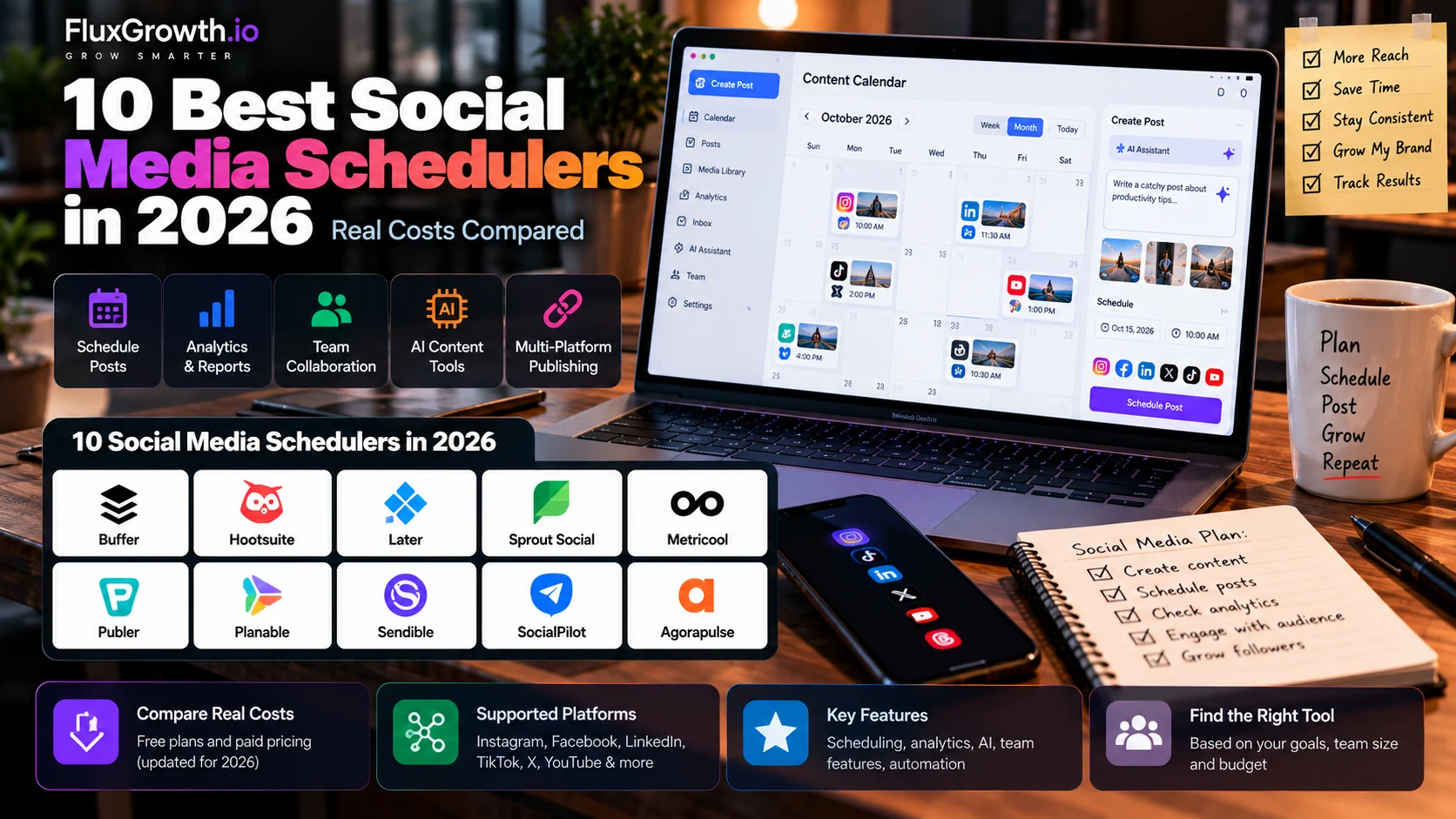
Posting to Instagram, LinkedIn, TikTok, and Threads by hand means four apps, four upload flows, and four chances to forget. A social media scheduler fixes that. You write a post once, pick a time, and the tool publishes it for you.
The catch is that these tools charge in completely different ways. Buffer charges per channel. Hootsuite and Sprout Social charge per seat. Later bundles profiles into “social sets.”
So the same 10 accounts and two users can cost about $100 a month on one tool and nearly $600 on another. This guide compares 10 schedulers on 2026 U.S. pricing, platform support, auto-publishing, AI, and team features, so you can shortlist two and test them.
This guide is part of our Social Media Growth hub — everything we have published on growing social accounts with AI tools, in one place.
What Is a Social Media Scheduler?
A social media scheduler is a tool that lets you prepare social posts in advance and automatically publish them to supported social networks at times you choose. You connect your accounts once, write or upload your content, set a date, and the scheduler publishes through each platform’s official API.
That’s the core job. Most tools now add more on top: Sprout Social has an AI agent, Later has link-in-bio pages, and Metricool has ad reporting. That’s where the comparison gets confusing.
Scheduling, auto-publishing, and reminders
Scheduling puts a post on your calendar. Auto-publishing posts it automatically, while notification publishing sends you a reminder to finish the post in the native app.
Buffer supports notification publishing for Instagram, TikTok, YouTube, and Facebook Groups. Publer supports push notifications for Instagram Stories, with direct publishing also available for eligible accounts.
What else gets bundled in
Beyond the queue, most schedulers add some of these:
- A content calendar: a month or week view of everything planned.
- Analytics: reach, engagement, and follower growth pulled from each platform.
- Team collaboration: shared drafts, comments on posts, and user roles.
- Approval workflows: a manager or client signs off before anything goes live.
- AI assistance: caption drafts, post ideas, and per-network rewrites.
- A social inbox: comments and DMs from every account in one feed.
- Automation: RSS-to-post, evergreen recycling, and connections to Zapier, Make, or n8n.
Scheduler vs. the tools with similar names
These labels get used loosely. Here’s the plain-English version:
- A social media management platform bundles scheduling with an inbox, analytics, approvals, and sometimes listening. Hootsuite and Sprout Social are the classic examples.
- A social media publishing tool is another name for a scheduler.
- A social media automation tool runs on rules and triggers, like “post every new blog article to LinkedIn.”
- A social media analytics platform measures performance and may not publish at all.
- A content calendar is a planning view. It can live inside a scheduler, or in Notion or Airtable.
- A social listening tool tracks mentions of your brand across the web, including posts that don’t tag you.
- An AI social media tool generates content. Some schedule, many don’t.
- A social media API is the developer access each platform provides. Every scheduler is built on one.
Summary: the scheduler is the publishing engine. A management platform wraps that engine in inbox, analytics, and team features. Pay for the wrapper only if someone will use it every week.
How We Evaluated These Social Media Scheduling Tools
We scored all 10 tools on the same criteria, grouped into four questions.
- Can it publish what you post? Platform support, auto-publishing vs. reminders, bulk scheduling, and the content calendar.
- Can your team work on it? Collaboration, approvals, client management, and mobile apps.
- What does it add? AI features, analytics, integrations, and automation.
- What does it really cost? Pricing model, free plan, and ease of use.
Every claim carries one of three labels:
- Verified (vendor): From the vendor’s own pricing page or help center, checked in September–October 2026.
- Third-party: From a dated source that quotes the vendor. These are marked until confirmed on the official page.
- Our take: Editorial judgment based on verified facts, not a personal test result.
Pricing, platform support, and feature availability can change. Confirm the current plan and supported networks on the vendor’s official website before purchasing.
We left out Tailwind, Loomly, Sendible, Zoho Social, and Vista Social to keep the comparison focused on the 10 tools selected for this U.S.-focused roundup. Tailwind is particularly focused on Pinterest and visual-content scheduling, while the other exclusions were editorial choices based on the scope of this comparison.
Best Social Media Schedulers in 2026
1. Buffer
Best for: Beginners, creators, and small teams who want a useful free plan.
What it does: Simple scheduling, calendar, analytics, AI, and team collaboration.
Strengths:
- Free plan: 3 channels, 10 scheduled posts per channel.
- Team plan: unlimited team members and approvals.
- Per-channel pricing.
Limitations:
- The free plan has an 8-channel lifetime connection limit.
- Some content requires notification publishing.
Supported platforms: Facebook, Instagram, LinkedIn, X, TikTok, YouTube Shorts, Pinterest, Threads, Bluesky, Mastodon, Google Business Profile, and more.
AI: AI Assistant available on all plans.
Analytics: Basic on Free; advanced features on paid plans.
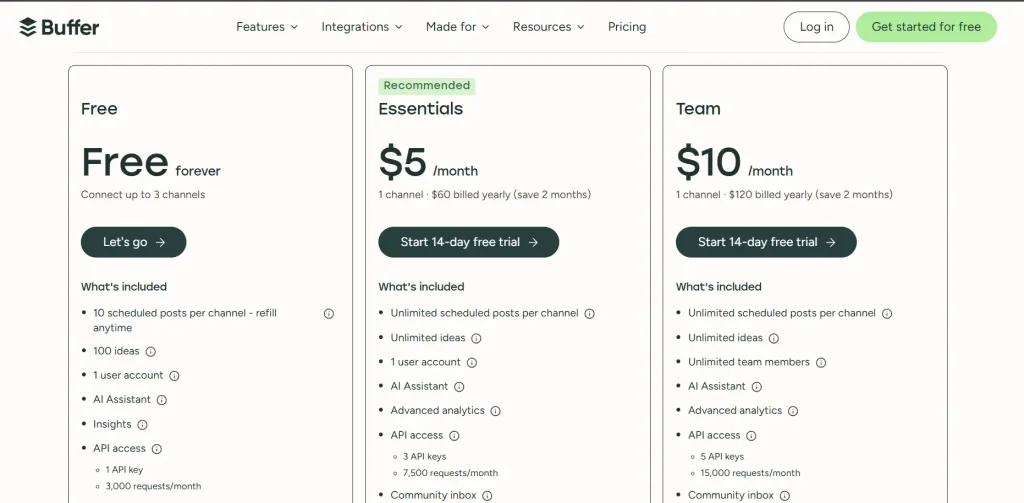
Pricing: Free; Essentials from $5/channel/month and Team from $10/channel/month, billed annually. See pricing
Who it fits: Creators, personal brands, small teams, and agencies.
Verdict: A strong all-around scheduler, especially for users who want a useful free plan.
2. Metricool
Best for: Small businesses and freelancers focused on analytics.
What it does: Scheduling, analytics, competitor tracking, reporting, and ad analytics.
Strengths:
- Free plan with 1 brand and 20 scheduled posts/month.
- PDF/PPT reporting on paid plans.
- MCP available on the Free plan.
Limitations:
- X requires a paid add-on.
- API access is limited to higher-tier plans.
Supported platforms: Instagram, Facebook, TikTok, LinkedIn, X, Pinterest, YouTube, Threads, Bluesky, Twitch, Google Business Profile, and more.
AI: AI assistant and MCP support.
Analytics: One of Metricool’s strongest features.
Team/agency: Team management and approvals on higher plans.
Pricing: Free; Starter from $20/month annually; Advanced from $53/month annually. See Pricing
Who it fits: Small businesses, creators, freelancers, and agencies.
Verdict: Excellent choice when analytics matter as much as scheduling.
3. Publer
Best for: Budget-conscious creators and small businesses.
What it does: Scheduling, feed previews, analytics, AI tools, and multi-platform publishing.
Strengths:
- The free plan supports 3 accounts.
- Supports Telegram, Mastodon, WordPress, and Bluesky.
- AI Assist for captions and content.
Limitations:
- X isn’t available on the Free plan.
- Some Instagram Stories use notifications.
- API access is limited to higher plans.
Supported platforms: Facebook, Instagram, X, LinkedIn, Pinterest, TikTok, YouTube, Threads, Bluesky, Google Business Profile, Mastodon, Telegram, and WordPress.
Analytics: Basic analytics, with advanced features on Business.
Team/agency: Collaboration and approvals on Business.
Pricing: Free; Professional from $5/month; Business from $10/month.
Who it fits: Creators, solopreneurs, and small businesses.
Verdict: A strong budget option with broad platform support.
4. Later
Best for: Instagram- and TikTok-focused creators and visual brands.
What it does: Visual planning, scheduling, analytics, and Link in Bio.
Strengths:
- Supports up to 8 profiles per Social Set.
- Link in Bio included.
- Growth adds approvals and social inbox.
Limitations:
- X is not supported.
- Starter limits posts per profile.
- No free plan; a 14-day free trial instead.
Supported platforms: Instagram, Facebook, TikTok, Pinterest, LinkedIn, YouTube Shorts, Threads, Snapchat.
AI: AI captions and content tools with plan-based credits.
Analytics: Available on paid plans.
Team/agency: More users and collaboration on higher plans.
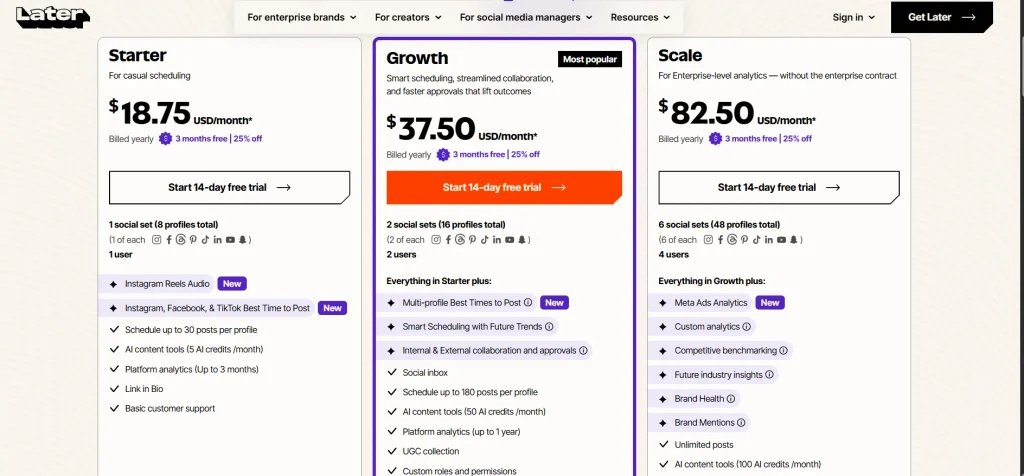
Pricing: No free plan (14-day trial); Starter is $18.75/month billed annually ($25 billed monthly). See Pricing
Who it fits: Visual creators, influencers, and Instagram-led brands.
Verdict: Great for visual planning, but not ideal if X is essential.
5. SocialBee
Best for: Small businesses and marketers using evergreen content.
What it does: Content categories, scheduling, bulk uploads, and content recycling.
Strengths:
- Category-based recycling.
- Bulk scheduling and approvals on higher plans.
- 14-day trial and 30-day money-back guarantee.
Limitations:
- No permanent free plan.
- Limited users on lower plans.
- Extra users cost more.
Supported platforms: Facebook, Instagram, Threads, X, LinkedIn, Pinterest, TikTok, YouTube, Google Business Profile, and Bluesky.
AI: AI content generation and caption tools.
Analytics: Available across plans, with more history on higher tiers.
Team/agency: More users and workspaces on higher plans.
Pricing: From $29/month; higher plans at $49 and $99/month.
Who it fits: Small businesses, bloggers, and marketers reusing content.
Verdict: Best when content recycling is a major part of your strategy.
6. SocialPilot
Best for: Small agencies and teams managing multiple accounts.
What it does: Scheduling, bulk uploads, client approvals, analytics, and white-label reports.
Strengths:
- Multiple accounts and users included in paid plans.
- Bulk CSV scheduling.
- AI tools and client collaboration.
Limitations:
- No permanent free plan.
- API access is limited to Enterprise.
- Pricing varies by plan and billing cycle.
Supported platforms: Facebook, Instagram, X, LinkedIn, TikTok, YouTube, Pinterest, Threads, Bluesky, and Google Business Profile.
AI: AI content tools with plan-based credits.
Analytics: Advanced analytics on higher plans.
Team/agency: Client approvals and white-label reporting on higher plans.
Pricing: Starts around $25.50/month billed annually.
Who it fits: Agencies and teams managing many accounts.
Verdict: A strong agency-focused scheduler with good account limits.
7. Planable
Best for: Agencies and teams needing approval workflows.
What it does: Scheduling, collaboration, comments, previews, and post approvals.
Strengths:
- Unlimited users.
- First 50 posts free.
- Strong approval and collaboration tools.
Limitations:
- Post limits on lower plans.
- Analytics and Social Inbox cost extra.
- Separate workspaces can increase costs.
Supported platforms: Facebook, Instagram, LinkedIn, X, TikTok, YouTube, Pinterest, Threads, and Google Business Profile.
AI: AI-assisted content tools.
Analytics: Paid add-on.
Team/agency: Excellent approvals, comments, and client collaboration.
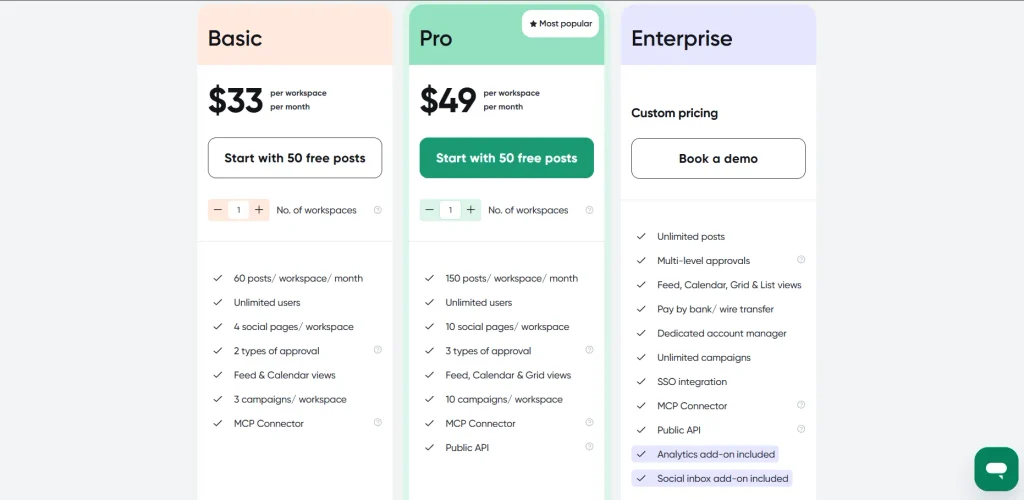
Pricing: First 50 posts free; paid plans start around $33/month per workspace (Basic; Pro is $49). See pricing
Who it fits: Agencies, brands, and approval-heavy teams.
Verdict: Excellent for approvals; overkill for solo users.
8. Agorapulse
Best for: Teams managing lots of comments and DMs.
What it does: Scheduling, unified inbox, reporting, and conversation management.
Strengths:
- Unified Social Inbox.
- 10 profiles included on paid plans.
- Strong reporting and team workflows.
Limitations:
- Per-user pricing can get expensive.
- Extra profiles cost more.
- No free plan (30-day free trial).
Supported platforms: Facebook, Instagram, Threads, X, LinkedIn, YouTube, Pinterest, Google Business Profile, TikTok, and Bluesky.
AI: AI and writing features vary by plan.
Analytics: Reporting available on paid plans.
Team/agency: Assignments, permissions, approvals, and collaboration.
Pricing: Starts at $79/user/month billed annually.
Who it fits: Community-focused brands and social teams.
Verdict: Best when engagement and inbox management matter as much as publishing.
9. Hootsuite
Best for: Larger teams needing scheduling, listening, inbox, and governance.
What it does: Scheduling, social listening, analytics, AI, and team management.
Strengths:
- Supports multiple social accounts.
- Built-in AI and social listening.
- Strong approval and governance tools.
Limitations:
- No permanent free plan.
- Starts at $99/user/month.
- Higher-tier plans are needed for advanced approvals and controls.
Supported platforms: Facebook, Instagram, LinkedIn, X, TikTok, YouTube, Pinterest, Threads, and more.
AI: AI content creation tools.
Analytics: Cross-network reporting and benchmarking.
Team/agency: Approvals, permissions, and assignments.
Pricing: From $99/user/month.
Who it fits: Larger marketing teams and organizations.
Verdict: Powerful, but expensive for basic scheduling.
10. Sprout Social
Best for: Data-driven teams needing advanced analytics and social customer care.
What it does: Publishing, Smart Inbox, reporting, AI, and customer-care tools.
Strengths:
- Advanced analytics and reporting.
- Trellis AI and AI Assist.
- 30-day free trial.
Limitations:
- Expensive for small teams.
- Essentials is limited to 5 profiles.
- API access starts on Advanced.
Supported platforms: Facebook, Instagram, LinkedIn, X, TikTok, Pinterest, YouTube, Google Business Profile, and more.
AI: Trellis AI and AI Assist.
Analytics: Advanced reporting and competitor insights.
Team/agency: Approvals, workflows, and collaboration.
Pricing: From $79/seat/month billed annually.
Who it fits: Marketing teams and larger brands.
Verdict: Excellent for analytics and customer care, but overkill for basic scheduling.
Social Media Scheduler Comparison Table
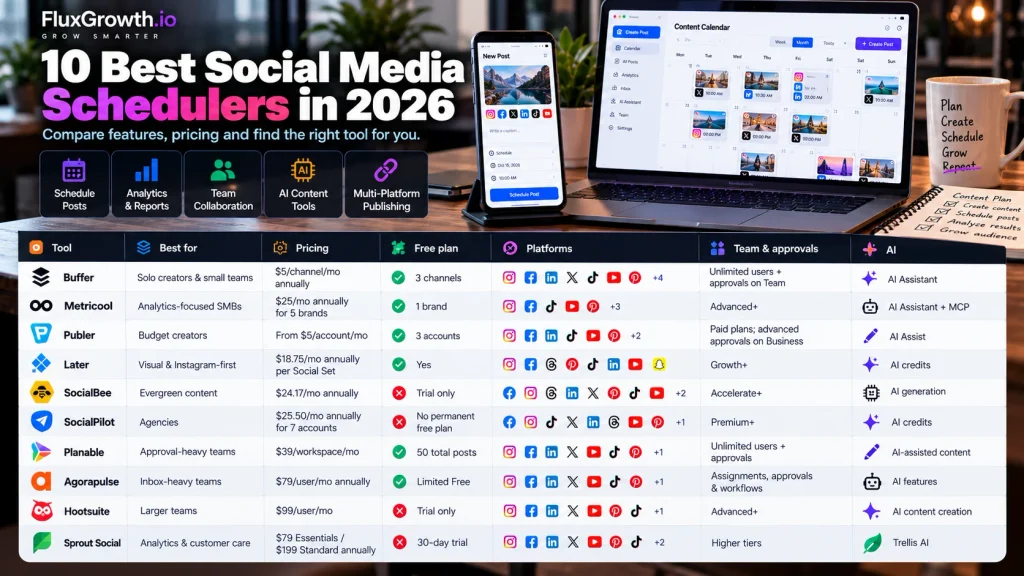
| Tool | Best for | Pricing | Free plan | Platforms | Team & approvals | AI |
| Buffer | Solo creators & small teams | $5/channel/mo annually | ✅ 3 channels | Instagram, Facebook, LinkedIn, X, TikTok, YouTube, Pinterest, Threads, Bluesky, Mastodon, Google Business Profile, Substack | Unlimited users + approvals on Team | AI Assistant |
| Metricool | Analytics-focused SMBs | $20/mo annually (Starter) | ✅ 1 brand | Broad; X & LinkedIn unavailable on Free | Advanced+ | AI Assistant + MCP |
| Publer | Budget creators | From $5/account/mo | ✅ 3 accounts | Broad; X excluded on Free | Paid plans; advanced approvals on Business | AI Assist |
| Later | Visual & Instagram-first | $18.75/mo annually per Social Set | ❌ 14-day trial | Instagram, Facebook, Threads, Pinterest, TikTok, LinkedIn, YouTube, Snapchat | Growth+ | AI credits |
| SocialBee | Evergreen content | $24.17/mo annually | ❌ Trial only | Facebook, Instagram, Threads, LinkedIn, X, Pinterest, TikTok, YouTube, Google Business Profile, Bluesky | Accelerate+ | AI generation |
| SocialPilot | Agencies | $25.50/mo annually for 7 accounts | ❌ No permanent free plan | Facebook, Instagram, TikTok, X, LinkedIn, Threads, YouTube, Pinterest, Google Business, Bluesky | Premium+ | AI credits |
| Planable | Approval-heavy teams | $33/workspace/mo | ✅ 50 total posts | Major social networks + Google Business Profile | Unlimited users + approvals | AI-assisted content |
| Agorapulse | Inbox-heavy teams | $79/user/mo annually | ❌ 30-day trial | Major networks + Bluesky | Assignments, approvals & workflows | AI features |
| Hootsuite | Larger teams | $99/user/mo | ❌ Trial only | Major social networks | Advanced+ | AI content creation |
| Sprout Social | Analytics & customer care | $79 Essentials / $199 Standard annually | ❌ 30-day trial | Major networks + review management | Higher tiers | Trellis AI |
Does Your Social Media Scheduler Actually Auto-Publish?
Not every scheduled post publishes automatically. Many schedulers support automatic publishing for Instagram feed posts and Reels, but Stories, TikTok, YouTube, and other formats can still require notification publishing depending on the tool, format, and account type.
Here’s the thing: if you post five Stories a day and your scheduler sends five phone notifications, you’re still manually finishing five posts.
Check this before you pay:
- List every format you publish: feed posts, carousels, Reels, Stories, TikTok videos, Shorts, Pins, and LinkedIn documents.
- Check the vendor’s help center for each format and whether it supports auto-publishing or notification publishing.
- During the trial, schedule a real post for each format and verify what happens.
Social Media Scheduler vs. Social Media Management Platform: What’s the Difference?
A social media scheduler prepares and publishes posts. A social media management platform adds analytics, a social inbox, monitoring, approvals, and team collaboration on top.
A scheduler is enough when one person publishes and replies in the native apps. Picture a solo fitness coach posting to Instagram and LinkedIn: Buffer or Publer covers it.
You need a management platform when the work is shared. Picture a four-person team where a manager approves posts, someone else answers DMs, and leadership wants a monthly report. That’s Agorapulse, Hootsuite, or Sprout Social territory.
Metricool, SocialBee, SocialPilot, and Planable sit in between.
A quick test: if you can’t name who’d open the inbox and reports every week, don’t pay for them.
Which Social Media Scheduler Should You Choose?
Start with your account count, team size, and the formats you publish most.
- Choose Buffer if you’re a beginner who wants simple scheduling and a useful free plan.
- Choose Later if you’re a visual creator focused on Instagram and TikTok.
- Choose Metricool if you want scheduling plus strong analytics for a small business.
- Choose Planable if client approvals are your main bottleneck; choose SocialPilot if you manage many accounts.
- Choose Metricool or Later for visual e-commerce brands, but verify their current Shopify integrations before buying.
- Choose Sprout Social or Hootsuite if your team needs advanced reporting, governance, and social management.
- Choose Buffer or Publer if you’re building a personal brand across LinkedIn, X, and Threads.
- Choose SocialBee for evergreen content recycling, or SocialPilot for bulk scheduling.
Free vs. Paid Social Media Schedulers
Free social media schedulers are useful for testing a workflow, but they usually come with limits:
- Connected accounts: Buffer allows 3 channels; Metricool allows 1 brand. Buffer
- Queued posts: Buffer allows 10 scheduled posts per channel on Free. Buffer Support
- Analytics history: Metricool Free provides 30 days of analytics history. Metricool Help Centre
- AI credits: Later’s Starter plan includes 5 AI credits/month. Later Help Center
- Team features: Advanced collaboration and approvals are generally reserved for paid plans.
- Platform access: Metricool Free excludes LinkedIn and X; Publer Free excludes X.
How Much Does a Social Media Scheduler Cost?
A social media scheduler can cost $0 to several hundred dollars per month. The pricing model matters as much as the starting price.
The four pricing models
- Per channel/account: Buffer, Publer: good for a few accounts, but costs rise as you add more.
- Per user/seat: Hootsuite, Sprout Social: affordable for one user but expensive for larger teams.
- Flat plans: SocialBee, SocialPilot: predictable pricing with account limits.
- Bundles: Metricool, Later, Planable: pricing is based on brands, social sets, or workspaces.
How to Schedule Social Media Posts (Step by Step)
The workflow is nearly identical in every tool:
- Connect your social accounts through each platform’s login (OAuth).
- Define your content strategy: pillars, frequency, and which formats go where.
- Create or upload the content: images, video, or carousels.
- Write the caption, then edit it per network instead of pasting the same text everywhere.
- Select the publishing platforms.
- Choose the date and time, or use the best-time suggestion.
- Preview each version, checking crops, link previews, and character limits.
- Schedule it, or publish it now.
- Check performance after 24 hours and again after 7 days.
- Adjust based on what the numbers show, not what you expected them to show.
Check formatting per platform before trusting auto-publish. A 1,200-character LinkedIn post won’t fit X’s 280-character limit on a standard account, and a 4:5 image can get cropped badly on Pinterest.
What Can AI Actually Do in a Social Media Scheduler?
AI in a social media scheduler is a drafting assistant, not a strategist. It speeds up writing and repurposing, but it doesn’t know your audience the way your own analytics do. For Instagram, our free Instagram caption generator drafts five caption structures you can edit before scheduling.
What AI handles reasonably well:
- Caption drafts and per-network rewrites
- Post ideas from a topic or a blog URL
- Turning one LinkedIn post into three shorter X posts
- Hashtag suggestions
- Best-time recommendations based on your own audience’s activity
What still needs a human:
- Brand voice. Without examples and editing, AI captions drift toward generic.
- Facts and numbers, which AI can get wrong with total confidence.
- Images and video, where rights, likeness, and quality all need checking.
- Auto-replies, which can turn one customer complaint into a screenshot that spreads.
Review every AI-generated post before it publishes. We found no reliable independent evidence that AI-written captions raise engagement on their own, so treat vendor claims like that as marketing until your own numbers say otherwise.
Social Media Scheduling for Developers and Technical Teams
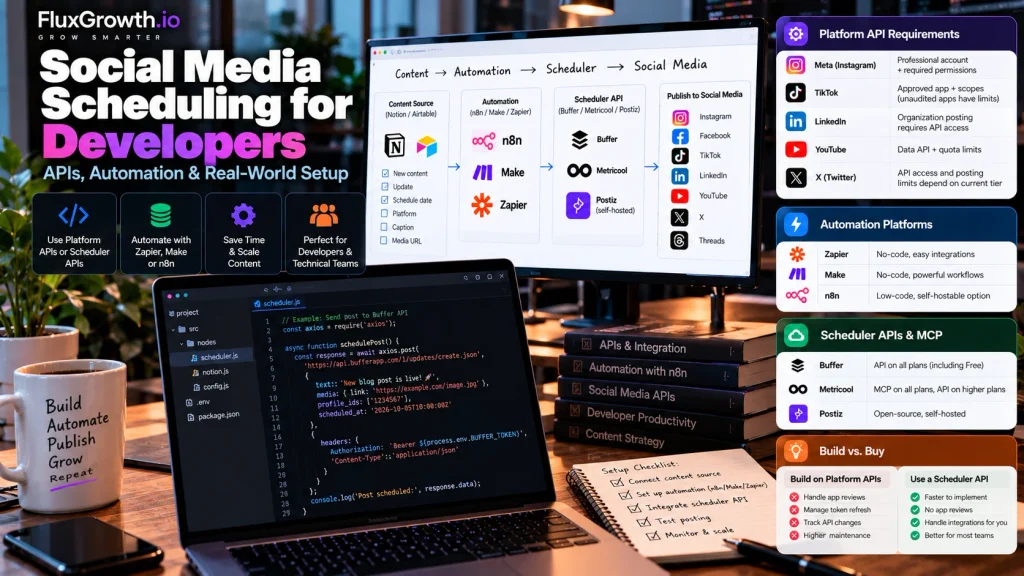
Developers can use platform APIs directly or connect a scheduler’s API. A common setup is Notion/Airtable → n8n → scheduler API.
Platform APIs, OAuth, and rate limits
- Meta: Instagram publishing requires a Professional account and appropriate permissions.
- TikTok: Content Posting API requires approval/scopes; unaudited apps have public-posting restrictions.
- LinkedIn: Organization posting requires the appropriate API access and permissions.
- YouTube: Uploads use the YouTube Data API and are subject to quota limits.
- X: API access and posting limits depend on the current developer tier.
Automation platforms: Zapier, Make, and n8n
Zapier and Make are the no-code options (we compare all three in n8n vs Make vs Zapier). n8n is the low-code one, and you can self-host it if you’d rather keep content data on your own servers. All three can watch a content database and push posts to a scheduler.
Scheduler APIs and MCP servers
A scheduler’s API lets developers automate publishing without maintaining every social-network integration themselves. Buffer offers an API on all plans, including Free (see the Buffer API documentation), while Metricool provides MCP on all plans and API access on higher plans. Postiz is an open-source scheduler that can be self-hosted. For developers, APIs are useful for codebased automation, while MCP lets AI assistants help create and schedule posts.
Build vs. buy
Building straight on platform APIs means you own app reviews, token refresh, and every breaking change from five companies. For most teams, a content database feeding a scheduler’s API is the smarter split.
Social Media Scheduler Security and Privacy
Connecting a scheduler gives a third party permission to post as your brand. Review access before you connect any account you can’t afford to lose.
- OAuth permissions: Read the scopes the tool requests. Publishing and reading insights are normal. Anything broader deserves a support ticket.
- No password sharing: Reputable schedulers connect through official OAuth. Never type a social password into a third-party form.
- Team roles: Give each person the lowest role that works. Your intern doesn’t need publishing rights on the brand account.
- Client access: Use approval-only or guest roles, not full logins.
- Token revocation: Know where to disconnect the tool, both inside the scheduler and in each platform’s connected-apps settings.
- Data storage: Check where the vendor stores content and inbox messages, especially if your DMs contain customer order details.
- AI data use: Find out whether the vendor uses your content to train AI features, and whether you can opt out.
- Integration: Every Zapier or Make connection is one more place a token lives. Audit them quarterly.
- Off-boarding: Remove people from the scheduler on their last day, not their last week.
We aren’t vouching for any vendor’s security. Read each one’s current privacy policy and security documentation, and ask for compliance reports like SOC 2 if your business requires them.
How to Choose a Social Media Scheduler in 10 Steps
- List the networks you actually post to, not the ones you plan to someday.
- Count your accounts now, and estimate them in six months.
- Decide whether you need analytics beyond the native apps.
- Decide whether anyone has to approve posts.
- Check the AI features and how many credits the plan includes.
- Check auto-publishing for every format, especially Stories and TikTok.
- Compare free-plan limits against your real posting volume.
- Calculate the true monthly cost under the tool’s pricing model.
- Run the same small batch of posts through trials of two tools.
- Review permissions and the privacy policy before connecting business accounts.
FAQ
What is the best social media scheduler in 2026?
There’s no single best social media scheduler in 2026, because the right choice depends on team size and platforms. Buffer is a strong default for beginners, Metricool offers the best value for small businesses that want analytics, and Sprout Social leads for data-heavy marketing teams.
What is the best free social media scheduler?
Buffer has one of the most usable free plans in 2026, covering 3 channels with 10 scheduled posts per channel. Metricool’s free plan is better for analytics, but it covers only 1 brand and excludes X.
What is the easiest social media scheduler for beginners?
Buffer is the easiest social media scheduler for most beginners because its queue-and-calendar interface has very few settings to learn. Later is similarly approachable for creators who plan visually around Instagram.
Can I schedule posts to multiple social media platforms at once?
Yes. Every scheduler in this guide can publish one post to several networks at once. For better results, adjust the caption and image crop for each platform, since a post written for LinkedIn rarely fits X or Instagram as-is.
Do social media schedulers post Instagram Stories and TikToks automatically?
It depends on the tool and the format. Most schedulers auto-publish Instagram feed posts and Reels, but some send phone reminders for Stories, TikTok, or YouTube posts instead. Test each format during a free trial before you commit.
How much does a social media scheduler cost?
A social media scheduler costs $0 on a free plan, roughly $5–$30 a month for a solo user, and $100 to $600 or more a month for a team. Per-seat tools like Hootsuite and Sprout Social cost the most as teams grow, while per-channel and flat-plan tools stay cheaper for small teams.
The Bottom Line
The right social media scheduler is the cheapest one that publishes every format you post, for every person who touches your accounts. Everything else (analytics, AI, inbox) depends on how many platforms you run, your team size, your budget, and whether clients are involved.
Your next step: pick two schedulers from this list, connect the same accounts to both, and schedule the same 10 posts on each during the free trial. By day seven, you’ll know which one saved you time and which one just moved the work to a different screen.