FluxGrowth is reader-supported. Some links in our guides are affiliate links — if you buy through one we may earn a commission, at no extra cost to you. It never changes which tools we recommend. How we test tools.
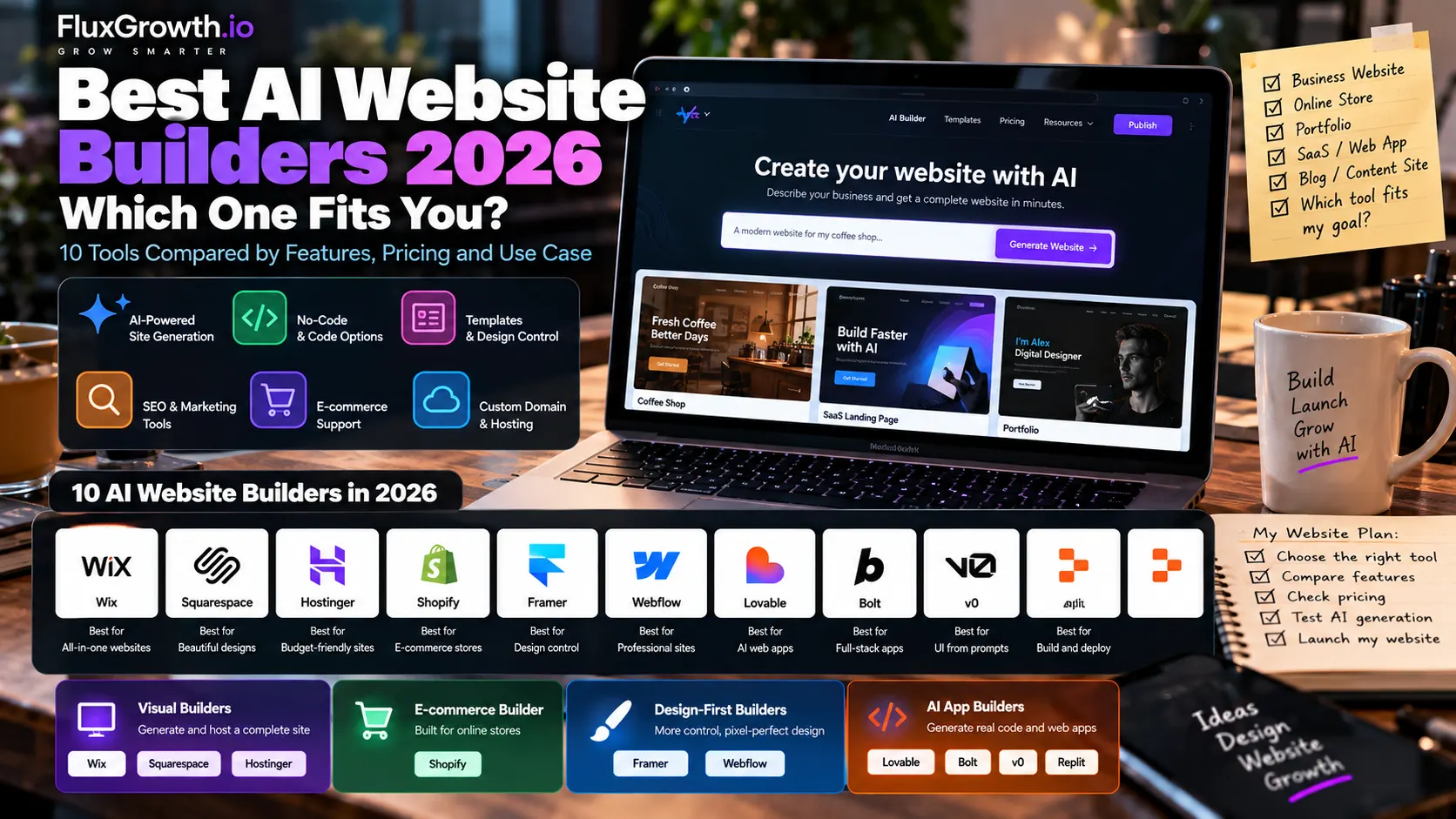
The best AI website builders in 2026 fall into three camps. Visual builders like Wix and Squarespace generate and host a finished site for you. Design-first tools like Framer and Webflow give you pixel-level control. AI app builders like Lovable, Bolt, v0, and Replit write real application code you can take with you.
That split is the whole problem. Search for an AI website builder and you’ll get lists that rank a hosting bundle next to a coding agent, as if they do the same job. They don’t.
This guide compares 10 tools on the things that decide a purchase: code control, hosting, SEO, e-commerce, migration, and what you’ll actually pay. Prices and features come from official vendor pages, checked in October 2026. Where we’re giving an opinion, we say so.
What is an AI website builder?
An AI website builder is a platform that turns a text prompt into a working website, then lets you edit and publish it. Simple enough. What the AI actually produces is where the tools split apart.
AI website builders vs. AI web-app builders
An AI website builder generates pages: layout, copy, images, navigation. You edit them in a visual editor, and the platform hosts them. Wix, Squarespace, and Hostinger’s Website Builder work this way.
An AI web-app builder generates application code: React components, database tables, login flows, API calls. Lovable, Bolt, and Replit work this way. You can build a website with them, but they’re designed for software that does things, like a booking tool or a SaaS dashboard.
No-code, low-code, and code-first
- No-code means you never see code. You click, drag, and prompt. Squarespace is the clearest example.
- Low-code means a visual editor that exposes developer concepts like classes, CMS collections, and custom code embeds. Webflow sits here.
- Code-first means the AI writes files you can open, edit, commit to GitHub, and deploy elsewhere. v0 and Replit sit here.
Where AI coding tools and agents fit
AI coding assistants (auto-complete in your editor) and AI coding agents (tools like Claude Code or Cursor’s agent that edit a whole repository and run commands) aren’t website builders at all. They don’t host anything or hand you a template. They work on code you already own.
| Category | What the AI produces | Do you get the code? | Examples |
| Visual AI builder | Pages inside a hosted editor | No | Wix, Squarespace, Hostinger Website Builder |
| E-commerce builder | Store pages, product copy, admin help | Theme code only | Shopify |
| Design-first builder | Pages with fine design control | Partial or none | Framer, Webflow |
| AI web-app builder | Full-stack app code | Yes | Lovable, Bolt, Replit, Hostinger Horizons |
| AI UI generator | Front-end components and apps | Yes | v0 |
| AI coding agent | Edits to your existing codebase | You already own it | Claude Code, Cursor |
The short version: if you want a business site live this week, use a visual builder. If you’re building software with logins and customer data, use an app builder. Pick the wrong category and no amount of prompting will fix it.
How we evaluated the 10 AI website builders
We scored each tool on four groups of criteria, weighted by what the tool is built for. A store builder isn’t marked down for lacking a code editor, and a code generator isn’t marked down for lacking templates.
- Build: AI generation quality, ease of use, visual editing, templates.
- Code control: code access and export, GitHub integration, frameworks, APIs, backend and database support.
- Publishing: hosting, custom domains, CMS, SEO controls, e-commerce, performance, security.
- Cost and scale: free plan limits, paid pricing, AI credits, per-seat costs, commercial use, scalability.
Three kinds of information appear in this guide, and we keep them separate:
- Verified facts come from each vendor’s official pricing page, documentation, or help center, checked in October 2026. These are linked.
- Third-party reports (independent reviews, user-reported patterns) are attributed to their source and labeled as such.
- Editorial judgment is ours. Verdicts, “best for” picks, and rankings are opinions based on the verified facts, not lab benchmarks.
We didn’t run timed builds or performance benchmarks, so you won’t find invented speed scores here.
Best AI Website Builders in 2026
The 10 tools below run from no-code to code-first. Wix, Squarespace, Hostinger, and Shopify build and host a finished site for you. Framer and Webflow are for people who care about every pixel. The last four (Lovable, Bolt, v0, and Replit) write real application code, and that code is yours to take elsewhere. Prices are U.S. plans as of October 2026.
1. Wix (Wix Harmony)
Best for: Beginners and small businesses that want a complete, hosted site fast.
What it does: Wix Harmony, launched January 21, 2026, is Wix’s flagship AI builder. You describe your business in chat, and Aria, Wix’s AI agent, generates the site. You keep editing by prompt or by drag-and-drop, and Wix handles hosting and SSL.
Best use cases: service-business sites, small online stores, booking and event sites.
Strengths:
- You can switch between AI prompting and manual editing in the same editor
- Built-in business apps for bookings, stores, and events
- A free plan lets you test the AI before paying
Limitations:
- No code export, so the site stays on Wix
- The entry Light plan doesn’t take online payments; selling starts on Core
- Harmony doesn’t yet match every feature of Wix’s older editors
AI capabilities: Wix Harmony generates layouts, copy, images, and sections from a prompt. Aria then edits the live site from chat.
Developer experience: Wix is mainly a visual, no-code/low-code builder. It supports custom code and developer features, while Base44 is Wix’s AI app-building platform for more custom applications.
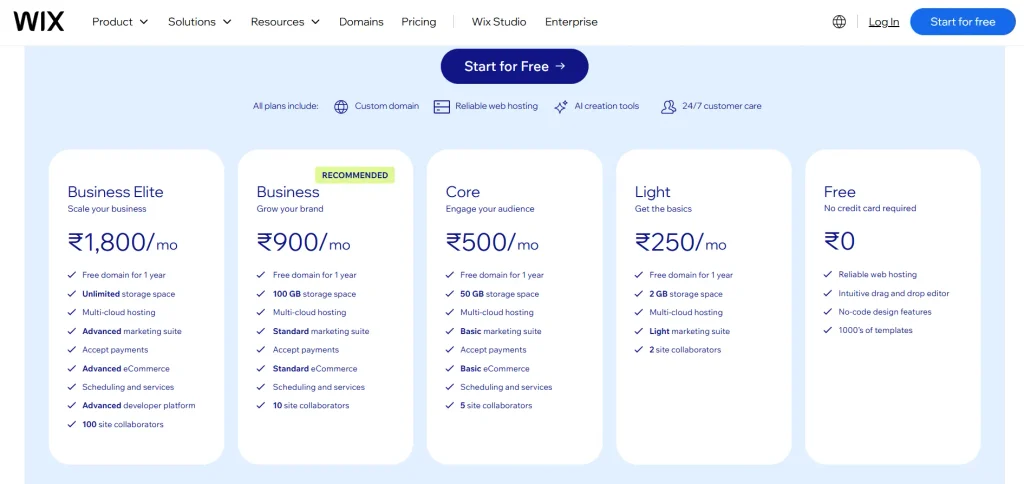
Pricing: Wix offers a free plan with Wix branding. Current annual pricing starts at $17/month (Light), $29/month (Core), $39/month (Business), and $159/month (Business Elite). Prices vary by location, billing period, taxes, and promotions, so verify the final checkout price before purchasing.
Verdict: The safest default for a non-technical owner who wants one bill and no setup. Skip it if code ownership matters to you.
2. Squarespace (Blueprint AI)
Best for: Creatives, consultants, and studios that prioritize polished design.
What it does: Squarespace’s Blueprint AI Builder creates a custom site template based on your business, pages, style, colors, and fonts. Squarespace also provides AI-generated text and images, plus built-in hosting and commerce. Squarespace Help
Best use cases: Portfolios, service businesses, consultants, and small online stores.
Strengths:
- Strong design consistency
- Built-in hosting, domain options, and commerce
- AI-assisted site and content creation
Limitations:
- No permanent free plan; Squarespace offers trials.
- No traditional code export or Git-based workflow.
- Less suitable for highly custom applications.
AI capabilities: Blueprint AI builds the initial site structure, while Squarespace AI can generate website text and images. Squarespace Help
Developer experience: Custom CSS is available on all plans. JavaScript/iframe code blocks and code injection require Core or higher. Squarespace does not support server-side code such as PHP, Ruby, or SQL. Squarespace Help
Pricing: Current U.S. annual pricing starts at $19/month for Basic, $29 Core, $49 Plus, and $99 Advanced. squarespace.com
Verdict: Pick Squarespace when design and simplicity matter more than deep developer control.
3. Hostinger AI Builder (Website Builder + Horizons)
Best for: Budget-conscious users who want hosting, domains, email, and AI website/app creation together.
What it does: Hostinger AI Builder provides AI-assisted website creation, while its agentic mode can build web applications from prompts. Hostinger says exported agentic projects use React + Vite + Node.js. Hostinger
Best use cases: Small-business websites, portfolios, blogs, simple web apps, and budget projects.
Strengths:
- Hosting and website tools in one platform
- AI website and app generation
- React/Vite code export for agentic projects
Limitations:
- Website Builder and Horizons/agentic workflows are different products with different purposes. Hostinger Help Center
- Exported projects cannot simply be returned to the builder for continued prompting. Hostinger Help Center
- Pricing depends heavily on the billing term and promotion.
AI capabilities: AI can generate websites, content, layouts, and web applications from prompts.
Developer experience: Agentic projects can be exported as React + Vite + Node.js, giving developers more control after export. GitHub import is not currently supported. Hostinger
Pricing: Current Hostinger pricing varies by region. Promotional long-term rates and renewal rates differ, so check Hostinger’s U.S. pricing page before you buy.
Verdict: A strong budget option if you want hosting + AI website/app creation in one place, but choose the right building mode before starting.
4. Shopify (Sidekick)
Best for: E-commerce businesses that sell products online or in person.
What it does: Shopify is a hosted commerce platform with Sidekick, its built-in AI commerce assistant. Sidekick can help with store tasks, content, insights, and other commerce workflows. Shopify
Best use cases: DTC brands, online stores, physical-product businesses, and omnichannel retail.
Strengths:
- Checkout, payments, inventory, and shipping in one platform
- Sidekick is included with Shopify plans
- Strong developer tools, APIs, CLI, and GitHub integration
Limitations:
- Primarily designed for commerce
- Apps and transaction fees can increase total costs
- Less suitable for non-commerce content sites
AI capabilities: Sidekick provides AI assistance for content, store tasks, insights, and commerce workflows. Shopify
Developer experience: Strong. Developers can work with Shopify themes and CLI, while Hydrogen provides a React-based approach for custom storefronts. Shopify also supports GitHub integration for theme development. Shopify
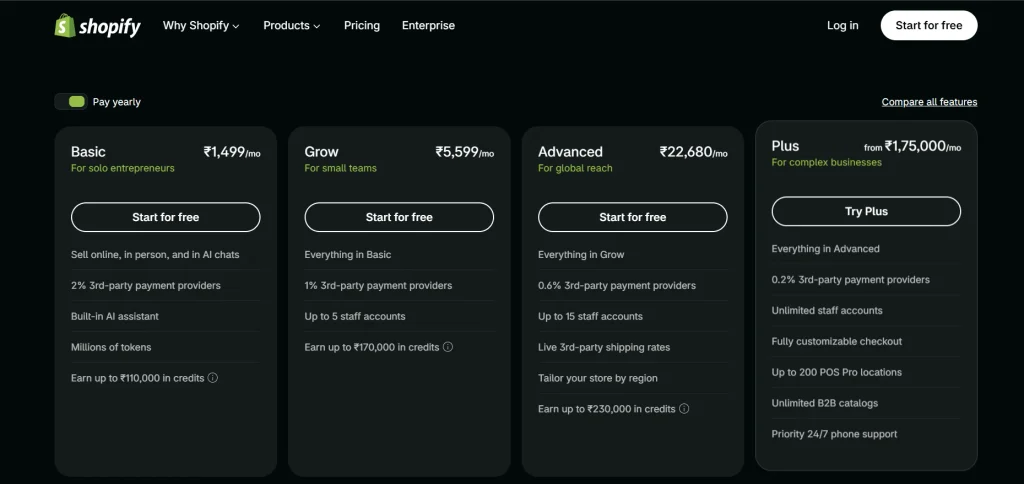
Pricing: Basic starts at $29/month when billed annually ($39 monthly). Current U.S. online card rates start at 2.9% + 30¢. Shopify
Verdict: Best choice for e-commerce. If the website does not need serious commerce functionality, another builder may be simpler.
5. Framer
Best for: Startups and designers who want polished marketing sites with strong visual control.
What it does: Framer combines visual design, AI-assisted site creation, CMS, animations, and hosting. Its current AI Agents can create and edit websites, while Workshop can generate custom React components. Framer
Best use cases: SaaS/startup sites, landing pages, portfolios, and design-led marketing websites.
Strengths:
- Excellent visual and interaction control
- Built-in hosting and CMS
- React code components and external-agent support Framer
Limitations:
- Site-based billing can become expensive for multiple sites.
- It is primarily a website platform, not a full-stack application builder.
- Framer’s export/portability options differ from a traditional Git-based workflow. Framer
AI capabilities: Framer Agents can create and edit sites, while AI features use monthly credits. Current plans include 1,000 credits on Basic and 3,000 on Pro. Framer
Developer experience: Developers can build React-based Code Components directly in Framer and connect external agents such as Codex, Claude Code, and Cursor. Framer
Pricing: Free plan available. Current U.S. pricing starts at $10/month for Basic and $30/month for Pro, with annual billing. Framer
Verdict: Excellent for design-focused marketing websites; less suitable when you need a traditional full-stack Git/repository workflow.
6. Webflow
Best for: Agencies, freelancers, and marketing teams building professional CMS-driven websites.
What it does: Webflow is a visual, low-code website builder with strong control over layouts, CMS content, interactions, hosting, and localization. Webflow AI can help generate pages, sections, and content.
Best use cases: Client websites, SaaS marketing sites, content-heavy websites, and multilingual projects.
Strengths:
- Detailed layout and interaction control
- Strong structured CMS
- HTML, CSS, and JavaScript export on eligible Workspace plans
Limitations:
- Steeper learning curve than simpler builders
- Site and Workspace plans can make pricing confusing
- Exported code does not include Webflow CMS functionality
AI capabilities: Webflow AI can generate pages and sections, create content, and assist with SEO-related tasks. Availability and limits vary by feature and plan.
Developer experience: Good for front-end-focused developers. Webflow supports custom code and code export, but it is not a replacement for a traditional Git-based application stack.
Pricing: Webflow offers a free Starter plan. Paid Site plans start at $15/month (Basic) when billed yearly, and CMS-capable plans cost more. Workspace plans are separate, with Core at $19/month and including code export. Prices are in USD before applicable taxes.
Verdict: A strong choice for professional client and CMS websites. It takes longer to learn than basic AI builders, but offers substantially more design and content control.
7. Lovable
Best for: Non-technical founders and developers building full-stack MVPs quickly.
What it does: Lovable generates full-stack web applications from natural-language prompts, including UI, backend functionality, authentication, and database integrations.
Best use cases: SaaS MVPs, internal tools, dashboards, and apps with user accounts.
Strengths:
- Two-way GitHub synchronization
- Full-stack app generation
- Code can be continued outside Lovable
Limitations:
- Credit usage can become a constraint during heavy iteration.
- Generated code and security rules still need human review.
- Complex Git workflows may require additional developer management.
AI capabilities: Lovable can generate and modify application code, UI components, database structures, and authentication flows through chat.
Developer experience: Stronger than traditional website builders because projects can be connected to GitHub and developed outside Lovable.
Pricing: Lovable offers a Free plan plus Pro and Business plans. Pricing is credit-based, with paid plans providing monthly credit balances and additional features. Check Lovable’s pricing page for the current subscription price.
Verdict: A strong choice for rapid full-stack MVP development, especially when you want an eventual path to conventional development.
8. Bolt (bolt.new)
Best for: Developers and teams that want a full-stack AI development environment in the browser.
What it does: Bolt generates, runs, edits, and deploys web applications from natural-language prompts, with hosting and databases built in. bolt.new
Best use cases: Prototypes, MVPs, client demos, and full-stack side projects.
Strengths:
- Browser-based development with editable source code
- Built-in hosting and databases
- GitHub integration and code portability bolt.new
Limitations:
- Token consumption increases as projects become larger.
- Generated code still needs developer review before production.
- Costs can become harder to predict on large projects.
AI capabilities: Bolt can generate and modify applications across the stack from chat, then preview and deploy them. bolt.new
Developer experience: Strong. Developers can edit files directly, use GitHub, and export standard web projects rather than being locked to a proprietary runtime. bolt.new
Pricing: Free includes 1 million tokens/month and a 300,000-token daily limit. Pro is $25/month, while Teams is $30 per member/month. Paid tokens can roll over for one additional month. bolt.new
Verdict: A strong choice when you want AI-assisted full-stack development with real code and an exit path to GitHub.
9. v0 by Vercel
Best for: React and Next.js developers, especially teams already using Vercel.
What it does: v0 generates React/Next.js interfaces and applications from prompts, with visual editing, GitHub sync, and direct Vercel deployment. v0
Best use cases: Dashboards, landing pages, UI components, and Next.js applications.
Strengths:
- Uses a mainstream React/Next.js stack
- GitHub sync is included even on Free
- Direct Vercel deployment
Limitations:
- Less focused on backend infrastructure than some full-stack builders.
- Usage is measured through monthly credits.
- Heavy development can require additional credits.
AI capabilities: v0 generates and edits UI, components, and applications using natural-language prompts and supports visual editing.
Developer experience: Strong. The Free plan includes GitHub sync and Vercel deployment, making it easy to continue development in your own repository. v0
Pricing: Free includes $5/month in credits. Plus is $30/user/month, Business is $100/user/month, and Enterprise is custom. v0
Verdict: The natural choice for React/Next.js developers already working in the Vercel ecosystem.
10. Replit
Best for: Developers and technical founders who want an AI agent, cloud IDE, database, and deployment in one platform.
What it does: Replit combines a browser-based development environment with Replit Agent, which can build, debug, and deploy applications from natural-language instructions.
Best use cases: Full-stack apps, Python backends, internal tools, prototypes, and learning with AI assistance.
Strengths:
- Full code editor and Git/GitHub support
- Built-in database, deployment, and secrets
- Supports multiple programming languages and frameworks
Limitations:
- Agent usage is credit-based, so costs can increase with heavier work.
- Generated code still requires developer review.
- Less design-focused than Framer or Webflow.
AI capabilities: Replit Agent can create applications, modify existing code, troubleshoot issues, and help deploy projects.
Developer experience: Strong. Replit provides a full development environment, Git capabilities, GitHub synchronization, and GitHub project import. Replit Docs
Pricing: Starter is free. Current Core pricing is $20/month or $18/month billed annually, with $20 toward supported AI models. Pro is $100/month or $90/month billed annually, with $100 in monthly credits. Enterprise pricing is custom. replit
Verdict: A strong choice for developers who want AI-assisted full-stack development without leaving the browser. Budget for Agent usage rather than judging the platform only by its subscription price.
Also considered
Five more tools came close. Durable targets local service businesses and gets a site live fast, but offers little code control. 10Web is worth a look if you already run WordPress, and only then.
GoDaddy Airo mostly makes sense inside GoDaddy’s ecosystem. Base44, which Wix owns, overlaps heavily with Lovable. And B12 pairs AI with a done-for-you service, which is a different purchase entirely.
AI website builder comparison table
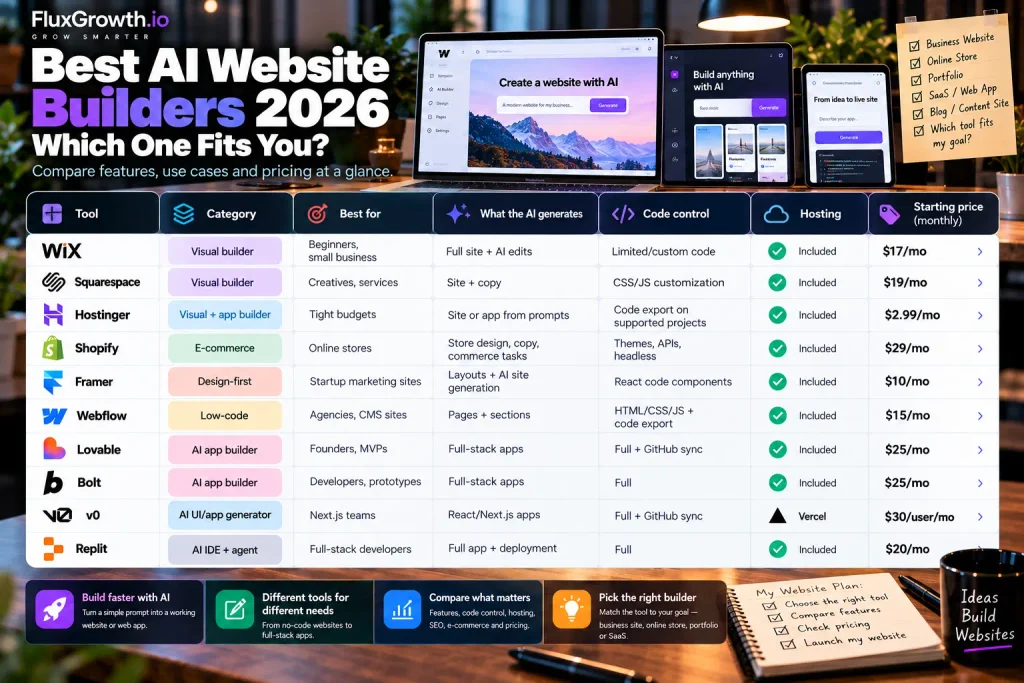
Read this table by the “Best for” column first. A $29 Shopify plan and a $25 Lovable plan look close in price, but they solve completely different problems.
| Wix | Visual builder | Beginners, small business | Full site + AI edits | Limited/custom code | Included | $17/mo wix.com |
| Squarespace | Visual builder | Creatives, services | Site + copy | CSS/JS customization | Included | $19/mo Squarespace |
| Hostinger AI Builder | Visual + app builder | Tight budgets | Site or app from prompts | Code export on supported projects | Included | $2.99/mo* Hostinger |
| Shopify | E-commerce | Online stores | Store design, copy, commerce tasks | Themes, APIs, headless | Included | $29/mo Shopify |
| Framer | Design-first | Startup marketing sites | Layouts + AI site generation | React code components | Included | $10/mo Framer |
| Webflow | Low-code | Agencies, CMS sites | Pages + sections | HTML/CSS/JS + code export | Included | $15/mo Webflow |
| Lovable | AI app builder | Founders, MVPs | Full-stack apps | Full + GitHub sync | Included | $25/mo Lovable |
| Bolt | AI app builder | Developers, prototypes | Full-stack apps | Full | Included | $25/mo bolt.new |
| v0 | AI UI/app generator | Next.js teams | React/Next.js apps | Full + GitHub sync | Vercel | $30/user/mo v0 |
| Replit | AI IDE + agent | Full-stack developers | Full app + deployment | Full | Included | $20/mo |
AI website builder vs. AI coding agent: which do you need?
An AI website builder creates and publishes a site through a visual or chat interface, and it usually hosts the result.
An AI coding agent works on a codebase you already own. It reads files, edits them across the project, runs commands and tests, and opens pull requests. The builder starts from nothing. The agent starts from your repo.
Three quick scenarios show where each fits:
- A bakery needs a five-page site with online ordering by Friday. Use a website builder like Wix or Shopify. An agent would mean building hosting, payments, and a CMS you don’t need to own. (Nobody needs a Git workflow for a croissant menu.)
- A founder needs a SaaS MVP with logins and a database to show investors. Use an AI app builder like Lovable, Bolt, or Replit. You get working code fast and can hand the repo to developers later.
- A dev team needs a new billing page inside an existing Next.js product. Use an AI coding agent like Claude Code or Cursor’s agent, or generate the UI in v0 and merge it. A builder can’t work inside your existing architecture.
App builders are creeping into agent territory, though. Lovable syncs to GitHub, and Replit Agent works inside a real IDE.
So use this test. Does the project already have a repository, CI, and team conventions? Reach for an agent. Does it not exist yet? A builder gets you to version one faster.
If you’re comparing agents specifically, our breakdown of the best AI coding tools in 2026 ranks them by workflow.
Will an AI-built website rank on Google and get cited by AI search?
An AI-built site can rank and get cited, but only if search and AI crawlers receive real content in the page’s HTML. That comes down to rendering. Most roundups never check it.
Why rendering decides visibility
Some apps send the browser an almost empty HTML shell, then fill in the content with JavaScript. That’s called client-side rendering.
Here’s the thing — Googlebot can run JavaScript, but most AI crawlers can’t. In a crawl-log study of live traffic, Vercel and MERJ found that none of the major AI crawlers rendered JavaScript, including OpenAI’s GPTBot and Anthropic’s ClaudeBot. They download the JavaScript files. They just never run them.
So a page that looks perfect in your browser can be nearly blank to ChatGPT or Claude. Vercel’s advice was to render main content on the server and keep client-side rendering for extras.
How the 10 builders handle it
- Hosted visual builders: Wix, Squarespace, Shopify, Framer, and Webflow handle rendering and hosting for you. Don’t assume identical HTML or rendering behavior across platforms; test important pages yourself.
- Lovable: Rendering depends on how the generated project is set up, so don’t assume a Lovable app is server-rendered. Run the two-minute test below on your live pages.
- v0: v0 generates Next.js applications, and Next.js supports both server and client rendering, including static generation and ISR. The actual rendering mode depends on how the generated application is implemented. nextjs.org
- Bolt, Replit, and Hostinger Horizons: Rendering depends on the framework and architecture used by the generated project. A client-rendered React/Vite application should not be treated as automatically server-rendered.
A two-minute test for any AI-built site
- Open the live page, right-click, and choose View Page Source (not Inspect).
- Search the source for a sentence from your main content.
- If the sentence is there, crawlers can read it. If you only see an empty div like id=”root”, AI crawlers likely can’t.
- Check that each page has its own title tag and meta description in the source, not one shared title.
If your page fails, the fix is server-side rendering, static generation, or a prerendering service. For the bigger picture on getting cited, see our GEO and AI search guides.
Rendering won’t make a thin page rank. But a client-rendered page may never get read by AI crawlers at all, however good it is.
Which AI website builder should you choose?
Choose based on what you’re building and who will maintain it, not on which AI demo looked best.
- Beginner with no coding experience: choose Wix if you want the most guidance, or Squarespace if design polish matters more than flexibility.
- Developer: choose Replit if you want a full IDE and any language, Bolt if you want speed in the browser, or v0 if you already ship Next.js on Vercel.
- Freelancer building client sites: choose Webflow. Clients get a CMS they can edit, and you get real control over the markup.
- Startup: choose Framer for the marketing site and Lovable for the first version of the product. Keeping them separate lets each one do what it’s good at.
- SaaS team: choose v0 or an AI coding agent for work inside the existing product, and Framer or Webflow for the marketing site.
- Agency: choose Webflow for content-heavy client work, or Framer for design-led launches.
- E-commerce: choose Shopify. If the store is a small add-on to a service business, Wix Core or Squarespace Core may be enough.
- Marketing website on a tight budget: choose Hostinger AI Builder, and check renewal pricing before you commit.
- Custom web application: choose Lovable if you can’t code, or Replit if you can. Either way, connect GitHub from day one.
How much does an AI website builder cost?
Most AI website builders cost between $0 and about $30 a month to start, but the plan price is rarely the full bill. AI credits, per-site billing, seats, and multi-year terms decide what you actually pay.
What free plans leave out
Free plans exist so you can kick the tires. Across the 10 tools, free tiers commonly restrict:
- AI credits, often with a daily cap (Lovable, Bolt, v0)
- Custom domains, so you publish on a vendor subdomain (Wix, Framer, Webflow)
- Branding, such as a vendor badge or watermark on your site
- Code export or downloads (Lovable’s one-click download is paid; Webflow’s export needs a paid workspace plan)
- Page counts, CMS items, and bandwidth
- Collaboration and team seats
- Selling online or accepting payments
Need more no-cost options? See our list of free AI tools worth using.
The pricing models you’ll run into
- Monthly or annual subscriptions: annual billing is cheaper, but you pay upfront.
- AI credits or tokens: Lovable, Bolt, and v0 meter AI work. Bigger projects use more per request.
- Effort-based billing: Replit charges Agent work by how much effort each task takes.
- Per-site billing: Framer and Webflow charge for each published site.
- Per-seat billing: team plans for v0, Bolt, and Webflow charge for each editor.
- Hosting bundles: Hostinger includes the builder with hosting, often on long prepaid terms.
- E-commerce plans: Shopify, Wix, and Squarespace raise prices or cut transaction fees on store-focused tiers.
Why headline prices mislead
Take Framer. Pro is $30 a month per site, so an agency running three client sites on Pro pays $90 a month before adding a single editor seat. Three sites, three bills.
Hostinger works the other way. Its lowest advertised rate of $2.99/month assumes a 48-month prepaid term, so you’re committing to four years upfront. After the initial term, the plan renews at a higher rate of $10.99/month. Promotional and renewal prices change, so confirm them on Hostinger’s pricing page.
Credit-based tools add a different risk. Third-party reviewers report that debugging sessions in Lovable can use up a month of credits quickly, and that Replit’s effort-based billing makes monthly costs hard to predict. Set a spending limit where the tool allows it, and plan for heavier use in the first month.
Can developers use AI website builders for production?
Yes for marketing websites, and sometimes for web applications. A Webflow, Framer, or Shopify site can run in production today because the vendor handles hosting, scaling, and uptime. An AI-generated web app is production-ready only after it passes the same checks as any other code.
Marketing sites vs. web applications
A marketing site is mostly content: pages, a CMS, forms. The risk is low, and hosted builders are built for it. A web application stores user data, handles logins, and calls APIs. Here, how fast the AI wrote the code matters far less than whether you can test, secure, and maintain it.
The production checklist for AI-generated apps
- GitHub and version control: the code should live in a repository you own, not only inside the builder.
- Framework: a mainstream stack (React, Next.js, Python) is easier to hire for and debug.
- Environment variables: API keys belong in server-side secrets, never in front-end code.
- Database and authentication: review access rules yourself, especially row-level security if the app uses Supabase.
- CI/CD and testing: add automated tests and a deploy pipeline before real users arrive.
- Deployment: confirm you can deploy outside the builder if pricing or terms change.
- Scaling: check the builder’s hosting limits (requests, bandwidth, database size) against your expected traffic.
Vendor lock-in, ranked
Lock-in runs from high to low across this list. Wix and Squarespace sites, and Shopify themes, stay on their platforms. Framer keeps the site too, though you can write code components.
Webflow exports static code on a paid plan. Lovable, Bolt, v0, and Replit hand you the code itself. That’s the cleanest exit you’ll get.
In short: use hosted builders for production marketing sites. Treat AI-generated app code like a pull request from a fast junior developer: useful, but reviewed before it ships.
AI website builder security and privacy
The builder secures its own platform, but you’re responsible for what the AI generates and what data you put into it. Check five things before any customer data goes in.
Who owns the code and content
Ownership varies by platform, so don’t assume that using an AI website builder gives you the same rights or portability as owning a conventional codebase. Code-first tools generally provide ways to export or sync generated code, while hosted visual builders keep the site runtime on their platform. For example, Webflow offers code export on eligible plans, but its hosted CMS and platform features remain tied to Webflow.
Whether your prompts train AI models
AI data-use and training policies vary by provider and plan. Before entering proprietary code, client information, credentials, or other sensitive data, check the vendor’s current privacy and AI-data-use policy and any available training/data-sharing controls. Do not assume that a paid plan automatically means your prompts are excluded from model training.
Secrets, API keys, and customer data
AI app builders can connect to databases and third-party APIs. Keep API keys in server-side secrets managers—never expose secret keys in client-side React code.
AI-generated apps can also contain security issues, so manually review authentication, database permissions, API keys, and customer-data access before launch.
Authentication and integrations
Generated login flows can look finished while missing rate limiting, email verification, or proper session handling. Test sign-up, password reset, logout, authorization, and session handling before launch.
The current OWASP Top 10:2025 is a useful security checklist for web applications and specifically includes Authentication Failures and Broken Access Control.
Enterprise security and compliance
SSO, audit logs, and compliance reports like SOC 2 are usually limited to enterprise or business tiers. If you’re in a regulated industry, ask the vendor for its security documentation before you build, not after launch.
None of the tools in this guide were security-audited for this article. Treat these as questions to ask, not guarantees.
How to choose an AI website builder in 10 steps
Work through these in order, and don’t skip steps 2 and 10. They’re the ones that save you from a rebuild. Hostinger’s own docs, for example, say there’s no migration tool between its two builders, so picking the wrong mode means starting over.
- Define the website type: content site, store, or web app.
- Decide whether you need code access now or might need it later.
- Check hosting: included, bring your own, or locked to one provider.
- List the integrations you need (payments, email, CRM, analytics) and confirm each one is supported.
- Check SEO and CMS features, and run the view-source test from the SEO section above.
- Check AI usage limits: credits, daily caps, and what happens when you run out.
- Read the commercial-use terms, especially on free plans.
- Compare total monthly cost, including seats, per-site fees, and renewal rates.
- Test the free plan by building the same small project in two tools.
- Run the exit test: export your code or content before you commit, and confirm you could move it.
Frequently asked questions
What is the best AI website builder in 2026?
There’s no single best AI website builder in 2026; it depends on what you’re building. Wix is the best all-round choice for beginners, Shopify for online stores, Framer for design-led marketing sites, and Lovable or Replit for custom web apps. Pick the category first, then the tool.
Which AI website builder is best for beginners?
Wix is the best AI website builder for most beginners. Wix Harmony builds a full site from a chat conversation, then lets you keep editing by prompt or drag-and-drop, with hosting included. Squarespace is a good alternative if design polish matters more than flexibility.
What is the best AI website builder for developers?
Replit is the best AI website builder for most developers because it combines an AI agent with a full IDE, databases, and deployment in many languages. v0 is the better fit for teams already building in Next.js on Vercel. Bolt suits developers who want fast full-stack prototypes in the browser.
Can AI build a website from a prompt?
Yes. Tools like Wix Harmony, Lovable, Bolt, and Hostinger’s AI builder generate a working website from a text prompt. The first draft usually needs editing for copy, branding, and SEO before it’s ready to publish.
Can you export code from an AI website builder?
It depends on the tool. Lovable, Bolt, v0, and Replit give you the actual code, and Lovable and v0 sync it with GitHub. Webflow exports static code on a paid workspace plan, while Wix and Squarespace don’t offer code export.
Are AI website builders free?
Most AI website builders offer a free plan, but free tiers limit AI credits, custom domains, and branding. Wix, Framer, Webflow, Lovable, Bolt, v0, and Replit all have free tiers as of October 2026. Expect to pay for a custom domain and production use.
Can I use an AI website builder for a business website?
Yes. Hosted builders like Wix, Squarespace, Shopify, and Webflow run production business sites with hosting, SSL, and support included. Choose a paid plan with a custom domain, and check that pages render as real HTML so search engines and AI crawlers can read them.
The bottom line
The best AI website builders in 2026 aren’t competing for the same job, so the right one depends on what you need to own when the AI is done.
Want visual simplicity? Start with Wix. Care most about design? Framer or Webflow. Selling products? Shopify, no contest. And if you need code you can keep, a real backend, or a full-stack app, go to Lovable, Bolt, v0, or Replit.
Here’s the next step. Pick two tools that match your workflow and build the same small project in both: one landing page, one form, one edit after publishing. Compare the output, the editing experience, the true monthly cost, and how easily you could migrate.
Which one are you testing first?