FluxGrowth is reader-supported. Some links in our guides are affiliate links — if you buy through one we may earn a commission, at no extra cost to you. It never changes which tools we recommend. How we test tools.
Quick answer: to check if ChatGPT mentions your business, open ChatGPT in a clean session (logged out, or a Temporary Chat with memory off), ask 10 questions your customers would actually type, run each one more than once, and log three things every time: were you named, were you linked, and was what ChatGPT said about you true. Then check your robots.txt and your GA4 referrals from chatgpt.com. That whole loop takes about 15 minutes, and below is the exact minute-by-minute version.
However, I didn’t want to write this from theory. So on 11 November 2026 I ran the test on my own site, FluxGrowth, and I’m showing you every screenshot, including the ones that don’t flatter me.
Short version of what I found: ChatGPT knows exactly who we are when you ask by name. Ask it the questions our readers really ask, and we vanish. And yet GA4 says ChatGPT sent us 716 visits in the last 90 days. Both things are true at once, and once you see why, you’ll stop checking this the wrong way.
Why the usual way to check if ChatGPT mentions your business fails
Most owners type their own business name into ChatGPT, see a nice paragraph, and relax. That’s a vanity check, not a visibility check.
Brand prompts vs. buyer prompts
For example, a brand prompt names you: “What is FluxGrowth?” A buyer prompt doesn’t: “What’s a free tool to write Instagram Reels scripts?” Your customers don’t know your name yet. They ask buyer prompts. If you only test brand prompts, you’re measuring whether ChatGPT can read your About page, not whether it will ever send you a stranger.
Mentions are not citations
ChatGPT can mention you (your name appears in the answer) without citing you (a link to your site in the sources). The opposite happens too: your page gets cited as a source while a competitor gets recommended. Track both. They fail for different reasons.
One run is a sample, not a verdict
In addition, ChatGPT answers change from run to run. I’ll prove it with my own data further down: ChatGPT sent 659 visits to one of our tool pages this quarter, and in today’s single test run it still didn’t name that tool. If you test each prompt once, you’re flipping a coin and calling it research.
How to check if ChatGPT mentions your business: the 15-minute test
Here’s the whole routine to check if ChatGPT mentions your business, start to finish. First, set a timer. Then open a blank Google Sheet with these columns: Date, Prompt, Type, Run number, Named (Y/N), Linked (Y/N), Position, Accurate (Y/N), Competitors named. That sheet is the whole point. Screenshots without a log are just vibes.
Minutes 0–2: Get a clean session
Because your own ChatGPT account knows things about you, a normal chat is a biased test. When I opened a Temporary Chat while logged in, ChatGPT showed a “Personalized” label and said the chat can reference memory and custom instructions. That can bias results toward your own brand.
- Best: a private/incognito browser window, logged out of ChatGPT.
- Next best: a Temporary Chat with memory and custom instructions turned off.
- Make sure web search is being used. If the answer shows source chips or links, it searched. If you want to see what the model “knows” without browsing, run the same prompt again with search off and compare.
Minutes 2–5: Write 10 prompts your customers would actually type
Don’t overthink wording. Steal it from your sales calls, your support inbox, and Google’s “People also ask” box. Use this mix:
- 2 brand prompts: “What is [Business] and what does it do?” / “Is [Business] legit?”
- 2 problem prompts: “How do I fix [problem your product solves]?”
- 4 category prompts: “Best [service] for [audience] in [city/country]” / “Best websites to learn [topic]”
- 2 comparison prompts: “[Competitor] alternatives” / “[You] vs [Competitor]”
Local business? Put the town in. “Emergency plumber in Leeds” and “emergency plumber” are completely different tests.
Minutes 5–11: Run everything and log it
Paste each prompt into a fresh chat. Run your four category prompts twice each if you can; that’s where the volatility lives. For every answer, fill one row: named or not, linked or not, what position you appeared in, whether the facts were right, and which competitors showed up instead.
That last column is gold. The competitors ChatGPT keeps naming are telling you which pages, lists, and reviews it trusts in your space.
Minutes 11–13: Check the two technical basics
1. Your robots.txt. Go to yourdomain.com/robots.txt. OpenAI’s publisher FAQ is clear: to appear in ChatGPT search summaries and snippets, don’t block OAI-SearchBot. Note that GPTBot is a different OpenAI crawler, used for model training. Blocking GPTBot is a training choice; blocking OAI-SearchBot is a visibility choice. Plenty of sites mix these up.
2. Your referrals. OpenAI says ChatGPT automatically adds utm_source=chatgpt.com to links it sends. In GA4, go to Reports → Acquisition → Traffic acquisition, switch the dimension to Session source, and search “chatgpt”. If that number is above zero, ChatGPT is already recommending something of yours, even if your manual test can’t find it.
Minutes 13–15: Score it
Three numbers, no fancy tool:
- Brand accuracy: out of your 2 brand prompts, how many were factually correct?
- Mention rate: category + problem + comparison runs where you were named ÷ total runs of those prompts.
- Citation rate: runs where your domain appeared as a source ÷ total runs.
Write the three numbers at the top of the sheet with today’s date. Re-run the exact same prompts in 2–4 weeks. The trend matters far more than any single score.
I used this test to check if ChatGPT mentions our business. Here’s what happened
All tests below were run on 11 November 2026 in ChatGPT Temporary Chats, with web search active. I’m showing one run per prompt here to keep it readable.
Brand prompt: mentioned, and accurate
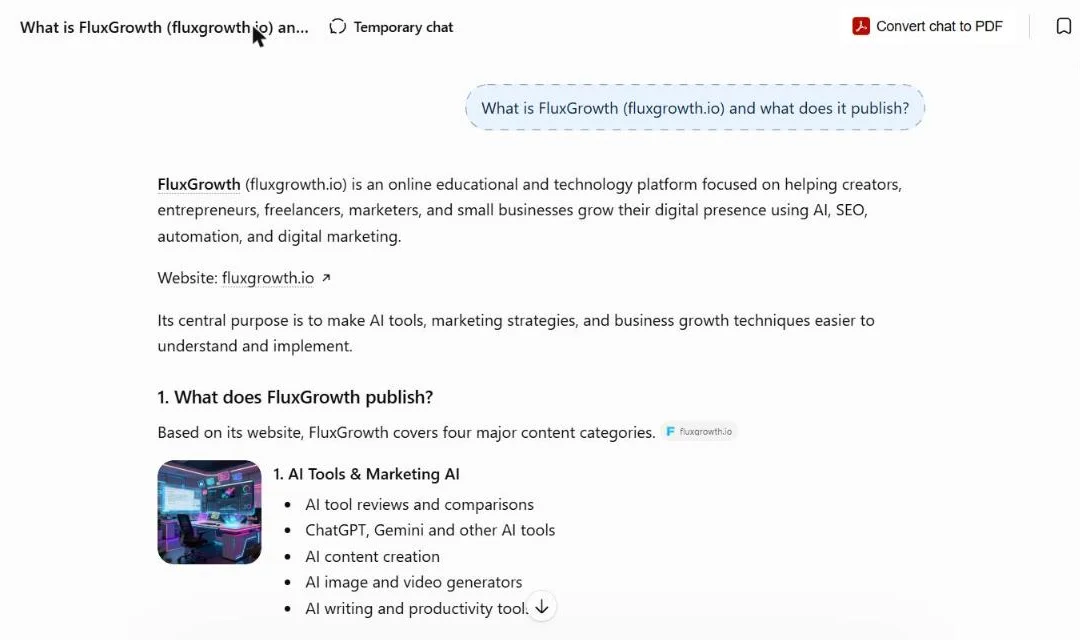
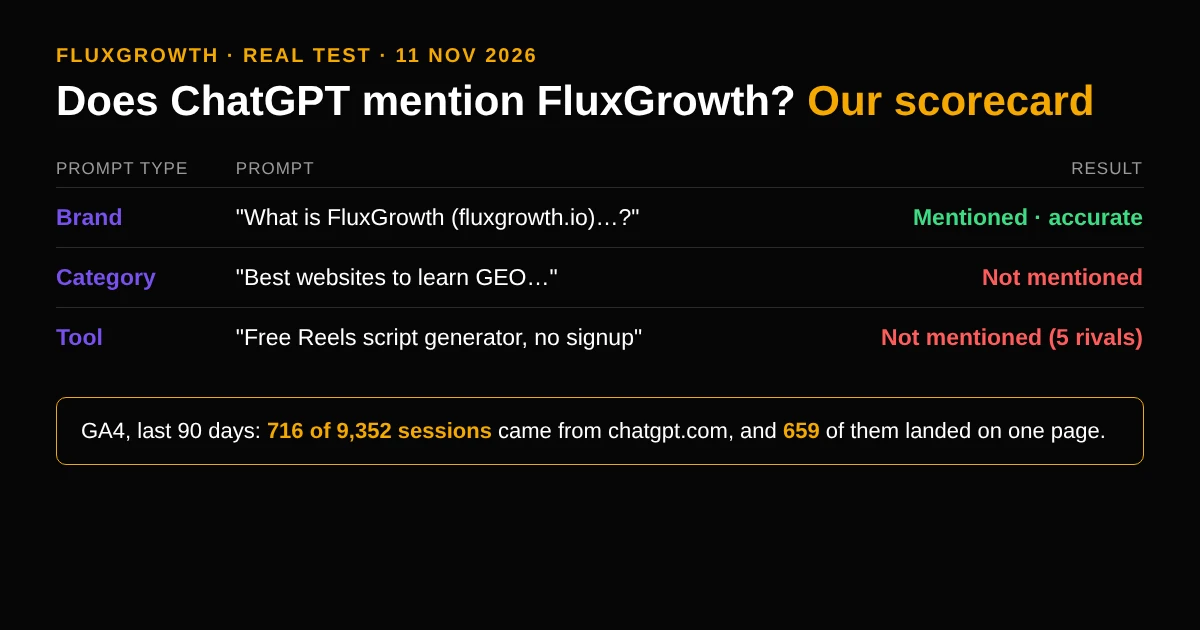
I asked “What is FluxGrowth (fluxgrowth.io) and what does it publish?” ChatGPT got it right: an AI, SEO and marketing publication for creators and small businesses, split into four content areas that match our real hubs. It named me as founder, named Arzoo as our reviews writer, and listed our free tools. It cited fluxgrowth.io itself.
Nice. Also kind of useless on its own, because nobody who’s never heard of us types our name.
Category prompt: not mentioned
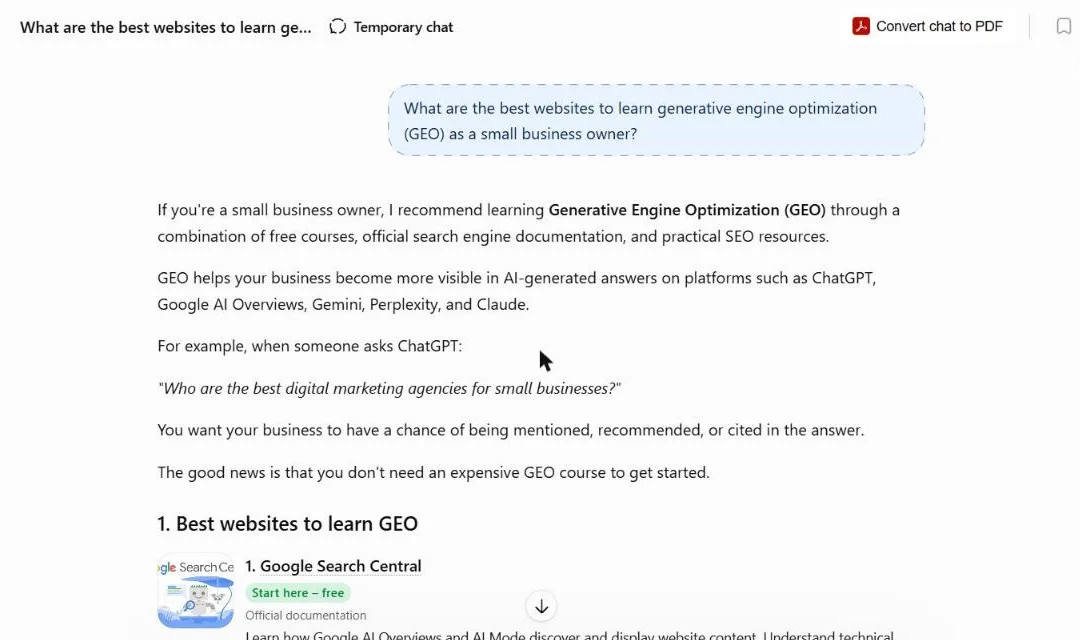
“What are the best websites to learn generative engine optimization (GEO) as a small business owner?” This is exactly what our GEO hub is built for. ChatGPT recommended Google Search Central, Ahrefs Academy, Semrush Academy, HubSpot Academy, Bing Webmaster Tools and Search Engine Land.
Is that unfair? Not really. Those are huge brands with courses and official docs. The lesson isn’t “ChatGPT is unfair.” Instead, it’s that for broad category prompts, ChatGPT leans on recognized authorities, and a young site has to win narrower prompts first.
Tool prompts: not mentioned, even where we get real traffic
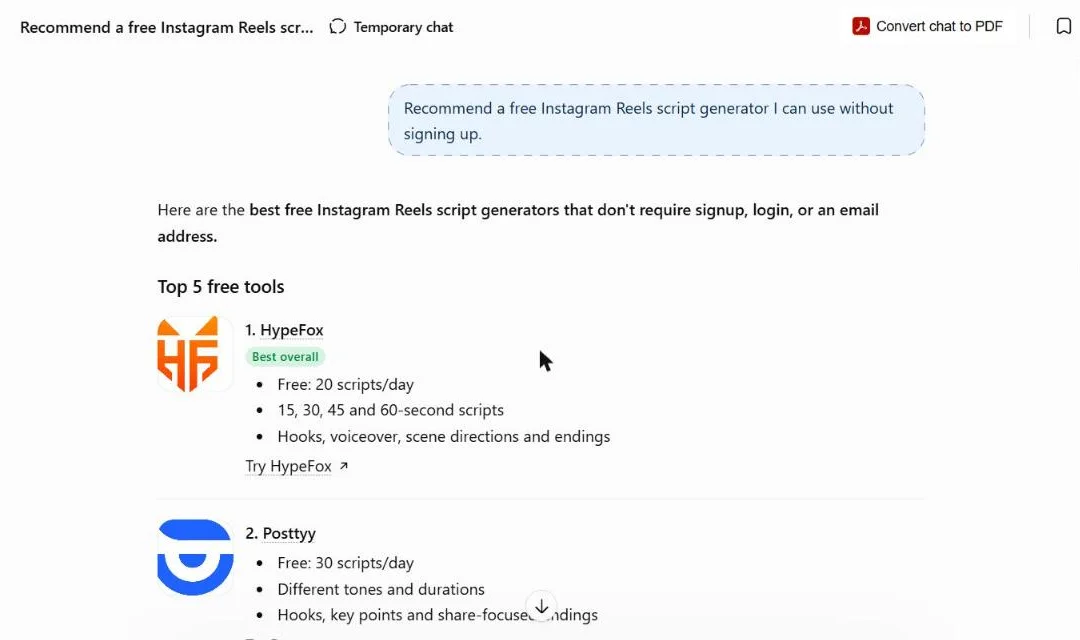
“Recommend a free Instagram Reels script generator I can use without signing up.” We have one. ChatGPT named five others: HypeFox, Posttyy, Clipmetry, Clip Utils and Postcake. Look at how it described them: “Free: 20 scripts/day”, “Free: 30 scripts/day”. It’s pulling hard numbers from pages that state them plainly. Our page doesn’t put a limit like that in one obvious line. That’s a fix I can make this week.
Next, I asked “Is there a free website where I can watch Instagram Reels online without an account?” Again, four other sites. Not us.
The twist: GA4 says ChatGPT sends us traffic anyway
Here’s where the manual test alone would have misled me. I pulled our GA4 data for 13 August to 10 November 2026:
- 716 of 9,352 sessions (about 7.7%) had chatgpt.com as the source.
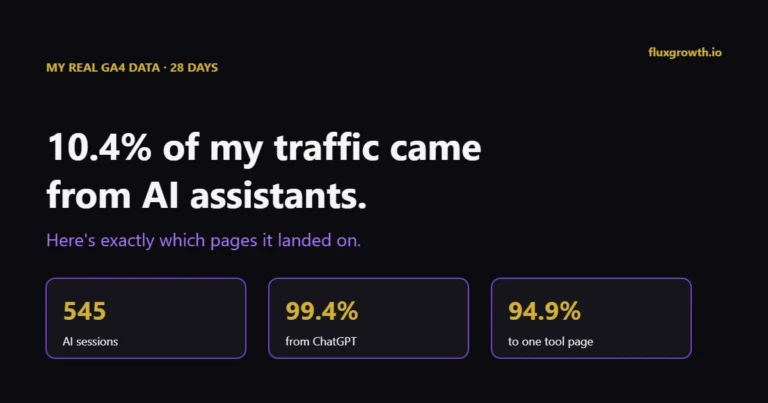
- 659 of those 716 landed on one page: our Instagram Reels viewer tool.
- For comparison: Perplexity sent 5 sessions, Gemini 16, Copilot 1.
So ChatGPT is recommending our Reels viewer, a lot, just not in the one run I did today. That’s the volatility problem in real numbers. It’s also why the referral check is part of the 15 minutes and not an optional extra. I wrote up the full page-by-page breakdown in which of my pages get AI traffic.
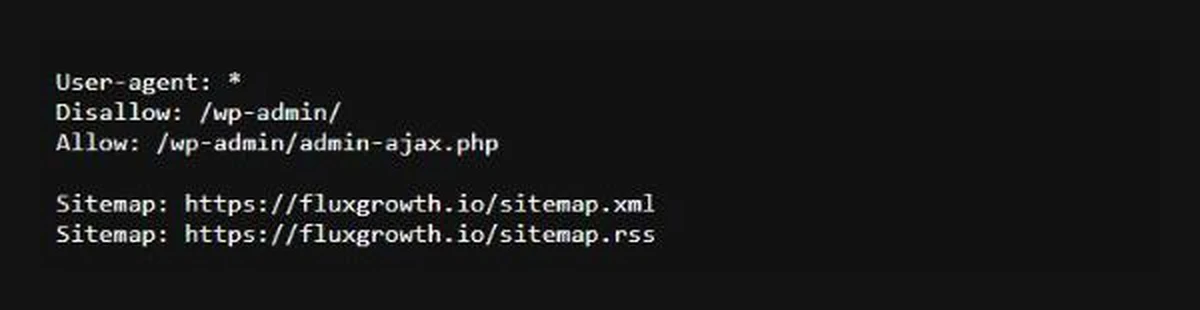
Finally, the robots.txt check? Clean. We only disallow /wp-admin/, so OAI-SearchBot can crawl everything public. If your test shows zero mentions and zero chatgpt.com referrals, this file is the first place to look.
What to do after you check if ChatGPT mentions your business
Named by brand, missing on buyer prompts
This was us. ChatGPT can read your site, but it doesn’t see you as a go-to answer for the category. Fixes, roughly in order of impact for effort:
- Pick the 2–3 narrowest buyer prompts you could realistically win, not the broadest.
- Make sure one page answers each prompt directly in its first lines, with concrete facts ChatGPT can lift: prices, limits, locations, who it’s for.
- Look at the competitors ChatGPT named and the sources it cited. Get listed, reviewed, or mentioned on those same sources.
Described wrongly
This is actually worse than not being mentioned. Wrong prices, old services, a founder who left in 2023. Update your About, pricing and contact pages first, then your Google Business Profile and big directory listings, so the web agrees on one version of the facts. Re-test in a few weeks.
Not mentioned anywhere, no chatgpt.com referrals
Check the basics before anything clever: robots.txt (OAI-SearchBot allowed?), important pages indexed in Google and Bing, and no login wall or heavy script hiding your main content. Our guide to AI search engine optimization that actually works goes deeper on the on-page side.
Cited as a source, but a competitor gets recommended
Your content is useful, but your offer isn’t clear. Add a plain line that says what you sell, to whom, and where, on the pages ChatGPT is already citing.
Don’t stop at ChatGPT
Your customers also use Google AI Overviews, Gemini, Perplexity and Copilot. The same 10 prompts work across all of them, and the answers often disagree, which we dug into in where ChatGPT, Perplexity, Gemini and AI Overviews disagree.
One free extra: Bing Webmaster Tools now has an AI Performance report that shows when your pages are cited in Microsoft Copilot. It’s the closest thing to a “Search Console for AI answers” you can get without paying for a tracker.
Meanwhile, paid trackers (Ahrefs Brand Radar, Semrush and others) run hundreds of prompts on a schedule. Worth it once you’ve outgrown a spreadsheet. Not before.
FAQ
How do I check if ChatGPT mentions your business for free?
Ask ChatGPT the questions your customers ask, without using your business name, in a clean logged-out session. Run each prompt more than once and log whether you’re named or linked. Then check GA4 for sessions with chatgpt.com as the source.
Why does ChatGPT give different answers each time?
Answers are generated fresh each time and, with search on, can pull different sources. That’s why one run proves very little. Run important prompts at least twice and track the trend over weeks.
Does blocking GPTBot remove me from ChatGPT search?
No. According to OpenAI, GPTBot relates to training data, while OAI-SearchBot is what surfaces sites in ChatGPT search. If you want to appear in ChatGPT search answers, make sure OAI-SearchBot isn’t blocked in robots.txt.
How do I track traffic from ChatGPT in Google Analytics?
OpenAI adds utm_source=chatgpt.com to links in ChatGPT answers. In GA4, open Traffic acquisition, set the dimension to Session source, and filter for “chatgpt”. Add Landing page as a secondary dimension to see which pages get the visits.
How often should you check if ChatGPT mentions your business?
Every 2–4 weeks is enough for most small businesses. Use the same prompts each time so the numbers are comparable, and re-test soon after any big change to your site or listings.
Can I pay to be mentioned in ChatGPT answers?
Not in the organic answers. OpenAI does run ads in ChatGPT, but those are labelled separately. Being named in the answer itself comes from being findable, clear, and mentioned by sources ChatGPT trusts.
The bottom line
To check if ChatGPT mentions your business, you need 15 minutes, a clean session, and a spreadsheet. The trap is stopping at your own brand name. Test buyer prompts, run them more than once, and always cross-check with your chatgpt.com referrals in GA4, because, as our own numbers showed, ChatGPT can be sending you hundreds of visitors while a single test run says it’s never heard of you.
Your next step: open a private window right now, write your 10 prompts, and fill in the first row of your sheet. Then come back in a month and see what moved.