FluxGrowth is reader-supported. Some links in our guides are affiliate links — if you buy through one we may earn a commission, at no extra cost to you. It never changes which tools we recommend. How we test tools.
Most students pick one AI tool and try to make it do everything. Then they hit the free-tier limit at 11pm before an exam, panic, and either pay for something they don’t need or waste an hour switching apps. There’s a better way.
The students pulling ahead in 2026 aren’t using better AI they’re using the right AI for the right job. A rotation of three or four free tools covers almost every academic task you’ll have. If your focus is finding research papers, analyzing PDFs, and writing literature reviews, check out our Best AI Tools for Academic Research 2026 guide. You probably won’t need to pay a cent.
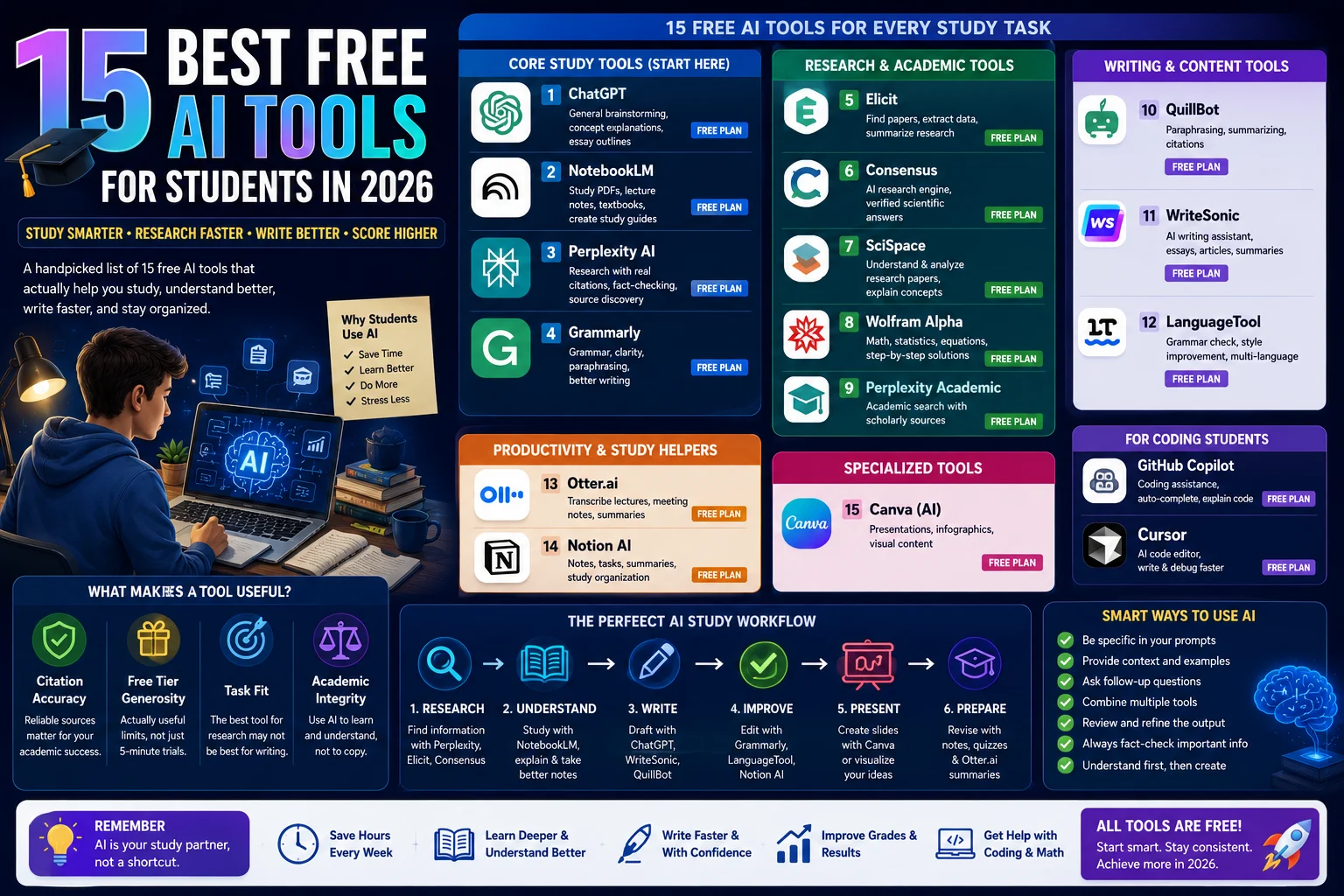
This guide covers 15 free AI tools for students, what each one actually does well, where the free tier runs out, and how to stack them so nothing falls through the cracks.
What Makes an AI Tool Actually Useful for Students?

Not every AI tool earns a place in a student’s workflow. A lot of them are demos dressed up as products useful for one task, unusable for the next.
Before getting into the list, here are the four things worth checking on any AI tool before you commit your study time to it.
Citation accuracy matters more in academic work than anywhere else. An AI that makes up sources for a common problem called hallucination can get you failed or flagged for academic misconduct without you even knowing why. Some tools are much better at grounding answers in real sources than others.
Free tier generosity varies wildly. Some tools give you a real product; others give you a five-minute trial with a paywall behind every useful feature. This guide only covers tools where the free plan is genuinely usable for a full semester.
Task fit is the one most students skip. A great research tool is often mediocre for exam prep. A strong writing assistant can be useless for quantitative courses. Matching the tool to the job is what the rotation strategy is built around.
Academic integrity risk is real, and most AI tool roundups pretend it isn’t. Some use patterns like submitting AI-generated text word for word will get you flagged by tools like Turnitin or GPTZero. Knowing how to use AI to understand material rather than copy it keeps you out of trouble. More on this later.
The Core Stack: Four Tools Every Student Needs First

Start here. These four cover the majority of what students need day-to-day. Everything else on this list is a specialist tool you add when you find a gap.
1.ChatGPT — General Brainstorming and Concept Explanations
Best for: Essay outlines, concept explanations, study planning, first-draft brainstorming
Free tier: Free plan runs on GPT-4o with usage limits; no credit card required
ChatGPT is still the first tool most students reach for, and for good reason. It handles the wide, generalist tasks: “explain this concept like I’m new to it,” “help me outline an argument for this prompt,” “what are the counterarguments to X.” It’s especially strong when you don’t quite know what kind of help you need yet.
The free plan’s main constraint is that it rate-limits you during heavy-traffic periods, usually evenings and weekends. Long sessions hit the wall faster. For most students doing moderate daily use, the free tier holds up. The $20/month Plus plan bumps you to higher limits and faster responses, but it’s not necessary to start.
One thing to watch: ChatGPT will sometimes sound confident about things it doesn’t actually know. For research work where citations matter, use Perplexity instead (covered below). Use ChatGPT for reasoning, drafting, and understanding not for sourcing facts.
2.NotebookLM — Studying Your Material
Best for: Studying PDFs, lecture notes, textbook chapters, research papers
Free tier: Includes 100 notebooks, 50 sources per notebook, 50 chat queries per day, and 3 Audio Overviews per day. It’s fully free with a Google account, no trial or credit card required. Paid tiers through Google AI subscriptions increase these limits for heavier users.
NotebookLM is the most underused student tool available right now. The concept is different from a general chatbot: you upload your own materials, lecture slides, assigned readings, your notes and then ask questions based only on what you uploaded. It can’t hallucinate information about your course because it’s constrained to your actual sources.
The practical payoff is significant. Upload Chapter 5 of your textbook and ask “what are the three main arguments the author makes?” and you get an answer grounded in that specific text, with page citations. Ask it to generate quiz questions, create a study guide, or compare how two readings approach the same topic. It does all of that.
The June 2026 update added code execution inside notebooks, which makes it genuinely useful for data-heavy coursework not just reading comprehension. The free tier’s 50 daily chat queries reset every 24 hours, which is more than enough for most students on a typical study day.
One limitation worth naming: if you’re working on a thesis with 100+ sources, you’ll hit the 50-source-per-notebook ceiling and have to split your materials across multiple notebooks. That’s a workflow inconvenience, not a dealbreaker, but it’s worth knowing before you build around it.
3.Perplexity AI — Research With Actual Citations
Best for: Research-backed answers, academic source discovery, fact-checking claims
Free tier: Includes practically unlimited basic searches, 3 Pro Searches per day, limited file uploads, and search history. Perplexity automatically chooses the AI model for free users. Academic search is available through the platform’s search modes, but advanced AI models, Deep Research, and unlimited Pro Searches require a paid plan.
Here’s the core difference between Perplexity and ChatGPT: Perplexity shows you its sources. Every claim links back to a real web page you can open and verify. That matters enormously for academic work, where “my AI told me” is not an acceptable citation.
Turn on Academic mode inside Perplexity settings. It filters results to prioritize research papers and university sources over general web content. For literature review work, early-stage research on a topic, or checking whether a claim has academic backing, it’s a better starting point than Google Scholar for most students.
The honest limitation: Perplexity is a research starting point, not a finishing point. Open every source it cites. Read the original. The AI summarizes sometimes accurately, sometimes with important nuances flattened out. The sources are real; the summary still needs your judgment.
4.Grammarly — Writing Polish and Error Checking
Best for: Assignment proofreading, clarity improvements, grammar and tone checks
Free tier: Includes unlimited grammar, spelling, punctuation, and basic writing suggestions, plus 100 AI prompts per month. It works across the browser, Google Docs, Microsoft Word, email, and many other apps. More advanced rewriting, tone adjustments, plagiarism detection, and unlimited AI assistance require a paid plan.
Grammarly is not exciting. It’s also the fastest way to catch the kinds of errors that cost you marks on assignments, missing commas, unclear sentence structure, accidentally passive voice running three paragraphs in a row.
The free plan handles the core job well. The paid plan adds more AI-generated rewrite suggestions, tone adjustments, and a plagiarism checker. Most students don’t need those features to get real value out of the free tier.
One warning worth taking seriously: don’t let Grammarly sand down everything interesting in your writing. Its suggestions trend toward corporate-brand. Accept the grammar fixes, be skeptical about the stylistic suggestions, and make sure the final version still sounds like you.
Research and Academic Tools

Once you have the core stack, these four add serious horsepower for research-heavy work.
1.Elicit — Structured Literature Review
Best for: Finding and summarizing academic papers on a specific question
Free tier: Includes 5,000 AI credits, allowing students to search literature, summarize papers, extract findings, and perform evidence synthesis before upgrading to a paid plan.
Elicit does one thing well: it takes a research question and returns a list of relevant academic papers, with automatic summaries of each. For grad students or upper-year undergrads doing literature reviews, it cuts the initial discovery phase from days to hours.
Instead of entering keywords, you ask a complete research question. Elicit searches Semantic Scholar’s database of more than 200 million scholarly papers to identify relevant studies and automatically summarizes their key findings. The summaries aren’t a substitute for reading the original papers, but they’re accurate enough to help you quickly decide which sources deserve a closer look.
The free tier limits how many papers you can analyze per search. It’s enough to do real preliminary research; heavier thesis-level use bumps against the ceiling.
2.Consensus — Academic Answers, Sourced
Best for: Finding out what peer-reviewed research actually says about a question
Free tier: Includes limited daily AI-powered searches with access to Consensus Search, the Consensus Meter, paper summaries, and evidence-based answers. Advanced AI features, unlimited searches, and Deep Research are available on paid plans.
Consensus is built around one question: what does the research say? Ask it something like “does sleep deprivation affect exam performance?” and it returns a synthesis of what academic papers have found, with individual paper citations you can follow.
It’s not a replacement for reading primary sources. But for getting a fast, defensible orientation to a research topic before you go deeper, it’s more trustworthy than asking a general chatbot which might just invent a confident-sounding answer.
3.SciSpace — Reading Research Papers
Best for: Understanding dense academic papers, asking questions about a specific paper
Free tier: Includes limited AI credits, PDF uploads, paper chat, annotations, literature search, and access to core research features. Daily and monthly AI usage is capped, while paid plans provide higher AI limits and premium models.
Research papers are written for other researchers. The vocabulary, the statistical notation, the passive voice it’s not designed for a third-year undergrad reading outside their specialty. SciSpace lets you upload a paper and ask plain-English questions about it: “what is the methodology here?” “what does this statistical result actually mean?” “summarize the limitations section.”
It’s genuinely useful for any course that assigns primary literature. The free tier’s daily query limit is the main constraint; plan your reading sessions around it.
4.Wolfram Alpha — Math and Science, Step-by-Step
Best for: Calculus, statistics, physics, chemistry any quantitative problem
Free tier: Includes unlimited standard computations, formula solving, graphing, and factual queries. Step-by-step solutions, detailed explanations, downloadable notebooks, and advanced educational features require Wolfram Alpha Pro.
Wolfram Alpha doesn’t summarize or explain in plain English it computes. Give it a calculus problem, a statistics formula, a chemical equation, and it returns the answer plus the step-by-step working. For STEM students, it’s irreplaceable.
The critical distinction from ChatGPT: Wolfram actually does the math. ChatGPT reasons through math problems but can make arithmetic errors in complex calculations. Wolfram Alpha gets the computation right.
Note-Taking and Lecture Tools
1.Otter ai — Transcribing Live Lectures
Best for: Real-time lecture transcription, recorded class notes, meeting notes
Free tier: Includes 300 transcription minutes per month, with a 30-minute limit per conversation and up to 3 imported audio/video files during the account’s lifetime. The free plan also provides live transcription, AI-generated meeting summaries, and searchable notes.
If you’re in a class where the professor talks fast and the slides don’t tell the full story, Otter ai is worth having. Open it on your phone, hit record, and get a text transcript of the lecture as it happens. After class, search the transcript by keyword to find the part where they explained that concept you couldn’t keep up with.
300 minutes per month is roughly 10 one-hour lectures. Most students with 4-5 classes won’t transcribe every session and use it selectively for the lectures that matter most.
2.Notion AI — Notes, Study Plans, and Organization
Best for: Organizing class notes, building study schedules, connecting information across courses
Free tier: The Free plan includes unlimited pages and blocks for personal use, collaborative workspaces, databases, calendars, and note-taking. Notion AI is not included in the Free plan and requires a paid plan with AI features. The Business plan ($20/user/month, annual billing) includes Notion AI, while Enterprise plans also include AI capabilities.
Notion’s strength is organization, not generation. Build a wiki for each course, link your notes together, drop in Perplexity research, paste in Otter transcripts, set deadlines. The workspace structure is what most students need. The AI features are useful but not essential on the free plan.
Fair warning: Notion has a learning curve. If you’re two weeks from finals and have never used it, start with something simpler. Notion rewards students who set it up at the beginning of a semester.
Presentations and Visual Content
1.Canva — Slides, Graphics, and Anything Visual
Best for: Presentation slides, infographics, posters, social content
Free tier: Includes millions of free templates, unlimited designs, cloud storage, Magic Write (with limited AI usage), and many core design features. Premium templates, Brand Kit, Magic Studio’s advanced AI features, premium stock assets, and additional AI credits require Canva Pro.
Student deal: Canva for Education is free for eligible K–12 teachers and students whose schools have been verified by Canva. It is not automatically available to university or college students, although some higher education institutions may provide Canva through institutional licensing.
Canva’s free tier is genuinely generous. The AI features Magic Write for copy, background removal, and text-to-image are available to varying degrees for free, with daily limits on the AI-specific tools.
For presentations, the template library is large enough that you’re not starting from a blank slide. The student Education plan, available through many schools, unlocks premium templates and removes the AI usage caps.
2.Gamma AI — Full Decks From a Prompt
Best for: Building a complete presentation from an outline or topic
Free tier: Includes 400 one-time AI credits when you create an account, which is typically enough for around 10–15 AI-generated presentations, depending on complexity. Once the credits are used, you can earn additional credits through referrals or upgrade to a paid plan.
Gamma takes a topic or an outline and builds a complete slide deck structure, copy, layout, images. It’s not Canva’s level of visual polish, but for a first draft of a 10-slide presentation at midnight, it’s much faster than starting from scratch.
The credit-based free tier means heavy users run out. Use it for the presentations that matter, not as an always-on tool.
Tools for Coding Students
1. GitHub Copilot Student — AI Pair Programmer
Best for: Code completion, debugging, code explanations, and programming assignments in Visual Studio Code, JetBrains IDEs, and other supported editors.
Free tier for students: Verified students through the GitHub Student Developer Pack can access GitHub Copilot Student for free. As of June 2026, GitHub has started gradually reopening new Copilot Student sign-ups after a temporary pause introduced in April 2026. Availability may still roll out in phases depending on your account or region.
GitHub Copilot remains one of the most valuable AI tools for programming students. It offers intelligent code completions, explains unfamiliar code, suggests fixes for bugs, generates boilerplate code, and helps you learn new programming concepts without leaving your IDE.
For students learning Java, Python, C++, JavaScript, or other programming languages, Copilot can dramatically speed up coding assignments while also explaining why a solution works. It’s best used as a learning companion rather than a replacement for understanding the code yourself.
2. Cursor — A Strong Alternative for New Students
Best for: AI-assisted coding, code generation, debugging, and programming projects in a full IDE environment.
Free tier: Includes limited AI requests, access to core coding features, and support for multiple AI models. The free plan is designed for light personal use, while Cursor Pro unlocks higher usage limits, faster responses, and premium models.
If GitHub Copilot isn’t available to you or you simply want an AI-first coding environment Cursor is one of the best alternatives. Built on Visual Studio Code, it feels familiar to anyone already using VS Code while adding AI directly into the editor. You can generate code, explain unfamiliar functions, refactor projects, fix bugs, and chat with your codebase without leaving the IDE.
For computer science and software engineering students, Cursor is particularly useful for assignments, debugging, and learning new programming concepts. The free plan is generous enough for coursework and personal projects, while heavier daily users may eventually benefit from upgrading to Cursor Pro.
Free vs. Paid: When It’s Worth Upgrading
Most students won’t need to pay for any of these tools. But there are a few cases where an upgrade makes sense.
| Tool | Free Tier Limit You’ll Actually Hit | Worth Paying? |
| ChatGPT | Rate limits during peak hours | $20/mo Plus if you rely on it daily for long sessions |
| NotebookLM | 50 sources per notebook; 50 chats/day | $9.99/mo student discount for Google AI Pro if you’re doing thesis-level work |
| Perplexity | Limited Pro searches per day | $20/mo Pro unlocks unlimited; most students don’t need it |
| Grammarly | Limited AI rewrites | Free handles grammar fine; paid adds plagiarism checker |
| GitHub Copilot | Student plan paused for new sign-ups | Check current status; Copilot Pro is $10/mo if needed |
| Otter.ai | 300 min/month transcription | $16.99/mo Pro if you transcribe every lecture |
| Gamma AI | ~10-15 decks on free credits | Credit packs available; not a subscription |
On Google Gemini: Several older articles still mention a one-year free Google AI Pro plan for students as if it’s universally available. That isn’t the full picture anymore.
Current offer: Eligible college students in supported countries can still claim one year of Google AI Pro for free, but the promotion is time-limited and country-specific. Students must verify their enrollment through SheerID, be 18 years or older, have a personal Google Account, and sign up before the promotion deadline in their country. After the promotional year ends, the subscription automatically renews at $19.99/month (or the local equivalent) unless canceled.
The One Mistake That Gets Students Into Trouble
AI tools don’t get students flagged. How students use them does.
Copy-pasting an AI-generated answer into an assignment and submitting it as your own is the version that gets people caught. Detection tools like Turnitin’s AI writing checker, GPTZero, and Originality.ai have gotten meaningfully better at identifying AI-generated text particularly the flat, uniform paragraph rhythm that most models default to.
The students who avoid problems use AI the way you’d use a tutor: to understand material, to pressure-test an argument, to catch errors, to get unstuck. They write the final version themselves.
There’s also a practical academic argument for this approach beyond the integrity one. If you outsource your thinking to an AI, you’re not building the understanding the course is designed to give you. That matters a lot when you’re taking a follow-on course that assumes you actually learned the previous one or when you’re in a job interview six months later.
The safe workflow: use AI to understand, outline, and research. Write your own draft. Use AI again to check the draft and catch errors. You end up with better work than you’d have produced alone, and it’s unambiguously yours.
What I’d Do If I Were Starting College Today
If I were starting college today, I wouldn’t install every AI tool I came across. That’s one of the biggest mistakes students make. More tools don’t automatically mean better results.
I’d start with just three. NotebookLM would be my study companion because it works with my own lecture notes, PDFs, and textbooks instead of pulling answers from across the web. For research, I’d use Perplexity to quickly find credible sources with citations before reading the original papers myself. Before submitting any assignment, I’d run it through Grammarly to catch grammar mistakes, improve clarity, and polish the writing.
Only after those tools became part of my daily workflow would I add more specialized ones. If I had a presentation due, I’d use Canva to create professional slides quickly. When programming courses started, I’d use GitHub Copilot or Cursor if Copilot wasn’t available to help explain code and speed up debugging. If I began writing literature reviews or research-heavy assignments, Elicit would become my go-to tool for finding and summarizing academic papers.
The goal isn’t to build the biggest AI toolkit. It’s to build a small workflow where every tool solves a specific problem better than the others.
Most importantly, I’d treat AI as a study partner not a shortcut. I’d use it to understand difficult concepts faster, organize information better, and save time on repetitive work. But I’d still read the source material, solve practice problems myself, and think critically. AI can make learning more efficient, but it can’t replace genuine understanding. The students who benefit the most from AI aren’t the ones who let it do their work—they’re the ones who use it to learn more effectively.
Frequently Asked Questions
What is the best free AI tool for students?
For most students, the combination of NotebookLM and Perplexity covers the most important academic tasks: studying your own materials and finding cited research. ChatGPT is the best generalist for brainstorming and explanations. There’s no single best tool; the right answer depends on whether you’re studying for an exam, writing a paper, or solving problem sets.
Is ChatGPT free for students?
Yes. ChatGPT’s free plan runs on GPT-4o with usage limits and requires no credit card. The main constraint is rate limiting during peak hours. The $20/month Plus plan removes most limits and adds access to additional models, but the free tier handles most student tasks.
Which AI is best for homework help?
It depends on the subject. For math and science problem sets, Wolfram Alpha gives step-by-step solutions and actually does the computation. For writing-based assignments, ChatGPT is strong for outlines and concept explanation. For research-backed work, Perplexity in Academic mode is the most reliable option because it cites real sources.
Can AI improve grades?
Used well, yes by helping you understand material faster, catch writing errors, and organize your study time. Used poorly (submitting AI output as your own work), it creates academic integrity risk that can result in a zero or worse. The research benefit comes from using AI to learn, not to skip learning.
Is NotebookLM free?
Yes. NotebookLM’s Standard tier is completely free with any Google account, no credit card, no trial period, no expiration. The free plan includes 100 notebooks, 50 sources per notebook, 50 chat queries per day, and Audio Overviews. Most students never need to upgrade.
Is GitHub Copilot free for coding students?
As of this writing (July 2026), GitHub paused new sign-ups for its free Copilot Student plan on April 20, 2026. Students already verified before the pause keep free access. New students trying to sign up now land on the limited Copilot Free tier until GitHub reopens sign-ups. Check github.com/education for the current status before assuming you can claim the full student plan.
Which AI is best for research papers?
Perplexity in Academic mode is the best starting point — it cites real sources and can filter to peer-reviewed content. For analyzing specific papers you already have, SciSpace and NotebookLM are strong. For finding papers on a topic systematically, Elicit is the most structured option. Use all three in sequence for serious research work.
Should students use AI?
Yes, with intention. AI tools are becoming a baseline skill in most careers, and learning to use them well in an academic context builds habits that transfer. The caveat: use them to understand and think, not to replace understanding and thinking. That distinction is the difference between a tool that helps you learn faster and one that produces work you can’t actually stand behind.