FluxGrowth is reader-supported. Some links in our guides are affiliate links — if you buy through one we may earn a commission, at no extra cost to you. It never changes which tools we recommend. How we test tools.
Introduction
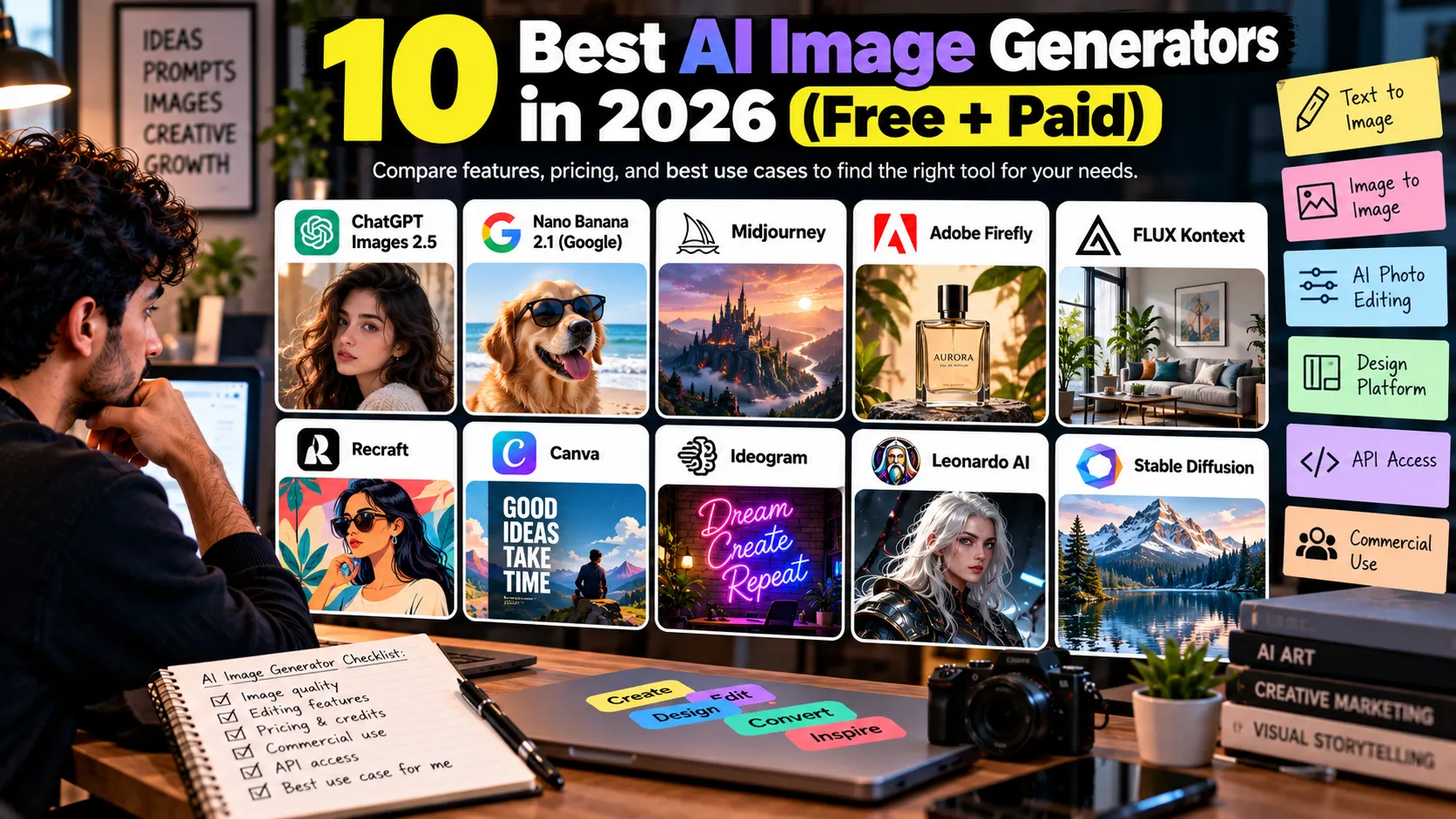
The best AI image generator in 2026 depends on what you’re making. ChatGPT Images 2.5 is the easiest all-rounder, Google’s Nano Banana 2.1 is the strongest free option, Midjourney still leads on style, and Adobe Firefly is the safer bet when an image goes into paid client work.
Here’s the problem. Every tool now makes a good-looking picture, so looks alone won’t decide it. What separates them is editing control, text rendering, credit limits, API access, and the licensing fine print.
This guide compares 10 tools on exactly those points. You’ll see what each one costs, who it’s built for, where it falls short, and what you’re actually allowed to do with the images it makes.
What is an AI image generator?
An AI image generator is software that turns a written description, a reference image, or both into a new image. You type “a ceramic coffee mug on a walnut desk, morning light,” and the model returns a picture that matches.
Most of these models are trained on huge sets of image and caption pairs. They learn which visual patterns go with which words, then build a new image step by step from noise until it fits your prompt. Newer models like GPT-Image-2.5 and Nano Banana 2.1 also accept images as input, so you can edit an existing photo by describing the change.
The 7 types of AI image tools
The label “AI image generator” covers very different products. Knowing which type you need cuts your shortlist fast.
| Type | What it does | Example |
| Text-to-image | Creates an image from a written prompt | Midjourney |
| Image-to-image | Restyles or transforms an image you upload | FLUX Kontext |
| AI photo editing | Adds, removes, or extends parts of a real photo | Photoshop Generative Fill (Firefly) |
| AI design platform | Generates images inside a layout you can edit | Canva, Recraft |
| Image API | Lets developers call a model from their own app | OpenAI Images API, Gemini API |
| Open-weight / local model | Model files you can run on your own GPU | FLUX.2 Klein |
| Creative suite with AI | AI features built into tools you already use | Adobe Creative Cloud |
A blogger who needs one featured image a week and a developer generating 10,000 product shots a month are shopping in different aisles. Keep your type in mind as you read the tool breakdowns.
How we picked these 10 AI image generators
We chose these 10 tools from official product documentation, pricing pages, terms of service, and published third-party benchmarks, all checked in October 2026. We didn’t run our own side-by-side tests for this piece, so you won’t see invented scores here. No tool paid for placement.
Each tool was judged on eight things: image quality, prompt adherence, editing features, ease of use, pricing and usage limits, commercial-use terms, API access, and privacy defaults.
One thing to know up front. Leaderboards change monthly, and several “best of” lists on page one are published by the tools ranking themselves first. Where a claim comes from a vendor or a public leaderboard, we say so.
1. ChatGPT Images 2.5 (OpenAI)
ChatGPT Images 2.5 is the easiest AI image generator to get good results from, because you refine images by talking to it. OpenAI released it on September 8, 2026, and says it cuts generation time by up to 50% compared with Images 2.0.
Key features. Multi-turn editing that keeps earlier changes intact, a Sketch tool (type @Sketch and draw a rough guide), comments you pin directly on an image, templates for posters and merch, and transparent backgrounds. Developers get two API models: GPT-Image-2.5 Flare (fast default) and Sunburst (slower, tighter edit control).
Pros: natural-language editing, strong text rendering, available on every ChatGPT tier.
Cons: fewer fine-grained style controls than Midjourney; OpenAI hasn’t published how many tokens a 2.5 image uses, so per-image API costs are hard to predict.
ChatGPT Images 2.5 pricing and commercial use
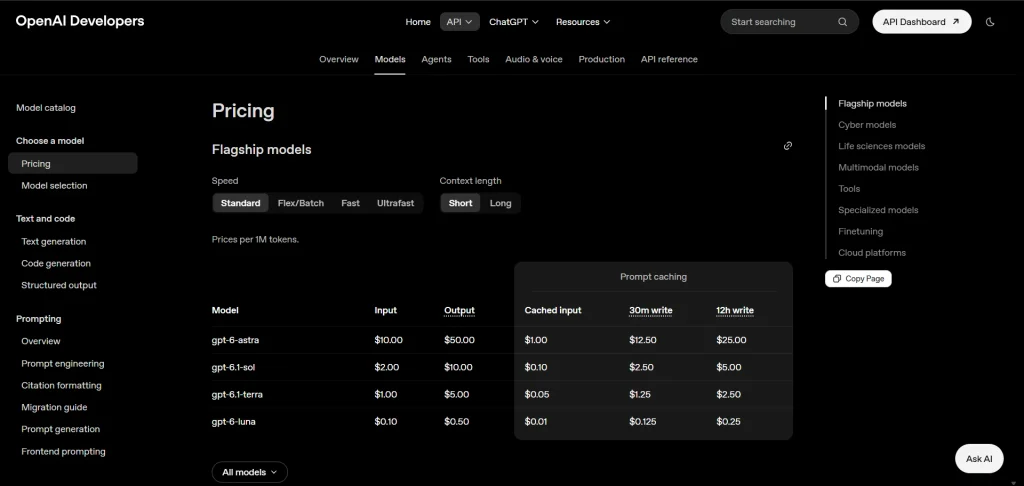
ChatGPT Images 2.5 works on every ChatGPT plan, Free included, though your limits depend on the tier. ChatGPT Plus is $20 per month. On the API, Flare and Sunburst bill image output at $30 per million tokens, or $15 per million if you run jobs through the Batch API. Input tokens are billed on top, so your real cost per image depends on the prompt and size. Check the official API pricing for details.
OpenAI’s Terms of Use say you own what you generate, as far as the law allows, as long as you follow its usage policies. That covers commercial use. Owning an image isn’t the same as holding copyright in it, though, and it won’t protect you if the output copies someone else’s work.
Best for: beginners, marketers, and anyone who wants to iterate on one image across several rounds.
Verdict: the default pick for most people. Choose something else if you need a signature artistic style or vector files.
2. Google Gemini (Nano Banana 2.1)
Google Gemini, powered by the Nano Banana image models, is the strongest free AI image generator for most people. Nano Banana 2.1 became generally available on October 6, 2026, as an update to Nano Banana 2 (Gemini 3.1 Flash Image).
Key features. Output at 1K, 2K, or 4K; up to 14 reference images fused into one result; conversational editing; and search grounding, so infographics and diagrams can pull in real-world information. Google adds an invisible SynthID watermark to its images.
Pros: generous free access, strong photorealism, product recontextualization (placing an existing product in a new scene).
Cons: free limits change often and without notice; fewer art-direction controls than Midjourney.
Gemini pricing and commercial use
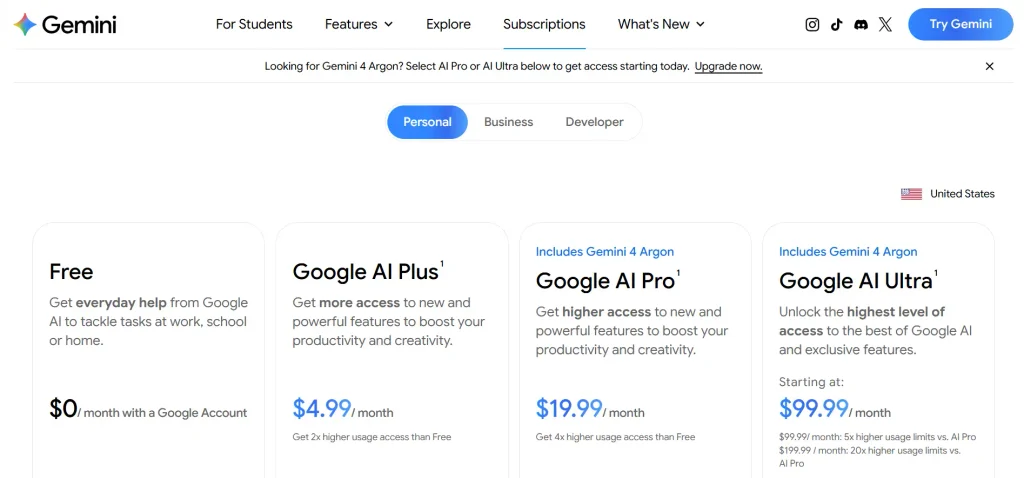
The Gemini app lets you generate images for free, within limits Google adjusts often. Google AI Pro is $19.99/month in the U.S. Developers can use the Gemini API or Vertex AI and pay by model and usage.
Official links: Gemini plans and pricing · Gemini API pricing · Gemini API terms
Google’s Gemini API Additional Terms say Google doesn’t claim ownership of what you generate, so commercial use is fine within its policies. Like every tool here, that’s not the same as copyright protection.
Best for: budget-conscious creators, e-commerce product scenes, and teams already in Google Workspace.
Verdict: start here if cost matters. Move to a paid plan once daily limits start slowing you down.
3. Midjourney V8.2
Midjourney V8.2 is a strong choice for stylized, art-directed visuals. It became the default model on July 24, 2026, replacing V8.1, according to Midjourney.
Key features. HD image generation up to 2K resolution, Style References (–sref), moodboards, personalization profiles, Raw mode, and an Edit Model for image editing, inpainting, outpainting, and combining up to four reference images. Midjourney called V8.1 its fastest model yet.
Pros: distinctive aesthetics, extensive style controls, and tools for maintaining a consistent visual direction.
Cons: paid subscription required for regular access, a learning curve for advanced prompting, and no documented public self-serve API for general developers.
Midjourney pricing and commercial use
Plans cost $10/month for Basic, $30 for Standard, $60 for Pro, and $120 for Mega. Annual billing reduces the effective monthly prices to $8, $24, $48, and $96, respectively. Paid plans permit commercial use under Midjourney’s terms, but businesses earning over $1 million in annual gross revenue must use Pro or Mega. Creations are public by default; Stealth Mode is available only on Pro and Mega.
Best for: designers, illustrators, marketers, and brands that want distinctive visuals.
Verdict: choose Midjourney for creative quality and style control. Consider alternatives if you need a low-cost private workflow or direct API integration.
Want to turn your Midjourney images into video? See our guide to the 10 Best AI Image-to-Video Generators in 2026.
4. Adobe Firefly
Adobe Firefly is the AI image generator built for professional editing and commercially cautious teams. Its biggest advantage isn’t the text-to-image box. It’s Generative Fill inside Photoshop, where AI edits land in a real layered file.
Key features. Generative Fill, Generative Expand, and Text to Vector; Firefly Image Model 5; partner models from Google, OpenAI, Black Forest Labs, and others inside the same app; and Firefly Boards for moodboarding.
Pros: unlimited standard image generations on paid plans, deep Photoshop and Illustrator integration, one place to try several models.
Cons: partner models and video burn credits fast, and the credit math takes effort to understand.
Adobe Firefly pricing and commercial use
Firefly has a free plan with a small number of generations. Paid plans include Standard ($9.99/month), Pro ($19.99/month), Pro Plus ($49.99/month), and Premium ($199.99/month), each with a different monthly credit allowance. Check the official pricing page for current limits and features.
Adobe’s Firefly models are trained on licensed and public-domain content. That’s why Adobe allows commercial use of eligible outputs. But images from partner models (Google, OpenAI, and others) follow different rules, so note which model you used. Review Adobe’s Generative AI User Guidelines before publishing.
Best for: designers in Creative Cloud, agencies, and brand teams editing real photos.
Verdict: the safest choice for client work inside Adobe. Overkill if you only need a few blog images a month.
5. Ideogram 4.5
Ideogram is the AI image generator to use when the text inside the image has to be right. Version 4.5 adds native 2K output, up to 5 reference images, and Precise Edit masking, and it’s live in the app, the API, and through MCP.
Key features. Reliable typography for posters, thumbnails, and logos; Precise Edit for changing one region without redrawing the rest; style references; and four quality modes.
Pros: best-known for legible text, a real free tier, API pricing per image.
Cons: less impressive for pure photorealism; free-plan images are public.
Ideogram pricing and commercial use
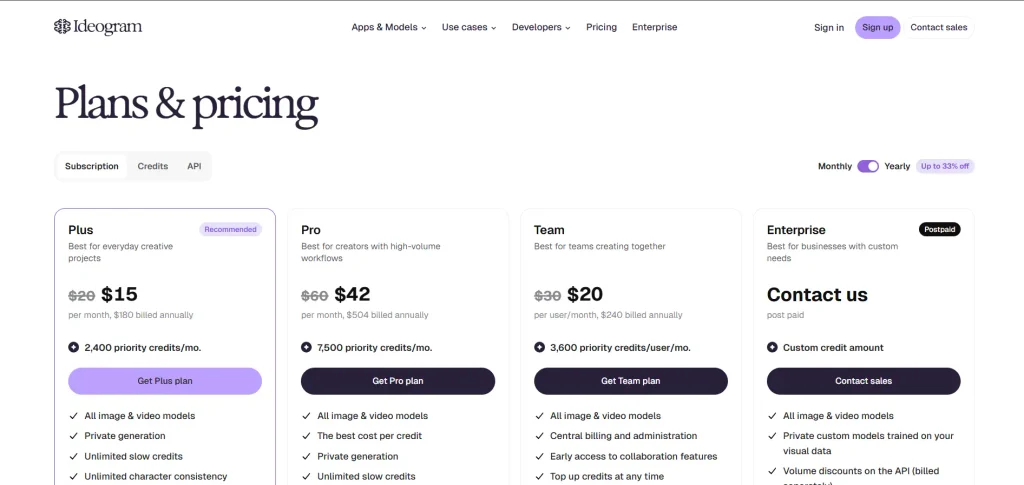
Ideogram has a free plan with limited credits. Paid plans start at $15/month (Plus, billed yearly) and raise the limits. Check the official pricing page for current prices and credits, as these can change.
Ideogram says it doesn’t restrict your rights to the images you generate, so commercial use is fine. Copyright protection and third-party IP risk are still on you. See the official plans and pricing documentation.
Best for: YouTubers, social media managers, and anyone making text-heavy graphics.
Verdict: the go-to for thumbnails and posters. Pair it with another tool for photoreal scenes.
6. FLUX (Black Forest Labs)
FLUX is the AI image generator family for developers who want control, including open-weight models you can run yourself. Black Forest Labs, founded by researchers behind Stable Diffusion, ships FLUX.2 today and announced FLUX 3 on July 23, 2026.
Key features. FLUX.2 comes in Pro, Flex, and Dev versions, plus an Apache 2.0-licensed Klein model you can self-host. FLUX Kontext handles image-to-image editing. FLUX 3 is a multimodal model covering image, video, and audio, but it launched in gated early access, with FLUX 3 Image and an open-weight FLUX 3 Dev to follow.
Pros: open weights, fine-tuning, and wide availability through hosting platforms like fal and Replicate.
Cons: no polished consumer app of its own; you’ll need technical setup or a third-party interface.
FLUX pricing and commercial use
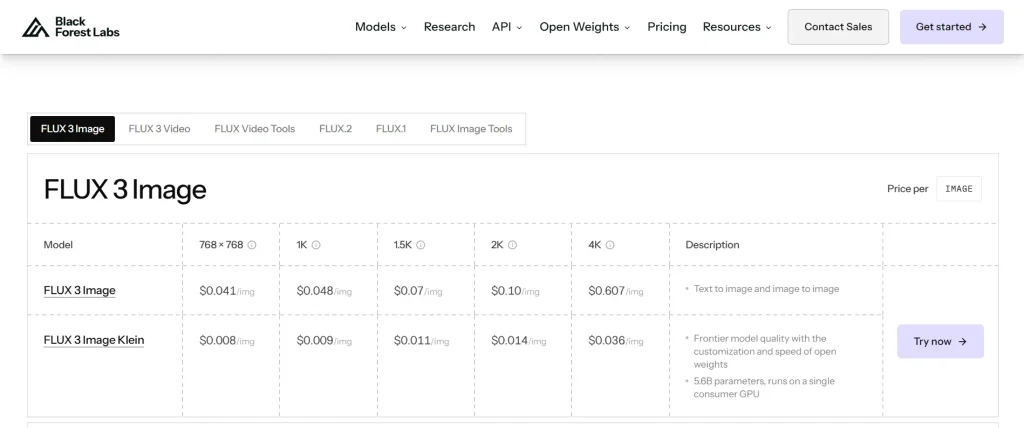
FLUX API pricing varies by model and resolution. FLUX.2 [klein] 4B starts at $0.014 per image. Commercial rights depend on the model: Klein 4B uses Apache 2.0, while self-hosted Klein 9B and FLUX.2 [dev] require a commercial license. Check the official pricing, and read the licensing terms for the exact model you deploy before using it commercially.
Best for: developers, SaaS teams, and anyone who needs self-hosting for privacy or cost.
Verdict: the strongest open option. Non-technical users are better served elsewhere.
7. Recraft V4.1
Recraft is the AI image generator for designers who need real vector files. Recraft says V4 Vector is the only model that produces editable, production-quality SVG, not a traced raster image.
Key features. Standard, Vector, Pro, and Utility model variants; SVG output with real paths you can open in Figma or Illustrator; brand color controls; style training on your own references; and a Figma plugin.
Pros: true vectors for logos and icons, strong typography, designer-friendly canvas.
Cons: less suited to photoreal lifestyle shots; free plan is non-commercial.
Recraft pricing and commercial use
Recraft gives you 30 free credits a day, for non-commercial use only. Paid plans raise the limits and add commercial rights, and you keep those rights for images made while subscribed, even after you cancel. API pricing depends on the model and operation. Check the official pricing page for current plan prices and API rates. All V4 models are available through the Recraft API.
Best for: brand designers, startups building identity kits, and print-on-demand sellers.
Verdict: the clear pick for vectors. Use something else for photography.
8. Leonardo.ai
Leonardo.ai is a versatile AI image generator with a useful free tier, making it a good option for experimenting with styles, character concepts, and game assets. Key features include multiple models, image editing, custom model training, a real-time canvas, and video generation. Leonardo.ai technology also powers Canva’s Dream Lab.
Pros: 150 free tokens daily, a broad range of styles, and useful character and concept-art tools.
Cons: free creations are public, and Leonardo, not you, owns the IP on free-plan images.
Leonardo pricing and commercial use
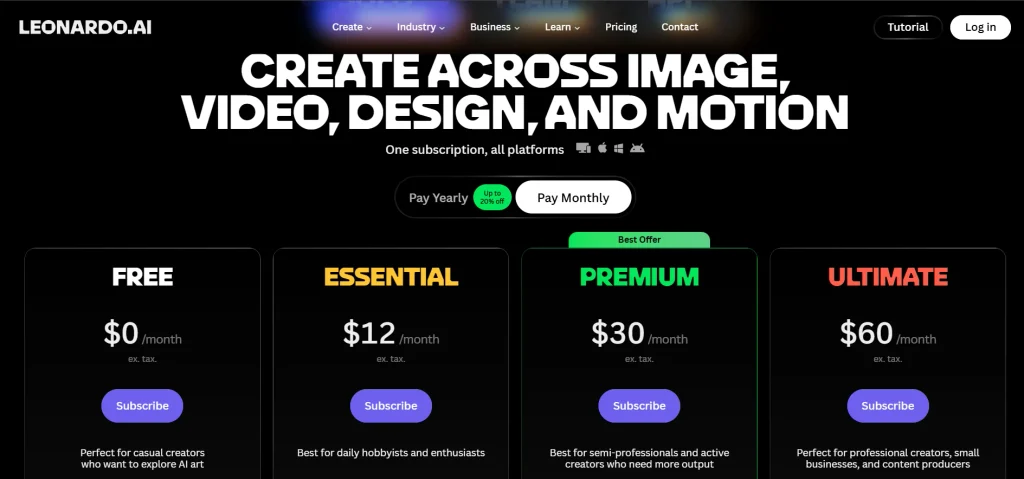
Plans include Free (150 tokens/day), Essential ($12/month), Premium ($30/month), and Ultimate ($60/month). Annual billing reduces the monthly equivalent to $10, $24, and $48 for the paid plans. Free users get a limited license to use images commercially, but Leonardo keeps the IP. Paid subscribers own what they generate. Check the official pricing page for current details.
Best for: hobbyists, game developers, and creators exploring visual ideas.
Verdict: a strong free sandbox for testing image-generation workflows.
9. Canva AI (Dream Lab)
Canva AI is the AI image generator for marketers who need the image inside a finished design. Dream Lab generates directly into a Canva layout, so a social post or ad is one step instead of three.
Key features. Dream Lab text-to-image, Magic Edit, Background Remover, Magic Resize for every social format, and Brand Kits that keep colors and fonts consistent.
Pros: no exporting between tools, templates for every platform, easy for non-designers.
Cons: image quality trails dedicated generators, and AI features share a monthly allowance.
Canva pricing and commercial use
Canva Free includes limited AI usage. Canva Pro costs $15/month or $144/year in the U.S., while Canva Business costs $250/year per person with annual billing. Under Canva’s AI Product Terms, you generally own your AI output and can use it commercially, with a few licensing exceptions. Check the official pricing page and AI Product Terms for details.
Best for: social media managers, small-business owners, and bloggers making featured images.
Verdict: pick Canva for speed and finished social media designs. Choose a dedicated generator for high-quality standalone images. Once your design is ready, use our free Instagram caption generator to create captions for your social media posts.
10. Microsoft Copilot and Bing Image Creator (MAI-Image-2e)
Microsoft Copilot and Bing Image Creator offer a free AI image generator for anyone with a Microsoft account. Microsoft’s in-house MAI-Image-2 debuted at #3 on the Arena.ai text-to-image leaderboard in March 2026, and Bing Image Creator now lists MAI-Image-2e alongside GPT-4o and DALL-E 3.
Key features. A choice of models, strong photorealism and in-image text, and integration with Copilot and PowerPoint.
Pros: free, with 15 fast creations a day before it drops to standard speed; no subscription.
Cons: at launch MAI-Image-2 had no image-to-image, inpainting, or reference image support, and its content filters are strict.
Microsoft pricing and commercial use
Bing Image Creator is free with a personal Microsoft account. For developer integrations, Microsoft Foundry offers image-generation APIs with pricing that depends on the model and usage. Microsoft’s terms don’t clearly settle commercial use either way.
Check the Bing Image Creator terms and Microsoft Foundry pricing before using images in paid projects.
Best for: casual users, students, and Microsoft 365 users making slides.
Verdict: a solid free option for personal projects. Hold off on commercial assets until you’ve read the current terms.
AI image generator comparison table
No single AI image generator wins every job. The best choice depends on whether you prioritize photorealism, creative control, text rendering, design workflows, or developer integration.
| AI Image Generator | Best For | Free Access | Main Advantage | Main Limitation |
| ChatGPT Images 2.5, Google Gemini | Everyday images and conversational editing | Yes, with usage limits | Easy to create and refine images using natural language | Limits vary; fewer specialized controls |
| Midjourney, Leonardo.ai | Art, concept art, and stylized visuals | Leonardo offers a free tier; Midjourney has no standard free plan | Strong artistic styles and creative controls | Midjourney requires a subscription; Leonardo free creations are public |
| Ideogram, Recraft, Canva AI | Text-heavy graphics, vectors, and social designs | Free tiers available | Useful text rendering, vector generation, and design workflows | Features and output quality vary by tool |
| Adobe Firefly | Image editing and professional design workflows | Limited free access | Integration with Adobe creative tools | Premium features may require credits or a paid plan |
| FLUX, Microsoft Copilot | Developers and free image creation | FLUX offers API access and some open-weight models; Copilot offers free image creation | FLUX supports model integration and self-hosting; Copilot is easy to use | FLUX licensing varies by model; Copilot has usage limits |
Quick specs for all 10 tools
| Tool | Free Access | Paid From (U.S., Monthly) | Public API | Commercial Use |
| ChatGPT Images 2.5 | Yes, with limits | $20 (Plus; API billed separately) | Yes | Users own outputs, subject to applicable terms and law |
| Google Gemini | Yes, with limits | $19.99 (Google AI Pro) | Yes | Subject to Google’s terms and applicable policies |
| Midjourney | No standard free plan | $10 (Basic) | No official public API confirmed | Commercial use allowed under its terms; businesses earning over $1M annually need Pro or Mega |
| Adobe Firefly | Limited free access | $9.99 (Standard) | Yes, through Adobe’s developer offerings; access and pricing vary | Generally permitted for eligible outputs, subject to terms and model restrictions |
| Ideogram | Free tier available | $15 (Plus, billed annually) | Yes | Allowed subject to licensing terms and third-party rights |
| FLUX | Some open-weight models | Pay-as-you-go API; FLUX.2 Klein 4B starts at $0.014/image | Yes | Depends on model license and deployment method |
| Recraft | 30 free daily credits | Check current official pricing | Yes | Paid-plan images have commercial rights; free-plan use is non-commercial |
| Leonardo.ai | 150 tokens/day | $12 (Essential) | Yes | Free users receive a commercial-use license; paid users own generated images under its terms |
| Canva AI | Limited free AI usage | $15/month or $144/year (Pro) | No general public image-generation API confirmed | Subject to Canva’s AI terms and applicable content licenses |
| Microsoft Copilot | Free, with changing usage limits | Free for basic image creation | Microsoft Foundry offers separate developer APIs | Check current product terms before commercial use |
Best AI image generator by use case
- Overall: ChatGPT Images 2.5. OpenAI’s two new models ranked first and second on the Arena image board on September 9, 2026, though on far fewer votes than older models, so treat that lead as provisional.
- Beginners: ChatGPT or Google Gemini, because you can describe changes instead of learning prompt syntax.
- Photorealistic images: no clear winner. Nano Banana 2.1, GPT-Image-2.5, and MAI-Image-2 all score well, and leaderboards reshuffle monthly.
- Product photography: Google Gemini for placing a product into new scenes; Adobe Firefly when you’re editing real product photos.
- Marketing and social media: Canva AI for finished posts; Ideogram when the text on the graphic has to be right.
- Image editing: Adobe Firefly, through Generative Fill in Photoshop.
- Developers and API integration: OpenAI’s API for hosted quality, FLUX for open weights and self-hosting.
- Budget-conscious users: Google Gemini’s free plan, with Leonardo.ai and Microsoft Copilot as backups.
How do you choose the right AI image generator for your workflow?
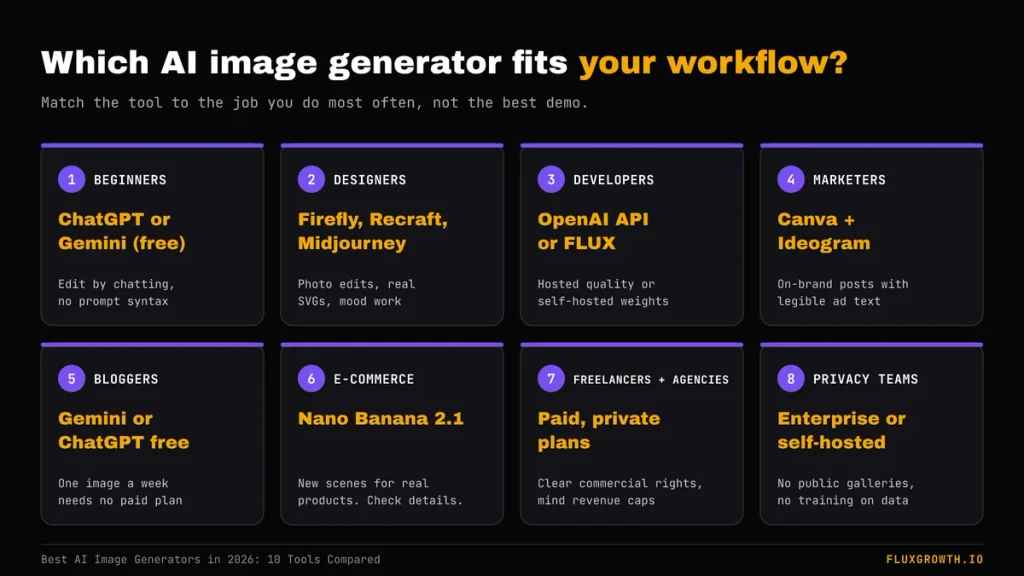
Choose the AI image generator that fits the job you do most often, not the one with the best demo. Here’s how that plays out for different readers.
Beginners. Start with ChatGPT or Google Gemini on a free plan. Generate the same three prompts in both, and keep the one whose edits feel more natural to you.
Professional designers. If you live in Photoshop, Firefly’s Generative Fill saves the export-import loop. For brand identity work, Recraft’s editable SVGs beat any raster tool. Use Midjourney when the brief is about mood.
Developers building apps. Compare per-image cost at your real volume. OpenAI’s API and the Gemini API are the easiest hosted options; FLUX is the one you can self-host when data can’t leave your servers.
Digital marketers. Canva gets you from prompt to a sized, on-brand post fastest. Add Ideogram for ads and banners where headline text sits inside the image.
Bloggers and publishers. One featured image a week doesn’t justify a pricey plan. Gemini or ChatGPT on a free tier covers it, and Canva handles the text overlay.
E-commerce stores. Nano Banana 2.1 can place an existing product into new lifestyle scenes. Check every output against the real item, because AI can subtly change product details, which matters for accurate listings.
Freelancers and agencies. Licensing matters more than features. Use a paid plan with clear commercial rights, keep generations private, and check revenue thresholds like Midjourney’s $1 million rule for larger clients.
Teams with privacy or compliance needs. Avoid tools that make images public by default. Look for enterprise plans that exclude your data from training, or self-host an open-weight model.
Are AI-generated images free to use commercially?
AI-generated images are often allowed for commercial use, but “allowed” and “protected” are different things. Three separate questions decide what you can actually do with an image.
1. Free access. Can you make the image without paying? That says nothing about how you may use it. Recraft’s free plan, for example, is non-commercial.
2. The platform license. Does the tool’s contract let you use the image commercially? OpenAI assigns output ownership to you. Midjourney allows commercial use on paid plans but requires Pro or Mega once a company passes $1 million in annual gross revenue. Check the plan-specific terms of every tool you use, and re-check them when you change plans.
3. Copyright protection. Under U.S. law, purely AI-generated images without human authorship generally cannot be copyrighted. In Thaler v. Perlmutter, the courts upheld this principle, and the Supreme Court declined to review the case in March 2026. Human edits and creative arrangements may qualify for protection. Read the U.S. Copyright Office report.
Before publishing, remember:
- Trademarks: Commercial licenses don’t grant rights to others’ logos or characters.
- If you’re creating a business logo, read our guide to AI logo generators and what you actually own to understand commercial-use licenses, ownership, and copyright protection.
- Real people: Identifiable images may raise privacy or publicity concerns.
- Confidential data: Check privacy settings before uploading client files.
- Disclosure: Avoid misleading AI-generated endorsements or advertising.
This is general information, not legal advice. Consult an IP attorney for high-stakes projects.
AI image generator FAQ
What is the best AI image generator in 2026?
ChatGPT Images 2.5 is the best all-round AI image generator for most people in late 2026. It’s easy to use, edits well over several rounds, and topped the Arena image leaderboard in September. Midjourney still wins on artistic style, and Adobe Firefly on editing real photos.
Is there a completely free AI image generator?
Yes. Google Gemini, ChatGPT, Microsoft Bing Image Creator, Leonardo.ai, Ideogram, and Recraft all have free plans. Each one caps daily or monthly generations, and several make free images public or limit commercial use, so read the free plan’s terms.
Can I use AI-generated images for commercial purposes?
Usually, if your plan allows it. OpenAI, Adobe, Ideogram, and paid Midjourney and Recraft plans permit commercial use, with conditions like Midjourney’s $1 million revenue rule. Commercial permission doesn’t mean the image is protected by copyright.
Can you copyright an AI-generated image in the US?
Not if the image was generated entirely by AI. US courts and the Copyright Office require human authorship, and the Copyright Office says prompts alone aren’t enough. Human edits, selection, and arrangement of AI material can be protected case by case.
Which AI image generator is best for text inside images?
Ideogram is the most reliable choice for readable text in thumbnails, posters, and ads. ChatGPT Images 2.5 and Recraft V4 also render text well. Always proofread the output, since a single wrong letter can still slip through.
Are my AI-generated images public?
Sometimes. Midjourney’s Basic and Standard plans and the free plans of Leonardo.ai and Ideogram show your images in a public gallery. Pay for a private or stealth option before you generate anything confidential.
Which AI image generator is best for developers?
OpenAI’s Images API and Google’s Gemini API are the easiest hosted options with strong quality. FLUX is the best fit when you need open weights, fine-tuning, or self-hosting. Compare per-image cost at your real monthly volume before you commit.
Pick the AI image generator that fits your workflow
The best AI image generator is the one that matches your work, your budget, and the rights you need. For most people, that’s ChatGPT or Google Gemini. Designers may prefer Midjourney, Firefly, or Recraft. Developers should consider the OpenAI API and FLUX.
Don’t decide from screenshots. Shortlist two tools from the table above, run the same three prompts you’d actually use this week (a featured image, a product shot, and a graphic with text), and compare the results side by side.
Then read the commercial terms for the plan you’d buy. That five-minute check can help you avoid publishing an image you don’t have the rights to use. For more practical strategies, explore our AI marketing guides to discover ways to use AI in your marketing workflow.