You can build a working automation in an afternoon. Getting a business owner to pay you for it every month is a completely different skill.
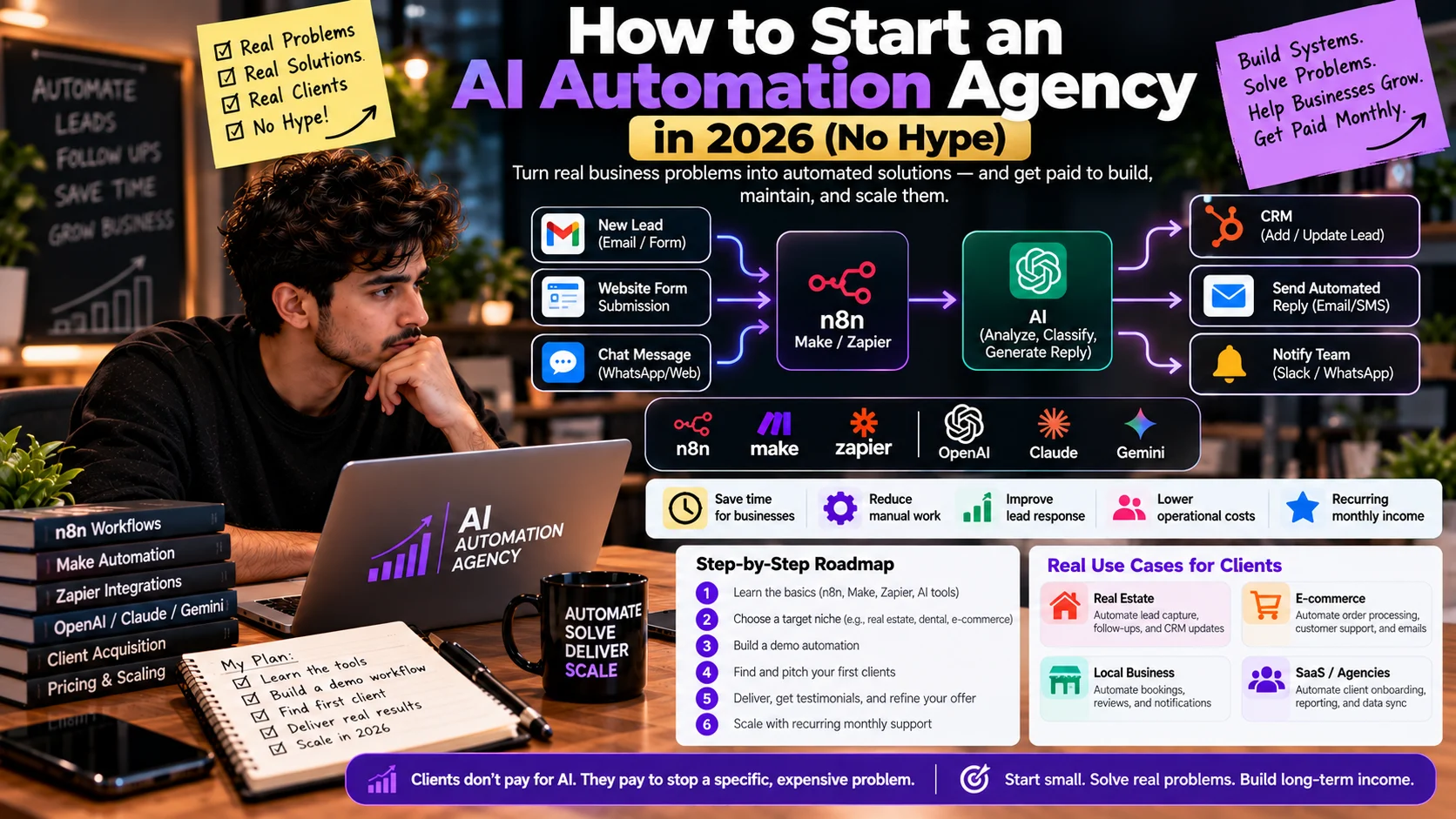
An AI automation agency is a service business that designs, builds, and maintains automated workflows for other companies, usually with a platform like n8n, Make, or Zapier connected to an AI model from OpenAI, Anthropic, or Google. If you’re working out how to start an AI automation agency in 2026, start with the part most guides skip: clients don’t pay for AI. They pay for a specific, expensive problem to stop happening, like missed leads, retyped data, or slow replies.
This guide skips the income screenshots, because nobody can honestly promise those. It covers the glamorous parts a paying client actually cares about: what to sell, how to price it, and how to keep it working in month three.
What Is an AI Automation Agency?
An AI automation agency builds systems that move data and make routine decisions between a client’s existing apps, then keeps those systems running. The deliverable isn’t a website or a campaign. It’s a process that used to take a person’s time and now runs on its own, with a person checking the parts that matter.
How it differs from other service businesses
| Business type | What the client buys | Where an AI automation agency differs |
| Digital marketing agency | Traffic, leads, campaigns | The automation agency handles what happens after the lead arrives: routing, follow-up, CRM updates |
| Software development agency | Custom apps and platforms | The automation agency mostly connects tools the client already pays for instead of building new software |
| No-code automation freelancer | Individual Zaps or scenarios, often hourly | The agency sells a defined outcome with testing, documentation, and ongoing support |
| AI consulting firm | Strategy, roadmaps, training | The agency builds and maintains the working system, not just the plan |
| AI software (SaaS) company | One product, many customers | The agency configures several products around one client’s specific process |
Four terms people mix up
These get used interchangeably in sales calls, and that causes scoping fights later.
- Workflow automation is a fixed sequence of steps triggered by an event, such as “new form submission → add row to Google Sheets → send Slack alert.” No AI is involved.
- An AI-powered workflow is the same fixed sequence with one or more steps handed to an AI model, such as classifying an inbound email or drafting a reply. The path is still predictable.
- A chat-bot is a conversational interface that answers questions, usually from a defined knowledge source. It talks; it doesn’t necessarily do anything in other systems.
- An AI agent is a system where the model decides which steps or tools to use to reach a goal. It’s the most flexible option and the hardest to test, which is why most first client projects shouldn’t be one.
Start with AI-powered workflows, not agents. Predictable systems are easier to price, test, and support (and a lot easier to explain on a sales call).
Is Starting an AI Automation Agency Worth It in 2026?
It can be, if you treat it as a sales-and-service business that happens to use AI, not a shortcut to income. The opportunity is real because most small businesses still haven’t put AI to work. That same fact is also your biggest sales obstacle.
Where the demand actually sits
The U.S. Census Bureau’s Business Trends and Outlook Survey (BTOS) provides a recurring snapshot of business AI adoption. From December 2025 to May 2026, reported AI use stayed between 17% and 20%. On May 3, 2026, the national rate was 19.8%. Source: U.S. Census Bureau.
Adoption varied by industry: 39.7% of businesses in the Information sector reported AI use, compared with around 14% in retail.
Firm size matters, too. AI use increased among businesses with at least 20 employees during this period but showed no statistically significant change among smaller firms. Fewer than 20% of businesses with four or fewer employees reported using AI.
Important caveat: In November 2025, the Census Bureau broadened its question from AI use in producing goods or services to AI use in any business function. Avoid comparing these figures directly with older estimates without accounting for the change.
For an AI automation agency, lower adoption may indicate an opportunity to investigate—not proof of demand. Start by identifying a specific business problem, then validate whether owners want to solve it and will pay for a solution.
Who you’re competing with
An AI automation agency competes with more than other agencies. Your alternatives include:
- Freelancers: Professionals on Upwork and Fiverr offering individual workflows or integration.
- Software vendors: Platforms such as HubSpot Breeze AI and Zendesk AI offer built-in AI features and automation.
- In-house teams: Employees can often build simple workflows themselves using tools such as Zapier or Make.
- Doing nothing: Businesses may keep manual processes if the problem doesn’t justify the cost or effort of changing them.
That’s why vague pitches fail. Show a specific, costly or time-consuming problem, explain how your solution would work, and validate that the business is willing to pay for it.
The skills you need besides building
Building is only part of the job. The rest is finding prospects, scoping work so it doesn’t sprawl, writing clear proposals, and supporting systems after launch. Love building but hate selling? You can still do this. Just plan to partner with an existing agency or start with a narrow, easily explained offer.
How Do You Choose a Profitable AI Automation Niche?
Choose a niche where one problem repeats across many businesses, you can reach the owners, and they already spend money trying to fix it. There’s no universally “most profitable” niche. Anyone claiming one usually has a course to sell you.
The four-question niche filter
Score each candidate niche from 1 to 5 on these questions before you commit. Anything under 14 out of 20 probably isn’t worth your first 90 days.
| Question | What a 5 looks like | What a 1 looks like |
| Does the same problem recur weekly? | Every business in the niche loses leads to slow follow-up | Each business has a different, one-off issue |
| Can you reach decision-makers? | Owners are active on LinkedIn or in local groups you’re already in | Buyers sit behind procurement teams |
| Do they already pay to solve it? | They pay for a receptionist, VA, or answering service | They don’t think it’s a problem |
| How hard is delivery? | Their tools have open APIs and the data isn’t sensitive | Legacy software, health or financial records |
The scoring is an editorial framework, not a statistical model. Its job is to stop you from picking a niche because a YouTube video said so.
Example niches and the workflow each tends to need
These are illustrations of how the filter plays out, not rankings.
- Marketing agencies: client reporting, lead routing, and content approvals. They already have clients, so white-label partnerships are worth exploring (check your tools’ licenses first; more on that below).
- Real estate teams: instant lead response from portals and open-house sign-ins, plus CRM hygiene.
- Home-service companies (HVAC, plumbing, cleaning): missed-call text-back, quote follow-up, and review requests.
- E-commerce stores: order-status replies, inventory alerts, and support ticket triage.
- Professional service firms: intake forms, document collection, and appointment reminders. Watch for confidentiality rules.
- Recruiting and staffing agencies: résumé intake, candidate status updates, and interview scheduling. Hiring decisions need human review.
What AI Automation Services Should You Offer First?
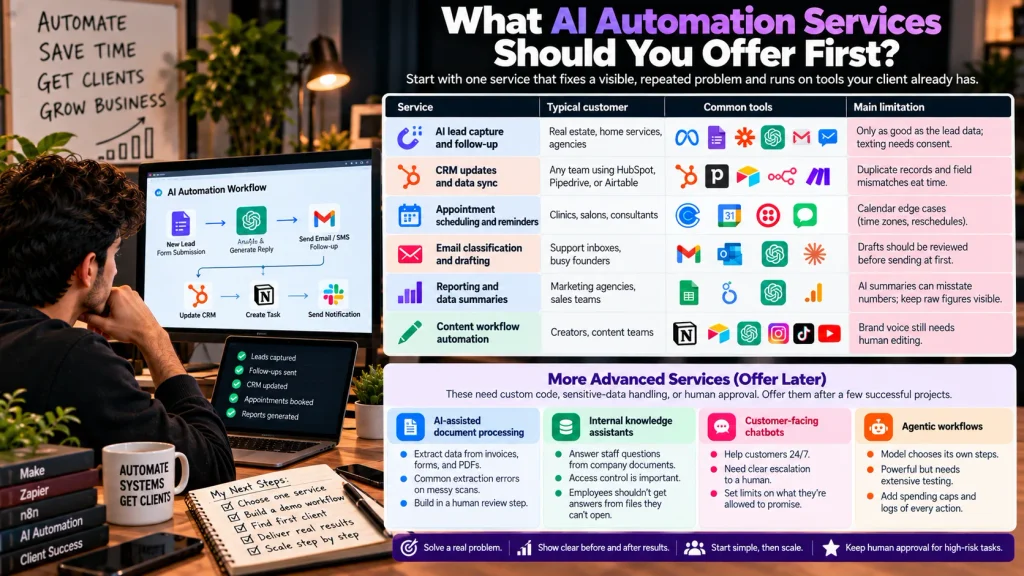
Start with one service that fixes a visible, repeated problem and runs on tools the client already has. Lead follow-up and CRM updates are the usual starting points because the cost of the problem is easy to see.
Starter services
| Service | Typical customer | Common tools | Main limitation |
| AI lead capture and follow-up | Real estate, home services, agencies | Web form or ad lead source, Make or Zapier, an AI model, SMS or email | Only as good as the lead data; texting needs consent (see legal section) |
| CRM updates and data sync | Any team using HubSpot, Pipedrive, or Airtable | Native CRM APIs, n8n or Make | Duplicate records and field mismatches eat time |
| Appointment scheduling and reminders | Clinics, salons, consultants | Calendly or Google Calendar, SMS tool | Calendar edge cases (time zones, reschedules) |
| Email classification and drafting | Support inboxes, busy founders | Gmail or Outlook API, an AI model | Drafts should be reviewed before sending at first |
| Reporting and data summaries | Marketing agencies, sales teams | Google Sheets, Looker Studio, an AI model | AI summaries can misstate numbers; keep raw figures visible |
| Content workflow automation | Creators, content teams | Notion or Airtable, an AI model, scheduling tools | Brand voice still needs human editing |
Each of these has a clear before and after you can measure, such as response time or hours spent per week. That’s what makes it sellable.
Services that need custom code, sensitive-data handling, or human approval
These are worth offering once you’ve delivered a few simpler projects:
- AI-assisted document processing, like pulling fields from invoices or intake forms. Extraction errors are common on messy scans, so build in a review step.
- Internal knowledge assistants that answer staff questions from company documents. Access control matters: an employee shouldn’t get answers from files they can’t open.
- Customer-facing chatbots. They need clear escalation to a human and limits on what they’re allowed to promise.
- Agentic workflows, where the model chooses its own steps. Powerful, but they need extensive testing, spending caps, and logs of every action.
The rule I’d use: if a mistake could cost the client money, a customer, or a legal problem, a human approves that step.
Which AI Automation Tools Does an Agency Need?
An AI automation agency needs four core layers:
- Workflow platform: Zapier, Make, or n8n to connect apps and automate tasks.
- AI model API: OpenAI, Claude, or Gemini for classification, data extraction, and drafting. Check current API pricing before estimating costs.
- Data storage: Google Sheets for simple pilots; a CRM or database such as Supabase for more demanding workflows.
- Monitoring and alerts: Email or Slack notifications, execution logs, backups, and up-time monitoring where needed.
Tip: Master one tool per layer first. Test workflows thoroughly and protect client data before deploying them.
Disclosure: This guide was drafted with Claude’s assistance. No vendor paid for placement, and FluxGrowth has no affiliate relationship with the tools mentioned. Confirm this remains accurate before publishing.
When no-code is enough and when to write code
No-code tools like Zapier, Make, and n8n work well for standard integration and simple workflows.
Write Python or TypeScript when you need custom API integration, complex logic, better cost control, or stricter data handling.
The Licensing Check
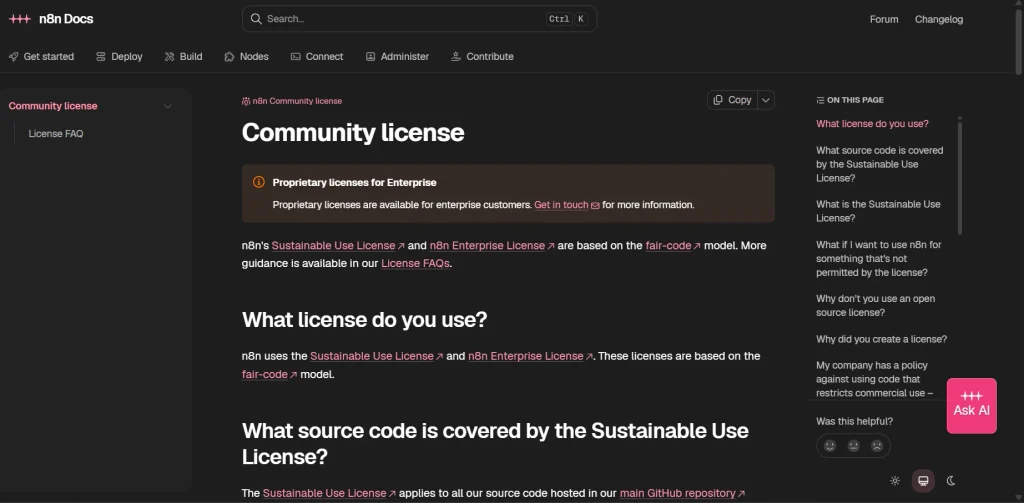
n8n: Its license permits qualifying consulting work, but offering hosted n8n access or white-labeling it may require a commercial agreement.
Zapier and Make: Review their terms and service options. Clearly define account ownership, billing, credentials, and workflow handover in your client contract.
Which AI automation setup fits your agency?
| Approach | Best for | Main advantage | Main limitation | When to choose it |
| Zapier | Beginners and simple integrations | 9,000+ app integrations | Task-based billing can rise with usage | Fast setup and familiar apps |
| Make | Visual, multi-step workflows | Flexible branching and data mapping | Credit usage needs monitoring | Complex visual workflows |
| n8n | Technical builders | Self-hosting and code support; Cloud pricing is execution-based | Hosting responsibilities and license restrictions | You want control over deployment |
| Custom code | Developers and specialized systems | Control over logic and infrastructure | You maintain, secure, and debug it | Platform limits or specific requirements justify it |
| Hybrid | Growing agencies | Combines visual workflows with custom code | More components to maintain | Some workflow steps need custom logic |
Quick recommendation: Start with Zapier for simplicity, Make for visual flexibility, or n8n if you’re comfortable with technical setup. Use custom code when a clear requirement justifies it. No single tool is best for every agency.
Official references: Zapier pricing, Make pricing, n8n pricing, and n8n licensing.
How to Start an AI Automation Agency Step by Step
The first goal isn’t building an agency. It’s proving that one specific offer solves one specific problem well enough that someone pays for it. Everything else, like hiring, branding, and a bigger service menu, comes after that.
- Audit your skills honestly. List what you can build today (Zapier flows, API calls, Python scripts) and what you can sell (writing, calls, an existing network). Your first offer should sit where those overlap.
- Pick one niche and one recurring problem. Use the four-question filter above. “Real estate agents lose portal leads because nobody replies within an hour” is a problem. “AI for real estate” is not.
- Build a small working demo. One workflow, real-looking data, start to finish. A form submission that triggers an AI-written reply and a CRM entry is plenty.
- Test it with messy inputs and failure cases. Blank fields, duplicate leads, a misspelled email, an API timeout. Write down what happens in each case.
- Define the scope and support terms. What’s included, what isn’t, how many revisions, response time for fixes, and who pays for software and API usage.
- Create a portfolio page or a short demo video. A two-minute Loom showing the before and after does more than a page of claims.
- Find and contact relevant prospects. Twenty well-researched businesses beat 500 scraped emails (and they’re far less likely to land your sending domain on a spam list).
- Deliver a pilot with clear success criteria. Agree up front on what “working” means, such as “every new lead gets a reply within five minutes for 30 days.”
- Document and hand over properly. A one-page run-book: what the workflow does, where credentials live, what to do when it fails.
- Improve the offer from real feedback. After each project, note what took longer than quoted and what the client actually valued. Adjust your scope and price.
Steps 4 and 9 are the easiest to skip when you’re excited to sell. They’re also the ones that protect the relationship after launch.
How Much Does It Cost to Start an AI Automation Agency?
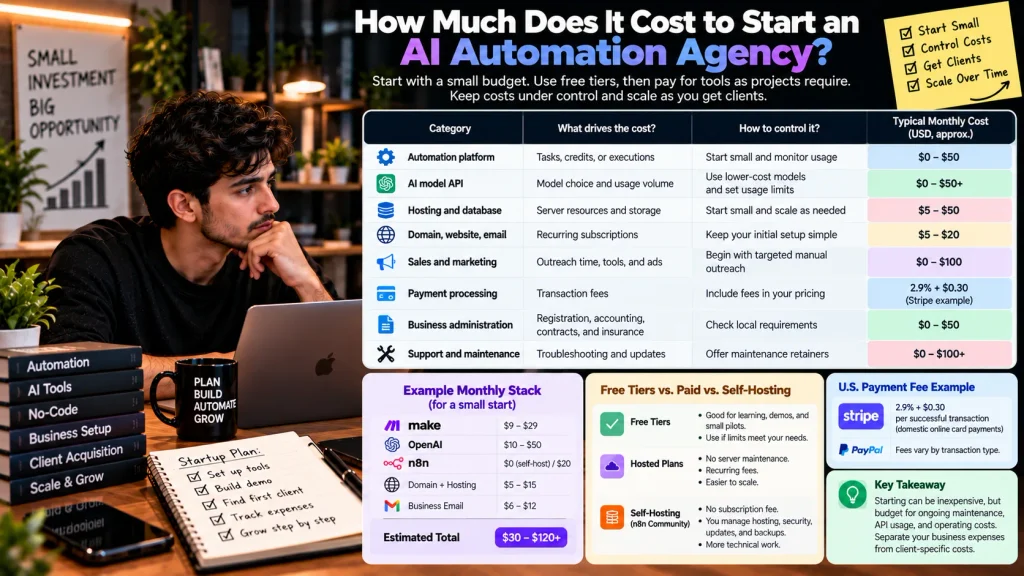
You can start an AI automation agency with a relatively small budget by using free tiers and paying for tools as projects require them. However, API usage, hosting, client acquisition, and ongoing maintenance can increase costs.
Cost categories to budget for
| Category | What drives the cost | How to control it |
| Automation platform | Tasks, credits, or executions | Start small and monitor usage |
| AI model API | Model choice and usage volume | Use suitable lower-cost models and set limits |
| Hosting and database | Server resources and storage | Start small and scale as needed |
| Domain, website, email | Recurring subscriptions | Keep your initial setup simple |
| Sales and marketing | Outreach time, tools, and ads | Begin with targeted manual outreach |
| Payment processing | Transaction fees | Include fees in your pricing |
| Business administration | Registration, accounting, contracts, and insurance | Check local requirements |
| Support and maintenance | Troubleshooting and updates | Offer clearly defined maintenance retainers |
U.S. payment fee example: Stripe lists standard domestic online card payments at 2.9% + $0.30 per successful transaction. PayPal fees vary by transaction type.
Practical tip: Separate your own business expenses from client-specific API, hosting, and platform costs. Agree in advance who pays for usage and ongoing support.
Free tiers vs. hosted plans vs. self-hosting
Free tiers are useful for learning, demos, and small pilots if their limits meet the project’s needs. Hosted plans reduce server maintenance but have recurring fees. Self-hosting n8n Community Edition avoids its subscription fee but requires you to manage hosting, security, updates, and backups.
An Illustrative Monthly Stack
- Automation: Zapier, Make, or n8n.
- AI API: Costs depend on model, usage, and features.
- Website: Domain and hosting fees.
- Your time: Setup, testing, troubleshooting, and support.
Key takeaway: Starting can be inexpensive, but price for ongoing maintenance and operating costs.
How Should You Price AI Automation Services?
Price AI automation services on scope, risk, and the ongoing work of keeping them running, not on how long the first build took you. Most agencies combine a one-time setup fee with a monthly retainer, because a working automation still needs support.
Five pricing models
| Model | How it works | When it fits |
| Fixed-fee implementation | One price for a defined build | Clear scope you’ve delivered before |
| Hourly consulting | Billed per hour | Discovery, audits, or unclear scope |
| Monthly maintenance retainer | Fixed monthly fee for monitoring and fixes | Any live client system |
| Usage-based pricing | Fee tied to volume (runs, leads, documents) | High-volume workflows where your costs scale too |
| Ongoing support agreement | Retainer plus a set number of change requests | Clients who will keep asking for tweaks |
I can’t give you a verified “market rate,” because I haven’t found a credible public dataset that tracks small AI automation agency pricing. Be wary of anyone who quotes one confidently.
What should move your price
- Scope: number of apps, steps, and edge cases
- Risk: what breaks for the client if the workflow fails
- Data sensitivity: customer records and financial data need more care
- Usage costs: API and platform bills you either absorb or pass through
- Support load: how often the client’s tools change or break
- Business value: what the problem costs them today, in hours or lost deals
A hypothetical example: revenue vs. profit
Illustrative figures, not market benchmarks.
Suppose you charge $1,500 for setup plus $300 monthly, with $70 in monthly costs, 3% payment fees, 20 setup hours, and four support hours monthly.
- Month one: $1,800 revenue − $124 costs and fees = $1,676 before taxes and other overhead (about $70/hour).
- Following months: $300 revenue − $79 costs and fees = $221 before taxes and other overhead (about $55/hour).
Key lesson: Recurring revenue isn’t automatically profitable. Price retainers to cover ongoing support and usage costs.
U.S. self-employed individuals may owe self-employment tax. See the IRS guidance.
How Do You Get Your First AI Automation Client?
You get your first AI automation client by finding a business with a visible operational problem, showing them a small working fix for that exact problem, and offering a low-risk pilot. Generic “I do AI automation” messages rarely get replies because they make the prospect do all the thinking.
The eight-step process
- Spot a visible problem. Check whether their Google reviews mention slow callbacks or missed messages. See if their contact form sends any confirmation at all. (Don’t submit fake inquiries; it wastes their staff’s time and starts the relationship with a lie.) Look for a booking page that’s just “call us.”
- Research the current process. What CRM, booking tool, or form builder do they use? Their site’s source code and job postings often tell you.
- Build a small, relevant demo. Same type of form, same kind of reply. Thirty to sixty minutes, not a week.
- Explain it in their language. “Every lead gets a personal reply in under five minutes” beats “GPT-powered n8n workflow.”
- Send a personalized message referencing what you actually found.
- Offer a defined pilot or a short discovery call, with a fixed scope and end date.
- Agree on scope, access, deliverables, and payment in writing before you touch any of their accounts.
- Follow up once or twice, politely, then move on.
Channels worth your time
- LinkedIn: good for reaching owners of agencies and B2B firms directly, especially if you post about the problems you solve.
- Agency partnerships: marketing and web agencies already have clients who need automation but may not want to build it. Check tool licenses before offering white-label work.
- Local business networks: chambers of commerce, BNI chapters, and industry meetups. Slower, but trust builds faster in person.
- Freelance marketplaces: Upwork and Fiverr can bring early projects and reviews, though price competition is heavy.
An illustrative outreach message
This is an example written for this article. It hasn’t been tested, and you should rewrite it in your own voice.
Hi Maria, I noticed three of your recent Google reviews mention waiting a day or more for a callback. For a plumbing company, that gap probably sends some jobs to whoever answers first.
I put together a two-minute video showing how new form leads could get a personal email reply within five minutes, logged straight into your Jobber account. Want me to send it over?
Notice what it does: one specific observation, one specific fix, one low-effort ask. No pricing, no jargon, no attachment.
How Do You Deliver AI Automations That Hold Up in Production?
A demo proves a workflow works once. Production means it stays reliable despite messy data, API outages, expired logins, and changing forms.
Before Launch, Test:
- Empty, malformed, and duplicate inputs
- Incorrect AI responses
- API timeouts and rate limits
- Expired app connections
Define when the workflow should retry, send an alert, or request human review. Use Zapier error handling, Make error handlers, and n8n Error Trigger.
Key takeaway: Test failures before launch and monitor workflows after deployment.
Credentials, permissions, and human approval
Ask the client to create accounts or API keys for you instead of sharing their personal logins. Give each integration the least access it needs. Store secrets in the platform’s credential manager or a vault like 1Password or Doppler, never in a spreadsheet or a Slack message.
Add a human approval step anywhere a mistake has real consequences: refunds, pricing, legal or medical language, hiring decisions, or anything sent to a large list. A simple “approve or reject” message in Slack or email works for most cases.
Logging, monitoring, and handover
You need to know if a workflow broke before the client does. At minimum:
- Error alerts to a dedicated Slack channel you actually check, like #client-alerts
- Run logs you can check when the client asks “did my lead go through?”
- A weekly glance at run counts, since a sudden drop to zero is often a silent failure
- Spending caps on AI API usage
At handover, give the client a short document: what the workflow does, which accounts it uses, what it costs to run, how to pause it, and how to reach you.
Then agree on how changes get requested and billed. Without a change process, “one small tweak” becomes unpaid work every week.
What Privacy, Security, and Legal Risks Should You Plan For?
AI automation agencies handle client and customer data, so privacy and security must be built into every workflow. Requirements vary by industry, data type, and jurisdiction. This is general information, not legal advice.
Protect the data you handle
- Minimize data: Send AI only the information needed for the task.
- Check vendor policies: OpenAI API data controls and Anthropic API data usage state that API inputs and outputs aren’t used for model training by default. Retention rules and exceptions still apply.
- Secure credentials: Use restricted permissions and protect API keys.
- Set retention rules: Limit how long logs containing personal data are stored.
- Get written authorization: Obtain client approval before connecting systems or contacting their customers.
Check industry and channel rules
Some workflows have specific legal requirements:
- Health data: HIPAA may apply to healthcare providers and their business associates. See HHS HIPAA guidance.
- Texts and calls: Automated marketing messages may require consent under the FCC’s TCPA rules.
- Privacy: California’s CCPA and other state laws may impose privacy obligations.
- AI disclosure: Some jurisdictions require disclosure when people interact with certain AI chatbots. Check applicable state laws.
When in doubt, disclose AI involvement clearly, obtain required consent, and have the client’s attorney review high-risk workflows. Requirements depend on the specific use case and jurisdiction.
Keep your own marketing honest
This one applies to you, not just your clients. In September 2024, the FTC announced Operation AI Comply, a set of actions against companies making deceptive AI claims. Several targeted “AI-powered” business opportunity schemes that promised earnings they couldn’t back up, including one the FTC said cost consumers more than $15.9 million.
The lesson for an agency is simple. Don’t promise specific revenue, time savings, or “fully autonomous” results unless you can substantiate them. The FTC’s Business Opportunity Rule also governs earnings claims when selling business opportunities, which matters if you ever sell courses or templates on how to start an agency.
A disclaimer in your footer won’t do any of this work for you.
Common Mistakes New AI Automation Agencies Make
Most early mistakes come from selling the technology instead of the outcome, or from underestimating what happens after launch.
| Mistake | How to avoid it |
| Selling tools (“I build n8n workflows”) instead of fixes | Lead with the problem and the result: “every lead answered in five minutes” |
| Targeting every industry at once | Pick one niche for at least your first few projects |
| Building before anyone wants it | Talk to five potential buyers before writing a single workflow |
| Promising fully autonomous AI | Sell supervised automation with human checkpoints |
| Ignoring maintenance and API costs | Price a retainer and pass usage through or cap it |
| Underpricing ongoing support | Track support hours per client and adjust at renewal |
| Skipping documentation | Hand over a one-page runbook on every project |
| Mishandling client data | Least-privilege access, no shared passwords, retention rules |
| Depending on one vendor or integration | Know your fallback if a tool changes pricing or an API breaks |
| Claiming results you can’t prove | Share real, dated numbers from real projects, or none at all |
What I’d Do If I Were Starting Today: A 30-Day Plan
If I were starting from zero today, I’d spend 30 days validating one offer, not building a brand. This plan won’t guarantee a paying client. It’s designed to tell you, with evidence, whether your offer has demand.
Week 1: Pick the niche and the problem. Run three or four niches through the filter above. Then talk to at least five people in your top pick, even informally, and ask what eats their week. Leave with one recurring problem in their own words.
Week 2: Build and break a demo. Build one workflow that fixes that problem with realistic sample data. Spend at least half the week testing failure cases. Record a two-minute walk-through.
Week 3: Package the offer. Write a one-paragraph offer with scope, timeline, and price. Put the demo video on a simple page. Build a list of 20 to 30 businesses that visibly have the problem, with a note on what you observed for each.
Week 4: Reach out and listen. Send personalized messages to your list and follow up once. Track replies, objections, and questions. At the end of the week, decide: keep going, adjust the offer, or switch niches.
What counts as a good signal? Replies that ask about price, timing, or how it works with their tools. Silence after 30 thoughtful messages is also data. Usually it means the problem, the audience, or the message needs to change.
Frequently Asked Questions
How do I start an AI automation agency with no experience?
Start by learning one workflow platform, such as Zapier or Make, and building three or four automation for your own work or a friend’s business. Then pick one niche and one recurring problem, build a demo that fixes it, and offer a small paid pilot. Experience comes from delivering real projects, so keep the first one simple.
How much does it cost to start an AI automation agency?
The upfront cash cost of an AI automation agency can be low, because most automation platforms and AI APIs offer free tiers or trials for building demos. Ongoing costs depend on usage: platform plans, API tokens, hosting, payment fees, and business administration. The biggest real cost is your time spent finding clients and maintaining their systems.
What services should an AI automation agency offer?
A new AI automation agency should start with one service tied to a visible problem, like lead follow-up, CRM data sync, appointment reminders, or email triage. These are easier to scope and test than chatbots or AI agents. Add more complex services after you’ve delivered a few projects successfully.
What are the best tools for an AI automation agency?
No single tool is best for every AI automation agency. Zapier suits simple flows and non-technical clients, Make suits visual builders who need more control, and n8n suits technical builders who want self-hosting, within the limits of its Sustainable Use License. Most agencies pair one of these with an AI model API from OpenAI, Anthropic, or Google.
How do AI automation agencies get clients?
AI automation agencies usually get early clients through personalized outreach that points to a specific, visible problem, along with a short demo of the fix. LinkedIn, partnerships with marketing or web agencies, local business networks, and freelance marketplaces are common channels. Offering a clearly scoped pilot lowers the risk for a first-time buyer.
How much can an AI automation agency make?
There’s no reliable public figure for what a typical AI automation agency earns, and claims of guaranteed income should be treated with suspicion. Earnings depend on niche, pricing, number of clients, support costs, and how much time goes into sales. Always calculate profit after software, API usage, payment fees, taxes, and maintenance hours, not just revenue.
Do I need coding skills to start an AI automation agency?
You don’t need coding skills to start an AI automation agency, because platforms like Zapier and Make handle many workflows without code. Basic knowledge of APIs, webhooks, and JSON helps a lot, though, and coding becomes useful for unsupported apps, high-volume work, or sensitive data. Many agencies start no-code and add code as projects require it.
Your Next Step
If you remember one thing about how to start an AI automation agency, make it this: clients pay for a specific problem to stop happening, reliably. Tools change every few months. That part doesn’t.
So start small. One niche, one offer, one workflow you’ve tested against the ugly cases. Document it, keep humans on the risky steps, protect your clients’ data, and only claim results you can prove.
Today, write one sentence that names a business type and the problem you’ll fix for them. Can’t finish it yet? Then that’s your first task, and it’s a better use of tonight than learning another tool.
For more on building with these tools, browse FluxGrowth’s AI automation guides.