
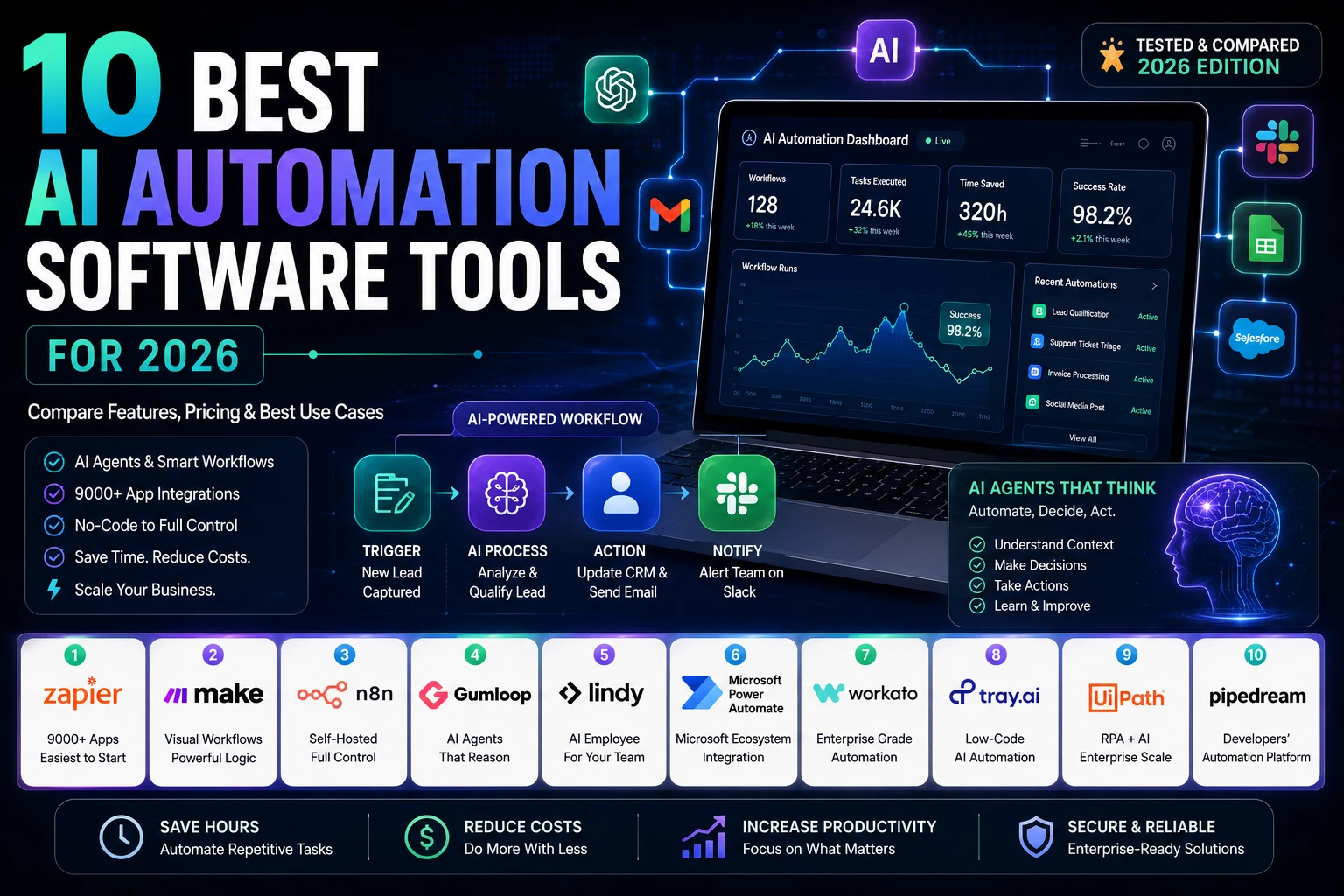
Zapier, Make, n8n, and Gumloop lead the pack in 2026. But “leads the pack” doesn’t tell you which one to pick.
Zapier wins on a breadth of 9,000+ apps. Make wins on logic, with a visual canvas built for branching. n8n wins on control, since you can self-host it and never touch a third-party server. Gumloop wins on reasoning; its agents actually think instead of just triggering.
The right pick has less to do with features and more to do with where your work already lives. A spreadsheet? A browser tab? A Microsoft stack you’re stuck with for the next five years? Start there.
If you’re still copying leads from a form into a CRM by hand, or exporting a spreadsheet every Friday just to email it to someone, you already know the problem this guide solves. For a typical marketing workflow, automation can eliminate many repetitive tasks. Instead of manually exporting leads from a landing page, importing them into a CRM, sending a welcome email, updating a spreadsheet, and notifying a Slack channel, an AI automation platform can handle the entire process in seconds. The biggest time savings usually come from automating routine work such as lead routing, content approvals, client reporting, and social media publishing. If your primary goal is growing your business with AI, our guide to Best AI Tools for Digital Marketing in 2026 explores the top AI platforms marketers use alongside automation software to streamline campaigns, improve content creation, and scale marketing operations. Together, these tools allow teams to focus on higher-value work instead of repetitive administration.
AI automation software used to mean “if this happens, do that.” Now the AI part actually reasons about what’s in front of it reading an email, deciding whether it’s urgent, drafting a reply, and only pinging you if something looks off.
That shift is why 2026 feels different from 2023’s wave of simple Zaps. The tools aren’t just moving data anymore. They’re making small judgment calls along the way.
This guide covers 10 tools, tested against the same criteria, with real pricing, real limitations, and a buying framework built around your actual budget, not a generic “best overall” pick that ignores what you’re going to spend.
What is AI automation software?
AI automation software connects your everyday apps and lets an AI model make decisions inside that connection, classifying a support ticket, summarizing a call, or routing a lead instead of just moving data from one place to another. You describe what you want in plain language, and the platform builds and runs the workflow.
How AI automation works
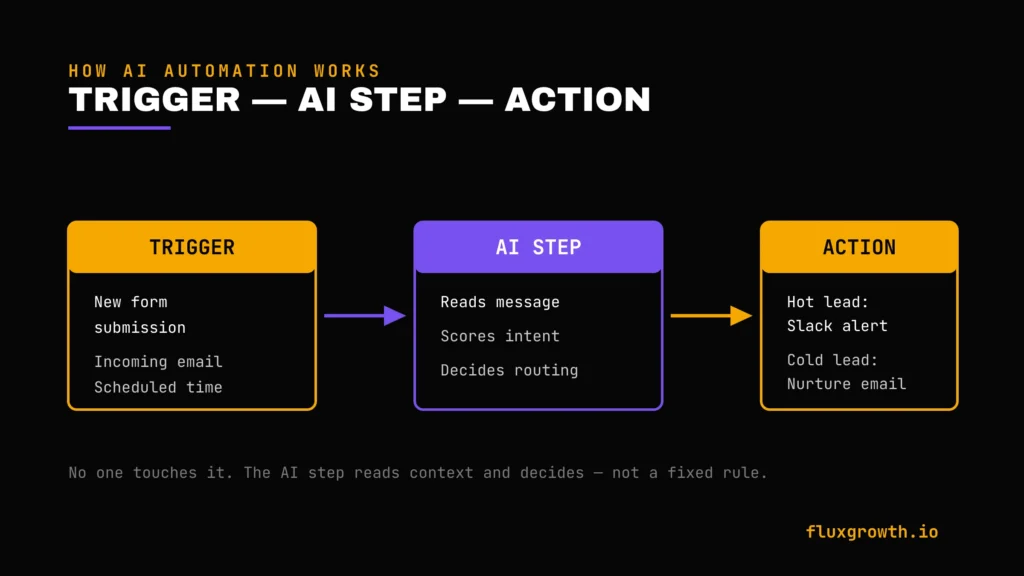
Most tools follow the same shape. A trigger, a new form submission, an incoming email, a scheduled time starts things off. One or more actions run in sequence. Somewhere in the middle, an AI step reads unstructured data (an email body, a support ticket, a social comment) and turns it into something the rest of the workflow can actually use.
Here’s what that looks like in practice: a lead comes in through a form. An AI step reads the message and scores intent. Hot leads go to Slack. Cold ones go into a nurture sequence. Nobody touches any of it.
AI automation vs. workflow automation
Traditional workflow automation moves data between apps on fixed rules: if a field says “urgent,” send it here. AI automation adds judgment to that chain. The AI reads context and decides the routing itself, even when the input doesn’t match a rule you wrote in advance.
AI automation vs. RPA
RPA the category UiPath built its business on mimics how a human clicks through a screen. That matters when a system has no API, which describes a lot of the software still running inside older companies.
AI automation usually skips the screen entirely and connects through APIs and webhooks instead, with an AI reasoning step layered on top.
Here’s the thing the line between the two is blurring fast. UiPath now blends screen-based bots with AI agents. Zapier’s AI steps can trigger actions inside apps that had no public API a few years ago. The categories used to be clean. They aren’t anymore.
Benefits of AI-powered automation
The honest version, not the highlight reel: fewer manual handoffs. Faster responses on lead routing and support triage. The ability to process a pile of unstructured text emails, tickets, social mentions without someone reading every single one.
The tradeoff is real too. AI steps misclassify. And a workflow you stop watching can quietly make the wrong call a few hundred times before anyone notices, usually a customer, not you.
How AI Automation Software Works
AI agents. Multi-step, semi-autonomous processes that can call tools, remember context across steps, and decide what to do next without a human specifying every branch in advance. Zapier Agents, Lindy AI, and Gumloop’s agent nodes all fall here, with different levels of actual autonomy.
Workflow builders. The visual canvas Zapier’s Zap editor, Make’s scenario canvas, n8n’s node graph where you wire triggers, actions, and logic together.
Trigger-based automation. The starting condition: a new row, an incoming webhook, a scheduled time, a keyword mention.
AI decision making. The step where a language model reads unstructured input and outputs something structured: a category, a score, a draft reply.
Integrations. The pre-built connections to apps like Slack, Gmail, Salesforce, and Shopify that let a workflow act without custom code.
Human approval steps. A pause built into the workflow where a person reviews before the action goes live is increasingly common in 2026 as teams get more cautious about letting AI act unsupervised on anything customer-facing.
AI-generated actions. The output itself: a drafted email, a categorized ticket, a written summary, a CRM update.
How We Tested the Best AI Automation Software
Rather than relying solely on marketing claims, this comparison is based on each platform’s official documentation, pricing, feature availability, independent product reviews, release notes, and real-world business use cases. Wherever pricing, AI capabilities, or enterprise features change frequently, the information has been verified against the vendor’s official website before publication.
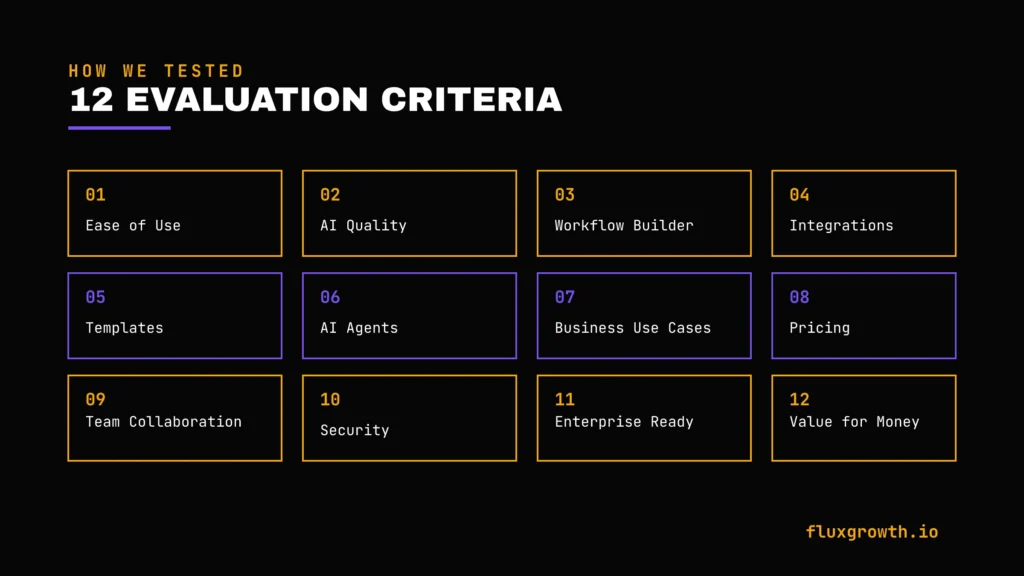
Every platform was evaluated using the same criteria to keep comparisons as consistent and objective as possible:
- Ease of use — how long it takes a non-developer to build a working workflow
- AI quality — how well the AI step handles ambiguous or messy input
- Workflow builder — how much logic (branching, loops, conditions) the canvas supports
- Integrations — breadth and depth of pre-built app connections
- Automation templates — how much you can start from instead of building blind
- AI agents — whether the platform supports multi-step, semi-autonomous agents, not just single AI steps
- Business use cases — how well it fits real departmental workflows, not just toy demos
- Pricing — cost at realistic usage volumes, not the headline “starting at” number
- Team collaboration — shared workspaces, roles, and permissions
- Security — SOC 2, GDPR, data residency, and access controls
- Enterprise readiness — SSO, audit logs, governance at scale
- Value for money — what you actually get per dollar at the volume you’ll realistically run
Types of AI Automation Software
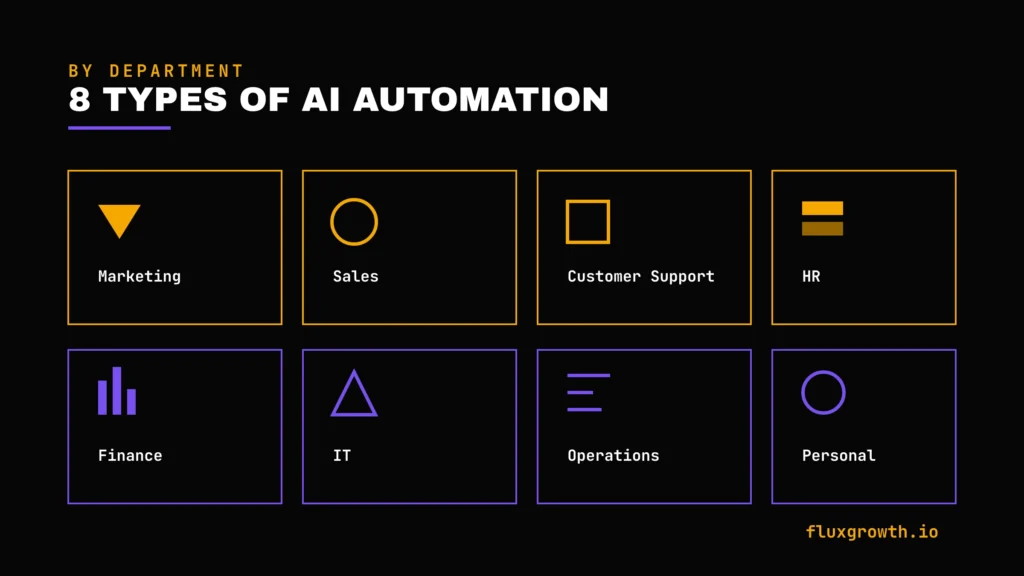
1.Marketing automation
This is where most FluxGrowth readers will spend the most time: pulling analytics into a weekly report, repurposing a long-form post into social captions, routing form-fill leads by campaign source, auto-tagging UGC mentions by sentiment. Zapier and Make both have dedicated marketing solution pages. Gumloop’s content and social workflows lean in this direction too.
2.Sales automation
Lead scoring. CRM enrichment. Meeting-prep briefings. Outbound sequencing. Lindy AI and Bardeen both lean hard into this category. Bardeen in particular has built out sales and GTM playbooks specifically for lead sourcing and enrichment.
3.Customer support automation
Ticket triage, sentiment routing, auto-drafted replies with human approval before sending. Make’s branching logic routes negative sentiment to a senior rep, log feature requests, archive spam, all from one inbound email is a textbook example of why this category needs more than a linear trigger-action chain.
4.HR automation
Onboarding checklists. Interview scheduling. Chasing down the same three documents from every new hire. Workato and UiPath both build for this, though worth saying, most small teams don’t need enterprise RPA just to automate an onboarding checklist. A Zapier free plan usually does it.
5.Finance automation
Invoice processing, expense categorization, reconciliation. This is UiPath’s and Power Automate’s strongest ground, since it’s almost always where a legacy system has a screen but no usable API.
6.IT automation
Ticket routing, access provisioning, alert triage. Workato and n8n with its LangChain-based agent nodes both fit technical IT workflows well.
7.Operations automation
Cross-department handoffs: the kind of work that doesn’t belong to any one team but breaks the moment nobody owns it. Make and n8n’s branching and conditional logic make them well-suited here.
8.Personal productivity automation
Inbox summarizing, meeting note capture, personal task routing. Notion AI and Claude both fit here, though worth saying clearly they’re AI assistants you work with conversationally, not automation platforms that run on a schedule without you.
10 Best AI Automation Software in 2026
1. Zapier AI
Best for: Teams that need the widest possible app coverage and want automation to just work without a learning curve.
Overview: Zapier remains the default starting point for most teams new to automation, and in 2026 it’s learned all the way into AI orchestration Zap workflows, Tables, Forms, and Zapier MCP now sit inside one platform with a shared task-based billing pool.
AI capabilities: AI by Zapier steps run at three model tiers (Standard, Advanced, Premium), each costing a different task multiplier. Zapier Agents let you build autonomous assistants that research leads, triage tickets, and take multi-step actions, with human-in-the-loop approval available before a high-stakes step runs.
Key features: Zap workflows, Tables (structured data), Forms, Zapier Copilot (AI-assisted Zap building), Canvas for mapping business processes visually.
Integrations: 9,000+ apps, the widest library of any tool on this list.
Workflow builder: Linear, trigger-then-action structure. Paths add conditional branching; Looping and Sub-Zaps add more complex logic than Zapier’s reputation suggests.
Templates: Thousands of pre-built Zap templates across every major use case.
Pricing: Zapier offers a free plan with 100 tasks per month, unlimited Zaps, and support for 2-step workflows, making it suitable for exploring the platform. Paid plans start with Professional at $19.99/month (billed annually, or $29.99/month billed monthly), which includes 750 tasks per month, AI features, and premium integrations. The Team plan starts at $69/month (billed annually, or $103.50/month billed monthly) with 2,000 tasks per month, shared workspaces, advanced permissions, and SAML SSO. Enterprise pricing is available on request for organizations that require governance, security, and large-scale automation. Pricing has been verified against Zapier’s official pricing page; however, task allowances and AI usage limits may change over time, so it’s worth checking the latest pricing before making a purchase decision.
Free plan: Yes 100 tasks/month, unlimited Zaps, but only 2-step Zaps.
Pros:
- Largest integration library by a wide margin
- Genuinely easy for non-technical marketers to pick up
- SOC 2 Type II and GDPR compliant out of the box
Cons:
- Task-based billing gets expensive fast once workflows get complex a 5-step Zap running 150 times a month burns your entire base tier
- AI steps use a task multiplier (up to 5x for Premium models), which compounds the cost problem
Real-world use case: A marketing team captures leads through a landing page, automatically enriches the contact with company information, creates a new deal in HubSpot, sends a personalized welcome email, assigns the lead to the appropriate sales representative based on territory, and posts a notification in Slack all within a few seconds without any manual data entry. This type of workflow is one of Zapier’s most common business automation use cases and demonstrates how multiple apps can be connected through a single AI-assisted workflow.
2. Make
Best for: Teams that have outgrown Zapier’s linear model and need visual, branching logic without full developer involvement.
Overview: Make (formerly Integromat) trades Zapier’s simplicity for a visual canvas where you can see exactly how data flows through branches, routers, and filters. Genuinely useful once a workflow gets past three or four steps less so before that.
AI capabilities: AI modules for OpenAI, Claude, and Gemini plug into any scenario. Make AI Agents (beta) and the Make AI Toolkit add reasoning steps without leaving the canvas; an AI Web Search module (beta) pulls live data into a workflow.
Key features: Visual scenario builder with real-time data-flow animation, Make Code for custom JavaScript/Python, Make Grid for an org-wide view of automation.
Integrations: 3,000+ apps, including 350+ AI apps.
Workflow builder: True branching logic routers split one trigger into multiple conditional paths in a single scenario, something Zapier needs Paths (a paid add-on) to approximate.
Templates: 7,500+ pre-built scenario templates.
Pricing: Make offers a generous Free plan with 1,000 credits per month and up to 2 active scenarios, making it suitable for learning the platform and building small automations. Paid plans start with Core at $9/month (billed annually) or $12/month (billed monthly), which includes 10,000 credits per month, unlimited active scenarios, scheduled executions, and API access. The Pro plan starts at $16/month (annual) or $21/month (monthly) with 10,000 credits, priority execution, custom variables, and advanced AI features. Teams start at $29/month (annual) or $38/month (monthly), adding shared workspaces, team roles, and collaborative workflow management. Enterprise pricing is available on request for organizations requiring advanced governance, security, and enterprise integrations. Make officially replaced operations with credits as its billing unit, and AI features may consume dynamic credits depending on token usage, so it’s worth reviewing the latest pricing before choosing a plan.
Free plan: Yes1,000 credits/month, capped at two active scenarios.
Pros:
- Roughly 3–5x cheaper than Zapier per unit of work at comparable volume
- Branching logic that’s actually visible, not hidden behind a paid add-on
- Strong marketing-specific solution templates (social posting, lead management, content creation)
Cons:
- Steeper learning curve than Zapier modules, routers, and iterators take real time to understand
- Credit consumption is harder to predict than Zapier’s task model, especially with loops
Real-world use case: An agency automatically routes incoming support emails, analyzes their sentiment using an AI model, creates or updates tickets in a CRM, sends high-priority requests to a dedicated Slack channel, and schedules lower-priority follow-ups all within a single Make scenario. This demonstrates Make’s strength in handling complex branching workflows that would otherwise require multiple separate automations.
3. Microsoft Power Automate
Best for: Organizations already paying for Microsoft 365 who want AI automation without adding a new vendor.
Overview: If your company already pays for Microsoft 365, Power Automate is close to free for basic flows, anyway. Reach outside the Microsoft world and you hit real walls fast.
AI capabilities: Copilot inside Power Automate can build simple flows from a plain-language description. AI Builder (included in Premium) adds document processing and prediction models, with 5,000 credits/month bundled in.
Key features: Cloud flows across Microsoft 365, desktop flows (RPA) for legacy apps, Process Mining as an add-on.
Integrations: 1,000+ connectors, including both standard Microsoft apps and premium third-party connectors (Salesforce, SAP, ServiceNow).
Workflow builder: Template- and logic-based flow builder; less visually intuitive than Make or n8n but tightly integrated with Outlook, SharePoint, and Teams.
Templates: Large library, heavily weighted toward Microsoft-ecosystem workflows.
Pricing: Power Automate is included with many Microsoft 365 subscriptions for basic cloud automation using standard connectors. For advanced automation, Power Automate Premium costs $15 per user/month and includes premium connectors, AI Builder capabilities, cloud flows, desktop flows, and RPA. Organizations that require unattended robotic process automation can choose the Power Automate Process plan at $150 per bot/month, while Hosted Process costs $215 per bot/month and includes Microsoft-hosted infrastructure for unattended automation. Enterprise licensing and additional AI Builder credits are available separately for organizations with larger automation requirements. Pricing has been verified against Microsoft’s official Power Automate pricing page and may change over time as Microsoft updates licensing and bundled features.
Free plan: Yes, if you already have a qualifying M365 subscription but no premium connectors, RPA, or AI Builder.
Pros:
- Genuinely free automation for teams already inside the Microsoft stack
- Only platform on this list with native RPA plus AI reasoning in one product
- Deep, low-friction integration with Outlook, Teams, and SharePoint
Cons:
- The moment a workflow needs a non-Microsoft app, you’re paying $15/user/month minimum
- Desktop flows and AI Builder are separate paid layers, not included in the free tier
Real-world use case: A Microsoft 365 team automatically routes document approval requests from SharePoint to Microsoft Teams, notifies the appropriate manager in Outlook, records approval status in Excel, and archives the final document in SharePoint all without requiring manual follow-up. This is one of the most common Power Automate workflows for organizations already using the Microsoft ecosystem.
4. n8n
Best for: Technical teams and agencies that want full control over infrastructure, cost, and data residency.
Overview: Run it yourself and n8n costs nothing unlimited executions, no subscription, no third-party server touching your data. Don’t want to manage infrastructure? There’s a managed cloud plan for that, priced a bit steeper.
AI capabilities: Native LangChain integration with roughly 70 AI nodes, supporting multi-step reasoning workflows, RAG pipelines, and tool-calling agents. You bring your own LLM API keys.
Key features: 500+ integrations, custom JavaScript/Python nodes for anything the built-in nodes can’t do, Git-based version control on higher tiers.
Integrations: 500+ official integrations, extendable via custom nodes and HTTP requests to virtually anything with an API.
Workflow builder: Node-based visual canvas, similar in spirit to Make but built for a technical audience expects comfort with logic, not just drag-and-drop.
Templates: 5,000+ community-created workflow templates.
Pricing:n8n offers a free self-hosted Community Edition with unlimited workflow executions, making it one of the most generous automation platforms for technical users you only pay for your own hosting infrastructure. For teams that prefer managed hosting, the Cloud Starter plan costs €20/month (billed annually) and includes 2,500 workflow executions, while Cloud Pro starts at €50/month (billed annually) with 10,000 workflow executions, higher concurrency, workflow history, and advanced collaboration features. Organizations that require self-hosted collaboration, SSO, Git version control, and enterprise governance can choose the Business plan from €667/month (billed annually), while Enterprise pricing is available on request. Unlike Zapier or Make, n8n charges per workflow execution rather than per individual step, making costs far more predictable for complex automations with many actions.
Free plan: Yes the self-hosted Community Edition is free indefinitely with unlimited executions, though you’re responsible for hosting.
Pros:
- Only tool on this list where a 10-step workflow costs the same as a 2-step one (billed per execution, not per action)
- Full data residency control for teams with compliance requirements
- Free self-hosted tier is genuinely production-capable, not a crippled trial
Cons:
- Requires real technical comfort this is not a tool to hand a non-technical marketer on day one
- Cloud plans require your own LLM API keys, adding a second bill on top of the subscription
Real-world use case: An agency self-hosts n8n to automate lead enrichment for multiple clients. Every new form submission is enriched with company information, qualified using an AI model, synchronized with the client’s CRM, assigned to the correct sales representative, and logged in an internal reporting dashboard all while keeping customer data on the agency’s own infrastructure.
5. Gumloop
Best for: Marketing teams and solo operators who want AI-native workflows without wrangling their own API keys.
Overview: Gumloop was built AI-first rather than bolting AI onto an existing automation platform, and it shows in how naturally agent-style reasoning fits into its visual canvas. It’s used by teams at Shopify, Instacart, and Webflow but it scales down cleanly to a solo creator’s workflow too.
AI capabilities: Model choice built in (OpenAI, Claude, Gemini, and others) with no requirement to bring your own API key, though you can if you want to cut credit costs. “Gummie,” Gumloop’s AI assistant, can build workflows for you from a plain-language description.
Key features: Visual drag-and-drop canvas, hosted MCP server, Gumstack (a security and observability layer for MCP tool usage on Enterprise).
Integrations: Broad but smaller ecosystem than Zapier or Make strongest in content, research, and CRM-adjacent workflows.
Workflow builder: Canvas-based, closer to Make’s visual style than Zapier’s linear one; genuinely fast once you’re past the initial learning curve.
Templates: A template library exists but is smaller than Zapier’s or Make’s community template submissions are limited.
Pricing: Gumloop offers a Free plan with 5,000 credits per month, 1 seat, and enough capacity to build and test AI workflows. The Pro plan starts at $37/month (with a 20% discount on annual billing) and includes 20,000+ monthly credits, unlimited seats, hosted MCP server support, team collaboration, analytics, and higher concurrency limits. Enterprise pricing is available on request and adds SCIM/SAML SSO, audit logs, role-based access control, VPC deployment, custom credit allocations, and advanced security controls. Gumloop uses a credit-based pricing model, so actual usage depends on the AI models, enrichment nodes, and workflow complexity. AI-heavy workflows such as contact enrichment or large-scale research can consume credits significantly faster than standard automation tasks.
Free plan: Yes 5,000 credits/month, one seat.
Pros:
- No per-seat pricing on Pro one subscription covers unlimited team members
- AI reasoning feels native to the platform, not an add-on module
- Strong for content and marketing-specific workflows (repurposing, sentiment analysis, brand monitoring)
Cons:
- Credit costs for AI-heavy or high-volume enrichment steps can burn through an allotment fast
- Smaller integration and template ecosystem than the category leaders
Real-world use case: A content marketing team automatically monitors brand mentions across the web, analyzes sentiment with an AI model, summarizes important conversations, drafts social media responses, updates a CRM, and posts high-priority alerts to Slack all from a single Gumloop workflow without requiring separate API integrations.
6. Lindy AI
Best for: Sales and customer support teams that want an AI agent with judgment, not just a trigger-action chain.
Overview: Lindy markets itself as an “AI employee builder” rather than a workflow tool. The pitch: agents that reason through ambiguous situations, a voice-based email triage assistant, a DM auto-responder with human review that a rules-based tool like Zapier or Make genuinely can’t replicate.
AI capabilities: Multi-agent coordination Lindys can call other Lindys, so one agent triages email and hands qualified items to a second agent for meeting prep. Voice-based interaction is a genuine differentiator here.
Key features: Three-step setup (describe the task, connect apps, iterate by talking to Lindy in natural language), human-in-the-loop review before customer-facing actions send.
Integrations: 100+ on the free plan, 4,000+ on paid plans, strong CRM and sales-tool coverage in particular.
Workflow builder: Conversational, not visual you describe and refine in natural language rather than dragging nodes.
Pricing: Lindy offers a 7-day free trial with full access to Pro features for new users. After the trial, the Plus plan starts at $49.99/month and includes standard usage with up to 2 connected inboxes, AI email management, meeting scheduling, meeting notes, and hundreds of integrations. The Pro plan costs $99.99/month, providing 3× the usage capacity of Plus, support for 3 connected inboxes, browser automation (“Computer Use”), and model selection. The Max plan costs $199.99/month, offering 7× the usage capacity of Plus and support for 5 connected inboxes. Enterprise pricing is available on request and includes SSO, SCIM, audit logs, HIPAA compliance, shared team management, and dedicated onboarding. Lindy measures usage dynamically rather than publishing a fixed credit-to-task conversion, so actual consumption depends on workflow complexity, AI model selection, and the integrations being used.
Free plan: Yes 400 credits/month, capped at roughly 40 tasks.
Pros:
- Multi-agent handoffs (one Lindy passing work to another) genuinely aren’t possible in trigger-action tools
- Voice interaction opens up use cases (hands-free email triage) no other tool on this list covers
- Strong out-of-the-box fit for sales and support teams specifically
Cons:
- Paid plans get expensive relative to task volume compared to Zapier or Make
- Fewer templates and less documentation than more established platforms
Real-world use case: A sales team uses Lindy to monitor incoming emails and website inquiries, automatically qualify leads, draft personalized replies, schedule meetings when prospects show buying intent, and notify the assigned account executive for final approval before customer-facing messages are sent. This combines AI reasoning with human review, making it well suited for sales and customer support workflows.
7. Relay.app
Best for: Teams that want automation with a built-in human checkpoint for anything customer-facing or compliance-sensitive.
Overview: Relay’s core differentiator isn’t AI sophistication. It’s that human approval is a first-class, designed-in feature rather than a workaround: a workflow can pause mid-run and route to a specific person for sign-off before continuing, which matters a lot for legal review, client communications, or financial approvals.
AI capabilities: AI steps for drafting and summarizing sit inside the same simple builder as the rest of the platform, less deep than Make or n8n’s AI modules, but easier to trust precisely because a human checks the output before it goes live.
Key features: Simple, low-learning-curve visual builder; workflows for social posting, meeting follow-ups, and competitor report generation.
Integrations: Smaller library than Zapier or Make, though it covers the core stack most small teams need.
Workflow builder: Clean and linear, closer to Zapier’s simplicity than Make’s branching complexity.
Pricing:Relay.app offers a Free plan with 200 automation steps per month, 500 AI credits, and 1 user, making it easy to build and test workflows. The Professional plan starts at $19/month (billed annually) for 1 user, including 750 automation steps per month, 2,000 AI credits, unlimited workflows, and access to all supported AI models. The Team plan starts at $59/month (billed annually) and includes up to 10 users, 1,500 automation steps per month, 2,000 AI credits, shared workflows, and shared app connections. Enterprise pricing is available on request, adding custom usage limits, dedicated support, advanced governance, and SOC 2 and GDPR compliance. Relay.app also allows paid plans to purchase additional AI credits or bring your own API keys for supported AI models when needed. Pricing has been verified against Relay.app’s official pricing page.
Free plan: Yes — 200 automation steps/month, 500 AI credits/month, 1 user, with access to all core workflow features.
Pros:
- Human-approval-first design is genuinely rare and genuinely useful for compliance-sensitive workflows
- Low learning curve one of the fastest tools on this list to get a first workflow running
- Strong third-party review ratings (4.9 on G2)
Cons:
- No AI assistant to help build workflows the way Zapier’s Copilot or Gumloop’s Gummy do
- Smaller integration library limits it for teams with a sprawling tech stack
Real-world use case: A client services team automatically generates a weekly project status update using AI, drafts an email for the client, pauses the workflow for the account manager’s approval, and only sends the message after it has been reviewed. This human-in-the-loop workflow reduces manual work while ensuring customer-facing communications remain accurate and compliant.
8. Bardeen AI
Best for: Sales and GTM teams doing browser-based lead sourcing and enrichment work.
Overview: Bardeen is a Chrome extension first and an automation platform second. It automates the parts of your job that happen inside browser tabs scraping leads from LinkedIn, auto-filling forms, moving data between web apps without an API in sight.
AI capabilities: Bardeen AI Agents detect what you’re doing in the browser and suggest actions; you can also describe an outcome in plain language and have the agent build the automation.
Key features: Browser-native automation, playbooks for lead sourcing, enrichment, and outreach built specifically for 2026’s GTM workflows.
Integrations: Connects to Google Sheets, Slack, Notion, and major CRMs, alongside anything reachable through a browser tab.
Workflow builder: Point-and-click within the browser rather than a separate visual canvas.
Pricing: Bardeen offers a Free plan with limited monthly AI credits, basic browser automations, and access to core playbooks for individual users. The Professional plan starts at $30/month (billed annually) and includes higher AI credit limits, unlimited premium playbooks, advanced automations, and CRM integrations. The Business plan starts at $75/user/month (billed annually), adding team collaboration, shared playbooks, centralized administration, and advanced security controls. Enterprise pricing is available on request and includes SSO, audit logs, dedicated support, custom security policies, and enterprise governance. Bardeen uses an AI credit system, so actual usage depends on workflow complexity, browser actions, and AI-powered enrichment tasks. Pricing has been verified against Bardeen’s official pricing page.
Free plan: Yes — includes limited monthly AI credits and access to core browser automation features for individual users.
Pros:
- The only tool on this list built specifically for browser-based, no-API workflows
- Strong, current fit for sales and GTM lead-sourcing playbooks
- Low barrier to entry install the extension and start automating immediately
Cons:
- Automation stops the moment your browser sleeps or closes not built for production-grade, always-on workflows
- Fragile to website layout changes, since it’s interacting with pages the way a human would
Real-world use case: A sales representative collects prospects from LinkedIn, automatically enriches company and contact information, saves qualified leads to Google Sheets, creates new records in HubSpot, and notifies the sales team in Slack all directly from the browser without manually copying and pasting data between applications.
9. UiPath
Best for: Large organizations automating legacy systems that have a screen but no usable API.
Overview: Every no-code tool on this list struggles with the same scenario: a 15-year-old internal system with no API, where the only way in is to click through the interface the way a human would. That’s UiPath’s home turf. It’s evolved into a broader “agentic orchestration” platform since, but RPA is still its core strength.
AI capabilities: AI agents that interpret context, classify data, and decide whether (and how) a robot should act, layered on top of traditional rule-based bots. Document Understanding handles invoice and PDF extraction; AI Center manages the underlying models.
Key features: Attended and unattended robots, Orchestrator for managing bot fleets, Process Mining and Task Mining for identifying what to automate in the first place.
Integrations: Broad, but the real value is UI-level automation of systems with no integration at all.
Workflow builder: Studio (UiPath’s development environment) has real depth but a genuine learning curve this is a platform built for RPA developers, not marketers.
Pricing: UiPath offers a Community Edition that is free for individual developers, students, and small businesses to learn, build, and test automations. Organizations moving into production typically require Enterprise licensing, which is available through custom quotes based on the number of users, robots, AI capabilities, and automation requirements. Enterprise plans include attended and unattended robots, Orchestrator, AI Center, Process Mining, Task Mining, governance, security, and premium support. Because UiPath pricing is highly customized, there is no publicly listed standard monthly subscription for most production deployments. Large enterprise implementations can range from tens of thousands to well over $200,000 per year, depending on deployment size and licensing needs. Pricing has been verified against UiPath’s official licensing information and sales documentation.
Free plan: Yes. The UiPath Community Edition is available for individual developers, students, and small businesses to learn and build automations before moving to enterprise licensing.
Pros:
- Handles automation no no-code tool can touch legacy systems, custom internal software, anything screen-only
- Blends rule-based RPA with genuine AI reasoning for context-dependent decisions
- Deep governance and audit tooling built for regulated industries
Cons:
- Enterprise pricing escalates fast a 25-bit deployment can run into six figures annually
- Serious overkill (and overhead) for a small team automating simple app-to-app workflows
Real-world use case: A finance department automates invoice processing from a legacy accounting system that has no API. UiPath extracts invoice data using Document Understanding, validates key fields, enters the information into the accounting software through the user interface, routes exceptions to a human reviewer, and updates ERP records automatically reducing hours of manual data entry each day.
10. Workato
Best for: Large enterprises standardizing automation across marketing, sales, HR, IT, and customer service in one governed platform.
Overview: Book a demo. Talk to sales. That’s the first step with Workato, and it tells you most of what you need to know about who this platform is for — not a solo operator, not a small team testing the waters, but IT-governed automation running across an entire org.
AI capabilities: AI agents deployable across marketing, sales, recruiting, HR, IT security, and customer service, with the platform positioning itself as the connective layer between departmental tools rather than a single-team automation builder.
Key features: Unlimited connections, workflows, and collaborators under a platform-plus-usage pricing model, agile governance tooling, and in-product support built for enterprise IT oversight.
Integrations: Broad enterprise app coverage, with particular strength in the systems large companies already run (HubSpot, Zendesk, and similar enterprise-scale platforms are common in its customer base).
Workflow builder: “Recipes” Workato’s term for automated workflows built through a platform designed for both technical and business users, with IT retaining governance control.
Pricing: Workato follows a custom enterprise pricing model and does not publicly publish standard subscription rates. Organizations must contact the Workato sales team for a personalized quote based on the number of integrations, automation volume, AI agent usage, governance requirements, and deployment size. Unlike most tools in this guide, Workato does not offer a public free plan or self-service trial, reinforcing its focus on mid-market and enterprise customers rather than individual users or small businesses. Enterprise subscriptions typically include unlimited workflow design, advanced governance, AI agents, security controls, audit logs, and premium support, with pricing tailored to each organization’s requirements. Pricing has been verified against Workato’s official pricing information, which confirms that quotes are provided through the sales team rather than published online.
Free plan: No. Workato does not offer a publicly available free plan or self-service trial. Prospective customers must request a demo and speak with the sales team.
Pros:
- Built for governance at scale a real advantage once automation spans multiple departments and needs IT oversight
- Genuinely broad department coverage (marketing through IT security) in one platform
- Used by large, complex organizations (HubSpot, Monday.com, Zendesk) as customers, a signal of enterprise readiness
Cons:
- No self-serve pricing or free tier you can’t test-drive it the way you can every other tool on this list
- Overkill for small teams or solo operators; this is squarely an enterprise-IT-governed tool
Real-world use case:A global enterprise automates its entire lead-to-cash process using Workato. When a marketing-qualified lead is created in HubSpot, Workato synchronizes the data with Salesforce, triggers approval workflows, creates customer records in the ERP system, generates invoices, notifies the finance team, and updates executive dashboards all while maintaining centralized governance, audit logs, and security policies across multiple departments.
Frequently Asked Questions
What is AI automation software?
AI automation software connects your apps and adds an AI reasoning step reading unstructured input like an email or ticket and deciding what should happen next, instead of just moving data on a fixed rule.
Which AI automation software is best?
There’s no single best Zapier wins on app coverage, Make on branching logic, n8n on cost control and data residency, and Gumloop on native AI reasoning for marketing work. The right one depends on your workflow complexity and budget.
Is AI automation better than Zapier?
AI automation” isn’t a single competing product Zapier itself now includes AI steps and Agents. The real question is whether Zapier’s linear, breadth-first approach fits your workflow, or whether you need Make’s branching logic or n8n’s technical control instead.
Can AI automate business processes?
Yes, for processes with clear inputs and outputs lead routing, ticket triage, report generation. Processes that require genuine judgment calls with high stakes still need a human checkpoint, which is why human-approval steps exist on most platforms.
What is the best AI workflow builder?
Make offers the most visual, branching-friendly builder for non-developers. n8n offers more power if your team is comfortable with a technical, node-based canvas.
Which AI automation software is free?
n8n’s self-hosted Community Edition is free with unlimited executions. Zapier, Make, Gumloop, Lindy, Relay, and Bardeen all offer capped free tiers; UiPath has a free Community plan for individual use.
Is Make better than Zapier?
Make is cheaper per unit of work and handles branching logic more visibly. Zapier is easier to learn and has a far larger integration library. Neither is universally “better” it depends on workflow complexity and your team’s technical comfort.
Is n8n worth it?
If you have the technical comfort to self-host, yes the free tier alone can replace a $20–50/month subscription elsewhere. If you need a fully managed, no-maintenance tool, the learning curve may not be worth it.
What is an AI agent?
A multi-step, semi-autonomous process that can call tools, remember context across steps, and decide what to do next without a human specifying every branch in advance — as opposed to a single AI step that just classifies or drafts one piece of content.
Can AI automate emails?
Yes — reading incoming emails, classifying intent, drafting replies, and routing based on content are all common AI automation use cases across Zapier, Make, Lindy, and Relay.
Can AI automate customer support?
Yes, particularly ticket triage and drafted replies. Most teams keep a human-approval step before anything sends to a customer, especially early on.
Which AI automation tool is best for small businesses?
Make, for the balance of price and branching logic or Zapier if the team wants the shortest possible learning curve.
Is AI automation secure?
It depends entirely on the platform and how you configure it. Check the Security & Compliance table above tools like Zapier, Make, n8n, UiPath, and Workato publish SOC 2 reports and GDPR documentation; smaller tools may not, so ask directly if you’re handling sensitive data.
What is the difference between AI automation and RPA?
RPA mimics clicking through a screen, which matters for systems with no API. AI automation typically connects through APIs and adds a reasoning step. The two are converging UiPath now blends both.
Which AI automation software has the best integrations?
Zapier, by a wide margin 9,000+ apps versus Make’s 3,000+ and n8n’s 500+ official integrations (though n8n can reach almost anything via HTTP request with more setup work).
Conclusion
Ten tools, one honest takeaway: there’s no universal “best.” Zapier wins when breadth matters more than cost. Make wins when your workflows need real branching logic. n8n wins when you want full control over your data and don’t mind the technical lift. Gumloop wins when the work is marketing- and content-heavy and you want AI reasoning built in, not bolted on.
Best overall: Make — the best balance of power, price, and learning curve for most FluxGrowth readers.
Best budget option: n8n’s self-hosted Community Edition, if you’re willing to manage your own server.
Best enterprise option: Workato for cross-department governance, UiPath when legacy systems are the real blocker.
Start with the one workflow that wastes the most of your week. Automate that first. Everything else can wait until the first one’s actually working.