FluxGrowth is reader-supported. Some links in our guides are affiliate links — if you buy through one we may earn a commission, at no extra cost to you. It never changes which tools we recommend. How we test tools.
You’ve got the photo ready. It’s a good one. And now you’re staring at the caption box, typing and deleting the same sentence for the fourth time.
This guide is part of our Social Growth hub – everything we have published on growing on social with AI, in one place.
That’s the moment an AI Instagram caption generator is supposed to save you. Not by writing your whole personality for you but by getting you from a blank box to a usable draft in under a minute, so you can spend your energy on the part that actually needs a human: making it sound like you.
I tested twelve of the most-used AI Instagram caption generators in 2026 from general-purpose tools like ChatGPT to social-specific platforms like Predis.ai, Metricool, and Hootsuite’s OwlyWriter AI to see which ones actually save time without flattening your voice into generic marketing-speak. This guide covers what each tool does well, where it falls short, exactly what it costs, and how to prompt any of them for a caption that doesn’t sound like every other caption on your feed.
What Is an AI Instagram Caption Generator?
An AI Instagram caption generator is a tool that uses a language model to draft Instagram captions from a prompt, a photo, or a topic usually with hashtag and emoji suggestions attached.
How they work: you give it an input on a topic, a product description, an uploaded photo, pick a tone, and it hands back a draft or two based on patterns it learned from a mountain of training text. Most also toss in a few hashtags and an emoji suggestion, whether you asked for them or not.
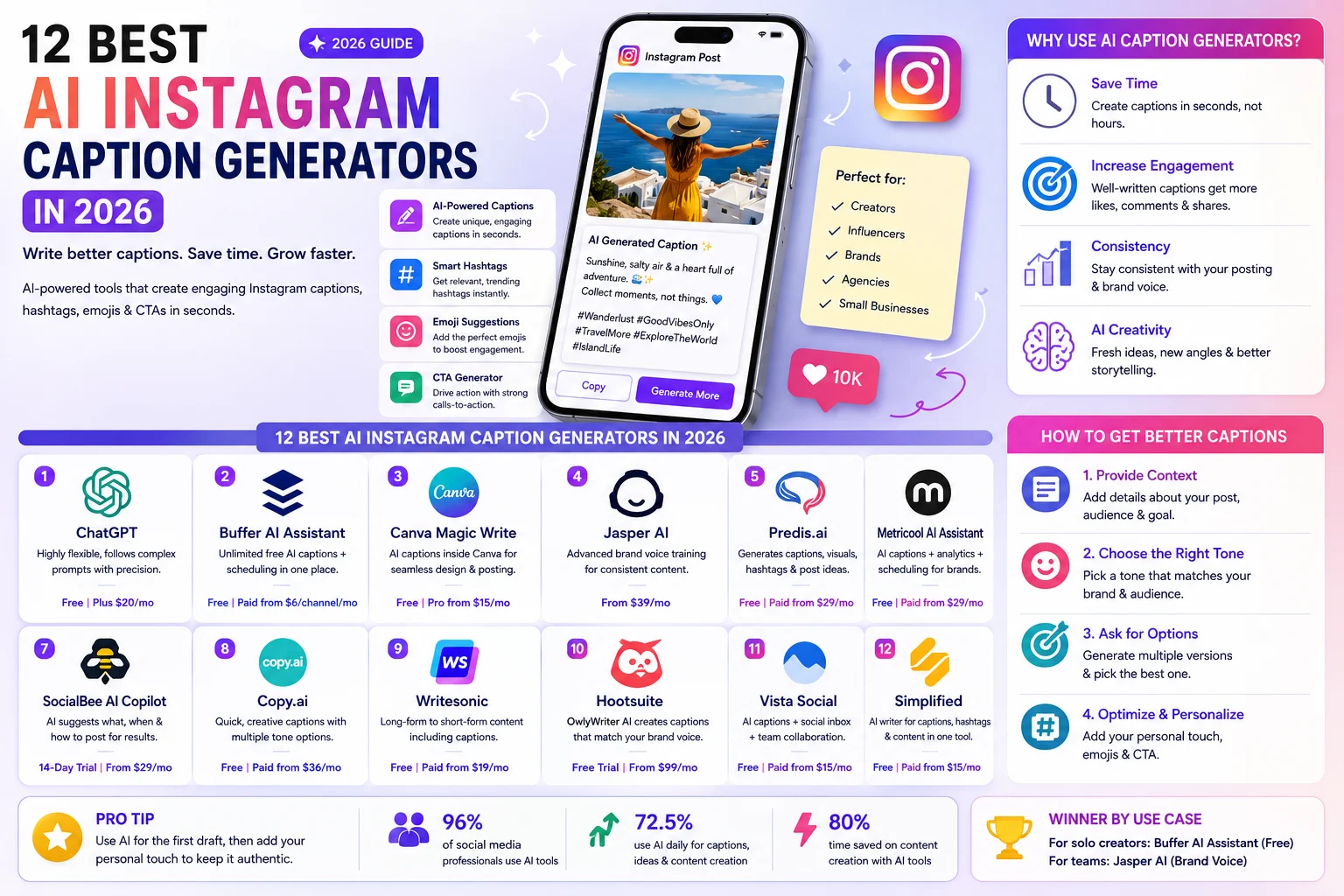
Why creators and businesses use them: The honest reason is time. Writing a genuinely good caption, one with a strong hook, a clear message, and a natural voice takes longer than most people expect, especially when you’re posting consistently across multiple platforms. AI caption generators speed up that process by producing a first draft in seconds, allowing creators and marketers to spend less time writing from scratch and more time refining content, engaging with their audience, and planning campaigns. Industry research shows AI is now widely used in social media workflows, with 96% of social media professionals reporting they use AI tools and 72.5% using them daily for tasks such as brainstorming ideas, writing captions, and adapting content across channels
AI vs. manual caption writing, in practice: manual writing wins on authenticity and costs you time. AI writing wins on speed and consistency and costs you a “genericness tax” if you publish the first draft unedited.
None of the twelve tools below are mind readers (despite what some of their landing pages imply). They’re pattern-matchers genuinely good at structure and tone-matching, genuinely bad at knowing what actually happened at your event, in your kitchen, or in your DMs last week. That gap is exactly why the “best” tool isn’t the one with the most features. It’s the one that gets you 80% of the way there fastest, so the human 20% takes two minutes instead of twenty.
How We Tested AI Instagram Caption Generators
To make this comparison as fair as possible, we evaluated every AI Instagram caption generator using the same set of criteria. Instead of relying on marketing claims or feature lists alone, we focused on the aspects that have the biggest impact on everyday content creation: caption quality, creativity, ease of use, AI capabilities, pricing, and overall value.
Most AI social media management tools roundups rank products by feature count, which rewards whichever tool has the longest marketing page not the one that actually makes your Tuesday easier.
- Caption quality — does the first draft need heavy editing, or light editing?
- Creativity — does it produce more than one obvious angle, or does every output read the same?
- Brand voice customization — does it learn your tone over time, or start from zero every session?
- Engagement potential — does the caption structure invite a comment or a save, or just sit there?
- Hashtag suggestions — relevant and specific, or generic and overused?
- CTA generation — does it write a call-to-action that sounds like a person, not a pop-up ad?
- Ease of use — how many steps between opening the tool and having something publishable?
- Pricing — Compared using each vendor’s official pricing page. Since pricing changes frequently, always verify the latest plans on the official website before subscribing.
- Overall value — what you get relative to what you pay, not just the sticker price
Quick Comparison Table
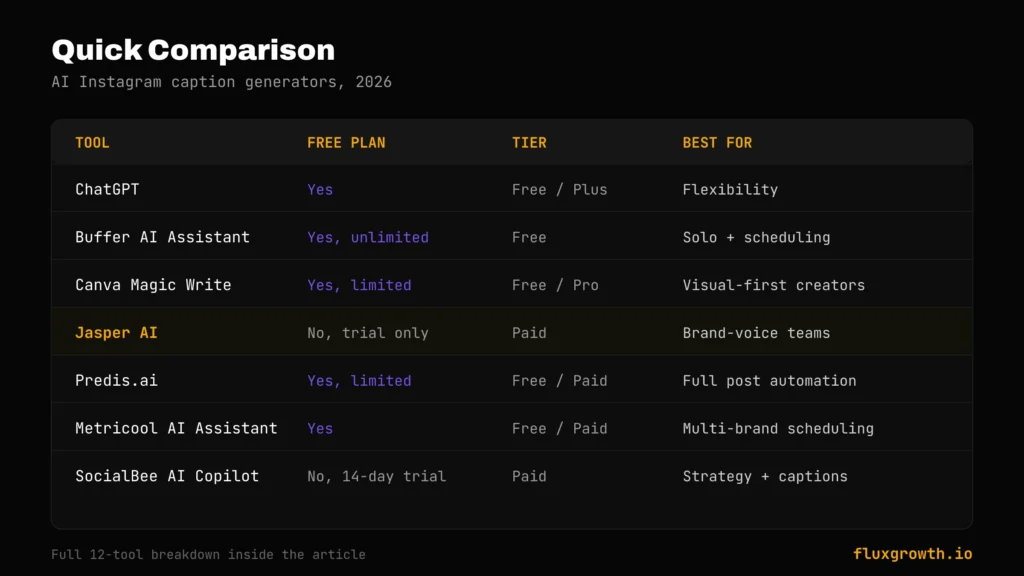
| Tool | Free Plan | Starting Price | est For | Standout AI Feature |
| ChatGPT | Yes | Free (Plus $20/month) | Flexibility, any tone or format | Follows detailed multi-part prompts precisely |
| Buffer AI Assistant | Yes, unlimited on free plan | Free (Buffer paid from $6/channel/month) | Solo creators who also need scheduling | Free-tier AI with no usage cap |
| Canva Magic Write | Yes (limited) | Free (Canva Pro from $15/month) | Visual-first creators | Caption writing inside your design tool |
| Jasper AI | No, trial only | From $39/month | Teams needing brand-voice consistency | Deepest brand-voice training of the group |
| Predis.ai | Yes | Free (Paid from $29/month) | Full post automation | Generates caption + visual + hashtags together |
| Metricool AI Assistant | Yes | Free (paid from $29/mo) | Multi-brand scheduling with basic AI help | AI credits bundled with a full scheduler + analytics suite |
| SocialBee AI Copilot | No, 14-day trial | From $29/month | Solo creators wanting strategy, not just text | Suggests what and when to post, not just what to say |
This table covers the seven strongest options for most people — see the full 12-tool breakdown below for Copy.ai, Writesonic, Hootsuite OwlyWriter AI, Vista Social, and Simplified. Winner by use case: if you post solo and don’t want to pay for anything, start with Buffer’s free AI Assistant. If you’re managing brand voice across a team, Jasper is the one that actually remembers it instead of re-guessing every session.
The 12 Best AI Instagram Caption Generators in 2026
1. ChatGPT
ChatGPT is the tool most people already have open in another tab, which is exactly why it’s still the most-used AI Instagram caption generator in 2026 not because it’s built for Instagram, but because it’s flexible enough to fake being built for anything.
You can specify tone, length, hashtag count, emoji use, and brand personality in a single prompt, and it follows all of it with more consistency than most Instagram-specific tools manage. Upload a photo directly and it writes from what it sees, no separate description step needed.
Pricing: A free plan is available. ChatGPT Plus costs $20/month, providing access to faster performance, higher usage limits, GPT-5, advanced reasoning models, image generation, file uploads, and other premium features. Team and Enterprise plans are also available for organizations.
What it doesn’t do: no scheduling, no built-in hashtag research, no memory of your brand voice between sessions unless you rebuild the context each time.
Best for: anyone who wants maximum control and doesn’t mind copy-pasting into a separate scheduler. If you already pay for ChatGPT Plus for other work, the marginal cost of using it for captions too is effectively zero.
2. Jasper AI
Jasper is built for teams, and it shows the moment you set up brand voice training the deepest voice-customization system on this list, letting you feed it existing content so new captions actually sound like your brand instead of a generic assistant.
That depth comes at a cost: no permanent free plan, and pricing well above the caption-specific tools. If you post three times a week solo, Jasper is overkill. If you’re an agency managing voice consistency across five client accounts, it starts to make sense fast.
Pricing: Jasper offers a 7-day free trial but no permanent free plan. The Pro plan starts at $69/month per seat when billed monthly, or $59/month per seat when billed annually. Business plans are available with custom pricing for larger teams and enterprises.
Best for: marketing teams and agencies managing multiple brand voices at once. Worth the price specifically when a client or brand owner keeps flagging captions as “off,” since that’s the exact problem Jasper’s voice training is built to fix.
3. Copy.ai
Copy.ai has evolved from a standalone AI writing tool into a broader go-to-market (GTM) AI platform. While it still handles Instagram captions well, its focus is now on automating marketing and sales workflows rather than being an Instagram-specific caption generator.
It’s less Instagram-specialized and more of a general marketing copy tool that happens to handle captions well. Templates cover promotional posts, storytelling captions, and product launches, but you do more of the prompt-engineering yourself compared to a tool built Instagram-first.
Pricing: Copy.ai offers a free plan with limited workflow credits and core AI features. Paid Starter plans begin at $49/month (1 seat), while Advanced plans start at $249/month (up to 5 seats). Enterprise pricing is available on request.
Best for: creators who want Jasper-style flexibility without the Jasper-style price tag. A reasonable middle step if you’ve outgrown ChatGPT’s blank-prompt-box approach but aren’t ready to commit to Jasper’s team pricing.
4. Writesonic
Writesonic sits mid-tier: more structured than ChatGPT, less expensive than Jasper. It’s built around templates plugging in a product, an event, or a topic, and it returns caption variations you pick from and edit.
The caption quality is solid but rarely surprising. It won’t hand you a caption you couldn’t have gotten with a well-written ChatGPT prompt, but the templates save the ten minutes you’d spend writing that prompt from scratch.
Pricing: Writesonic offers a free trial (no credit card required). Paid plans currently start at $79/month (Starter), with Basic at $199/month, Growth at $399/month, and Enterprise custom pricing. Plans include AI content generation alongside SEO and AI search visibility features.
Best for: small teams who want structure without training a custom brand voice. The template library also doubles as a decent cure for writer’s block on days when even a good prompt feels like too much effort.
5. Canva Magic Write
Magic Write’s advantage isn’t caption quality, it’s that it lives inside the same tool where you’re already designing the post. Write the caption, adjust the graphic, export, done, no tab-switching.
The Canva Free plan includes limited access to Magic Write and other AI features, while Canva Pro significantly increases AI usage limits through Magic Studio. Canva’s real strength is its integrated workflow rather than producing the most creative captions if caption quality is your top priority, tools like ChatGPT or Jasper generally produce stronger first drafts.
Pricing: Canva offers a free plan with limited AI usage. Canva Pro starts at $15/month (or $120/year), unlocking higher AI usage limits across Magic Studio, including Magic Write, Magic Design, and other AI-powered tools. Canva Teams starts at $10 per user/month (minimum three users). Enterprise pricing is available on request.
Best for: creators who design in Canva anyway and want one less app open. Not the tool to reach for if caption writing, not design, is your actual bottleneck.
6. Buffer AI Assistant
Buffer made a call that paid off for its users in 2026: the AI Assistant runs on the free plan with no usage cap, at a time when most competitors gate AI behind a paywall.
It generates caption drafts, adjusts tone, and repurposes existing posts solid first-draft quality, though it won’t learn your brand voice over time the way Jasper does. For a solo creator or small business that just needs “caption plus somewhere to schedule it,” this is hard to beat on value.
Pricing: Free plan available (includes Buffer AI Assistant). Paid plans start at $6 per channel/month (or $5 per channel/month when billed annually), adding more channels, analytics, collaboration features, and advanced publishing tools.
Best for: solo creators and small businesses who want caption writing and scheduling in one free tool. If your only complaint about ChatGPT is the extra copy-paste step into your scheduler, Buffer removes that step for free.
7. Hootsuite OwlyWriter AI
OwlyWriter is Hootsuite’s built-in writing assistant, and its standout move is repurposing: it scans your post history, finds what performed best, and suggests fresh versions of it, something none of the standalone writers do, because they don’t have access to your engagement data.
The downside is cost. OwlyWriter AI isn’t available as a standalone product; it’s included with every paid Hootsuite subscription. If caption writing is the only feature you need, Hootsuite is likely more expensive than dedicated AI caption tools.
Pricing: No free plan. OwlyWriter AI is included with all paid Hootsuite plans. The Standard plan starts at $99/month (billed annually) for 1 user and 5 social accounts, while the Advanced plan starts at $249/month (billed annually). Enterprise pricing is available on request.
Best for: teams already paying for Hootsuite’s full scheduling and analytics suite. Skip it if you’d be signing up for Hootsuite purely to get access to OwlyWriter that math rarely works out.
8. Predis.ai
Predis.ai skips the “just a caption” category entirely, giving it a topic or product URL, and it generates the caption, the hashtags, and a visual (carousel, single image, or short video) in one pass.
For e-commerce accounts especially, this is the closest thing to a done-for-you post generator on the list. The trade-off is that any one part of the output caption, image, or hashtags is a bit less refined than a tool built to do only that one thing well.
Pricing: Free plan available with limited AI credits and features. Paid plans start at $29/month, with higher tiers offering increased AI credits, additional brand workspaces, and more content generation capacity.
Best for: e-commerce brands and creators who want a full post, not just text, generated from one prompt. The watermark on the free tier is a real limitation for anyone planning to publish that output directly.
9. SocialBee AI Copilot
SocialBee’s AI Copilot does something the others don’t: it doesn’t just write captions, it suggests a posting strategy for what category of content to post, how often, and when then generates captions inside that structure.
For a solo creator who struggles more with “what do I post today” than “how do I phrase this,” that’s genuinely different help. No free plan, only a 14-day trial, and the category system takes some setup time before it pays off.
Pricing: No free plan. A 14-day free trial is available. Paid plans start at $29/month (Bootstrap), with higher tiers adding more social profiles, users, AI features, and collaboration tools.
Best for: solo creators and consultants who want strategy guidance, not just sentence-level help. Less appealing if you already have a content plan and just need the writing part handled.
10. Metricool AI Assistant
Metricool bundles its AI writing tool into a full scheduling and analytics platform that connects to Instagram, Facebook, TikTok, LinkedIn, X, YouTube, Pinterest, and more from one dashboard. You pick a topic, a tone, and a platform, and it drafts a caption tailored to each network’s format.
The AI is best suited for overcoming writer’s block rather than replacing a dedicated AI writing platform. Unlike Jasper or ChatGPT, it doesn’t offer advanced brand voice training. AI features are included with paid plans, with usage based on your subscription rather than unlimited generation.
Pricing: Free plan available (1 brand with limited features). Paid plans start at approximately $22–25/month (depending on billing cycle and region), with higher tiers adding more brands, advanced analytics, collaboration, and expanded AI capabilities.
Small businesses and agencies get the most out of it. You’re really paying for the scheduling and analytics, and the AI comes along for free. Pick a dedicated writer instead if caption quality, not account management, is the actual priority.
11. Vista Social AI
Vista Social includes AI-powered caption generation as part of its broader social media management platform, positioning itself as a more affordable alternative to enterprise tools like Hootsuite and Sprout Social. AI features focus on caption creation, content ideas, and reply assistance, while the platform’s biggest strengths remain scheduling, social inbox management, and analytics.
It’s a reasonable pick if you’re choosing a scheduler first and treating AI captions as a secondary feature, but it’s not a tool you’d choose specifically for its writing quality; the caption output is functional rather than distinctive.
Pricing: Vista Social does not offer a permanent free plan. The Professional plan starts at $79/month (3 users, up to 15 social accounts). Enterprise pricing is available on request for larger organizations.
Best for: budget-conscious teams who want a scheduler with AI captions included, not a dedicated writing tool. Compare the base-plan AI feature list carefully before assuming it matches what a competitor includes at a similar price.
12. Simplified AI
Simplified takes the broadest swing of any tool here: one workspace for AI captions, graphic design, video editing, and scheduling. The caption generator analyzes an uploaded image or video and produces context-aware drafts with hashtag and emoji suggestions, plus multiple tone variations to choose from.
The free plan is useful for getting started, while paid plans unlock higher AI usage limits, premium templates, advanced design tools, and expanded scheduling capabilities. The trade-off of doing everything in one platform is that no single feature captions, design, or video editing is as specialized as dedicated tools.
Pricing: Free plan available. Paid plans start at $24/month (Simplified One), with higher tiers available for teams and businesses that need additional AI usage, collaboration, and workspace features.
If you want captions, design, and scheduling in one workspace instead of stitching three tools together, this is the one to try first.
Best AI Instagram Caption Generator by Category
- Best overall: ChatGPT, for the combination of caption quality, flexibility, and near-zero cost.
- Best free tool: Buffer AI Assistant unlimited AI on the free plan, plus a real scheduler attached to it.
- Best for businesses: Jasper AI, for brand-voice consistency across multiple writers.
- Best for influencers: Canva Magic Write, since most influencer content is visual-first and the caption tool lives right where the graphic gets made.
- Best for agencies: Jasper AI or Metricool, depending on whether the priority is voice training (Jasper) or flat-rate multi-brand scheduling (Metricool).
- Best for e-commerce: Predis.ai, for generating the caption and the product visual together.
- Best for personal brands: ChatGPT paired with a saved brand-voice prompt, for full control at low cost.
- Best budget option: Copy.ai’s free 2,000-word tier, for creators posting a handful of times a week without needing scheduling built in.
None of these picks are permanent. An influencer running one account solo today might be running an agency-style operation across three accounts next year worth revisiting this list against your actual workflow every few months rather than picking once and forgetting about it.
Free vs. Paid AI Caption Generators
The free tiers in 2026 are genuinely usable, a real shift from a couple of years ago, when “free” usually meant a handful of trial generations before a hard paywall.
What you get for free, typically: a capped number of monthly or lifetime generations, basic tone controls, and no brand-voice memory between sessions. Buffer and Metricool both offer real free plans with actual AI attached, not just a demo.
What premium features are worth paying for: unlimited or much higher generation caps, brand-voice training that persists across sessions, team seats with shared brand settings, and in scheduler-based tools the ability to publish what you wrote instead of copy-pasting it somewhere else.
Which plan offers the best value: if you post fewer than five times a week and manage only your own account, stay free as long as you can. The moment you’re managing brand voice across more than one person, paid tools like Jasper start paying for themselves in edited-time saved.
AI Instagram Caption Generator Features
Not every tool on this list includes every feature below that’s the actual reason to compare them beyond price. A tool that nails caption writing but skips brand voice isn’t a worse tool, it’s a different tool for a different job.
- AI caption writing — the core function: turning a prompt or image into draft text.
- Tone customization — playful, professional, inspirational, and similar presets, adjustable per post.
- Brand voice — tools like Jasper and Simplified let you train the AI on existing captions so new output matches your established voice.
- Emoji suggestions — most tools add emoji automatically; quality varies from natural to noticeably overdone.
- Hashtag generation — relevant tags suggested alongside the caption, though manual review is still worth it (see the mistakes section below).
- Multi-language support — useful if your audience spans more than one language; ChatGPT and Jasper both handle this well.
- Caption rewriting — feed in an existing caption and get variations back, useful for A/B testing hooks.
- Content ideas — several tools (Metricool, SocialBee) suggest what to post about, not just how to phrase it.
- SEO-friendly captions — some tools nudge toward keyword-aware phrasing for Instagram’s search function, though this matters far less on Instagram than on Google-indexed content.
In short: match the feature list to the actual bottleneck in your workflow. If that bottleneck is “I don’t know what to say,” prioritize tone customization and content ideas. If it’s “I say the same thing every time,” prioritize caption rewriting and hook variation instead.
Benefits of Using an AI Instagram Caption Generator
- Save time — the core benefit. A caption that takes fifteen to twenty minutes to write from scratch drops to three to five minutes with a decent AI draft plus a personal edit, which adds up fast across a weekly posting schedule.
- Beat writer’s block — a blank caption box is a bigger barrier to consistent posting than most people admit. A first draft, even an imperfect one, removes the blank-page problem and gets you editing instead of staring.
- Increase engagement — indirectly: consistency matters more to the algorithm than any single caption, and AI tools make daily posting realistic for people who’d otherwise skip days when motivation runs out.
- Maintain brand consistency — tools with brand-voice training (Jasper, Simplified) keep tone stable even when multiple people are writing captions, which matters the moment a second writer joins the account.
- Generate unlimited ideas — useful when you’re stuck between two directions for a post; ask for five variations instead of committing to your first instinct and second-guessing it after publishing.
- Improve content quality — mainly by giving you more drafts to choose from, not by writing something you couldn’t have written yourself. The quality gain is in the selection, not the generation.
- Scale content production — genuinely valuable for agencies managing several accounts, where writing every caption by hand doesn’t scale past a certain client count without adding headcount.
Real-World Use Cases
- Content creators posting daily use AI tools mainly to beat writers block and generate hook variations for the same photo, then pick the strongest opening line before publishing.
- Influencers lean on brand-voice-aware tools to keep sponsored and organic content sounding consistent. A sponsor’s approved messaging doc leaves zero room for guessing at tone the AI just needs to hit the same note every time.
- Small businesses use free tools like Buffer’s AI Assistant to keep a posting schedule alive without hiring a copywriter. Cheapest fix for the “we haven’t posted in two weeks” problem.
- E-commerce stores turn to full-post generators like Predis.ai once a product catalog passes a few dozen items writing captions one SKU at a time stops being realistic around then.
- Marketing agencies use brand-voice tools like Jasper so a new writer joining a client account doesn’t have to relearn that brand’s tone from a style guide alone.
- Personal brands stick with ChatGPT and a saved voice prompt. No agency, no scheduler, just a prompt they’ve refined over months.
- Freelancers managing several small clients often pick flat-rate, multi-brand tools like Metricool over per-seat platforms, since per-seat pricing punishes anyone juggling many small accounts instead of one large one.
- Social media managers on bigger teams usually end up on whatever their scheduler already includes OwlyWriter inside Hootsuite, AI Assistant inside Buffer rather than adding a separate login to manage.
AI Instagram Caption Generator Examples
These are illustrative prompt-and-output patterns, not guaranteed results treat them as starting points to adapt, not copy-paste captions. Run any of these through the prompt templates below with your own specific detail swapped in, and edit before posting; that’s the difference between a caption that sounds like a template and one that sounds like you.
- Product caption: “New in the shop: the ceramic mug that’s been sitting on my desk for three days because I don’t want to put it away. Link in bio before the small-batch run sells out.”
- Travel caption: “Got lost trying to find this waterfall. Worth every wrong turn. Where’s the last place you got lost and were glad about it?”
- Fitness caption: “Week six of actually showing up, not week six of feeling motivated. Motivation left weeks ago. Showing up stayed.”
- Fashion caption: “This jacket has one job today: making the 6am train feel less like a punishment. Mission mostly accomplished.”
- Food caption: “Made this three times before it looked like the recipe photo. Still tasted good the first two times, for the record.”
- Business caption: “We turned down a client this month. Wrong fit, and we’ve learned that it’s more expensive than the revenue is worth.”
- Educational caption: “Most people format their Instagram bio link wrong. Here’s the fix, in under 30 seconds.”
- Funny caption: “My camera roll is 40% screenshots of things I meant to buy and never did.”
- Motivational caption: “You don’t need a better plan. You need to start with the mediocre one you already have.”
- Giveaway caption: “One winner, one $50 gift card, zero requirement to tag five friends who didn’t ask to be tagged. Just follow and comment below.”
Prompt Templates
Copy and adapt these directly in ChatGPT, Jasper, or any general-purpose tool on this list:
- Product launch: “Write an Instagram caption announcing [product] launching [date]. Tone: [playful/professional]. Include one specific product detail and end with a soft CTA to the link in bio.”
- Storytelling caption: “Write a short story-style Instagram caption about [specific event/moment]. Start mid-scene, not with ‘today I want to share.’ End with a one-line reflection, not a moral.”
- Viral Reel caption: “Write a short, punchy caption for a Reel about [topic]. Under 15 words. No hashtags in the caption itself. I’ll add those separately.”
- Carousel caption: “Write an Instagram caption that introduces a carousel about [topic], hinting at what’s in slide 2 without giving it away. End with ‘swipe for [specific payoff].'”
- Promotional caption: “Write a caption promoting [offer] that doesn’t sound like an ad. Lead with the customer problem, not the discount. Discount mentioned once, near the end.”
- Educational caption: “Write a caption teaching one specific tip about [topic] in under 60 words. Lead with the tip itself, not a setup sentence.”
- Personal brand caption: “Write a first-person caption about [specific experience/lesson]. Include one honest limitation or mistake, not just the win.”
- Engagement caption: “Write a caption ending in a genuine, specific question about [topic] — not a generic ‘what do you think?’ but something that only someone in this niche would answer.”
- Giveaway caption: “Write a giveaway caption for [prize]. Entry rules in a numbered list, no more than 3 steps. Tone: excited but not shouty.”
- Holiday caption: “Write a [holiday] caption for [brand/topic] that references the holiday in the first line without opening with ‘Happy [Holiday]!'”
Every template above works in ChatGPT, Jasper, Copy.ai, or Writesonic without modification. The specificity in brackets is doing the real work the more precisely you fill it in, the less editing the output needs afterward.
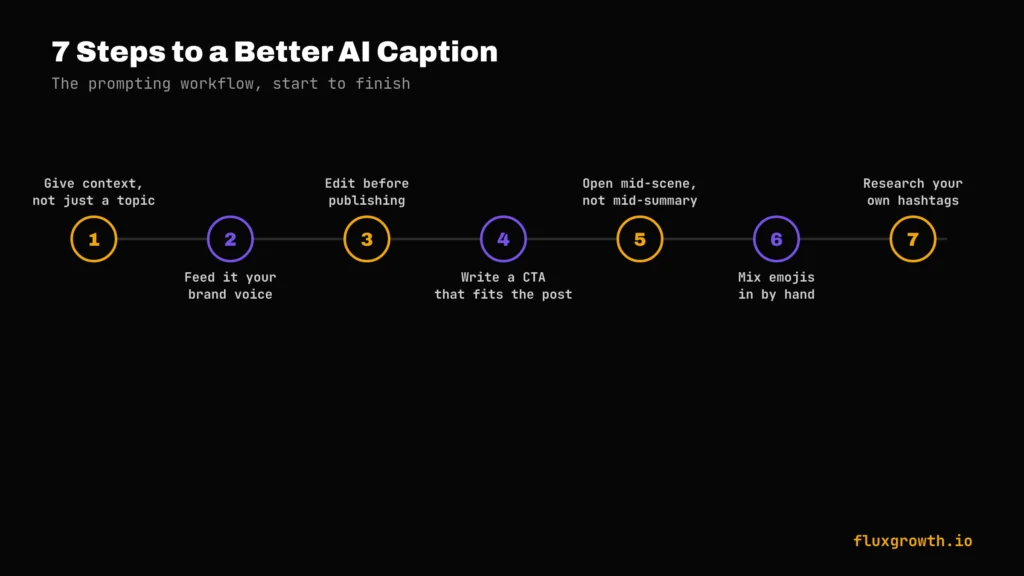
Tips to Get Better AI Captions
- Give it context, not just a topic. “Write an Instagram caption for a coffee shop” gets you a generic caption. “Write a caption for a photo of our new oat milk latte, playful tone, one joke about Mondays, end with a question” gets you something closer to done.
- Feed it your actual brand voice. Paste three of your best past captions into the prompt and ask it to match the tone. Every tool improves with this step, even the ones without formal brand-voice training.
- Edit the AI output before publishing. Treat the draft as a first pass, not a final one. Swap in a specific detail only you would know.
- Include a CTA that fits the post, not a default one. “Comment below” works on some posts and reads lazily on others, asking the tool for three CTA options and picking the one that fits.
- Use storytelling structure for personal posts. Prompt for a mid-scene opening instead of a summary opening it reads far less like a template.
- Mix emojis naturally. Ask the tool for zero emojis, then add one or two yourself where they actually land, rather than accepting a default emoji-per-sentence pattern.
- Add relevant hashtags yourself. AI-suggested hashtags skew generic; swap at least half for ones you’ve researched or pulled from a tool built for hashtag research specifically.
None of these tips require a better tool; they work with any of the twelve options above. The tool changes how fast you get a draft; these habits change whether that draft is worth publishing.
Common Mistakes to Avoid
Here’s the thing: most of the “AI captions feel generic” complaints trace back to one of these six habits, not to the tool itself.
- Publishing AI text without editing. The single most common mistake and the fastest way to make an account sound like every other account using the same tool. This is the one habit worth fixing before any other change on this list.
- Overusing emojis. Default AI output tends to add more emoji than a natural caption would; trim aggressively and add back only the one or two that actually land.
- Generic captions. If the caption could apply to any account in your niche, it needs a specific detail only you have a number, a name, a moment that couldn’t have happened to anyone else.
- Weak CTAs. “Let me know what you think!” at the end of every post trains your audience to skip that line entirely, since it stops meaning anything after the fifth time they’ve seen it.
- Ignoring audience intent. A caption optimized for engagement bait (asking a shallow question purely to boost comments) tends to attract low-quality engagement, not the audience you actually want to grow.
- Keyword stuffing. Cramming your main keyword into every sentence for Instagram’s search function reads unnatural and doesn’t meaningfully move discoverability the way it does on Google one natural mention does the job.
AI Instagram Caption Generator vs. ChatGPT
Every tool on this list is, at some level, competing with the fact that ChatGPT already does most of what they do, for free or near-free.
Speed: dedicated Instagram tools (Predis.ai, Metricool) are faster for full-post generation since they skip the prompt-writing step. ChatGPT is faster if you already have a good saved prompt.
Customization: Jasper and Simplified beat ChatGPT on persistent brand-voice memory. ChatGPT requires you to rebuild context each session unless you’re using saved custom instructions.
Accuracy: roughly equivalent across tools all of them occasionally produce a caption that misreads the tone of an image or event, which is why editing before publishing matters regardless of tool.
Brand voice: advantage goes to the specialized tools with formal voice-training features.
Pricing: advantage goes to ChatGPT for anyone not managing a team.
Best use cases: ChatGPT for flexibility and low cost; specialized tools when scheduling, hashtag research, or multi-account management are part of the job, not just caption writing.
The practical test: if you’d need to buy a second tool just to do what ChatGPT already does for captions, make sure that second tool is earning its price on scheduling, analytics, or brand-voice memory, not on writing quality alone.
AI Instagram Caption Generator vs. Human Writing
Pros of AI: speed, a reliable first draft even on low-motivation days, and unlimited variation for testing different hooks on the same post before committing to one.
Cons of AI: genericness if published unedited, no real memory of what actually happened in your day or business unless you explicitly tell it, and a flattening effect on voice if you rely on it for every single post without editing anything in.
When to use AI: routine posts, product announcements, and anything where speed matters more than a distinctive voice, get a draft, edit it, move on.
When to write manually: anything deeply personal, anything referencing a specific relationship or inside joke with your audience, and any caption where the entire point is that only you could have written it.
Most accounts land somewhere in between: AI for the routine 80%, manual writing for the 20% that’s actually about your relationship with your audience.
Free tools: ChatGPT, Buffer AI Assistant, Canva Magic Write (limited), Copy.ai, Predis.ai, Metricool, and Simplified all offer free plans with varying AI usage limits.
Around $20/month: ChatGPT Plus ($20/month) remains one of the best-value upgrades for solo creators who primarily need AI writing rather than a full social media management platform.
$20–50/month: SocialBee ($29/month), Simplified ($24/month), Sendible ($29/month), CoSchedule Pro ($29/month), Planable ($33/month), Jasper Creator ($39/month), and Loomly ($42/month).
$50+/month: Buffer Team (depending on channels), Vista Social Professional ($79/month), Agorapulse (from $79/month), Hootsuite Standard ($99/month), NapoleonCat Pro ($89/month), Sprout Social, and Enterprise plans for larger organizations.
Pros & Cons
Pros
- Faster content creation across the board, from first draft to publish-ready
- Unlimited caption ideas and hook variations to test against each other before picking one
- Better consistency for teams with more than one writer touching the same account
- Beginner-friendly no copywriting background required to get a usable draft on the first try
- Meaningful productivity gain for anyone posting more than three times a week, where the time savings compound
Cons
- Requires editing every time the accounts that skip this step are usually the ones whose captions all start sounding the same
- May sound generic without a brand-voice setup step, especially on tools without a formal voice-training feature
- Premium tools with real brand-voice training (Jasper, Simplified paid tiers) can be expensive relative to a solo creator’s budget, even when the quality gain is real
Future of AI Instagram Caption Generators
A few trends are already emerging based on the direction major platforms are taking:
- More personalized AI that remembers your brand voice and writing style across sessions instead of requiring repeated prompting or paid brand-voice setup.
- Better multimodal understanding, where AI analyzes the actual image or video not just a text prompt to generate more context-aware captions.
- Built-in trend detection, surfacing topics, hashtags, and content formats that are currently performing well in your niche.
- Performance-aware optimization, where AI learns from your highest-performing posts and adapts future caption suggestions accordingly. Hootsuite’s OwlyWriter AI is an early example of this approach through content repurposing.
Editor’s note: This section reflects current product direction and industry trends based on publicly available features and announcements. It is analysis, not a prediction or guarantee of future product development.
What I’d Use If I Were Starting Today
If I were starting from scratch today, I’d keep things simple. I’d begin with ChatGPT for generating high-quality caption drafts and Buffer for scheduling and publishing. Together, they cover the essentials without requiring a significant monthly investment.
As my content strategy grew and I started managing multiple brands or client accounts, I’d move to Metricool. The combination of scheduling, analytics, competitor tracking, and AI assistance offers one of the best value-for-money packages in this category.
If maintaining a consistent brand voice across a larger team became the priority, Jasper AI would be my upgrade. Its brand voice capabilities remain among the strongest available, making it a better fit for agencies and businesses that publish content at scale.
The most important takeaway is this: don’t choose a tool because it has the longest feature list. Choose the one that fits your workflow today. Start with a free plan or trial, publish real content for a week, and upgrade only when you consistently hit the platform’s limits.
Frequently Asked Questions (FAQs)
What is an AI Instagram caption generator?
An AI Instagram caption generator is a tool that uses a language model to draft Instagram captions from a topic, prompt, or photo, usually with hashtag and emoji suggestions included. It’s meant to speed up the writing process, not replace editing.
Is there a free AI Instagram caption generator?
Yes. Several AI Instagram caption generators offer free plans. ChatGPT, Buffer AI Assistant, Canva Magic Write, Copy.ai, Metricool, Predis.ai, and Simplified all provide free access with varying feature or usage limits. For most creators, ChatGPT and Buffer AI Assistant are among the strongest free options, while Canva Magic Write and Metricool are good choices if you also need design or social media management features. Because free-plan limits change frequently, it’s worth checking each tool’s official pricing page before choosing one.
Which AI writes the best Instagram captions?
There’s no single answer, it depends on what you’re optimizing for. ChatGPT tends to produce the most flexible, natural-sounding drafts for general use, while Jasper produces the most brand-consistent output for teams with trained voice profiles. If your priority is a complete post rather than just text, Predis.ai’s combined caption-and-visual output is worth testing instead.
Can ChatGPT create Instagram captions?
Yes. ChatGPT can write captions from a text prompt or an uploaded photo and follows detailed instructions on tone, length, hashtags, and emoji use well. It doesn’t include scheduling, hashtag research, or analytics, so it works best paired with a separate posting tool.
Can AI generate hashtags?
Yes, most tools on this list suggest hashtags alongside the caption. Quality varies tools like Predis.ai lean toward more Instagram-specific hashtag research, while general tools like ChatGPT tend to suggest broader, more generic tags that benefit from manual review.
Are AI-generated captions good for engagement?
They can be, but mainly through consistency rather than any single caption being uniquely persuasive. Captions published straight from an AI tool without a personal edit tend to read as generic, so the engagement benefit comes from editing the draft, not from the AI output alone.
How do influencers use AI for Instagram?
Influencers typically use AI tools to generate multiple hook variations for the same photo, then pick and edit the strongest one, rather than publishing a single AI draft as-is. Brand-voice-aware tools help keep sponsored and organic content sounding consistent.
Can AI write captions in multiple languages?
Yes. ChatGPT and Jasper both handle multilingual caption writing well, which matters for accounts with an audience spanning more than one language or region.
Which AI tool is best for businesses?
It depends on team size. Solo business owners tend to do well with Buffer’s free AI Assistant or ChatGPT; businesses managing multiple writers or a larger content calendar typically get more value from Jasper’s brand-voice training or Metricool’s flat-rate multi-brand scheduling. E-commerce businesses specifically tend to lean toward Predis.ai, since product-based content benefits most from generating the caption and visual together.
Is using AI for Instagram captions allowed?
Yes. Instagram does not prohibit using AI to help write captions. Meta’s transparency policies primarily apply to AI-generated or AI-edited images, videos, and audio that could mislead viewers, rather than text-only captions. As long as your content follows Instagram’s Community Standards and other platform policies, using AI to draft or improve captions is allowed.
How much does an AI Instagram caption generator cost?
Prices range from free (ChatGPT, Buffer AI Assistant, Canva Magic Write, Copy.ai, Metricool, Predis.ai, and Simplified all offer free plans) to $99/month and above for enterprise-focused platforms like Hootsuite that combine AI writing with social media scheduling, analytics, collaboration, and governance features. For most solo creators and small businesses, $0–20/month is enough to access a capable AI caption generator, with ChatGPT Plus ($20/month) remaining one of the best-value upgrades if you need more advanced AI capabilities.
Do I still need to edit AI-generated Instagram captions?
Yes. Every tool in this guide produces a first draft, not a finished caption editing in one specific, personal detail is what separates a caption that performs from one that reads as generic. Treat AI output the same way you’d treat a draft from a junior writer: useful, but not ready to publish as-is.
Final Verdict
- Best overall: ChatGPT the combination of caption quality, flexibility, and near-zero cost is hard to beat for most people.
- Best free option: Buffer AI Assistant unlimited AI generation on a genuinely free scheduling plan.
- Best value for money: Metricool flat-rate pricing, multi-platform scheduling, and useful-enough AI in one tool.
- Best for professionals/teams: Jasper AI the only tool here built specifically around persistent, trainable brand voice.
Our recommendation: start free. Run ChatGPT or Buffer’s AI Assistant through the prompt templates and editing tips in this guide before paying for anything. Upgrade to a brand-voice tool like Jasper only once you’re managing more than one person’s writing, or a full-automation tool like Predis.ai once volume not quality becomes the bottleneck. Revisit this decision every few months rather than locking in once; the tools, pricing, and your own workflow will all keep shifting through 2026.
What I’d Take Away From All This
The single biggest takeaway: the best AI Instagram caption generator isn’t the one with the most features it’s the one that gets you a usable first draft fastest, so you spend your time on the two-minute edit that makes it sound like you, not the twenty-minute stare-at-a-blank-box problem it’s meant to solve.
If you’re not sure where to start, open Buffer’s free AI Assistant or ChatGPT today and run one real caption through the prompt templates and editing checklist above before you write your next post manually.
What’s actually working for you right now: a dedicated tool, or just ChatGPT and a good prompt? Reply and let me know; it’ll shape the next tool roundup.