FluxGrowth is reader-supported. Some links in our guides are affiliate links — if you buy through one we may earn a commission, at no extra cost to you. It never changes which tools we recommend. How we test tools.
You’ve got 15 browser tabs open, three of them are AI tools you forgot you signed up for, and you’re still doing half your work the slow way. That’s the real story behind “AI productivity” in 2026 most people aren’t under-using AI, they’re using the wrong five tools out of the fifty they’ve tried.
This guide is part of our AI Automation hub – everything we have published on automating a small business with AI, in one place.
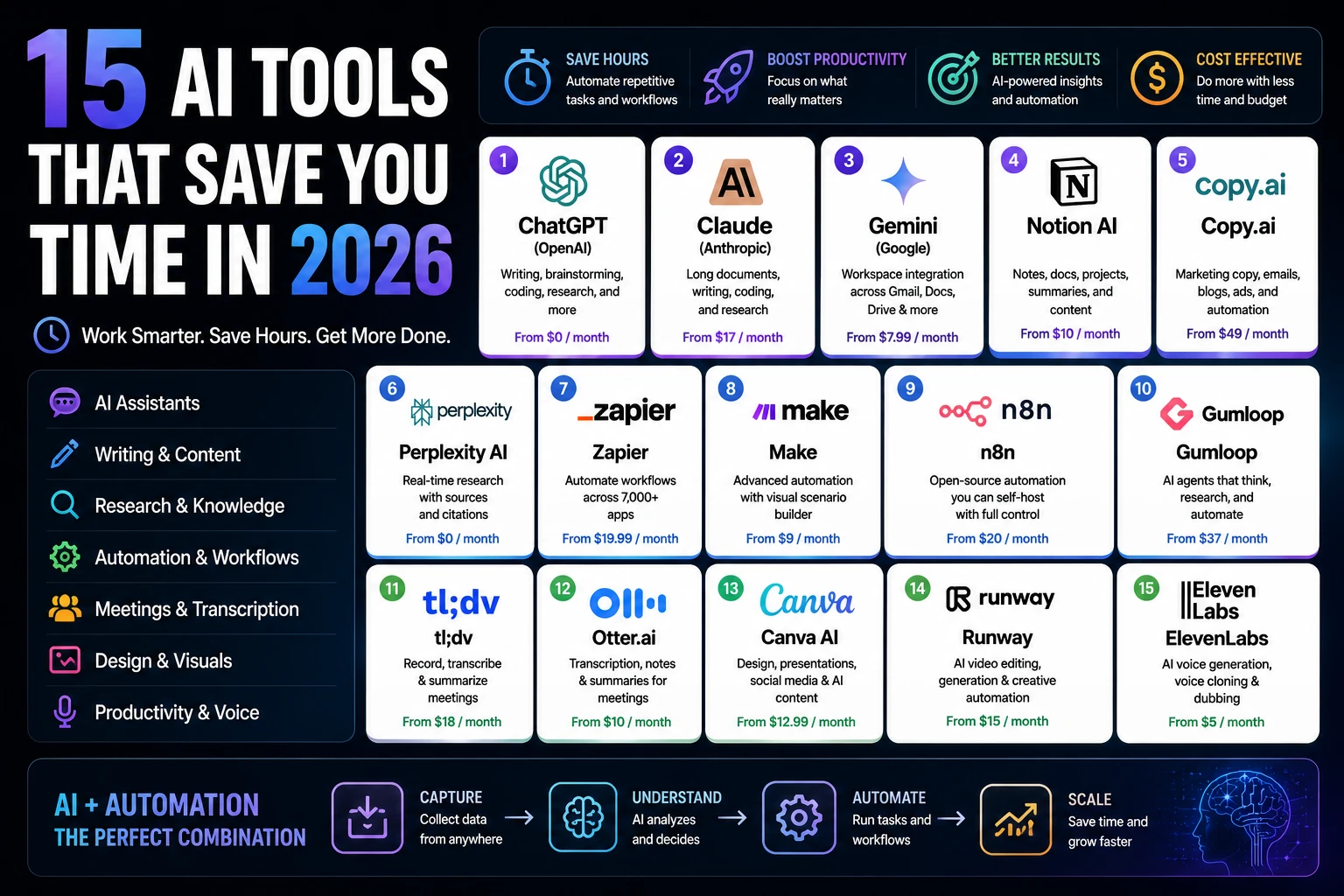
This guide covers 15 AI tools that save time for real work: writing, research, meetings, design, automation, and voice.
Every price below comes from the tool’s own pricing page, checked in July 2026. Not a listicle that’s been sitting untouched since last spring.
If you’re an entrepreneur, agency owner, freelancer, sales rep, or content creator trying to claw back hours in your week, this is the list to start from.
The biggest time savings usually come from automating routine work such as lead routing, content approvals, client reporting, and social media publishing, allowing teams to focus on higher-value work instead of repetitive administration. If your work revolves around campaigns, content, SEO, or social media, check out our guide to the best AI tools for marketers for specialized recommendations.
Why AI Actually Saves So Much Time
The honest version: AI doesn’t do your job for you. It removes the parts of your job that were never really “your job” in the first place: formatting, first drafts, note-taking, repetitive clicks.
Automating repetitive work
Anything you do the same way more than three times a week is a candidate for automation. Sending the same follow-up email, moving a lead from a form into your CRM, resizing a graphic for five platforms, tools like Zapier and Make exist specifically to take that off your plate.
Reducing manual tasks
Meeting notes are the clearest example. You used to type while listening, half-catching both. Now a tool joins the call, transcribes it, and hands you a summary before you’ve closed your laptop.
Faster content creation
A blank page is the biggest time sink in content work. AI tools don’t write your final draft but they collapse the blank-page problem into a five-minute first pass you edit instead of starting from nothing.
Smarter research
Ask a question, get a sourced answer with citations instead of ten browser tabs and forty minutes of skimming. That’s the entire pitch behind Perplexity.
AI decision-making support
This one’s more limited than the marketing suggests. AI can help you weigh options and summarize data. It can’t make the call for you full stop. Treating it like it can is how people end up trusting bad advice because it sounded confident.
How We Evaluated These 15 Tools
We looked at ten factors for each tool: time saved, ease of use, output quality, automation depth, pricing, integrations, learning curve, real ROI, whether the free plan is actually usable, and the single best use case.
One quick note on “time saved,” though. Outside of a few tools with published, dated studies, most numbers in this space are vendor claims dressed up as research. We’ve flagged every figure below with its source. Where no real source exists, we said so instead of making one up.
15 AI Tools That Save Time in 2026
General-purpose AI assistants
1. ChatGPT (OpenAI)
Best for: Writing, brainstorming, coding, research, image generation, and everyday AI productivity.
Overview: ChatGPT remains the most versatile AI assistant in 2026. Powered by OpenAI’s latest models, it excels at long-form writing, coding assistance, research, brainstorming, data analysis, and image generation through Images 2.0. Its broad ecosystem of tools and integrations makes it the default AI workspace for many marketers, creators, developers, students, and businesses.
Pricing: Free plan available. ChatGPT Go starts at $8/month, Plus costs $20/month, while Pro is available in $100/month and $200/month tiers for power users requiring significantly higher usage limits and advanced capabilities. Ads may appear on Free and Go plans in supported regions, while Plus, Pro, Business, Enterprise, and Edu remain ad-free. Verify current pricing before publishing:
One honest limitation: The free plan has tighter usage limits than paid subscriptions, so very large documents or extended conversations may need to be split into smaller sections for smoother analysis.
2. Claude (Anthropic)
Best for: Long-document analysis, careful writing, research, coding, and editing.
Overview: Claude is Anthropic’s flagship AI assistant and one of the strongest alternatives to ChatGPT in 2026. It excels at analyzing long documents, producing natural-sounding writing, reviewing code, summarizing research, and handling complex reasoning tasks. Its large context window makes it especially popular among writers, developers, marketers, researchers, and businesses working with lengthy reports or knowledge bases.
Pricing: Free plan available. Claude Pro costs $20/month or $17/month when billed annually ($200/year). Claude Max is available in two tiers: $100/month (Max 5×) and $200/month (Max 20×) for users who need substantially higher usage limits. Verify current pricing before publishing:
One honest limitation: Claude does not include native AI image generation. While it can understand and analyze uploaded images, you’ll need a separate AI image generator if you want to create images from text prompts.
3. Gemini (Google)
Best for: Anyone already using Gmail, Google Docs, Google Drive, and the Google Workspace ecosystem.
Overview: Gemini is Google’s flagship AI assistant and is deeply integrated across Google Workspace. Following the Google I/O 2026 subscription overhaul, Gemini is now available through Google AI Plus, Google AI Pro, and Google AI Ultra plans. Its biggest advantage is native integration with Gmail, Docs, Sheets, Drive, Meet, and Search, making it one of the best AI assistants for people already working inside Google’s ecosystem.
Pricing: Free plan available. Google AI Plus starts at $7.99/month, Google AI Pro costs $19.99/month, and Google AI Ultra starts at $99.99/month (higher-tier Ultra plans are also available for power users). Verify current pricing before publishing:
One honest limitation: Google’s subscription plans, storage allowances, AI usage limits, and included features change more frequently than most competitors. Comparison articles can become outdated quickly, so it’s worth checking Google’s official subscription page before making a purchase decision.
4. Perplexity
Best for: Research where you want answers backed by citations and trusted sources, rather than a general-purpose chatbot.
Overview: Perplexity positions itself as an AI answer engine rather than a traditional chatbot. Instead of simply generating responses, it searches the web in real time, cites its sources, and lets you verify where information comes from. That makes it one of the strongest AI tools for researchers, analysts, journalists, students, and professionals who care about accuracy and up-to-date information.
Pricing: Free plan available. Perplexity Pro costs $20/month or $200/year (about $16.67/month when billed annually). Perplexity also offers Perplexity Max for power users at $200/month, along with Enterprise plans for organizations. Verify current pricing before publishing:
One honest limitation: Perplexity excels at research, fact-finding, and source-backed answers, but it’s generally weaker than ChatGPT or Claude for long-form creative writing, storytelling, and highly polished marketing copy. It’s designed to help you find reliable information first, then write not to replace a dedicated writing assistant.
Workspace and automation
1. Notion AI
Best for: Teams that already manage projects, documents, wikis, and databases inside Notion.
Overview: Notion AI is deeply integrated into the Notion workspace, making it easy to summarize notes, generate content, search across documents, answer questions from your workspace, and automate repetitive writing tasks without leaving the app. It’s especially valuable for teams that already use Notion as their central knowledge base.
Pricing: Notion offers a Free workspace with a limited AI trial. AI features are included with paid workspace plans, with the Business plan starting at $20 per seat/month when billed annually. Enterprise pricing is available on request. Verify current pricing before publishing:
One honest limitation: If your team doesn’t already use Notion for documentation and project management, paying for an entire workspace just to access the AI features is difficult to justify. Notion AI delivers the most value when it’s working with your existing notes, databases, and company knowledge rather than acting as a standalone AI assistant.
2. Zapier AI
Best for: Connecting thousands of apps and building AI-powered automations without writing code.
Overview: Zapier remains the most widely adopted automation platform in 2026, connecting more than 9,000 apps through its no-code workflow builder. AI is now deeply integrated across the platform, with AI-powered workflow generation, AI fields, Zapier Copilot, AI orchestration, Tables, Forms, and MCP all sharing the same task-based billing system.
Starting price: Free plan available with 100 tasks per month and two-step Zaps. The Professional plan starts at $19.99/month when billed annually, with configurable task tiers beginning at 2,000 tasks per month. Team plans start at $69/month, while Enterprise pricing is available on request. Verify current pricing before publishing:
One honest limitation: Zapier’s task-based pricing means your costs increase as automation volume grows. Every successful action consumes tasks, and AI steps, premium connectors, and more complex workflows can use additional tasks, making high-volume automations significantly more expensive than usage-based competitors such as Make or self-hosted n8n. For small businesses this isn’t usually an issue, but teams running thousands of workflow executions each month should carefully estimate task usage before choosing a plan.
3. Make
Best for: Teams that need visual, branching workflows and more flexibility than traditional trigger-and-action automation.
Overview: Make (formerly Integromat) is one of the most powerful no-code automation platforms available in 2026. Unlike Zapier’s linear workflow model, Make lets you build complex automations using a visual canvas with routers, filters, loops, and conditional logic. It has also expanded its AI capabilities with AI Agents, AI Toolkit, and integrations with more than 350 AI applications.
Starting price: Free plan includes 1,000 credits per month. The Core plan starts at $12/month (annual billing) and includes 10,000 credits per month. Pro starts at $21/month, Teams at $38/month, while Enterprise pricing is available on request. Verify current pricing before publishing:
One honest limitation: Make’s credit-based billing is powerful but takes time to understand. Most standard workflow actions consume one credit each, while certain AI features and advanced modules can consume significantly more. As workflows become larger or run more frequently, estimating monthly credit usage becomes more difficult than Zapier’s task-based model, making it important to calculate expected usage before choosing a plan.
Design and presentations
1. Gamma
Best for: Creating polished presentations, pitch decks, documents, and web pages from a simple prompt or outline without needing design skills.
Overview: Gamma has become one of the most popular AI presentation platforms by focusing on speed and simplicity. Instead of manually designing slides, you describe your topic or upload an outline, and Gamma generates an entire presentation, document, or website with AI-written content, layouts, and visuals. Its card-based design system also makes it easy to publish presentations as shareable web pages.
Starting price: Free plan includes 400 one-time AI credits at signup. Plus starts at $9 per seat/month when billed annually ($108/year) and includes 1,000 AI credits that refresh monthly, removes Gamma branding, and unlocks additional AI features. Pro starts at $18/month, while Ultra starts at $90/month. Verify current pricing before publishing:
One honest limitation: The free plan is designed as a trial rather than a permanent free tier. Once the initial 400 credits are used, they do not refresh monthly. Free users must either earn more credits through referrals or upgrade to a paid plan, making Gamma less attractive for ongoing free use than tools with renewable monthly allowances.
2. Canva Magic Studio
Best for: Creating social media graphics, presentations, videos, documents, and marketing assets from one integrated design platform.
Overview: Canva Magic Studio brings AI across Canva’s entire creative suite, including Magic Design, Magic Write, Magic Edit, Magic Expand, Magic Media, and other AI-powered tools. It’s ideal for marketers, creators, and small businesses that want to generate designs, presentations, videos, and marketing assets without switching between multiple applications.
Starting price: Canva Free includes access to Magic Studio with limited AI usage. Canva Pro costs US$15/month or US$120/year for one person (US$10/month when billed annually). Canva Teams starts at US$10 per user/month (minimum three users, annual billing), while Enterprise pricing is available on request. Verify current pricing before publishing:
One honest limitation: Canva’s AI tools are excellent for quick marketing assets, presentations, and social media content, but Magic Write isn’t designed to replace dedicated long-form writing assistants like ChatGPT or Claude. For blog posts, detailed reports, or in-depth research, you’ll almost always get better results by drafting in a dedicated AI writing tool before polishing the design inside Canva.
Related: how to use artificial intelligence in 2026
Writing and editing
1.Grammarly
Best for: Catching grammar mistakes, improving clarity, and refining tone before publishing or sending professional writing.
Overview: Grammarly remains one of the most widely used AI writing assistants in 2026. It goes far beyond grammar checking by offering AI-powered rewriting, tone detection, clarity improvements, plagiarism detection (paid plans), and writing suggestions across browsers, email clients, Microsoft Office, Google Docs, and mobile devices. It’s an excellent editing companion for professionals, marketers, students, and business teams.
Starting price: Free plan available. Grammarly Pro costs $12/month when billed annually ($144/year) or $30/month when billed monthly. Business and Enterprise plans are also available. Verify current pricing before publishing:
One honest limitation: Grammarly is designed to improve and refine existing writing rather than generate complete long-form content from scratch. While its AI can rewrite paragraphs and expand ideas, using it as your primary drafting tool often produces generic, repetitive copy. It works best as a final editing layer after you’ve created the first draft in a dedicated AI assistant such as ChatGPT or Claude.
Meeting notes and transcription
1.Otter AI
Best for: Recording meetings, generating searchable transcripts, and creating AI-powered meeting summaries for professionals and remote teams.
Overview: Otter AI automatically joins Zoom, Microsoft Teams, and Google Meet meetings to capture live conversations, generate searchable transcripts, identify speakers, and produce AI summaries with action items. It’s one of the most popular meeting assistants for professionals who want accurate notes without manual note-taking.
Starting price: Free plan includes 300 transcription minutes per month (up to 30 minutes per conversation). Otter Pro costs $8.33/month when billed annually ($99.96/year) or $16.99/month when billed monthly. Business plans start at $20 per user/month (annual billing), while Enterprise pricing is available on request. Verify current pricing before publishing:
One honest limitation: Otter AI currently supports English, French, and Spanish for live transcription. While its transcription quality is excellent for supported languages, organizations that regularly conduct meetings in other languages may need a more multilingual transcription platform.
2.Fireflies AI
Best for: Sales teams and businesses that want AI meeting notes automatically synced with CRM platforms like Salesforce and HubSpot.
Overview: Fireflies AI automatically records meetings across Zoom, Google Meet, Microsoft Teams, and other conferencing platforms, then generates searchable transcripts, meeting summaries, action items, and conversation analytics. Its strongest advantage over many competitors is deep CRM integration, allowing meeting notes, customer insights, and follow-up tasks to flow directly into sales workflows.
Starting price: Free plan includes 800 minutes of transcription storage per seat. Pro costs $10/user/month when billed annually ($18/month when billed monthly). Business starts at $19/user/month (annual billing), while Enterprise pricing is available on request. Verify current pricing before publishing:
One honest limitation: Fireflies separates AI Credits from transcription storage. Even if you still have meeting minutes available, advanced AI capabilities such as premium AI Apps, enhanced summaries, and deeper AI insights consume AI credits. Heavy users may run out of AI credits before reaching their transcription storage limit, so it’s worth checking both usage meters when choosing a plan.
Audio and video production
1.Descript
Best for: Podcasters, YouTubers, and content creators who want to edit audio and video by editing text instead of learning a traditional timeline editor.
Overview: Descript completely changes the editing workflow by letting you edit audio and video simply by editing the transcript. Delete a sentence from the text, and it disappears from the video. Alongside transcription, it includes AI voice cloning, filler-word removal, screen recording, automatic captions, and AI-powered editing tools, making it one of the fastest ways to produce podcasts and talking-head videos.
Starting price: Free plan includes approximately 1 hour (60 minutes) of transcription and AI features to get started. Hobbyist costs $16/month when billed annually ($24/month when billed monthly). Creator plans start at $24/month, Business at $50/month, with Enterprise pricing available on request. Verify current pricing before publishing:
One honest limitation: Descript’s pricing is no longer based solely on a simple monthly subscription. AI features, transcription allowances, and media usage are metered separately, meaning heavy users can consume AI credits or transcription limits faster than expected. For creators producing multiple podcasts or long-form videos every month, the actual monthly cost can be noticeably higher than the advertised starting price.
2.ElevenLabs
Best for: AI voiceovers, narration, dubbing, podcasts, audiobooks, and realistic voice cloning.
Overview: ElevenLabs remains the industry leader in AI voice generation in 2026. It offers highly realistic text-to-speech, instant and professional voice cloning, multilingual dubbing, speech-to-text, AI sound effects, and AI music generation. Many AI voice features found in other applications are powered by ElevenLabs behind the scenes, making it the benchmark for creators and businesses that need natural-sounding AI voices.
Starting price: Free plan includes 10,000 monthly credits for personal projects. Starter costs $6/month (or $5/month when billed annually) and unlocks commercial licensing, Instant Voice Cloning, and 30,000 monthly credits. Higher plans include Creator, Pro, Scale, Business, and Enterprise. Verify current pricing before publishing:
One honest limitation: The Free plan cannot be used for commercial work. If you’re creating voiceovers for YouTube monetization, client projects, marketing campaigns, or any business use, you’ll need at least the Starter plan to obtain commercial rights. In addition, voice cloning is no longer available on the Free plan; it starts with the paid Starter tier.
Visual generation
1.Midjourney
Best for: Designers, marketers, and creators who prioritize image quality over deep workflow integrations.
Overview: Midjourney remains the benchmark for high-quality AI image generation in 2026. Its V8 generation model continues to produce some of the most visually impressive artwork, concept art, product mockups, and marketing visuals available. While many competitors focus on workflow integration, Midjourney focuses almost entirely on image quality and creative control. Users can create images through both the web application and Discord.
Starting price: No free plan. The Basic plan costs $10/month or $96/year (equivalent to $8/month when billed annually). Standard, Pro, and Mega plans are also available with additional GPU time and premium features. Verify current pricing before publishing:
One honest limitation: Although Midjourney now offers a polished web application, many advanced users still work through Discord, which can feel unfamiliar for people who have never used the platform. Another drawback is the lack of a free web trial, making it harder for new users to test the service before subscribing.
Quick Comparison Table
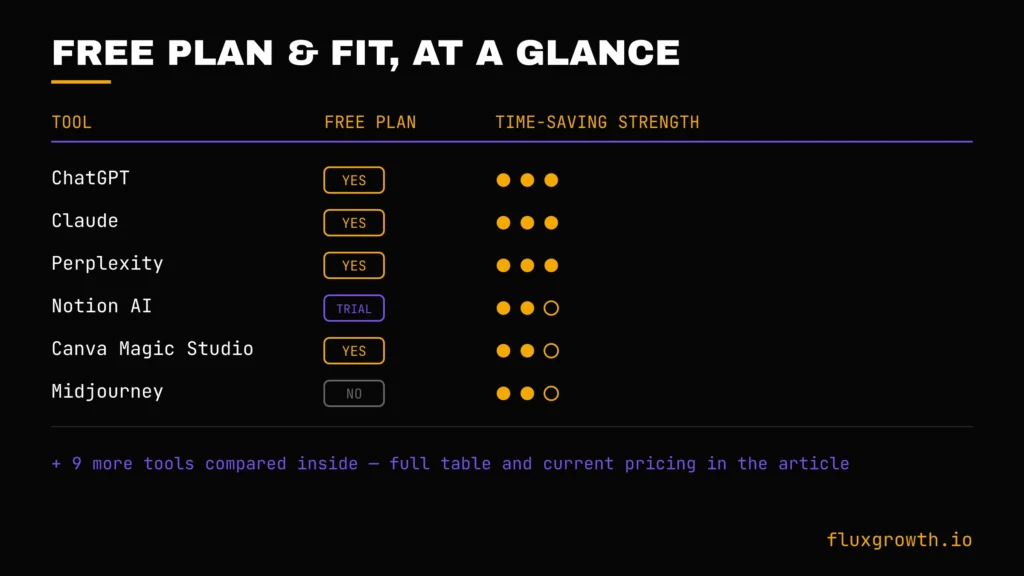
| Tool | Free Plan | Starting Price | Best For | Time-Saving Strength |
| ChatGPT | Yes (Free tier) | $20/mo (Plus) | All-around writing, research & coding | High |
| Claude | Yes | $20/mo (Pro) | Long documents & careful writing | High |
| Gemini | Yes | $7.99/mo (Google AI Plus) | Google Workspace users | Medium |
| Perplexity | Yes | $20/mo (Pro) | Research with citations | High |
| Notion AI | Limited AI trial | $20/seat/mo (Business) | Teams already using Notion | Medium |
| Zapier AI | Yes (100 tasks/month) | $19.99/mo | App-to-app automation | High |
| Make | Yes (1,000 credits/month) | ~$10/mo | Complex, branching automations | High |
| Gamma | Yes (one-time AI credits) | ~$10/mo | Fast presentations & documents | Medium |
| Canva Magic Studio | Yes | $15/mo | All-in-one AI design | Medium |
| Grammarly | Yes | $12/mo | Editing & tone improvement | Low–Medium |
| Otter AI | Yes (300 min/month) | $8.33/mo | Solo meeting notes | Medium |
| Fireflies AI | Yes (800 min/seat) | $10/mo | Sales-team meeting notes | Medium |
| Descript | Yes (60 min/month) | $16/mo | Podcast & video editing | High |
| ElevenLabs | Yes (personal use only) | $6/mo | Voiceover & narration | Medium |
| Midjourney | No | $10/mo | AI image generation | Medium |
“Time-Saving Strength” is a qualitative assessment based on how directly each tool replaces repetitive manual work, not a measured average of hours saved. We didn’t find reliable, up-to-date, independently verified “hours saved per week” figures for most of these tools, so we’ve deliberately avoided inventing numbers.
The biggest takeaway isn’t that one tool is universally “best.” It’s that the highest return comes from choosing the tool that eliminates the task you already spend the most time doing every week. If you spend hours writing, start with ChatGPT or Claude. If you’re manually moving data between apps, Zapier or Make will have a bigger impact. If meetings consume your day, Otter AI or Fireflies AI will likely deliver the fastest productivity gains. The right AI tool is the one that removes your biggest weekly bottleneck, not the one with the flashiest demo.
Best AI Tool by Use Case
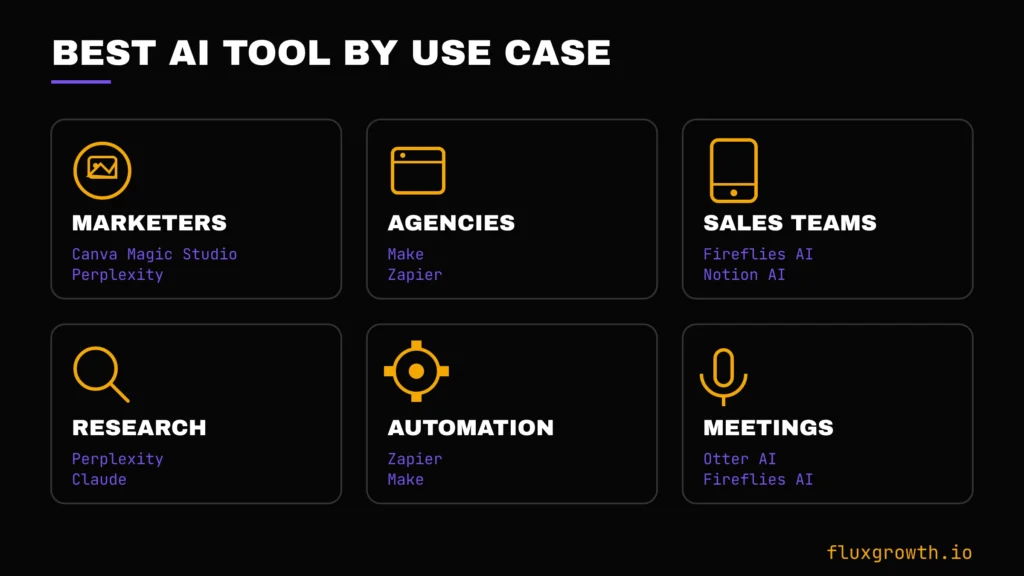
- Students: Claude or ChatGPT Free for research and study help.
- Marketers: Canva Magic Studio for content, Perplexity for trend research.
- Agencies: Make or Zapier to connect client tools without hiring an ops person.
- Entrepreneurs: ChatGPT Plus or Claude Pro as a daily generalist.
- Writers: Grammarly for editing, Claude for long-form drafting.
- Sales teams: Fireflies AI for CRM-synced call notes.
- Customer support: Notion AI if your knowledge base already lives in Notion.
- Meetings: Otter AI for solo professionals, Fireflies for teams tied to a CRM.
- Research: Perplexity, no real competitor here.
- Automation: Zapier if you want breadth of integrations, Make if you want cheaper volume.
How Much Time Can AI Actually Save?
This is where most listicles start inventing numbers. We’re not going to.
Here’s what’s genuinely supportable, category by category:
Writing and content: AI dramatically reduces the time it takes to produce a first draft. Instead of staring at a blank page for an hour, you can usually generate an editable draft in a matter of minutes. Research has found that, when used appropriately, generative AI reduced writing time by 56.7% while also improving average writing quality in a controlled academic study.
Research: Tools like Perplexity can collapse what would normally be a multi-tab research session into a single response with cited sources. The exact time savings depend on the complexity of the topic and the amount of fact-checking required, but these tools significantly reduce the time spent locating, comparing, and organizing information from multiple sources. They accelerate research and they don’t eliminate the need to verify important claims.
Meetings: The clearest win on this list. A meeting bot means you attend the call instead of splitting attention between listening and typing. The time saved is closer to “focus recovered” than “hours removed.”
Automation: Genuinely measurable if you track it yourself count the manual steps a Zap or scenario replaces and multiply by how often it runs. This is the one category where you can build your own real number instead of trusting ours.
Design and video: Gamma and Canva cut first-draft design time from hours to minutes for standard formats, though custom, brand-heavy work still needs a human pass.
The honest summary: AI tools save the most time on tasks that were mostly mechanical to begin with formatting, transcribing, and first drafts. On judgment calls, which is most of what actually matters in your work, they save a lot less than the ads promise.
Free vs. Paid AI Tools
Free limitations: Most free tiers cap you on volume (messages, minutes, credits) rather than features, which means free is fine for testing but breaks down under daily use. A few ElevenLabs and Midjourney among them restrict commercial use entirely for free or don’t offer a free plan at all.
AI credits: Several tools (Make, Gamma, ElevenLabs, Canva) meter usage through credits rather than a flat monthly allowance. Read the credit math before you commit to annual billing “unlimited” is rarer than the marketing implies.
Speed: Paid tiers usually mean priority processing, not just more usage. On tools like Midjourney, this is the actual product you’re buying.
Advanced models: The gap between free and paid model access has widened in 2026 several tools now gate their newest, most capable model entirely behind a paid tier.
Commercial use: Check this specifically before you use free-tier output in anything client-facing or monetized. It’s the most commonly missed limitation on this whole list.
Collaboration: Team features shared workspaces, admin controls, centralized billing are almost always a separate, higher tier from the individual paid plan.
Pricing Comparison (2026)
| Tool | Free | Monthly (Individual) | Team / Enterprise |
| ChatGPT | Yes | $20 (Plus) | Business: $25/user/month (annual); Enterprise: Custom |
| Claude | Yes | $20 (Pro) | Team: $25/user/month (annual); Enterprise: Custom |
| Gemini | Yes | $19.99 (Google AI Pro) | Google AI Ultra: $249.99/month; Gemini Enterprise: Custom |
| Perplexity | Yes | $20 (Pro) | Enterprise Pro: $40/user/month |
| Notion AI | Limited AI on Free | $10/user/month (Plus) | Business: $20/user/month; Enterprise: Custom |
| Zapier | Yes | $19.99 (Professional) | Team: $69/month; Enterprise: Custom |
| Make | Yes | $10.59 (Core) | Teams: from $34/month; Enterprise: Custom |
| Gamma | Yes | $10 (Plus) | Team: $20/user/month; Enterprise: Custom |
| Canva Magic Studio | Yes | $15/month (Pro) | Canva Teams: from $10/user/month (minimum seats); Enterprise: Custom |
| Grammarly | Yes | $12/month (Pro, annual) | Enterprise: Custom |
| Otter AI | Yes | $8.33/month (Pro, annual) | Business: $20/user/month (annual); Enterprise: Custom |
| Fireflies AI | Yes | $10/user/month (Pro, annual) | Business: $19/user/month (annual); Enterprise: Custom |
| Descript | Yes | $16/month (Hobbyist) | Business: $50/user/month; Enterprise: Custom |
| ElevenLabs | Yes | $6/month (Starter) | Business: Custom; Enterprise: Custom |
| Midjourney | No | $10/month (Basic) | Pro: $60/month; Mega: $120/month (no enterprise pricing) |
How to Choose the Right AI Tool
Budget: Start with what you’d actually pay if it disappeared tomorrow. If the honest answer is “nothing,” start on the free tier and upgrade only when you hit a real limit.
Workflow: Pick tools that slot into what you already do, not ones that require rebuilding your process around them.
Integrations: Check whether the tool connects to what you already use before you buy a brilliant tool that can’t talk to your CRM is a second inbox, not a time-saver.
Ease of use: If it takes longer to learn than the task it replaces, it’s not saving you time yet. It might be later. Budget for that learning curve honestly.
Privacy: Read what happens to your data on the free tier specifically. Several tools use free-tier content for model training by default; paid tiers often opt you out.
AI quality: Test the actual output on your real work before committing to an annual plan. Demos are always better than your Tuesday-afternoon use case.
Common Mistakes People Make with AI Tools
Using too many AI tools. Five subscriptions doing overlapping jobs costs more than one tool used properly. Worse, it fragments where your actual work lives: half your context in Notion, half in a Zapier scenario nobody remembers building.
Not verifying AI output. Every tool on this list produces mistakes dressed up in confident phrasing. Check anything that touches facts, numbers, or claims before it goes out under your name.
Ignoring privacy settings (the default is rarely the private option go check, it takes two minutes per tool).
Poor prompts. Vague in, vague out. The five extra minutes spent writing a specific prompt usually saves you a rewrite later.
Not measuring ROI. If you can’t say what a subscription actually saved you last month, you don’t actually know if it’s worth renewing. Track it. Even roughly.
The Future of AI Productivity
The direction is toward less typing, more delegating. Agents that finish a multi-step task without you babysitting every step. Voice assistants that handle scheduling instead of just transcribing it. Tools that start acting like a coworker instead of a chat window you type questions into.
Here’s the thing: how fast that actually shows up in a small agency’s day-to-day, versus how fast it gets announced on stage at a keynote, are two very different timelines. Watch the gap. Don’t assume it’s already closed.
What I’d Choose Depending on My Budget
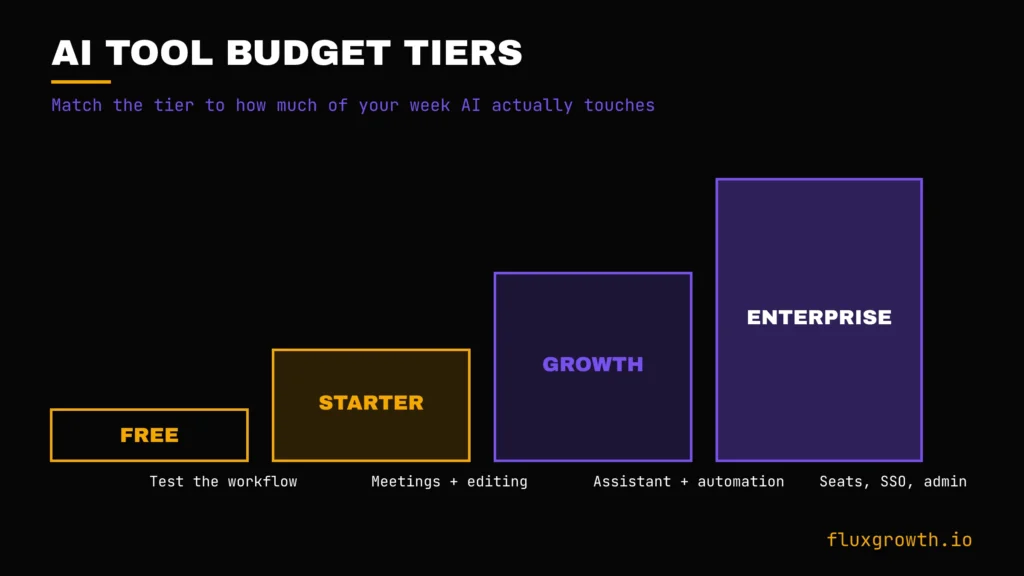
Free: ChatGPT or Claude for daily generalist work, plus Canva free for basic design. Genuinely workable for testing your workflow before you spend anything.
Under $20/month: One meeting-notes tool (Otter or Fireflies) plus Grammarly. This tier is where most solo professionals get the best return.
$20–$50/month: Add a paid general assistant (Claude Pro or ChatGPT Plus) and one automation tool at its entry tier.
Enterprise: Once you’re paying per seat across a team, the conversation shifts from “which tool” to “which admin controls, SSO, and data-retention terms you actually need.” That’s a procurement conversation, not a listicle recommendation.
My AI Productivity Workflow
Over the past year, I’ve found that AI delivers the biggest productivity gains when each tool has a specific job. Rather than relying on one platform for everything, I use a small stack of AI tools that work together throughout the day.
1. Morning Planning
I start each morning by reviewing my task list and prioritizing work based on deadlines and business impact. Instead of jumping straight into writing, I outline the day’s content, research tasks, and client work first. Spending a few minutes organizing priorities prevents context switching later in the day.
2. Research
For research-heavy articles, I begin with Perplexity to quickly gather current information, official documentation, and source links. If I’m reviewing software, I also check the vendor’s pricing page, changelog, and documentation before writing anything. This helps reduce outdated information and minimizes fact-checking later.
3. Writing & Drafting
Most first drafts are created with Claude, especially for long-form content such as software comparisons, buying guides, and SEO articles. Claude helps organize complex information into a logical structure, but I never publish AI-generated text directly. Every article goes through a complete human editing pass where I rewrite sections, verify claims, add examples, improve readability, and optimize for search intent.
4. Automation
For repetitive tasks, automation saves the most time. Simple workflows such as moving information between apps, sending notifications, or organizing content can be handled with platforms like Zapier or Make. Rather than copying information manually between tools, automation keeps routine tasks running in the background while I focus on writing and research.
5. Meetings & Notes
When meetings need to be documented, tools like Otter AI or Fireflies AI can automatically generate searchable transcripts, meeting summaries, and action items. Instead of spending time taking notes during calls, I can stay focused on the conversation and review the AI-generated summary afterward.
6. Content Creation
For presentations, I use AI presentation tools to generate an initial structure before customizing the slides manually. For images and design assets, I use AI design tools to create first drafts, then refine them before publishing. This approach dramatically reduces production time while maintaining quality.
7. Reporting & Review
Before publishing any content, I run one final quality review. I verify statistics against official sources, check internal and external links, review SEO elements, proofread the article, and make sure every recommendation reflects current pricing and product capabilities. AI speeds up the workflow, but human review remains the most important step.
The Biggest Lesson
The biggest productivity boost doesn’t come from using more AI tools, it comes from using fewer tools more effectively. A focused workflow with dedicated tools for research, writing, automation, and review consistently saves more time than constantly switching between dozens of AI applications.
Frequently Asked Questions
What AI tool saves the most time in 2026?
There’s no single answer, it depends on which task is eating your week. For meetings, Otter or Fireflies. For research, Perplexity. For general writing and thinking, ChatGPT or Claude.
Which AI tools are free to use?
All 15 tools on this list offer a free tier except Midjourney, which has required a paid subscription since 2023. Free tiers vary widely in usable volume, so check the limits before assuming “free” means “unlimited.”
Can AI actually replace manual work?
For mechanical tasks transcription, formatting, first drafts largely yes. For judgment calls, client relationships, and anything requiring real accountability, AI supports the work; it doesn’t replace the person doing it.
What’s the best AI tool for a small business?
Start with a general assistant (ChatGPT or Claude) and one automation tool (Zapier or Make) before adding anything more specialized. Most small businesses are better served by using two tools well than five tools badly.
What AI tool should beginners start with?
ChatGPT’s free tier is the lowest-friction starting point with no learning curve, broad enough to be useful immediately, and free.
Can AI automate my entire workflow?
Not entirely, and treating it as a set-and-forget system is how errors slip through unnoticed. Automation tools handle the repetitive middle of a workflow well; the judgment calls at the start and end still need a person.
How much time does AI realistically save per week?
It depends entirely on which tasks you automate and how consistently you use the tool. There’s no reliable, dated industry-wide average. We’re comfortable citing here any listicle that gives you one specific number without a source.
Conclusion
The single most useful thing you can do after reading this isn’t to sign up for all 15 tools. It’s to pick the one task you resent doing every single week and match it to the tool built specifically for that job. Start there, use it for a month, and only add a second tool once the first one has actually earned its subscription cost.
Best overall: Claude or ChatGPT, for sheer range. Best value: Perplexity Pro, if research is your bottleneck. Best free option: ChatGPT free tier, no contest.
What’s the one task eating the most hours in your week right now? Start there.