FluxGrowth is reader-supported. Some links in our guides are affiliate links — if you buy through one we may earn a commission, at no extra cost to you. It never changes which tools we recommend. How we test tools.
Every AI presentation maker promises the same thing: describe your idea, get a finished deck. Most of them deliver in the first half. It’s the second half the finished part where things fall apart.
This guide is part of our AI Marketing hub – everything we have published on AI marketing tools and content workflows, in one place.
Export a Gamma deck to PowerPoint and watch your charts turn into flattened images you can’t edit. Do the same with Canva’s Magic Design and you’ll spend twenty minutes re-aligning text boxes that look perfect in the browser. The AI presentation maker category has gotten very good at generation and stayed stubbornly bad at the last mile: getting a deck out of the tool and into an actual meeting, unbroken.
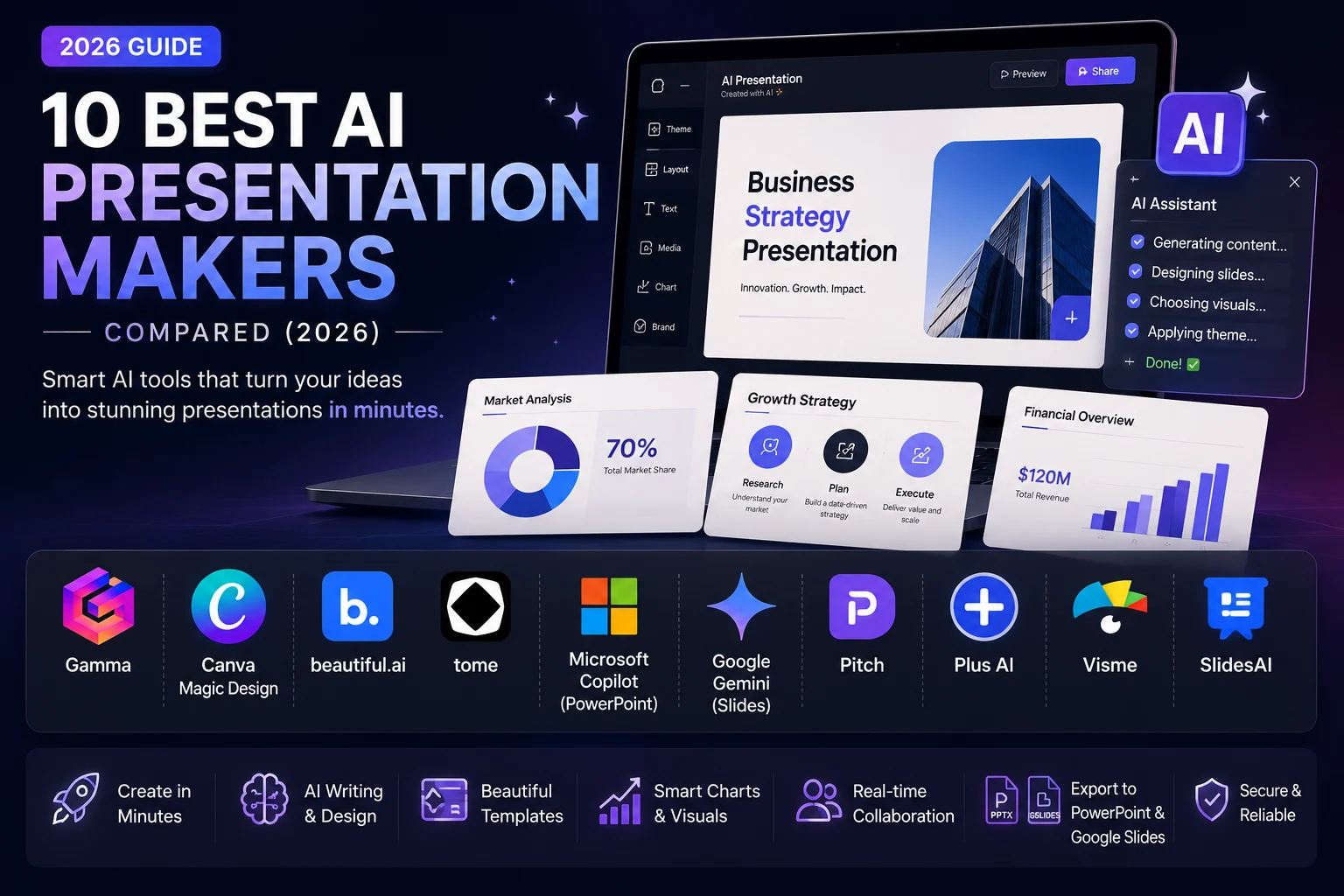
That gap is what this guide is built around. I tested the ten tools people actually compare in 2026 Gamma, Canva, Beautiful.ai, Tome (or what’s left of it), Microsoft Copilot for PowerPoint, Google’s Gemini in Slides, Pitch, Plus AI, Visme, and SlidesAI against the same criteria: how good the AI writing and design actually are, whether PowerPoint and Google Slides exports survive contact with reality, and what each one costs once you’re past the free credits.
Each tool is evaluated using the same framework:
- AI writing quality
- Presentation design and visual consistency
- Template quality
- Ease of editing
- PowerPoint compatibility
- Google Slides compatibility
- Export quality
- Collaboration features
- Free plan limitations
- Pricing and overall value for money
If you’re a solopreneur pitching a client tomorrow, a marketer who needs five decks a week, or a student who just wants a passing grade without learning slide design there’s a different right answer for each of you. Here’s what actually works.
What Is an AI Presentation Maker?
An AI presentation maker is software that generates slide content, layout, and design from a prompt, an outline, or an existing document instead of you building each slide by hand. Type “10-slide pitch deck for a DTC skincare brand raising a seed round” and the tool writes the copy, picks a layout, sources or generates images, and hands you something presentable in under a minute.
That’s the pitch. The reality splits into two genuinely different products, and mixing them up is why so many “best of” lists read the same.
Template-fillers Canva Magic Design, Microsoft Copilot for PowerPoint, Plus AI, SlidesAI take your content and drop it into a fixed slide format you already recognize: 16:9 rectangles, one idea per slide, PowerPoint-compatible by design because they’re often built inside PowerPoint or Google Slides.
Fluid-canvas tools Gamma, Pitch, and what Tome used to be don’t think in slides at all. Gamma calls its output “cards” that expand to fit their content, which is why a Gamma deck can double as a webpage. That flexibility is also exactly why exporting it back into a rigid PPTX format breaks things.
Neither approach is “better.” A template-filler will never surprise you with a weird layout choice, but it will also never generate something as visually interesting as what a fluid-canvas tool can produce on a good prompt. Know which category you’re shopping in before you compare prices.
AI Presentation Makers vs. PowerPoint
PowerPoint still wins on precise control. Pixel-level positioning, complex animations, a fifteen-year library of templates nothing else quite matches.
AI tools win on speed. A rough draft in a minute instead of an hour (assuming you’re not still typing your first bullet point while the tool next to you already has slide six done).
Here’s the thing: most people don’t actually pick one anymore. They use an AI tool to get the first 80% done fast, then finish the last 20% in PowerPoint or Keynote, where the real control lives.
Benefits of AI-Powered Presentations
- Cuts first-draft time from hours to minutes for standard business presentations.
- Removes the blank-page problem you start by editing and refining instead of creating every slide from scratch.
- Built-in design assistance helps non-designers avoid common presentation mistakes like overcrowded slides, inconsistent fonts, and clashing colors.
- AI can quickly turn documents, outlines, or prompts into polished presentations, helping you focus more on your message than slide formatting.
AI-generated charts, statistics, and data visualizations should always be verified before presenting. Many AI presentation tools can summarize and visualize information effectively, but the accuracy of charts depends on the quality of the data you provide. If an AI generates figures or statistics from prompts rather than real datasets, review every number before sharing the presentation with clients, stakeholders, or your audience.
How AI Presentation Makers Work
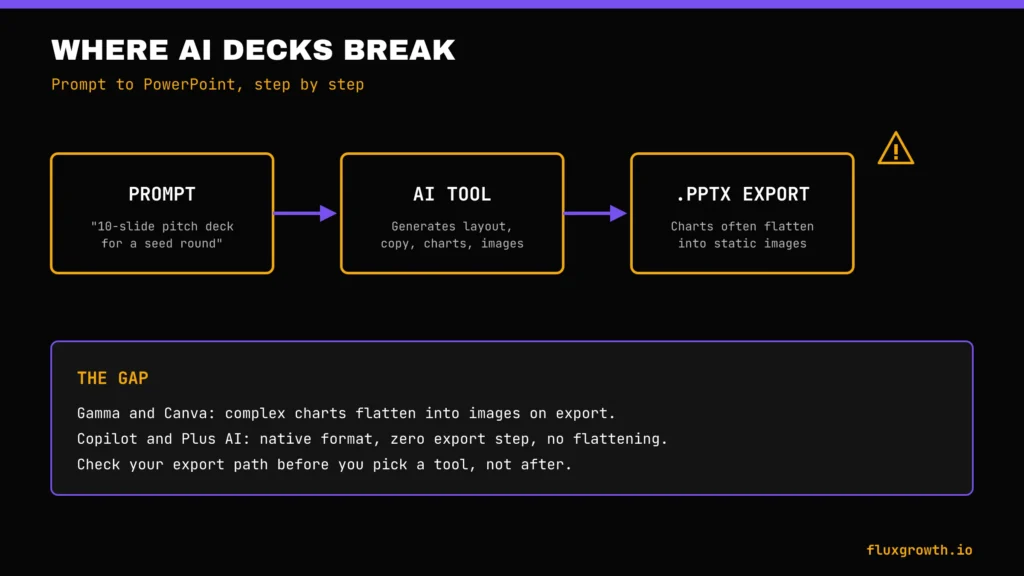
Peel back the marketing and most of these tools run the exact same pipeline. The polish changes. The steps don’t.
If you’re building presentations as part of a broader marketing workflow, it’s worth combining an AI presentation maker with specialized AI marketing software for research, SEO, content creation, and campaign management. Our guide to the Best AI Marketing Tools 2026 covers the platforms marketers use alongside presentation tools to speed up content production, social media, email marketing, and analytics.
Prompt or document input. You either type a topic and a few bullet points, or upload something the AI can restructure a PDF, a Word doc, a rough outline, sometimes a URL.
Outline generation. The AI drafts a slide-by-slide structure first. This is the step where you can usually intervene before it commits to full content, and it’s worth doing. Approving the outline before the AI writes full copy saves a full regeneration cycle later.
Automatic slide creation and layout. Content gets distributed across slides using the tool’s design system. This is where template-fillers and fluid-canvas tools diverge hardest: a template-filler picks from a fixed layout library; a fluid-canvas tool composes each card’s proportions based on how much content landed on it.
AI design recommendations. Font pairing, color application from a brand kit (if you’ve set one up), spacing, and icon placement mostly automated, mostly serviceable, rarely final.
AI image generation. Either genuinely generated (Gamma, Beautiful.ai) or pulled from a stock library dressed up as “AI-selected” (this distinction matters more than most reviews admit a stock photo isn’t wrong, but it’s not the flex some marketing pages imply).
AI presenter notes. Increasingly standard the tool drafts speaker notes alongside the slide content, which is genuinely useful for anyone who hates writing notes after the deck is already done.
AI charts and data visualization. The weakest link across the category. Ask any of these tools for a chart and it will happily generate one. The problem is that the underlying numbers are frequently invented unless you feed in real data yourself. Treat every AI-generated chart as a template to fill with your own verified numbers, never as a finished asset.
How We Tested the Best AI Presentation Makers
To keep this comparison fair, every AI presentation maker should be evaluated using the same testing process rather than relying on feature lists or marketing claims.
Every tool below got evaluated on the same criteria:
- AI writing quality does the generated copy sound usable or does it need a full rewrite
- Presentation design does the output look finished or obviously templated
- Templates and customization how much control you have after generation
- Ease of use and collaboration real-time editing, comments, shared workspaces
- Export options PowerPoint compatibility, Google Slides compatibility, and whether charts survive the export
- AI image generation and AI charts genuinely generated vs. stock-dressed-as-AI
- Pricing and value for money cost against what you actually get, not the sticker price alone
Types of AI Presentation Makers
Not every tool on this list is built for the same job. Before you pick one, place yourself in one of these categories; it narrows the field faster than any feature comparison.
Business presentation builders — general-purpose tools built for internal reports, client updates, and standard corporate decks. Gamma, Canva, and Beautiful.ai all fit here.
Marketing presentation tools — decks meant to be shared externally and look brand-consistent every time. Visme and Canva lead here because of deeper brand-kit controls.
Student presentation makers — free-tier generosity and simplicity matter more than advanced branding. Canva and Gamma’s free plans cover most student needs.
Startup pitch deck generators — Gamma and Pitch both built specific pitch-deck templates and get named most often in founder communities for this use case.
Sales presentation software — this is genuinely Tome’s current category, not general presentations (more on that below), alongside Plus AI for reps who live inside PowerPoint.
Educational presentation tools — Canva and Visme both have education-specific pricing and classroom features worth checking if you teach.
AI presentation tools for agencies — Visme and Beautiful.ai’s brand-kit and multi-client workspace features are built for exactly this.
10 Best AI Presentation Makers in 2026
1. Gamma
Best for: Fast first drafts you’ll share as a link, not a file
Gamma is the tool most people mean when they say “AI presentation maker” in 2026 it’s grown past 70 million users on the strength of one thing: type a prompt, get a genuinely good-looking deck in under a minute. Gamma’s real product isn’t slides, it’s “cards” that expand to fit whatever content lands on them, which is why the same deck can double as a webpage with its own shareable URL.
Key features: AI writing and layout generation, real AI image generation (not just stock), live chart embeds, an API for programmatic generation, and integrations with Figma, Miro, Airtable, and Zapier’s 8,000+ app library.
PowerPoint support: Exports to PPTX, but complex charts and interactive embeds flatten into static images on export the card-based layout doesn’t translate perfectly to rigid slides. Google Slides support: similar caveat.
Free plan: Yes a one-time pool of AI credits at signup that does not refresh monthly. Once they’re gone, you’re referring friends for more credits or upgrading.
Pricing: Free: $0 includes 400 one-time AI credits at signup (credits do not refresh). Create up to 10 cards per prompt and export to PDF, PPTX, PNG, and Google Slides.
Plus: $9/month per seat (billed annually; $108/year). Includes 1,000 monthly AI credits, advanced AI image models, and removes Gamma branding.
Pro: $18/month per seat (billed annually; $216/year). Includes 4,000 monthly AI credits, API access, premium AI image models, analytics, custom branding, and up to 10 custom domains.
Ultra: $90/month per seat (billed annually). Includes 20,000 monthly AI credits, access to the most advanced AI models, and early access to new features.
2. Canva Magic Design
Best for: Anyone who already lives in Canva and wants AI without leaving the asset library
Canva’s Magic Design turns a prompt or an uploaded outline into a full deck using Canva’s existing template and stock-asset library which is the tool’s real advantage. When a slide needs a photo, an icon, or a chart style, Canva already has it, rather than generating it from scratch.
Key features: Magic Design for full-deck generation, Magic Write for on-slide copy, Magic Edit for image tweaks, and the entire Canva asset library layered underneath.
PowerPoint support: Exports to PPTX but, like Gamma, tends to flatten anything with live data or animation into static images.
Free plan: Canva Free includes access to Magic Design, a large template library, basic AI features with a limited AI allowance, and exports for presentations. Premium templates, Brand Kit, advanced AI tools, and higher AI usage limits require Canva Pro.
Pricing: Canva Free is available at no cost. Canva Pro starts at US$15/month or US$144/year for one person (equivalent to US$12/month when billed annually). Canva also offers Canva Teams and Enterprise plans for businesses that need advanced collaboration and administration features
Pros: Massive asset library, near-zero learning curve if you’ve used Canva for anything else, strong free tier.
Cons: AI-generated copy is often the weakest of the tools tested here and needs a heavier editing pass; PowerPoint fidelity issues on export.
3. Beautiful.ai
Best for: Teams that want every slide to look professionally designed without a designer on staff
Beautiful.ai’s whole premise is a “smart template” system: you can’t misalign an element or pick a clashing color because the design engine enforces rules as you edit, AI-generated or not. That constraint is the product: less creative freedom, fewer ugly slides.
Key features: Design-locked templates, DesignerBot AI drafting, team brand-kit enforcement, and slide-level analytics on paid tiers.
PowerPoint support: Native export, generally cleaner than Gamma or Canva because the design system is simpler and less dependent on live embeds.
Free plan: No meaningful free tier Beautiful.ai is one of the few tools here with no generous free option, just a trial.
Pricing: Beautiful.ai offers a 14-day free trial. The Pro plan starts at $12/month (billed annually) or $45/month (monthly billing) for individual users. Team plans cost $40/user/month (annual) or $50/user/month (monthly) and include collaboration, shared libraries, analytics, and advanced brand management. Enterprise pricing is available on request.
Pro (Individual): $12/month when billed annually, or $45/month when billed monthly. Includes unlimited AI content generation, Smart Slides, AI image generation, PowerPoint import/export, and custom branding.
Team: $40/user/month when billed annually, or $50/user/month when billed monthly (2–20 seats). Adds collaboration, shared asset libraries, analytics, version control, and team workspaces.
Enterprise: Custom pricing.
4. Tome What It Used to Be, and Why It’s Not a Like-for-Like Pick Anymore
Best for: Nobody, currently, as a general presentation tool here’s why it’s still worth understanding
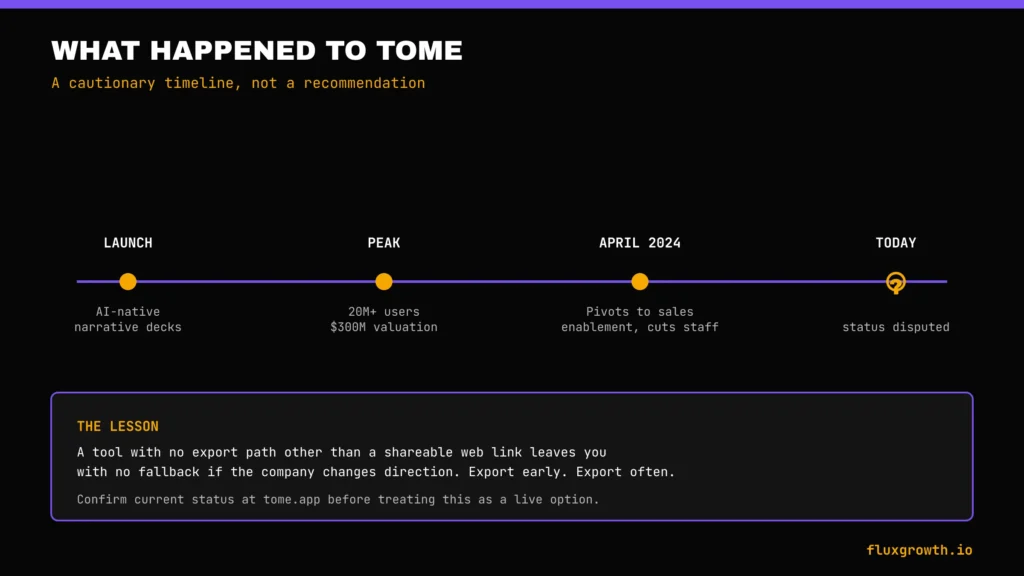
Tome is still active, but it has pivoted away from being a general AI presentation tool toward AI-powered sales enablement and account intelligence.
The old presentation editor still exists, but it is no longer positioned as a direct competitor to Gamma, Canva, or Beautiful.ai.
Tome still does not support PowerPoint (.PPTX) export through its legacy product. It primarily supports web sharing and PDF export
Following its 2024 pivot, Tome shifted its focus from being a general AI presentation maker to an AI-powered sales workspace designed for account research, sales narratives, and customer-facing presentations. The product remains active, but its primary audience is now sales teams rather than users looking for a traditional PowerPoint replacement. Unlike competitors such as Gamma or Canva, Tome emphasizes web-based presentations and collaborative storytelling over slide-first workflows.
The lesson for anyone shopping in this category: a beloved free-feeling AI tool with no clear path to revenue is a real risk, not a hypothetical one. If you build decks in a tool with no export option other than a shareable web link, you have no fallback if the company changes direction or shuts the product down. Export early, export often, and don’t build your only copy of a client deck inside a tool you can’t get data out of.
If you were looking for what Tome used to be: Gamma is the closest replacement for the “type a prompt, get a striking web-native deck” experience Tome pioneered.
5. Microsoft Copilot for PowerPoint
Best for: Teams already paying for Microsoft 365 who want AI inside the tool they already use
Copilot for PowerPoint isn’t a standalone app. It’s an AI layer bolted onto PowerPoint itself which is exactly why half the “best of” roundups get it wrong, comparing it to Gamma or Canva like it’s competing on the same terms. It isn’t. You need an existing Microsoft 365 subscription plus the Copilot add-on just to open the door. No free tier, no trial deck, nothing.
Key features: Generates a first draft from a prompt or an existing Word document, rewrites and restructures existing decks, drafts speaker notes, and works inside the same file format your team already uses for review and approval.
PowerPoint support: Native, obviously this is the one tool on this list with zero export-fidelity problems because there’s no export step. Google Slides support: none; Copilot is Microsoft-ecosystem only.
Free plan: None. Requires Microsoft 365 (Business or Enterprise tiers) plus the Copilot add-on.
Pricing: Microsoft 365 Copilot is not sold as a standalone product. It requires an eligible Microsoft 365 Business or Enterprisere subscription plus a Microsoft 365 Copilot license, which is typically US$30 per user/month for enterprise customers (annual commitment). Small business customers can purchase Microsoft 365 Copilot Business starting at US$21 per user/month with eligible Microsoft 365 Business plans. Pricing varies by plan, region, and promotional offers.
Pros: Zero export friction, works inside existing IT-approved infrastructure, no new tool for a team to learn.
Cons: Less creative than dedicated AI presentation makers such as Gamma, Beautiful.ai, and Canva Magic Design. Copilot excels at improving existing PowerPoint presentations and generating business-ready content, but its slide layouts and visual creativity are generally more conservative than purpose-built AI presentation platforms.
6. Google Slides AI (Gemini)
Best for: Teams standardized on Google Workspace who want the same in-tool convenience Copilot offers Microsoft users
Gemini’s integration inside Google Slides mirrors the Copilot logic, an AI layer inside your existing tool rather than a separate product to learn. It generates a first draft from a prompt, helps rewrite existing slide copy, and works natively in the file format your collaborators already use.
Key features: Prompt-to-outline generation, in-line rewriting assistance, and native integration with Google Drive, Docs, and Sheets for pulling in existing content.
PowerPoint support: Exports through Google Slides’ standard PPTX export, with the usual minor formatting shifts any Slides-to-PowerPoint export carries are not Gemini-specific. Google Slides support: native, obviously.
Free plan: Google Slides is free with a Google account. Basic Gemini features are available to many users, but advanced AI capabilities, higher usage limits, and premium Workspace integrations require Google AI Pro, Google AI Ultra, or eligible Google Workspace plans.
Pricing: Google AI Pro: US$19.99/month Google AI Ultra: US$249.99/month (introductory offers may apply)Google Workspace Business plans start at US$7/user/month, with Gemini features included or available depending on the Workspace edition and licensing. Enterprise pricing varies by plan. (Google, 2026)
Pros: Seamless experience for teams already using Google Workspace.Excellent collaboration with real-time editing and commenting.Native integration with Google Docs, Sheets, Drive, and Meet.No need to learn a separate presentation platform.
Cons:Gemini focuses on productivity rather than advanced presentation design. While it generates outlines, speaker notes, and slide content efficiently, dedicated AI presentation makers such as Gamma, Beautiful.ai, and Canva Magic Design generally offer more polished layouts, stronger visual storytelling, and greater creative flexibility.
7. Pitch
Best for: Startup teams that want pitch-deck-specific templates and strong real-time collaboration
Pitch was a collaboration tool before AI generation was even a category. That history shows. Real-time multi-editor sessions, comments that don’t disappear into a sidebar nobody checks, version history that actually works all of it feels more mature than what you get from Gamma or Canva, tools that built AI first and bolted collaboration on after.
Key features: AI outline and slide generation, a template library weighted toward pitch decks and startup use cases, and strong live-collaboration tooling.
PowerPoint support: Exports to PPTX with the same general caveat as Gamma and Canva heavier layouts need a manual check after export.
Free plan: Yes. Pitch offers a permanent Free plan for up to 5 workspace members. It includes unlimited presentations, sharing links, custom templates, and 100 one-time AI credits (these do not renew).
Pricing: Plus: $13/month (annual billing) or $15/month (monthly) for one user.Team: $19/user/month (annual) or $23/user/month (monthly).Business: $25/user/month (annual) or $30/user/month (monthly).Enterprise: Custom pricing
Pros: Genuinely strong collaboration tooling, good template fit for founders and small teams.
Cons:AI generation is strong for business presentations but generally less creative than dedicated AI-first tools like Gamma or Beautiful.ai. The AI credit system also requires monitoring if your team generates presentations frequently, since additional credits are billed separately after your included allowance is used.
8. Plus AI
Best for: Anyone who wants AI generation without leaving native PowerPoint or Google Slides
Plus AI takes a different approach from every other tool on this list. Instead of building its own editor, it’s an add-on that generates slides directly inside PowerPoint or Google Slides. The trade-off is visual sophistication for zero export friction: what you generate is already a native file.
Key features: Prompt-to-slide generation inside your existing tool, brand-kit application, and slide-rewrite assistance without a separate app to open.
PowerPoint support: Native this is the entire premise. Google Slides support: native, same reason.
Free plan: No permanent free plan. Plus AI offers a 7-day free trial for both Google Slides and Microsoft PowerPoint with limited AI credits
Pricing: Basic: $10/user/month (billed annually) or $15/user/month (monthly). Includes 1,500 AI credits per month.
Pro: $20/user/month (annual) or $25/user/month (monthly). Includes 3,000 AI credits, document uploads, AI image generation, and advanced prompts.
Team: $30/user/month (annual) or $40/user/month (monthly). Adds custom branding, collaboration, and enterprise management features.
Enterprise: Custom pricing.
Pros: Zero export-fidelity problems by design, minimal learning curve if your team already knows PowerPoint or Slides.
Cons: Design output prioritizes compatibility over creativity. While Plus AI produces clean, presentation-ready slides directly inside PowerPoint or Google Slides, dedicated AI presentation makers such as Gamma and Beautiful.ai generally offer more polished layouts, richer visual storytelling, and stronger design automation.
9. Visme AI
Best for: Agencies and marketers who need heavier data visualization and multi-client brand management
Visme leans into data-heavy content harder than most tools on this list: infographic-style charts, data widgets, and brand-kit management built for agencies juggling multiple client identities at once.
Key features: AI deck generation, strong native charting and data-visualization tools, multi-brand-kit support, and a broader content library that extends into infographics and documents, not just slides.
PowerPoint support: Exports to PPTX; charts generally hold up better here than on Gamma or Canva because Visme’s chart engine was built for data-heavy content first.
Free plan: Yes. Visme offers a permanent Basic (Free) plan with unlimited projects, limited templates and assets, 10 AI credits per month, and 500 MB of storage. Export formats and premium assets are limited.
Pricing: Starter: US$12.25/month per user (billed annually; US$147/year)
Pro: US$24.75/month per user (billed annually; US$297/year)
Enterprise: Custom pricing for organizations with advanced security, governance, and onboarding needs
Pros: Best-in-category charting and data visualization, strong fit for agencies managing several client brand kits.
Cons: Visme’s AI presentation generator is capable, but the platform’s biggest strength remains its design editor, data visualization tools, and branding features rather than fully automated presentation generation. Users looking for highly creative, prompt-first presentations may find Gamma or Beautiful.ai faster for initial drafts, while Visme excels when refining data-rich business presentations.
10. SlidesAI
Best for: Budget-conscious users who want a simple Google Slides add-on, not a new platform
SlidesAI is a lightweight add-on rather than a standalone app; it turns text or an outline into slides directly inside Google Slides, aiming for simplicity over design sophistication.
Key features: Text-to-slide generation inside Google Slides, basic template styling, and multi-language support for generated copy.
PowerPoint support: Indirect export happens through Google Slides’ standard PPTX export, same caveats as any Slides-to-PowerPoint conversion.
Free plan: Yes. The Basic plan includes 12 presentations and 120 AI credits per year. The allowance resets annually, not monthly.
Pricing: Basic: Free
Pro: US$10/month (billed annually at US$120/year) 120 presentations/year, 600 AI credits/year, document upload support.
Premium: US$20.83/month (billed annually at US$250/year) Unlimited presentations, 1,200 AI credits/year, larger document support.
Team and Institution plans are also available with custom pricing
Pros: Genuinely low cost, renewing free-tier credits, minimal learning curve for anyone who already uses Google Slides.
Cons:SlidesAI focuses on converting text into structured presentations rather than producing highly polished visual designs. Users looking for advanced layouts, animations, and AI-powered design suggestions may find Gamma, Beautiful.ai, or Canva Magic Design better suited for presentation aesthetics, while SlidesAI excels as a fast content-to-slides tool.
AI Presentation Maker Comparison Table
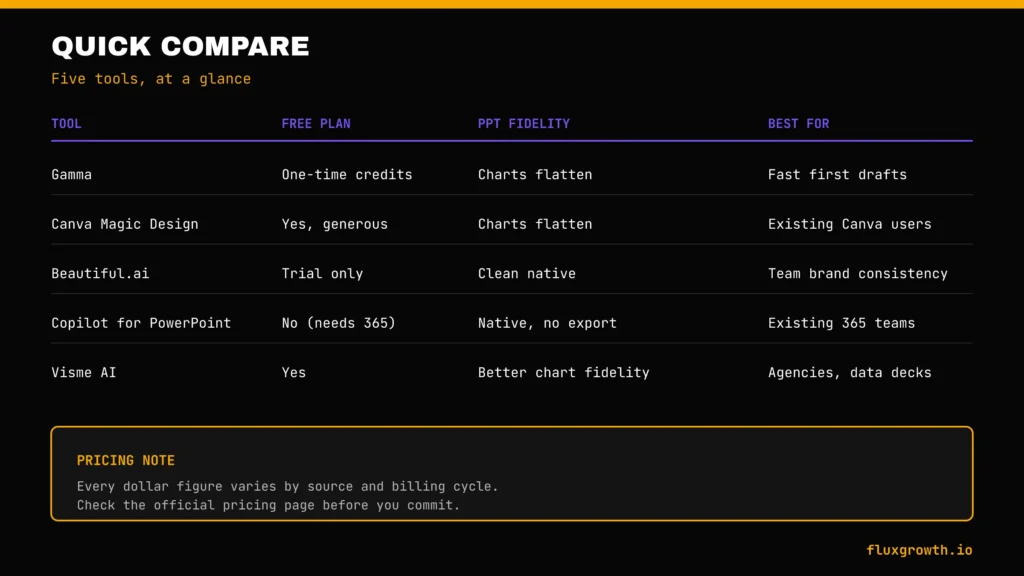
| Tool | Free Plan | Starting Price | PowerPoint Fidelity | Google Slides | AI Writing | AI Design | Best For |
| Gamma | Yes (one-time credits) | $9/mo (annual) | Flattens complex charts | Export only | Strong | Strong | Fast first drafts |
| Canva Magic Design | Yes | $15/mo ($144/year) | Flattens complex charts | Export only | Moderate | Strong (asset library) | Existing Canva users |
| Beautiful.ai | Trial only | $12/mo (annual) | Clean native export | Limited | Moderate | Strong (design-locked) | Team brand consistency |
| Tome | No meaningful free plan (sales-focused) | Contact sales / business pricing | Web-doc only, no PPTX | N/A | N/A (legacy) | N/A (legacy) | Legacy / caution entry |
| Copilot for PowerPoint | No (needs 365) | $30/user/mo (Microsoft 365 Copilot license) | Native, no export step | None | Weakest tested | Weakest tested | Existing 365 teams |
| Gemini in Slides | Yes (Google account) | Google AI Pro $19.99/mo | Standard Slides export | Native | Weakest tested | Weakest tested | Existing Workspace teams |
| Pitch | Yes (one-time credits) | $13/user/mo (annual) | Manual check needed | Export only | Moderate | Moderate | Startup collaboration |
| Plus AI | Trial only | $10/user/mo (annual) | Native, no export step | Native | Moderate | Basic | PowerPoint/Slides loyalists |
| Visme AI | Yes | $12.25/user/mo (annual) | Better chart fidelity | Export only | Moderate | Moderate | Agencies, data-heavy decks |
| SlidesAI | Yes (renewing credits) | $10/mo (annual) | Standard Slides export | Native | Basic | Basic | Budget, simple use |
Best AI Presentation Maker by Use Case
Best for beginners: Canva the asset library and near-zero learning curve remove the intimidation factor entirely.
Best for students: Canva or Gamma both have free tiers generous enough to cover a semester’s worth of class presentations.
Best for teachers: Canva education pricing and a template library already built around lesson and lecture formats.
Best for business: Gamma the fastest path from idea to a presentable draft for internal reports and client updates.
Best for marketers: Visme brand-kit management and charting depth matter more here than raw generation speed.
Best for startups: Pitch or Gamma Pitch for collaboration-heavy fundraising processes, Gamma for solo founders who need a fast first draft.
Best for agencies: Visme multi-brand-kit support solves the actual agency problem of juggling several client identities.
Best for enterprise: Whatever your team already pays for Copilot for Microsoft shops, Gemini for Google Workspace shops. The IT-approval and security-review cost of adding a new standalone tool usually outweighs the design-quality gap for large organizations.
Free vs Paid AI Presentation Makers
The free-tier gotcha nobody puts on the pricing page clearly enough: on Gamma and Pitch, free-plan AI credits are a one-time pool, not a monthly allowance. Once you’ve spent them generating your first few decks, your only options are referring friends for more credits or upgrading; there’s no waiting until next month for a refill. SlidesAI is the exception among the tools tested here, with credits that actually renew monthly on the free tier.
So spend those one-time credits on a real project, not a throwaway test you likely won’t get a second batch.
What free plans typically restrict:
- Watermarks or branding on exported decks (Gamma, Pitch, Canva at the free tier)
- A capped number of AI generations, either one-time or monthly depending on the tool
- Limited or no premium templates
- Export quality caps some tools reserve full-resolution export for paid tiers
- No custom brand kit, meaning your company colors and fonts don’t carry over automatically
- Commercial licensing: Commercial usage rights differ by provider. Some platforms allow commercial use even on free plans, while others reserve certain AI-generated assets, premium stock content, or advanced AI features for paid subscribers. Always review each tool’s current licensing terms before using AI-generated presentations or images for client work or commercial projects.
Feature and Design Quality Comparison
Gamma and Canva led on generation speed and image quality. Visme led on charts and data visualization, not close, honestly. Copilot and Gemini trailed everyone else on every creative dimension tested. That’s not a knock on Microsoft or Google. Convenience was always the pitch, not design.
Beautiful.ai’s design-locked system produced the most consistently polished output with the least editing, on professional appearance and theme consistency specifically. The trade-off is less creative range; you can’t break the rules even when you want to.
Visme and Canva both outperform the rest on branding and brand-kit depth. Useful specifically if you’re an agency juggling several client identities inside one account.
PowerPoint vs. AI Presentation Makers
Manual PowerPoint building still wins on precise control, complex animation, and total offline reliability. AI presentation makers win on raw speed. The honest comparison isn’t “which is better” it’s “which stage of the process are you in.”
For a rough first draft or a fast internal update, an AI tool saves real hours. For a client-facing deck with tight brand requirements and complex data, most experienced users still finish the job manually in PowerPoint or Keynote after the AI tool does the first pass.
The productivity gain is real but front-loaded it shows up in drafting time, not in the finishing time, which barely changes.
How to Choose the Best AI Presentation Maker
Work through these in order, not all at once:
- What format do you need out the other end? If it has to be a clean PPTX file with zero manual fixing, that alone rules out Gamma, Canva, and Pitch as your primary tool and points you toward Copilot, Plus AI, or Gemini.
- What’s your budget, actually? Not the sticker price, the real monthly cost once you account for credit consumption if the tool uses a credit system.
- Do you already pay for Microsoft 365 or Google Workspace? If yes, test the built-in AI (Copilot or Gemini) before adding a new tool the convenience of zero export friction often outweighs a design-quality gap.
- How many people need to collaborate live? Pitch and Gamma both handle real-time multi-editor sessions well; this matters less for solo users.
- Do you need heavy data visualization? Visme is the strongest pick here; the others treat charts as an afterthought.
Common Mistakes to Avoid
- Choosing a tool based only on the free-plan sticker price, then discovering the AI credits don’t renew monthly
- Publishing AI-generated charts without checking the underlying numbers the visual is often more polished than the data behind it
- Ignoring your own brand guidelines and shipping a deck that looks like every other AI-generated deck in your industry
- Skipping speaker notes because the tool didn’t generate them automatically always add your own before presenting live
- Writing one giant prompt instead of approving the outline first regenerating a full deck from scratch costs more credits and time than course-correcting at the outline stage
- Cramming too much onto individual slides because the AI filled space it didn’t need to
- Picking a tool with no export path and building your only copy of an important deck inside it see Tome, above
Future of AI Presentation Makers
The biggest shift isn’t better slide templates, it’s automation. Gamma has already taken a major step in that direction with its Generate API, which became generally available in late 2025, allowing developers to create presentations, documents, and webpages programmatically instead of working only through the web interface. That points toward a future where AI agents research a topic, build an outline, generate a presentation, and update it automatically as new information becomes available
Gamma already shipped a piece of this future; its Generate API went live in January 2026, letting developers trigger deck creation programmatically instead of typing into a chat box. Expect more of that direction: agents that research a topic, draft the outline, and iterate on it without you retyping a prompt five times.
Voice narration, AI presenters, and talking-avatar presentations are the next area to watch, but they’re industry trends rather than confirmed roadmaps for any specific vendor in this comparison. Meanwhile, real-time collaboration, AI-assisted editing, and native integrations with Microsoft 365 and Google Workspace have already become standard expectations for modern presentation software
What I’d Choose Depending on My Budget
Under $20/month:
I’d recommend Gamma for most people. It offers the best balance of AI writing, presentation design, and ease of use at an affordable price. If you already work inside Canva every day, Canva Pro is an equally strong alternative.
$20–50/month:
For agencies and growing businesses, Beautiful.ai Team, Pitch Team, or Plus AI provide the best value. Beautiful.ai excels at brand consistency, Pitch is ideal for collaborative startup teams, and Plus AI is the best choice if your workflow revolves around PowerPoint or Google Slides.
$50–100/month:
If budget isn’t the primary concern, I’d look at Microsoft 365 Copilot (for Microsoft-first organizations) or Canva Teams for larger marketing teams. Both integrate well into existing workflows and reduce the time spent creating presentations across multiple team members.
Enterprise:
Large organizations should evaluate Microsoft 365 Copilot, Canva Enterprise, Pitch Enterprise, or Visme Enterprise based on their collaboration, security, compliance, and brand-management requirements rather than AI features alone.
My AI Presentation Workflow
After comparing today’s leading AI presentation makers, here’s the workflow I’d recommend for creating professional presentations efficiently:
- Research the topic using reliable sources and collect the key facts, statistics, and references before opening any AI presentation tool.
- Generate an outline with your preferred AI presentation maker or AI assistant. This provides a solid presentation structure before slides are created.
- Review and refine the outline manually. AI-generated outlines are a good starting point, but removing unnecessary sections and reorganizing the flow almost always produces a stronger presentation.
- Generate the presentation using the approved outline instead of asking AI to create an entire deck from a single prompt. This typically results in more focused and accurate slides.
- Replace placeholder content with verified charts, real data, company branding, and original visuals wherever possible. AI-generated charts and statistics should always be fact-checked before presenting.
- Apply your Brand Kit by updating colors, fonts, logos, and images to match your organization’s visual identity. Even the best AI presentation makers benefit from a manual branding pass.
- Export to PowerPoint or Google Slides if needed, then review every slide for formatting, alignment, animations, and compatibility before sharing or presenting.
My biggest recommendation is simple: let AI handle the first draft, but always keep a human in charge of the final presentation. AI can dramatically reduce the time spent building slides, but accuracy, branding, and storytelling still depend on human review.
Frequently Asked Questions
What is the best AI presentation maker?
There’s no single best tool Gamma wins on generation speed and design, Canva wins on ease of use and asset depth, and Copilot or Gemini win on zero export friction if you’re already in that ecosystem.
Which AI presentation maker is free?
Canva, Gamma, Pitch, Visme, SlidesAI, and Gemini in Slides all offer free tiers, though Gamma and Pitch limit free AI credits to a one-time pool rather than a monthly renewal.
Can AI create PowerPoint presentations?
Yes, though export fidelity varies Copilot and Plus AI generate natively in PowerPoint with no export step, while Gamma, Canva, and Pitch can flatten complex charts and embeds into static images on export.
Which AI presentation maker is best for students?
Canva or Gamma, based on free-tier generosity and how quickly a first-time user can produce something presentable.
Which AI presentation maker works with Google Slides?
Gemini and SlidesAI both work natively inside Google Slides; Gamma, Canva, and Pitch export to Slides with the same fidelity caveats as PowerPoint export.
Can AI generate an entire presentation from a prompt?
Yes, all ten tools tested here can generate a full deck from a single prompt quality and how much editing it needs afterward varies significantly by tool.
Conclusion
Final recommendation: match the tool to the format you actually need out the other end before you look at price or design quality. A beautiful deck that breaks on PowerPoint export is worse than a plainer one that opens cleanly in the room where it matters. Pick the tool that fits how you’ll actually use the output, not the one with the flashiest generation demo; the demo always looks better than your real, unglamorous Tuesday-afternoon deck.