FluxGrowth is reader-supported. Some links in our guides are affiliate links — if you buy through one we may earn a commission, at no extra cost to you. It never changes which tools we recommend. How we test tools.
You’ve got 40 unread emails, a cold outreach sequence due by Friday, and a blinking cursor on a subject line you’ve rewritten four times. An AI email writer fixes that specific problem: it turns “I know what I want to say but not how to say it” into a usable draft in under a minute.
This guide is part of our AI Marketing hub – everything we have published on AI marketing tools and content workflows, in one place.
That’s a narrower promise than the marketing usually makes. These tools don’t know your business, your relationship with the recipient, or what actually happened in the last conversation unless you tell them.
What they’re good at is speed on the first 80% of a draft: structure, tone, a reasonable opening line. The last 20% is the part that actually requires knowing the person you’re writing to? Still yours.
This guide covers 12 AI email writers, what each one actually does well, what it costs as of July 2026, and which one fits your situation. Quick answer if you’re in a hurry: ChatGPT is the best all-around AI email writer for most people, Mailmodo’s free tool is the best zero-cost option, and Lavender is the strongest pick if you’re doing cold sales outreach specifically.
If you’re also creating content for social media, our guide to AI Instagram caption generators covers the best AI tools for writing engaging Instagram captions, hashtags, and post ideas for creators, businesses, and marketers.
Who should use an AI email writer: solopreneurs juggling client comms, sales reps writing 30+ outreach emails a day, marketers who need on-brand copy fast, freelancers replying to inbound leads, and basically anyone who spends more time staring at a blank email than they’d like to admit.
One thing became obvious while researching and comparing these tools: the biggest time sink wasn’t writing entire emails, it was getting started. Whether it was replying to clients, drafting outreach, or following up after meetings, the first draft always took the longest. The best AI email writers didn’t replace human judgment, but they consistently eliminated the blank-page problem and cut the time needed to create a polished draft.
What this guide won’t do: tell you every tool on this list is great. A few of them have gotten more expensive, pivoted away from what made them useful, or quietly dropped features that used to be free. I’m flagging those honestly, because the worst outcome here is you signing up for something based on a review that’s a year out of date.
What Is an AI Email Writer?
An AI email writer is a tool that uses a large language model to generate email drafts, subject lines, full bodies, replies, or follow-ups from a short prompt or a few pieces of context you give it.
How AI Email Writers Work
Most of these tools sit on top of an LLM (GPT-5-class models, Gemini, Claude, or a fine-tuned variant) and add an email-specific layer on top:
- Prompt-based generation — you type what you want (“follow-up after no response, polite but direct”) and the model drafts it, usually in under 10 seconds.
- Context-aware writing — better tools pull in details you’ve already provided: recipient name, company, previous thread, your CRM data. This is the feature that separates a genuinely useful tool from a generic text generator wearing an email skin.
- Tone and template layers — most add tone selectors, subject-line generators, and pre-built templates so you’re not writing prompts from scratch every time, which matters a lot once you’re generating dozens of emails a week.
The difference between a mediocre tool and a good one usually comes down to how well it handles that second layer; a model that can only generate generic text isn’t actually saving you editing time. You still have to read and fix a generic draft; you might as well have written it yourself and skipped the extra step.
There’s also a real difference between tools built on general-purpose models (ChatGPT, Gemini) and tools fine-tuned on nothing but email data (Lavender, SmartWriter). General-purpose tools will write you a birthday message just as happily as a cold email flexible, sometimes to a fault. The fine-tuned ones are narrower. But narrower isn’t worse here: Lavender’s scoring model was trained on real reply-rate outcomes from actual sales emails, not on “does this sound coherent,” which is a different and frankly more useful bar to clear.
Types of Emails AI Can Write
- Business and professional correspondence
- Sales outreach and cold email
- Follow-up emails
- Customer support replies
- Marketing and newsletter emails
- Networking and introduction emails
- Job application and cover emails
- Thank-you and relationship-maintenance emails
Not every tool on this list handles all eight types equally well. General-purpose tools like ChatGPT and Gemini cover the full range reasonably; specialized ones like Lavender and SmartWriter are built almost entirely around sales outreach and follow-ups, and will underperform if you try to stretch them into newsletter or support-reply territory.
Benefits of Using an AI Email Writer
Save Hours Every Week
The obvious one. If you write 20+ emails a day and an AI writer cuts your average drafting time from about 4 minutes to under a minute, that’s real time back often more than an hour a day for someone managing a busy inbox. The savings compound even more for repetitive email types such as follow-ups, meeting scheduling, customer support responses, and routine client communications. Even when the AI draft still needs a quick review and personalization, starting from a structured draft is significantly faster than writing every email from scratch.
Improve Grammar and Professionalism
Tools like Grammarly catch the stuff spellcheck misses, tone mismatches, run-ons, passive voice that makes you sound unsure of yourself. This matters more than it seems: a client-facing email with a tone slip can undercut an otherwise solid message.
Personalize Emails at Scale
This is where sales-focused tools like Lavender and SmartWriter earn their price tag pulling in LinkedIn activity or company news so a “personalized” email doesn’t read like a mail-merge with a first name swapped in. The gap between “Hi {{FirstName}}” and “saw your team just closed the Series B” is the entire reason these tools exist.
Reduce Writer’s Block
Staring at a blank compose window is a real productivity drain. A rough AI draft, even a bad one, gives you something to react to and edit, and that’s just faster than starting from nothing. Here’s the thing: you’re probably not a slower writer than the AI. You’re slower at starting. Give yourself a bad first line to fix instead of a blank cursor, and the whole email moves faster.
Increase Reply Rates
Lavender’s own data across roughly 230,000 cold emails shows A-graded emails getting meaningfully higher reply rates than lower-graded ones. That’s a vendor-reported number, so treat it as directional, not gospel but the mechanism (shorter, clearer, better-structured emails get more replies) checks out, and it lines up with what most sales trainers have said for years, AI tool or not.
Maintain Brand Voice
Tools with a “brand voice” or custom-tone feature (Jasper, Copy.ai, HyperWrite) let you train the AI on your existing writing so drafts sound like you, not like a generic AI. This takes an upfront investment usually 20 to 30 minutes feeding it sample writing but it’s the difference between a tool you trust and one you have to heavily rewrite every time.
How We Tested AI Email Writers
We evaluated all 12 tools across nine criteria: email quality, personalization depth, ease of use, AI accuracy, speed, template variety, integrations (Gmail/Outlook/CRM), pricing, and overall value for a solo user or small team. Pricing and feature details were cross-checked against each vendor’s current pricing page as of July 2026, since this category changes fast three tools on this list changed their pricing structure or free-plan availability in the past year alone.
To keep the comparison consistent, every tool was assessed using similar business email scenarios, including writing professional emails, sales outreach, follow-up messages, customer support replies, and networking emails. We also compared how well each AI handled tone customization, personalization, subject-line generation, and editing quality, while evaluating overall workflow, integrations, and value for money rather than judging output quality alone.
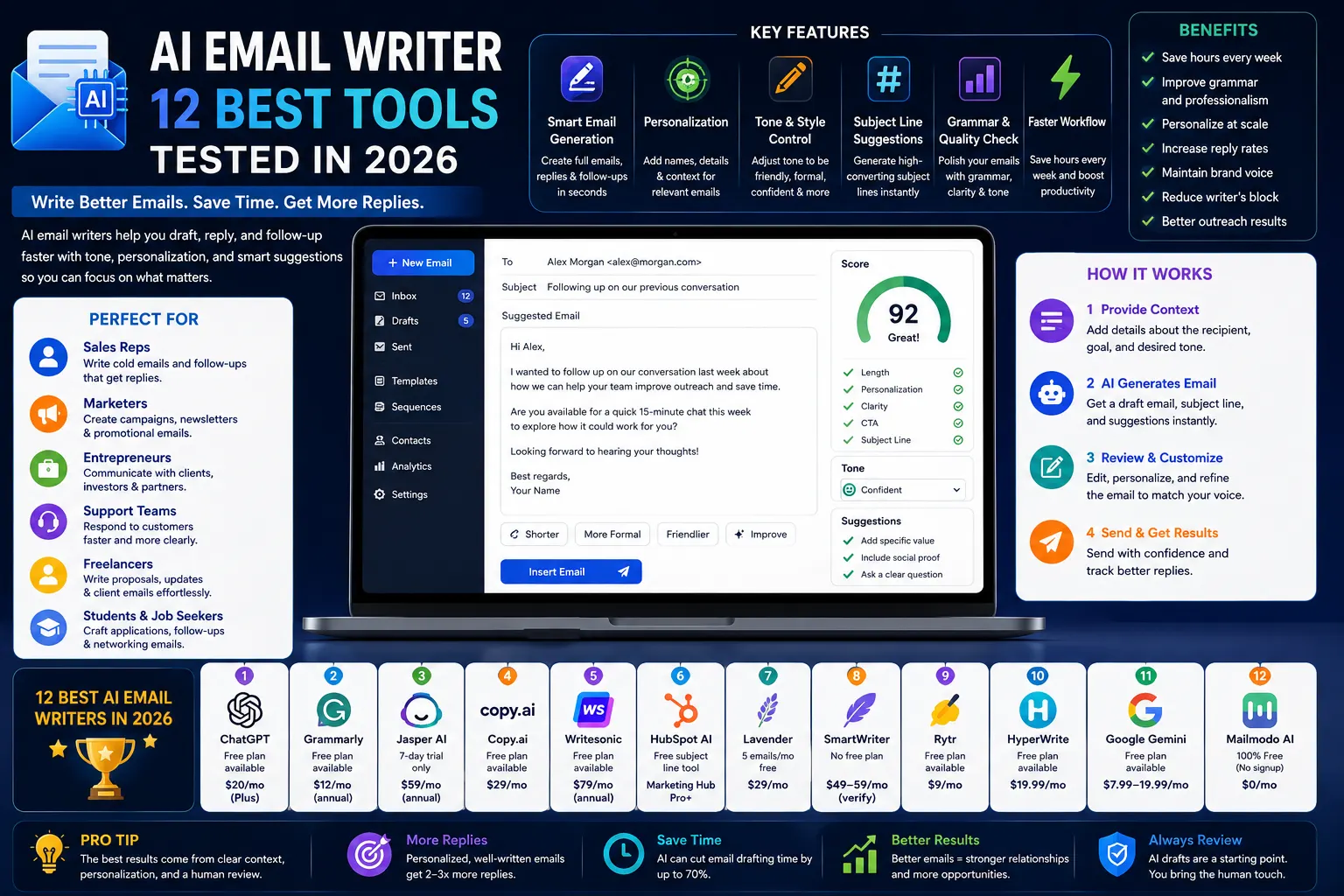
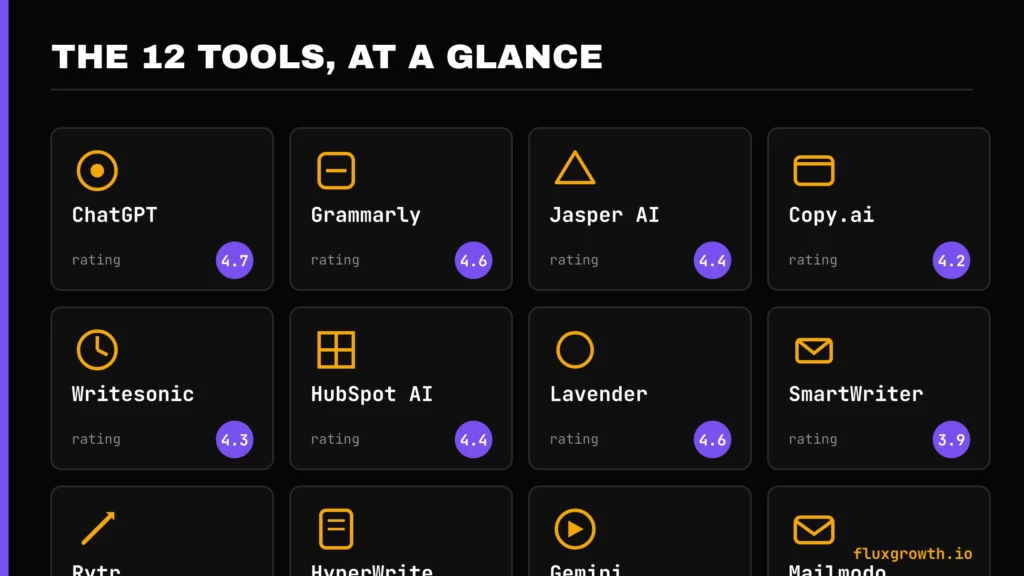
Quick Comparison Table
| Tool | Free Plan | Starting Price | Best For | Rating |
| ChatGPT | Yes (limited) | $20/mo (Plus) | All-around email writing | 4.7/5 |
| Grammarly | Yes | $12/mo (annual) | Grammar + polish | 4.6/5 |
| Jasper AI | No (7-day trial only) | $59/mo (annual) | Brand-voice marketing emails | 4.4/5 |
| Copy.ai | Limited (verify current tier) | $29/mo | Short-form + GTM workflows | 4.2/5 |
| Writesonic | Limited | $79/mo (annual) | SEO + AI-visibility content teams | 4.3/5 |
| HubSpot AI | Free subject-line tool only | Bundled in Marketing Hub Pro | CRM-personalized sales/marketing email | 4.4/5 |
| Lavender | Yes (5 emails/mo) | $29/mo | Cold sales outreach coaching | 4.6/5 |
| SmartWriter | No | $49–59/mo (verify current) | LinkedIn-sourced cold email openers | 3.9/5 |
| Rytr | Yes | $9/mo | Budget short-form writing | 4.5/5 |
| HyperWrite | Yes | $19.99/mo | Daily email + Chrome extension use | 4.5/5 |
| Google Gemini | Yes (Gmail “Help me write”) | $7.99–19.99/mo | Gmail-native drafting | 4.4/5 |
| Mailmodo AI Writer | Yes, fully free | Free (no signup) | Zero-cost marketing email drafts | 4.3/5 |
The takeaway: if you just need something free and simple, start with Mailmodo’s tool or Gemini in Gmail. If you’re doing daily professional writing across email and everything else, ChatGPT Plus is the best value. If cold sales outreach is your job, Lavender is worth the $29/month.
A pattern worth noticing in that table: the tools with the widest range between their headline price and what most people actually pay (Copy.ai, Writesonic, SmartWriter) are also the ones that pivoted their business model most recently. That’s not a coincidence when a company’s still figuring out where its pricing should land, published numbers lag reality. Confirm current pricing directly before you commit to any of the three.
The 12 Best AI Email Writers in 2026
1. ChatGPT
Overview: ChatGPT isn’t built specifically for email, and that’s part of why it’s the best all-around option; it handles tone, context, and editing requests better than most single-purpose tools because the underlying model is simply stronger.
Best for: Anyone who wants one tool that handles email plus everything else they write.
Features: Custom instructions for consistent tone, memory across conversations, voice input for drafting on the go, and the ability to paste in a whole thread and ask for a reply.
Pricing: Free plan available. ChatGPT Go is available in select countries at localized pricing. ChatGPT Plus costs $20/month and includes higher usage limits, GPT-5.5, advanced AI features, and custom GPTs. ChatGPT Pro is available for power users with expanded limits, while Team and Enterprise plans are offered for businesses.
Pros: Best raw writing quality, handles nuance and edits well, cheap for what you get at the Plus tier.
Cons: No native CRM or email-platform integration you’re copying and pasting unless you build a workflow around it. If your workflow depends on emails generated directly inside Gmail or your CRM, a purpose-built tool will save you more clicks.
Rating: 4.7/5
Where ChatGPT actually wins is edit requests. Ask it to “make this 20% shorter and less formal” or “rewrite the second paragraph so it doesn’t sound defensive,” and it understands the request the way a human editor would. Most single-purpose email tools handle that kind of nuanced revision poorly; they’re built to generate a first draft, not iterate on one.
2. Grammarly
Overview: A quick flag before the review: Grammarly’s parent company rebranded to Superhuman in late 2025 after acquiring Coda and the Superhuman Mail app. The writing tool you know is still called Grammarly and works the same way this is a company-name change, not a product shutdown.
Best for: Polishing drafts you’ve already written, in any tool.
Features: Real-time grammar and tone suggestions, an AI rewrite/generate function built into the same sidebar, brand tone profiles on paid plans.
Pricing: Free tier covers basic grammar checks; Pro is $12/month billed annually ($30/month billed monthly). The old standalone Business plan has been folded into custom Enterprise pricing.
Pros: Works everywhere you type Gmail, Outlook, Google Docs, LinkedIn not just inside its own app.
Cons: Weaker at generating a full email from scratch than at editing one you’ve already drafted. Treat it as your last-pass editor, not your first-draft tool.
Rating: 4.6/5
One more thing worth knowing: in March 2026 Grammarly drew criticism over an “Expert Review” feature that briefly attached real writers’ names to AI-generated feedback without consent. Grammarly apologized and pulled the feature. It doesn’t change what the tool costs or does today, but it’s context worth having if you’re evaluating Grammarly for a team.
3. Jasper AI
Overview: Jasper has repositioned itself as a full marketing content hub, and email is one feature among many rather than the main event. If you came to Jasper specifically for email, you’re now paying for a lot of adjacent tooling (blog, ads, social) whether you touch it or not.
Best for: Marketing teams that need on-brand email campaigns alongside blog posts, ads, and social copy.
Features: Brand Voice training from your existing content, Canvas editor, campaign-level content generation.
Pricing: No permanent free plan. Jasper offers a 7-day free trial. The Pro plan costs $59/month per seat when billed annually or $69/month per seat when billed monthly and includes one seat. Business pricing is custom and available on request. The older Creator plan is no longer listed on Jasper’s official pricing page
Pros: Strong brand-voice matching once trained; good for teams managing multiple client accounts.
Cons: No free plan anymore, and the jump from Pro (1 seat) to Business (custom, often $900+/month) is steep if you need even a second seat. There’s no simple two-seat option: you’re either solo or you’re negotiating an enterprise contract.
Rating: 4.4/5
If you’re a solo freelancer managing three or four client brand voices, Jasper’s Pro plan covers that fine. Where it stops making sense is the moment you need a second person in the workspace at that point you’re pricing against Business, not against a modest per-seat add-on the way Copy.ai or Grammarly structure things.
4. Copy.ai
Overview: Copy.ai has pivoted hard toward a go-to-market automation platform, and current pricing reflects that shift. What used to be a straightforward short-form copywriting tool now markets itself as a “GTM AI Platform” ; the email-writing feature still exists, but it’s positioned as one piece of a much larger sales-and-marketing automation suite.
Best for: Teams that want short-form email copy plus broader GTM workflow automation.
Features: Chat-based generation, 90+ templates, workflow automation for multi-step sequences (research → draft → personalize → send).
Pricing: Copy.ai offers a free plan for individuals getting started with AI. The Chat plan starts at $29/month (or $24/month billed annually) for small teams and includes 5 seats, unlimited chat words and projects, plus access to OpenAI, Anthropic, and Gemini models. Higher-tier Growth plans start at $1,000/month, with Expansion ($2,000/month), Scale ($3,000/month), and custom Enterprise plans designed for GTM workflow automation. Copy.ai has retired its older Free/$49 Pro pricing structure in favor of this new GTM-focused model.
Pros: Fast for short-form copy subject lines, snippets, quick replies.
Cons: Pricing structure has a real gap in the middle; if you outgrow the entry tier, the next option is a big jump. This is a tool that’s clearly optimizing for enterprise GTM teams now, not solo email writers keep that in mind before you sign up expecting the old Copy.ai.
Rating: 4.2/5
If you only need email copy, no workflow automation, no prospecting, you’re likely paying for a lot of platforms you won’t touch. Worth comparing against Rytr or ChatGPT before committing, especially at the entry tier.
5. Writesonic
Overview: Writesonic has moved from “AI writing tool” toward a GEO (generative engine optimization) platform that tracks how your brand shows up in AI search results, with content generation as one piece of a larger suite.
Email writing is still in there. But it’s no longer the product’s center of gravity; the pricing page now leads with AI-visibility tracking across ChatGPT, Gemini, and Google AI Overviews.
Best for: Content and SEO teams that want email drafting bundled with broader AI-search visibility tracking not solo users who just need email copy.
Features: Article and email generation, SEO site audits, AI-search visibility tracking across ChatGPT, Gemini, and Google AI Overviews.
Pricing: Starter around $79/month billed annually, scaling to $399/month for Growth, plus custom Enterprise. A limited free tier exists for basic tools.
Pros: Genuinely useful if you already need SEO and AI-visibility tracking.
Cons: Overkill and overpriced if email writing is your only use case you’re paying for a lot you won’t touch. The entry tier alone costs more than Jasper’s Pro plan, and email is a minor feature inside a much bigger product now.
Rating: 4.3/5
Writesonic is a good example of a tool that’s outgrown its original use case. If you found it years ago as a cheap content writer, it’s worth checking current pricing before assuming it’s still the budget option it used to be.
6. HubSpot AI Email Writer
Overview: Important correction to a common claim: HubSpot’s CRM-personalized AI email writer is not a standalone free tool. It’s bundled inside paid Marketing Hub Professional or Enterprise plans and uses HubSpot Credits for some features.
This is one of the most frequently mislabeled “free” tools across older AI-writer roundups worth being precise about what’s actually included at no cost versus what requires a paid tier.
Best for: Teams already paying for HubSpot Marketing Hub Professional+ who want email drafts pulling directly from Smart CRM data.
Features: Draft generation from CRM contact/company data, subject-line suggestions, send-time prediction.
Pricing: Bundled into Marketing Hub Professional and above not sold standalone. HubSpot does offer a genuinely free AI subject-line generator (Campaign Assistant) that doesn’t require a paid plan.
Pros: Deep CRM personalization if you’re already in the HubSpot ecosystem.
Cons: Not worth adopting HubSpot just for this feature; the value is in the CRM integration, not the writer alone. If you’re not already on Marketing Hub Professional or above, there are cheaper standalone options that will do just as well for pure email drafting.
Rating: 4.4/5
This is the tool most likely to disappoint someone who found it on an older “free AI tools” roundup. If email writing is the only reason you’re considering HubSpot, look at Rytr or Mailmodo instead; you’ll get similar output quality without the CRM price tag attached.
7. Lavender
Overview: Lavender is a real-time email coach built specifically for cold sales outreach. It scores your draft as you type and tells you exactly what to fix.
Unlike a general-purpose model that just generates text, Lavender’s scoring engine is trained on real reply-rate outcomes from millions of actual sales emails. That’s why its suggestions tend to be more specific than a generic “make this better” rewrite.
Best for: SDRs and sales reps sending high volumes of cold or follow-up email.
Features: 0–100 email scoring based on length, tone, personalization, and CTA quality; LinkedIn and company context pulled into a sidebar; a separate autonomous AI agent (Ora) for teams that want emails drafted and sent, not just coached.
Pricing: Free (5 emails/month); Starter $29/month; Pro $49/month; Teams $69/user/month. Ora, the autonomous agent, is priced separately at $500/agent/month.
Pros: The coaching mechanism is genuinely different from a generic LLM rewrite; it’s trained on real reply-rate outcomes, not just “sounds good” heuristics.
Cons: Sales-specific. A practitioner tip worth repeating: using Lavender for newsletter or marketing copy doesn’t work well; it’s tuned for one-to-one sales email patterns, not broadcast content. It’s also a coaching layer, not a full outreach platform; you’ll still need separate tools for lead data and sequencing.
Rating: 4.6/5
Lavender’s Free plan for Everyone program is worth flagging separately: students, job seekers, and bootstrapped entrepreneurs can get access at no cost, which is a genuinely useful option if you’re early-career and job-hunting via cold outreach.
8. Smartwriter
Overview: SmartWriter automates prospect research (LinkedIn, company news, podcasts) into personalized cold-email openers.
Worth a direct flag: pricing figures vary significantly across sources ($49–$359/month depending on the page), its G2 profile has been inactive for over a year, and Trustpilot shows a 2.1/5 rating with recurring cancellation complaints a noticeably different reliability profile than everything else on this list.
Best for: High-volume cold outreach where personalized first lines matter more than full email drafting.
Features: Pulls from 45+ data sources for personalization, generates full emails and follow-ups, Chrome extension.
Pricing: SmartWriter offers a 7-day free trial. The Basic plan starts at $59/month (or $49/month billed annually), the Popular plan is $149/month (or $124/month annually), and the Pro plan costs $359/month (or $299/month annually). Pricing varies depending on billing cycle and lead credits included.
Pros: When it works, the personalization research genuinely saves time versus manual prospecting.
Cons: Inconsistent pricing information, mixed recent reviews, and most modern outreach platforms (Instantly, Smartlead) now include similar personalization natively reducing the case for a standalone tool.
Rating: 3.9/5
Being direct here: this is the tool on this list I’d tell you to price-check most carefully before subscribing. The gap between what different sources say it costs is unusually wide for a product that’s been around this long, and that’s often a sign of a pricing page that’s changed recently or inconsistently.
9. Rytr
Overview: Rytr stays in its lane short-form content at a genuinely low price and that focus is exactly why it’s stayed relevant while flashier competitors chase bigger enterprise contracts. It’s not trying to be a full marketing platform, and that restraint is the point.
Best for: Freelancers and solo users on a tight budget who mostly need short, fast drafts.
Features: 40+ use cases, 20+ preset tones, built-in Copyscape plagiarism checker, Chrome extension.
Pricing: Free (10,000 characters/month); Unlimited $9/month ($7.50/month annual); Premium $29/month ($24.16/month annual).
Pros: Cheapest genuinely usable paid tier on this list, real permanent free plan.
Cons: Runs on an older model architecture than ChatGPT or Gemini, so longer or nuanced emails often need more editing. Fine for short-form; don’t expect it to nail a long, nuanced client email on the first try.
Rating: 4.5/5
If your budget is the primary constraint student, early freelancer, side-hustle stage Rytr’s Unlimited plan at $7.50/month annually is hard to beat for straightforward, high-volume short email drafting.
10. HyperWrite
Overview: HyperWrite leans into daily writing tasks, email, short-form content, quick replies with a Chrome extension that follows you across the web rather than confining you to a single app window. It’s positioned less as a destination tool and more as a writing layer that sits underneath everything else you’re already doing.
Best for: People who write emails and short content constantly throughout the day and want an always-available assistant, not a separate app to open.
Features: Custom personas, TypeAhead autocomplete-style suggestions, browser-wide availability.
Pricing: Free tier (limited monthly generations); Premium $19.99/month ($16/month annual); Ultra $44.99/month ($29/month annual).
Pros: Genuinely useful for email specifically cheaper than Jasper for a comparable daily-writing use case.
Cons: Weaker for long-form content like full blog posts or reports it’s built for quick, in-context writing, not extended documents.
Rating: 4.5/5
The Chrome extension is the real selling point here. It follows you into Gmail, LinkedIn, Slack anywhere you’re typing which makes it feel less like a separate app and more like a writing layer over everything you already do.
11. Google Gemini
Overview: If you already live in Gmail, Gemini’s “Help me write” feature is the lowest-friction option on this list. It’s already sitting in your compose window, no extension to install and no new tab to open. For anyone whose entire workflow already runs through Google Workspace, this is the path of least resistance.
Best for: Gmail and Google Workspace users who want AI drafting without adding another tool.
Features: In-Gmail drafting and proofreading, tone adjustment, thread summarization for long chains before you reply.
Pricing: Free in the consumer Gemini app with limits; Google AI Plus $7.99/month, Pro $19.99/month for individuals. For Workspace, it’s split: Business Starter (~$7–8/user/month annual) includes Gemini in Gmail only. Full Gemini across Docs, Sheets, and Meet requires Business Standard (~$14–18/user/month annual) or higher.
Pros: Zero extra app to learn if you’re already on Workspace; free consumer tier is genuinely usable for occasional drafting.
Cons: The free/cheap tiers only cover Gmail full-suite access costs meaningfully more, and the jump from Business Starter to Business Standard is the one to budget for if you want Gemini in Docs and Sheets too, not just email.
Rating: 4.4/5
Gemini’s proofreading feature is worth calling out specifically: it underlines wordy, passive, or structurally weak sentences directly inside the compose window not just spelling errors, but actual sentence-quality issues which puts it closer to Grammarly’s territory than a typical “help me write” button.
12. Mailmodo AI
Overview: Mailmodo’s AI Email Writer is a standalone, genuinely free tool no signup, no credit card, no trial clock. In a category where “free” often means “free until you hit an arbitrary limit,” this is one of the few tools on this list that means it literally.
Best for: Anyone who wants a zero-cost option for marketing-style emails and doesn’t need it embedded in a larger platform.
Features: Tone selector, campaign-type input (product launch, survey, follow-up), word- and paragraph-count controls, and genuinely unusual themed writing styles for fun.
Pricing: The AI Email Writer tool is free with no login required. Mailmodo’s broader email marketing platform has its own separate pricing (free up to 500 contacts, scaling from there).
Pros: Actually free, no catch, no upsell wall on the writer itself.
Cons: Built for marketing campaign copy specifically not ideal if you need a simple assistant for one-off personal or reply emails. It’s optimized for “write me a launch announcement,” not “help me reply to this one tricky client message.”
Rating: 4.3/5
If you’ve never used it, the themed-writing option is a genuinely fun detail; most tools on this list skip entirely; you can generate a draft with a Harry Potter or Game of Thrones-inspired flavor, which is a nice touch for a casual internal email or a lighter-touch newsletter.
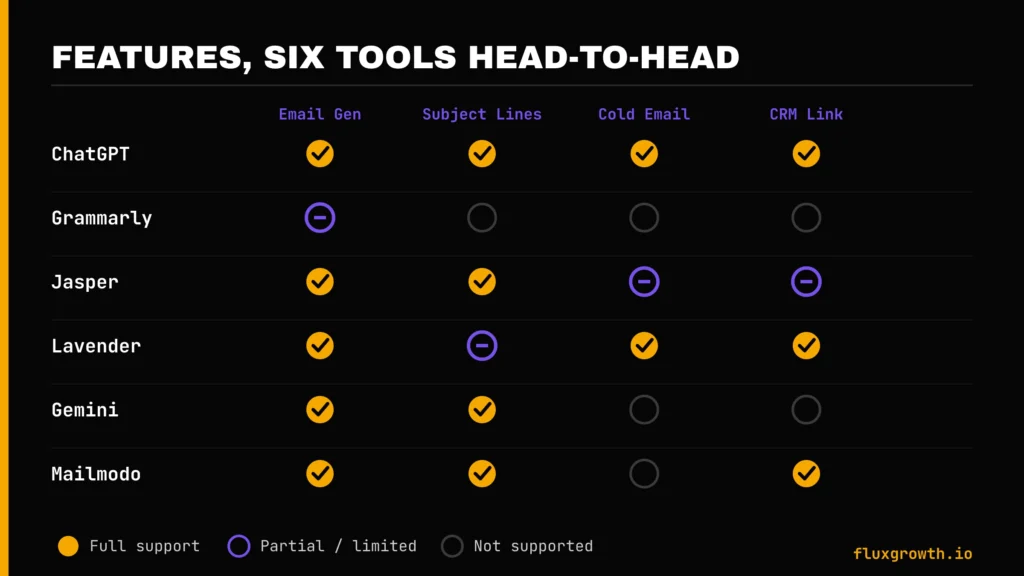
AI Email Writer Features Comparison
| Feature | ChatGPT | Grammarly | Jasper | Lavender | Gemini | Mailmodo |
| AI Email Generation | Yes | Limited | Yes | Yes | Yes | Yes |
| Subject Line Generator | Yes | No | Yes | Partial | Yes | Yes |
| Reply Assistant | Yes | Yes | Limited | Yes | Yes | No |
| Cold Email Generator | Yes | No | Limited | Yes | No | No |
| Tone Adjustment | Yes | Yes | Yes | Yes | Yes | Yes |
| Grammar Correction | Basic | Best-in-class | Basic | Basic | Basic | Basic |
| CRM Integration | No (native) | No | Limited | Yes | No | Yes |
| Gmail/Outlook Integration | Via extension | Yes | Via extension | Yes | Native (Gmail) | No |
One idea per row here, deliberately this table is meant to answer “does this tool do the specific thing I need,” not rank tools overall. Use the comparison table above for that. If CRM integration is your top priority, Lavender and HubSpot are your realistic options. If Gmail-native drafting is what matters most, Gemini is the only tool here that lives directly in the compose window without an extension.
A pattern in this table worth calling out: grammar correction is the one feature nobody has fully matched Grammarly on. General-purpose LLMs are good writers but inconsistent proofreaders they’ll happily generate a grammatically sound sentence and just as happily miss an error in text you paste in for review. If clean grammar matters as much as generation, pairing a general tool with Grammarly’s free tier covers the gap for zero extra cost.
AI Email Writer vs. Human Writing
Pros of AI
Speed, consistency across high volumes, and a solid starting point when you’re stuck. None of that is nothing especially on a day when you’ve got 40 emails to clear and half of them are routine.
Cons of AI
Generic phrasing if you don’t edit, occasional factual errors when it invents details about a recipient or company (this happens more than most tools admit always verify anything specific the AI claims to know about a person or company), and a tendency to sound the same across different senders unless you actively train tone.
When AI Is Better
High-volume, lower-stakes email: routine follow-ups, first-draft outreach, internal status updates, scheduling logistics. Speed matters more than perfect nuance here, and the downside of a slightly generic draft is low.
When Humans Should Write Emails
Anything emotionally sensitive layoffs, apologies, conflict resolution, condolences. Write those yourself. Every time.
Also anything where relationship history matters more than speed, a long-time client, a mentor, someone you’ve burned a bridge with before. And the first email to someone who could actually make or break a deal. A generic-sounding message there doesn’t just underperform. It can cost you the meeting entirely.
Best AI Email Writers for Different Users
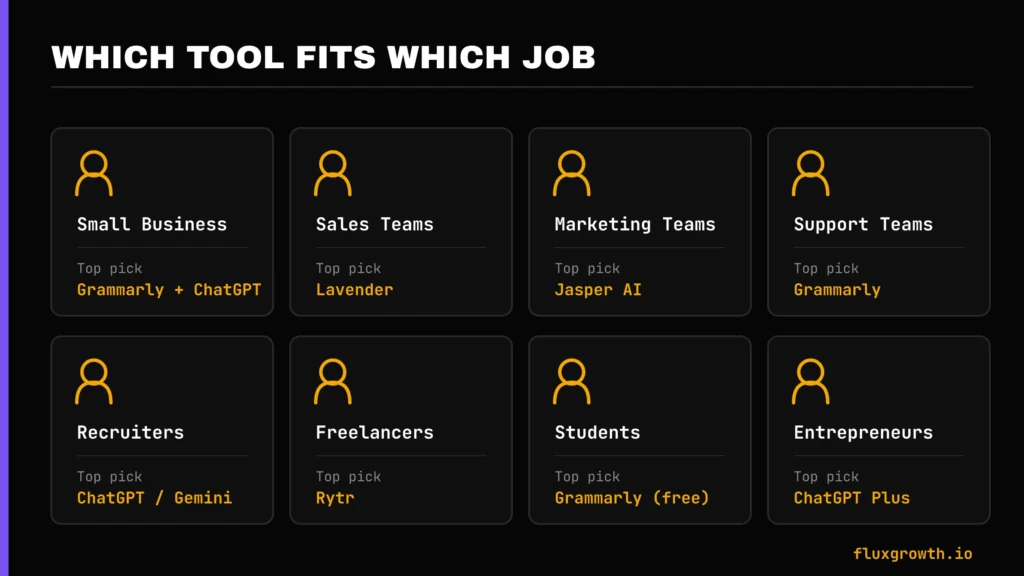
Small Businesses
Grammarly (polish) + ChatGPT (drafting) covers most needs without a big monthly bill together that’s around $32/month for a genuinely solid setup.
Sales Teams
Lavender for coaching and reply-rate optimization; ChatGPT or Gemini for general correspondence. If the team is scaling outreach volume fast, it’s worth budgeting for Lavender’s Teams tier from the start rather than starting individual reps on Starter and migrating later.
Marketing Teams
Jasper or HubSpot AI (if already on Marketing Hub Professional) for brand-consistent campaign emails. Teams managing multiple client brand voices lean toward Jasper; teams already deep in HubSpot’s CRM lean toward keeping everything native.
Customer Support
Grammarly for tone consistency across a team, ChatGPT for drafting complex or escalated replies where a templated response won’t cut it.
Recruiters
ChatGPT or Gemini for volume outreach, scheduling, rejection emails with a human pass on anything candidate-facing that needs a personal touch. Candidates notice generic-sounding recruiter emails fast, so this is a category where light personalization pays off disproportionately.
Freelancers
Rytr or HyperWrite both are cheap enough to justify for solo use, and both handle the mix of client emails, proposals, and quick replies that make up a freelancer’s day.
Students
Grammarly’s free tier plus ChatGPT’s free tier covers essentially everything a student needs for email professor correspondence, internship applications, networking outreach without spending a dollar.
Entrepreneurs
ChatGPT Plus as a single tool that also handles the fifty other things a solo founder writes in a day, from investor updates to customer support to internal notes-to-self.
Free AI Email Writers
A genuinely accurate list, since two tools commonly listed as free actually aren’t:
- ChatGPT — free tier, usage-limited, still strong enough for most everyday email drafting
- Grammarly — free tier, basic grammar and tone checks only, not full email generation
- Rytr — permanent free plan, 10,000 characters/month, no credit card required
- Google Gemini — free in the consumer app with rate limits; free in Gmail specifically only on paid Workspace Business Starter and above
- Mailmodo AI Writer — fully free, no signup, no catch the most genuinely no-cost option on this entire list
- HyperWrite — free tier with limited monthly generations, good for testing before committing to Premium
- Copy.ai still offers a free plan, although the platform has shifted toward a GTM AI platform. Users can start on the free tier before upgrading to the Chat plan or higher if they need advanced workflow automation.
Correction to the common list: Jasper dropped its permanent free plan (7-day trial only now), and HubSpot’s CRM-personalized email writer is bundled into paid Marketing Hub plans; the free HubSpot tool is a subject-line generator, not the full writer. If you saw either of those listed as “free” on another site, that information is likely outdated.
AI Email Writing Tips
The gap between a mediocre AI-drafted email and a genuinely good one usually comes down to five habits: not a better tool, just better inputs and a closer read before sending.
Write Better Prompts
Give the AI context it can’t guess: the relationship with the recipient, the specific ask, and the tone you want. “Write a follow-up email” gets you a generic draft. “Write a follow-up to a prospect who went quiet after a demo two weeks ago, keep it under 80 words, no guilt-tripping” gets you something usable. The more specific the input, the less editing the output needs. That trade-off is worth the extra 15 seconds of typing almost every time.
Personalize Every Email
Swap in one specific, real detail something from the recipient’s LinkedIn, a recent company announcement, a callback to your last conversation. This is the single biggest lever for reply rates. It doesn’t need to be elaborate; one accurate, specific line does more than three generic compliments.
Improve Subject Lines
Short, specific, and curiosity-driven beats are clever. “Quick question about [specific project]” consistently outperforms wordplay. If you’re unsure, generate three or four options and read them as if you were the busy person deciding whether to open this in a crowded inbox.
Write Strong CTAs
One clear ask per email. “Let me know if this is useful” is not a CTA. “Are you free for 15 minutes Thursday?” is. Multiple asks in one email tend to get none of them answered, pick the single most important next step and ask for that.
Edit Before Sending
Non-negotiable. AI drafts are a starting point, not a finished product read every line before it goes out, especially anything touching a client relationship or a sensitive topic. Watch specifically for invented facts: names, dates, or details the AI filled in confidently but incorrectly.
Common Mistakes to Avoid
Most of the mistakes below aren’t about the technology failing, they’re about treating a first draft like a finished product. Every one of these is avoidable with about 60 extra seconds of review before you hit send.
- Sending AI emails without editing. The fastest way to get caught is a sentence that clearly wasn’t written by you, usually an oddly formal phrase or a claim that isn’t quite accurate.
- Overusing generic templates. If every email you send sounds identical, recipients notice, especially if they’re on the receiving end of your outreach more than once.
- Ignoring personalization. A mail-merge with a first name isn’t personalization, it’s decoration. Real personalization requires one fact the AI couldn’t have guessed.
- Poor subject lines. Even a great email body won’t get opened if the subject line is vague or spammy. Most tools on this list have a dedicated subject-line generator; use it even if you’re drafting the body elsewhere.
- Using AI for sensitive conversations. Layoffs, conflict, apologies, write those yourself. These are the moments where a slightly-off tone does real damage, and no AI tool currently reads emotional stakes reliably enough to trust with the first draft.
Future of AI Email Writers
None of this is speculative marketing; every trend below is already visible in at least one tool on this list today. The question isn’t whether these become standard, it’s how fast.
AI Agents
Tools like Lavender’s Ora are moving from “coach that suggests” to “agent that drafts and sends” expect more of this shift through 2026 and 2027. But full autonomy raises the stakes of a mistake. An AI that scores your draft and lets you fix a wrong company name before it sends is very different from one that sends the wrong company name to 200 prospects overnight. Adoption will lag the technology because of exactly that gap.
CRM Automation
Deeper CRM integration (what HubSpot and Lavender already do) will likely become table stakes rather than a premium feature, as more vendors realize context-free email generation is the weakest version of the product.
Personalized AI
Models that learn your specific writing patterns over time, not just a generic “brand voice” trained once and left static. Expect this to get less clunky than today’s one-time brand-voice uploads.
Multimodal AI
Email tools that can read an attached screenshot, PDF, or image and reference it directly in the draft are useful for support replies referencing a bug report screenshot, or sales emails referencing a shared deck.
Predictive Email Writing
Send-time optimization and subject-line testing, already present in some tools, becoming standard rather than a paid add-on. The direction of travel across this whole category is toward fewer standalone point tools and more integrated writing-plus-sending platforms.
Frequently Asked Questions
What is an AI email writer?
An AI email writer is a tool that uses a large language model to generate email drafts, subject lines, bodies, replies, or follow-ups based on a prompt or context you provide. It speeds up drafting; it doesn’t replace editing. Think of it as a fast first-draft generator, not an autopilot for your inbox.
Is there a free AI email writer?
Yes. Mailmodo’s AI Email Writer is fully free with no signup, and ChatGPT, Grammarly, Rytr, and HyperWrite all offer usable free tiers with usage limits. Gemini’s “Help me write” is also free in Gmail’s consumer version, though full Workspace-wide access requires a paid plan.
Which AI email writer is the best?
ChatGPT is the strongest all-around option for most people because of its writing quality and flexibility. For cold sales outreach specifically, Lavender is the better specialized choice, since it’s trained on actual reply-rate data rather than general writing quality.
Can AI write professional emails?
Yes, and it does this well for routine professional correspondence follow-ups, scheduling, standard replies. It’s weaker for emails requiring deep context about a specific relationship or sensitive subject matter, where a generic-sounding draft can do more harm than good.
Can ChatGPT write emails?
Yes. ChatGPT can draft, edit, and adjust the tone of emails, and it handles context (like a pasted email thread) better than most single-purpose email tools. You can also ask it to match a specific tone by pasting in a few examples of your own past writing.
Does Gmail have an AI email writer?
Yes Gemini’s “Help me write” feature is built into Gmail’s compose window, available free with usage limits and more fully on paid Google Workspace plans starting at Business Standard.
Can AI write cold email and follow-ups?
Yes, and this is one of the strongest use cases on this list. Lavender and SmartWriter are both built specifically for this, pulling prospect context to avoid the generic “just checking in” follow-up that gets ignored.
Is AI email writing safe?
Generally yes for standard business correspondence, but avoid pasting sensitive personal, financial, or confidential company information into free-tier tools, since some platforms use free-tier input to train models unless you opt out. When in doubt, check the specific tool’s data-use policy before pasting anything you wouldn’t want stored.
Final Verdict
- Best Overall: ChatGPT
- Best Free Tool: Mailmodo AI Email Writer
- Best for Sales: Lavender
- Best for Marketing Teams: Jasper AI (if brand voice matters) or HubSpot AI (if already on Marketing Hub Professional+)
- Best for Small Businesses: Grammarly + ChatGPT combo
- Best Value for Money: Rytr
The single most useful takeaway here: match the tool to the job, not the hype. Rytr at $9/month, used every day, beats Jasper at $69/month sitting open in a tab you forget about by Wednesday. Most people reading this don’t need three of these tools running at once. They need one used consistently that fits their actual volume and budget.
Next step: pick one tool from this list, use it for a week on real emails, and see if your reply rates or time-saved actually move. That’s the only test that matters. Skip the tools flagged with [VERIFY] in this guide until you’ve confirmed current pricing directly on their site. A few of them have changed enough in 2026 that last year’s numbers won’t hold.
What’s the one email you dread writing most and would you actually let AI take the first pass at it?