FluxGrowth is reader-supported. Some links in our guides are affiliate links — if you buy through one we may earn a commission, at no extra cost to you. It never changes which tools we recommend. How we test tools.
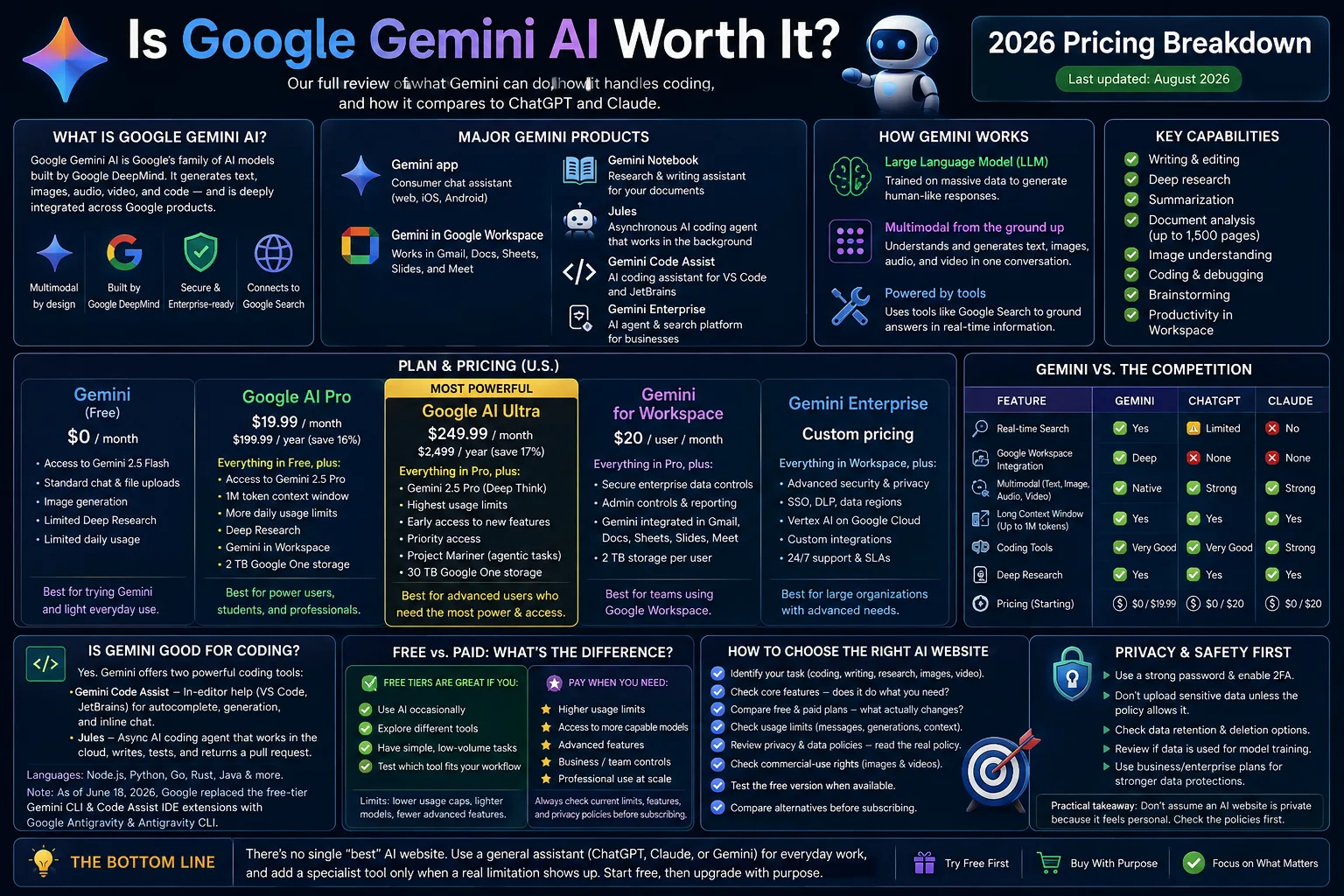
If you typed “Google Gemini AI” into a search bar, you’re probably asking one question: is it worth using, and which plan fits your budget? Fair question. Google Gemini AI is Google’s family of AI models and apps built by Google DeepMind and it writes, researches, analyzes documents, reads images, and helps with code.
This review covers what Gemini actually does, what it costs right now in the U.S., how it handles coding, and how it stacks up against ChatGPT and Claude. No guessing required.
What Is Google Gemini AI?
Google Gemini AI is Google’s generative AI model family, developed by Google DeepMind. It powers the Gemini app, Gemini inside Google Workspace (gmail, Docs, Sheets, Meet), the Gemini API for developers, and standalone coding tools like Jules and Gemini Code Assist.
Gemini is different from a traditional Google Search. Search returns links to existing pages; Gemini generates original answers, drafts, summaries, and images based on what you ask it, sometimes pulling in live search results to ground its response in current information.
It’s also different from a “standard chat-bot” in one key way: Gemini is multi-modal from the ground up. That means it can process and generate text, images, audio, and video in the same conversation not text only, with images bolted on as an afterthought.
The major Gemini products worth knowing:
- Gemini app the consumer chat assistant (web, iOS, Android)
- Gemini in Google Workspace embedded in gmail, Docs, Sheets, Slides, and Meet
- Gemini Notebook (formerly NotebookLM) a research and writing assistant for your own documents
- Jules an asynchronous AI coding agent that works in the background
- Gemini Code Assist an in-IDE coding assistant for VS Code and JetBrains
- Gemini Enterprise Google’s business-focused AI agent and search platform for companies
How Does Google Gemini AI Work?
Gemini is built on generative AI models trained to produce new text, images, or code rather than just retrieve existing information. Specifically, it’s a large language model (LLM), a system trained on massive amounts of text and other data to predict and generate human-like responses.
That multi-modal design isn’t bolted onto the LLM as an extra feature; it’s baked into the same underlying model.
A few concepts matter for how well Gemini performs in practice:
- Context: how much information the model can “remember” in a single conversation. Google AI Pro and Ultra plans give you access to a 1 million-token context window, which is large enough to hold long documents or entire code bases in one session.
- Reasoning Gemini’s more advanced modes (like Deep Think on the Ultra plan) work through multi-step problems rather than answering in one pass.
- Tool use Gemini can call external tools, including Google Search, to ground its answers in current information instead of relying only on its training data.
Related: best ChatGPT alternatives in 2026
What Can Google Gemini AI Do?
Here’s what people actually use it for, day to day:
- Writing — drafts, outlines, edits, and tone adjustments
- Research — Deep Research mode analyzes multiple sources and compiles a report instead of making you open twenty tabs
- Stigmatization — condensing long documents, meeting notes, or articles
- Document analysis — Gemini can process large file uploads (Google’s product page cites up to 1,500 pages) to find patterns or answer questions across your own material
- Image understanding — describing, analyzing, or answering questions about a photo or screenshot you upload
- Coding — generating, explaining, and debugging code (more on this below)
- Brainstorming — working through ideas conversationally
- Productivity — drafting emails in gmail, summarizing Docs, or prepping for a Meet call, if you’re on a Workspace account
None of this makes Gemini uniquely capable. ChatGPT summarizes documents too. Claude drafts emails just fine. The real differentiation is how deep Gemini sits inside gmail, Docs, and Search. If that’s where your workday already happens, this matters. If you live in Notion and Slack instead, it matters a lot less.
Is Google Gemini AI Good for Coding?
Yes, with a caveat: Gemini’s coding strength depends on which tool you use, and Google is still actively rearranging that lineup.
Google runs two separate coding products, and mixing them up is easy to do.
Gemini Code Assist lives inside your editor — VS Code, IntelliJ, PyCharm, GoLand, and WebStorm — handling auto-complete, whole-function generation, and inline chat while you type. For a broader comparison of AI coding assistants and developer workflows, see our best AI coding tools guide. Jules works differently. You hand it a task, it works on your repository in an isolated cloud environment, and returns the results for review.
Worth flagging for anyone who’s used Gemini for coding before: as of June 18, 2026, Google replaced the free-tier Gemini CLI and Code Assist IDE extensions with Google Anti-gravity and Anti-gravity CLI, per Google’s own Code Assist documentation. If you’re returning to Gemini’s coding tools after a break, expect a different setup than you remember.
Coding Strengths
- Jules is genuinely good at parallel, well-specified work — assigning several bug fixes or a repeated migration across repos at once, rather than one line-by-line pairing session
- Deep integration with GitHub for pull-request-based review
- A large context window helps when a task requires understanding a big chunk of an existing code-base
Coding Limitations
- Jules works asynchronously by design, which is a mismatch if you want a live pair-programming experience. Google describes Jules as an asynchronous coding agent that works on repository tasks in the background.
- Google’s developer tooling has changed significantly in 2026. Gemini Code Assist and Gemini CLI consumer access transitioned toward the Anti-gravity family of products, so developers should check Google’s current documentation before following older setup guides.
- Google does publish coding benchmark results for Gemini models, including comparisons with other leading models on benchmarks such as Terminal-Bench and SWE-Bench. However, these are model-level evaluations and should not be treated as proof that Jules or Anti-gravity will outperform a competing coding product in every real-world workflow.
Google Gemini AI Pricing and Plans
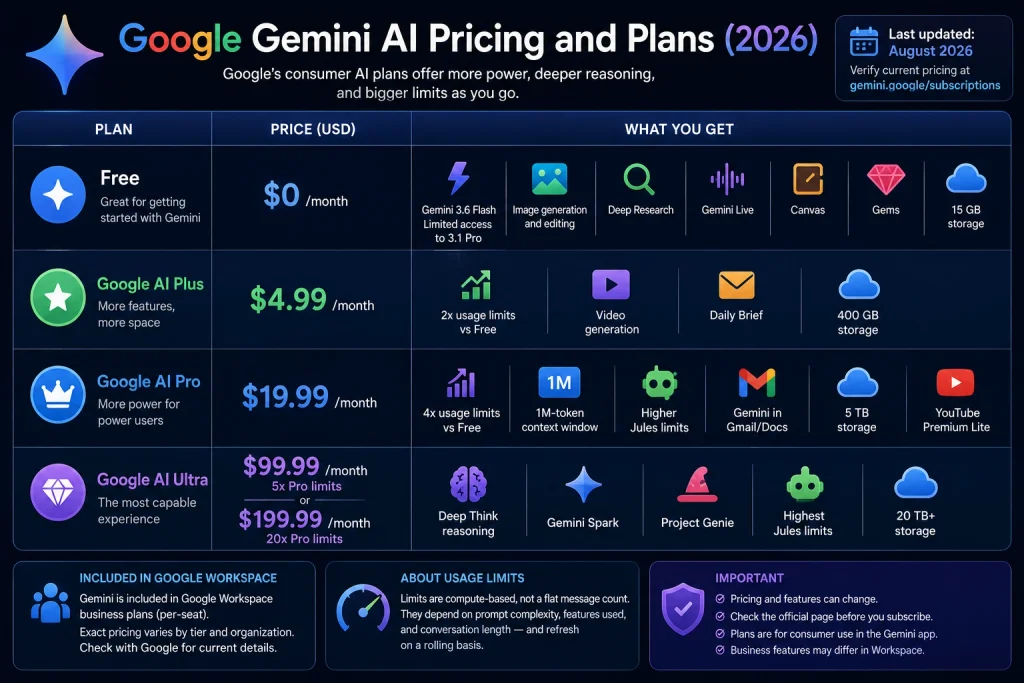
Google restructured its consumer AI pricing in 2026. It’s changed more than once since. Treat the table below as accurate today, and double-check at gemini.google/subscriptions before you actually commit.
| Plan | Price (USD) | What you get |
| Free | $0/month | Gemini 3.6 Flash, limited access to 3.1 Pro, image generation and editing, Deep Research, Gemini Live, Canvas, Gems, 15 GB storage |
| Google AI Plus | $4.99/month | 2x Free’s usage limits, video generation, Daily Brief, 400 GB storage |
| Google AI Pro | $19.99/month | 4x usage limits, 1M-token context window, higher Jules limits, Gemini in Gmail/Docs, 5 TB storage, YouTube Premium Lite |
| Google AI Ultra | $99.99/month (5x Pro limits) or $199.99/month (20x limits) | Deep Think reasoning, Gemini Spark, Project Genie, highest Jules limits, 20 TB+ storage |
Google AI Plus sits at $4.99/month right now (it was reported at $7.99 in some earlier 2026 roll-outs Google’s clearly still tuning this tier, so don’t be shocked if it moves again before you read this).
Gemini is also bundled into Google Workspace business plans, where it’s included in the per-seat subscription rather than sold as a separate add-on. Exact Workspace tier pricing is best confirmed directly with Google, since it varies by business size and contract.
Usage limits in the Gemini app are compute-based rather than a flat message count: they factor in prompt complexity, which features you use, and conversation length, and they refresh on a rolling basis.
Related: Gemini 4 Argon vs ChatGPT for coding
Is Google Gemini AI Free?
Yes Gemini has a real free tier, not just a trial. On the free plan, you get Gemini 3.6 Flash, some access to the more capable 3.1 Pro model, image generation and editing, Deep Research, Gemini Live voice mode, Canvas, and Gems (custom mini-assistants), plus 15 GB of shared Google storage.
The catch is usage limits and model access. Free users get “varying access” to Gemini’s top-tier model rather than consistent priority access, and the free tier’s compute-based usage caps refresh more slowly than paid tiers. Features that require the largest context windows, the most advanced reasoning modes, or heavy video generation sit behind AI Pro or AI Ultra. Nothing in Google’s current plans is described as unlimited.
Google Gemini AI vs. ChatGPT
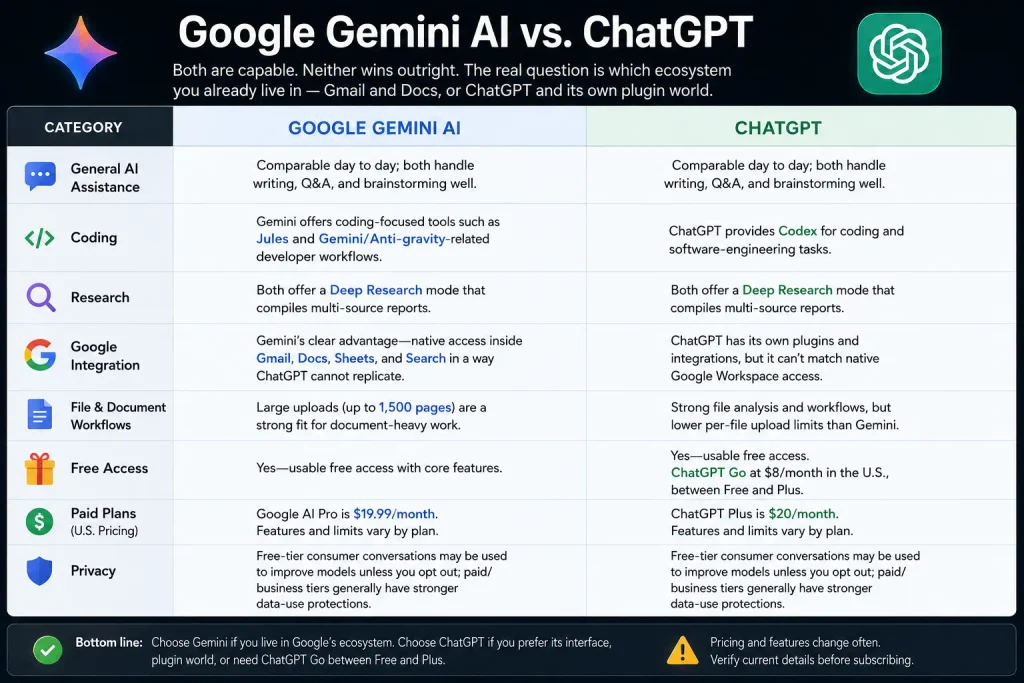
Both are capable. Neither wins outright. The real question is which ecosystem you already live in gmail and Docs, or ChatGPT and its own plugin world because that’s what actually shapes your day-to-day, not some abstract leader-board.
- General AI assistance: Comparable day to day; both handle writing, Q&A, and brainstorming well.
- Coding: Gemini offers coding-focused tools such as Jules and Gemini/Anti-gravity-related developer workflows, while ChatGPT provides Codex for coding and software-engineering tasks. Avoid claiming that either product is objectively more accurate without citing a specific, current benchmark.
- Research: Both offer a Deep Research mode that compiles multi-source reports.
- Google integration: Gemini’s clear advantage native access inside gmail, Docs, Sheets, and Search in a way ChatGPT cannot replicate.
- File and document workflows: Gemini’s large uploads (up to 1,500 pages) are a strong fit for document-heavy work.
- Free access: Both offer usable free access. ChatGPT also has ChatGPT Go at $8/month in the U.S., positioned between Free and Plus; ChatGPT Plus remains $20/month.
- Paid plans: ChatGPT Plus costs $20/month, while Google AI Pro is currently $19.99/month in the U.S. Both companies can change plan features and usage limits, so verify pricing immediately before publication.
- Privacy: Both companies disclose that free-tier consumer conversations may be used to improve their models unless you opt out; paid/business tiers generally carry stronger data-use protections. Confirm current terms directly with each provider before handling sensitive information in either tool.
Google Gemini AI vs. Claude
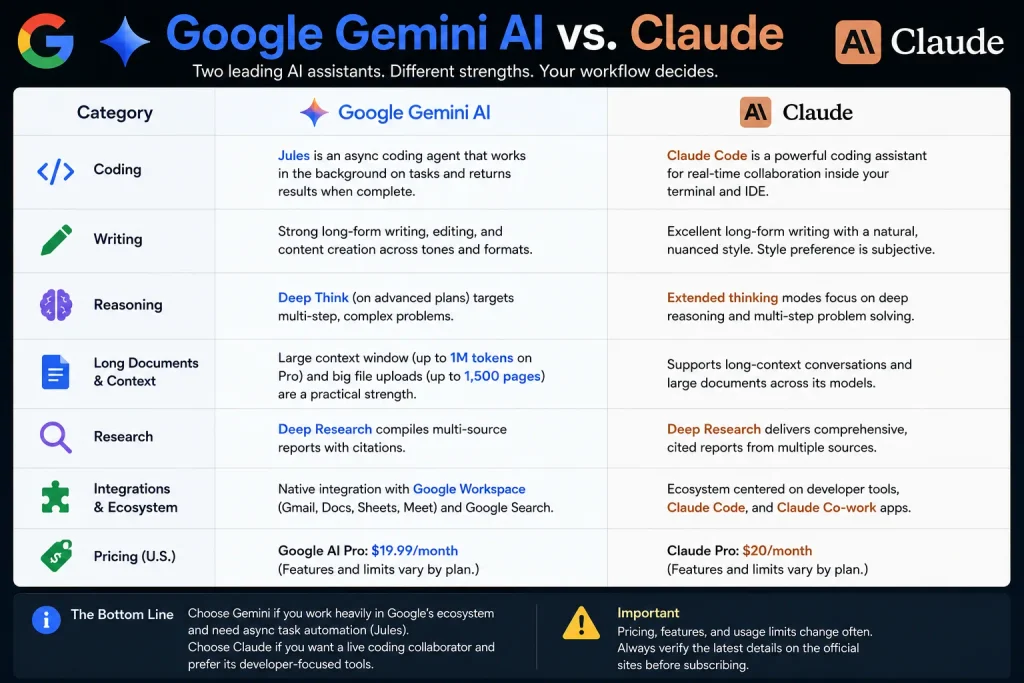
- Coding: Claude has a strong reputation for coding assistance through Claude Code; Gemini’s Jules focuses on asynchronous, background tasks. Pick based on whether you want a live coding collaborator or a task-queue agent, not on an unverified “better” claim.
- Writing: Both produce strong long-form writing; style preference is genuinely subjective here.
- Reasoning: Claude and Gemini’s top-tier reasoning modes (Claude’s extended thinking, Gemini’s Deep Think) both target multi-step problems; independent third-party benchmarks should be checked directly rather than taken from marketing copy.
- Long documents: Gemini’s large-context plans and big file uploads are a practical strength for document-heavy work; Claude also supports long-context conversations.
- Research: Both offer deep-research-style modes.
- Integration’s: Gemini’s advantage is Google Workspace; Claude’s ecosystem centers more on developer tools and its own Claude Code/Co-work apps.
- Pricing: Claude Pro costs $20/month in the U.S., while Google AI Pro costs $19.99/month in the U.S. Both are therefore effectively $20/month, although their included features and usage limits differ. Verify current pricing before publication because both companies can change plans and pricing.
Privacy and Data Security
Privacy works differently depending on which kind of Gemini account you use.
Consumer accounts: Google’s own Gemini Apps Privacy Hub says conversations may be used to improve its products, and human reviewers including trained reviewers from Google’s service providers can read a subset of that data. Google’s own advice: don’t type anything you wouldn’t want a stranger to read.
You can dial some of this back through Gemini Apps Activity settings. Google also added an option in 2026 to use certain core features without saving your activity at all.
Google Workspace / business accounts: Gemini access through a Workspace subscription is governed by your organization’s Workspace agreement rather than consumer terms, and Google states this data is not used to train its models.
Here’s the thing if you or your team paste client data, proprietary code, or anything sensitive into the free consumer Gemini app, that’s a real gap, not a theoretical one. Close it by moving that work to a Workspace-governed account, or by turning off Gemini Apps Activity. Gemini isn’t “completely private” on the free tier. Nothing in Google’s own documentation says it is.
Comparison Table
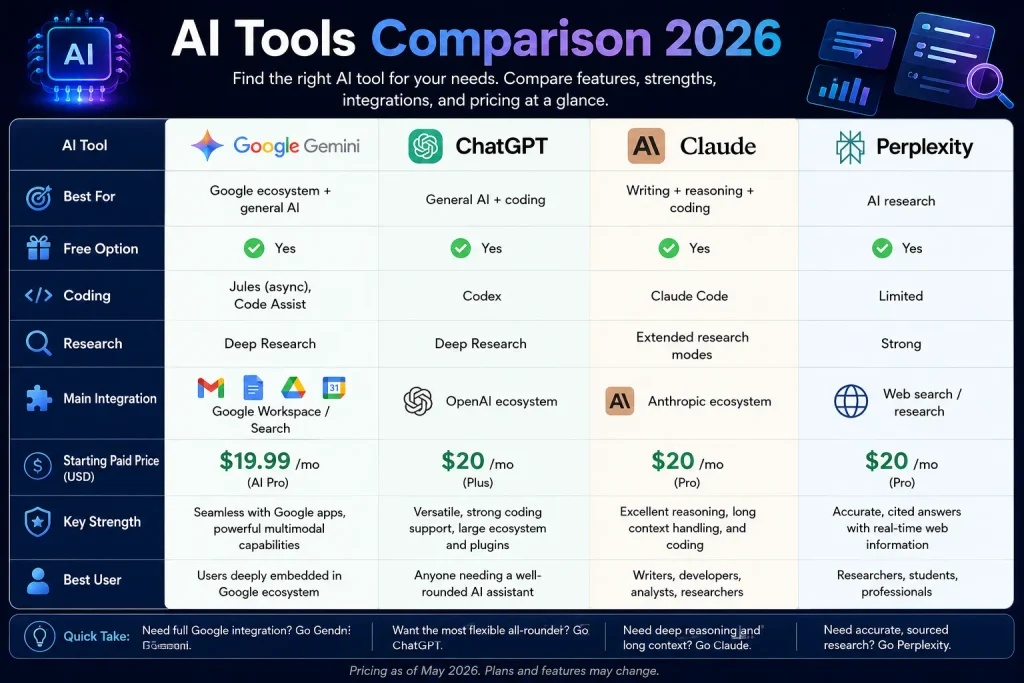
| AI Tool | Best For | Free Option | Coding | Research | Main Integration | Starting Paid Price |
| Google Gemini | Google ecosystem + general AI | Yes | Jules (async), Code Assist | Deep Research | Google Workspace / Search | $19.99/mo (AI Pro) |
| ChatGPT | General AI + coding | Yes | Codex | Deep Research | OpenAI ecosystem | $20/mo (Plus) |
| Claude | Writing + reasoning + coding | Yes | Claude Code | Extended research modes | Anthropic ecosystem | $20/mo (Pro) |
| Perplexity | AI research | Yes | Limited | Strong | Web search/research | $20/mo (Pro) |
By use case:
- Best for Google ecosystem: Google Gemini
- Best for general AI: comparable across Gemini, ChatGPT, and Claude pick based on ecosystem fit, not a declared “winner”
- Best for coding: There is no single verified winner across every coding workflow. Codex, Claude Code, and Google’s coding tools serve different workflows, while Jules is designed for asynchronous coding tasks. Use current independent benchmarks and your own workflow before declaring one tool superior.
- Best for research: Gemini, ChatGPT, and Perplexity all offer credible deep-research modes; Perplexity’s core product is built around research specifically
Pros and Cons
Pros
- Free tier is genuinely usable, not just a trial
- Deep, native integration across gmail, Docs, Sheets, and Search
- Large context window (1M tokens on paid plans) and large document upload limits
- Jules offers a distinct async workflow for batched coding tasks
- Multimodal by design text, image, audio, and video in one system
Cons
- Free-tier usage limits and model access are inconsistent (“varying access” to top models)
- Coding tools have changed structure multiple times in 2026, creating setup churn
- Consumer-tier conversations may be reviewed by humans unless you adjust privacy settings
- Feature differences between Free, Plus, Pro, and Ultra can be hard to track without checking the current pricing page
- No independently verified benchmark currently establishes Gemini as the top coding model
Frequently Asked Questions
What is Google Gemini AI?
Google Gemini AI is Google’s family of generative AI models, built by Google DeepMind, that power the Gemini app and its integration across gmail, Docs, Search, and standalone coding tools. It’s multi-modal, meaning it works with text, images, audio, and video in the same system.
Is Google Gemini AI free?
Yes. The free tier includes Gemini 3.6 Flash, limited access to the more capable 3.1 Pro model, image generation, Deep Research, Gemini Live, and 15 GB of storage. Paid plans (AI Plus, Pro, and Ultra) unlock higher usage limits, larger context windows, and more advanced features.
Is Google Gemini AI good for coding?
It can be, depending on which tool you use. Gemini Code Assist works inside your editor for real-time help, while Jules handles background, asynchronous coding tasks and returns a pull request. Neither is independently verified as the top-performing coding AI, so match the tool to your workflow rather than assuming one is universally best.
Is Gemini better than ChatGPT?
Neither is flatly better; it depends on your workflow. Gemini’s advantage is deep Google ecosystem integration; ChatGPT’s strengths are similar in scope for general assistance and coding through Codex. Compare pricing, model access, and which ecosystem you already use before deciding.
Can Google Gemini analyze PDFs and documents?
Yes. Gemini can process large document uploads Google’s product materials cite support for up to 1,500 pages for summarization, analysis, and question-answering across your own files.
Is Google Gemini AI safe to use?
It follows standard account security practices, but “safe” and “private” aren’t the same thing. On consumer accounts, conversations may be used to improve Google’s services and can be reviewed by humans unless you adjust your Gemini Apps Activity settings. Workspace/business accounts follow separate, generally stricter data terms.
What is the difference between Gemini Free and paid plans?
Free gives you real access to Gemini’s models and core features but with lower, “varying” usage limits and inconsistent access to the top-tier model. Paid plans (starting at Google AI Plus, $4.99/month) raise usage limits, and the Pro and Ultra tiers add a 1M-token context window, higher-tier reasoning modes, larger storage, and priority access to new features.
Conclusion
Google Gemini AI is genuinely capable, free to start, and best at one specific thing: living inside Gmail, Docs, Sheets, and Search. Not a benchmark champion. A workflow fit.
If your work already runs through Google’s ecosystem, or you’re regularly pushing 1,500-page documents through an AI, Gemini is worth using the free tier alone will tell you that. If you code daily and want a live in-editor partner, put Gemini Code Assist head-to-head with Claude Code or Codex before you commit to anything.
Upgrading to AI Pro ($19.99/month) makes sense once you’re actually hitting usage limits, not before. Start free. Run your real workflow through it for a week. Let this review decide whether you upgrade.