FluxGrowth is reader-supported. Some links in our guides are affiliate links — if you buy through one we may earn a commission, at no extra cost to you. It never changes which tools we recommend. How we test tools.
You need five product Reels by Friday. There’s no studio, no camera operator, and the freelance editor’s quote eats most of this month’s ad budget. So you start pricing AI video tools instead.
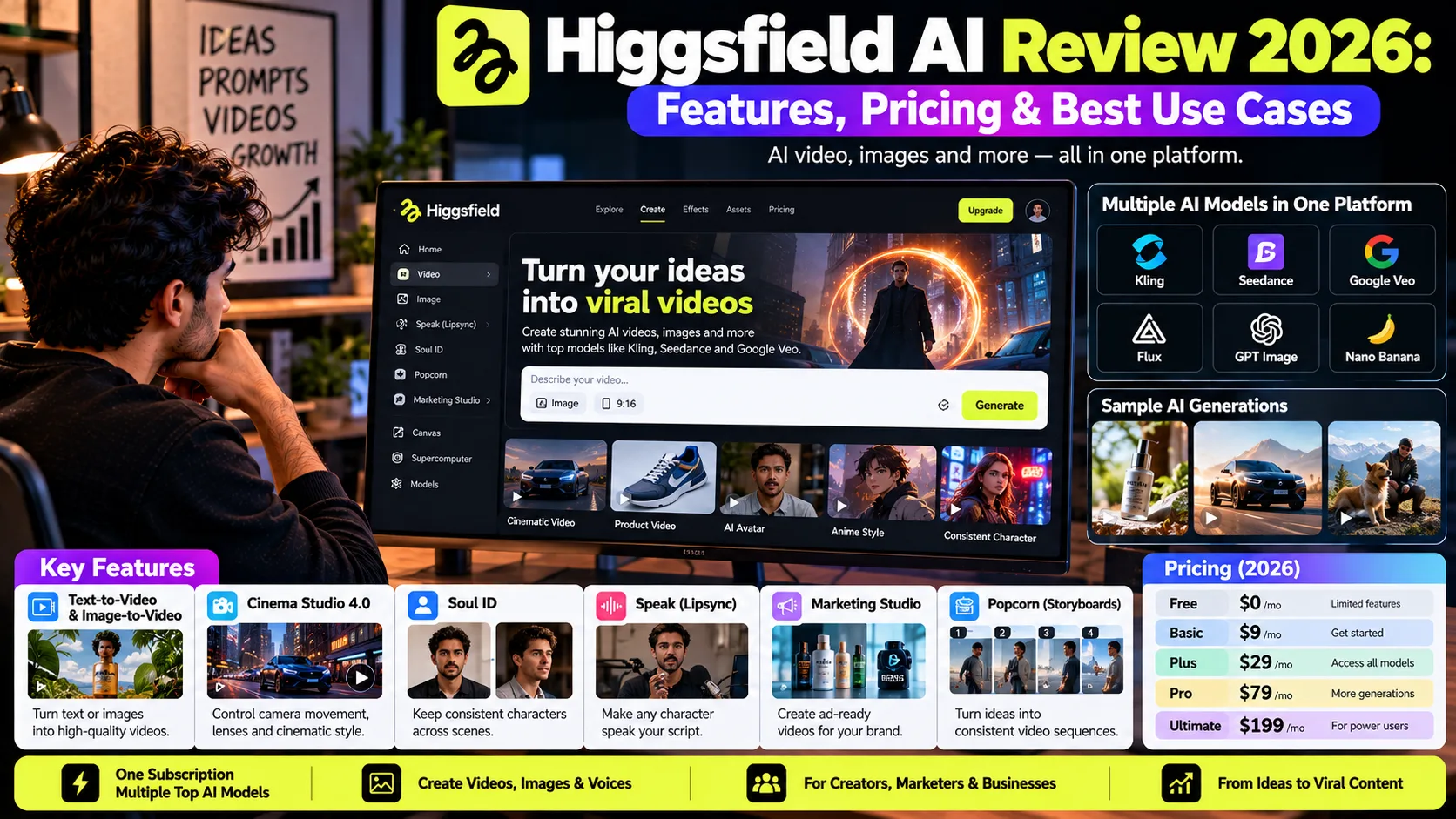
Higgsfield AI is a browser-based AI video and image platform that puts more than a dozen generation models, including Kling, See-dance, and Google Veo, behind one subscription and one credit balance.
This Higgsfield AI Review 2026 answers four questions a US creator or small team should ask before paying: what it actually does, what a finished clip costs, who owns the output, and whether Runway, Kling AI, or Google Veo would serve you better.
How this review was put together: it’s based on Higgsfield’s pricing page, Help Center, and Terms of Use, plus dated third-party reporting, all checked in October 2026.
What is Higgsfield AI?
Higgsfield AI is a web platform for generating AI video, images, and voice from text prompts or reference images. Instead of relying on one in-house model, Higgsfield gives you access to many third-party models, such as Kling, See-dance, and Google Veo, and adds its own tools for camera control, consistent characters, lipsync, and ad production on top.
Higgsfield, Inc. has grown fast: Times of Central Asia reported in February 2026 that the platform had passed 15 million users.
The main kinds of AI video tools, in plain English
- Text-to-video: you describe a scene and the model builds a clip from scratch.
- Image-to-video: you upload a still, like a product photo, and the model animates it. It’s the more controllable route for product work.
- AI image generators: they create stills, often used as the first frame of a video.
- Avatar and lipsync tools: they make a face speak your script.
- AI video editors: CapCut or Premiere Pro polish footage that already exists.
Higgsfield covers the first four. It isn’t a timeline editor, so plan on finishing your clips somewhere else.
A model hub with its own studio on top
The hub design means one login, one bill, and the option to draft on a cheap model and render finals on a premium one. The trade-off: duration, resolutions, features, and credit costs change from model to model.
Higgsfield’s Help Center says entry-level plans include core models, higher plans open up every model, and new models may roll out gradually. So treat every feature below as “available on some models and plans,” not a blanket promise.
How Higgsfield AI differs from editors and chat-bots
Traditional video editors such as Premiere Pro and CapCut are primarily used to assemble, refine, and polish footage, while Higgsfield can generate new video scenes from text prompts. Chatbots can help write scripts and prompts, but Higgsfield focuses on visual generation, with tools for controlling camera movement, lenses, and cinematic styles.
Higgsfield also offers official plugins for Adobe Premiere Pro and After Effects, allowing creators to generate and refine visuals within an existing editing workflow.
What features does Higgsfield AI offer in 2026?
Higgsfield AI’s 2026 feature set has three layers: third-party models for text-to-video and image-to-video, Higgsfield’s own creative tools (Cinema Studio, Soul ID, Popcorn, Speak, and Marketing Studio), and automation surfaces (Supercomputer, Canvas, MCP, and CLI). Which features you actually get depends on your plan and the model you pick.
Text-to-video and image-to-video
Higgsfield’s Plus plan and above include every model on the platform, and Higgsfield’s June 2026 pricing guide lists See-dance 2.0, Kling 3.0, and Google Veo 3.1 among them. (It also listed Sora 2, which OpenAI has since shut down.)
Example: upload a white-background photo of a ceramic mug and prompt a slow push-in with steam rising. That’s a product-page hero shot without a photographer.
The documented weak spot is consistency. Higgsfield’s own Help Center lists “character or motion consistency breaking down in complex scenes” among its most common user complaints.
Cinema Studio and DoP camera control
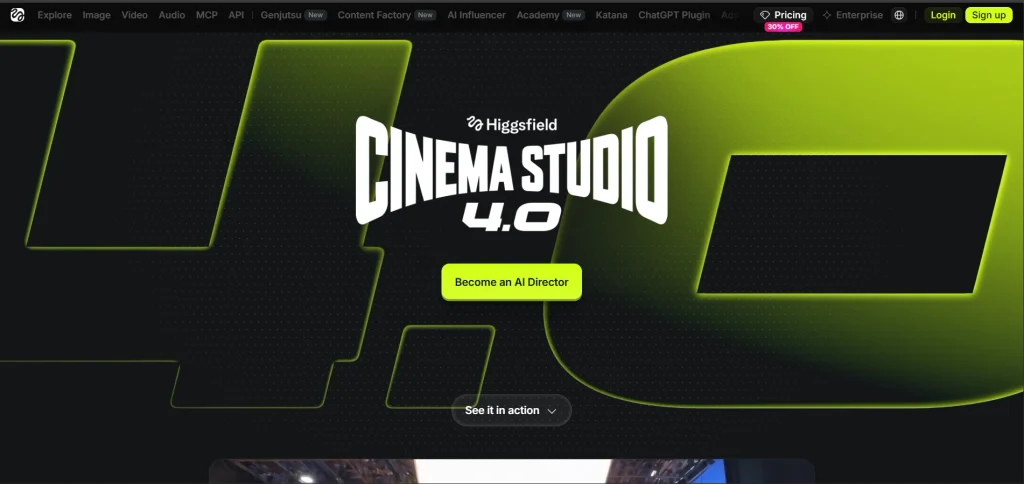
Cinema Studio 4.0 offers controls for camera movement, lenses, and cinematic style. Higgsfield announced up to 30-second generations at launch, while its current product page advertises up to one minute and native 4K. These specifications may reflect different versions or workflows.
Soul ID and Popcorn for consistent characters
Soul ID trains on 20–80 photos to maintain a character’s identity across generations. Higgsfield’s current pricing page lists Soul image generation at 0.25 credits per image, not 25 credits per character. I couldn’t verify a fixed Soul ID training cost; check the displayed cost before generating. Popcorn supports storyboards of up to eight frames and maintains consistency within a sequence.
Image generation
Higgsfield combines its in-house Soul image models with third-party options, including Seedream 4.5, FLUX.2 Pro, Nano Banana, and GPT Image. Its Plus plan includes Unlimited access to selected image models for eligible generations without deducting credits. If you’re exploring more options, check out our guide to the top AI tools for image creation in 2026.
In practice, a creator making 40 YouTube thumbnails and carousel slides a month on those models spends zero credits on them. That leaves the full 1,200 for video.
Speak, Lipsync Studio, and audio
Higgsfield Speak handles lipsync and voiceover, so a still portrait can deliver a scripted line. Higgsfield’s FAQ prices Speak video at 20 to 50 credits depending on duration, and voice or sound generation at 1 credit.
Use it for ex plainer intros or a talking mascot, but skip AI people “recommending” your product. US fake-testimonial rules apply (see the commercial-use section).
Marketing Studio, Supercomputer, Canvas, and MCP
Marketing Studio turns a product URL into ad creative, Supercomputer runs production from a single chat, Canvas is a node-based workspace, and MCP and CLI let AI agents call Higgsfield directly.
The catch is spelled out in Higgsfield’s Help Center: any generation made through MCP, CLI, Canvas, Supercomputer, or other automated tools always deducts credits, regardless of plan. “Unlimited” stops at the website.
How does Higgsfield AI work? A product video, step by step
A typical Higgsfield workflow starts with a reference image, then you pick a model based on what the shot needs and what it costs, write a prompt covering subject, motion, and camera, then generate, review, and export. Controls vary by model and plan.
Here’s how that looks for a 15-second Reel for a small candle brand:
- Plan three shots. A hero product shot, a close-up of the flame, and a lifestyle shot on a nightstand. Five seconds each.
- Choose image-to-video. Starting from your real product photo keeps the jar, label, and color accurate.
- Upload a clean reference. Good light, plain background, label facing the camera.
- Pick a model and check the price first. Higgsfield shows the exact credit cost on the Generate button before you confirm. Draft on a fast or lower-resolution variant.
- Write the prompt. Cover subject, motion, camera, light, and format:
Slow dolly-in on an amber glass candle on a walnut nightstand, soft window light from the left, flame flickering gently, shallow depth of field, warm evening tones, no text overlays, vertical 9:16. - Review on a phone at full size. Check that the label text stayed legible, the glass didn’t warp, and the flame moves naturally. Regenerate only the shot that failed.
- Export and finish. Assemble the three clips in CapCut or Premiere, add captions and music, and export at 1080×1920 for Reels, Shorts, or TikTok.Then write the post caption with our free Instagram caption generator.
How much does Higgsfield AI cost in 2026?
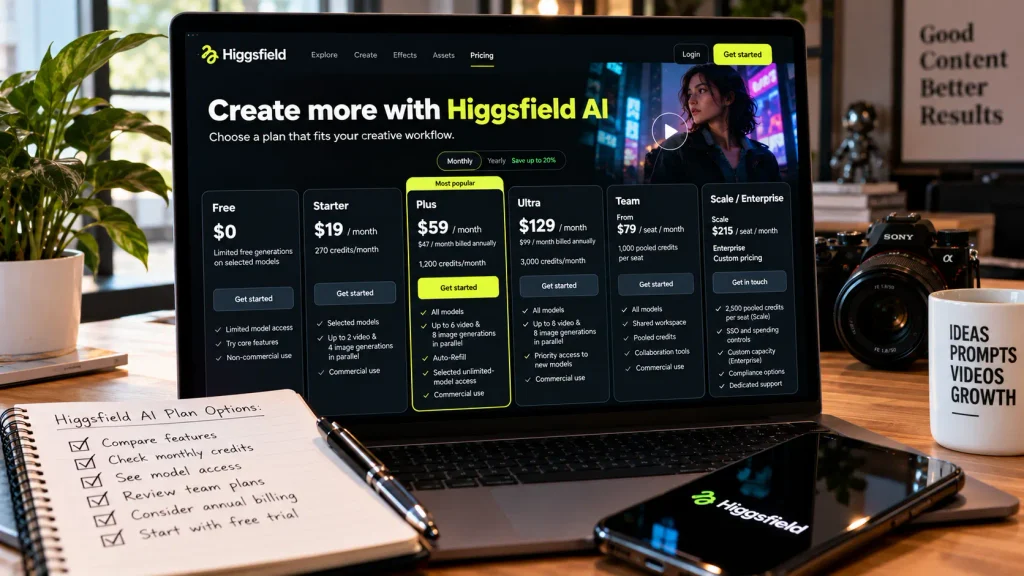
Higgsfield AI offers individual plans starting at $19/month for Starter, $59/month for Plus, and $129/month for Ultra, based on the current U.S. pricing information. Annual billing lowers Plus to $47/month and Ultra to $99/month. The plans differ in monthly credits, model access, and the number of generations you can run simultaneously.
There is no full-featured free subscription, but limited free generations are available. Prices and promotions can change, so check the official Higgsfield pricing page before subscribing.
| Plan | Price (US, Oct 2026) | Included Credits or Usage | Key Features | Best For |
| Free | $0 | No subscription credits; limited free generations on selected models | Limited model access; commercial use not included | Testing selected tools |
| Starter | $19/mo | 270 credits/mo | Selected models; up to 2 video and 4 image generations in parallel; commercial use | Beginners and light creators |
| Plus | $59/mo, or $47/mo billed annually | 1,200 credits/mo | All models; up to 6 video and 8 image generations in parallel; Auto-Refill and selected unlimited-model access | Regular short-form creators |
| Ultra | $129/mo, or $99/mo billed annually | 3,000 credits/mo; higher-credit options may be available | All models; up to 8 video and 8 image generations in parallel; priority access to new models | High-volume creators and small studios |
| Team | From $79/seat/mo; annual pricing may differ | 1,000 pooled credits per seat | Shared workspace, pooled credits, collaboration tools | Agencies and in-house teams |
| Scale / Enterprise | Scale: $215/seat/mo; Enterprise: custom | Scale: 2,500 pooled credits per seat; Enterprise: custom | Scale adds SSO and spending controls; Enterprise offers custom capacity and compliance options | Larger teams and organizations |
Billing notes: Subscriptions auto-renew. Upgrades take effect immediately with a prorated charge; downgrades begin at the next billing cycle. Individual subscription credits reset each billing cycle and generally do not roll over. Taxes may be added at checkout, depending on your location.
Sources: Official pricing page · Plan details · Upgrade and downgrade policy
Why the Higgsfield price you see may differ
Higgsfield says its pricing page is automatically adjusted for your country. Tier names come in pairs (Starter or Basic, Plus or Pro, Ultra or Max), and entry plans start from $9 a month in some regions.
That’s why a reader in Texas and one in the UK can see different plans on the same day, and why reviews online contradict each other.
Credits, rollover, Auto-Refill, and refunds
- No rollover. Subscription credits reset each billing cycle. Credit Pack and Auto-Refill credits last 90 days.
- Spending order. Subscription credits go first, then Credit Packs, then promo credits, then Auto-Refill.
- Auto-Refill. When your balance drops below 500 credits, Higgsfield charges your card at $1 per 20 credits, from $30 for 600 credits. Plus and above only.
- Canceling. Credits stay usable until the end of the paid period, then expire.
- Refunds. Only within 7 days of the initial purchase, and only if zero credits were used. Not even one paid test render. Higgsfield’s FAQ says refunds can carry a service fee of up to 6%, and renewals are non-refundable.
- Failed generations. Higgsfield refunds credits for generations that fail technically, usually within minutes.
Is there a free Higgsfield plan or trial?
Higgsfield has no ongoing free plan. New users in select countries get a one-time 10-credit grant valid for one day, and free output is watermarked. Some third-party reviews describe a 24-hour unlimited trial that needs a card and converts to a paid monthly plan unless you cancel. If you see that offer, set a reminder before you start generating.
What does one finished Higgsfield clip really cost?
The number that matters is cost per usable clip, not cost per credit. Higgsfield explains the calculation simply: real cost per clip = cost of one generation × average number of attempts. Every completed attempt can consume credits, even when you decide not to use the result.
Using the Plus prices listed above, $59 per month for 1,200 credits or $47 per month billed annually, one 8-second See-dance 2.5 clip at 1080p costs about $6.29 before retries.
Here’s the catch: not every take makes the final edit.
| Step | Plus, monthly | Plus, annual |
| Cost per credit | $59 ÷ 1,200 ≈ $0.049 | $47 ÷ 1,200 ≈ $0.039 |
| One Seedance 2.5 take, 1080p, 8 sec (128 credits) | ≈ $6.29 | ≈ $5.01 |
| If each keeper takes 3 attempts (assumption) | ≈ $18.88 | ≈ $15.04 |
| Keepers from 1,200 credits at that rate | About 3 | About 3 |
Three attempts per keeper is an editorial assumption, not a measured average. Your results may vary. Check the credit cost shown in Higgsfield before generating.
How to reduce the cost
- Draft at lower resolution. Higgsfield lists See-dance 2.5 at 24 credits for an 8-second 480p clip, 56 credits at 720p, and 128 credits at 1080p. Test the composition at a lower resolution before paying for the final render.
- Use Unlimited where available. Some plans include access to selected models without credit deductions during the eligible period. Check that the specific model is covered and that Unlimited is enabled.
- Storyboard first. Use Popcorn to identify composition problems before generating motion.
- Start with a strong still. A clear, well-lit product image gives image-to-video generation a more specific starting point.
At 128 credits per 1080p take, 1,200 credits buys about 9 attempts. At 24 credits per 480p take, the same balance buys 50 attempts. If you average three attempts per keeper, that works out to roughly 3 finished clips at 1080p or 16 at 480p, assuming each attempt uses the stated credits.
What are the pros and cons of Higgsfield AI?
Higgsfield AI’s biggest strengths are model choice, character consistency tools, and camera control in one subscription. Its biggest weaknesses are credit economics, strict refund rules, and a trust record that’s worth reading before you subscribe.
Pros
- A dozen-plus video and image models, including Kling 3.0, See-dance, and Veo 3.1, under one login and one credit balance.
- Soul ID keeps a character’s identity across sessions, which most single-model tools don’t package this way.
- Cinema Studio gives camera, lens, and genre controls before you generate.
- Commercial use isn’t tied to a specific plan, and no attribution is required (Terms of Use, Section 4.4).
- Plus includes 365-day Unlimited on a list of image models, on the website.
- Parallel generation (6 videos at once on Plus) speeds up batch work like ad variations.
Cons
- No credit rollover, and refunds only within 7 days with zero credits used.
- Premium video burns credits fast: one 1080p See-dance 2.5 take is about 72 credits, roughly a quarter of Starter’s monthly allowance.
- “Unlimited” doesn’t apply to MCP, CLI, Canvas, or Supercomputers.
- Consistency still breaks in complex scenes, by Higgsfield’s own account.
- Your content is used to train Higgsfield’s models unless you’re on an enterprise agreement.
- Trust history: Times of Central Asia reported a wave of subscription and refund complaints tied to “unlimited” promotions in early 2026, after which Higgsfield reinstated some accounts and issued refunds.
- Country-based pricing makes plan comparisons harder than they should be.
What is Higgsfield AI best for?
Higgsfield AI fits short-form, image-led work where you control the starting frame and need volume or a recurring character: product ads, Reels and Shorts, concept videos, and storyboards. It’s a weaker fit for long narrative pieces, exact product demonstrations, or anything that has to show real customers.
Reels, YouTube Shorts, and TikTok
Generate several 5- to 10-second vertical clips, then cut and caption them in CapCut. Parallel generation lets you test three or four hooks at once. You’re still assembling short clips, not generating a finished 60-second video.
Product ads and e-commerce
Image-to-video from your real product photo is the strongest use case, and Marketing Studio turns a product URL into ad drafts. Check every frame for warped logos. If the ad must show exactly how something works, like how a blender lid locks, film it.
Cinematic concepts and story-boarding
Higgsfield Popcorn costs around 1.5 credits per image, so an eight-frame storyboard costs approximately 12 credits. That makes it a relatively inexpensive way to pitch a visual concept, mood, and camera plan before booking a shoot. Storyboard frames are planning assets, not finished video footage, so budget separately for animation and final production.
Source: Higgsfield pricing · Official Popcorn guide
Marketing agencies and freelancers
Team plans pool credits and share Soul ID characters across members. For NDA work, remember only an enterprise agreement excludes your data from training.
Small businesses on a tight budget
Starter’s 270 credits stretch much further on images than on video. At Higgsfield’s listed 0.25 credits per Soul image, 270 credits covers about 1,000 images, or about three 1080p Sedance 2.5 takes.
If you mainly need a handful of product clips, test with free daily credits on Kling AI or Google Flow first, then decide whether Higgsfield’s extra tools are worth paying for.
When to film it for real instead
Customer testimonials, step-by-step how-tos, your actual staff or storefront, and anything where an AI person could be mistaken for a real customer. A phone and good window light beat a generated clip in all four cases.
How does Higgsfield AI compare to Runway, Kling AI, and Google Veo?
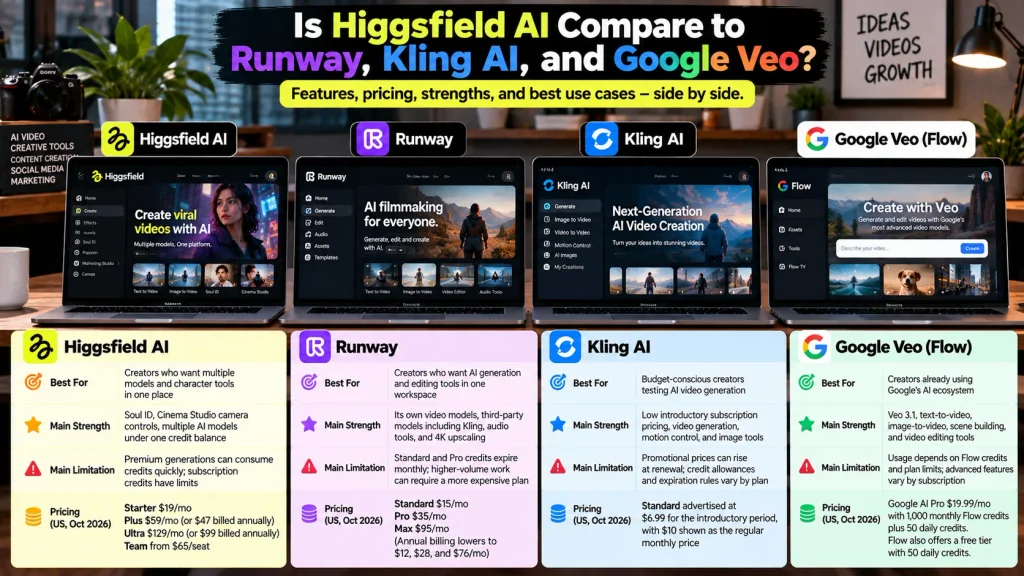
Higgsfield AI is a strong option for creators who want multiple video models and character tools in one subscription. Runway combines AI generation with creative editing tools and third-party models. Kling AI offers relatively low introductory pricing, while Google Veo through Flow suits creators who want Google’s video models within its AI ecosystem.
| Tool | Best For | Main Strength | Main Limitation | Pricing (US, Oct 2026) |
| Higgsfield AI | Creators who want multiple models and character tools in one place | Soul ID, Cinema Studio camera controls, multiple AI models under one credit balance | Premium generations can consume credits quickly; subscription credits have limits | Starter $19/mo; Plus $59/mo or $47 billed annually; Ultra $129/mo or $99 billed annually; Team from $65/seat |
| Runway | Creators who want AI generation and editing tools in one workspace | Its own video models, third-party models including Kling, audio tools, and 4K upscaling | Standard and Pro credits expire monthly; higher-volume work can require a more expensive plan | Standard $15/mo, Pro $35/mo, Max $95/mo; annual billing lowers these to $12, $28, and $76/mo |
| Kling AI | Budget-conscious creators testing AI video generation | Low introductory subscription pricing, video generation, motion control, and image tools | Promotional prices can rise at renewal; credit allowances and expiration rules vary by plan | Standard advertised at $6.99 for the introductory period, with $10 shown as the regular monthly price |
| Google Veo via Flow | Creators already using Google’s AI ecosystem | Veo 3.1, text-to-video, image-to-video, scene building, and video editing tools | Usage depends on Flow credits and plan limits; advanced features vary by subscription | Google AI Pro $19.99/mo with 1,000 monthly Flow credits plus 50 daily credits; Flow also offers a free tier with 50 daily credits |
For the latest details, check the official pricing pages: Higgsfield, Runway, Kling AI, and Google Flow.
Higgsfield AI vs Runway and Kling AI
Higgsfield AI vs Runway comes down to workflow: Higgsfield for model choice and consistent characters, Runway for generating and editing in one app. Higgsfield AI vs Kling AI is simpler. If Kling alone covers your work, its free daily credits make Higgsfield hard to justify.
What happened to OpenAI Sora?
OpenAI discontinued the Sora app and website on April 26, 2026, followed by the Sora API on September 24, 2026, according to its official Help Center.
That means Sora is no longer a working alternative for AI video generation. Higgsfield’s October 2026 API migration guide also confirms that Sora 2 is no longer available in its model lineup. If another platform still lists Sora 2, verify that it actually generates video before counting it as a usable feature.
Who should use Higgsfield AI, and who should skip it?
Higgsfield AI suits people who publish short videos every week and want several models and recurring characters in one place. It’s a poor fit for occasional users and anyone whose budget can’t absorb retries.
- Beginners: Usable, but learn prompting on free credits elsewhere first; retries cost money here.
- Experienced AI creators: The best fit for model switching, Cinema Studio, and parallel generation.
- Social media marketers: Good for hook tests and product clips you finish in an editor.
- Freelance video creators: Worth it for client concepts; read the training terms before uploading client assets.
- E-commerce businesses: Strong for image-to-video product shots.
- Marketing agencies: Team plans fit, and enterprise terms solve the training question.
- Professional filmmakers: Useful for previs and pitches; test delivery quality and duration yourself.
- Strict budgets: Skip for now, or use Starter for images only.
Can you use Higgsfield AI videos commercially?
Yes. Under Section 4.4 of Higgsfield’s Terms of Use, Higgsfield doesn’t claim ownership of your inputs or outputs and doesn’t restrict commercial use, and those rights aren’t tied to a specific plan or conditioned on attribution.
Here’s the thing, though: you can run a Higgsfield clip in a paid Meta ad tomorrow. Whether you can stop a competitor from reusing that same clip is a separate question, covered below.
What Higgsfield’s Terms give the company
- Section 4.3 grants Higgsfield a non-exclusive, royalty-free license to host and process your content to run the service.
- Section 4.4 lets Higgsfield train its models on your content. Deleting content or your account stops future use, but content already in trained models can’t be removed.
- Other users may generate similar outputs, so there’s no exclusivity.
- An enterprise agreement can exclude your data from training.
Higgsfield updated these Terms on July 25, 2026, effective August 27, 2026 for existing users, after public backlash over an earlier, broader license.
One conflict to flag: a competitor’s review says Higgsfield’s free tier excludes commercial use, while Higgsfield’s Help Center says rights aren’t plan-tied but free output is watermarked. Either way, don’t publish free-tier output commercially.
Privacy checklist for client and brand work
- Don’t upload unreleased product photos or confidential concepts unless the client accepts the training terms, or you’re on an enterprise agreement.
- Get written consent before building a Soul ID from anyone’s face.
- Deleted content becomes inaccessible right away and stays recoverable for 30 days, per Higgsfield.
Copyright, likeness, and US advertising rules
- AI copyright: The U.S. Copyright Office’s January 2025 report says AI-generated material can qualify for copyright protection when a human author contributes sufficient expressive elements. Prompts alone generally aren’t enough. Purely AI-generated footage may therefore lack copyright protection on its own, limiting your ability to prevent others from reusing it. Official report
- Fake testimonials: The FTC’s 2024 rule prohibits fake consumer reviews and testimonials, including AI-generated ones that falsely imply a real person exists or actually used a product or service. Don’t present an AI-generated character as a real customer sharing a genuine experience. FTC rule overview
- Likeness and legal review: Get appropriate permission before using a real person’s likeness, especially in commercial campaigns. For paid advertising, client agreements, or complex rights questions, consult a qualified lawyer.
This is general information, not legal advice.
Which AI video tool fits your priority?
| If your priority is… | Consider first | Why |
| Cinematic shots with deliberate camera moves | Higgsfield AI or Runway | Higgsfield exposes lens and camera controls before generation; Runway pairs generation with a full editor. Test both on your own shot. |
| Image-to-video product shots | Higgsfield AI or Kling AI | Both handle image-to-video well; Higgsfield lets you switch models per shot, Kling is cheaper per test. |
| A recurring character in social ads | Higgsfield AI | Soul ID is built to keep one identity across sessions. |
| Learning as a beginner | Kling AI or Google Flow | Free daily credits let you practice prompting without spending. |
| Lowest cost to test | Kling AI or Google Flow | Kling gives 66 free credits a day; Flow gives 50. |
| Generation and editing in one app | Runway | Its editing suite sits next to its generation tools. |
What I’d do if I were starting with Higgsfield today
- Spend one week on Kling AI’s or Google Flow’s free daily credits to learn prompting at zero cost.
- Write down the one job you’re hiring the tool for, like “eight product clips a month.”
- Buy Plus on monthly billing for the first cycle. Annual locks you in, and the refund window effectively closes once you use a credit.
- Draft on fast or low-resolution variants, and render 1080p only for the takes you’ll publish.
- Use Credits Usage History to log credits per finished clip, then compare your 30-day cost per clip against a freelancer’s quote.
- Decide before renewal, not after.
FAQ
What is Higgsfield AI used for?
Higgsfield AI is used to generate short AI videos and images from text prompts or reference photos, mostly for social content, product ads, and cinematic concept clips. It bundles models like Kling, See-dance, and Google Veo with its own tools for camera control (Cinema Studio), consistent characters (Soul ID), and lipsync (Speak).
Is Higgsfield AI free?
No, Higgsfield AI has no ongoing free plan as of October 2026. New users in select countries get a one-time 10-credit grant valid for one day, and free output carries a watermark. Some promotions offer a short trial that requires a card, so check whether it converts to a paid plan automatically.
How much does Higgsfield AI cost in 2026?
Higgsfield AI’s US pricing in October 2026 was $19 a month for Starter (270 credits), $59 a month or $47 billed annually for Plus (1,200 credits), and $129 a month or $99 billed annually for Ultra (3,000 credits). Team plans are priced per seat. Prices adjust by country, so confirm on Higgsfield’s pricing page before you buy.
Is Higgsfield AI worth it?
Higgsfield AI is worth it if you produce short-form video regularly and want many models and consistent characters in one place. It’s harder to justify for occasional use, because credits don’t roll over and premium video models can cost several dollars per attempt. Practice on free credits elsewhere, then try one monthly cycle of Plus before committing to annual billing.
Can you use Higgsfield AI videos commercially?
Yes. Section 4.4 of Higgsfield’s Terms of Use says Higgsfield doesn’t claim ownership of your outputs and doesn’t restrict commercial use, with no attribution required. Higgsfield can still use your content to train its models unless you’re on an enterprise agreement, and you remain responsible for copyright, likeness, and ad-disclosure rules.
Is Higgsfield AI better than Runway or Kling AI?
Higgsfield AI isn’t better across the board; each tool fits a different job. Higgsfield offers the widest model choice plus Soul ID, Runway pairs generation with a full editing suite, and Kling AI is the cheapest place to start with free daily credits. Because Runway and Higgsfield both offer Kling models, the choice often comes down to workflow rather than raw quality.
Can beginners use Higgsfield AI without video editing experience?
Yes, beginners can generate clips in Higgsfield AI with a prompt or a photo and no editing skills. You’ll still want a basic editor like CapCut to join clips, add captions, and export at 9:16. The bigger learning curve is managing credits: three tries at one 1080p See-dance 2.5 shot use about 216 credits.
Higgsfield AI Review 2026: The Bottom Line
Higgsfield AI makes the most sense for US creators, e-commerce brands, and small agencies who publish short videos every week and want Kling, See-dance, Veo, and a recurring character under one login. Its real strengths are Soul ID, Cinema Studio’s camera controls, and the image Unlimited on Plus.
The weak spots are just as specific: no credit rollover, a refund window that closes the moment you spend one credit, training on your content by default, and an early-2026 billing controversy. Weigh both lists before trusting any Higgsfield AI Review 2026, this one included.
Your next step: run 30 days of cost-per-clip math against Kling AI’s free credits, then open Higgsfield’s pricing page from a US connection and check the exact price at checkout.