FluxGrowth is reader-supported. Some links in our guides are affiliate links — if you buy through one we may earn a commission, at no extra cost to you. It never changes which tools we recommend. How we test tools.
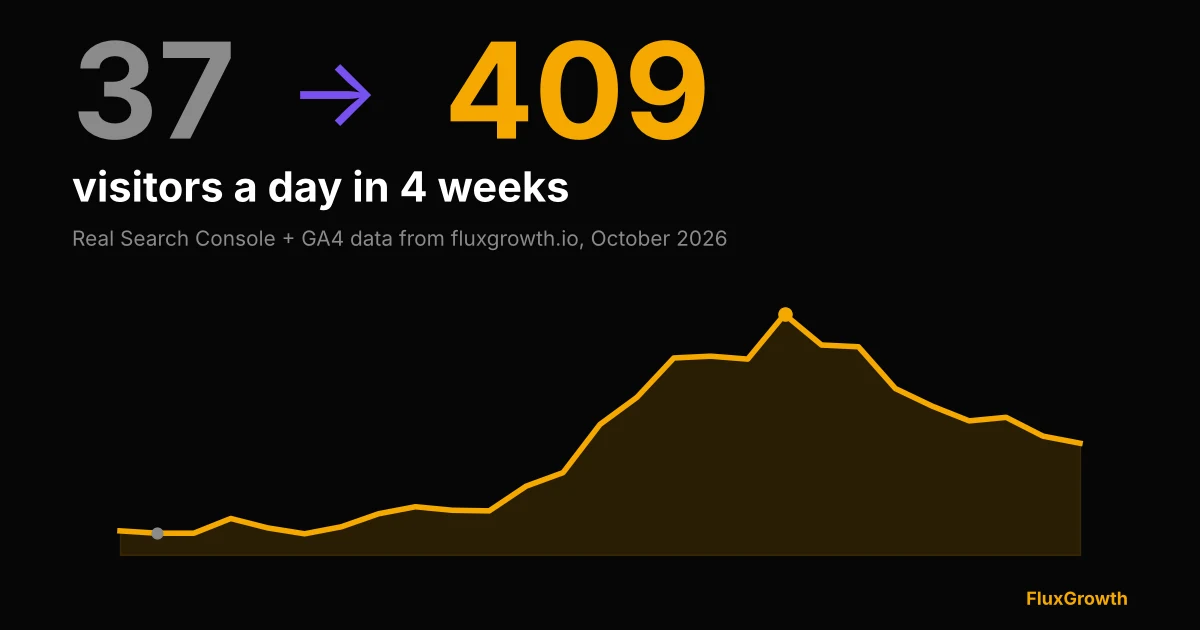
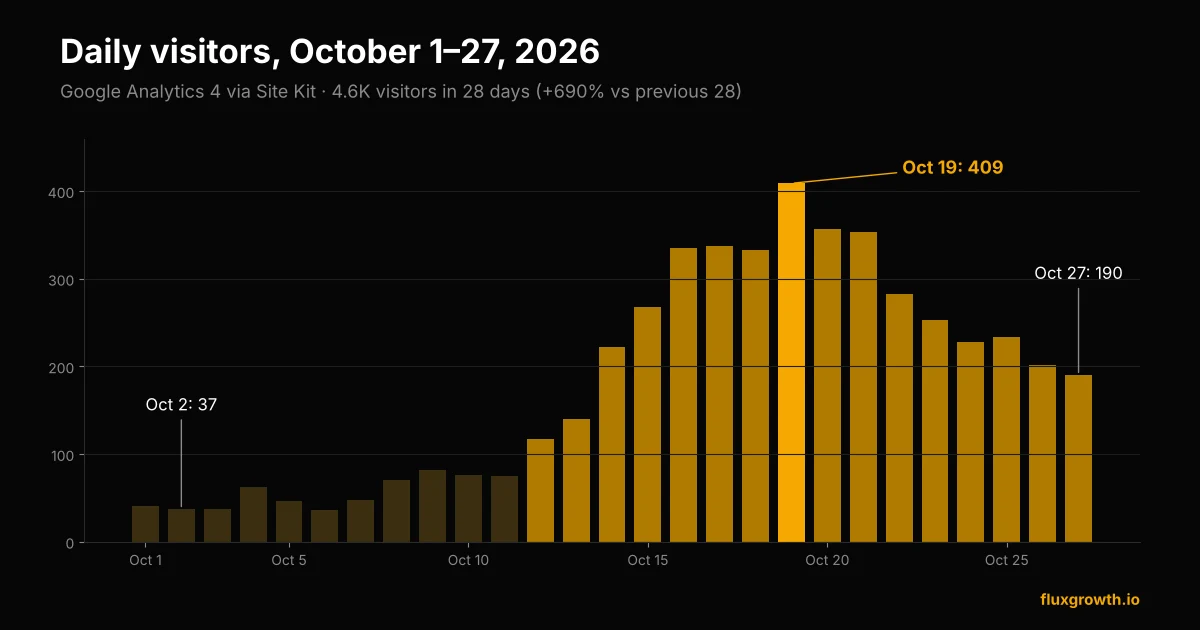
On October 2, 2026, FluxGrowth had 37 visitors. Seventeen days later, on October 19, it had 409. No backlinks, no viral post, no paid ads. One page moved from “sort of ranking” to the top of Google for a handful of searches, and it pulled the whole site up with it. That’s this website traffic case study in one paragraph.
What follows is the full breakdown, with the actual Search Console and Google Analytics numbers. Including the part most traffic case studies quietly leave out: the line is going back down.
Key takeaways
- Daily visitors went from 37 (Oct 2, 2026) to 409 (Oct 19, 2026), with no backlinks or ads.
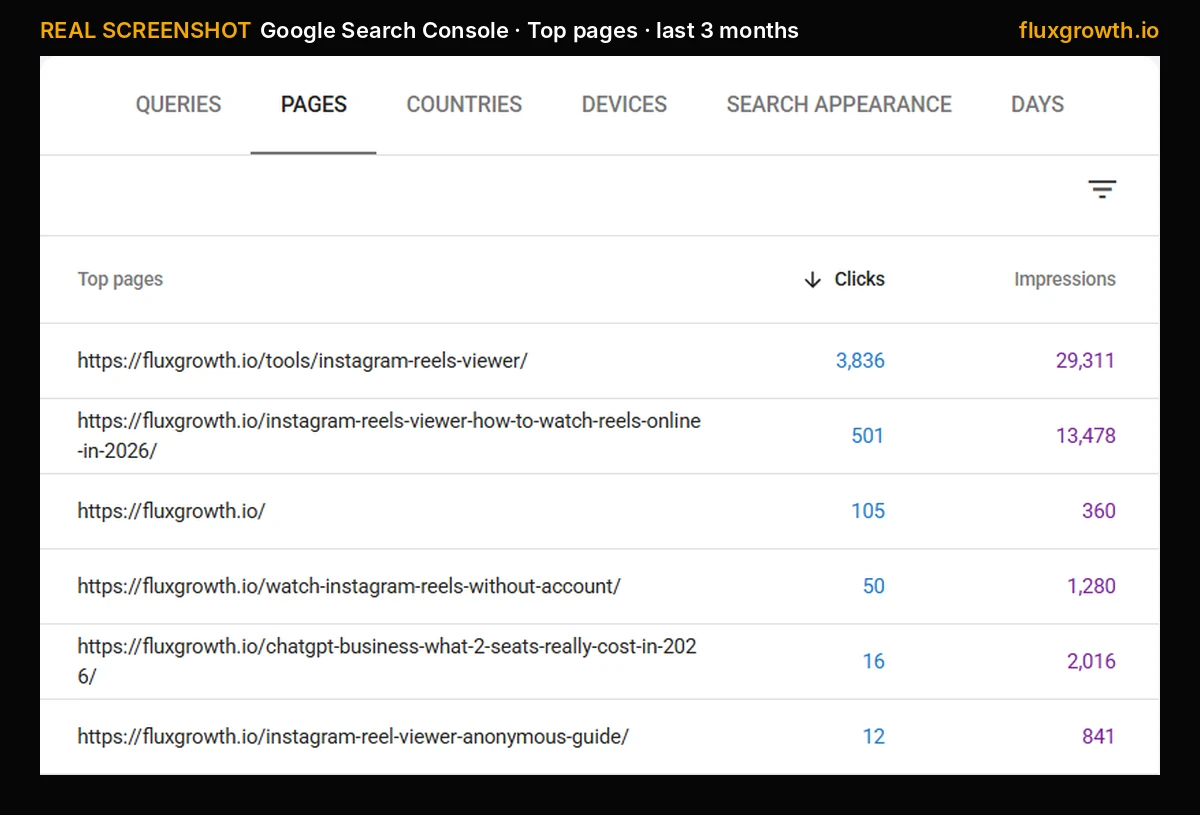
- 98% of Google clicks in that stretch went to one free tool page: an Instagram Reels viewer.
- The biggest fix was giving one search intent one URL: a corrected canonical tag, redirected duplicates, and the tool removed from a competing article.
- Traffic has since dropped to 190 a day because average position slipped from 3.2 to 4.9, not because fewer people searched.
The numbers behind this website traffic case study
Everything below comes from Site Kit by Google on my WordPress dashboard, which pulls from Search Console and GA4. Date range: the 28 days ending October 27, 2026, compared to the 28 days before that.
| Metric | Last 28 days | Change vs previous 28 |
|---|---|---|
| Visitors (GA4) | 4.6K | +690% |
| Google Search clicks | 4.0K | +1,150% |
| Google Search impressions | 50K | +261% |
| Lowest day | 36 visitors (Oct 6) | — |
| Best day | 409 visitors (Oct 19) | — |
| Latest full day | 190 visitors (Oct 27) | — |
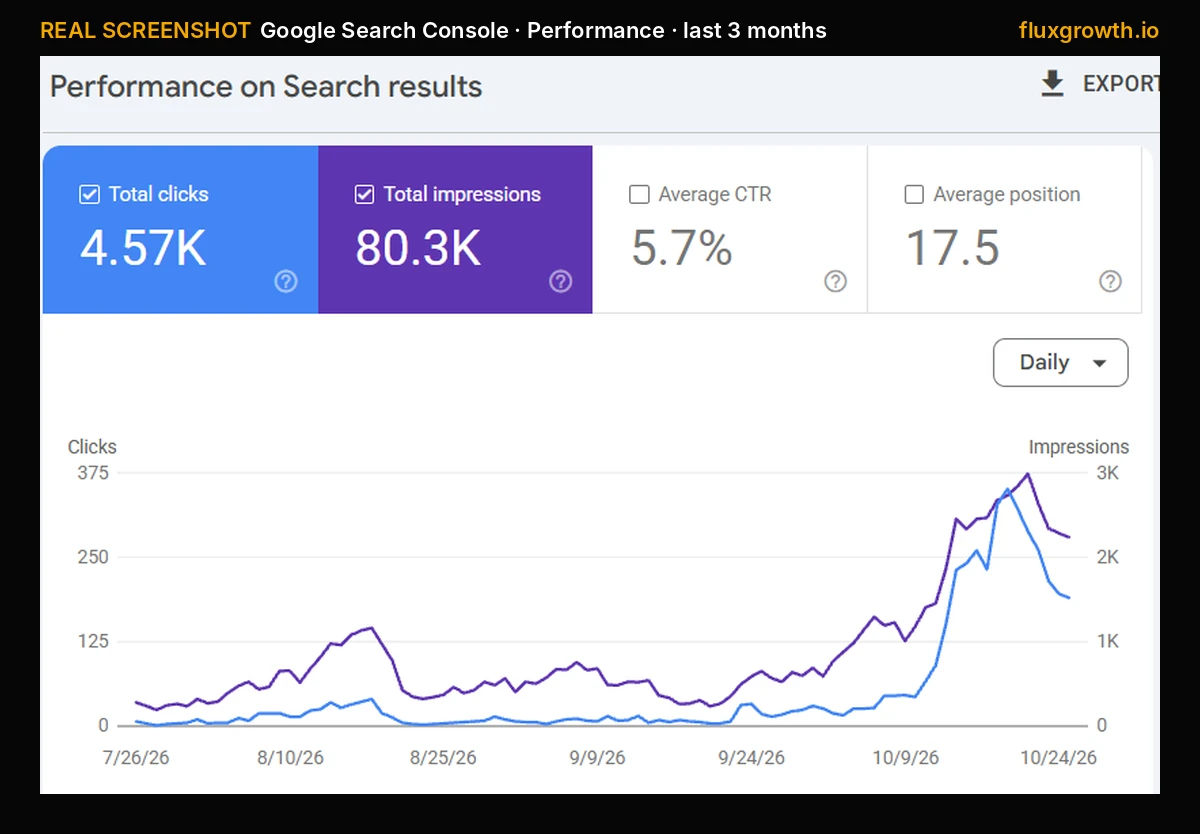
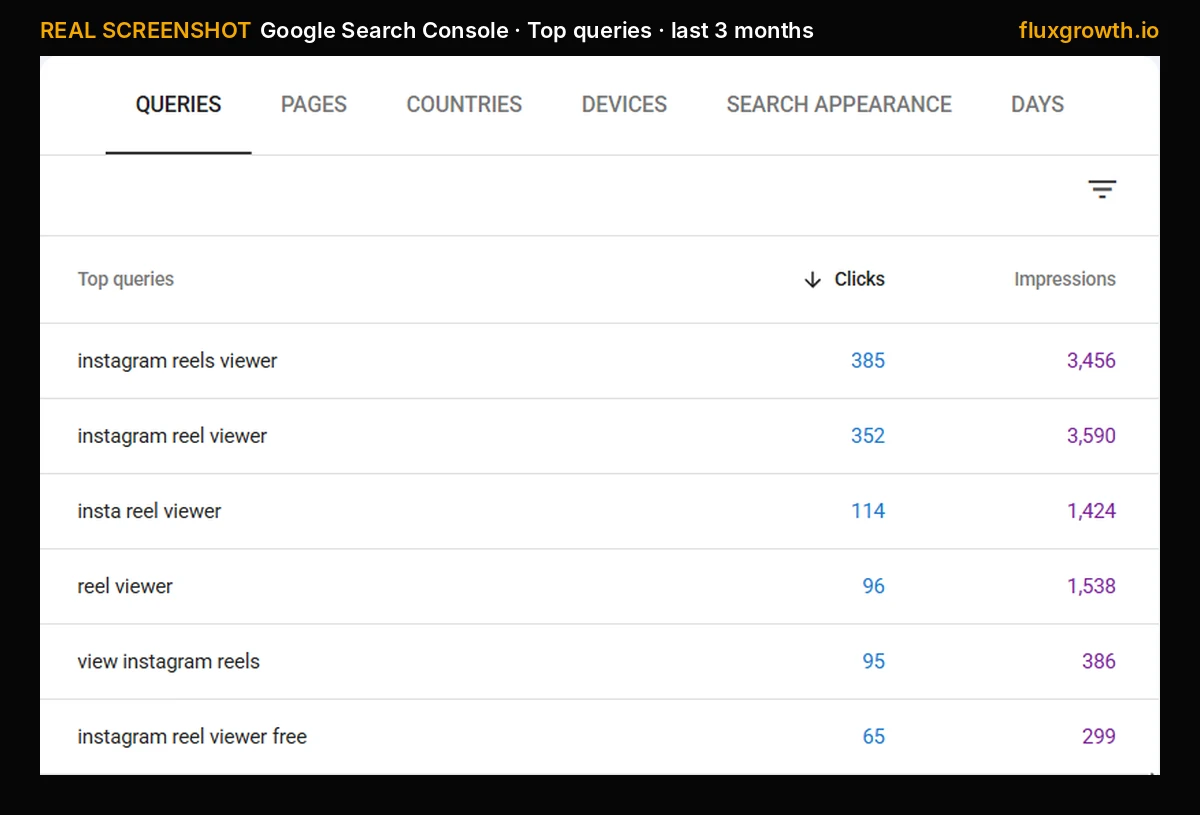
Don’t want to take my word for it? Here’s the raw Search Console view over the last three months. Look at the right edge.
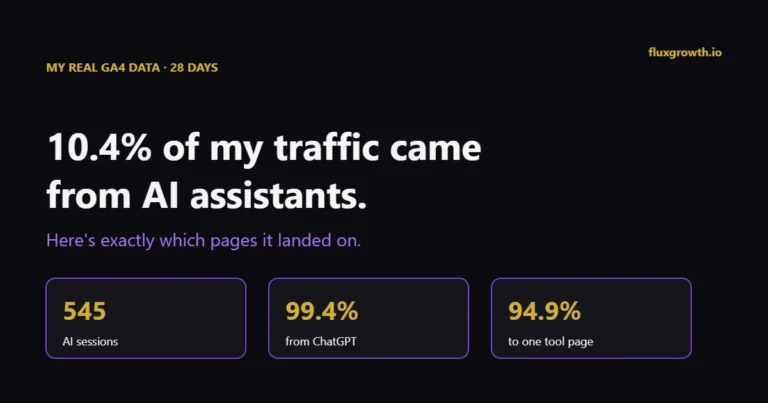
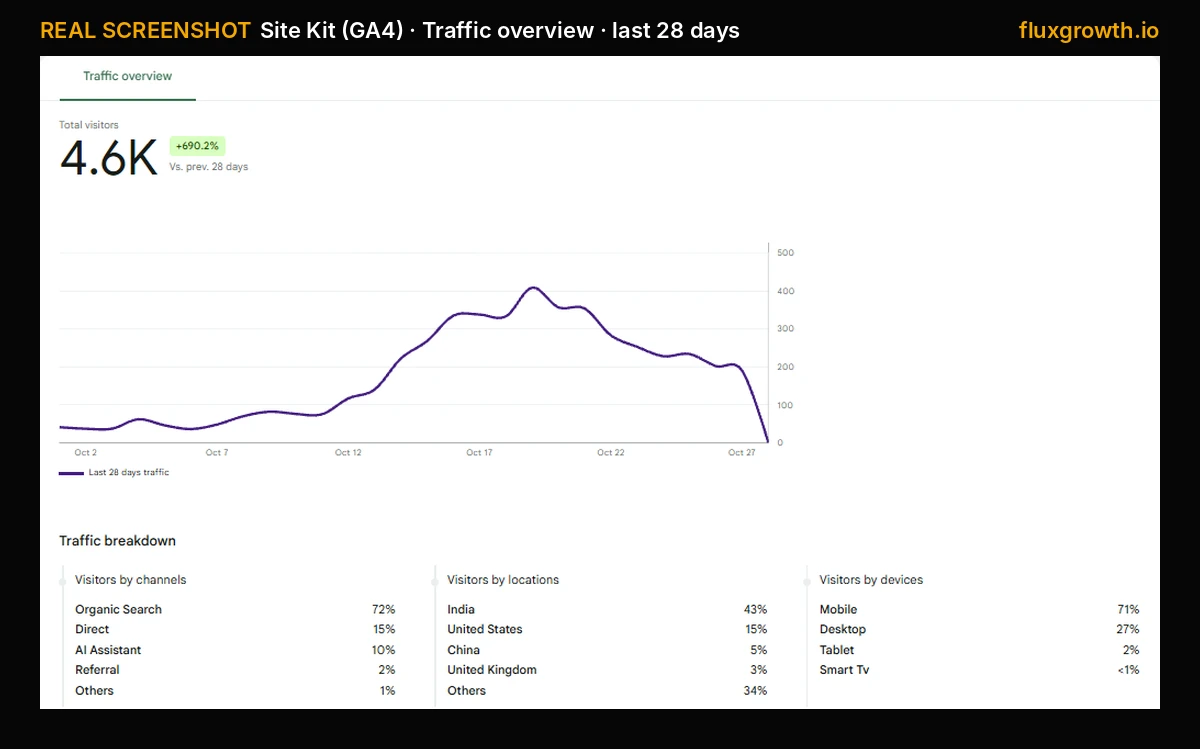
Where the visitors came from: 72% organic search, 15% direct, 10% AI assistants, 2% referral. That AI assistant slice surprised me. One in ten visitors arrived from a chatbot answer, not a Google results page. (If that’s new to you, here’s how to get found in ChatGPT and Perplexity.)
And 71% were on mobile. Keep that in mind; it matters later.
One page did 98% of the work
I’d love to tell you my whole content strategy kicked in at once. It didn’t. If there’s one lesson in this website traffic case study, it’s how lopsided the growth was.
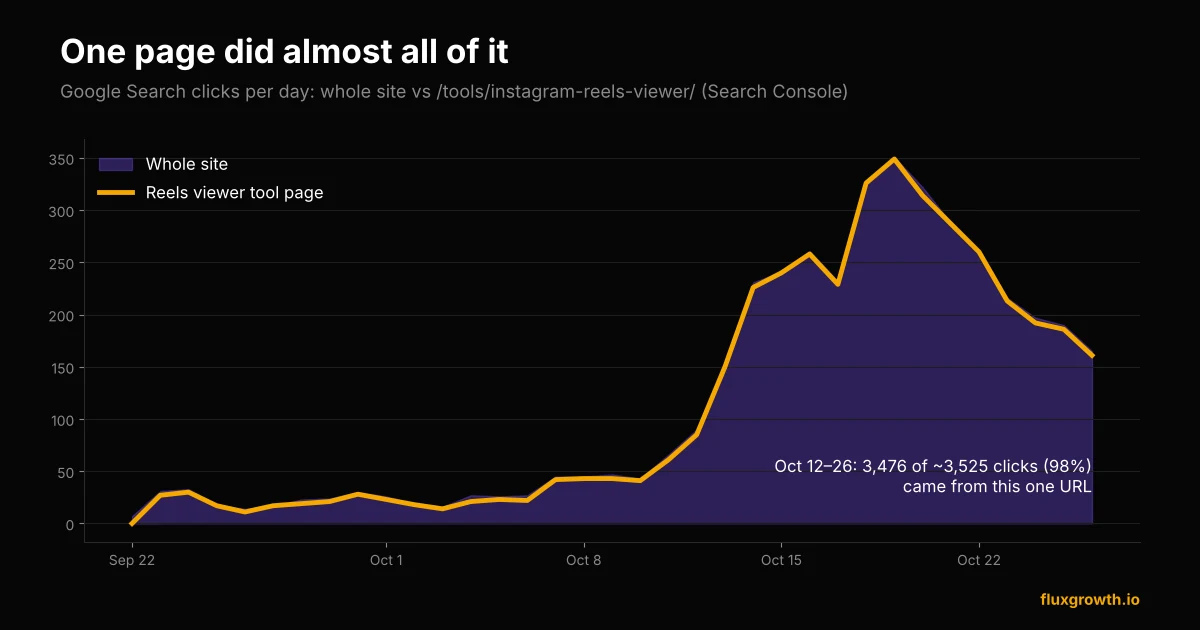
Between October 12 and October 26, the site picked up about 3,525 clicks from Google Search. 3,476 of them landed on a single URL: my free Instagram Reels viewer. Every other page on the site, combined, brought in roughly 50 clicks over those two weeks.
What the page actually is
It’s a small browser tool. You paste a public Reel link and watch it without opening the Instagram app. That’s it. There’s no sign-up, no download, and nothing clever on the server. It runs in the visitor’s browser and costs me nothing to host.
The queries that sent the traffic
Here are the top searches from Search Console for October 12–26. Notice, though, how boring they are. These aren’t clever long-tail phrases. They’re people typing exactly what they want.
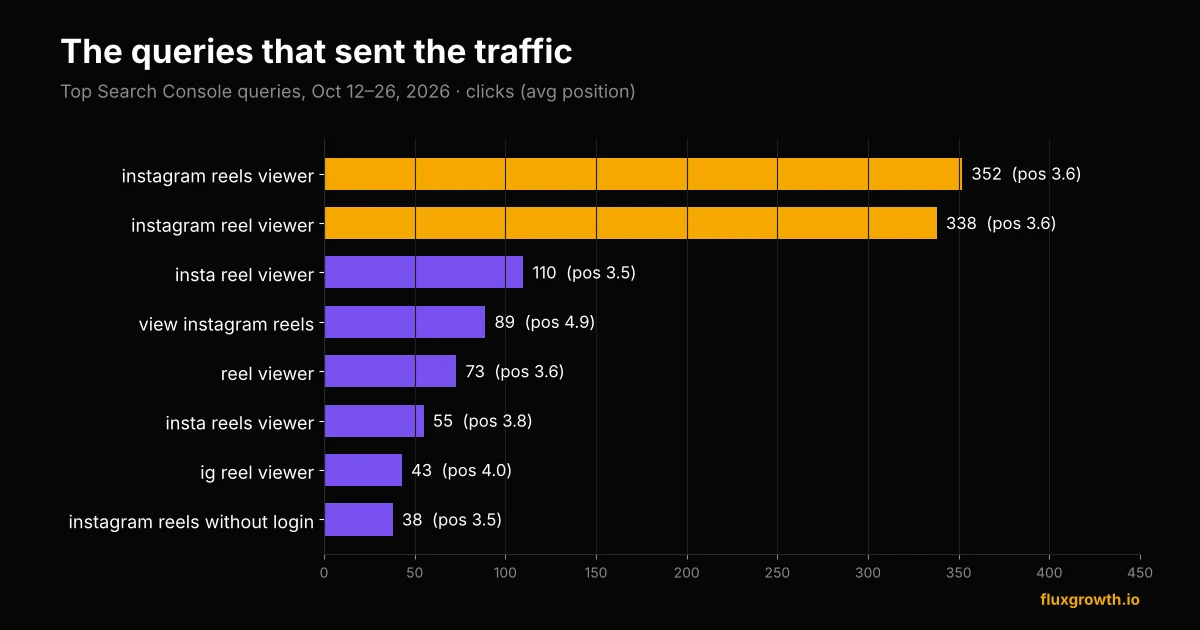
“instagram reels viewer” sent 352 clicks at an average position of 3.6. “instagram reel viewer” (singular) sent 338 from 3,421 impressions. Then a long tail of variations: insta reel viewer, ig reel viewer, reels viewer, view instagram reel by link. Every one of them sits between position 3 and 5.
Before vs after, same page
| /tools/instagram-reels-viewer/ | Sep 14–28 | Oct 12–26 |
|---|---|---|
| Clicks | 121 | 3,476 |
| Impressions | 1,005 | 26,922 |
| Average position | 6.0 | 3.7 |
In other words, clicks went up roughly 29x. Impressions went up about 27x. Position improved by a bit more than two spots. That last number is the one that explains the other two.
What I actually changed (the timeline)
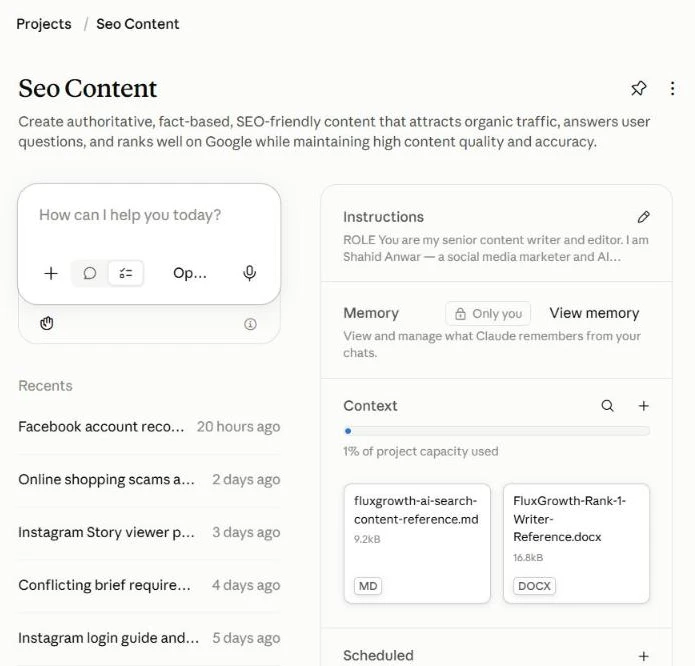
Quick context: I run FluxGrowth solo, and I use Claude as my SEO assistant. It pulls the Search Console data through Site Kit, flags problems, and ships fixes to WordPress when I approve them. So every change below is logged with a date. Here’s what touched this page.
Mid-September: I stopped the page from pointing away from itself
Frankly, This one is embarrassing. The tool page had a canonical tag pointing at my older Reels article. In plain English, I was telling Google, “don’t rank this page, rank the other one.” So it didn’t.
On September 16, I cleared it and made the tool page self-canonical. The first impressions show up in Search Console on September 22. The next day it got 27 clicks.
Mid-September: I killed the duplicates
I had four URLs chasing the same “watch Reels” intent: the tool, the main how-to article, and two newer posts I’d written in early September. One of them was splitting 65 search queries with the main article. I moved their unique FAQ answers into the main article, 301-redirected both, and set them to draft so they’d stop appearing in my own archive pages.
October 2: one intent, one URL
This is the change I’d point to if I had to pick one. For a while I had embedded the same viewer widget inside the Reels how-to article too. Two pages, both offering the tool, both competing for “instagram reel viewer.”
On October 2, I pulled the widget out of the article. It became a straight how-to and privacy guide with a box that says “use the tool here” and links to the tool page. The tool page became the only place on the site where you can actually do the thing people are searching to do.
Then, five days later on October 7, the tool page went from the low 20s to 42 clicks a day. Four days after that, it started climbing hard.
The supporting stuff (smaller, but it adds up)
- Built a proper Free Tools hub and put “Free Tools” in the main menu, so every page on the site links to it.
- Added two related tools, a Reels script generator and an Instagram caption generator, which cross-link back to the viewer.
- Linked to the tool from my Social Growth hub.
- Converted images to WebP and delayed ad scripts until the first tap, so the page loads fast on phones.
That last point is the mobile thing I mentioned. On mobile, the page converted 11.2% of impressions into clicks. On desktop, 5.2%. Most of the people searching for a Reels viewer are on their phone, often because they don’t want to open Instagram. The page has to work instantly there.
Why I think it worked
I want to be careful here. Yes, I can see what I changed and what happened after. But nobody outside Google can see inside it. So treat this as my best reading of the data, not a formula.
The page matched the intent exactly
Someone searching “instagram reel viewer” doesn’t want 2,000 words on how Reels work. They want a box to paste a link into. The article was answering a question. The tool was doing the job. Once there was only one page doing the job, Google seemed to figure out which one to show.
Google tested it on bigger queries, and it held
Look at the impressions. Between October 11 and October 14, daily impressions on the tool page went from 576 to 1,817. That’s not more people searching. That’s Google showing my page for searches it wasn’t showing it for before, mainly the head terms.
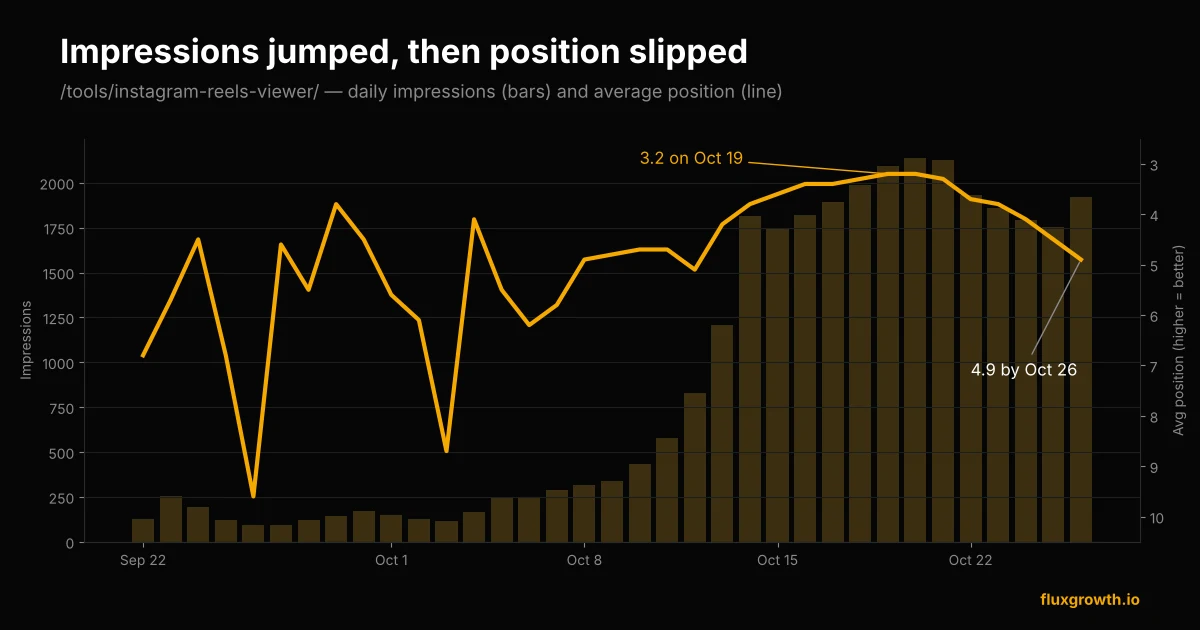
As a result, position kept improving after that, from 4.7 on October 11 to 3.2 on October 19. Clicks followed, peaking at 349 to that one page on October 19.
A small site can win a tool query
FluxGrowth has basically no backlinks. I can’t outrank big publishers on “best AI tools.” But on a query where the answer is a working tool, a small site with a fast, focused page has a real shot. That’s the most useful thing I’ve learned all year.
The part no website traffic case study shows: the drop
Since October 19, daily visitors went 409, 357, 354, 283, 253, 228, 234, 202, 190. Search clicks to the tool page fell from 349 to 161 by October 26.
Here’s the interesting bit, though. Impressions didn’t fall. They stayed around 1,750–1,950 a day. What fell was position, from 3.2 to 4.9. Same demand, slightly lower spot on the page, a lot fewer clicks. On a results page with Reels-viewer competitors stacked on top of each other, dropping from 3 to 5 is a big deal.
What I’m reading into it
- It’s not over. 190 visitors a day is still five times where I started the month.
- But it’s fragile. 98% of search clicks from one URL is a single point of failure. If that page drops another few spots, the site goes back to 40 a day.
- Still, it’s a signal, not a fluke. The same pattern (one focused tool, one intent, one URL) should work for other small tools.
How to copy this website traffic case study on your own site
So if you run a small blog and want your own version of this website traffic case study, here’s the checklist I’d follow. All of it can be done with free tools.
1. Find a query where the answer is a tool
Open the Search Console Performance report, sort queries by impressions, and look for words like viewer, generator, checker, calculator, converter. If you’re getting impressions for those with an article, you’re probably leaving clicks on the table.
2. Build the smallest version that works
Mine is a small chunk of JavaScript on a WordPress page. No backend. Put the tool above the fold, then add short supporting content and an FAQ below it.
3. Give that intent exactly one URL
Check your canonical tags. Redirect or merge duplicates. If an article covers the same topic, turn it into a supporting guide that links to the tool instead of competing with it.
4. Link to it from everywhere it makes sense
For example: the menu, a tools hub, related articles, related tools. Internal links are the one ranking lever a site with no backlinks fully controls.
5. Watch position, not just clicks
If you install Site Kit, you get Search Console and GA4 inside WordPress. When clicks drop, check whether impressions dropped too. If they didn’t, you have a ranking problem, not a demand problem, and that changes what you fix.
FAQ
How long did it take to see results?
The tool page got its first Search Console impressions six days after I fixed its canonical tag. The big jump came about nine days after I consolidated the Reels intent onto one URL on October 2. From the lowest day to the peak took 17 days.
Did you build any backlinks?
No. Every change was on my own site: canonical tags, redirects, internal links, page speed, and the tool itself.
Is 409 visitors a day still the number?
No. That was the peak on October 19. By October 27 it was 190 a day, because the tool page’s average position slipped from 3.2 to 4.9. I’ll update this post as it changes.
Where did the visitors come from?
GA4 shows India at 43% of visitors and the US at 15%, then China and the UK. Search Console clicks for October 12–26 were led by India (1,057), the US (281), the UK (89) and Canada (56).
Can a free tool page really outrank big sites?
On tool-intent searches, it can. Google seems to reward the page that does what the searcher wants fastest. Mine sat at an average position of 3.7 for two weeks with no backlinks behind it.
The takeaway
The short version of this website traffic case study: my site went from 37 to 409 visitors a day in under three weeks, and the real Search Console data says it was one page, one intent, one URL. No hacks. The fix that mattered most was deleting my own competition.
Your next step: open Search Console today and look for a “viewer,” “generator” or “checker” query you’re getting impressions for. That’s your page. If you want to see what mine looks like, try the Reels viewer here.