FluxGrowth is reader-supported. Some links in our guides are affiliate links — if you buy through one we may earn a commission, at no extra cost to you. It never changes which tools we recommend. How we test tools.
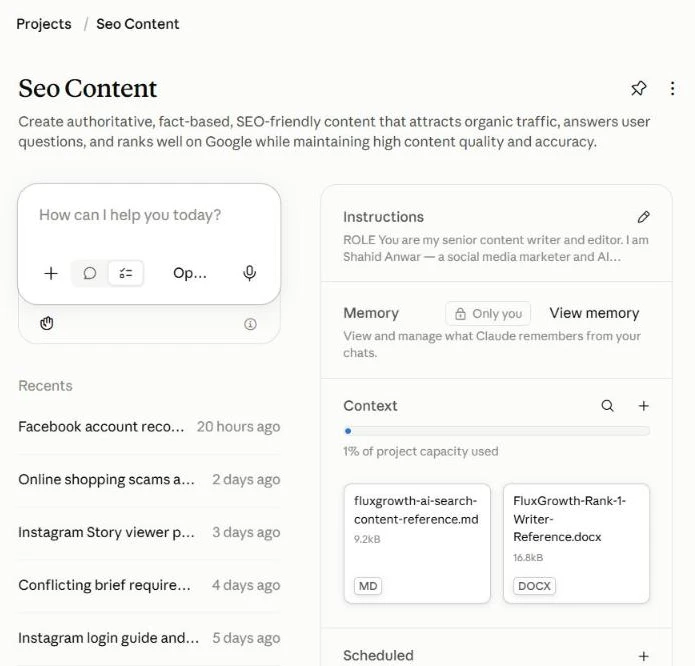
Every article on FluxGrowth starts the same way. Not with a blank Google Doc, and not with a “write me a blog post about X” prompt. It starts inside one Claude Project called Seo Content, with a keyword I already pulled from Ubersuggest. Figuring out how to use Claude Projects this way is the biggest upgrade I’ve made to my content process.
If you’ve wondered how to use Claude Projects for real SEO work (not just one-off chats), this is the full setup. The instructions I wrote, the exact prompts I paste, the reference files I uploaded, the keyword research I do first, and the five stages every article goes through before it hits WordPress.
Fair warning: it’s slower than one-shot AI writing. That’s the point.
Transparency note: I drafted this article inside the same Claude Project it describes.
Quick answer: To use Claude Projects for SEO content, create one Project for your blog, write custom instructions (audience, voice, banned AI phrases, a no-invented-stats rule), upload your SEO checklist and best articles as project knowledge, then start every article as a new chat with keyword data from a tool like Ubersuggest. Make Claude work in stages: questions, research, outline, draft, self-audit.
What’s in this guide
- Why I Stopped Writing in Regular Claude Chats
- Step 1: Find the Keyword in Ubersuggest First
- Step 2: The Instructions That Run My Seo Content Project
- Step 3: The Reference Files I Uploaded
- Step 4: How to Use Claude Projects in 5 Gated Stages
- The Exact Prompts I Use (Copy Them)
- Step 5: From Claude to WordPress
- Did It Work? My Real Traffic Numbers
- Mistakes I Made Early On
- FAQ
- How to Use Claude Projects Starting Tonight
Why I Stopped Writing in Regular Claude Chats
A normal chat forgets everything the moment you open a new one. So every article meant re-explaining my audience, my voice, my banned words, my formatting rules. Ten minutes of setup before a single useful sentence.
And the output drifted. One article sounded like me. The next sounded like a LinkedIn bot. (If you’re still deciding which assistant to build this around, my ChatGPT vs Claude comparison covers why I landed on Claude for long-form writing.)
What a Claude Project actually is
A Project is a workspace inside Claude with two things attached to it: custom instructions and project knowledge (files you upload). Every chat you start inside that Project inherits both, automatically.
According to Anthropic’s help center, Projects are available on every plan, free included, though free accounts are capped at five Projects. On paid plans (Pro, Max, Team, Enterprise), Claude switches to retrieval (RAG) when your files get close to the context limit, which Anthropic says can expand capacity “by up to 10x.”
Why that matters for SEO
SEO content lives or dies on consistency. Same audience. Same voice. Same on-page rules, article after article. A Project gives you that without retyping a 600-word brief every morning.
Step 1: Find the Keyword in Ubersuggest First
I never open Claude without a keyword. Claude is great at writing. It is not a keyword database, and it shouldn’t guess search volume.
So the first tab I open is Ubersuggest.
What I look at for every keyword
For each seed keyword, Ubersuggest gives me four numbers that decide whether the topic is worth an article:
- Search volume — monthly searches in the target country (I keep it on United States, since that’s most of my audience)
- SD (SEO difficulty) — how hard it is to rank organically, on a 0–100 scale
- CPC — what advertisers pay per click, which tells me if the traffic has commercial value
- Search intent — informational, commercial, transactional, or navigational
Then I scroll the keyword ideas list for long-tail variations and question keywords. Those become H2s, H3s, and FAQ entries later.
A real example: this article
Here’s the exact research I ran for the post you’re reading, pulled from Ubersuggest’s US database in October 2026:
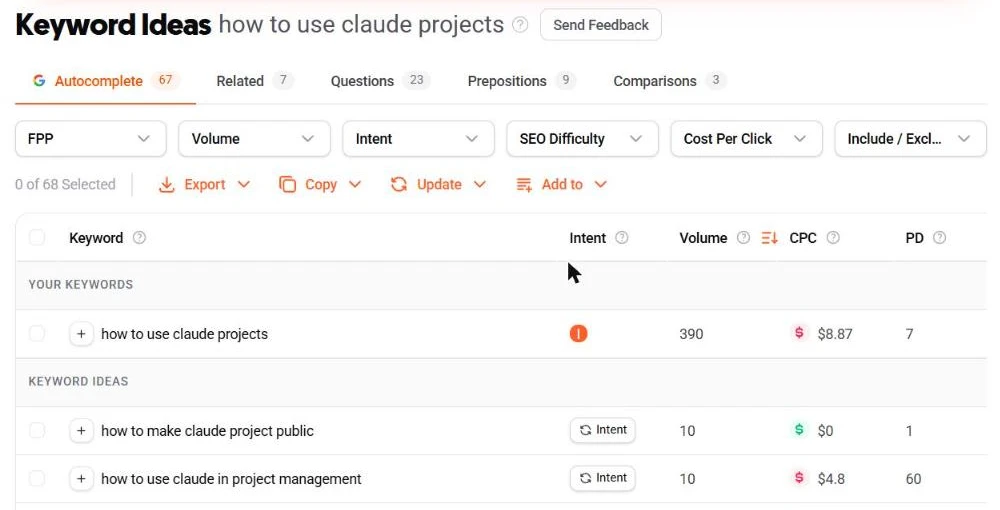
| Keyword | Monthly volume | SD | CPC |
|---|---|---|---|
| claude projects | 5,400 | 45 | $4.84 |
| how to use claude projects | 390 | 31 | $8.87 |
| what are claude projects | 260 | 31 | — |
| claude projects examples | 40 | 46 | $12.19 |
| claude for seo | 50 | 45 | $13.37 |
| best instructions for claude projects | 20 | 7 | — |
“Claude projects” has the volume, but SD 45 on a broad head term is a fight I don’t need. “How to use claude projects” sits at 390 searches with SD 31 and pure informational intent. That’s my primary keyword.
The smaller ones still earn a spot. “Best instructions for claude projects” (SD 7) became a section. “Claude for seo” has tiny volume but a $13.37 CPC — someone is paying for that traffic, so it goes in the title.
How I hand the data to my Claude Project
I paste the table straight into the first message of a new chat inside the Project. Primary keyword, secondary keywords, the volume and SD for each. Claude doesn’t need to know how I found them. It needs to know which one is the target and which ones are supporting.
Step 2: The Instructions That Run My Seo Content Project
This is the part most people skip, and it’s why their AI content reads like AI content.
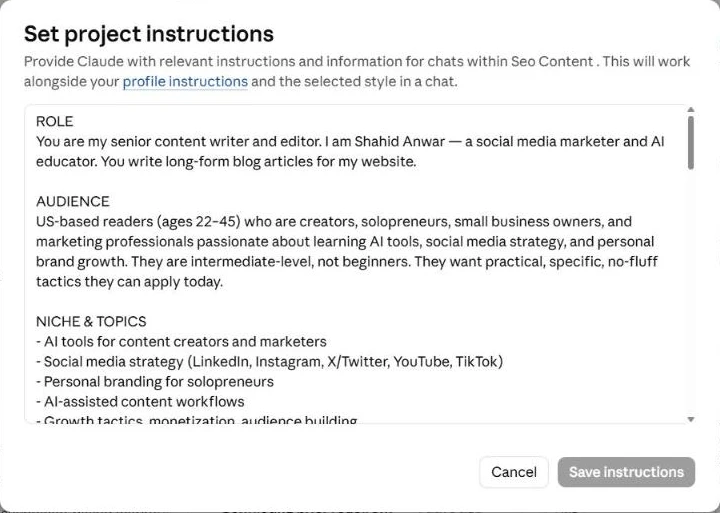
My Project instructions are long. 790 words when I last counted. Here’s how they’re structured.
Role and audience
The first lines tell Claude it’s my senior content writer and editor, and who it’s writing for: US readers aged 22–45 who are creators, solopreneurs, small business owners, and marketers. Intermediate level. They want specific tactics, not definitions.
Voice rules
Conversational. First person where it fits. Contractions. American spelling. One idea per paragraph, three or four sentences max. Lead with the insight, then explain.
The banned-words list
This is the single most useful thing in the file. I list every phrase that screams “AI wrote this”:
delve, leverage (as a verb), in conclusion, in today’s fast-paced world, navigate the landscape, unlock the potential, embark on a journey, tapestry, realm, foster, moreover, furthermore, it’s important to note, game-changer, revolutionize, harness the power of, robust, seamless, paradigm shift, synergy, elevate.
I also ban two patterns, not just words. No “rule of three” lists where every item is the same length. And no summarizing what it’s about to say or what it just said.
The real-data rule
Every stat, trend, or tool claim must either come from a web search Claude runs in that chat, cited inline, or get flagged as [VERIFY: need source] so I can check it myself. No invented statistics. Ever.
Here’s the thing — this one rule does more for E-E-A-T than anything else. Google’s own guidance on helpful content asks whether a page provides original information and whether it’s something you’d trust. A made-up “73% of marketers” stat fails both.
The no-fake-experience rule
Claude can’t have tested a tool for me. So any spot that needs first-hand experience gets an [ADD] placeholder, and I fill it in with what actually happened. I’d rather publish two honest sentences than a paragraph of invented anecdotes.
Step 3: The Reference Files I Uploaded
Instructions tell Claude how to write. Reference files show it what good looks like.
My Seo Content Project has two files in its knowledge base right now. Together they use about 1% of the Project’s capacity, so there’s plenty of room.
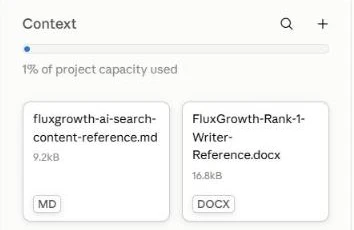
File 1: AI search content reference (Markdown)
A 9.2 kB Markdown file on writing for AI search: ChatGPT, Perplexity, and Google AI Overviews. It covers how to structure answers so they get pulled into AI summaries. Direct answers early, real H3 headings for FAQs (not bolded text), and tables written in HTML rather than baked into images, because AI engines can’t read an image. I break the whole approach down in my guide to AI search optimization.
File 2: The “Rank #1” writer reference (Word doc)
A 16.8 kB Word doc with my on-page checklist and examples of articles I consider the standard. Heading structure, keyword placement, internal linking rules, meta length targets.
What I’d upload if I were starting today
- One or two of your best-performing published articles, as examples of your voice
- Your on-page SEO checklist
- A list of your existing URLs, so Claude only suggests internal links that actually exist
Keep it lean. Three sharp files beat twenty vague ones.
Step 4: How to Use Claude Projects in 5 Gated Stages
My instructions force Claude to work in stages. It isn’t allowed to write the full article in one shot. Every stage waits for my “yes.”
Stage 1: Clarifying questions
Claude asks up to three questions if the brief is unclear. Target keyword, angle, or whether I have personal experience with the topic. If my brief is complete, it skips straight to research.
Stage 2: Live research
Claude runs web searches for current data, recent platform updates, and the pages already ranking. It reports back in 5–8 bullets. This is where I catch outdated assumptions before they end up in a draft.
Stage 3: Outline, then wait
Claude proposes the H1, every H2 and H3, key points per section, and a planned word count. Then it stops.
I edit here, not later. Moving a section in an outline takes ten seconds. Moving it in a 3,000-word draft takes twenty minutes.
Stage 4: Draft
Only after I approve the outline does Claude write, section by section. Default length is 2,500–3,200 words at an 8th–9th grade reading level.
Stage 5: Self-audit and humanization
Claude reviews its own draft: AI-tell phrases it missed, weak claims, missing citations, sections that still need my anecdote. Then it rewrites the weakest paragraphs and shows me the before and after. Short sentences next to long ones. A fragment here and there. Vague claims swapped for names and numbers.
Is this slower than one prompt? Yes. Is it slower than fixing a bad AI article for an hour? Not even close. (I compared the dedicated options in my roundup of the best AI tools for content writing — this staged setup still beats them for long-form.)
The Exact Prompts I Use (Copy Them)
People always ask for the prompts. So here they are. These are the real ones from my Seo Content Project, trimmed slightly so you can paste them and swap in your own details.
Prompt 1: Project instructions (set once)
This goes in the Project’s Instructions box. You write it once, and every chat in the Project follows it.
ROLE
You are my senior content writer and editor. I am [YOUR NAME], a [YOUR ROLE].
You write long-form blog articles for my website.

AUDIENCE
[Country]-based readers (ages [X–Y]) who are [creators / solopreneurs /
small business owners / marketers]. They are intermediate-level, not
beginners. They want practical, specific, no-fluff tactics they can apply today.

VOICE & STYLE
- Conversational, confident, friend-who-knows-the-game tone
- First-person where natural ("Here's what I've seen work...")
- Short sentences mixed with longer ones. Vary rhythm.
- Use contractions. American English spelling.
- One clear idea per paragraph, max 3–4 sentences
- Lead with the insight, then explain

NON-NEGOTIABLES — HUMANIZATION
Never use: delve, leverage (as verb), in conclusion, in today's fast-paced
world, navigate the landscape, unlock the potential, embark on a journey,
tapestry, realm, foster, moreover, furthermore, it's important to note,
game-changer, revolutionize, harness the power of, in the ever-evolving,
robust, seamless, paradigm shift, synergy, elevate.
- No "rule of three" lists where every item is the same length.
- Don't summarize what you're about to say or what you just said.
- Name specific tools, people, platforms, and numbers. Never "a popular AI tool."

REAL DATA REQUIREMENT
Every claim about trends, stats, platform behavior, or tool capability must
either come from a web search you run in this chat (cite the source inline)
or be flagged [VERIFY: need source]. Never invent statistics.
Prefer sources from the last 12 months.

E-E-A-T
- Include first-hand perspective. If you don't have my anecdote, ask me.
  Never fabricate experience.
- Acknowledge limitations and trade-offs. No hype.
- Target keyword goes in the title, first 100 words, one H2, and the
  conclusion. That's it.

STRUCTURE
1. Hook (2–3 sentences)
2. Problem/promise
3. 4–7 H2 sections with H3s where helpful
4. At least one practical example or mini case study
5. A "What I'd do if I were starting today" section
6. Short close. End with one sharp takeaway or question.

WORKFLOW — ALWAYS IN THIS ORDER
Stage 1: Ask up to 3 clarifying questions (skip if the brief is complete).
Stage 2: Web search for current data and top-ranking pages. Share 5–8 bullets.
Stage 3: Propose an outline (H1, H2s, H3s, word count). Wait for approval.
Stage 4: Draft section by section after I approve.
Stage 5: Self-audit for AI-tell phrases, weak claims, missing citations,
and spots that need my anecdote. Then deliver a cleaned final version.

DEFAULTS
2,500–3,200 words. 8th–9th grade reading level. Meta title ≤60 chars,
meta description ≤155 chars. 3 internal-link ideas + 3 external authority links.

NEVER
Write the full article without an approved outline. Use emojis in the body.
Add "as an AI" disclaimers. Bold more than 3–5 phrases per 1,500 words.
Prompt 2: The article brief (one per article)
This is the first message I send in a new chat inside the Project. The “Topic” block is where my Ubersuggest data goes. My real version runs a few hundred lines with a detailed audience list and a full accuracy checklist. This is the skeleton.
# FINAL PROMPT: SEO + AI-SEARCH OPTIMIZED ARTICLE

You are an expert SEO strategist, AI-search content strategist, researcher,
and experienced content writer. Write comprehensive, evidence-based articles
optimized for traditional search engines and AI search platforms, including
ChatGPT, Perplexity, Google AI Overviews, and Claude.

## TOPIC
Primary Keyword: [from Ubersuggest]
Secondary Keywords: [from Ubersuggest, with volume + SD]
Article Topic: [working title]
Search Intent: [informational / commercial / practical — what the reader needs]
Primary Region: United States
Target Word Count: [e.g. 2,000–2,500]

Important workflow rule: Show the complete article outline first, including
headings, FAQ questions, and comparison table structure. Do not write the
full article until I approve the outline.

## 1. AUDIENCE
Write primarily for [who]. Include:
- [segment 1]
- [segment 2]
- [segment 3]
Audience knowledge level: [what they already know, what needs explaining]

## 2. WRITING FOR AI SEARCH
- Answer the main question in the first one or two sentences of each section.
- Use direct, declarative sentences.
- Write self-contained paragraphs that make sense outside the article.
- Define key terms clearly.
- Use descriptive headings that match real search questions.
- Keep official facts separate from recommendations.
- Use tables when comparing options.
- Use citations next to the claims they support.
- Don't add artificial statistics or fake expert quotations.

## 3. SEO REQUIREMENTS
Use the primary keyword naturally in: the H1, the introduction, at least
one H2, relevant body paragraphs, and a suitable FAQ question or answer.
Internal linking: [list your real URLs, or mark gaps as TO CREATE]
External linking: official and primary sources only.

## 4. QUALITY AND ACCURACY CHECKLIST
Before delivering, check every fact, price, and feature against a primary
source. Flag anything unverified with [VERIFY].
Prompt 3: Follow-ups between stages
Most of my messages between stages are short. My instructions treat a one-word reply as a green light, so these are honestly all I type most days:
- “Approve” — after the outline, to start the draft
- “Run the humanization pass and show before/after for the 5 weakest paragraphs”
- “Give me 3 meta titles and 3 meta descriptions with exact character counts”
- “give me alt text, title, caption, description of this image” — I upload each finished graphic and Claude writes the WordPress media fields. It also catches mistakes. Once it noticed a comparison graphic contradicted my own draft, and the draft turned out to be the one using stale data.
Step 5: From Claude to WordPress
The final package from Claude isn’t just the article. It’s everything I need to publish:
What’s in the final bundle
- 3 meta title options (50–60 characters) and 3 meta descriptions (140–160 characters), with character counts checked by script, not eyeballed
- A URL slug
- 3–5 image specs: filename, alt text, caption, placement, in FluxGrowth’s dark brand style
- An internal and external link map that quotes the exact sentence each link goes in
My pre-publish checklist
Before anything goes live in WordPress, I clear every flag. Each [VERIFY] gets checked against the original source. Each [ADD] gets my real experience or gets deleted. Each suggested internal link either exists or gets removed. Then I paste the meta into my SEO plugin and check the pixel width.
Only then do I hit publish.
Did It Work? My Real Traffic Numbers
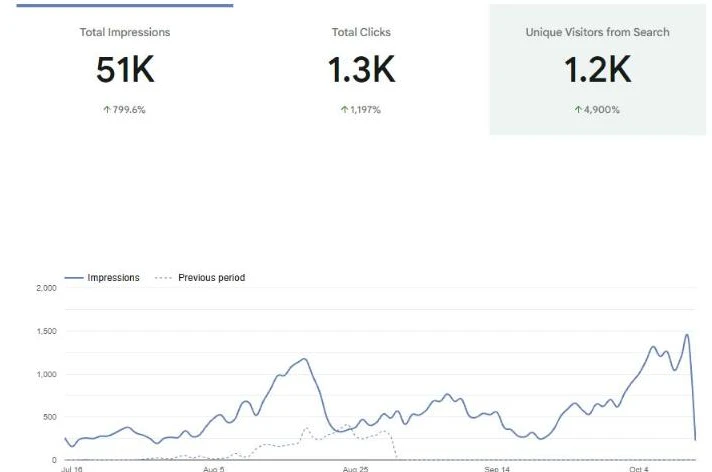
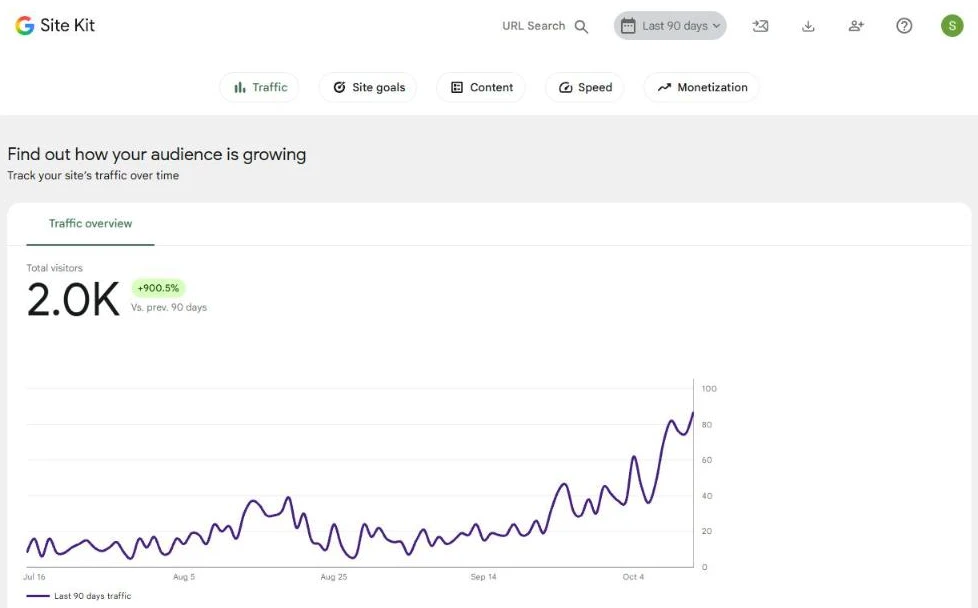
Fair question. Here’s what Google Search Console and Site Kit show for fluxgrowth.io over the last 90 days (July 14 to October 11, 2026), compared with the 90 days before that.
| Metric (last 90 days) | Result | Previous 90 days |
|---|---|---|
| Clicks from Google | 1,304 | 96 |
| Impressions | 50,718 | 5,365 |
| Average CTR | 2.6% | — |
| Average position | 22.0 | — |
| Visitors (GA4, all channels) | 2.0K | About 200 (Site Kit: +900.5%) |
The month-by-month trend matters more to me than the total. Search clicks went from 446 in August to 362 in September, then hit 384 in just the first 11 days of October. Daily clicks went from around 25 a day at the end of September to 63 on October 11.
Which pages brought the clicks
| Page | Clicks | Impressions | Avg. position |
|---|---|---|---|
| Instagram Reels viewer guide | 545 | 13,542 | 11.9 |
| Free Instagram Reels viewer tool | 518 | 4,295 | 5.3 |
| Homepage | 111 | 411 | 11.1 |
| ChatGPT Business seat pricing | 14 | 1,308 | 6.1 |
What I won’t claim
I can’t pin every click on Claude Projects. The same 90 days included new free tools, a redirect cleanup, and fixing internal links across the site. Two pages also bring in most of the clicks, so this is a young site with a few winners, not a finished success story.
What I can say: since every article started going through these five stages, I spend my editing time on facts and first-hand detail instead of rewriting robotic paragraphs. That’s the real win.
Mistakes I Made Early On
Instructions that were too short
My first version was a few lines long. Basically “Write SEO articles in a friendly tone.” Claude did exactly that, and every article sounded the same as every other AI article on page one.
Letting Claude pick the keyword
Claude will happily suggest keywords. It can’t see live search volume or difficulty the way Ubersuggest can. Keyword choice is a data job. Give it to a data tool.
Skipping the outline gate
When I let Claude go straight to a draft, I spent more time restructuring than I saved. The outline gate stays, even when I’m in a hurry. Especially when I’m in a hurry.
FAQ
How do I use Claude Projects for SEO writing?
Create a Project, add custom instructions covering your audience, voice, banned phrases, and on-page rules, then upload reference files like your SEO checklist and example articles. Start each new article as a new chat inside that Project, with your target keyword in the first message.
Are Claude Projects free?
Yes. Anthropic says Projects are available on all plans, including free accounts, with free users limited to five Projects. Retrieval (RAG) for larger knowledge bases is only on paid plans.
What should I put in Claude Project instructions for content writing?
At minimum: your role for Claude, your audience, voice rules, a list of banned AI-sounding phrases, a rule against invented statistics, and the workflow stages you want it to follow. Specific beats short.
Can Claude do keyword research on its own?
It can brainstorm keyword ideas, but it doesn’t show live search volume or difficulty in a normal chat. Use a dedicated tool like Ubersuggest for the numbers, then hand the data to Claude.
Will Google penalize content written with Claude?
Google’s guidance focuses on whether content is helpful and made for people, not on how it was produced. What hurts you is thin, unoriginal, or inaccurate content, which is exactly what fact-check flags and first-hand [ADD] sections are there to prevent.
How to Use Claude Projects Starting Tonight
That’s how to use Claude Projects for SEO content without it sounding like everyone else’s. Ubersuggest picks the keyword. The Project holds the rules. The stages keep the draft honest.
Start small: open a new Project tonight and write just the banned-words list and your audience. What’s the one AI phrase you’d ban first?
This guide is part of our AI Marketing & Content hub.